
ANSI terminal support for Haskell, with Windows compatibility
Haskell
117
312 commits
updated Jan 22, 2026
README
ansi-terminal and ansi-terminal-types 
Haskell packages together providing support for 'ANSI' control character sequences for terminals on Unix-like operating systems and Windows
Description
'ANSI' terminal escape code support for Haskell, which allows:
- Colored text output, with control over foreground, background and (where supported) underlining colors
- Clearing parts of a line or the screen
- Hiding or showing the cursor
- Moving the cursor around
- Reporting the position of the cursor
- Enabling and disabling automatic line wrapping
- Scrolling the screen up or down
- Switching between the Alternate and Normal Screen Buffers
- Clickable hyperlinks to URIs
- Changing the title of the terminal
If you like this, you may be interested in ansi-wl-pprint, which provides a pretty-printer that can construct strings containing 'ANSI' colorisation.
Not all 'ANSI' escape codes are supported by this library but most (if not all) of the popular ones that are well-supported by terminal software are, including:
- Select Graphic Rendition mode (colors and other attributes):
setSGR - Clearing parts of the screen:
clearFromCursorToScreenEnd,clearFromCursorToScreenBeginning,clearScreen,clearFromCursorToLineEnd,clearFromCursorToLineBeginningandclearLine - Cursor visibility changes:
hideCursorandshowCursor - Cursor movement by character:
cursorUp,cursorDown,cursorForwardandcursorBackward - Cursor movement by line:
cursorUpLineandcursorDownLine - Directly changing cursor position:
setCursorColumnandsetCursorPosition - Saving, restoring and reporting cursor position:
saveCursor,restoreCursorandreportCursorPosition - Automatic line wrapping:
enableLineWrapanddisableLineWrap - Scrolling the screen:
scrollPageUpandscrollPageDown - Changing the title:
setTitle
Each supported escape code or family of codes has a corresponding function that comes in three variants:
- A straight
IOvariant that doesn't take aHandleand just applies the escape code tostdoutand any terminal attached to it - An
IOvariant similar to above, but which takes aHandleto which the escape code should be applied - A
Stringvariant that returns a literal string that should be included to get the effect of the code.
Example
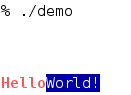
A full example is available, but for a taste of how the library works try the following code:
import System.Console.ANSI
import System.IO (stdout)

main :: IO ()
main = do
  stdoutSupportsANSI <- hNowSupportsANSI stdout
  if stdoutSupportsANSI
    then do
      setCursorPosition 5 0
      setTitle "ANSI Terminal Short Example"

      setSGR [ SetConsoleIntensity BoldIntensity
             , SetColor Foreground Vivid Red
             ]
      putStr "Hello"

      setSGR [ SetConsoleIntensity NormalIntensity
             , SetColor Foreground Vivid White
             , SetColor Background Dull Blue
             ]
      putStrLn "World!"
    else
      putStrLn "Standard output does not support 'ANSI' escape codes."
Documentation
Haddock documentation is available at Hackage
(ansi-terminal)
and
(ansi-terminal-types).
Credits
The library was originally written by Max Bolingbroke
Maintainers
Mike Pilgrem and Roman Cheplyaka are the primary maintainers.
Oliver Charles is the backup maintainer. Please get in touch with him if the primary maintainers cannot be reached.
Contributors


Languages
Haskell
96.1%
C
2.7%
Shell
1.1%
ANSI terminal support for Haskell, with Windows compatibility
Haskell
117
312 commits
updated Jan 22, 2026
README
ansi-terminal and ansi-terminal-types
Haskell packages together providing support for 'ANSI' control character sequences for terminals on Unix-like operating systems and Windows
Description
'ANSI' terminal escape code support for Haskell, which allows:
- Colored text output, with control over foreground, background and (where supported) underlining colors
- Clearing parts of a line or the screen
- Hiding or showing the cursor
- Moving the cursor around
- Reporting the position of the cursor
- Enabling and disabling automatic line wrapping
- Scrolling the screen up or down
- Switching between the Alternate and Normal Screen Buffers
- Clickable hyperlinks to URIs
- Changing the title of the terminal
If you like this, you may be interested in ansi-wl-pprint, which provides a pretty-printer that can construct strings containing 'ANSI' colorisation.
Not all 'ANSI' escape codes are supported by this library but most (if not all) of the popular ones that are well-supported by terminal software are, including:
- Select Graphic Rendition mode (colors and other attributes):
setSGR - Clearing parts of the screen:
clearFromCursorToScreenEnd,clearFromCursorToScreenBeginning,clearScreen,clearFromCursorToLineEnd,clearFromCursorToLineBeginningandclearLine - Cursor visibility changes:
hideCursorandshowCursor - Cursor movement by character:
cursorUp,cursorDown,cursorForwardandcursorBackward - Cursor movement by line:
cursorUpLineandcursorDownLine - Directly changing cursor position:
setCursorColumnandsetCursorPosition - Saving, restoring and reporting cursor position:
saveCursor,restoreCursorandreportCursorPosition - Automatic line wrapping:
enableLineWrapanddisableLineWrap - Scrolling the screen:
scrollPageUpandscrollPageDown - Changing the title:
setTitle
Each supported escape code or family of codes has a corresponding function that comes in three variants:
- A straight
IOvariant that doesn't take aHandleand just applies the escape code tostdoutand any terminal attached to it - An
IOvariant similar to above, but which takes aHandleto which the escape code should be applied - A
Stringvariant that returns a literal string that should be included to get the effect of the code.
Example
A full example is available, but for a taste of how the library works try the following code:
import System.Console.ANSI
import System.IO (stdout)

main :: IO ()
main = do
  stdoutSupportsANSI <- hNowSupportsANSI stdout
  if stdoutSupportsANSI
    then do
      setCursorPosition 5 0
      setTitle "ANSI Terminal Short Example"

      setSGR [ SetConsoleIntensity BoldIntensity
             , SetColor Foreground Vivid Red
             ]
      putStr "Hello"

      setSGR [ SetConsoleIntensity NormalIntensity
             , SetColor Foreground Vivid White
             , SetColor Background Dull Blue
             ]
      putStrLn "World!"
    else
      putStrLn "Standard output does not support 'ANSI' escape codes."
Documentation
Haddock documentation is available at Hackage
(ansi-terminal)
and
(ansi-terminal-types).
Credits
The library was originally written by Max Bolingbroke
Maintainers
Mike Pilgrem and Roman Cheplyaka are the primary maintainers.
Oliver Charles is the backup maintainer. Please get in touch with him if the primary maintainers cannot be reached.
Contributors
Languages
Haskell
96.1%
C
2.7%
Shell
1.1%