
The most complete tool for modding, decompiling and unpacking Undertale (and other GameMaker games!)
See the codeREADME
UndertaleModTool


The most complete tool for modding, decompiling and unpacking Undertale (and other GameMaker games!)
* (Seeing such a specialized tool, the culmination of work from many amazing contributors...)
* (It fills you with determination.)
Quick Start
Windows
- Find the latest stable (or nightly) release from the Downloads section below
- Download the GUI version (e.g.
UndertaleModTool_v0.9.2.0-Windows.zip), or the CLI version if you know what you're doing - Extract the ZIP file to a folder (do not run from inside the archive!)
- Run
UndertaleModTool.exeto start the tool - Open your game's data file (e.g.
data.win,game.ios,game.unx, etc.) via File → Open
macOS/Linux
As of writing, there is no official method of running UndertaleModTool's GUI on macOS or Linux. However, there are some options available:
- Use the CLI (command-line interface) version of the tool. This means there's no graphical interface, but it can be useful for automation and quick tasks.
- Use a work-in-progress port of the GUI to a cross-platform framework, such as the one currently available here. As of writing, this port is incomplete, but it has support for many features that are commonly used.
- Run the tool via Wine. This can be configured manually, or you can use an unofficial, community-maintained installer script such as this one. The Underminers team is not associated with these projects, so take care to ensure any scripts are safe before running them!
Downloads
Both the latest stable and nightly releases can be downloaded from the table below! The nightly releases are more likely to have issues, but contain the most recent features and fixes.
| Release | Link / Status |
|---|---|
| Stable |  |
| Nightly |  |
UndertaleModTool has a few different versions to choose from. The differences are as follows:
GUI(default) - the tool has a full graphical interface, making data file viewing and manipulation convenient.CLI- the tool is accessible only via a command-line interface, which is useful for automation and quick tasks, but is more difficult to use.Single file- the tool is only one executable, with all dependencies embedded within it. This makes your folders cleaner, however it can also cause stability issues in certain cases.Non-single file(default) - all dependencies are not embedded within the executable, and are now located right next to it. Choose this if you don't care about finding the right executable within ~300 DLL files, or if the stability issues from theSingle filebuild affect you.
Main Features
- Can read every single byte from the data file for latest versions of Undertale, Deltarune, and most other GameMaker games, and then recreate a byte-for-byte exact copy from the decoded data.
- Properly handles all of the pointers in the file so that if you add/remove stuff, make things longer/shorter, move them around, etc., the file format won't break.
- An editor which lets you change (almost) every single value, including unknown ones.
- Includes a simple room/level editor.
- Allows for GML VM code editing. This means you can add any custom code to a game, either using the built-in GML compiler or GML assembly. (YYC is not supported for this.)
- High-level GML decompiler and compiler. Supports a large range of GameMaker versions, and most important GML features (still missing a few).
- Support for running scripts that automatically modify your data file (or perform other nefarious tasks). This can be used for mod distribution, aside from other methods such as file patches/project systems.
- All core functionality extracted into a library for use in external tools.
- Can generate a
.yydebugfile for the GM:S debugger so that you can edit variables live! (see here) - Automatic file associations for all GameMaker related data files. This is opt-in at the first boot of the tool, and can also be disabled by having a
dna.txtfile next to the executable.
Screenshots
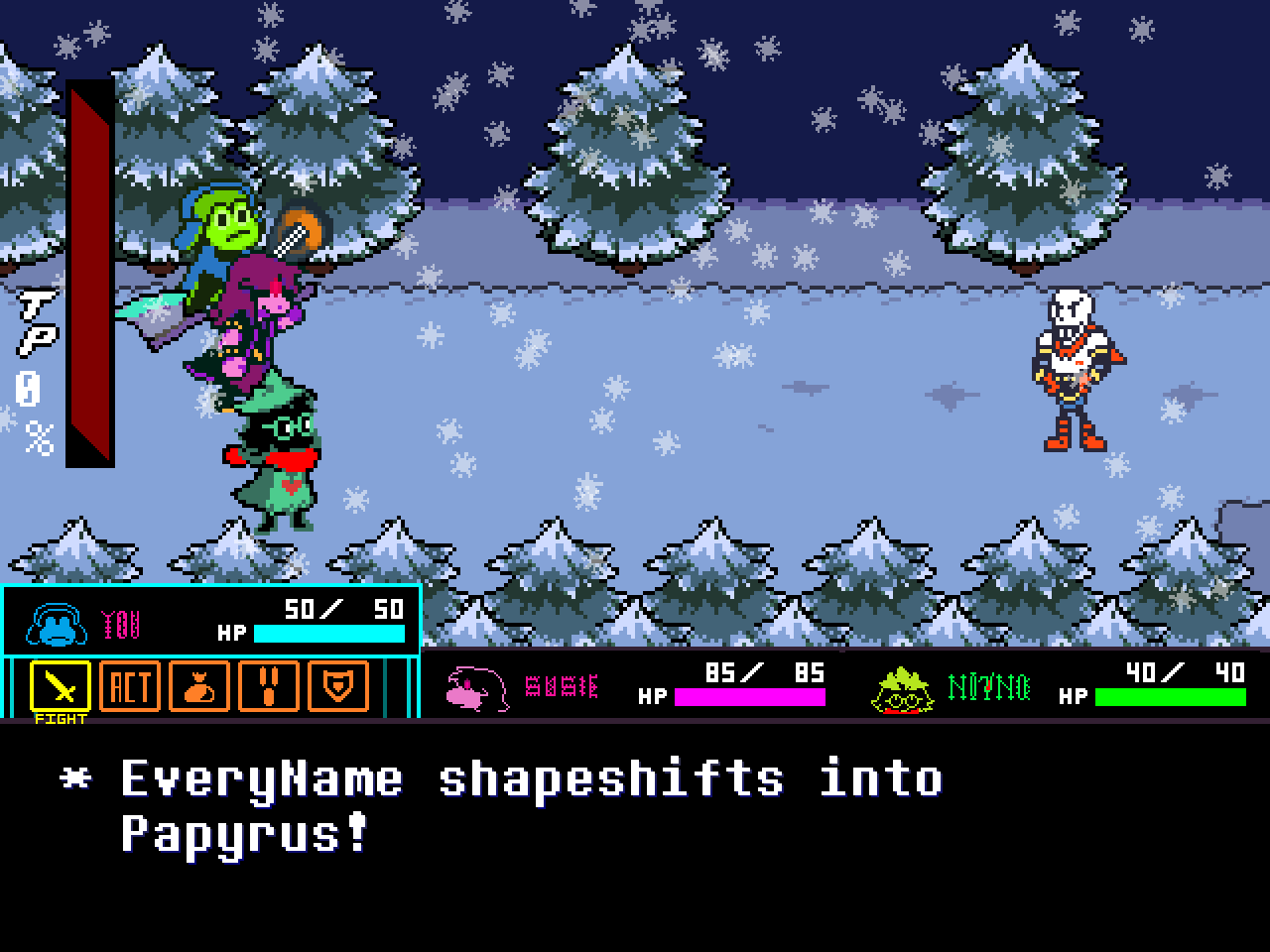
Here are some screenshots of what UTMT can do:
RIBBIT - The Deltarune Mod
Included Scripts
UndertaleModTool comes with a decently-sized collection of C# scripts that extend its functionality. For more information on them, consult the SCRIPTS.md file.
Contributing
If you find a bug, a data file that does not load etc., please report it on the issues page.
For more details on contributions, the project's AI policy (tl;dr: no), and what needs to be worked on, see the CONTRIBUTING.md file.
Compilation Instructions
In order to compile the repo yourself, the .NET Core 10 SDK or later is required.
When cloning using Git, make sure to recursively clone submodules (e.g. with --recurse-submodules), as a submodule is used for the Underanalyzer dependency.
The following projects can be compiled:
UndertaleModLib: The core library used by all other projects.UndertaleModCli: A command line interface for interacting with GameMaker data files and applying scripts. Currently is very primitive in what it can do.UndertaleModTool: The main graphical user interface for interacting with GameMaker data files. Windows is required in order to compile this.
Compiling Via IDE
- Open the
UndertaleModTool.slnin the IDE of your choice (Visual Studio, JetBrains Rider, Visual Studio Code etc.) - Select the project you want to compile
- Compile
Compiling Via Command Line
- Open a terminal and navigate to the directory of
UndertaleModTool.sln - Execute
dotnet publish <Project>where<Project>is one of the projects listed above. You can also provide arguments for compiling, such as--no-self-containedor-c release. For a full list of arguments, consult the Microsoft Documentation.
GameMaker Data File Format
Interested in the file and instruction format research I've done while working on this? Check out the Wiki for full details and documentation.
Special thanks
Special thanks to everybody who did previous research on unpacking and decompiling Undertale, it was a really huge help:
- PoroCYon's UNDERTALE decompilation research, maintained by Tomat
- Donkeybonks's GameMaker data.win Bytecode research
- PoroCYon's Altar.NET
- WarlockD's GMdsam
as well as all the other contributors:
And of course, special thanks to Toby Fox and the whole Undertale team for making the game(s) ;)

Contributors
(top 30 of 81)


Similar repos


Languages
C#
99.6%
The most complete tool for modding, decompiling and unpacking Undertale (and other GameMaker games!)
See the codeREADME
UndertaleModTool
The most complete tool for modding, decompiling and unpacking Undertale (and other GameMaker games!)
* (Seeing such a specialized tool, the culmination of work from many amazing contributors...)
* (It fills you with determination.)
Quick Start
Windows
- Find the latest stable (or nightly) release from the Downloads section below
- Download the GUI version (e.g.
UndertaleModTool_v0.9.2.0-Windows.zip), or the CLI version if you know what you're doing - Extract the ZIP file to a folder (do not run from inside the archive!)
- Run
UndertaleModTool.exeto start the tool - Open your game's data file (e.g.
data.win,game.ios,game.unx, etc.) via File → Open
macOS/Linux
As of writing, there is no official method of running UndertaleModTool's GUI on macOS or Linux. However, there are some options available:
- Use the CLI (command-line interface) version of the tool. This means there's no graphical interface, but it can be useful for automation and quick tasks.
- Use a work-in-progress port of the GUI to a cross-platform framework, such as the one currently available here. As of writing, this port is incomplete, but it has support for many features that are commonly used.
- Run the tool via Wine. This can be configured manually, or you can use an unofficial, community-maintained installer script such as this one. The Underminers team is not associated with these projects, so take care to ensure any scripts are safe before running them!
Downloads
Both the latest stable and nightly releases can be downloaded from the table below! The nightly releases are more likely to have issues, but contain the most recent features and fixes.
| Release | Link / Status |
|---|---|
| Stable | |
| Nightly | |
UndertaleModTool has a few different versions to choose from. The differences are as follows:
GUI(default) - the tool has a full graphical interface, making data file viewing and manipulation convenient.CLI- the tool is accessible only via a command-line interface, which is useful for automation and quick tasks, but is more difficult to use.Single file- the tool is only one executable, with all dependencies embedded within it. This makes your folders cleaner, however it can also cause stability issues in certain cases.Non-single file(default) - all dependencies are not embedded within the executable, and are now located right next to it. Choose this if you don't care about finding the right executable within ~300 DLL files, or if the stability issues from theSingle filebuild affect you.
Main Features
- Can read every single byte from the data file for latest versions of Undertale, Deltarune, and most other GameMaker games, and then recreate a byte-for-byte exact copy from the decoded data.
- Properly handles all of the pointers in the file so that if you add/remove stuff, make things longer/shorter, move them around, etc., the file format won't break.
- An editor which lets you change (almost) every single value, including unknown ones.
- Includes a simple room/level editor.
- Allows for GML VM code editing. This means you can add any custom code to a game, either using the built-in GML compiler or GML assembly. (YYC is not supported for this.)
- High-level GML decompiler and compiler. Supports a large range of GameMaker versions, and most important GML features (still missing a few).
- Support for running scripts that automatically modify your data file (or perform other nefarious tasks). This can be used for mod distribution, aside from other methods such as file patches/project systems.
- All core functionality extracted into a library for use in external tools.
- Can generate a
.yydebugfile for the GM:S debugger so that you can edit variables live! (see here) - Automatic file associations for all GameMaker related data files. This is opt-in at the first boot of the tool, and can also be disabled by having a
dna.txtfile next to the executable.
Screenshots
Here are some screenshots of what UTMT can do:
RIBBIT - The Deltarune Mod
Included Scripts
UndertaleModTool comes with a decently-sized collection of C# scripts that extend its functionality. For more information on them, consult the SCRIPTS.md file.
Contributing
If you find a bug, a data file that does not load etc., please report it on the issues page.
For more details on contributions, the project's AI policy (tl;dr: no), and what needs to be worked on, see the CONTRIBUTING.md file.
Compilation Instructions
In order to compile the repo yourself, the .NET Core 10 SDK or later is required.
When cloning using Git, make sure to recursively clone submodules (e.g. with --recurse-submodules), as a submodule is used for the Underanalyzer dependency.
The following projects can be compiled:
UndertaleModLib: The core library used by all other projects.UndertaleModCli: A command line interface for interacting with GameMaker data files and applying scripts. Currently is very primitive in what it can do.UndertaleModTool: The main graphical user interface for interacting with GameMaker data files. Windows is required in order to compile this.
Compiling Via IDE
- Open the
UndertaleModTool.slnin the IDE of your choice (Visual Studio, JetBrains Rider, Visual Studio Code etc.) - Select the project you want to compile
- Compile
Compiling Via Command Line
- Open a terminal and navigate to the directory of
UndertaleModTool.sln - Execute
dotnet publish <Project>where<Project>is one of the projects listed above. You can also provide arguments for compiling, such as--no-self-containedor-c release. For a full list of arguments, consult the Microsoft Documentation.
GameMaker Data File Format
Interested in the file and instruction format research I've done while working on this? Check out the Wiki for full details and documentation.
Special thanks
Special thanks to everybody who did previous research on unpacking and decompiling Undertale, it was a really huge help:
- PoroCYon's UNDERTALE decompilation research, maintained by Tomat
- Donkeybonks's GameMaker data.win Bytecode research
- PoroCYon's Altar.NET
- WarlockD's GMdsam
as well as all the other contributors:
And of course, special thanks to Toby Fox and the whole Undertale team for making the game(s) ;)
Similar repos
Contributors
(top 30 of 81)
Languages
C#
99.6%