
Software-only version of the USBridge ecosystem for secure, low-latency remote desktop control and peer-to-peer networking.
Go
610
1,560 commits
updated Oct 2, 2026
See what people are saying
README
USBridge Remote
English | Deutsch | Français | Italiano | Español | Português (Brasil) | Українська | Polski | 日本語 | 한국어 | 简体中文


USBridge Remote is a unified high-performance client for managing remote machines. Engineered to combine hardware-level BIOS access (via USBridge KVM devices) and software-based remote desktop in a single, streamlined interface.
Download
Client
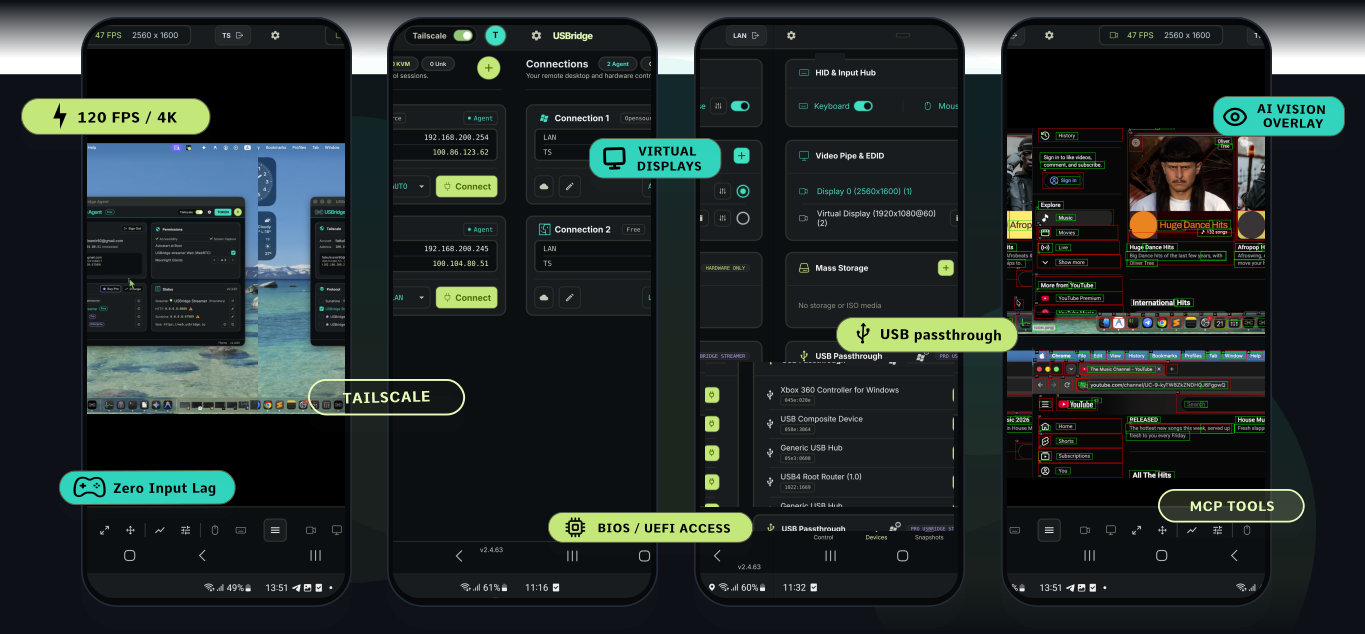
The Client is the control interface — installed on your workstation or laptop (or run directly in your browser). It manages connections, live remote desktop, virtual device passthrough, and snapshot registry.
| Architecture | Windows | macOS | Linux | Android | iOS | Web Browser |
|---|---|---|---|---|---|---|
| x86_64 | Download | — | Download | — | — | Open App |
| ARM64 | — | Download | — | Google Play | App Store | Open App |
Prefer a direct APK without a Play Store account? A self-updating build is also published on the latest release.
🌐 Zero-Install Web Client: No installation required. Just open web.usbridge.io to connect instantly. (Note: The web client operates with some feature and performance limitations due to browser security sandbox and WebRTC constraints. For the full uncompromised experience, use the native apps). On a freshly-started Agent it can take up to a minute to become reachable the first time (or after a network change) while it provisions a trusted HTTPS certificate for itself — see the Agent's Status → Certificate row, or the Agent docs for details.
Agent
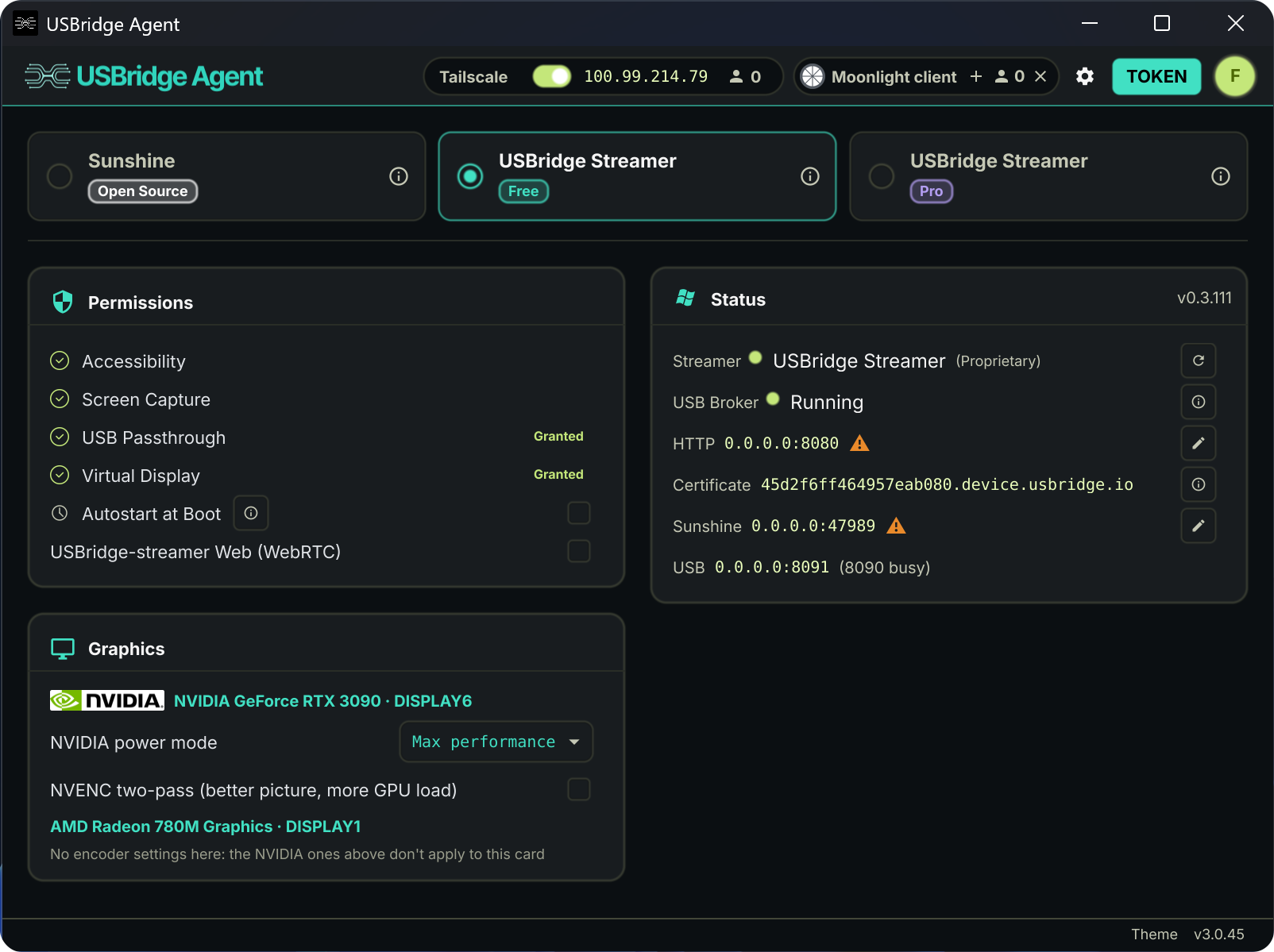
The Agent runs on the target machine — the server or PC you want to access remotely. It handles screen capture, input injection, and Tailscale networking.
Features
BASIC FUNCTIONALITYSUNSHINE OPEN-SOURCE Standard Game Streaming ✓ Built-in open-source Sunshine streamer ✓ Low-latency desktop & gaming access ✓ Bi-directional file & text clipboard ✓ Multi-monitor display switching ✓ Integrated Tailscale P2P networking ✓ Native Wayland support (promptless capture) |
+ BASIC FEATURESUSBRIDGE FREE Rust based Stream Engine ✓ Instant-connect custom remote protocol ✓ Adaptive streaming optimized for Wi-Fi stability ✓ HDR10 ✓ Headless virtual display management ✓ Low-latency gamepad controller passthrough ✓ Web browser client access (no installation required) ✓ Windows pre-login access (secure credential entry) |
+ BASIC FEATURES + FREE FEATURESUSBRIDGE PRO Professional Workflows ✓ Lossless 4:4:4 chroma color accuracy ✓ Raw USB peripheral device passthrough ✓ Wacom tablet support with pressure & tilt |
Quick Start
-
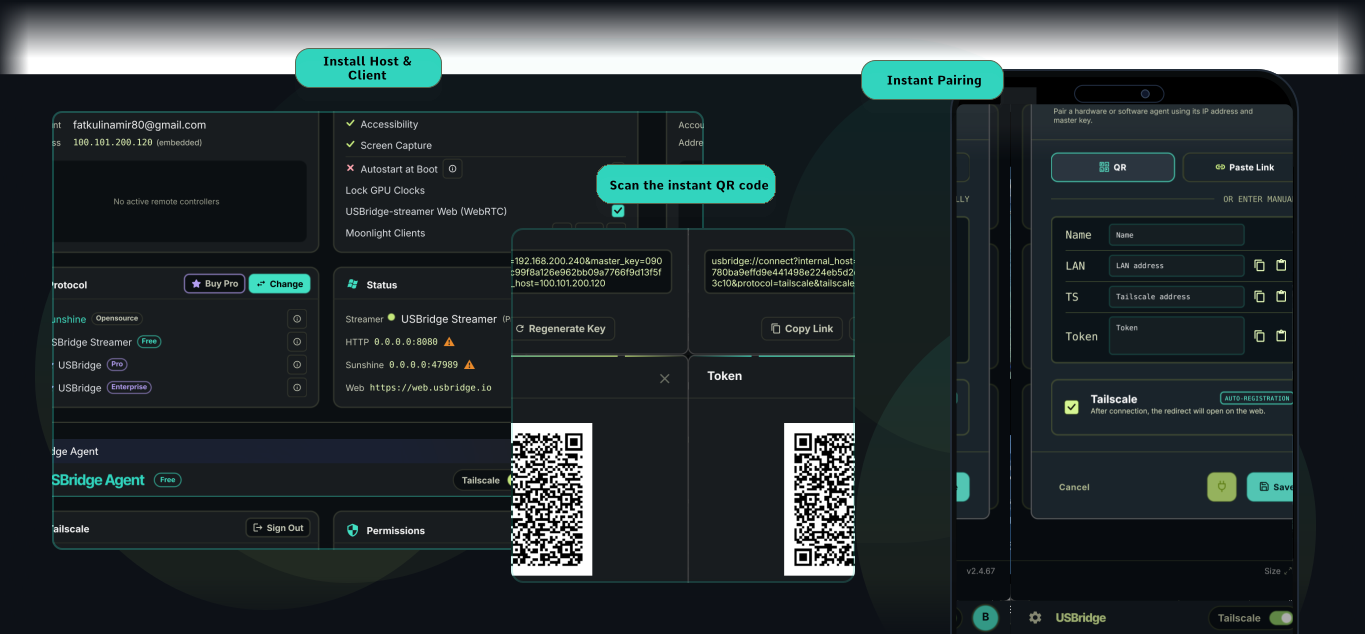
Install the Agent on the machine you want to access remotely. Launch it — it will display a connection token and Tailscale address. Connect Tailscale if you need access over the internet.
-
Install the Client on your workstation, laptop, or phone.
-
Add a connection — enter the IP or Tailscale address shown in the Agent window. That's it.
Hardware Integration
|
Hardware-Level BIOS Control USBridge Remote integrates natively with the USBridge-KVM 2.0 appliance for out-of-band, bare-metal management before OS boot. 
|
DIY IP-KVM Firmware Deploy the official firmware on a compatible SBC (e.g., Radxa Zero 3W/3E, Cubie A7) with a USB capture interface to provision a custom KVM node. 
|
USB/IP Hardware Dongle (ESP32-S3) Software USB passthrough hits a wall on macOS: there is no VHCI driver to attach to, so a remote Wacom tablet (or other USB device) can't be presented as real hardware. This dongle plugs into the Mac and does in hardware what vhci-hcd does in software elsewhere — the exported device enumerates with its own VID/PID, bound by macOS's own driver.
|
Resources & License
|
Development & Roadmap I maintain a public dashboard to track all planned features, architectural updates, and release schedules. View Live Roadmap |
Project Links |
License (GPLv3) This project is licensed under the GPLv3. The multi-platform client incorporates codebase from moonlight-common-c (also GPLv3).View LICENSE File |
Significant stargazers

1,258 followers · starred Jul 2026

710 followers · starred Jul 2026

41 followers · starred Jul 2026
Similar repos


Languages
Go
76.0%
C
14.4%
Shell
3.8%
Objective-C
1.7%
JavaScript
1.5%
Kotlin
1.4%
Software-only version of the USBridge ecosystem for secure, low-latency remote desktop control and peer-to-peer networking.
Go
610
1,560 commits
updated Oct 2, 2026
See what people are saying
README
USBridge Remote
English | Deutsch | Français | Italiano | Español | Português (Brasil) | Українська | Polski | 日本語 | 한국어 | 简体中文
USBridge Remote is a unified high-performance client for managing remote machines. Engineered to combine hardware-level BIOS access (via USBridge KVM devices) and software-based remote desktop in a single, streamlined interface.
Download
Client
The Client is the control interface — installed on your workstation or laptop (or run directly in your browser). It manages connections, live remote desktop, virtual device passthrough, and snapshot registry.
| Architecture | Windows | macOS | Linux | Android | iOS | Web Browser |
|---|---|---|---|---|---|---|
| x86_64 | Download | — | Download | — | — | Open App |
| ARM64 | — | Download | — | Google Play | App Store | Open App |
Prefer a direct APK without a Play Store account? A self-updating build is also published on the latest release.
🌐 Zero-Install Web Client: No installation required. Just open web.usbridge.io to connect instantly. (Note: The web client operates with some feature and performance limitations due to browser security sandbox and WebRTC constraints. For the full uncompromised experience, use the native apps). On a freshly-started Agent it can take up to a minute to become reachable the first time (or after a network change) while it provisions a trusted HTTPS certificate for itself — see the Agent's Status → Certificate row, or the Agent docs for details.
Agent
The Agent runs on the target machine — the server or PC you want to access remotely. It handles screen capture, input injection, and Tailscale networking.
Features
BASIC FUNCTIONALITYSUNSHINE OPEN-SOURCE Standard Game Streaming ✓ Built-in open-source Sunshine streamer ✓ Low-latency desktop & gaming access ✓ Bi-directional file & text clipboard ✓ Multi-monitor display switching ✓ Integrated Tailscale P2P networking ✓ Native Wayland support (promptless capture) |
+ BASIC FEATURESUSBRIDGE FREE Rust based Stream Engine ✓ Instant-connect custom remote protocol ✓ Adaptive streaming optimized for Wi-Fi stability ✓ HDR10 ✓ Headless virtual display management ✓ Low-latency gamepad controller passthrough ✓ Web browser client access (no installation required) ✓ Windows pre-login access (secure credential entry) |
+ BASIC FEATURES + FREE FEATURESUSBRIDGE PRO Professional Workflows ✓ Lossless 4:4:4 chroma color accuracy ✓ Raw USB peripheral device passthrough ✓ Wacom tablet support with pressure & tilt |
Quick Start
-
Install the Agent on the machine you want to access remotely. Launch it — it will display a connection token and Tailscale address. Connect Tailscale if you need access over the internet.
-
Install the Client on your workstation, laptop, or phone.
-
Add a connection — enter the IP or Tailscale address shown in the Agent window. That's it.
Hardware Integration
|
Hardware-Level BIOS Control USBridge Remote integrates natively with the USBridge-KVM 2.0 appliance for out-of-band, bare-metal management before OS boot.
|
DIY IP-KVM Firmware Deploy the official firmware on a compatible SBC (e.g., Radxa Zero 3W/3E, Cubie A7) with a USB capture interface to provision a custom KVM node.
|
USB/IP Hardware Dongle (ESP32-S3) Software USB passthrough hits a wall on macOS: there is no VHCI driver to attach to, so a remote Wacom tablet (or other USB device) can't be presented as real hardware. This dongle plugs into the Mac and does in hardware what vhci-hcd does in software elsewhere — the exported device enumerates with its own VID/PID, bound by macOS's own driver.
|
Resources & License
|
Development & Roadmap I maintain a public dashboard to track all planned features, architectural updates, and release schedules. View Live Roadmap |
Project Links |
License (GPLv3) This project is licensed under the GPLv3. The multi-platform client incorporates codebase from moonlight-common-c (also GPLv3).View LICENSE File |
Similar repos
Significant stargazers
1,258 followers · starred Jul 2026
710 followers · starred Jul 2026
41 followers · starred Jul 2026
Languages
Go
76.0%
C
14.4%
Shell
3.8%
Objective-C
1.7%
JavaScript
1.5%
Kotlin
1.4%