Seamless GitHub Actions integration for .NET test runners
See the code






| Development of this project is entirely funded by the community. Consider donating to support! |

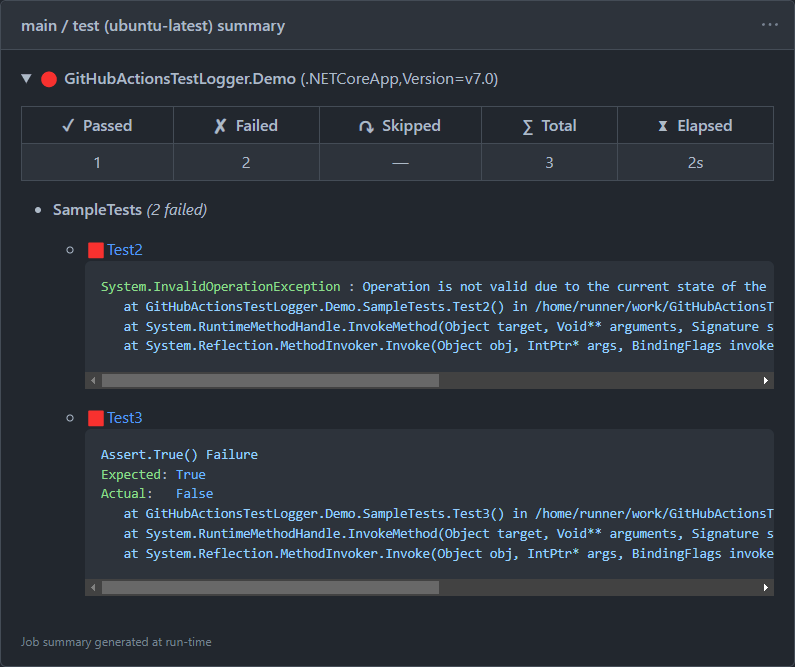
GitHub Actions Test Logger is an extension for VSTest and Microsoft.Testing.Platform that reports test results to GitHub Actions. It lists failed tests in job annotations, highlights them in code diffs, and produces detailed job summaries about the executed test runs.
By using this project or its source code, for any purpose and in any shape or form, you grant your implicit agreement to all the following statements:
To learn more about the war and how you can help, click here. Glory to Ukraine! 🇺🇦
dotnet add package GitHubActionsTestLogger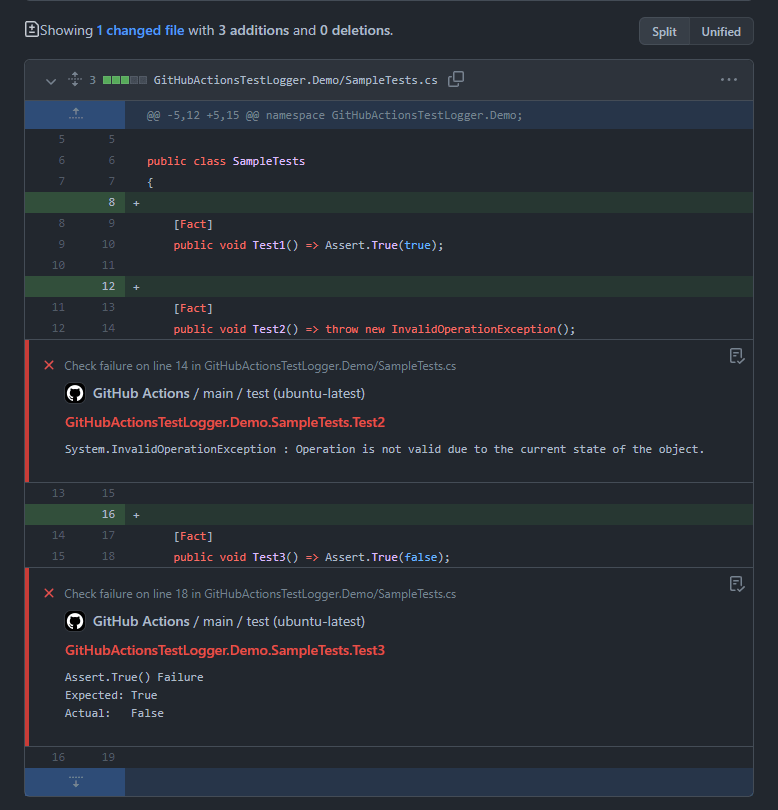
GitHub Actions Test Logger is available for both the classic VSTest test runner and the newer Microsoft.Testing.Platform.
Install the package in your test project and the provided test reporter will be detected and registered automatically.
The reporter is enabled by default when running in a GitHub Actions environment.
You can also enable it manually by adding the --report-github option when running tests:
name: main
on: [push, pull_request]

jobs:
  build:
    runs-on: ubuntu-latest

    steps:
      - name: Checkout
        uses: actions/checkout@v4

      - name: Install .NET
        uses: actions/setup-dotnet@v4

      - name: Build & test
        # Can also use with `dotnet run` or `dotnet exec`, depending on your setup.
        # For .NET 9 and lower, add an extra empty double dash sequence (--) before reporter options.
        run: dotnet test --configuration Release --report-github
[!IMPORTANT] If you are using Microsoft.Testing.Platform with xUnit v3, then make sure to replace the
xunit.v3package reference withxunit.v3.mtp-v2. The basexunit.v3package relies on MTP v1, which is incompatible with this extension.
[!IMPORTANT] The extension has a peer dependency on the
Microsoft.Testing.Platformpackage when used in this mode. It is highly recommended to install the latest version of this package in your test project to ensure compatibility.
[!WARNING] When used with Microsoft.Testing.Platform, do not mark the package reference to
GitHubActionsTestLoggeras private or exclude it from the build output. If you are upgrading from older versions of the extension, make sure to removePrivateAssets="all"from the package reference.
Install the package in your test project and enable the reporter by adding the --logger GitHubActions option when running tests:
name: main
on: [push, pull_request]

jobs:
  build:
    runs-on: ubuntu-latest

    steps:
      - name: Checkout
        uses: actions/checkout@v4

      - name: Install .NET
        uses: actions/setup-dotnet@v4

      - name: Build & test
        run: dotnet test --configuration Release --logger GitHubActions
[!IMPORTANT] If you are using VSTest with xUnit v3, then make sure to replace the
xunit.v3package reference withxunit.v3.mtp-off. The basexunit.v3package has a built-in dependency on MTP, which may cause conflicts with this extension.
[!IMPORTANT] The extension has a peer dependency on the
Microsoft.NET.Test.Sdkpackage when used in this mode. It is highly recommended to install the latest version of this package in your test project to ensure compatibility.
[!IMPORTANT] If you are using .NET SDK v2.2 or lower, you need to set the
<CopyLocalLockFileAssemblies>property totruein your test project.
[!NOTE] When used with VSTest, the package reference to
GitHubActionsTestLoggercan be marked as private by addingPrivateAssets="all"to the package reference.
GitHub Actions Test Logger can leverage source information to link reported test results to the locations in the source code where the corresponding tests are defined. By default, VSTest does not collect source information, so the extension relies on stack traces to extract it manually. This approach only works for failed tests, and even then may not always be fully accurate.
To instruct the runner to collect source information, add the RunConfiguration.CollectSourceInformation=true argument to the command as shown below:
jobs:
  build:
    runs-on: ubuntu-latest

    steps:
      # ...

      - name: Build & test
        # Note that the space after the last double dash (--) is intentional
        run: >
          dotnet test
          --configuration Release
          --logger GitHubActions
          --
          RunConfiguration.CollectSourceInformation=true
[!NOTE] This option can also be enabled by setting the corresponding property in a
.runsettingsfile instead.
[!WARNING] Source information collection may not work properly with the legacy .NET Framework.
You can customize the behavior of GitHub Actions Test Logger by passing additional options when running tests. The format of these options differs slightly between Microsoft.Testing.Platform and VSTest.
With Microsoft.Testing.Platform, the options are prefixed with --report-github- and can be specified as separate arguments on the command line:
jobs:
  build:
    runs-on: ubuntu-latest

    steps:
      # ...

      - name: Build & test
        run: >
          dotnet test
          --configuration Release
          --report-github
          --report-github-annotations-title @test
          --report-github-annotations-message @error
With VSTest, the options don't have a prefix and are specified as part of the reporter configuration string, delimited by semicolons:
jobs:
  build:
    runs-on: ubuntu-latest

    steps:
      # ...

      - name: Build & test
        run: >
          dotnet test
          --configuration Release
          --logger "GitHubActions;annotations-title=@test;annotations-message=@error"
Use the [--report-github-]annotations-title option to specify the annotation title format used for reporting test failures.
The following replacement tokens are available:
@test — replaced with the display name of the test.@error — replaced with the error message.@trace — replaced with the stack trace.@framework — replaced with the target framework.Default: @test.
Examples:
@test → MyTests.Test1@test (@framework) → MyTests.Test1 (.NETCoreApp,Version=v6.0)Use the [--report-github-]annotations-message option to specify the annotation message format used for reporting test failures.
Supports the same replacement tokens as the title format.
Default: @error.
Examples:
@error → AssertionException: Expected 'true' but found 'false'@error\n@trace → AssertionException: Expected 'true' but found 'false', followed by stacktrace on the next lineUse the [--report-github-]summary-allow-empty option to specify whether empty test runs should be included in the summary.
Default: false.
Use the [--report-github-]summary-include-passed option to specify whether passed tests should be included in the summary.
Default: true.
[!WARNING] If your test suite is really large, enabling this option may cause the summary to exceed the maximum allowed size.
Use the [--report-github-]summary-include-skipped option to specify whether skipped tests should be included in the summary.
Default: true.
[!WARNING] If your test suite is really large, enabling this option may cause the summary to exceed the maximum allowed size.
(top 24 of 26)
717 followers · starred Sep 2020
379 followers · starred May 2022
152 followers · starred Nov 2021
607 followers · starred May 2025
Seamless GitHub Actions integration for .NET test runners
See the code
| Development of this project is entirely funded by the community. Consider donating to support! |
GitHub Actions Test Logger is an extension for VSTest and Microsoft.Testing.Platform that reports test results to GitHub Actions. It lists failed tests in job annotations, highlights them in code diffs, and produces detailed job summaries about the executed test runs.
By using this project or its source code, for any purpose and in any shape or form, you grant your implicit agreement to all the following statements:
To learn more about the war and how you can help, click here. Glory to Ukraine! 🇺🇦
dotnet add package GitHubActionsTestLogger
GitHub Actions Test Logger is available for both the classic VSTest test runner and the newer Microsoft.Testing.Platform.
Install the package in your test project and the provided test reporter will be detected and registered automatically.
The reporter is enabled by default when running in a GitHub Actions environment.
You can also enable it manually by adding the --report-github option when running tests:
name: main
on: [push, pull_request]

jobs:
  build:
    runs-on: ubuntu-latest

    steps:
      - name: Checkout
        uses: actions/checkout@v4

      - name: Install .NET
        uses: actions/setup-dotnet@v4

      - name: Build & test
        # Can also use with `dotnet run` or `dotnet exec`, depending on your setup.
        # For .NET 9 and lower, add an extra empty double dash sequence (--) before reporter options.
        run: dotnet test --configuration Release --report-github
[!IMPORTANT] If you are using Microsoft.Testing.Platform with xUnit v3, then make sure to replace the
xunit.v3package reference withxunit.v3.mtp-v2. The basexunit.v3package relies on MTP v1, which is incompatible with this extension.
[!IMPORTANT] The extension has a peer dependency on the
Microsoft.Testing.Platformpackage when used in this mode. It is highly recommended to install the latest version of this package in your test project to ensure compatibility.
[!WARNING] When used with Microsoft.Testing.Platform, do not mark the package reference to
GitHubActionsTestLoggeras private or exclude it from the build output. If you are upgrading from older versions of the extension, make sure to removePrivateAssets="all"from the package reference.
Install the package in your test project and enable the reporter by adding the --logger GitHubActions option when running tests:
name: main
on: [push, pull_request]

jobs:
  build:
    runs-on: ubuntu-latest

    steps:
      - name: Checkout
        uses: actions/checkout@v4

      - name: Install .NET
        uses: actions/setup-dotnet@v4

      - name: Build & test
        run: dotnet test --configuration Release --logger GitHubActions
[!IMPORTANT] If you are using VSTest with xUnit v3, then make sure to replace the
xunit.v3package reference withxunit.v3.mtp-off. The basexunit.v3package has a built-in dependency on MTP, which may cause conflicts with this extension.
[!IMPORTANT] The extension has a peer dependency on the
Microsoft.NET.Test.Sdkpackage when used in this mode. It is highly recommended to install the latest version of this package in your test project to ensure compatibility.
[!IMPORTANT] If you are using .NET SDK v2.2 or lower, you need to set the
<CopyLocalLockFileAssemblies>property totruein your test project.
[!NOTE] When used with VSTest, the package reference to
GitHubActionsTestLoggercan be marked as private by addingPrivateAssets="all"to the package reference.
GitHub Actions Test Logger can leverage source information to link reported test results to the locations in the source code where the corresponding tests are defined. By default, VSTest does not collect source information, so the extension relies on stack traces to extract it manually. This approach only works for failed tests, and even then may not always be fully accurate.
To instruct the runner to collect source information, add the RunConfiguration.CollectSourceInformation=true argument to the command as shown below:
jobs:
  build:
    runs-on: ubuntu-latest

    steps:
      # ...

      - name: Build & test
        # Note that the space after the last double dash (--) is intentional
        run: >
          dotnet test
          --configuration Release
          --logger GitHubActions
          --
          RunConfiguration.CollectSourceInformation=true
[!NOTE] This option can also be enabled by setting the corresponding property in a
.runsettingsfile instead.
[!WARNING] Source information collection may not work properly with the legacy .NET Framework.
You can customize the behavior of GitHub Actions Test Logger by passing additional options when running tests. The format of these options differs slightly between Microsoft.Testing.Platform and VSTest.
With Microsoft.Testing.Platform, the options are prefixed with --report-github- and can be specified as separate arguments on the command line:
jobs:
  build:
    runs-on: ubuntu-latest

    steps:
      # ...

      - name: Build & test
        run: >
          dotnet test
          --configuration Release
          --report-github
          --report-github-annotations-title @test
          --report-github-annotations-message @error
With VSTest, the options don't have a prefix and are specified as part of the reporter configuration string, delimited by semicolons:
jobs:
  build:
    runs-on: ubuntu-latest

    steps:
      # ...

      - name: Build & test
        run: >
          dotnet test
          --configuration Release
          --logger "GitHubActions;annotations-title=@test;annotations-message=@error"
Use the [--report-github-]annotations-title option to specify the annotation title format used for reporting test failures.
The following replacement tokens are available:
@test — replaced with the display name of the test.@error — replaced with the error message.@trace — replaced with the stack trace.@framework — replaced with the target framework.Default: @test.
Examples:
@test → MyTests.Test1@test (@framework) → MyTests.Test1 (.NETCoreApp,Version=v6.0)Use the [--report-github-]annotations-message option to specify the annotation message format used for reporting test failures.
Supports the same replacement tokens as the title format.
Default: @error.
Examples:
@error → AssertionException: Expected 'true' but found 'false'@error\n@trace → AssertionException: Expected 'true' but found 'false', followed by stacktrace on the next lineUse the [--report-github-]summary-allow-empty option to specify whether empty test runs should be included in the summary.
Default: false.
Use the [--report-github-]summary-include-passed option to specify whether passed tests should be included in the summary.
Default: true.
[!WARNING] If your test suite is really large, enabling this option may cause the summary to exceed the maximum allowed size.
Use the [--report-github-]summary-include-skipped option to specify whether skipped tests should be included in the summary.
Default: true.
[!WARNING] If your test suite is really large, enabling this option may cause the summary to exceed the maximum allowed size.
(top 24 of 26)
717 followers · starred Sep 2020
379 followers · starred May 2022
152 followers · starred Nov 2021
607 followers · starred May 2025



