Tudmotu/gnome-shell-extension-clipboard-indicator

The most popular clipboard manager for GNOME, with over 2M downloads

JavaScript

1,280

809 commits

updated May 7, 2026

See the code

README

๐Ÿ“‹ Clipboard Indicator

Get it on GNOME Extensions

The most popular, reliable and feature-rich clipboard manager for GNOME with over 2M downloads.
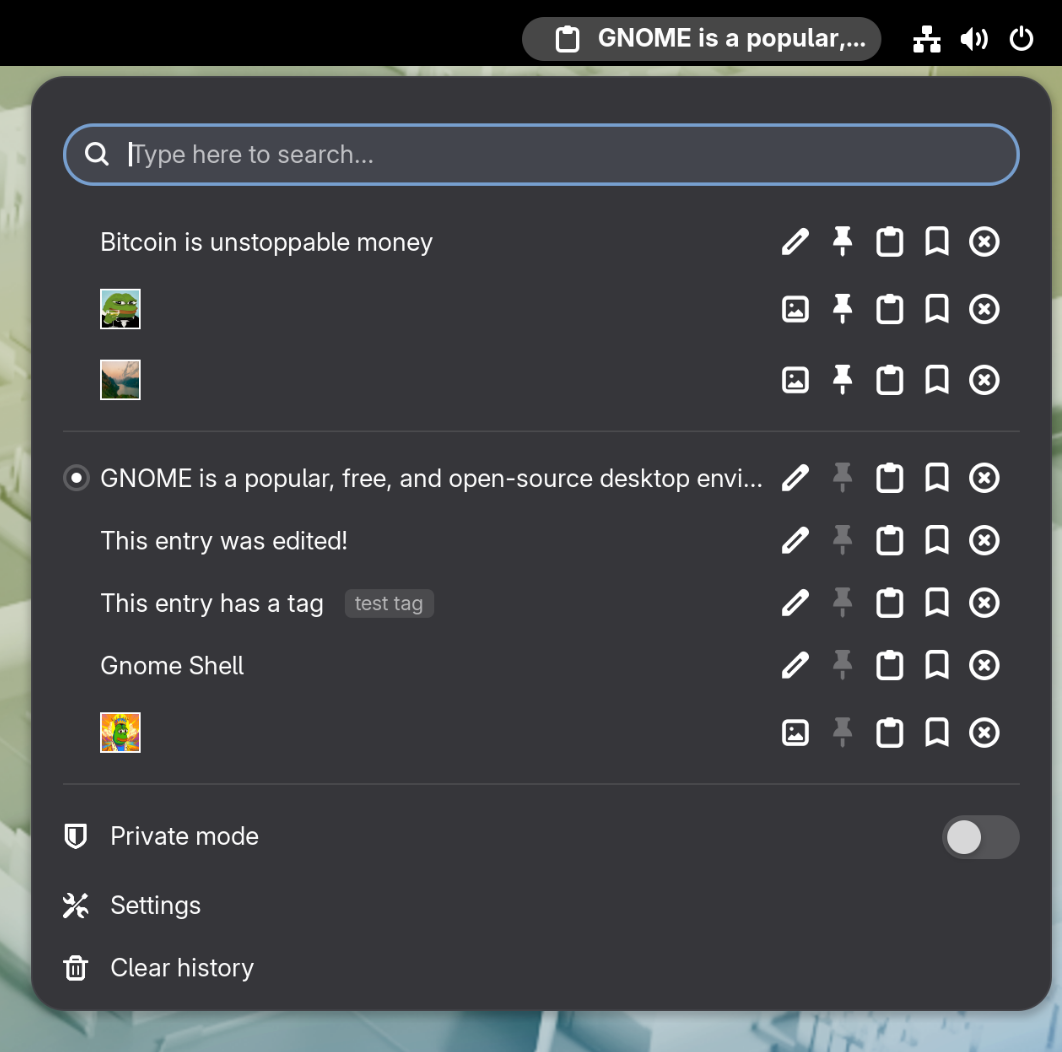
A screenshot of the clipboard manager, showing clipboard history including images

This extension is also packaged by the community for many popular Linux distros โ€” search your package manager.

๐Ÿงฐ Features

  • Image support โ€” Copy and paste images in addition to text
  • Pin items โ€” Keep important clipboard entries at the top of the menu
  • Search โ€” Find clipboard entries with text search, including regex
  • Edit entries โ€” Modify existing text entries
  • Tag entries โ€” Add custom labels to organize your clipboard
  • Keyboard shortcuts โ€” Open/close menu, cycle through entries and activate actions without touching the mouse
  • Auto-clear history โ€” Schedule automatic clipboard cleanup at regular intervals or at boot time
  • Private mode โ€” Temporarily pause clipboard history when working with sensitive data
  • Exclude apps โ€” Prevent clipboard tracking when specific applications are in focus (e.g., password managers)
  • Highly configurable โ€” Many more settings to control UI & behavior

In-Menu Keyboard Controls

  • Use arrows to navigate
  • <Enter> to select an item
  • <Delete> to delete an item
  • v to paste directly from menu
  • p to pin item
  • t to add a tag
  • h to preview image
  • e to edit entry

Terminal support

Pasting from the menu works by sending Shift+Insert to programs or Ctrl+Shift+Insert to terminals.

  • To use with tmux, add this to your .tmux.conf:

    # Add Ctrl Shift Insert to paste for clipboard-indicator
    bind -T root C-S-IC {
      run "tmux send-key \"$(xclip -d ${DISPLAY} -o -selection clipboard)\""
    }
    
  • To use with Ghostty, add this to your .config/ghostty/config:

    # Add Ctrl Shift Insert to paste for clipboard-indicator
    keybind = ctrl+shift+insert=paste_from_clipboard
    

Known issues

  • Copying large images causes a short freeze
  • Pasting via menu doesn't work for every application

๐Ÿ“ฆ Install from source

Installation via git is performed by cloning the repo into your local gnome-shell extensions directory (usually ~/.local/share/gnome-shell/extensions/):

$ git clone https://github.com/Tudmotu/gnome-shell-extension-clipboard-indicator.git <extensions-dir>/clipboard-indicator@tudmotu.com

After cloning the repo, the extension is practically installed yet disabled. In order to enable it, run the following command:

$ gnome-extensions enable clipboard-indicator@tudmotu.com

โœ… GNOME Version Support

Depending on your GNOME version, you will need to install the following Clipboard Indicator versions:

  • GNOME 46 and above:
    • Use latest version
  • GNOME 45:
    • v57
  • GNOME 42-44
    • v47
  • GNOME 40-41
    • v39
  • GNOME <40
    • v37

โŒจ๏ธ Contributing

Contributions to this project are welcome.

Please follow these guidelines when contributing:

  • If you want to contribute code, your best bet is to look for an issue with the label "Up for grabs"
  • DO NOT open unsolicited PRs unless they are for updating translations
  • Look at the list of previous PRs before you open a PR, if your PR conflicts with another, it will be rejected
  • If you have a feature idea, open an issue and discuss it there before implementing. DO NOT open a PR as a platform for discussion

Release Cycle

This project loosely follows the release cycle of GNOME. That means it will usually receive 2 updates a year, close to the release of a new major GNOME version. If there are features you'd like to implement or suggest, it is advised to start the discussion a month or two before a GNOME release.

Tudmotu/gnome-shell-extension-clipboard-indicator

The most popular clipboard manager for GNOME, with over 2M downloads

JavaScript

1,280

809 commits

updated May 7, 2026

See the code

README

๐Ÿ“‹ Clipboard Indicator

Get it on GNOME Extensions

The most popular, reliable and feature-rich clipboard manager for GNOME with over 2M downloads.

A screenshot of the clipboard manager, showing clipboard history including images

This extension is also packaged by the community for many popular Linux distros โ€” search your package manager.

๐Ÿงฐ Features

  • Image support โ€” Copy and paste images in addition to text
  • Pin items โ€” Keep important clipboard entries at the top of the menu
  • Search โ€” Find clipboard entries with text search, including regex
  • Edit entries โ€” Modify existing text entries
  • Tag entries โ€” Add custom labels to organize your clipboard
  • Keyboard shortcuts โ€” Open/close menu, cycle through entries and activate actions without touching the mouse
  • Auto-clear history โ€” Schedule automatic clipboard cleanup at regular intervals or at boot time
  • Private mode โ€” Temporarily pause clipboard history when working with sensitive data
  • Exclude apps โ€” Prevent clipboard tracking when specific applications are in focus (e.g., password managers)
  • Highly configurable โ€” Many more settings to control UI & behavior

In-Menu Keyboard Controls

  • Use arrows to navigate
  • <Enter> to select an item
  • <Delete> to delete an item
  • v to paste directly from menu
  • p to pin item
  • t to add a tag
  • h to preview image
  • e to edit entry

Terminal support

Pasting from the menu works by sending Shift+Insert to programs or Ctrl+Shift+Insert to terminals.

  • To use with tmux, add this to your .tmux.conf:

    # Add Ctrl Shift Insert to paste for clipboard-indicator
    bind -T root C-S-IC {
      run "tmux send-key \"$(xclip -d ${DISPLAY} -o -selection clipboard)\""
    }
    
  • To use with Ghostty, add this to your .config/ghostty/config:

    # Add Ctrl Shift Insert to paste for clipboard-indicator
    keybind = ctrl+shift+insert=paste_from_clipboard
    

Known issues

  • Copying large images causes a short freeze
  • Pasting via menu doesn't work for every application

๐Ÿ“ฆ Install from source

Installation via git is performed by cloning the repo into your local gnome-shell extensions directory (usually ~/.local/share/gnome-shell/extensions/):

$ git clone https://github.com/Tudmotu/gnome-shell-extension-clipboard-indicator.git <extensions-dir>/clipboard-indicator@tudmotu.com

After cloning the repo, the extension is practically installed yet disabled. In order to enable it, run the following command:

$ gnome-extensions enable clipboard-indicator@tudmotu.com

โœ… GNOME Version Support

Depending on your GNOME version, you will need to install the following Clipboard Indicator versions:

  • GNOME 46 and above:
    • Use latest version
  • GNOME 45:
    • v57
  • GNOME 42-44
    • v47
  • GNOME 40-41
    • v39
  • GNOME <40
    • v37

โŒจ๏ธ Contributing

Contributions to this project are welcome.

Please follow these guidelines when contributing:

  • If you want to contribute code, your best bet is to look for an issue with the label "Up for grabs"
  • DO NOT open unsolicited PRs unless they are for updating translations
  • Look at the list of previous PRs before you open a PR, if your PR conflicts with another, it will be rejected
  • If you have a feature idea, open an issue and discuss it there before implementing. DO NOT open a PR as a platform for discussion

Release Cycle

This project loosely follows the release cycle of GNOME. That means it will usually receive 2 updates a year, close to the release of a new major GNOME version. If there are features you'd like to implement or suggest, it is advised to start the discussion a month or two before a GNOME release.

Significant stargazers

Aaron Lichtman

515 followers ยท starred Feb 2025

Willow (GHOST)

284 followers ยท starred May 2025

Khแบฃi

137 followers ยท starred Jul 2021

Jan Pilzer

86 followers ยท starred May 2026