
TUI for agentic code orchestration
66
stars
1,382
commits
Rust
primary language
Sep 16, 2026
updated
README
Thurbox

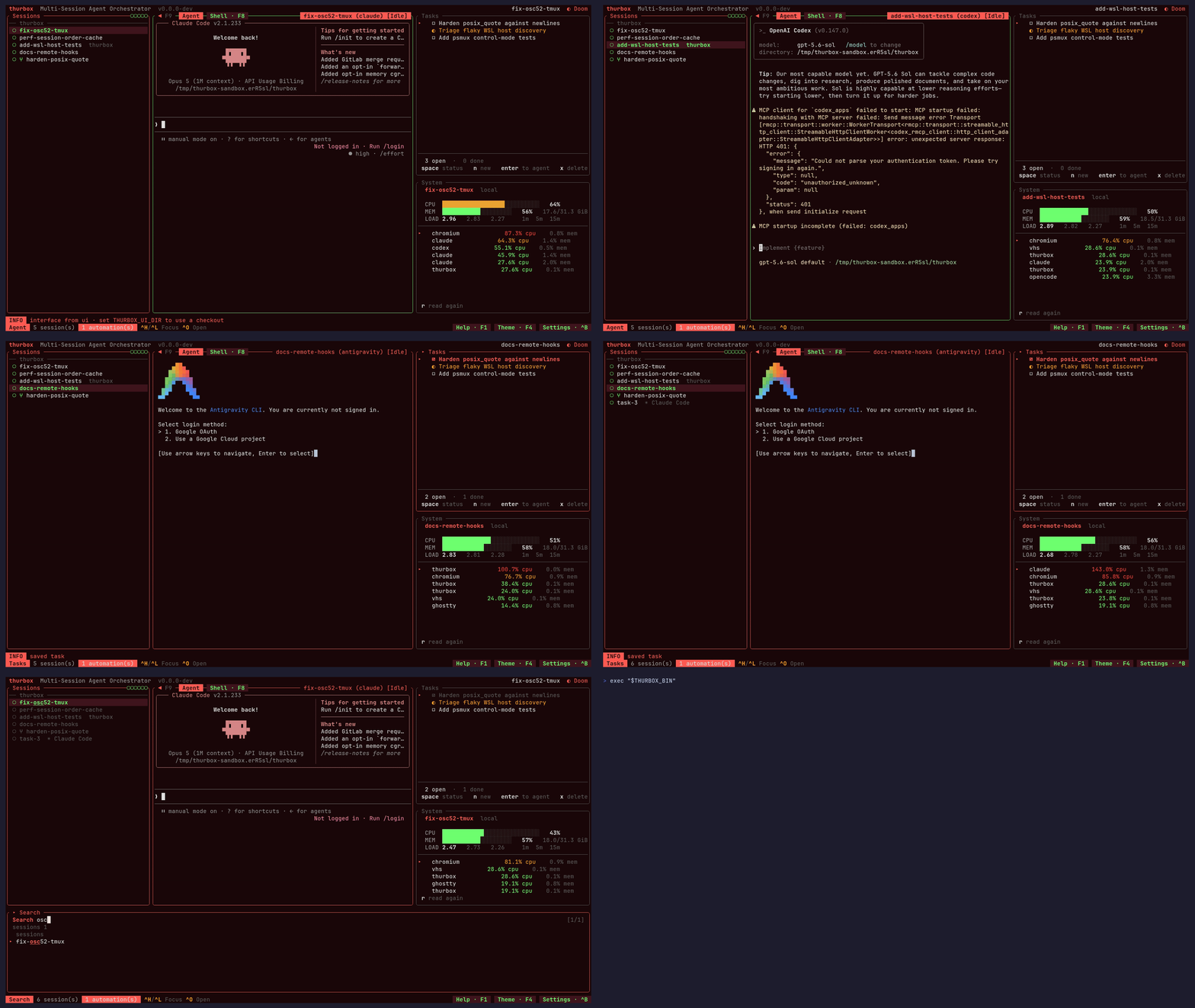
Run several coding agents at once — Claude Code, Codex, Antigravity, opencode, aider, or any CLI you describe yourself — side by side in one terminal. Each gets its own persistent tmux session and its own git worktree, so they never fight over your checkout, and they survive crashes, restarts and reboots. Quit thurbox and every agent keeps working; relaunch and they are all still there.
Thurbox is agent-neutral. It launches the vendor CLI unmodified and knows nothing about its model, prompts or tools, so you get new agent features the day the CLI ships them. And the interface is not compiled in: every pane you see, the session list included, is a Lua file in a directory you own — move it, turn it off, rewrite it, or install one somebody else wrote.




Installation
Linux / macOS:
curl -fsSL https://raw.githubusercontent.com/Thurbeen/thurbox/main/scripts/install.sh | sh
Windows (PowerShell):
irm https://raw.githubusercontent.com/Thurbeen/thurbox/main/scripts/install.ps1 | iex
That installs both binaries — thurbox (the TUI) and thurbox-cli (the
headless one) — with checksum verification and platform auto-detection.
You also need tmux ≥ 3.2 (or psmux on native Windows), git, and at least one coding-agent CLI.
Homebrew, the AUR, winget, Chocolatey, building from source, pinning a version, changing the install directory and uninstalling are all on the Installation page.
Your first session
thurbox
First launch seeds ~/.config/thurbox/ — the agents thurbox knows, the themes,
and the interface itself — then draws a session list on the left and an agent
terminal on the right.
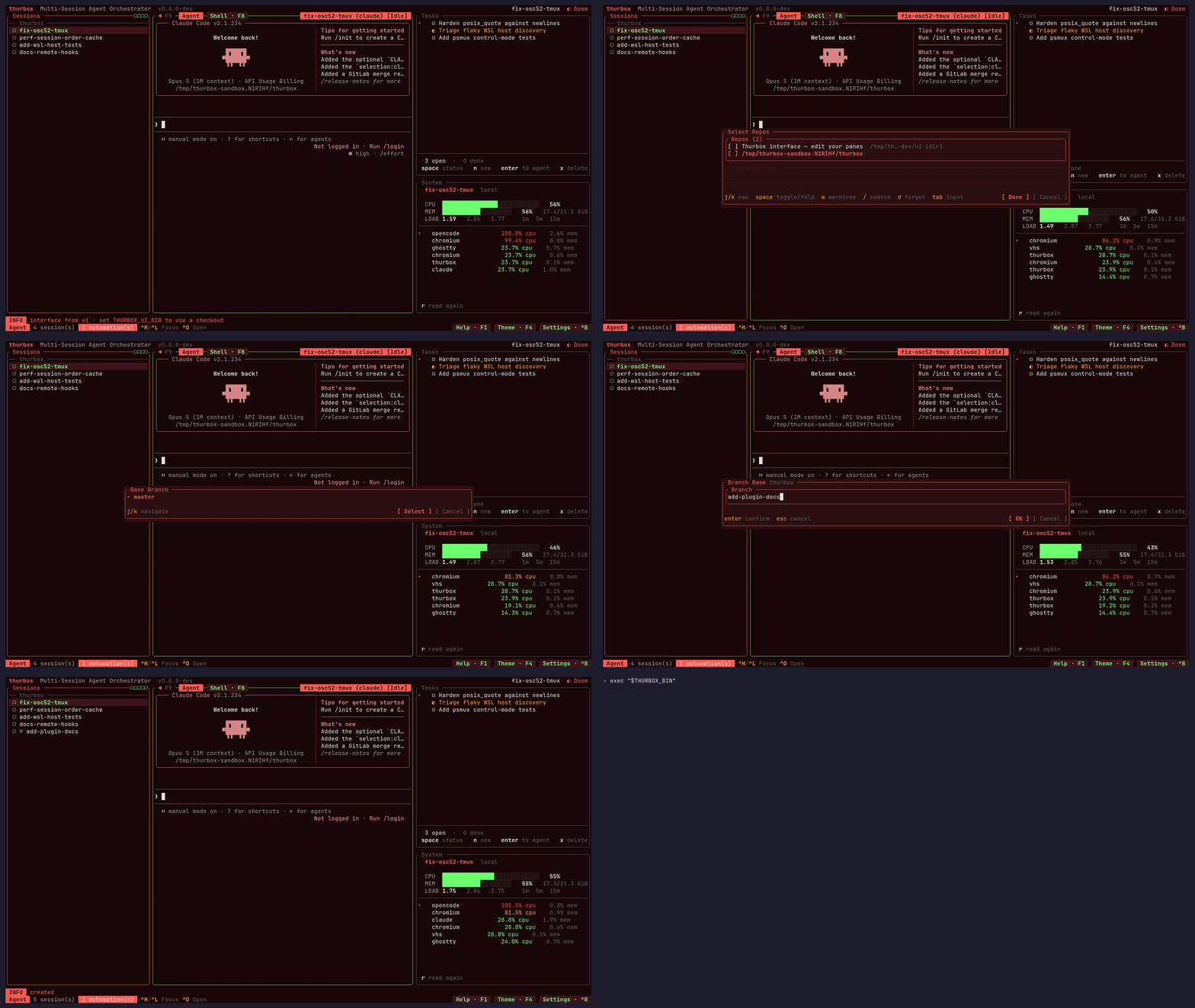
Ctrl+Nopens the repo picker.Spacetoggles a repo,wputs it in worktree mode (you are asked for a base branch and a new branch name),Enterconfirms. Name the session, then pick an agent.- Talk to it. The right pane is a live agent CLI; every key goes to it.
Ctrl+Nagain for a second agent on a second branch.Ctrl+J/Ctrl+Kmove between sessions — the one you are not looking at keeps working.Ctrl+Qleaves the TUI without killing anything. Runthurboxagain and both agents are still mid-task, or attach raw withtmux -L thurbox attach.
That is the whole product in four steps: parallel work that keeps going when you stop watching it.
F1 lists every key and is rendered from the live registry, so it cannot drift
from what is running; Ctrl+P is a command palette over the same actions.
For the same walkthrough with screenshots, see the
tutorial.
What else it does
- Global search
(
Ctrl+/) — find a session by name, agent, branch or repo, and by the text on its screen, which is the half that finds it by the error in it. - Fork and lead/worker trees
(
Ctrl+F) — branch a conversation; children nest under their lead. - Worktrees and multi-repo sessions
— one session can span several repos, each on its own worktree of a shared
branch.
Ctrl+Ssyncs them with their base. - Remote SSH and WSL sessions
— declare hosts in
hosts.tomland sessions run there while the TUI stays local. - A headless CLI
—
thurbox-clicreates, drives, captures and tears down sessions from a script, over the same database the TUI is reading. - Automations and tasks — scheduled agent runs and a todo list whose items can be handed to an agent. A tmux heartbeat fires them whether or not thurbox is open.
- Inter-session messages — an agent-neutral mailbox so one agent hands another a payload instead of scraping its terminal.
- Extensions — opt-in add-ons that are data, not code: a manifest declares the agents, files, sessions and automations it wants, and one command installs and self-heals them.
- Session lifecycle hooks,
OS notifications,
36 themes
(
Ctrl+Y) and full mouse support.
Wiring a fleet of agents at once — operators, developers, reviewers, from one script — is the monorepo recipe.
Make it yours
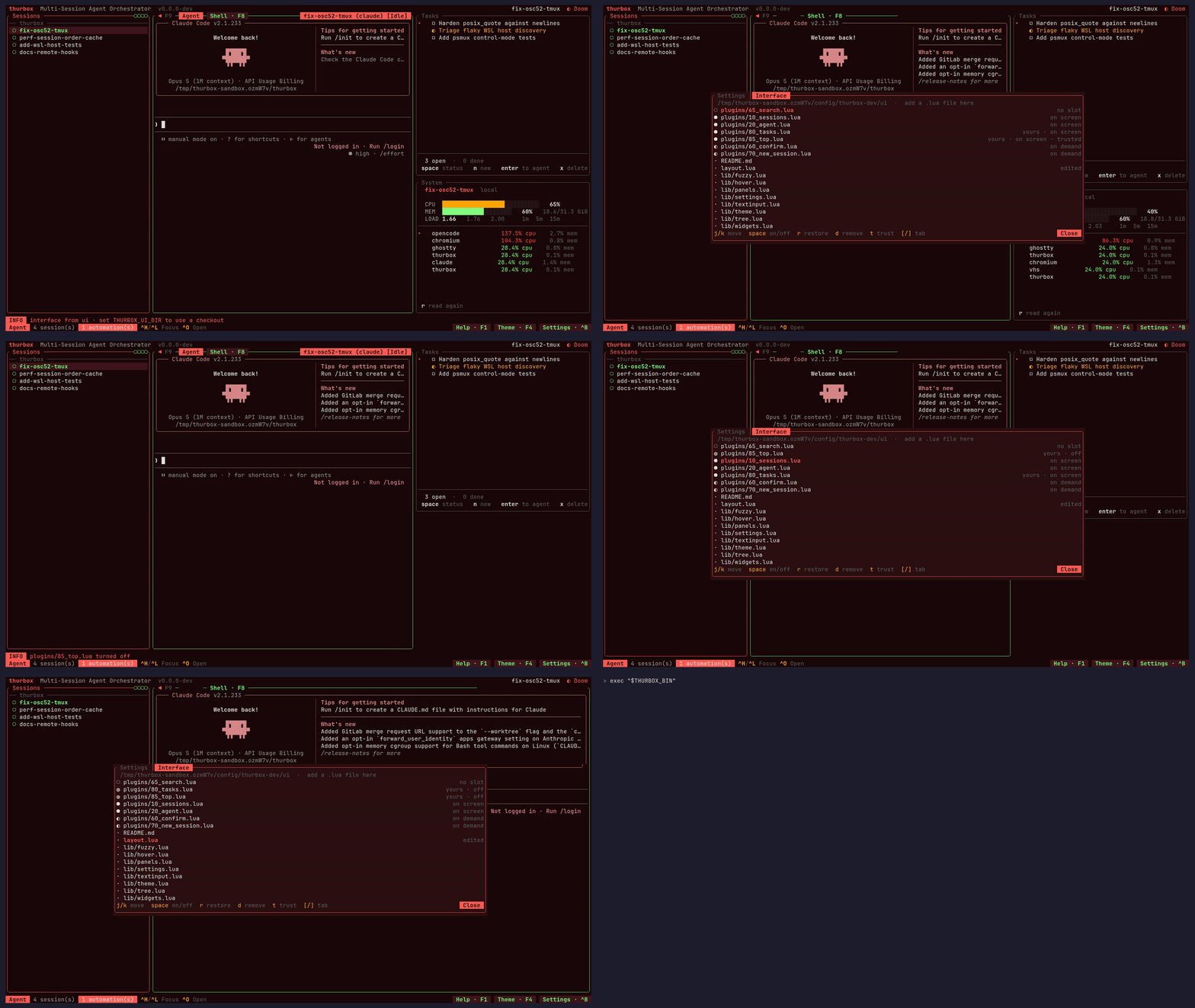
The binary boots a kernel, reads a directory, and draws whatever Lua it finds
there. Panes live in ui/plugins/*.lua, the arrangement in ui/layout.lua, and
F10 reloads both from disk. Agents, hosts, hooks, themes, chords and settings
are each a file under ~/.config/thurbox/.
You do not have to learn Lua for any of it. Thurbox ships a built-in ui-skill
extension that teaches whichever CLI you run how the interface is put together,
so from inside any session you can just ask:
Add a pane on the left with CPU and RAM usage. Move the search strip to the bottom and make the session column 30% wide.
Press F10 and the change is on your screen. If a pane breaks, Ctrl+, then
] is chrome rather than a pane, so it cannot be edited away — r restores a
shipped file, space turns yours off.
The Interface → · Writing a pane → · Configuration →
Documentation
thurbox.thurbeen.eu/docs is the manual: installation, tutorial, features, keybindings, configuration, agents, the interface, orchestration, architecture, a comparison with similar tools and an FAQ.
The rationale behind the decisions is in this repository, under
docs/: CONSTITUTION (non-negotiable
principles), ARCHITECTURE, FEATURES,
CONFIG, V2-KERNEL,
PLUGINS, ORCHESTRATION,
DEVELOPMENT and RELEASING.
Contributing
CONTRIBUTING.md is the full guide — the Nix dev shell, the
just tasks, the test discipline, and the conventional-commit rules that decide
what gets released.
git clone https://github.com/Thurbeen/thurbox.git
cd thurbox
nix develop          # or ./scripts/install-dev-tools.sh
just build && just test && just lint
Community
- Discord — questions, setup help, and
showing off your interface. Ask in
#help, one thread per problem. - GitHub Issues — confirmed bugs and concrete feature requests.
License
MIT — see LICENSE. Built on ratatui, tui-term, vt100 and tmux.
Contributors


See what people are saying
Similar repos


Languages
Rust
83.3%
HTML
5.8%
Lua
4.5%
Shell
3.4%
CSS
1.0%
TUI for agentic code orchestration
66
stars
1,382
commits
Rust
primary language
Sep 16, 2026
updated
README
Thurbox
Run several coding agents at once — Claude Code, Codex, Antigravity, opencode, aider, or any CLI you describe yourself — side by side in one terminal. Each gets its own persistent tmux session and its own git worktree, so they never fight over your checkout, and they survive crashes, restarts and reboots. Quit thurbox and every agent keeps working; relaunch and they are all still there.
Thurbox is agent-neutral. It launches the vendor CLI unmodified and knows nothing about its model, prompts or tools, so you get new agent features the day the CLI ships them. And the interface is not compiled in: every pane you see, the session list included, is a Lua file in a directory you own — move it, turn it off, rewrite it, or install one somebody else wrote.
Installation
Linux / macOS:
curl -fsSL https://raw.githubusercontent.com/Thurbeen/thurbox/main/scripts/install.sh | sh
Windows (PowerShell):
irm https://raw.githubusercontent.com/Thurbeen/thurbox/main/scripts/install.ps1 | iex
That installs both binaries — thurbox (the TUI) and thurbox-cli (the
headless one) — with checksum verification and platform auto-detection.
You also need tmux ≥ 3.2 (or psmux on native Windows), git, and at least one coding-agent CLI.
Homebrew, the AUR, winget, Chocolatey, building from source, pinning a version, changing the install directory and uninstalling are all on the Installation page.
Your first session
thurbox
First launch seeds ~/.config/thurbox/ — the agents thurbox knows, the themes,
and the interface itself — then draws a session list on the left and an agent
terminal on the right.
Ctrl+Nopens the repo picker.Spacetoggles a repo,wputs it in worktree mode (you are asked for a base branch and a new branch name),Enterconfirms. Name the session, then pick an agent.- Talk to it. The right pane is a live agent CLI; every key goes to it.
Ctrl+Nagain for a second agent on a second branch.Ctrl+J/Ctrl+Kmove between sessions — the one you are not looking at keeps working.Ctrl+Qleaves the TUI without killing anything. Runthurboxagain and both agents are still mid-task, or attach raw withtmux -L thurbox attach.
That is the whole product in four steps: parallel work that keeps going when you stop watching it.
F1 lists every key and is rendered from the live registry, so it cannot drift
from what is running; Ctrl+P is a command palette over the same actions.
For the same walkthrough with screenshots, see the
tutorial.
What else it does
- Global search
(
Ctrl+/) — find a session by name, agent, branch or repo, and by the text on its screen, which is the half that finds it by the error in it. - Fork and lead/worker trees
(
Ctrl+F) — branch a conversation; children nest under their lead. - Worktrees and multi-repo sessions
— one session can span several repos, each on its own worktree of a shared
branch.
Ctrl+Ssyncs them with their base. - Remote SSH and WSL sessions
— declare hosts in
hosts.tomland sessions run there while the TUI stays local. - A headless CLI
—
thurbox-clicreates, drives, captures and tears down sessions from a script, over the same database the TUI is reading. - Automations and tasks — scheduled agent runs and a todo list whose items can be handed to an agent. A tmux heartbeat fires them whether or not thurbox is open.
- Inter-session messages — an agent-neutral mailbox so one agent hands another a payload instead of scraping its terminal.
- Extensions — opt-in add-ons that are data, not code: a manifest declares the agents, files, sessions and automations it wants, and one command installs and self-heals them.
- Session lifecycle hooks,
OS notifications,
36 themes
(
Ctrl+Y) and full mouse support.
Wiring a fleet of agents at once — operators, developers, reviewers, from one script — is the monorepo recipe.
Make it yours
The binary boots a kernel, reads a directory, and draws whatever Lua it finds
there. Panes live in ui/plugins/*.lua, the arrangement in ui/layout.lua, and
F10 reloads both from disk. Agents, hosts, hooks, themes, chords and settings
are each a file under ~/.config/thurbox/.
You do not have to learn Lua for any of it. Thurbox ships a built-in ui-skill
extension that teaches whichever CLI you run how the interface is put together,
so from inside any session you can just ask:
Add a pane on the left with CPU and RAM usage. Move the search strip to the bottom and make the session column 30% wide.
Press F10 and the change is on your screen. If a pane breaks, Ctrl+, then
] is chrome rather than a pane, so it cannot be edited away — r restores a
shipped file, space turns yours off.
The Interface → · Writing a pane → · Configuration →
Documentation
thurbox.thurbeen.eu/docs is the manual: installation, tutorial, features, keybindings, configuration, agents, the interface, orchestration, architecture, a comparison with similar tools and an FAQ.
The rationale behind the decisions is in this repository, under
docs/: CONSTITUTION (non-negotiable
principles), ARCHITECTURE, FEATURES,
CONFIG, V2-KERNEL,
PLUGINS, ORCHESTRATION,
DEVELOPMENT and RELEASING.
Contributing
CONTRIBUTING.md is the full guide — the Nix dev shell, the
just tasks, the test discipline, and the conventional-commit rules that decide
what gets released.
git clone https://github.com/Thurbeen/thurbox.git
cd thurbox
nix develop          # or ./scripts/install-dev-tools.sh
just build && just test && just lint
Community
- Discord — questions, setup help, and
showing off your interface. Ask in
#help, one thread per problem. - GitHub Issues — confirmed bugs and concrete feature requests.
License
MIT — see LICENSE. Built on ratatui, tui-term, vt100 and tmux.
See what people are saying
Similar repos
Contributors
Languages
Rust
83.3%
HTML
5.8%
Lua
4.5%
Shell
3.4%
CSS
1.0%