
See what people are saying
README
Dynacat Dashboard - Self-hosted Homelab Layout
A dynacat config: host metrics with resources monitoring, docker stack status, container update badges, service uptime monitor, and jellyfin continue-watching / recently-added.
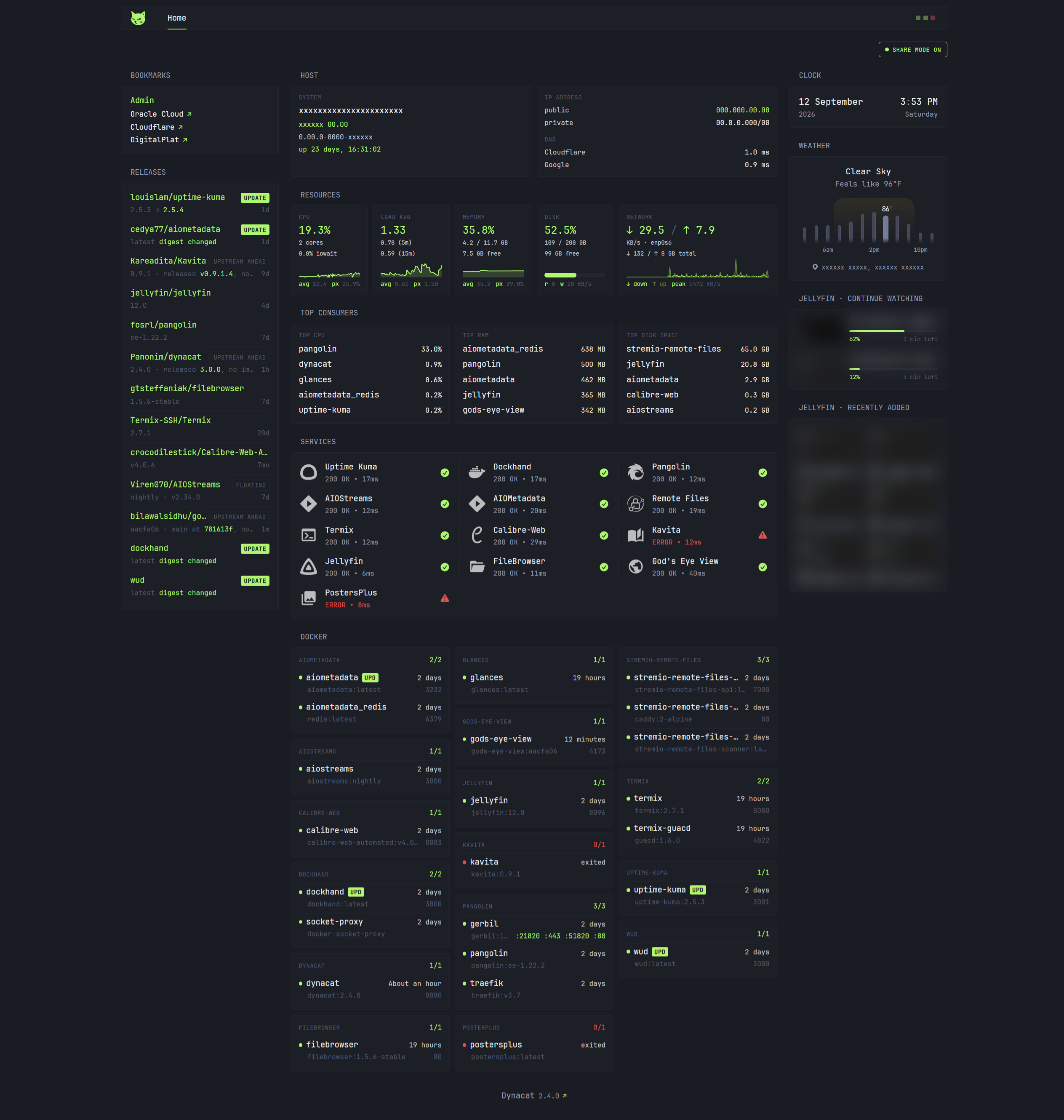
config/dynacat.yml ships three theme presets. Click a thumbnail for the
full-size shot.
 |  |  |
green-dark | blue-dark | red-light |
Setup
cp .env.example .env   # fill it in, every value is commented
docker compose up -d
Open http://localhost:8080.
What each widget needs
Widgets fail independently: skip a dependency and only its widgets break.
| Widget | Needs |
|---|---|
| Host, Resources, Top Consumers | Glances with the web API on (glances -w), reachable at GLANCES_HOST (see below) |
| Docker, Releases | A Docker socket-proxy container named socket-proxy on a shared network |
| update badges (Docker, Releases) | WUD named wud on a shared network |
| Releases | GITHUB_TOKEN |
| Jellyfin | JELLYFIN_API_KEY + JELLYFIN_USER_ID, Jellyfin named jellyfin on a shared network |
| Services | The listed containers on a shared network |
Widgets reach other services by container name, so dynacat must share a Docker network with them. Two lists are yours to fill in, they ship with placeholder examples, not a real stack:
Services(monitor widget): One block per service you want probed.Releases: Four parallel lists,$svc/$repo/$name/$mode. They must stay the same length and in the same order or rows pair with the wrong repo.$modeisreleaseto track tags orcommitto trackmain.
The Docker widget needs no such list: it discovers every container and groups
it by compose project automatically.
Glances
GLANCES_HOST has no default that works everywhere, so it ships as
CHANGEME:61208 and those three widgets show a connection error until you set
it. Two working setups:
- Glances on the host: Point at the gateway of the network this container
joins, which for the shipped
compose.yamlisdynacat:docker network inspect dynacat -f '{{(index .IPAM.Config 0).Gateway}}'. Glances must also listen on that address; a127.0.0.1bind is unreachable from a container. - Glances as a container on the same network: Then it is just
glances:61208, no gateway IPs involved. Note that a bridge-networked Glances reports the container's own network counters, so the Network tile will not show host traffic unless it runs withnetwork_mode: host.
ROOT_MOUNT and DISK_NAME must match what your Glances reports, not what
the host calls them, check curl $GLANCES_HOST/api/4/fs if the Disk tile is
empty.
Notes
- Share mode. The toggle top-right blurs hostnames, IPs, and media titles, and masks the weather location (for screenshots and screen-sharing). Pure CSS, no JavaScript.
- Jellyfin auth uses an
Authorization: MediaBrowser Token="..."header. Jellyfin 12 rejects the older?api_key=query parameter.
Contributors

5 commits
Similar repos


See what people are saying
README
Dynacat Dashboard - Self-hosted Homelab Layout
A dynacat config: host metrics with resources monitoring, docker stack status, container update badges, service uptime monitor, and jellyfin continue-watching / recently-added.
config/dynacat.yml ships three theme presets. Click a thumbnail for the
full-size shot.
| | |
green-dark | blue-dark | red-light |
Setup
cp .env.example .env   # fill it in, every value is commented
docker compose up -d
Open http://localhost:8080.
What each widget needs
Widgets fail independently: skip a dependency and only its widgets break.
| Widget | Needs |
|---|---|
| Host, Resources, Top Consumers | Glances with the web API on (glances -w), reachable at GLANCES_HOST (see below) |
| Docker, Releases | A Docker socket-proxy container named socket-proxy on a shared network |
| update badges (Docker, Releases) | WUD named wud on a shared network |
| Releases | GITHUB_TOKEN |
| Jellyfin | JELLYFIN_API_KEY + JELLYFIN_USER_ID, Jellyfin named jellyfin on a shared network |
| Services | The listed containers on a shared network |
Widgets reach other services by container name, so dynacat must share a Docker network with them. Two lists are yours to fill in, they ship with placeholder examples, not a real stack:
Services(monitor widget): One block per service you want probed.Releases: Four parallel lists,$svc/$repo/$name/$mode. They must stay the same length and in the same order or rows pair with the wrong repo.$modeisreleaseto track tags orcommitto trackmain.
The Docker widget needs no such list: it discovers every container and groups
it by compose project automatically.
Glances
GLANCES_HOST has no default that works everywhere, so it ships as
CHANGEME:61208 and those three widgets show a connection error until you set
it. Two working setups:
- Glances on the host: Point at the gateway of the network this container
joins, which for the shipped
compose.yamlisdynacat:docker network inspect dynacat -f '{{(index .IPAM.Config 0).Gateway}}'. Glances must also listen on that address; a127.0.0.1bind is unreachable from a container. - Glances as a container on the same network: Then it is just
glances:61208, no gateway IPs involved. Note that a bridge-networked Glances reports the container's own network counters, so the Network tile will not show host traffic unless it runs withnetwork_mode: host.
ROOT_MOUNT and DISK_NAME must match what your Glances reports, not what
the host calls them, check curl $GLANCES_HOST/api/4/fs if the Disk tile is
empty.
Notes
- Share mode. The toggle top-right blurs hostnames, IPs, and media titles, and masks the weather location (for screenshots and screen-sharing). Pure CSS, no JavaScript.
- Jellyfin auth uses an
Authorization: MediaBrowser Token="..."header. Jellyfin 12 rejects the older?api_key=query parameter.
Similar repos
Contributors
5 commits