
Fast, native (~8MB) post-processor and batch editor for AI images (Midjourney, Flux, ComfyUI). Preserves workflow metadata, Oklab grading, 3D LUTs.
Rust
3
7 commits
updated Oct 5, 2026
See what people are saying
README
TinyLuma
Lightweight, native post-processor and batch editor for AI-generated images.
Enhance Stable Diffusion, Midjourney, Flux, and ComfyUI generations in seconds.





Features • Why TinyLuma? • AI Detail Engine • Metadata Preservation • Download
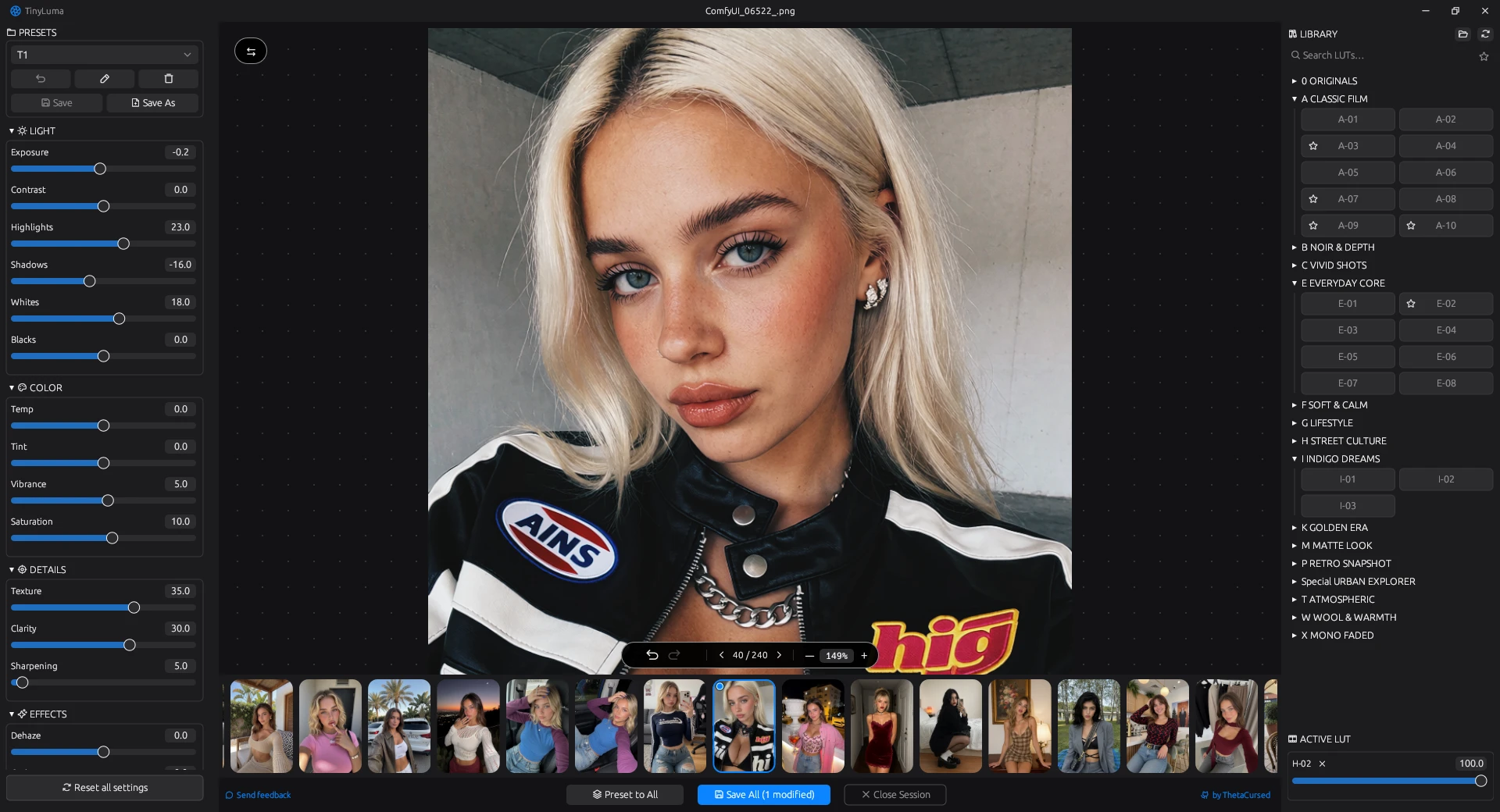
Overview
TinyLuma is a fast, standalone desktop photo editor designed specifically for finishing AI-generated artwork and photo sets. Instead of waiting for heavy creative suites (Lightroom, Photoshop) to launch, TinyLuma provides a focused, bloat-free workflow with professional Oklab color science, custom-tuned detail recovery, .cube LUT support, and instant batch processing.
No Electron, no web runtime, no subscriptions — a single native executable under 8 MB.
Key Features
- ⚡ Blazing Fast & Ultra-Lightweight (~8 MB): Built with pure Rust and
egui. Starts instantly, uses minimal RAM, and renders edits at 60 FPS via multi-threaded Rayon pipelines and 3D LUT caching. - 🧠 Custom AI Detail Engine: Algorithms for
Texture,Clarity, andSharpentuned specifically to eliminate smooth AI "plastic skin" and restore micro-contrast without edge halos. - 🧬 ComfyUI & A1111 Metadata Preservation: Exported PNGs retain raw prompt and node graph metadata (
tEXt,zTXt,iTXtchunks). Your ComfyUI workflow stays intact. - 🎨 Oklab Perceptual Color Grading: 16 non-destructive controls (Light, Color, Details, Effects) powered by Oklab color space and Bradford chromatic adaptation to avoid color shifts and clipping.
- 🎞️ Batch Workflow & Filmstrip: Navigate multi-image sessions, use Preset to All to sync looks across an entire generation batch, and export with background threading.
- 🎭 Complete 3D LUT System: Direct
.cubeLUT library integration with subfolder categorization, search, favorites (★), and intensity blending (0–100%). - ⚖️ Before / After Split Screen: Interactive draggable split divider to compare edits, instantly toggled with the
\key.
Why TinyLuma?
| Feature | Standard Editors (Lightroom / PS) | TinyLuma |
|---|---|---|
| Startup Time | 5–15 seconds | Instant (<0.3s) |
| Executable Size | Gigabytes | ~8 MB |
| ComfyUI/A1111 Metadata | Stripped by default | Preserved (Full pass-through) |
| AI Texture Handling | Generic sharpening (causes ringing) | Tuned for synthetic & AI surfaces |
| LUT Workflow | Buried in submenus | Instant visual library & blending |
| Memory Footprint | Heavy (>1 GB idle) | Strictly bounded LRU cache |
Engineered for AI Generations
Raw AI images (Stable Diffusion, Midjourney, Flux) often suffer from common artifacts: flat lighting, low local contrast, and unnatural "plastic" skin textures. TinyLuma solves this at the algorithm level:
- Clarity: Logarithmic local contrast base with soft-knee limiting. Enhances depth and scene separation without burning highlights or creating dark halos around subjects.
- Texture: Edge-preserving bilateral separation. Extracts fine surface details (hair strands, fabric weave, skin pores) without amplifying noise or digital artifacts.
- Sharpen: Asymmetric luma unsharp mask. Limits light-edge blooming (≤ 0.20) and dark ringing (≤ 0.12) to produce crisp, print-ready results.
- Film Grain: Darktable-inspired 3-octave simplex noise mapped via paper-response curves, strongest in midtones to naturally break up AI surface banding.
All spatial radii scale dynamically to exported resolution, ensuring identical results between preview and full-res renders.
ComfyUI & AI Metadata Preservation (Optional)
Most editors silently wipe workflow metadata, while others force-embed it. TinyLuma gives you full privacy control with a simple toggle:
- Keep Workflows (Opt-In): Copies
tEXt,zTXt,iTXt, andeXIfdata from source to export. Drop your edited PNG straight back into ComfyUI or Automatic1111 to reload your exact prompt, seed, and node graph. - Protect Your Privacy (Opt-Out): Uncheck the metadata box to export completely clean images — no leaked prompts, models, LoRAs, or generation settings.
Keyboard Shortcuts
| Key | Action |
|---|---|
\ | Toggle Before / After split screen |
← / → | Previous / Next image in session |
Ctrl + Z / Ctrl + Y | Undo / Redo (drag coalesced) |
Ctrl + + / Ctrl + - | Zoom In / Out |
Ctrl + 0 | Fit to Viewport |
Delete / Backspace | Remove frame from session |
Space + Drag | Pan canvas |
Download & Quick Start
Pre-built Binaries
⬇ Download TinyLuma v1.0.0 — Windows x64
Standalone .zip (~8 MB) — no installation required. Includes 9 curated starter LUTs.
Just unpack and run TinyLuma.exe.
Build from Source
Ensure you have Rust 1.95+ installed:
git clone https://github.com/ThetaCursed/TinyLuma.git
cd TinyLuma
cargo build --release
The optimized binary will be compiled to target/release/TinyLuma.exe.
Folder Structure
Place your custom .cube 3D LUTs inside the luts/ directory. Subfolders will automatically turn into categories inside the UI:
TinyLuma/
├── tiny_luma.exe
├── config/             # Automatically created (presets & favorites)
└── luts/               # Put your .cube files here
    ├── Film/
    │   └── Kodak_Portra.cube
    └── Cinematic/
        └── Moody_Teal.cube
Supported Formats
- Exports:
- PNG (Lossless, with optional metadata preservation)
- JPEG (Lossy, configurable quality 1–100, default 90)
- WebP (Lossy, configurable quality 1–100, optimized for web/social sharing)
License
TinyLuma is open-source software licensed under the GNU Affero General Public License v3.0 or later (AGPL-3.0-or-later). See the LICENSE file for details.
Copyright (c) 2026 ThetaCursed.
Similar repos


Fast, native (~8MB) post-processor and batch editor for AI images (Midjourney, Flux, ComfyUI). Preserves workflow metadata, Oklab grading, 3D LUTs.
Rust
3
7 commits
updated Oct 5, 2026
See what people are saying
README
TinyLuma
Lightweight, native post-processor and batch editor for AI-generated images.
Enhance Stable Diffusion, Midjourney, Flux, and ComfyUI generations in seconds.
Features • Why TinyLuma? • AI Detail Engine • Metadata Preservation • Download
Overview
TinyLuma is a fast, standalone desktop photo editor designed specifically for finishing AI-generated artwork and photo sets. Instead of waiting for heavy creative suites (Lightroom, Photoshop) to launch, TinyLuma provides a focused, bloat-free workflow with professional Oklab color science, custom-tuned detail recovery, .cube LUT support, and instant batch processing.
No Electron, no web runtime, no subscriptions — a single native executable under 8 MB.
Key Features
- ⚡ Blazing Fast & Ultra-Lightweight (~8 MB): Built with pure Rust and
egui. Starts instantly, uses minimal RAM, and renders edits at 60 FPS via multi-threaded Rayon pipelines and 3D LUT caching. - 🧠 Custom AI Detail Engine: Algorithms for
Texture,Clarity, andSharpentuned specifically to eliminate smooth AI "plastic skin" and restore micro-contrast without edge halos. - 🧬 ComfyUI & A1111 Metadata Preservation: Exported PNGs retain raw prompt and node graph metadata (
tEXt,zTXt,iTXtchunks). Your ComfyUI workflow stays intact. - 🎨 Oklab Perceptual Color Grading: 16 non-destructive controls (Light, Color, Details, Effects) powered by Oklab color space and Bradford chromatic adaptation to avoid color shifts and clipping.
- 🎞️ Batch Workflow & Filmstrip: Navigate multi-image sessions, use Preset to All to sync looks across an entire generation batch, and export with background threading.
- 🎭 Complete 3D LUT System: Direct
.cubeLUT library integration with subfolder categorization, search, favorites (★), and intensity blending (0–100%). - ⚖️ Before / After Split Screen: Interactive draggable split divider to compare edits, instantly toggled with the
\key.
Why TinyLuma?
| Feature | Standard Editors (Lightroom / PS) | TinyLuma |
|---|---|---|
| Startup Time | 5–15 seconds | Instant (<0.3s) |
| Executable Size | Gigabytes | ~8 MB |
| ComfyUI/A1111 Metadata | Stripped by default | Preserved (Full pass-through) |
| AI Texture Handling | Generic sharpening (causes ringing) | Tuned for synthetic & AI surfaces |
| LUT Workflow | Buried in submenus | Instant visual library & blending |
| Memory Footprint | Heavy (>1 GB idle) | Strictly bounded LRU cache |
Engineered for AI Generations
Raw AI images (Stable Diffusion, Midjourney, Flux) often suffer from common artifacts: flat lighting, low local contrast, and unnatural "plastic" skin textures. TinyLuma solves this at the algorithm level:
- Clarity: Logarithmic local contrast base with soft-knee limiting. Enhances depth and scene separation without burning highlights or creating dark halos around subjects.
- Texture: Edge-preserving bilateral separation. Extracts fine surface details (hair strands, fabric weave, skin pores) without amplifying noise or digital artifacts.
- Sharpen: Asymmetric luma unsharp mask. Limits light-edge blooming (≤ 0.20) and dark ringing (≤ 0.12) to produce crisp, print-ready results.
- Film Grain: Darktable-inspired 3-octave simplex noise mapped via paper-response curves, strongest in midtones to naturally break up AI surface banding.
All spatial radii scale dynamically to exported resolution, ensuring identical results between preview and full-res renders.
ComfyUI & AI Metadata Preservation (Optional)
Most editors silently wipe workflow metadata, while others force-embed it. TinyLuma gives you full privacy control with a simple toggle:
- Keep Workflows (Opt-In): Copies
tEXt,zTXt,iTXt, andeXIfdata from source to export. Drop your edited PNG straight back into ComfyUI or Automatic1111 to reload your exact prompt, seed, and node graph. - Protect Your Privacy (Opt-Out): Uncheck the metadata box to export completely clean images — no leaked prompts, models, LoRAs, or generation settings.
Keyboard Shortcuts
| Key | Action |
|---|---|
\ | Toggle Before / After split screen |
← / → | Previous / Next image in session |
Ctrl + Z / Ctrl + Y | Undo / Redo (drag coalesced) |
Ctrl + + / Ctrl + - | Zoom In / Out |
Ctrl + 0 | Fit to Viewport |
Delete / Backspace | Remove frame from session |
Space + Drag | Pan canvas |
Download & Quick Start
Pre-built Binaries
⬇ Download TinyLuma v1.0.0 — Windows x64
Standalone .zip (~8 MB) — no installation required. Includes 9 curated starter LUTs.
Just unpack and run TinyLuma.exe.
Build from Source
Ensure you have Rust 1.95+ installed:
git clone https://github.com/ThetaCursed/TinyLuma.git
cd TinyLuma
cargo build --release
The optimized binary will be compiled to target/release/TinyLuma.exe.
Folder Structure
Place your custom .cube 3D LUTs inside the luts/ directory. Subfolders will automatically turn into categories inside the UI:
TinyLuma/
├── tiny_luma.exe
├── config/             # Automatically created (presets & favorites)
└── luts/               # Put your .cube files here
    ├── Film/
    │   └── Kodak_Portra.cube
    └── Cinematic/
        └── Moody_Teal.cube
Supported Formats
- Exports:
- PNG (Lossless, with optional metadata preservation)
- JPEG (Lossy, configurable quality 1–100, default 90)
- WebP (Lossy, configurable quality 1–100, optimized for web/social sharing)
License
TinyLuma is open-source software licensed under the GNU Affero General Public License v3.0 or later (AGPL-3.0-or-later). See the LICENSE file for details.
Copyright (c) 2026 ThetaCursed.