
Self-hosted uptime monitoring for HTTP, TCP, DNS, databases, Kafka and more, with public status pages and a worker-based cluster mode.
See the codeSee what people are saying
README





About The Project
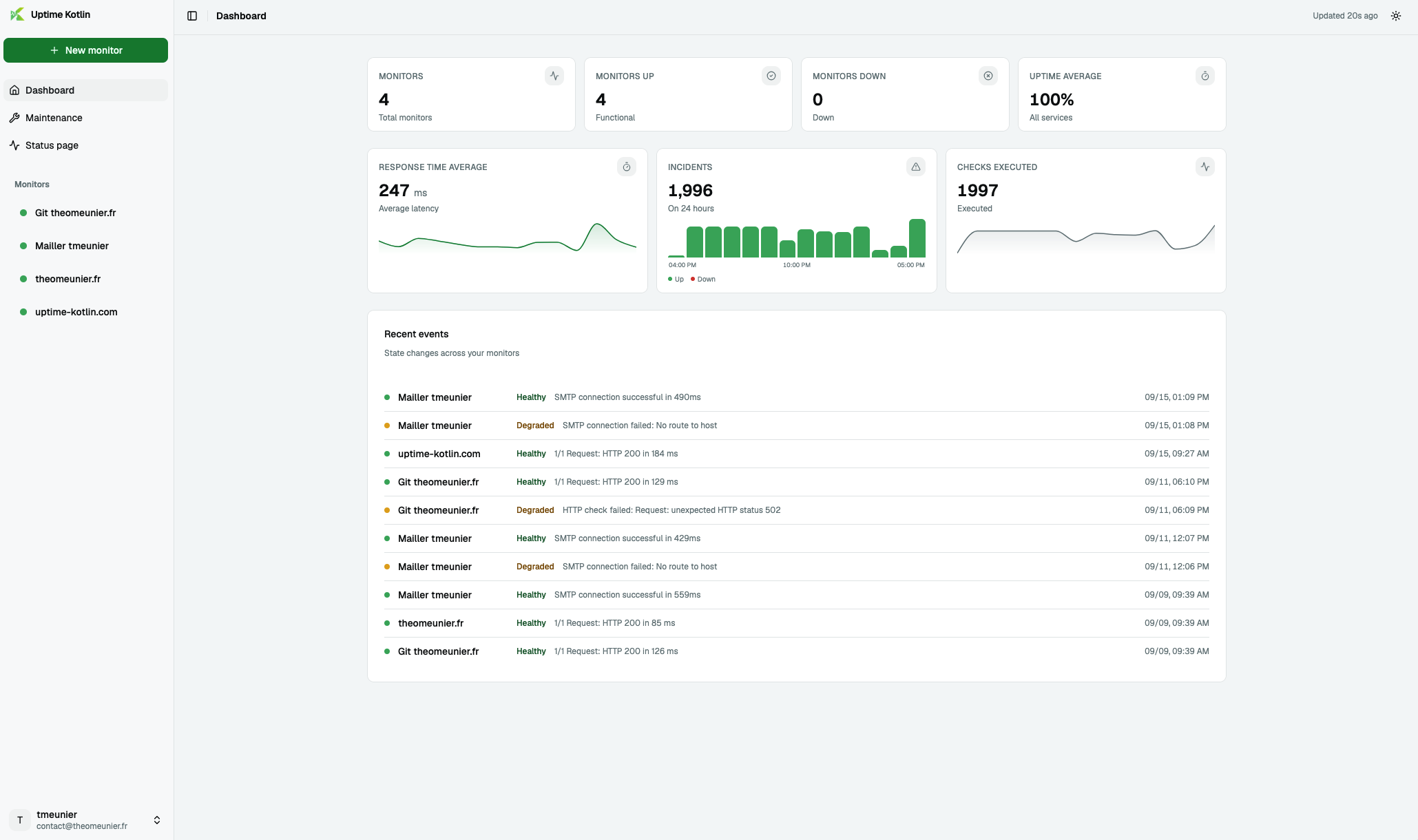
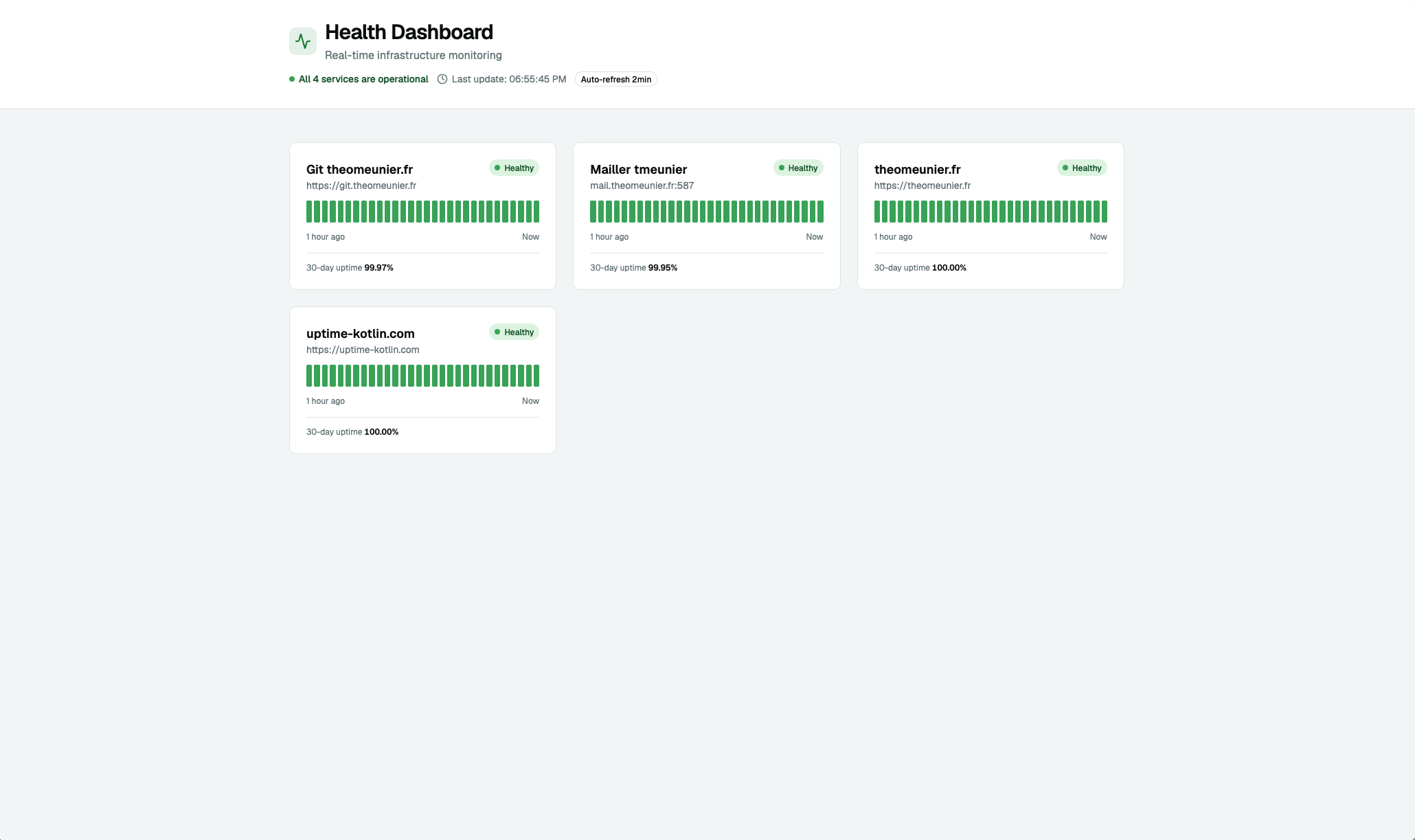
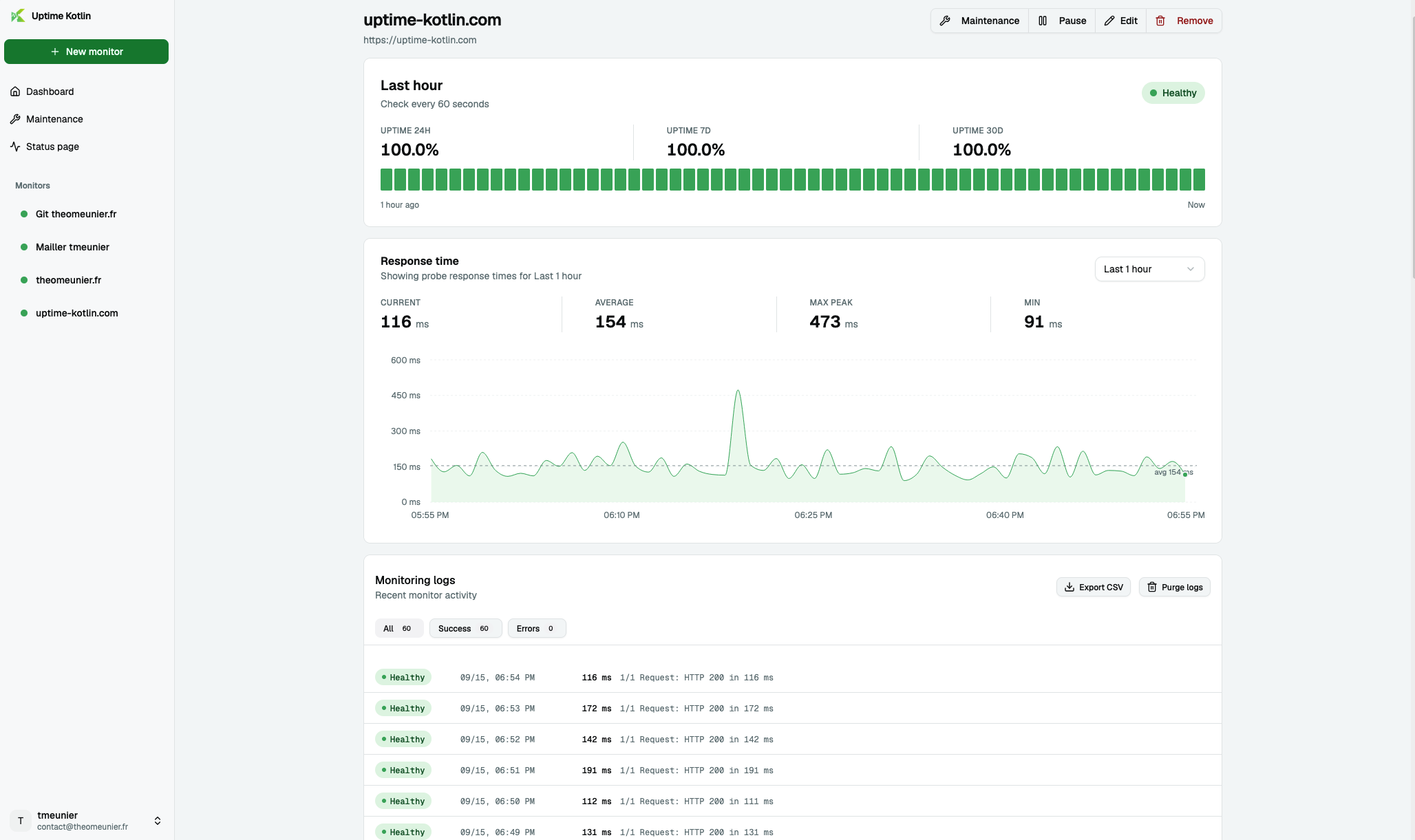
Self-hosted uptime monitoring for HTTP, TCP, DNS, databases, Kafka, RabbitMQ and more. Public status pages, multi-channel notifications, and a worker-based cluster mode to scale your checks.
 |  |  |
Key Features
- HTTP/HTTPS, TCP, DNS, ping, PostgreSQL, Microsoft SQL Server, MySQL/MariaDB, Redis, SMTP, Kafka and RabbitMQ monitoring
- Real-time dashboard with historical data
- Multi-channel notifications (Email, Slack, Discord, Teams, Webhook), with periodic resend while a monitor stays down (per-monitor interval, disabled by default)
- Public status pages for your users
- JWT authentication with encrypted data
- Docker-ready deployment
Built With
Getting Started
- Create keys for JWT token with
openssl:
mkdir certs/ && cd certs

openssl genrsa -out rsaPrivateKey.pem 2048
openssl rsa -pubout -in rsaPrivateKey.pem -out publicKey.pem
openssl pkcs8 -topk8 -nocrypt -inform pem -in rsaPrivateKey.pem -outform pem -out privateKey.pem

chmod 644 privateKey.pem publicKey.pem
- Create a
compose.yamlfile
Download the Nginx reverse proxy configuration into a docker/ folder next to your compose.yaml:
mkdir -p docker && curl -o docker/nginx.conf \
  https://raw.githubusercontent.com/TheoMeunier/uptime-kotlin/main/docker/nginx.conf
The reverse proxy is not optional: the frontend calls the API with relative URLs (/api/...), so both must
answer on the same origin. Only Nginx publishes a port — the app and the API are reached through it.
services:
  uptime-kotlin-app:
    image: ghcr.io/theomeunier/uptime-kotlin/app:latest
    container_name: uptime_kotlin_app
    restart: unless-stopped
    networks:
      - app_network

  uptime-kotlin-api:
    image: ghcr.io/theomeunier/uptime-kotlin/api:latest
    container_name: uptime_kotlin_api
    restart: unless-stopped
    environment:
      TZ: Europe/Paris
      SCHEDULER_STRATEGY: database
      QUARKUS_DATASOURCE_USERNAME: uptime-kotlin
      QUARKUS_DATASOURCE_PASSWORD: change-me
      QUARKUS_DATASOURCE_JDBC_URL: jdbc:postgresql://postgres:5432/uptime-kotlin
      ENCRYPTION_MASTER_KEY: change-me-32-characters-minimum-0
      MP_JWT_VERIFY_PUBLICKEY_LOCATION: /certs/publicKey.pem
      MP_JWT_VERIFY_ISSUER: https://issuer.uptime-kotlin.com
      SMALLRYE_JWT_SIGN_KEY_LOCATION: /certs/privateKey.pem
    volumes:
      - ./certs:/certs
    depends_on:
      - postgres
    networks:
      - app_network

  nginx:
    image: nginx:alpine
    container_name: uptime_kotlin_reverse_proxy
    restart: unless-stopped
    ports:
      - "8080:8080"
    volumes:
      - ./docker/nginx.conf:/etc/nginx/conf.d/default.conf
    depends_on:
      - uptime-kotlin-api
      - uptime-kotlin-app
    networks:
      - app_network

  postgres:
    image: postgres:17.4-alpine
    container_name: uptime_kotlin_database
    restart: unless-stopped
    environment:
      POSTGRES_DB: uptime-kotlin
      POSTGRES_USER: uptime-kotlin
      POSTGRES_PASSWORD: change-me
      PGDATA: /var/lib/postgresql/data/pgdata
    volumes:
      - ./storage-db:/var/lib/postgresql/data
    networks:
      - app_network

networks:
  app_network:
    driver: bridge
-
Configure the
variable environnementfile3.1 Encrypted variables:
ENCRYPTION_MASTER_KEY: The master key used to encrypt sensitive data. Required, at least 32 bytes (openssl rand -base64 32). The application refuses to start without it.
3.2 PostgreSQL Configuration:
QUARKUS_DATASOURCE_USERNAME: The username of your PostgreSQL databaseQUARKUS_DATASOURCE_PASSWORD: The password of your PostgreSQL databaseQUARKUS_DATASOURCE_JDBC_URL=jdbc:postgresql://[host][:port][/database]: The URL of your PostgreSQL database
3.3 JWT Configuration:
MP_JWT_VERIFY_PUBLICKEY_LOCATION: The location of the public key used to verify the JWT tokenMP_JWT_VERIFY_ISSUER: The issuer of the JWT tokenSMALLRYE_JWT_SIGN_KEY_LOCATION: The location of the private key used to sign the JWT token
3.4 Schedulers Configuration:
SCHEDULER_STRATEGY:database(the API runs the monitoring checks and the other background jobs itself), ornonewhen dedicated workers run them (see Cluster mode).SCHEDULER_WORKER_CONCURRENCY(default4) : checks run in parallel, and at most this many checks start per second. Keep it under the datasource pool size.
QUARKUS_SCHEDULER_STRATEGY=db-lockfrom previous versions is still understood asSCHEDULER_STRATEGY=databaseand logs a deprecation warning: replace it.3.5 Maintenance windows (set the same values on the API and the workers):
MAINTENANCE_HORIZON_DAYS(default90) : how far ahead recurring windows are unrolled into occurrences.MAINTENANCE_MAX_DURATION_HOURS(default24) : longest window the API accepts.
-
Start the application with docker-compose
docker compose up -d
- Access the application
http://localhost:8888
Cluster mode
By default the API runs everything. The cluster mode moves the background jobs (monitoring checks, notifications, maintenance windows, purges) to one or more workers. Both modes run the same engine: a job queue stored in PostgreSQL, which the workers share without running a check twice. No extra service is required.
Add Workers
uptime-kotlin-worker:
  image: ghcr.io/theomeunier/uptime-kotlin/worker:latest
  container_name: uptime_kotlin_worker
  environment:
    TZ: Europe/Paris
    SCHEDULER_STRATEGY: database
    SCHEDULER_WORKER_NAME: worker-primary
    SCHEDULER_WORKER_CONCURRENCY: "4"
    MAINTENANCE_HORIZON_DAYS: "90"
    MAINTENANCE_MAX_DURATION_HOURS: "24"
    QUARKUS_DATASOURCE_USERNAME: uptime-kotlin
    QUARKUS_DATASOURCE_PASSWORD: change-me
    QUARKUS_DATASOURCE_JDBC_URL: jdbc:postgresql://postgres:5432/uptime-kotlin
    ENCRYPTION_MASTER_KEY: change-me-32-characters-minimum-0
  depends_on:
    - uptime-kotlin-api
  networks:
    - app_network
Configure the variable environnement file
-
Cluster mode
On the API:
SCHEDULER_STRATEGYset tonone, so that only the workers run the background jobs.On each worker (these are
SCHEDULER_*variables, notQUARKUS_SCHEDULER_*):SCHEDULER_STRATEGY:databaseto run checks from the queue,none(default) to stay idle.SCHEDULER_WORKER_NAME: name of the worker, unique for each instance. Checks queued under a name that no running instance uses any more are picked up by the others after 30 seconds.SCHEDULER_WORKER_CONCURRENCY(default4): checks run in parallel by this worker. Keep it under the datasource pool size.
Contributing
Contributions are what make the open source community such an amazing place to learn, inspire, and create. Any contributions you make are greatly appreciated.
If you have a suggestion that would make this better, please fork the repo and create a pull request. You can also simply open an issue with the tag "enhancement". Don't forget to give the project a star! Thanks again!
- Fork the Project
- Create your Feature Branch (
git checkout -b feature/AmazingFeature) - Commit your Changes (
git commit -m 'Add some AmazingFeature') - Push to the Branch (
git push origin feature/AmazingFeature) - Open a Pull Request
License
Distributed under the MIT License. See LICENSE for more information.
Similar repos


Languages
Kotlin
50.7%
TypeScript
48.3%
Self-hosted uptime monitoring for HTTP, TCP, DNS, databases, Kafka and more, with public status pages and a worker-based cluster mode.
See the codeSee what people are saying
README
About The Project
Self-hosted uptime monitoring for HTTP, TCP, DNS, databases, Kafka, RabbitMQ and more. Public status pages, multi-channel notifications, and a worker-based cluster mode to scale your checks.
| | |
Key Features
- HTTP/HTTPS, TCP, DNS, ping, PostgreSQL, Microsoft SQL Server, MySQL/MariaDB, Redis, SMTP, Kafka and RabbitMQ monitoring
- Real-time dashboard with historical data
- Multi-channel notifications (Email, Slack, Discord, Teams, Webhook), with periodic resend while a monitor stays down (per-monitor interval, disabled by default)
- Public status pages for your users
- JWT authentication with encrypted data
- Docker-ready deployment
Built With
Getting Started
- Create keys for JWT token with
openssl:
mkdir certs/ && cd certs

openssl genrsa -out rsaPrivateKey.pem 2048
openssl rsa -pubout -in rsaPrivateKey.pem -out publicKey.pem
openssl pkcs8 -topk8 -nocrypt -inform pem -in rsaPrivateKey.pem -outform pem -out privateKey.pem

chmod 644 privateKey.pem publicKey.pem
- Create a
compose.yamlfile
Download the Nginx reverse proxy configuration into a docker/ folder next to your compose.yaml:
mkdir -p docker && curl -o docker/nginx.conf \
  https://raw.githubusercontent.com/TheoMeunier/uptime-kotlin/main/docker/nginx.conf
The reverse proxy is not optional: the frontend calls the API with relative URLs (/api/...), so both must
answer on the same origin. Only Nginx publishes a port — the app and the API are reached through it.
services:
  uptime-kotlin-app:
    image: ghcr.io/theomeunier/uptime-kotlin/app:latest
    container_name: uptime_kotlin_app
    restart: unless-stopped
    networks:
      - app_network

  uptime-kotlin-api:
    image: ghcr.io/theomeunier/uptime-kotlin/api:latest
    container_name: uptime_kotlin_api
    restart: unless-stopped
    environment:
      TZ: Europe/Paris
      SCHEDULER_STRATEGY: database
      QUARKUS_DATASOURCE_USERNAME: uptime-kotlin
      QUARKUS_DATASOURCE_PASSWORD: change-me
      QUARKUS_DATASOURCE_JDBC_URL: jdbc:postgresql://postgres:5432/uptime-kotlin
      ENCRYPTION_MASTER_KEY: change-me-32-characters-minimum-0
      MP_JWT_VERIFY_PUBLICKEY_LOCATION: /certs/publicKey.pem
      MP_JWT_VERIFY_ISSUER: https://issuer.uptime-kotlin.com
      SMALLRYE_JWT_SIGN_KEY_LOCATION: /certs/privateKey.pem
    volumes:
      - ./certs:/certs
    depends_on:
      - postgres
    networks:
      - app_network

  nginx:
    image: nginx:alpine
    container_name: uptime_kotlin_reverse_proxy
    restart: unless-stopped
    ports:
      - "8080:8080"
    volumes:
      - ./docker/nginx.conf:/etc/nginx/conf.d/default.conf
    depends_on:
      - uptime-kotlin-api
      - uptime-kotlin-app
    networks:
      - app_network

  postgres:
    image: postgres:17.4-alpine
    container_name: uptime_kotlin_database
    restart: unless-stopped
    environment:
      POSTGRES_DB: uptime-kotlin
      POSTGRES_USER: uptime-kotlin
      POSTGRES_PASSWORD: change-me
      PGDATA: /var/lib/postgresql/data/pgdata
    volumes:
      - ./storage-db:/var/lib/postgresql/data
    networks:
      - app_network

networks:
  app_network:
    driver: bridge
-
Configure the
variable environnementfile3.1 Encrypted variables:
ENCRYPTION_MASTER_KEY: The master key used to encrypt sensitive data. Required, at least 32 bytes (openssl rand -base64 32). The application refuses to start without it.
3.2 PostgreSQL Configuration:
QUARKUS_DATASOURCE_USERNAME: The username of your PostgreSQL databaseQUARKUS_DATASOURCE_PASSWORD: The password of your PostgreSQL databaseQUARKUS_DATASOURCE_JDBC_URL=jdbc:postgresql://[host][:port][/database]: The URL of your PostgreSQL database
3.3 JWT Configuration:
MP_JWT_VERIFY_PUBLICKEY_LOCATION: The location of the public key used to verify the JWT tokenMP_JWT_VERIFY_ISSUER: The issuer of the JWT tokenSMALLRYE_JWT_SIGN_KEY_LOCATION: The location of the private key used to sign the JWT token
3.4 Schedulers Configuration:
SCHEDULER_STRATEGY:database(the API runs the monitoring checks and the other background jobs itself), ornonewhen dedicated workers run them (see Cluster mode).SCHEDULER_WORKER_CONCURRENCY(default4) : checks run in parallel, and at most this many checks start per second. Keep it under the datasource pool size.
QUARKUS_SCHEDULER_STRATEGY=db-lockfrom previous versions is still understood asSCHEDULER_STRATEGY=databaseand logs a deprecation warning: replace it.3.5 Maintenance windows (set the same values on the API and the workers):
MAINTENANCE_HORIZON_DAYS(default90) : how far ahead recurring windows are unrolled into occurrences.MAINTENANCE_MAX_DURATION_HOURS(default24) : longest window the API accepts.
-
Start the application with docker-compose
docker compose up -d
- Access the application
http://localhost:8888
Cluster mode
By default the API runs everything. The cluster mode moves the background jobs (monitoring checks, notifications, maintenance windows, purges) to one or more workers. Both modes run the same engine: a job queue stored in PostgreSQL, which the workers share without running a check twice. No extra service is required.
Add Workers
uptime-kotlin-worker:
  image: ghcr.io/theomeunier/uptime-kotlin/worker:latest
  container_name: uptime_kotlin_worker
  environment:
    TZ: Europe/Paris
    SCHEDULER_STRATEGY: database
    SCHEDULER_WORKER_NAME: worker-primary
    SCHEDULER_WORKER_CONCURRENCY: "4"
    MAINTENANCE_HORIZON_DAYS: "90"
    MAINTENANCE_MAX_DURATION_HOURS: "24"
    QUARKUS_DATASOURCE_USERNAME: uptime-kotlin
    QUARKUS_DATASOURCE_PASSWORD: change-me
    QUARKUS_DATASOURCE_JDBC_URL: jdbc:postgresql://postgres:5432/uptime-kotlin
    ENCRYPTION_MASTER_KEY: change-me-32-characters-minimum-0
  depends_on:
    - uptime-kotlin-api
  networks:
    - app_network
Configure the variable environnement file
-
Cluster mode
On the API:
SCHEDULER_STRATEGYset tonone, so that only the workers run the background jobs.On each worker (these are
SCHEDULER_*variables, notQUARKUS_SCHEDULER_*):SCHEDULER_STRATEGY:databaseto run checks from the queue,none(default) to stay idle.SCHEDULER_WORKER_NAME: name of the worker, unique for each instance. Checks queued under a name that no running instance uses any more are picked up by the others after 30 seconds.SCHEDULER_WORKER_CONCURRENCY(default4): checks run in parallel by this worker. Keep it under the datasource pool size.
Contributing
Contributions are what make the open source community such an amazing place to learn, inspire, and create. Any contributions you make are greatly appreciated.
If you have a suggestion that would make this better, please fork the repo and create a pull request. You can also simply open an issue with the tag "enhancement". Don't forget to give the project a star! Thanks again!
- Fork the Project
- Create your Feature Branch (
git checkout -b feature/AmazingFeature) - Commit your Changes (
git commit -m 'Add some AmazingFeature') - Push to the Branch (
git push origin feature/AmazingFeature) - Open a Pull Request
License
Distributed under the MIT License. See LICENSE for more information.
Similar repos
Languages
Kotlin
50.7%
TypeScript
48.3%