
FineTuna is a web-based LLM fine-tuning platform that simplifies training Hugging Face foundation models using custom datasets. It provides beginner-friendly templates and GPU-free workflows, making AI model customization more accessible for developers and learners.
1
stars
31
commits
JavaScript
primary language
May 15, 2026
updated
README
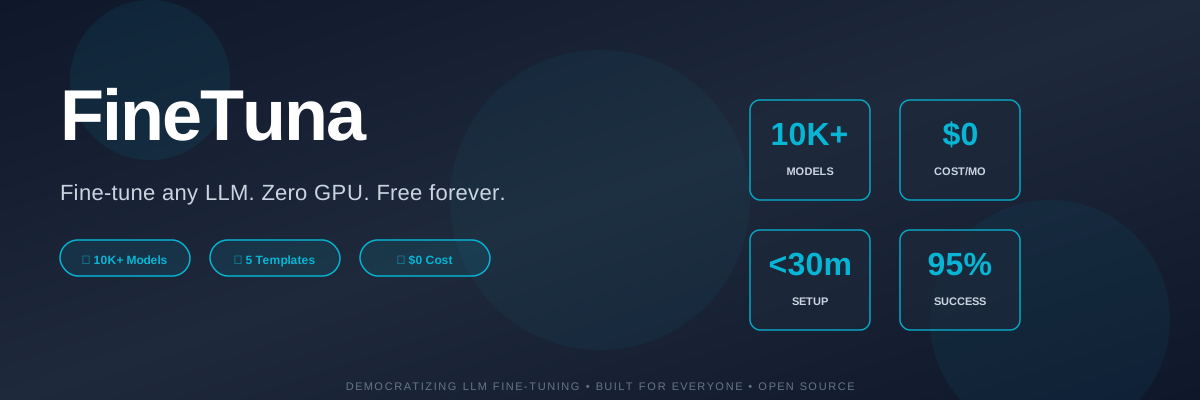
FineTuna
Fine-tune any open-source LLM without GPU ownership, setup headaches, or ML expertise.






🎯 The Problem
Fine-tuning LLMs today requires:
- Expensive GPUs ($5k-50k upfront) 💸
- ML expertise (hyperparameters, techniques, optimization) 🧠
- Fragmented tools (notebooks, CLIs, dashboards scattered everywhere) 🔧
- Manual boilerplate (script generation, artifact management, data packaging) 📝 Most people never even try because the friction is too high.
✨ The Solution
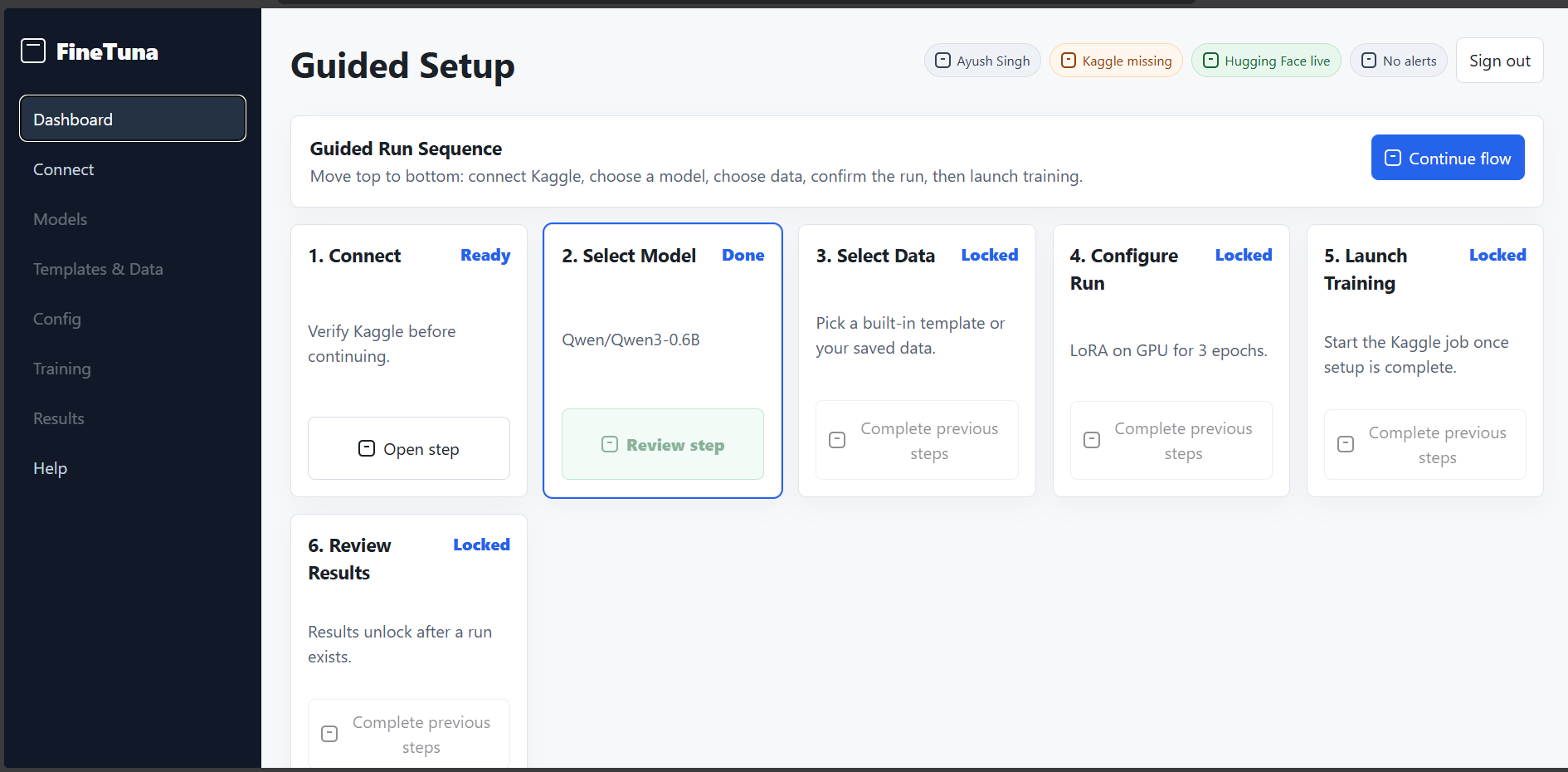
FineTuna is a single, guided dashboard that handles the entire fine-tuning workflow:
Model Selection → Data Setup → Training Config → Kaggle Execution → Download Results
All in your browser. No GPU needed. No setup required. Free forever.
🚀 Features
🧭 Guided Workflow
- Step-by-step flow prevents confusion
- Clear progress indication
- One-click jumps between sections
- Mobile-responsive design
🔎 Model Discovery
- Search 10,000+ models from Hugging Face
- Filter by:
- Model size (7B, 13B, 70B, etc.)
- Architecture (Llama, Mistral, Phi, etc.)
- Estimated VRAM requirements
- Community ratings
- Trending/Latest filters
🗂️ Intelligent Data Management
- Pre-built templates for 5 domains:
- ⚖️ Legal (contracts, case law, legal reasoning)
- 🏥 Medical (diagnoses, treatment plans, medical Q&A)
- 💰 Finance (tax planning, financial analysis)
- 💻 Code (debugging, code review, implementation)
- 📝 General (customer support, writing)
- Custom data uploads (CSV, JSON, PDF)
- Template editor with live preview
- Community templates (created and rated by users)
⚙️ Advanced Configuration
- Fine-tuning techniques:
- LoRA (balanced, recommended)
- QLoRA (fastest, lowest memory)
- Full fine-tuning (best quality)
- Auto-tuned hyperparameters with expert suggestions
- Gradient checkpointing and mixed precision
- Batch size calculator based on GPU type
☁️ Kaggle GPU Orchestration
- Free GPU hours leverage (30-37/month per user)
- One-click job submission
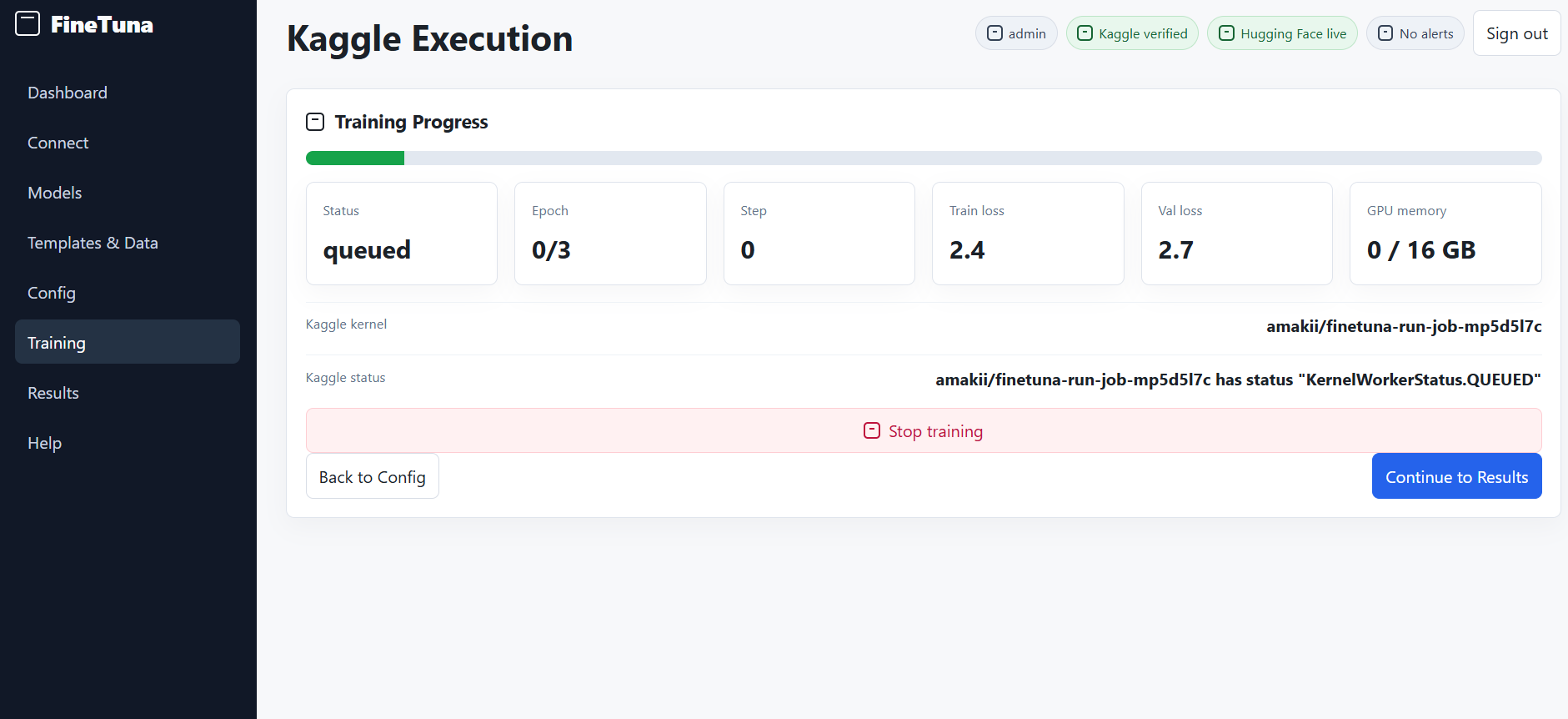
- Real-time training progress tracking
- Automatic error recovery
- Job history & rerun capability
📊 Performance Tracking
- Before/after loss comparison
- Training metrics dashboard
- Inference latency estimates
- Auto-generated technique reports
- Exportable results (PDF + JSON)
🎛️ Accelerator Selection
- GPU (T4, V100, P100)
- TPU (experimental)
- CPU (for testing)
- Explicit Kaggle accelerator mapping
📦 Smart Artifact Management
- Only download what you need
- Adapter files (LoRA: ~50-100MB)
- Merged models (full: 7-10GB)
- GGUF quantized versions (~2-3GB)
- Inference code snippets (Python, Node.js, GGUF)
🔐 Multi-Provider Authentication
- Supabase (database + auth)
- Kaggle (GPU execution)
- Google Drive (optional cloud storage)
- Hugging Face (model discovery)
- Resend (email notifications)
📊 Product Preview
| 🧭 Main Dashboard | 📈 Training Dashboard |
|---|---|
 |  |
🏃 Quick Start
Prerequisites
- Node.js 16+
- npm or yarn
- Kaggle account (free)
- Hugging Face account (optional)
Installation
# Clone the repository
git clone https://github.com/yourusername/finetuna.git
cd finetuna

# Install dependencies
npm install

# Set up environment variables
cp .env.example .env.local

# Start development server
npm run dev
Environment Variables
# Supabase
VITE_SUPABASE_URL=https://your-project.supabase.co
VITE_SUPABASE_ANON_KEY=your_anon_key

# Kaggle
VITE_KAGGLE_USERNAME=your_username
VITE_KAGGLE_KEY=your_api_key

# HuggingFace
VITE_HF_API_KEY=your_hf_token

# Google Drive (optional)
VITE_GOOGLE_CLIENT_ID=your_client_id

# Resend (optional)
VITE_RESEND_API_KEY=your_resend_key

# API
VITE_API_URL=http://localhost:8888
🌐 Deployment
Deploy to Netlify (Recommended)
# Install Netlify CLI
npm install -g netlify-cli

# Build
npm run build

# Deploy
netlify deploy --prod
Environment variables should be set in Netlify UI under Site settings > Build & deploy > Environment.
Deploy to Vercel
vercel --prod
🏗️ Architecture
┌─────────────────────────────────────────────────┐
│              FineTuna Frontend                   │
│         (React + Vite + TailwindCSS)            │
│                                                 │
│  • Model Discovery      • Training Dashboard    │
│  • Data Management      • Results Download      │
│  • Configuration        • Run History          │
└────────────────────┬────────────────────────────┘
                     │
        ┌────────────┼────────────┐
        │            │            │
    ┌───▼───┐   ┌───▼────┐  ┌───▼─────┐
    │Netlify│   │Supabase│  │ Kaggle  │
    │ API   │   │  Auth  │  │  GPU    │
    └───────┘   │ Storage│  │Execution│
                └────────┘  └─────────┘

    • Route handlers    • User data      • Kernel execution
    • Auth middleware   • Job metadata   • Model training
    • Job orchestration • Credentials    • Output storage
Technology Stack
| Layer | Technology |
|---|---|
| Frontend | React 18, Vite, TypeScript, TailwindCSS |
| Backend | Netlify Functions, Node.js |
| Database | Supabase (PostgreSQL) |
| Auth | Supabase Auth |
| Compute | Kaggle GPU/TPU |
| Model Hub | Hugging Face API |
| Storage | Supabase Storage, Google Drive |
| Resend SMTP |
📁 Project Structure
finetuna/
├── src/
│   ├── components/          # React components
│   │   ├── ModelSelector/   # Model discovery UI
│   │   ├── DataManager/     # Dataset upload & templates
│   │   ├── ConfigPanel/     # Training configuration
│   │   ├── ProgressDash/    # Real-time training status
│   │   └── ResultsView/     # Download & metrics
│   ├── pages/               # Page components
│   ├── hooks/               # Custom React hooks
│   ├── utils/               # Helper functions
│   └── App.tsx              # Main app
├── netlify/functions/
│   ├── api/auth/            # Authentication endpoints
│   ├── api/models/          # Model discovery
│   ├── api/jobs/            # Job management
│   ├── api/kaggle/          # Kaggle orchestration
│   ├── api/artifacts/       # Download handling
│   └── api/drive/           # Google Drive integration
├── docs/
│   ├── ARCHITECTURE.md      # System design details
│   ├── API.md               # API documentation
│   └── CONTRIBUTING.md      # Contribution guidelines
├── .env.example             # Environment template
├── netlify.toml             # Netlify configuration
└── vite.config.ts           # Vite configuration
🔐 Security & Privacy
✅ Environment files are never committed
✅ API keys stored securely server-side
✅ User data encrypted at rest
✅ Kaggle credentials never exposed to frontend
✅ Large artifacts only downloaded on explicit request
✅ No tracking (privacy-first)
See SECURITY.md for detailed security practices.
📚 Documentation
- API Reference - Complete endpoint documentation
- Architecture Guide - System design & data flow
- Contributing Guide - How to contribute
- Deployment Guide - Deploy your own instance
- FAQ - Common questions & answers
🎯 Use Cases
👨💻 Individual Developers
Fine-tune models for personal projects without buying GPUs.
🎓 Students
Learn LLM fine-tuning without expensive hardware or setup.
🏢 Teams
Create domain-specific models (legal assistant, medical QA, etc.).
🚀 Startups
Build AI features without ML infrastructure investment.
📚 Researchers
Quick experimentation with different techniques and datasets.
🤝 Contributing
We welcome contributions! Please see CONTRIBUTING.md for guidelines.
Quick Contribution Steps
# 1. Fork the repo
git clone https://github.com/YOUR_USERNAME/finetuna.git

# 2. Create feature branch
git checkout -b feature/amazing-feature

# 3. Make your changes & test
npm run dev

# 4. Commit & push
git commit -m "feat: add amazing feature"
git push origin feature/amazing-feature

# 5. Open pull request
Areas to Contribute
- 🐛 Bug fixes
- ✨ UI/UX improvements
- 📚 Documentation
- 🧪 Tests
- 🌍 Internationalization
- 💡 Feature ideas
📊 Stats
- ⭐ Stars: 0 (help us grow!)
- 🍴 Forks: 0
- 👥 Contributors: 1
- 📦 Package Size: ~500KB (gzipped)
- ⚡ Lighthouse Score: 95+
- 🌍 Supported Models: 10,000+
🐛 Troubleshooting
Kaggle GPU Not Available?
- Check your Kaggle free tier GPU hours
- Try switching to T4 (most stable)
- Wait during peak hours (try off-peak)
Model Download Too Large?
- Download adapter files instead of merged model
- Use GGUF quantized version
- Split downloads into parts
Training Loss Not Decreasing?
- Check dataset quality
- Reduce learning rate
- Increase training epochs
- Try QLoRA if OOM error See FAQ.md for more solutions.
📄 License
This project is licensed under the MIT License - see LICENSE file for details.
🙌 Acknowledgments
- Hugging Face - For the amazing model hub
- Kaggle - For free GPU resources
- Supabase - For auth and storage
- The open-source community - For amazing tools and libraries
📞 Get in Touch
- 🐦 Twitter: @ThaGeekiestOne
- 📧 Email: ayushnagarkoti2005@gmail.com
- 💡 Issues: GitHub Issues
- 💬 Discussions: GitHub Discussions
🌟 If FineTuna Helped You
Give us a star! ⭐ It means the world to our tiny team.
If FineTuna saved you time or money, consider:
• ⭐ Star this repo
• 🐦 Share on Twitter
• 📢 Recommend to a friend
• 🚀 Deploy your own instance
Live App • Documentation • Discord • Twitter
Contributors


Similar repos


Languages
JavaScript
51.8%
TypeScript
42.4%
CSS
5.7%
FineTuna is a web-based LLM fine-tuning platform that simplifies training Hugging Face foundation models using custom datasets. It provides beginner-friendly templates and GPU-free workflows, making AI model customization more accessible for developers and learners.
1
stars
31
commits
JavaScript
primary language
May 15, 2026
updated
README
FineTuna
Fine-tune any open-source LLM without GPU ownership, setup headaches, or ML expertise.
🎯 The Problem
Fine-tuning LLMs today requires:
- Expensive GPUs ($5k-50k upfront) 💸
- ML expertise (hyperparameters, techniques, optimization) 🧠
- Fragmented tools (notebooks, CLIs, dashboards scattered everywhere) 🔧
- Manual boilerplate (script generation, artifact management, data packaging) 📝 Most people never even try because the friction is too high.
✨ The Solution
FineTuna is a single, guided dashboard that handles the entire fine-tuning workflow:
Model Selection → Data Setup → Training Config → Kaggle Execution → Download Results
All in your browser. No GPU needed. No setup required. Free forever.
🚀 Features
🧭 Guided Workflow
- Step-by-step flow prevents confusion
- Clear progress indication
- One-click jumps between sections
- Mobile-responsive design
🔎 Model Discovery
- Search 10,000+ models from Hugging Face
- Filter by:
- Model size (7B, 13B, 70B, etc.)
- Architecture (Llama, Mistral, Phi, etc.)
- Estimated VRAM requirements
- Community ratings
- Trending/Latest filters
🗂️ Intelligent Data Management
- Pre-built templates for 5 domains:
- ⚖️ Legal (contracts, case law, legal reasoning)
- 🏥 Medical (diagnoses, treatment plans, medical Q&A)
- 💰 Finance (tax planning, financial analysis)
- 💻 Code (debugging, code review, implementation)
- 📝 General (customer support, writing)
- Custom data uploads (CSV, JSON, PDF)
- Template editor with live preview
- Community templates (created and rated by users)
⚙️ Advanced Configuration
- Fine-tuning techniques:
- LoRA (balanced, recommended)
- QLoRA (fastest, lowest memory)
- Full fine-tuning (best quality)
- Auto-tuned hyperparameters with expert suggestions
- Gradient checkpointing and mixed precision
- Batch size calculator based on GPU type
☁️ Kaggle GPU Orchestration
- Free GPU hours leverage (30-37/month per user)
- One-click job submission
- Real-time training progress tracking
- Automatic error recovery
- Job history & rerun capability
📊 Performance Tracking
- Before/after loss comparison
- Training metrics dashboard
- Inference latency estimates
- Auto-generated technique reports
- Exportable results (PDF + JSON)
🎛️ Accelerator Selection
- GPU (T4, V100, P100)
- TPU (experimental)
- CPU (for testing)
- Explicit Kaggle accelerator mapping
📦 Smart Artifact Management
- Only download what you need
- Adapter files (LoRA: ~50-100MB)
- Merged models (full: 7-10GB)
- GGUF quantized versions (~2-3GB)
- Inference code snippets (Python, Node.js, GGUF)
🔐 Multi-Provider Authentication
- Supabase (database + auth)
- Kaggle (GPU execution)
- Google Drive (optional cloud storage)
- Hugging Face (model discovery)
- Resend (email notifications)
📊 Product Preview
| 🧭 Main Dashboard | 📈 Training Dashboard |
|---|---|
| |
🏃 Quick Start
Prerequisites
- Node.js 16+
- npm or yarn
- Kaggle account (free)
- Hugging Face account (optional)
Installation
# Clone the repository
git clone https://github.com/yourusername/finetuna.git
cd finetuna

# Install dependencies
npm install

# Set up environment variables
cp .env.example .env.local

# Start development server
npm run dev
Environment Variables
# Supabase
VITE_SUPABASE_URL=https://your-project.supabase.co
VITE_SUPABASE_ANON_KEY=your_anon_key

# Kaggle
VITE_KAGGLE_USERNAME=your_username
VITE_KAGGLE_KEY=your_api_key

# HuggingFace
VITE_HF_API_KEY=your_hf_token

# Google Drive (optional)
VITE_GOOGLE_CLIENT_ID=your_client_id

# Resend (optional)
VITE_RESEND_API_KEY=your_resend_key

# API
VITE_API_URL=http://localhost:8888
🌐 Deployment
Deploy to Netlify (Recommended)
# Install Netlify CLI
npm install -g netlify-cli

# Build
npm run build

# Deploy
netlify deploy --prod
Environment variables should be set in Netlify UI under Site settings > Build & deploy > Environment.
Deploy to Vercel
vercel --prod
🏗️ Architecture
┌─────────────────────────────────────────────────┐
│              FineTuna Frontend                   │
│         (React + Vite + TailwindCSS)            │
│                                                 │
│  • Model Discovery      • Training Dashboard    │
│  • Data Management      • Results Download      │
│  • Configuration        • Run History          │
└────────────────────┬────────────────────────────┘
                     │
        ┌────────────┼────────────┐
        │            │            │
    ┌───▼───┐   ┌───▼────┐  ┌───▼─────┐
    │Netlify│   │Supabase│  │ Kaggle  │
    │ API   │   │  Auth  │  │  GPU    │
    └───────┘   │ Storage│  │Execution│
                └────────┘  └─────────┘

    • Route handlers    • User data      • Kernel execution
    • Auth middleware   • Job metadata   • Model training
    • Job orchestration • Credentials    • Output storage
Technology Stack
| Layer | Technology |
|---|---|
| Frontend | React 18, Vite, TypeScript, TailwindCSS |
| Backend | Netlify Functions, Node.js |
| Database | Supabase (PostgreSQL) |
| Auth | Supabase Auth |
| Compute | Kaggle GPU/TPU |
| Model Hub | Hugging Face API |
| Storage | Supabase Storage, Google Drive |
| Resend SMTP |
📁 Project Structure
finetuna/
├── src/
│   ├── components/          # React components
│   │   ├── ModelSelector/   # Model discovery UI
│   │   ├── DataManager/     # Dataset upload & templates
│   │   ├── ConfigPanel/     # Training configuration
│   │   ├── ProgressDash/    # Real-time training status
│   │   └── ResultsView/     # Download & metrics
│   ├── pages/               # Page components
│   ├── hooks/               # Custom React hooks
│   ├── utils/               # Helper functions
│   └── App.tsx              # Main app
├── netlify/functions/
│   ├── api/auth/            # Authentication endpoints
│   ├── api/models/          # Model discovery
│   ├── api/jobs/            # Job management
│   ├── api/kaggle/          # Kaggle orchestration
│   ├── api/artifacts/       # Download handling
│   └── api/drive/           # Google Drive integration
├── docs/
│   ├── ARCHITECTURE.md      # System design details
│   ├── API.md               # API documentation
│   └── CONTRIBUTING.md      # Contribution guidelines
├── .env.example             # Environment template
├── netlify.toml             # Netlify configuration
└── vite.config.ts           # Vite configuration
🔐 Security & Privacy
✅ Environment files are never committed
✅ API keys stored securely server-side
✅ User data encrypted at rest
✅ Kaggle credentials never exposed to frontend
✅ Large artifacts only downloaded on explicit request
✅ No tracking (privacy-first)
See SECURITY.md for detailed security practices.
📚 Documentation
- API Reference - Complete endpoint documentation
- Architecture Guide - System design & data flow
- Contributing Guide - How to contribute
- Deployment Guide - Deploy your own instance
- FAQ - Common questions & answers
🎯 Use Cases
👨💻 Individual Developers
Fine-tune models for personal projects without buying GPUs.
🎓 Students
Learn LLM fine-tuning without expensive hardware or setup.
🏢 Teams
Create domain-specific models (legal assistant, medical QA, etc.).
🚀 Startups
Build AI features without ML infrastructure investment.
📚 Researchers
Quick experimentation with different techniques and datasets.
🤝 Contributing
We welcome contributions! Please see CONTRIBUTING.md for guidelines.
Quick Contribution Steps
# 1. Fork the repo
git clone https://github.com/YOUR_USERNAME/finetuna.git

# 2. Create feature branch
git checkout -b feature/amazing-feature

# 3. Make your changes & test
npm run dev

# 4. Commit & push
git commit -m "feat: add amazing feature"
git push origin feature/amazing-feature

# 5. Open pull request
Areas to Contribute
- 🐛 Bug fixes
- ✨ UI/UX improvements
- 📚 Documentation
- 🧪 Tests
- 🌍 Internationalization
- 💡 Feature ideas
📊 Stats
- ⭐ Stars: 0 (help us grow!)
- 🍴 Forks: 0
- 👥 Contributors: 1
- 📦 Package Size: ~500KB (gzipped)
- ⚡ Lighthouse Score: 95+
- 🌍 Supported Models: 10,000+
🐛 Troubleshooting
Kaggle GPU Not Available?
- Check your Kaggle free tier GPU hours
- Try switching to T4 (most stable)
- Wait during peak hours (try off-peak)
Model Download Too Large?
- Download adapter files instead of merged model
- Use GGUF quantized version
- Split downloads into parts
Training Loss Not Decreasing?
- Check dataset quality
- Reduce learning rate
- Increase training epochs
- Try QLoRA if OOM error See FAQ.md for more solutions.
📄 License
This project is licensed under the MIT License - see LICENSE file for details.
🙌 Acknowledgments
- Hugging Face - For the amazing model hub
- Kaggle - For free GPU resources
- Supabase - For auth and storage
- The open-source community - For amazing tools and libraries
📞 Get in Touch
- 🐦 Twitter: @ThaGeekiestOne
- 📧 Email: ayushnagarkoti2005@gmail.com
- 💡 Issues: GitHub Issues
- 💬 Discussions: GitHub Discussions
🌟 If FineTuna Helped You
Give us a star! ⭐ It means the world to our tiny team.
If FineTuna saved you time or money, consider:
• ⭐ Star this repo
• 🐦 Share on Twitter
• 📢 Recommend to a friend
• 🚀 Deploy your own instance
Live App • Documentation • Discord • Twitter
Similar repos
Contributors
Languages
JavaScript
51.8%
TypeScript
42.4%
CSS
5.7%