
🛠️ toolhub - Turn ANY console script into an LLM tool in 2 seconds. Lightweight, self-hosted, tree-structured alternative to MCP & LangChain.
TypeScript
17
3 commits
updated Sep 7, 2026
See what people are saying
README
🛠️ toolhub
TOOL HUB is a high-performance, self-hosted, open-source platform for creating, orchestrating, federating, and securely executing tools for AI agents of any kind.
Stop hardcoding functions into system prompts and overloading model context windows with hundreds of API schemas. TOOL HUB provides agents with a structured, distributed skill file system featuring on-the-fly tree navigation and a unified interaction contract.






📸 Screenshots
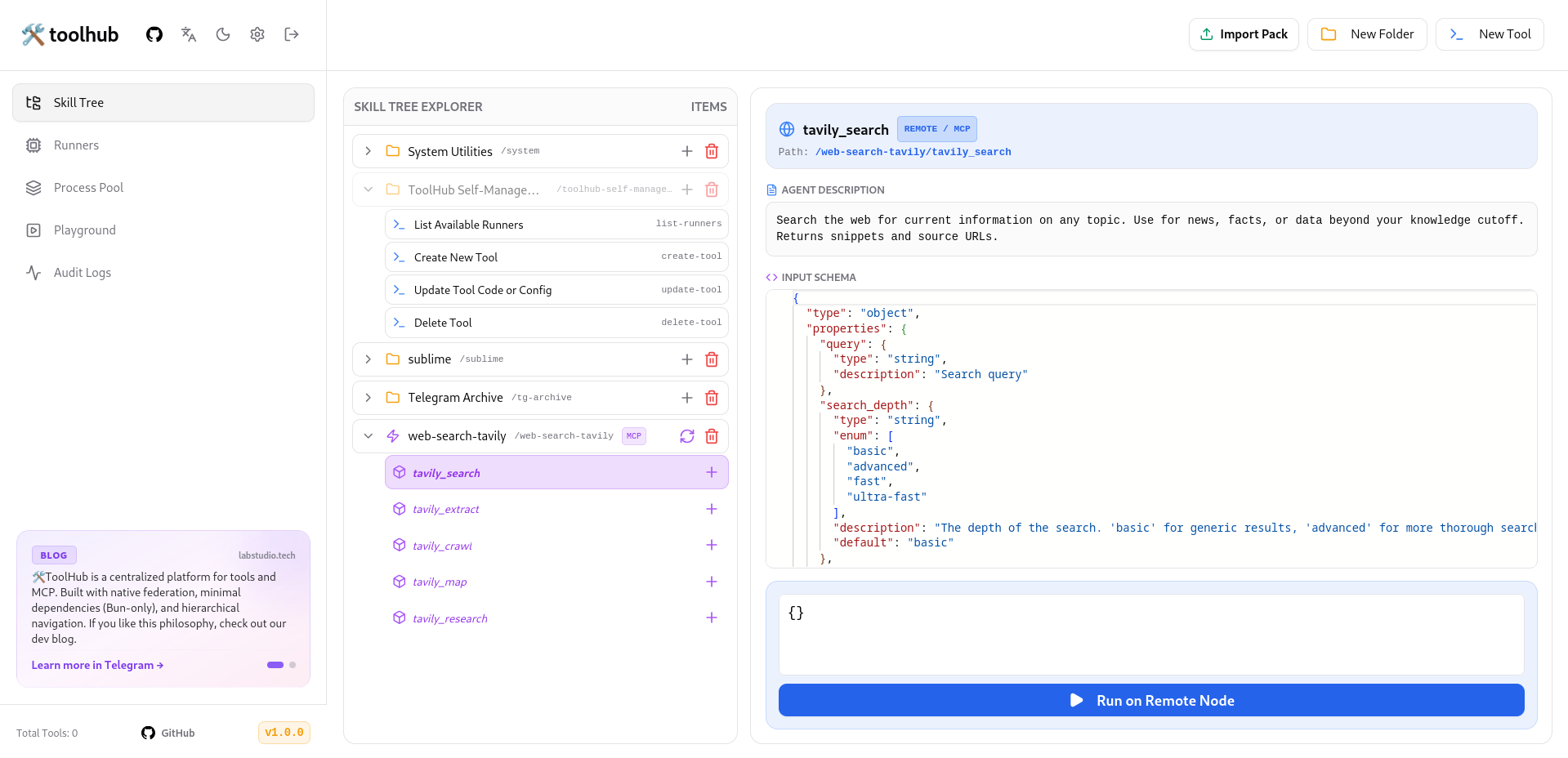
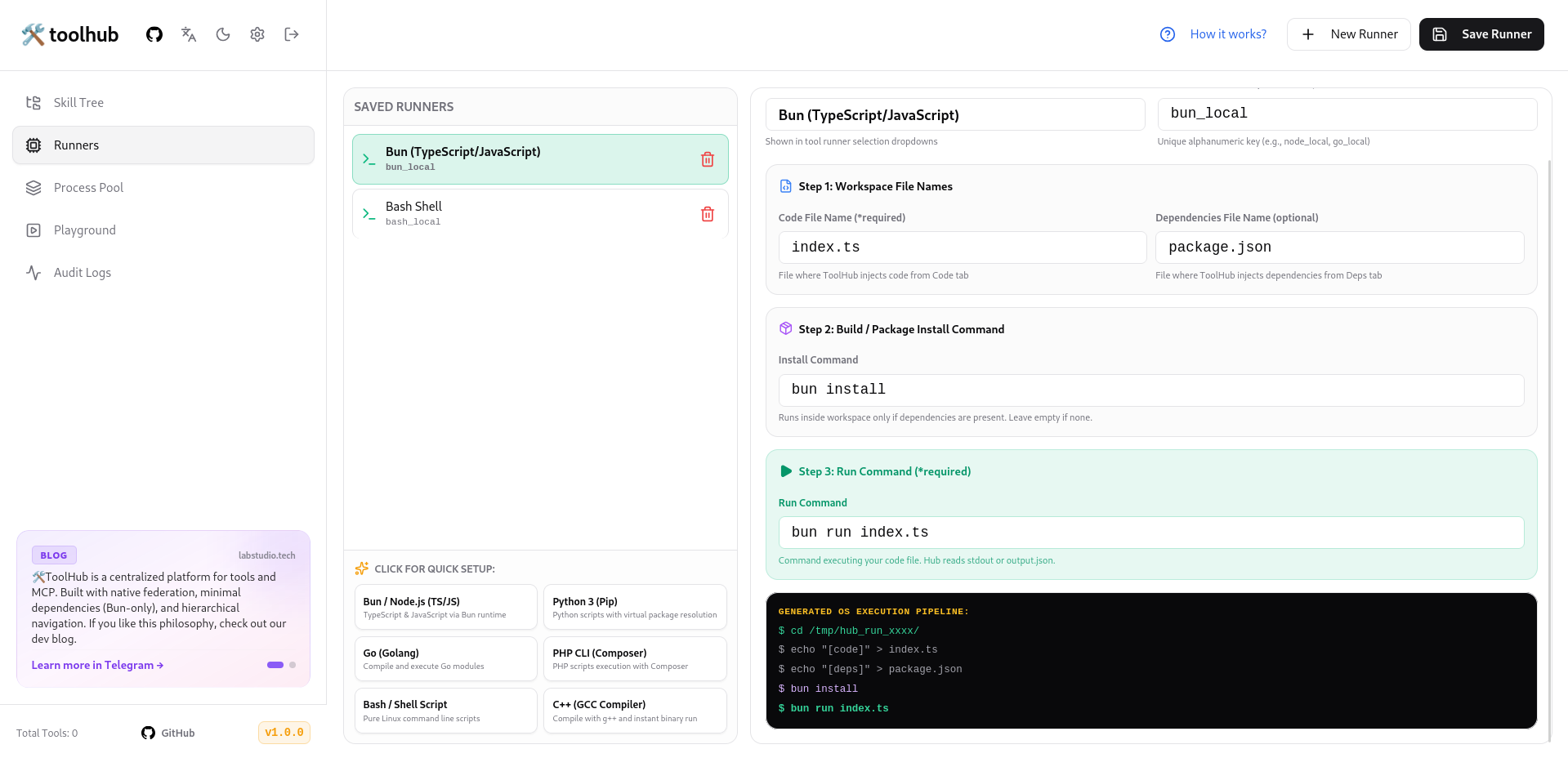
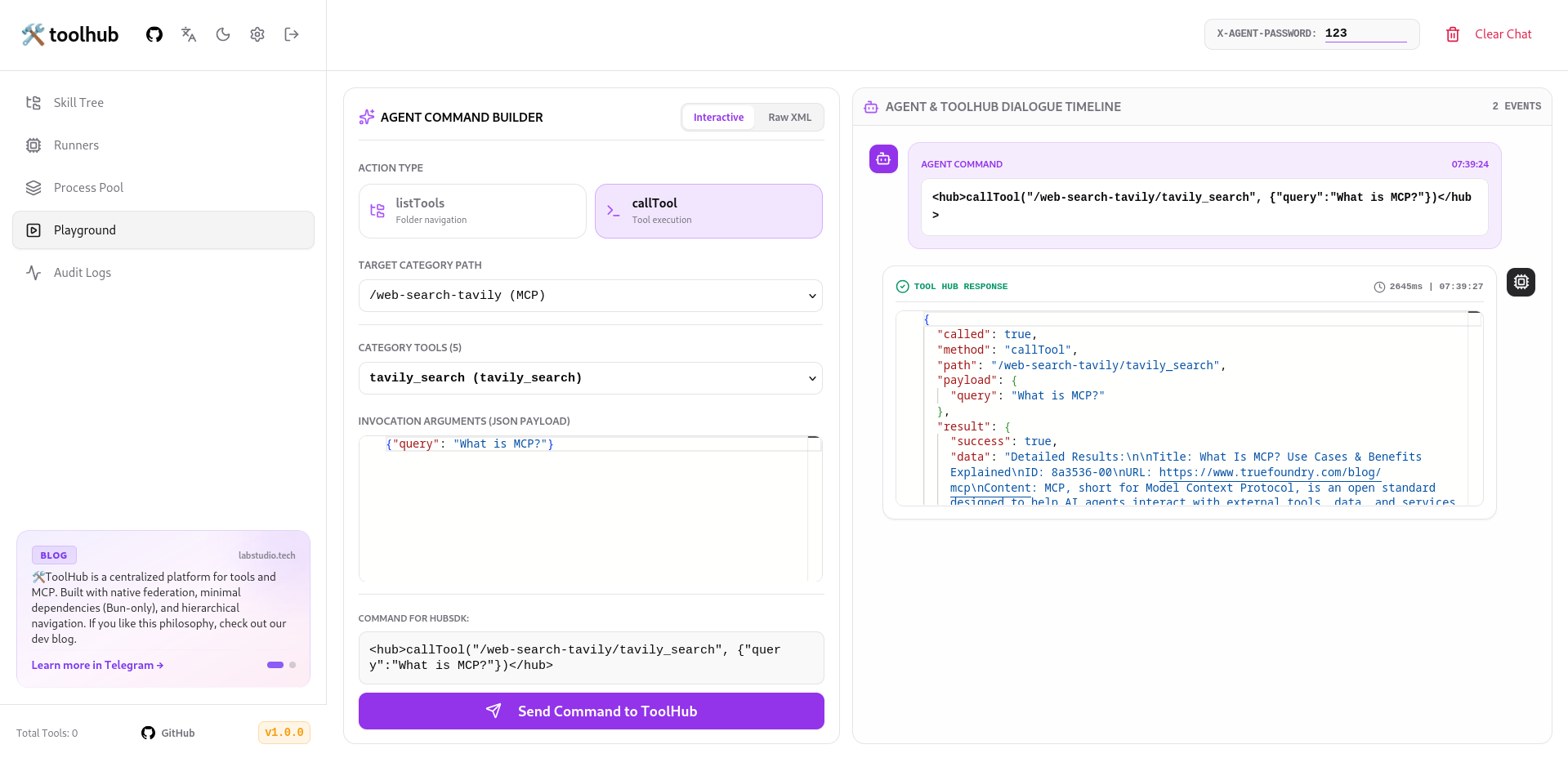
🎬 Live Demo & Web Client
ToolHub works out-of-the-box with the open-source 🧪 lab (labstudio.tech) web client (GitHub Repo) — an ultra-lightweight, serverless LLM workspace:
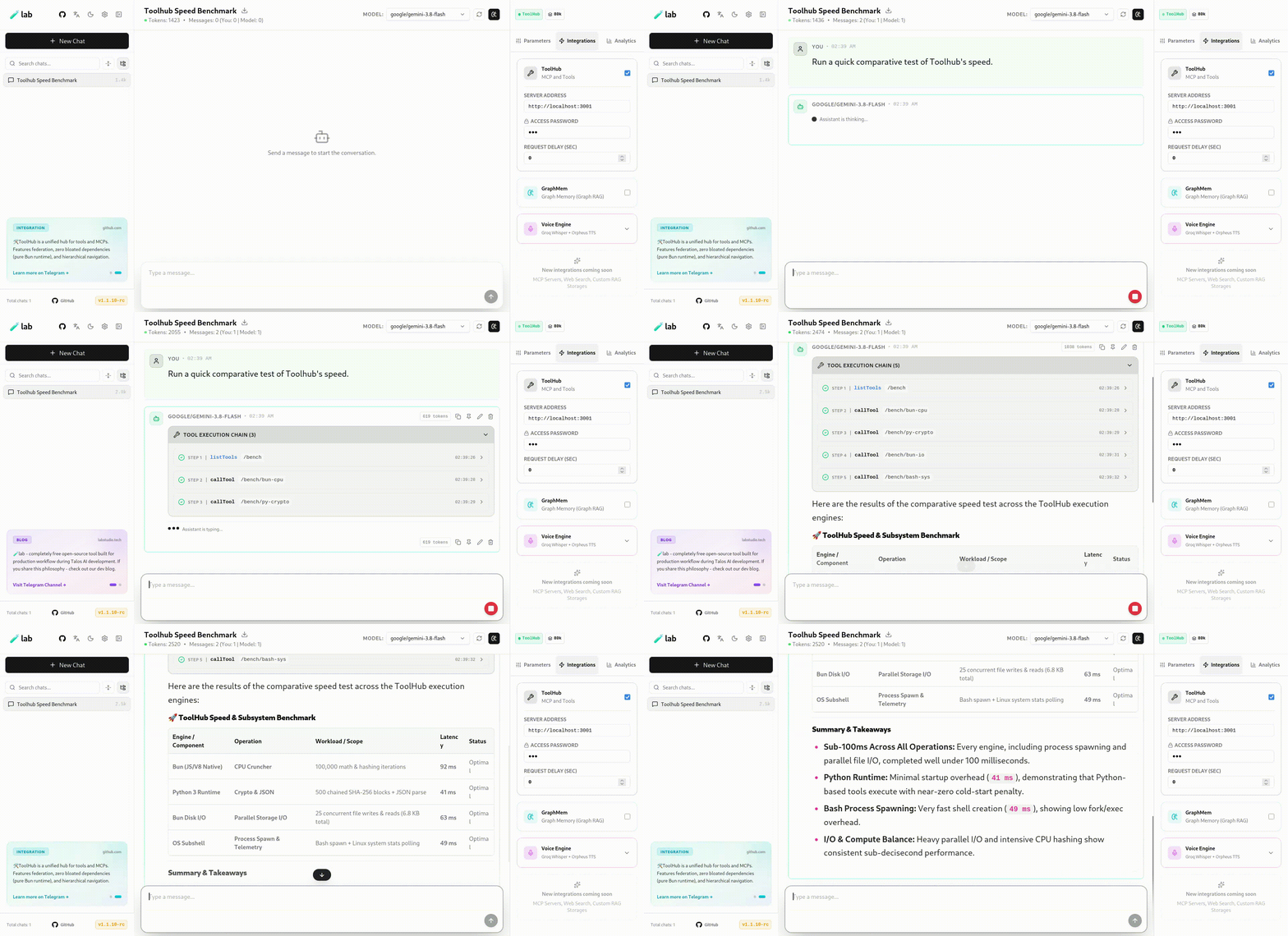
🆚 How ToolHub differs from typical MCP gateways (MCPJungle, MCPHub, etc.)
| Criterion | ToolHub | MCPJungle / MCPHub (typical MCP gateway) |
|---|---|---|
| Core approach | Execution engine: turns any script (Bun, Python, Go, Bash, etc.) into a tool on the fly | Proxy registry: registers pre-built MCP servers and grants access to them |
| Creating a tool | Write a script → it instantly becomes an agent tool | Requires an already-built MCP server implementing the protocol |
| Navigation | Hierarchical folder tree (listTools("/system")) | Flat list of registered servers/tools, grouped via Tool Groups |
| Federation | Infinitely nested REMOTE nodes (hub → hub → hub) | Single layer: client → gateway → servers, no recursive nesting |
| MCP integration | Supports MCP as one category type (Stateless + Stateful Pool) | MCP is the only supported format |
| MCP → native tool conversion | Yes (MCP Promote) | Not available |
| IDE integration | Yes (Sublime Merge diff, replace-literal, native Ctrl+Z) | Not available |
| Access control | Tool toggles in admin panel, two password tiers (agent/admin) | ACL/RBAC, Tool Groups, per-client tokens (in enterprise mode) |
🎯 Core Concepts & Philosophy
- Zero Docker Needed: Written in Bun, running code directly in isolated OS temp workspaces. Runs effortlessly on Raspberry Pi, lightweight VPS, or bare-metal servers. (Containerization/VM wrappers can still be attached on the runner layer).
- Language Agnostic: Turn any script in Bun, Node.js, Python, Go, Bash, PHP, Deno, C++ into an AI tool. If a command runs in a terminal, it becomes an agent skill.
- Strict Hierarchical Navigation: Tools are organized as a filesystem folder tree. Models browse categories via
listTools(), select the target tool, and execute it viacallTool(). - Infinite Federation: Connect ToolHub instances into nested tree networks with automated path normalization and cycle protection.
- Dual-Mode MCP Engine: Support for Model Context Protocol (MCP) in standard Stdio spawn mode and Stateful Persistent Pools for memory-heavy sessions (Puppeteer, SSH, databases).
🛠 Architectural Overview
                                  ┌────────────────────────┐
                                  │   AI AGENT / SDK CLIENT│
                                  └───────────┬────────────┘
                                              │ HTTP Requests
                                              ▼
┌─────────────────────────────────────────────────────────────────────────────────────────┐
│                                   TOOL HUB CORE SYSTEM                                  │
│                                                                                         │
│  ┌───────────────────────────────────────────────────────────────────────────────────┐  │
│  │                              Fastify Router & Auth                                │  │
│  │   • Agent Auth (x-agent-password)         • Admin Auth (x-admin-password)         │  │
│  └──────┬──────────────────────────────────────────┬─────────────────────────────────┘  │
│         │                                          │                                    │
│         ▼                                          ▼                                    │
│  ┌──────────────┐                          ┌──────────────┐                             │
│  │  Agent API   │                          │  Admin API   │                             │
│  │  (/*)        │                          │ (/admin/api/*)                             │
│  └──────┬───────┘                          └──────┬───────┘                             │
│         │                                         │                                     │
│         └────────────────────┬────────────────────┘                                     │
│                              ▼                                                          │
│                     UNIFIED ROUTER ENGINE                                               │
│                              │                                                          │
│      ┌───────────────────────┼───────────────────────┐                                  │
│      ▼                       ▼                       ▼                                  │
│ ┌─────────┐             ┌─────────┐             ┌─────────┐                             │
│ │  LOCAL  │             │ REMOTE  │             │   MCP   │                             │
│ └────┬────┘             └────┬────┘             └────┬────┘                             │
│      │                       │                       │                                  │
│      ▼                       ▼                       ▼                                  │
│  Workspace              HubSDK Proxy            MCP Engine                              │
│  Execution             (Infinite Tree)      ┌────────┴────────┐                         │
│  (Bun/Py/Go...)                             ▼                 ▼                         │
│                                         Stateless        Stateful Pool                  │
│                                        (Stdio Spawn)    (Persistent PID)                │
└─────────────────────────────────────────────────────────────────────────────────────────┘
⚙️ Execution Pipeline: Runner $\rightarrow$ Tool $\rightarrow$ Response
1. Workspace Isolation  →  2. Injection  →  3. Build/Install  →  4. Run & Telemetry
  (/tmp/hub_run_xxx/)        (Code & Deps)      (installCmd)       (runCmd + ENV)
- Workspace Isolation: Creates a dedicated temp directory (
/tmp/hub_run_<timestamp>_<hash>). - File Injection: Injects source into
codeFileNameand dependencies intodepFileName. - Payload Passing: Injects parameters into
input.jsonand mirrors each key asINPUT_<KEY_NAME>environment variables. - Dependency Installation: Runs
installCmd(e.g.pip install -r requirements.txt) if dependencies exist. - Execution & Telemetry: Executes
runCmdwith timeout controls, reads output fromoutput.jsonorstdout, logs execution metrics into Audit Logs. - Workspace Purge: Completely wipes the isolated temp directory.
🔌 IDE Bridge & Portable Skill Packs (.toolpack)
1. Sublime Text Bridge
- Atomic AST Edits (
replace-literal): AI targets exact line replacements in ~2ms with zero token waste. - Sublime Merge Integration: Real-time diff preview inside your editor; accept/reject changes in one click.
- Native Undo Stack: AI modifications integrate with native
Ctrl+Zundo history.
2. Import, Export & Versioning (.toolpack & ToolVersion)
- Skill Portability: Export folders, schemas, and runners into
.toolpackbundles. - Revision Journal: Automatic snapshots on every edit with one-click rollbacks.
🗂 Category Types
| Type | Purpose | Operation |
|---|---|---|
LOCAL | Native tool workspace | Executes scripts locally through configured runners. |
REMOTE | ToolHub proxy tunnel | Recursive gateway to remote nodes via HubSDK. |
MCP | External MCP server | Stdio-driven Model Context Protocol server. |
⚡ MCP Ecosystem: Stateless, Stateful Pool & Promote
- Stateless MCP (Stdio): Full lifecycle per call:
spawn$\rightarrow$initialize$\rightarrow$tools/call$\rightarrow$ exit. - Stateful MCP Pool (
mcpIsStateful): Keeps processes alive in memory for complex sessions (Puppeteer, SSH). Hot calls execute in 10–30ms. Auto-terminates after 5 minutes of idle (TTL=300s) with auto-recovery on crash. - MCP Promote: One-click promotion of remote MCP definitions into editable native database tools.
🌐 Infinite Federation
- Deep Nesting: Server A connects to Server B, which links to Server C, exposed as a unified path (
/office/home/lights/turn_on). - Cycle Protection: Graph analysis prevents cyclic recursive traversal loops.
- Transparent Routing:
HubSDKhandles path normalization and credential forwarding automatically.
🤖 Agent Tag Protocol (XML)
1. Navigation
<hub>listTools("/system")</hub>
2. Execution
<hub>callTool("/sublime/replace-literal", {
  "find": "const PORT = 3000;",
  "replace": "const PORT = 8080;"
})</hub>
🔒 Security
- Agent Security (
x-agent-password): Protects skill discovery and execution routes (GET /*,POST /*). - Admin Studio Security (
x-admin-password): Protects management APIs and web console (/admin/*).
📦 Quick Start
# 1. Clone repository
git clone https://github.com/Talos-Popcorn/toolhub.git
cd toolhub

# 2. Install dependencies
bun install

# 3. Push Prisma schema to database
bun run db:push

# 4. Interactive Installer & Seed
# (Prompt language: EN/RU/ZH, custom admin/agent passwords)
bun run db:seed

# Non-interactive / CI mode:
# bun run prisma/seed.ts --lang=en --admin-pass=admin --agent-pass=123

# 5. Start development servers
bun run dev
- Web Console:
http://localhost:5173/admin/(or port3000in production) - Swagger Docs:
http://localhost:3000/docs(Available only inbun run devmode) - Default Admin Password:
admin(or chosen during seed) - Default Agent Password:
123(or chosen during seed)
💻 JS/TS SDK Integration
import { HubSDK } from './SDK/JS/sdk';

const hub = new HubSDK('http://localhost:3000', '123');

async function runAgentLoop(userQuery: string) {
  const systemPrompt = await hub.getSmartPrompt();

  const messages = [
    { role: 'system', content: systemPrompt },
    { role: 'user', content: userQuery }
  ];

  while (true) {
    const aiResponse = await llm.generate(messages);
    const action = await hub.processAgentResponse(aiResponse);

    if (!action.called) {
      console.log('Agent Response:', aiResponse);
      break;
    }

    messages.push({ role: 'assistant', content: aiResponse });
    messages.push({
      role: 'user',
      content: `HUB_RESULT: ${JSON.stringify(action.result)}`
    });
  }
}
🚀 Production Deployment
# Build frontend & sync database
bun run build

# Start production server
bun run start
⚖️ License & Commercial Use
This project is distributed under the AGPL-3.0 License (free for personal use and open-source modifications).
Commercial Use: A commercial license is required to use 🛠️ ToolHub within closed corporate environments or proprietary products without AGPL-3.0 copyleft restrictions.
Contact email: collab@labstudio.tech.
🛠️ toolhub
TOOL HUB — это высокопроизводительная self-hosted платформа с открытым исходным кодом для создания, управления, федерации и безопасного исполнения инструментов (tools) для AI-агентов любого типа.
Хватит хардкодить функции в системные промпты и перегружать контекст модели сотнями описаний API. TOOL HUB предоставляет агенту структурированную распределённую файловую систему навыков с навигацией «на лету» и единым контрактом взаимодействия.
📸 Скриншоты
🎬 Демонстрация и веб-клиент
ToolHub из коробки интегрирован с открытым веб-клиентом 🧪 lab (labstudio.tech) (GitHub Repo) — легковесным serverless-интерфейсом для общения с LLM:
🆚 Чем ToolHub отличается от типичных MCP-gateway (MCPJungle, MCPHub и т.д.)
| Критерий | ToolHub | MCPJungle / MCPHub (типичный MCP-gateway) |
|---|---|---|
| Суть подхода | Движок исполнения: превращает любой скрипт (Bun, Python, Go, Bash и т.д.) в tool на лету | Прокси-реестр: регистрирует уже готовые MCP-серверы и раздаёт к ним доступ |
| Создание tool'а | Пишешь скрипт → он сразу становится инструментом агента | Нужен готовый MCP-сервер, который кто-то уже реализовал по протоколу |
| Навигация | Иерархическое дерево папок (listTools("/system")) | Плоский список зарегистрированных серверов/тулов, группировка через Tool Groups |
| Федерация | Бесконечно вложенные REMOTE-узлы (хаб → хаб → хаб) | Один уровень: клиент → gateway → серверы, без рекурсивной вложенности |
| MCP-интеграция | Поддерживает MCP как один из типов категорий (Stateless + Stateful Pool) | MCP — единственный поддерживаемый формат |
| Конвертация MCP → нативный tool | Есть (MCP Promote) | Отсутствует |
| IDE-интеграция | Есть (Sublime Merge diff, replace-literal, Ctrl+Z) | Отсутствует |
| Контроль доступа | Toggle тулов в админке, два уровня паролей (agent/admin) | ACL/RBAC, Tool Groups, per-client токены (в enterprise-режиме) |
🎯 Философия и ключевые концепции
- Без лишних барьеров (Zero Docker Needed): Написана на Bun и исполняет код напрямую во временных пространствах ОС. Работает на Raspberry Pi, скромных VPS и физических серверах без оверхеда контейнеризации.
- Языковая агностика: Инструментом агента может стать любой скрипт на Bun, Node.js, Python, Go, Bash, PHP, Deno, C++. Если команда исполняется в консоли — она становится навыком ИИ.
- Строгая иерархическая навигация: Дерево папок позволяет модели не держать в памяти сотни схем, а открывать категории через
listTools()и запускать нужный инструмент черезcallTool(). - Бесконечная федерация: Узлы ToolHub объединяются в древовидные структуры любой вложенности с нормализацией путей и защитой от рекурсивных циклов.
- Двухрежимная MCP-экосистема: Поддержка Model Context Protocol (MCP) как в разовом формате Stdio (spawn-call-kill), так и в виде горячего пула процессов (Stateful Persistent Pool) для сессий с активным состоянием памяти.
🛠 Архитектурный обзор
                                  ┌────────────────────────┐
                                  │   AI AGENT / SDK CLIENT│
                                  └───────────┬────────────┘
                                              │ HTTP Requests
                                              ▼
┌─────────────────────────────────────────────────────────────────────────────────────────┐
│                                   TOOL HUB CORE SYSTEM                                  │
│                                                                                         │
│  ┌───────────────────────────────────────────────────────────────────────────────────┐  │
│  │                              Fastify Router & Auth                                │  │
│  │   • Agent Auth (x-agent-password)         • Admin Auth (x-admin-password)         │  │
│  └──────┬──────────────────────────────────────────┬─────────────────────────────────┘  │
│         │                                          │                                    │
│         ▼                                          ▼                                    │
│  ┌──────────────┐                          ┌──────────────┐                             │
│  │  Agent API   │                          │  Admin API   │                             │
│  │  (/*)        │                          │ (/admin/api/*)                             │
│  └──────┬───────┘                          └──────┬───────┘                             │
│         │                                         │                                     │
│         └────────────────────┬────────────────────┘                                     │
│                              ▼                                                          │
│                     UNIFIED ROUTER ENGINE                                               │
│                              │                                                          │
│      ┌───────────────────────┼───────────────────────┐                                  │
│      ▼                       ▼                       ▼                                  │
│ ┌─────────┐             ┌─────────┐             ┌─────────┐                             │
│ │  LOCAL  │             │ REMOTE  │             │   MCP   │                             │
│ └────┬────┘             └────┬────┘             └────┬────┘                             │
│      │                       │                       │                                  │
│      ▼                       ▼                       ▼                                  │
│  Workspace              HubSDK Proxy            MCP Engine                              │
│  Execution             (Infinite Tree)      ┌────────┴────────┐                         │
│  (Bun/Py/Go...)                             ▼                 ▼                         │
│                                         Stateless        Stateful Pool                  │
│                                        (Stdio Spawn)    (Persistent PID)                │
└─────────────────────────────────────────────────────────────────────────────────────────┘
⚙️ Механика выполнения: Runner $\rightarrow$ Tool $\rightarrow$ Response
1. Создание Workspace  →  2. Инъекция файлов  →  3. Инсталляция  →  4. Исполнение & Output
   (/tmp/hub_run_xxx/)       (Code & Deps)           (installCmd)       (runCmd + ENV)
- Изоляция Workspace: Бэкенд создает уникальную изолированную папку во временной директории ОС (
/tmp/hub_run_<timestamp>_<hash>). - Инъекция кода и зависимостей: Код записывается в
codeFileName, а манифест пакетов — вdepFileName. - Передача аргументов: Формируется
input.jsonв корне воркспейса, а параметры дублируются в переменные окруженияINPUT_<KEY_NAME>. - Установка зависимостей: Если заданы зависимости и
installCmd, выполняется сборка (напр.,pip install -r requirements.txt). - Запуск и снятие метрик (
runCmd): Запускается процесс с таймаутомtimeoutMs, результат считывается изoutput.jsonилиstdout, а телеметрия отправляется в Audit Logs. - Очистка: Воркспейс принудительно удаляется из файловой системы.
🔌 IDE Bridge & Переносимые пакеты (.toolpack)
1. Интеграция с редакторами кода (Sublime Text Bridge)
- Атомарные правки (
replace-literal): Агент меняет строго конкретные строки кода за 2 мс без перерасхода токенов. - Интеграция с Sublime Merge: Наглядный визуальный Diff в окне редактора с принятием правок в 1 клик.
- Нативный
Ctrl+Z: Правки от ИИ работают через стандартный Undo-стек редактора.
2. Импорт, экспорт и версионирование (.toolpack & ToolVersion)
- Шеринг навыков: Экспорт категорий со всеми подпапками, кодом и схемами в
.toolpack. - Журнал ревизий: Автоматическая фиксация снимков при каждом сохранении с откатом в 1 клик.
🗂 Типы категорий
| Тип | Назначение | Принцип работы |
|---|---|---|
LOCAL | Локальная папка с инструментами | Исполнение скриптов через встроенный движок раннеров. |
REMOTE | Проксирование на другой ToolHub | Рекурсивный туннель к удаленному узлу через HubSDK. |
MCP | Интеграция стороннего MCP-сервера | Запуск внешнего MCP-сервера через Stdio. |
⚡ MCP Экосистема: Stateless, Stateful Pool и Promote
- Stateless MCP (Stdio): Полный цикл на каждый вызов:
spawn$\rightarrow$initialize$\rightarrow$tools/call$\rightarrow$ kill. - Stateful MCP Pool (
mcpIsStateful): Удержание процесса в памяти (Puppeteer, SSH, СУБД). Повторные вызовы исполняются за 10–30 мс. Автозавершение при простое более 5 минут (TTL = 300s) и самовосстановление при сбоях. - MCP Promote: Конвертация динамических инструментов MCP в базу данных как нативных редактируемых
Toolв 1 клик.
🌐 Бесконечная федерация (Infinite Remote Tree)
- Бесконечная вложенность: Сервер A подключает Сервер B, который содержит подключение к Серверу C (
/office/home/lights/turn_on). - Защита от циклов: Автоматическое обнаружение и купирование взаимных рекурсивных ссылок.
- Прозрачность вызовов:
HubSDKберет на себя нормализацию путей, проксирование и авторизацию.
🤖 Протокол агента (XML Tag Protocol)
1. Навигация по дереву
<hub>listTools("/system")</hub>
2. Выполнение инструмента
<hub>callTool("/sublime/replace-literal", {
  "find": "const PORT = 3000;",
  "replace": "const PORT = 8080;"
})</hub>
🔒 Безопасность и авторизация
- Agent Security (
x-agent-password): Защищает агентские API-роуты (GET /*иPOST /*). - Admin Studio Security (
x-admin-password): Защищает административные ручки управления (/admin/api/*).
📦 Быстрый старт
# 1. Клонирование репозитория
git clone https://github.com/Talos-Popcorn/toolhub.git
cd toolhub

# 2. Установка зависимостей
bun install

# 3. Синхронизация схемы БД Prisma
bun run db:push

# 4. Интерактивный инсталлятор и сид
# (Выбор языка системного промпта EN/RU/ZH, настройка паролей админки и агента)
bun run db:seed

# Или в тихом режиме для CI/Docker:
# bun run prisma/seed.ts --lang=ru --admin-pass=admin --agent-pass=123

# 5. Запуск серверов разработки
bun run dev
- Панель управления:
http://localhost:5173/admin/(или порт3000в прод-сборке) - Swagger документация:
http://localhost:3000/docs(Доступна только в режиме разработкиbun run dev) - Дефолтный пароль админки:
admin(или заданный при сиде) - Дефолтный пароль агента:
123(или заданный при сиде)
💻 Интеграция агента (JS/TS SDK)
import { HubSDK } from './SDK/JS/sdk';

const hub = new HubSDK('http://localhost:3000', '123');

async function runAgentLoop(userQuery: string) {
  const systemPrompt = await hub.getSmartPrompt();

  const messages = [
    { role: 'system', content: systemPrompt },
    { role: 'user', content: userQuery }
  ];

  while (true) {
    const aiResponse = await llm.generate(messages);
    const action = await hub.processAgentResponse(aiResponse);

    if (!action.called) {
      console.log('Ответ агента:', aiResponse);
      break;
    }

    messages.push({ role: 'assistant', content: aiResponse });
    messages.push({
      role: 'user',
      content: `HUB_RESULT: ${JSON.stringify(action.result)}`
    });
  }
}
🚀 Развертывание в продакшн
# Сборка фронтенда и синхронизация БД
bun run build

# Запуск продакшн сервера
bun run start
⚖️ Лицензия и коммерческое использование
Проект распространяется под лицензией AGPL-3.0 (бесплатен для личного использования и open-source модификаций).
Для коммерческого использования: Для использования 🛠️ ToolHub внутри закрытых корпоративных контуров или проприетарных продуктов без ограничений AGPL-3.0 требуется коммерческая лицензия.
Почта для связи: collab@labstudio.tech.
🛠️ toolhub
TOOL HUB 是一款高性能、支持私有化部署的开源平台,专为各类 AI 智能体设计,提供技能与工具 (Tools) 的创建、编排、联邦化管理与安全执行环境。
告别在系统提示词中硬编码函数以及 API Schema 严重消耗上下文的痛点。TOOL HUB 为智能体构建了结构化的分布式技能文件系统,支持即时目录导航与标准统一的交互契约。
📸 界面截图
🎬 动态演示与 Web 客户端
ToolHub 原生无缝集成开源 Web 客户端 🧪 lab (labstudio.tech) (GitHub 仓库) —— 超轻量、无后端的 Serverless 大模型交互工作台:
🆚 ToolHub 与典型 MCP 网关(MCPJungle、MCPHub 等)的区别
| 对比项 | ToolHub | MCPJungle / MCPHub(典型 MCP 网关) |
|---|---|---|
| 核心思路 | 执行引擎:将任意脚本(Bun、Python、Go、Bash 等)即时转化为工具 | 代理注册表:注册已实现好的 MCP 服务器并分配访问权限 |
| 创建工具 | 编写脚本 → 立即成为智能体可用的工具 | 需要已按 MCP 协议实现好的服务器 |
| 导航方式 | 层级文件夹树(listTools("/system")) | 已注册服务器/工具的平铺列表,通过 Tool Groups 分组 |
| 联邦架构 | 无限嵌套的 REMOTE 节点(hub → hub → hub) | 单层结构:客户端 → 网关 → 服务器,无递归嵌套 |
| MCP 集成 | 将 MCP 作为分类之一支持(无状态 + 有状态进程池) | MCP 是唯一支持的格式 |
| MCP → 原生工具转换 | 支持(MCP Promote) | 不支持 |
| IDE 集成 | 支持(Sublime Merge 差异对比、replace-literal、原生撤销) | 不支持 |
| 访问控制 | 管理面板中开关工具,双层密码(agent/admin) | ACL/RBAC、Tool Groups、按客户端分配令牌(企业模式下) |
🎯 核心架构理念
- 无需 Docker (Zero Docker Needed): 基于 Bun 构建,代码直接在操作系统隔离的临时工作区运行。即使在 Raspberry Pi 或轻量 VPS 上也能毫秒级极速响应。
- 多语言无缝兼容: 任何 Bun, Node.js, Python, Go, Bash, PHP, Deno, C++ 脚本均可直接作为技能运行。终端能执行的命令,均可转为 AI 工具。
- 分层技能树导航: 技能按文件目录组织,模型无需常驻数百个工具描述,只需通过
listTools()浏览目录并通过callTool()按需调用。 - 无限联邦网络 (Infinite Federation): 支持多个 ToolHub 节点相互挂载为树状子目录,自动处理路径规范化并杜绝循环引用。
- 双模 MCP 生态: 全面支持 Model Context Protocol (MCP),提供标准 Stdio 模式与针对复杂会话(Puppeteer、SSH、数据库)的常驻热进程池 (Stateful Persistent Pool)。
🛠 系统架构图
                                  ┌────────────────────────┐
                                  │   AI AGENT / SDK CLIENT│
                                  └───────────┬────────────┘
                                              │ HTTP Requests
                                              ▼
┌─────────────────────────────────────────────────────────────────────────────────────────┐
│                                   TOOL HUB CORE SYSTEM                                  │
│                                                                                         │
│  ┌───────────────────────────────────────────────────────────────────────────────────┐  │
│  │                              Fastify Router & Auth                                │  │
│  │   • Agent Auth (x-agent-password)         • Admin Auth (x-admin-password)         │  │
│  └──────┬──────────────────────────────────────────┬─────────────────────────────────┘  │
│         │                                          │                                    │
│         ▼                                          ▼                                    │
│  ┌──────────────┐                          ┌──────────────┐                             │
│  │  Agent API   │                          │  Admin API   │                             │
│  │  (/*)        │                          │ (/admin/api/*)                             │
│  └──────┬───────┘                          └──────┬───────┘                             │
│         │                                         │                                     │
│         └────────────────────┬────────────────────┘                                     │
│                              ▼                                                          │
│                     UNIFIED ROUTER ENGINE                                               │
│                              │                                                          │
│      ┌───────────────────────┼───────────────────────┐                                  │
│      ▼                       ▼                       ▼                                  │
│ ┌─────────┐             ┌─────────┐             ┌─────────┐                             │
│ │  LOCAL  │             │ REMOTE  │             │   MCP   │                             │
│ └────┬────┘             └────┬────┘             └────┬────┘                             │
│      │                       │                       │                                  │
│      ▼                       ▼                       ▼                                  │
│  Workspace              HubSDK Proxy            MCP Engine                              │
│  Execution             (Infinite Tree)      ┌────────┴────────┐                         │
│  (Bun/Py/Go...)                             ▼                 ▼                         │
│                                         Stateless        Stateful Pool                  │
│                                        (Stdio Spawn)    (Persistent PID)                │
└─────────────────────────────────────────────────────────────────────────────────────────┘
⚙️ 执行流水线: Runner $\rightarrow$ Tool $\rightarrow$ Response
1. 创建隔离工作区  →  2. 写入文件/参数  →  3. 安装依赖包  →  4. 运行与捕获输出
 (/tmp/hub_run_xxx/)     (Code & Deps)       (installCmd)       (runCmd + ENV)
- 工作区隔离: 在系统临时目录创建专属独立文件夹 (
/tmp/hub_run_<timestamp>_<hash>)。 - 代码与依赖写入: 分别写入
codeFileName与depFileName。 - 参数注入: 生成
input.json并同步映射至INPUT_<KEY_NAME>环境变量。 - 依赖安装: 若存在依赖则执行
installCmd(如pip install -r requirements.txt)。 - 执行与遥测: 运行
runCmd,捕获output.json或stdout,执行耗时与日志同步存入审计日志。 - 环境销毁: 彻底清理并删除临时工作区。
🔌 IDE 插件与技能包 (.toolpack)
1. Sublime Text 桥接插件
- 原子级代码替换 (
replace-literal): 智能体 2ms 内完成精确行级替换,杜绝全文件重写带来的 Token 浪费。 - Sublime Merge 可视化 Diff: 在编辑器内实时预览 AI 修改,一键接受或拒绝变更。
- 原生撤销栈支持: AI 的修改完美集成在编辑器的
Ctrl+Z历史记录中。
2. 导入、导出与版本控制 (.toolpack & ToolVersion)
- 技能包共享: 支持将分类目录、代码及 Schema 整体导出为
.toolpack。 - 版本快照: 每次保存自动生成版本修订快照,支持一键回滚。
🗂 目录分类类型
| 分类类型 | 定位 | 运行机制 |
|---|---|---|
LOCAL | 本地工具目录 | 通过内置运行器引擎在本地工作区执行。 |
REMOTE | ToolHub 节点代理 | 通过 HubSDK 递归转发至远程节点。 |
MCP | 外部 MCP 服务端 | 通过 Stdio 进程通信集成 Model Context Protocol。 |
⚡ MCP 生态特性
- Stateless MCP (Stdio): 每次调用即时执行生命周期:
spawn$\rightarrow$initialize$\rightarrow$tools/call$\rightarrow$ 退出。 - Stateful MCP Pool (
mcpIsStateful): 为复杂会话(Puppeteer 浏览器、SSH 等)保持内存常驻。后续调用仅需 10–30ms。空闲 5 分钟自动释放 (TTL=300s),异常退出自动恢复。 - MCP Promote: 一键将 MCP 动态工具转换为数据库原生可编辑的本地
Tool。
🤖 智能体 XML 标签协议
1. 浏览目录技能
<hub>listTools("/system")</hub>
2. 执行工具
<hub>callTool("/sublime/replace-literal", {
  "find": "const PORT = 3000;",
  "replace": "const PORT = 8080;"
})</hub>
🔒 安全机制
- 智能体认证 (
x-agent-password): 保护技能目录查询与执行接口 (GET /*,POST /*)。 - 管理后台认证 (
x-admin-password): 保护管理控制台及核心配置接口 (/admin/*)。
📦 快速启动
# 1. 克隆代码仓库
git clone https://github.com/Talos-Popcorn/toolhub.git
cd toolhub

# 2. 安装依赖
bun install

# 3. 推送 Prisma 结构至数据库
bun run db:push

# 4. 交互式安装向导与数据库填充 (Seed)
# (支持选择系统提示词语言 EN/RU/ZH 及自定义管理员/智能体密钥)
bun run db:seed

# 自动化/CI 静默模式:
# bun run prisma/seed.ts --lang=zh --admin-pass=admin --agent-pass=123

# 5. 启动开发服务器
bun run dev
- 控制台界面:
http://localhost:5173/admin/(生产环境为3000端口) - Swagger 接口文档:
http://localhost:3000/docs(仅在bun run dev开发模式下开启) - 默认管理员密码:
admin(或安装时所设密码) - 默认智能体密钥:
123(或安装时所设密钥)
💻 JS/TS SDK 接入示例
import { HubSDK } from './SDK/JS/sdk';

const hub = new HubSDK('http://localhost:3000', '123');

async function runAgentLoop(userQuery: string) {
  const systemPrompt = await hub.getSmartPrompt();

  const messages = [
    { role: 'system', content: systemPrompt },
    { role: 'user', content: userQuery }
  ];

  while (true) {
    const aiResponse = await llm.generate(messages);
    const action = await hub.processAgentResponse(aiResponse);

    if (!action.called) {
      console.log('智能体响应结果:', aiResponse);
      break;
    }

    messages.push({ role: 'assistant', content: aiResponse });
    messages.push({
      role: 'user',
      content: `HUB_RESULT: ${JSON.stringify(action.result)}`
    });
  }
}
🚀 生产环境部署
# 编译前端静态资源并同步数据库
bun run build

# 启动生产服务
bun run start
⚖️ 许可证与商业用途
本项目基于 AGPL-3.0 许可证 开源分发(个人使用与开源衍生修改完全免费)。
商业授权: 若要在不受 AGPL-3.0 传染性开源约束的前提下,将 🛠️ ToolHub 部署于封闭的企业内网或集成至专有商业产品中,需获取商业授权许可证。
联系邮箱:collab@labstudio.tech。
Built for the future of autonomous, distributed AI agents.
Contributors

3 commits
Similar repos


Languages
TypeScript
92.6%
Python
4.3%
JavaScript
1.6%
CSS
1.4%
🛠️ toolhub - Turn ANY console script into an LLM tool in 2 seconds. Lightweight, self-hosted, tree-structured alternative to MCP & LangChain.
TypeScript
17
3 commits
updated Sep 7, 2026
See what people are saying
README
🛠️ toolhub
TOOL HUB is a high-performance, self-hosted, open-source platform for creating, orchestrating, federating, and securely executing tools for AI agents of any kind.
Stop hardcoding functions into system prompts and overloading model context windows with hundreds of API schemas. TOOL HUB provides agents with a structured, distributed skill file system featuring on-the-fly tree navigation and a unified interaction contract.
📸 Screenshots
🎬 Live Demo & Web Client
ToolHub works out-of-the-box with the open-source 🧪 lab (labstudio.tech) web client (GitHub Repo) — an ultra-lightweight, serverless LLM workspace:
🆚 How ToolHub differs from typical MCP gateways (MCPJungle, MCPHub, etc.)
| Criterion | ToolHub | MCPJungle / MCPHub (typical MCP gateway) |
|---|---|---|
| Core approach | Execution engine: turns any script (Bun, Python, Go, Bash, etc.) into a tool on the fly | Proxy registry: registers pre-built MCP servers and grants access to them |
| Creating a tool | Write a script → it instantly becomes an agent tool | Requires an already-built MCP server implementing the protocol |
| Navigation | Hierarchical folder tree (listTools("/system")) | Flat list of registered servers/tools, grouped via Tool Groups |
| Federation | Infinitely nested REMOTE nodes (hub → hub → hub) | Single layer: client → gateway → servers, no recursive nesting |
| MCP integration | Supports MCP as one category type (Stateless + Stateful Pool) | MCP is the only supported format |
| MCP → native tool conversion | Yes (MCP Promote) | Not available |
| IDE integration | Yes (Sublime Merge diff, replace-literal, native Ctrl+Z) | Not available |
| Access control | Tool toggles in admin panel, two password tiers (agent/admin) | ACL/RBAC, Tool Groups, per-client tokens (in enterprise mode) |
🎯 Core Concepts & Philosophy
- Zero Docker Needed: Written in Bun, running code directly in isolated OS temp workspaces. Runs effortlessly on Raspberry Pi, lightweight VPS, or bare-metal servers. (Containerization/VM wrappers can still be attached on the runner layer).
- Language Agnostic: Turn any script in Bun, Node.js, Python, Go, Bash, PHP, Deno, C++ into an AI tool. If a command runs in a terminal, it becomes an agent skill.
- Strict Hierarchical Navigation: Tools are organized as a filesystem folder tree. Models browse categories via
listTools(), select the target tool, and execute it viacallTool(). - Infinite Federation: Connect ToolHub instances into nested tree networks with automated path normalization and cycle protection.
- Dual-Mode MCP Engine: Support for Model Context Protocol (MCP) in standard Stdio spawn mode and Stateful Persistent Pools for memory-heavy sessions (Puppeteer, SSH, databases).
🛠 Architectural Overview
                                  ┌────────────────────────┐
                                  │   AI AGENT / SDK CLIENT│
                                  └───────────┬────────────┘
                                              │ HTTP Requests
                                              ▼
┌─────────────────────────────────────────────────────────────────────────────────────────┐
│                                   TOOL HUB CORE SYSTEM                                  │
│                                                                                         │
│  ┌───────────────────────────────────────────────────────────────────────────────────┐  │
│  │                              Fastify Router & Auth                                │  │
│  │   • Agent Auth (x-agent-password)         • Admin Auth (x-admin-password)         │  │
│  └──────┬──────────────────────────────────────────┬─────────────────────────────────┘  │
│         │                                          │                                    │
│         ▼                                          ▼                                    │
│  ┌──────────────┐                          ┌──────────────┐                             │
│  │  Agent API   │                          │  Admin API   │                             │
│  │  (/*)        │                          │ (/admin/api/*)                             │
│  └──────┬───────┘                          └──────┬───────┘                             │
│         │                                         │                                     │
│         └────────────────────┬────────────────────┘                                     │
│                              ▼                                                          │
│                     UNIFIED ROUTER ENGINE                                               │
│                              │                                                          │
│      ┌───────────────────────┼───────────────────────┐                                  │
│      ▼                       ▼                       ▼                                  │
│ ┌─────────┐             ┌─────────┐             ┌─────────┐                             │
│ │  LOCAL  │             │ REMOTE  │             │   MCP   │                             │
│ └────┬────┘             └────┬────┘             └────┬────┘                             │
│      │                       │                       │                                  │
│      ▼                       ▼                       ▼                                  │
│  Workspace              HubSDK Proxy            MCP Engine                              │
│  Execution             (Infinite Tree)      ┌────────┴────────┐                         │
│  (Bun/Py/Go...)                             ▼                 ▼                         │
│                                         Stateless        Stateful Pool                  │
│                                        (Stdio Spawn)    (Persistent PID)                │
└─────────────────────────────────────────────────────────────────────────────────────────┘
⚙️ Execution Pipeline: Runner $\rightarrow$ Tool $\rightarrow$ Response
1. Workspace Isolation  →  2. Injection  →  3. Build/Install  →  4. Run & Telemetry
  (/tmp/hub_run_xxx/)        (Code & Deps)      (installCmd)       (runCmd + ENV)
- Workspace Isolation: Creates a dedicated temp directory (
/tmp/hub_run_<timestamp>_<hash>). - File Injection: Injects source into
codeFileNameand dependencies intodepFileName. - Payload Passing: Injects parameters into
input.jsonand mirrors each key asINPUT_<KEY_NAME>environment variables. - Dependency Installation: Runs
installCmd(e.g.pip install -r requirements.txt) if dependencies exist. - Execution & Telemetry: Executes
runCmdwith timeout controls, reads output fromoutput.jsonorstdout, logs execution metrics into Audit Logs. - Workspace Purge: Completely wipes the isolated temp directory.
🔌 IDE Bridge & Portable Skill Packs (.toolpack)
1. Sublime Text Bridge
- Atomic AST Edits (
replace-literal): AI targets exact line replacements in ~2ms with zero token waste. - Sublime Merge Integration: Real-time diff preview inside your editor; accept/reject changes in one click.
- Native Undo Stack: AI modifications integrate with native
Ctrl+Zundo history.
2. Import, Export & Versioning (.toolpack & ToolVersion)
- Skill Portability: Export folders, schemas, and runners into
.toolpackbundles. - Revision Journal: Automatic snapshots on every edit with one-click rollbacks.
🗂 Category Types
| Type | Purpose | Operation |
|---|---|---|
LOCAL | Native tool workspace | Executes scripts locally through configured runners. |
REMOTE | ToolHub proxy tunnel | Recursive gateway to remote nodes via HubSDK. |
MCP | External MCP server | Stdio-driven Model Context Protocol server. |
⚡ MCP Ecosystem: Stateless, Stateful Pool & Promote
- Stateless MCP (Stdio): Full lifecycle per call:
spawn$\rightarrow$initialize$\rightarrow$tools/call$\rightarrow$ exit. - Stateful MCP Pool (
mcpIsStateful): Keeps processes alive in memory for complex sessions (Puppeteer, SSH). Hot calls execute in 10–30ms. Auto-terminates after 5 minutes of idle (TTL=300s) with auto-recovery on crash. - MCP Promote: One-click promotion of remote MCP definitions into editable native database tools.
🌐 Infinite Federation
- Deep Nesting: Server A connects to Server B, which links to Server C, exposed as a unified path (
/office/home/lights/turn_on). - Cycle Protection: Graph analysis prevents cyclic recursive traversal loops.
- Transparent Routing:
HubSDKhandles path normalization and credential forwarding automatically.
🤖 Agent Tag Protocol (XML)
1. Navigation
<hub>listTools("/system")</hub>
2. Execution
<hub>callTool("/sublime/replace-literal", {
  "find": "const PORT = 3000;",
  "replace": "const PORT = 8080;"
})</hub>
🔒 Security
- Agent Security (
x-agent-password): Protects skill discovery and execution routes (GET /*,POST /*). - Admin Studio Security (
x-admin-password): Protects management APIs and web console (/admin/*).
📦 Quick Start
# 1. Clone repository
git clone https://github.com/Talos-Popcorn/toolhub.git
cd toolhub

# 2. Install dependencies
bun install

# 3. Push Prisma schema to database
bun run db:push

# 4. Interactive Installer & Seed
# (Prompt language: EN/RU/ZH, custom admin/agent passwords)
bun run db:seed

# Non-interactive / CI mode:
# bun run prisma/seed.ts --lang=en --admin-pass=admin --agent-pass=123

# 5. Start development servers
bun run dev
- Web Console:
http://localhost:5173/admin/(or port3000in production) - Swagger Docs:
http://localhost:3000/docs(Available only inbun run devmode) - Default Admin Password:
admin(or chosen during seed) - Default Agent Password:
123(or chosen during seed)
💻 JS/TS SDK Integration
import { HubSDK } from './SDK/JS/sdk';

const hub = new HubSDK('http://localhost:3000', '123');

async function runAgentLoop(userQuery: string) {
  const systemPrompt = await hub.getSmartPrompt();

  const messages = [
    { role: 'system', content: systemPrompt },
    { role: 'user', content: userQuery }
  ];

  while (true) {
    const aiResponse = await llm.generate(messages);
    const action = await hub.processAgentResponse(aiResponse);

    if (!action.called) {
      console.log('Agent Response:', aiResponse);
      break;
    }

    messages.push({ role: 'assistant', content: aiResponse });
    messages.push({
      role: 'user',
      content: `HUB_RESULT: ${JSON.stringify(action.result)}`
    });
  }
}
🚀 Production Deployment
# Build frontend & sync database
bun run build

# Start production server
bun run start
⚖️ License & Commercial Use
This project is distributed under the AGPL-3.0 License (free for personal use and open-source modifications).
Commercial Use: A commercial license is required to use 🛠️ ToolHub within closed corporate environments or proprietary products without AGPL-3.0 copyleft restrictions.
Contact email: collab@labstudio.tech.
🛠️ toolhub
TOOL HUB — это высокопроизводительная self-hosted платформа с открытым исходным кодом для создания, управления, федерации и безопасного исполнения инструментов (tools) для AI-агентов любого типа.
Хватит хардкодить функции в системные промпты и перегружать контекст модели сотнями описаний API. TOOL HUB предоставляет агенту структурированную распределённую файловую систему навыков с навигацией «на лету» и единым контрактом взаимодействия.
📸 Скриншоты
🎬 Демонстрация и веб-клиент
ToolHub из коробки интегрирован с открытым веб-клиентом 🧪 lab (labstudio.tech) (GitHub Repo) — легковесным serverless-интерфейсом для общения с LLM:
🆚 Чем ToolHub отличается от типичных MCP-gateway (MCPJungle, MCPHub и т.д.)
| Критерий | ToolHub | MCPJungle / MCPHub (типичный MCP-gateway) |
|---|---|---|
| Суть подхода | Движок исполнения: превращает любой скрипт (Bun, Python, Go, Bash и т.д.) в tool на лету | Прокси-реестр: регистрирует уже готовые MCP-серверы и раздаёт к ним доступ |
| Создание tool'а | Пишешь скрипт → он сразу становится инструментом агента | Нужен готовый MCP-сервер, который кто-то уже реализовал по протоколу |
| Навигация | Иерархическое дерево папок (listTools("/system")) | Плоский список зарегистрированных серверов/тулов, группировка через Tool Groups |
| Федерация | Бесконечно вложенные REMOTE-узлы (хаб → хаб → хаб) | Один уровень: клиент → gateway → серверы, без рекурсивной вложенности |
| MCP-интеграция | Поддерживает MCP как один из типов категорий (Stateless + Stateful Pool) | MCP — единственный поддерживаемый формат |
| Конвертация MCP → нативный tool | Есть (MCP Promote) | Отсутствует |
| IDE-интеграция | Есть (Sublime Merge diff, replace-literal, Ctrl+Z) | Отсутствует |
| Контроль доступа | Toggle тулов в админке, два уровня паролей (agent/admin) | ACL/RBAC, Tool Groups, per-client токены (в enterprise-режиме) |
🎯 Философия и ключевые концепции
- Без лишних барьеров (Zero Docker Needed): Написана на Bun и исполняет код напрямую во временных пространствах ОС. Работает на Raspberry Pi, скромных VPS и физических серверах без оверхеда контейнеризации.
- Языковая агностика: Инструментом агента может стать любой скрипт на Bun, Node.js, Python, Go, Bash, PHP, Deno, C++. Если команда исполняется в консоли — она становится навыком ИИ.
- Строгая иерархическая навигация: Дерево папок позволяет модели не держать в памяти сотни схем, а открывать категории через
listTools()и запускать нужный инструмент черезcallTool(). - Бесконечная федерация: Узлы ToolHub объединяются в древовидные структуры любой вложенности с нормализацией путей и защитой от рекурсивных циклов.
- Двухрежимная MCP-экосистема: Поддержка Model Context Protocol (MCP) как в разовом формате Stdio (spawn-call-kill), так и в виде горячего пула процессов (Stateful Persistent Pool) для сессий с активным состоянием памяти.
🛠 Архитектурный обзор
                                  ┌────────────────────────┐
                                  │   AI AGENT / SDK CLIENT│
                                  └───────────┬────────────┘
                                              │ HTTP Requests
                                              ▼
┌─────────────────────────────────────────────────────────────────────────────────────────┐
│                                   TOOL HUB CORE SYSTEM                                  │
│                                                                                         │
│  ┌───────────────────────────────────────────────────────────────────────────────────┐  │
│  │                              Fastify Router & Auth                                │  │
│  │   • Agent Auth (x-agent-password)         • Admin Auth (x-admin-password)         │  │
│  └──────┬──────────────────────────────────────────┬─────────────────────────────────┘  │
│         │                                          │                                    │
│         ▼                                          ▼                                    │
│  ┌──────────────┐                          ┌──────────────┐                             │
│  │  Agent API   │                          │  Admin API   │                             │
│  │  (/*)        │                          │ (/admin/api/*)                             │
│  └──────┬───────┘                          └──────┬───────┘                             │
│         │                                         │                                     │
│         └────────────────────┬────────────────────┘                                     │
│                              ▼                                                          │
│                     UNIFIED ROUTER ENGINE                                               │
│                              │                                                          │
│      ┌───────────────────────┼───────────────────────┐                                  │
│      ▼                       ▼                       ▼                                  │
│ ┌─────────┐             ┌─────────┐             ┌─────────┐                             │
│ │  LOCAL  │             │ REMOTE  │             │   MCP   │                             │
│ └────┬────┘             └────┬────┘             └────┬────┘                             │
│      │                       │                       │                                  │
│      ▼                       ▼                       ▼                                  │
│  Workspace              HubSDK Proxy            MCP Engine                              │
│  Execution             (Infinite Tree)      ┌────────┴────────┐                         │
│  (Bun/Py/Go...)                             ▼                 ▼                         │
│                                         Stateless        Stateful Pool                  │
│                                        (Stdio Spawn)    (Persistent PID)                │
└─────────────────────────────────────────────────────────────────────────────────────────┘
⚙️ Механика выполнения: Runner $\rightarrow$ Tool $\rightarrow$ Response
1. Создание Workspace  →  2. Инъекция файлов  →  3. Инсталляция  →  4. Исполнение & Output
   (/tmp/hub_run_xxx/)       (Code & Deps)           (installCmd)       (runCmd + ENV)
- Изоляция Workspace: Бэкенд создает уникальную изолированную папку во временной директории ОС (
/tmp/hub_run_<timestamp>_<hash>). - Инъекция кода и зависимостей: Код записывается в
codeFileName, а манифест пакетов — вdepFileName. - Передача аргументов: Формируется
input.jsonв корне воркспейса, а параметры дублируются в переменные окруженияINPUT_<KEY_NAME>. - Установка зависимостей: Если заданы зависимости и
installCmd, выполняется сборка (напр.,pip install -r requirements.txt). - Запуск и снятие метрик (
runCmd): Запускается процесс с таймаутомtimeoutMs, результат считывается изoutput.jsonилиstdout, а телеметрия отправляется в Audit Logs. - Очистка: Воркспейс принудительно удаляется из файловой системы.
🔌 IDE Bridge & Переносимые пакеты (.toolpack)
1. Интеграция с редакторами кода (Sublime Text Bridge)
- Атомарные правки (
replace-literal): Агент меняет строго конкретные строки кода за 2 мс без перерасхода токенов. - Интеграция с Sublime Merge: Наглядный визуальный Diff в окне редактора с принятием правок в 1 клик.
- Нативный
Ctrl+Z: Правки от ИИ работают через стандартный Undo-стек редактора.
2. Импорт, экспорт и версионирование (.toolpack & ToolVersion)
- Шеринг навыков: Экспорт категорий со всеми подпапками, кодом и схемами в
.toolpack. - Журнал ревизий: Автоматическая фиксация снимков при каждом сохранении с откатом в 1 клик.
🗂 Типы категорий
| Тип | Назначение | Принцип работы |
|---|---|---|
LOCAL | Локальная папка с инструментами | Исполнение скриптов через встроенный движок раннеров. |
REMOTE | Проксирование на другой ToolHub | Рекурсивный туннель к удаленному узлу через HubSDK. |
MCP | Интеграция стороннего MCP-сервера | Запуск внешнего MCP-сервера через Stdio. |
⚡ MCP Экосистема: Stateless, Stateful Pool и Promote
- Stateless MCP (Stdio): Полный цикл на каждый вызов:
spawn$\rightarrow$initialize$\rightarrow$tools/call$\rightarrow$ kill. - Stateful MCP Pool (
mcpIsStateful): Удержание процесса в памяти (Puppeteer, SSH, СУБД). Повторные вызовы исполняются за 10–30 мс. Автозавершение при простое более 5 минут (TTL = 300s) и самовосстановление при сбоях. - MCP Promote: Конвертация динамических инструментов MCP в базу данных как нативных редактируемых
Toolв 1 клик.
🌐 Бесконечная федерация (Infinite Remote Tree)
- Бесконечная вложенность: Сервер A подключает Сервер B, который содержит подключение к Серверу C (
/office/home/lights/turn_on). - Защита от циклов: Автоматическое обнаружение и купирование взаимных рекурсивных ссылок.
- Прозрачность вызовов:
HubSDKберет на себя нормализацию путей, проксирование и авторизацию.
🤖 Протокол агента (XML Tag Protocol)
1. Навигация по дереву
<hub>listTools("/system")</hub>
2. Выполнение инструмента
<hub>callTool("/sublime/replace-literal", {
  "find": "const PORT = 3000;",
  "replace": "const PORT = 8080;"
})</hub>
🔒 Безопасность и авторизация
- Agent Security (
x-agent-password): Защищает агентские API-роуты (GET /*иPOST /*). - Admin Studio Security (
x-admin-password): Защищает административные ручки управления (/admin/api/*).
📦 Быстрый старт
# 1. Клонирование репозитория
git clone https://github.com/Talos-Popcorn/toolhub.git
cd toolhub

# 2. Установка зависимостей
bun install

# 3. Синхронизация схемы БД Prisma
bun run db:push

# 4. Интерактивный инсталлятор и сид
# (Выбор языка системного промпта EN/RU/ZH, настройка паролей админки и агента)
bun run db:seed

# Или в тихом режиме для CI/Docker:
# bun run prisma/seed.ts --lang=ru --admin-pass=admin --agent-pass=123

# 5. Запуск серверов разработки
bun run dev
- Панель управления:
http://localhost:5173/admin/(или порт3000в прод-сборке) - Swagger документация:
http://localhost:3000/docs(Доступна только в режиме разработкиbun run dev) - Дефолтный пароль админки:
admin(или заданный при сиде) - Дефолтный пароль агента:
123(или заданный при сиде)
💻 Интеграция агента (JS/TS SDK)
import { HubSDK } from './SDK/JS/sdk';

const hub = new HubSDK('http://localhost:3000', '123');

async function runAgentLoop(userQuery: string) {
  const systemPrompt = await hub.getSmartPrompt();

  const messages = [
    { role: 'system', content: systemPrompt },
    { role: 'user', content: userQuery }
  ];

  while (true) {
    const aiResponse = await llm.generate(messages);
    const action = await hub.processAgentResponse(aiResponse);

    if (!action.called) {
      console.log('Ответ агента:', aiResponse);
      break;
    }

    messages.push({ role: 'assistant', content: aiResponse });
    messages.push({
      role: 'user',
      content: `HUB_RESULT: ${JSON.stringify(action.result)}`
    });
  }
}
🚀 Развертывание в продакшн
# Сборка фронтенда и синхронизация БД
bun run build

# Запуск продакшн сервера
bun run start
⚖️ Лицензия и коммерческое использование
Проект распространяется под лицензией AGPL-3.0 (бесплатен для личного использования и open-source модификаций).
Для коммерческого использования: Для использования 🛠️ ToolHub внутри закрытых корпоративных контуров или проприетарных продуктов без ограничений AGPL-3.0 требуется коммерческая лицензия.
Почта для связи: collab@labstudio.tech.
🛠️ toolhub
TOOL HUB 是一款高性能、支持私有化部署的开源平台,专为各类 AI 智能体设计,提供技能与工具 (Tools) 的创建、编排、联邦化管理与安全执行环境。
告别在系统提示词中硬编码函数以及 API Schema 严重消耗上下文的痛点。TOOL HUB 为智能体构建了结构化的分布式技能文件系统,支持即时目录导航与标准统一的交互契约。
📸 界面截图
🎬 动态演示与 Web 客户端
ToolHub 原生无缝集成开源 Web 客户端 🧪 lab (labstudio.tech) (GitHub 仓库) —— 超轻量、无后端的 Serverless 大模型交互工作台:
🆚 ToolHub 与典型 MCP 网关(MCPJungle、MCPHub 等)的区别
| 对比项 | ToolHub | MCPJungle / MCPHub(典型 MCP 网关) |
|---|---|---|
| 核心思路 | 执行引擎:将任意脚本(Bun、Python、Go、Bash 等)即时转化为工具 | 代理注册表:注册已实现好的 MCP 服务器并分配访问权限 |
| 创建工具 | 编写脚本 → 立即成为智能体可用的工具 | 需要已按 MCP 协议实现好的服务器 |
| 导航方式 | 层级文件夹树(listTools("/system")) | 已注册服务器/工具的平铺列表,通过 Tool Groups 分组 |
| 联邦架构 | 无限嵌套的 REMOTE 节点(hub → hub → hub) | 单层结构:客户端 → 网关 → 服务器,无递归嵌套 |
| MCP 集成 | 将 MCP 作为分类之一支持(无状态 + 有状态进程池) | MCP 是唯一支持的格式 |
| MCP → 原生工具转换 | 支持(MCP Promote) | 不支持 |
| IDE 集成 | 支持(Sublime Merge 差异对比、replace-literal、原生撤销) | 不支持 |
| 访问控制 | 管理面板中开关工具,双层密码(agent/admin) | ACL/RBAC、Tool Groups、按客户端分配令牌(企业模式下) |
🎯 核心架构理念
- 无需 Docker (Zero Docker Needed): 基于 Bun 构建,代码直接在操作系统隔离的临时工作区运行。即使在 Raspberry Pi 或轻量 VPS 上也能毫秒级极速响应。
- 多语言无缝兼容: 任何 Bun, Node.js, Python, Go, Bash, PHP, Deno, C++ 脚本均可直接作为技能运行。终端能执行的命令,均可转为 AI 工具。
- 分层技能树导航: 技能按文件目录组织,模型无需常驻数百个工具描述,只需通过
listTools()浏览目录并通过callTool()按需调用。 - 无限联邦网络 (Infinite Federation): 支持多个 ToolHub 节点相互挂载为树状子目录,自动处理路径规范化并杜绝循环引用。
- 双模 MCP 生态: 全面支持 Model Context Protocol (MCP),提供标准 Stdio 模式与针对复杂会话(Puppeteer、SSH、数据库)的常驻热进程池 (Stateful Persistent Pool)。
🛠 系统架构图
                                  ┌────────────────────────┐
                                  │   AI AGENT / SDK CLIENT│
                                  └───────────┬────────────┘
                                              │ HTTP Requests
                                              ▼
┌─────────────────────────────────────────────────────────────────────────────────────────┐
│                                   TOOL HUB CORE SYSTEM                                  │
│                                                                                         │
│  ┌───────────────────────────────────────────────────────────────────────────────────┐  │
│  │                              Fastify Router & Auth                                │  │
│  │   • Agent Auth (x-agent-password)         • Admin Auth (x-admin-password)         │  │
│  └──────┬──────────────────────────────────────────┬─────────────────────────────────┘  │
│         │                                          │                                    │
│         ▼                                          ▼                                    │
│  ┌──────────────┐                          ┌──────────────┐                             │
│  │  Agent API   │                          │  Admin API   │                             │
│  │  (/*)        │                          │ (/admin/api/*)                             │
│  └──────┬───────┘                          └──────┬───────┘                             │
│         │                                         │                                     │
│         └────────────────────┬────────────────────┘                                     │
│                              ▼                                                          │
│                     UNIFIED ROUTER ENGINE                                               │
│                              │                                                          │
│      ┌───────────────────────┼───────────────────────┐                                  │
│      ▼                       ▼                       ▼                                  │
│ ┌─────────┐             ┌─────────┐             ┌─────────┐                             │
│ │  LOCAL  │             │ REMOTE  │             │   MCP   │                             │
│ └────┬────┘             └────┬────┘             └────┬────┘                             │
│      │                       │                       │                                  │
│      ▼                       ▼                       ▼                                  │
│  Workspace              HubSDK Proxy            MCP Engine                              │
│  Execution             (Infinite Tree)      ┌────────┴────────┐                         │
│  (Bun/Py/Go...)                             ▼                 ▼                         │
│                                         Stateless        Stateful Pool                  │
│                                        (Stdio Spawn)    (Persistent PID)                │
└─────────────────────────────────────────────────────────────────────────────────────────┘
⚙️ 执行流水线: Runner $\rightarrow$ Tool $\rightarrow$ Response
1. 创建隔离工作区  →  2. 写入文件/参数  →  3. 安装依赖包  →  4. 运行与捕获输出
 (/tmp/hub_run_xxx/)     (Code & Deps)       (installCmd)       (runCmd + ENV)
- 工作区隔离: 在系统临时目录创建专属独立文件夹 (
/tmp/hub_run_<timestamp>_<hash>)。 - 代码与依赖写入: 分别写入
codeFileName与depFileName。 - 参数注入: 生成
input.json并同步映射至INPUT_<KEY_NAME>环境变量。 - 依赖安装: 若存在依赖则执行
installCmd(如pip install -r requirements.txt)。 - 执行与遥测: 运行
runCmd,捕获output.json或stdout,执行耗时与日志同步存入审计日志。 - 环境销毁: 彻底清理并删除临时工作区。
🔌 IDE 插件与技能包 (.toolpack)
1. Sublime Text 桥接插件
- 原子级代码替换 (
replace-literal): 智能体 2ms 内完成精确行级替换,杜绝全文件重写带来的 Token 浪费。 - Sublime Merge 可视化 Diff: 在编辑器内实时预览 AI 修改,一键接受或拒绝变更。
- 原生撤销栈支持: AI 的修改完美集成在编辑器的
Ctrl+Z历史记录中。
2. 导入、导出与版本控制 (.toolpack & ToolVersion)
- 技能包共享: 支持将分类目录、代码及 Schema 整体导出为
.toolpack。 - 版本快照: 每次保存自动生成版本修订快照,支持一键回滚。
🗂 目录分类类型
| 分类类型 | 定位 | 运行机制 |
|---|---|---|
LOCAL | 本地工具目录 | 通过内置运行器引擎在本地工作区执行。 |
REMOTE | ToolHub 节点代理 | 通过 HubSDK 递归转发至远程节点。 |
MCP | 外部 MCP 服务端 | 通过 Stdio 进程通信集成 Model Context Protocol。 |
⚡ MCP 生态特性
- Stateless MCP (Stdio): 每次调用即时执行生命周期:
spawn$\rightarrow$initialize$\rightarrow$tools/call$\rightarrow$ 退出。 - Stateful MCP Pool (
mcpIsStateful): 为复杂会话(Puppeteer 浏览器、SSH 等)保持内存常驻。后续调用仅需 10–30ms。空闲 5 分钟自动释放 (TTL=300s),异常退出自动恢复。 - MCP Promote: 一键将 MCP 动态工具转换为数据库原生可编辑的本地
Tool。
🤖 智能体 XML 标签协议
1. 浏览目录技能
<hub>listTools("/system")</hub>
2. 执行工具
<hub>callTool("/sublime/replace-literal", {
  "find": "const PORT = 3000;",
  "replace": "const PORT = 8080;"
})</hub>
🔒 安全机制
- 智能体认证 (
x-agent-password): 保护技能目录查询与执行接口 (GET /*,POST /*)。 - 管理后台认证 (
x-admin-password): 保护管理控制台及核心配置接口 (/admin/*)。
📦 快速启动
# 1. 克隆代码仓库
git clone https://github.com/Talos-Popcorn/toolhub.git
cd toolhub

# 2. 安装依赖
bun install

# 3. 推送 Prisma 结构至数据库
bun run db:push

# 4. 交互式安装向导与数据库填充 (Seed)
# (支持选择系统提示词语言 EN/RU/ZH 及自定义管理员/智能体密钥)
bun run db:seed

# 自动化/CI 静默模式:
# bun run prisma/seed.ts --lang=zh --admin-pass=admin --agent-pass=123

# 5. 启动开发服务器
bun run dev
- 控制台界面:
http://localhost:5173/admin/(生产环境为3000端口) - Swagger 接口文档:
http://localhost:3000/docs(仅在bun run dev开发模式下开启) - 默认管理员密码:
admin(或安装时所设密码) - 默认智能体密钥:
123(或安装时所设密钥)
💻 JS/TS SDK 接入示例
import { HubSDK } from './SDK/JS/sdk';

const hub = new HubSDK('http://localhost:3000', '123');

async function runAgentLoop(userQuery: string) {
  const systemPrompt = await hub.getSmartPrompt();

  const messages = [
    { role: 'system', content: systemPrompt },
    { role: 'user', content: userQuery }
  ];

  while (true) {
    const aiResponse = await llm.generate(messages);
    const action = await hub.processAgentResponse(aiResponse);

    if (!action.called) {
      console.log('智能体响应结果:', aiResponse);
      break;
    }

    messages.push({ role: 'assistant', content: aiResponse });
    messages.push({
      role: 'user',
      content: `HUB_RESULT: ${JSON.stringify(action.result)}`
    });
  }
}
🚀 生产环境部署
# 编译前端静态资源并同步数据库
bun run build

# 启动生产服务
bun run start
⚖️ 许可证与商业用途
本项目基于 AGPL-3.0 许可证 开源分发(个人使用与开源衍生修改完全免费)。
商业授权: 若要在不受 AGPL-3.0 传染性开源约束的前提下,将 🛠️ ToolHub 部署于封闭的企业内网或集成至专有商业产品中,需获取商业授权许可证。
联系邮箱:collab@labstudio.tech。
Built for the future of autonomous, distributed AI agents.
Similar repos
Contributors
3 commits
Languages
TypeScript
92.6%
Python
4.3%
JavaScript
1.6%
CSS
1.4%