
See what people are saying (1)
README

CompDesk
Lightweight, privacy-first, self-hosted help desk and ticketing. Built by xHydra.



xhydra.fr · github.com/TahaHydra · github.com/TahaHydra/CompDesk
Public beta. CompDesk is under active development and is not yet claimed as mature, production-hardened software. See Known limitations and the public release checklist before deploying it for real users.
CompDesk is a self-hosted helpdesk for small organizations: department-scoped ticket routing, role-based access, attachments, search and filtering, and fully customizable organization branding — deployed with Docker in minutes, with no mandatory cloud account. Review the production hardening guide before deployment.
What it provides
- Department-scoped ticket routing, searchable queues, templates, custom fields, SLA policies, escalation, tags, comments, internal notes, and immutable timeline history.
- Four server-enforced roles: User, Agent, department Admin, and Super Admin.
- Local credentials and optional Microsoft Entra ID authentication.
- Runtime branding, SMTP notifications, signed webhooks, and department-scoped external API clients.
- Private ticket attachments with signature validation, quarantine state, quotas, audited removal, and optional ClamAV scanning.
- Optimistic ticket concurrency, PostgreSQL-backed throttling, session revocation after security changes, and normalized email identities.
- English and French interface and Help Center content.
Supported deployment
- Ubuntu 22.04 or 24.04 and modern Debian-based Linux distributions.
- Windows 10, Windows 11, Windows Server, and macOS for standalone development or deployment.
- Docker Compose (bundled PostgreSQL) or standalone Node.js are the validated deployment paths for this beta.
- PostgreSQL 16.x is the supported and CI-tested production database for this release; other database engines and PostgreSQL major versions are not claimed as tested.
- Node.js 24 LTS is recommended; Node.js 22.12 or newer is supported.
docker-compose.external-db.yml (an application container connecting to an external PostgreSQL server) exists in the repository but is not currently validated — a live-deployment test found its app container never reaches the database because the orchestrator's default database host (db) doesn't match an externally hosted PostgreSQL server. Do not use this topology until that is fixed; track it as a known issue rather than a supported beta feature.
CompDesk must be served over HTTPS outside localhost. The production Compose topology keeps PostgreSQL private, runs migrations in the application orchestrator before serving requests, uses persistent volumes, and runs the application as a non-root user.
First run
A fresh installation starts the setup wizard before the main application. It generates a time-limited one-time token, publishes on localhost by default, tests the selected PostgreSQL deployment, writes secrets atomically, runs migrations, creates the first Super Admin, and permanently disables setup after installation.
Docker Compose is the recommended deployment. Download the version-pinned docker-compose.yml asset from the GitHub Release you intend to install into an empty directory, then run there (no Node.js or npm required):
docker compose up -d
The Compose file in a source checkout uses a local-only placeholder image tag. For a source build, use docker compose -f docker-compose.yml -f docker-compose.build.yml up -d --build instead.
Read the clearly boxed one-time token, then open the wizard:
docker compose logs --tail=50 compdesk
Open http://localhost:3000/setup, complete the wizard, and the same container automatically switches itself to production on the same port. The token exists only in the trusted setup process/log output and expires after 30 minutes; it is never sent to the setup page automatically. Follow First-run setup and Docker deployment for remote-server SSH tunneling, source builds, recovery, and HTTPS reverse-proxy guidance. Demo data is optional, disabled by default, and uses generated credentials shown once.
For local development, follow SETUP.md.
Screenshots
Dashboard
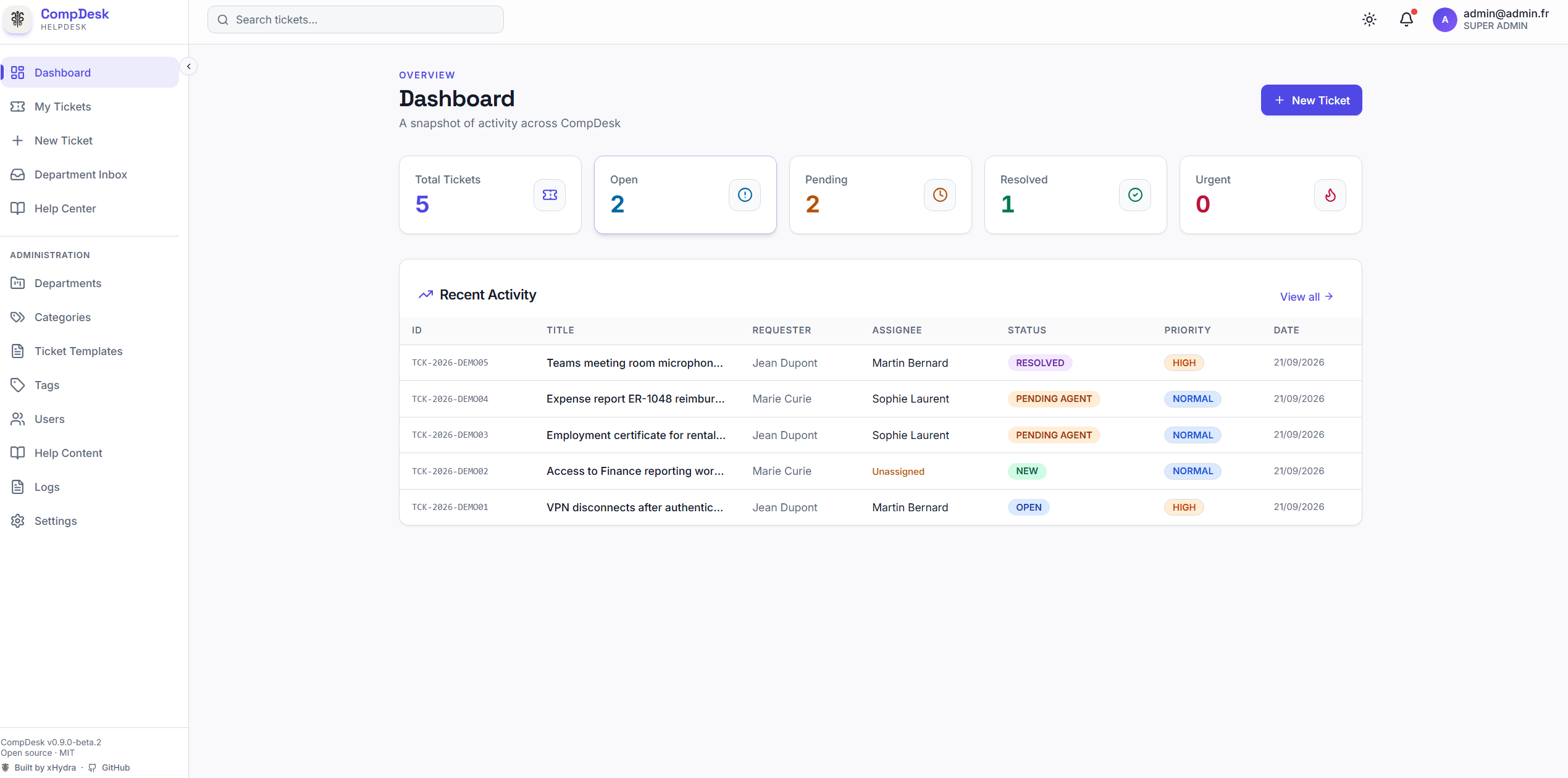
| Department Inbox | Help Center |
|---|---|
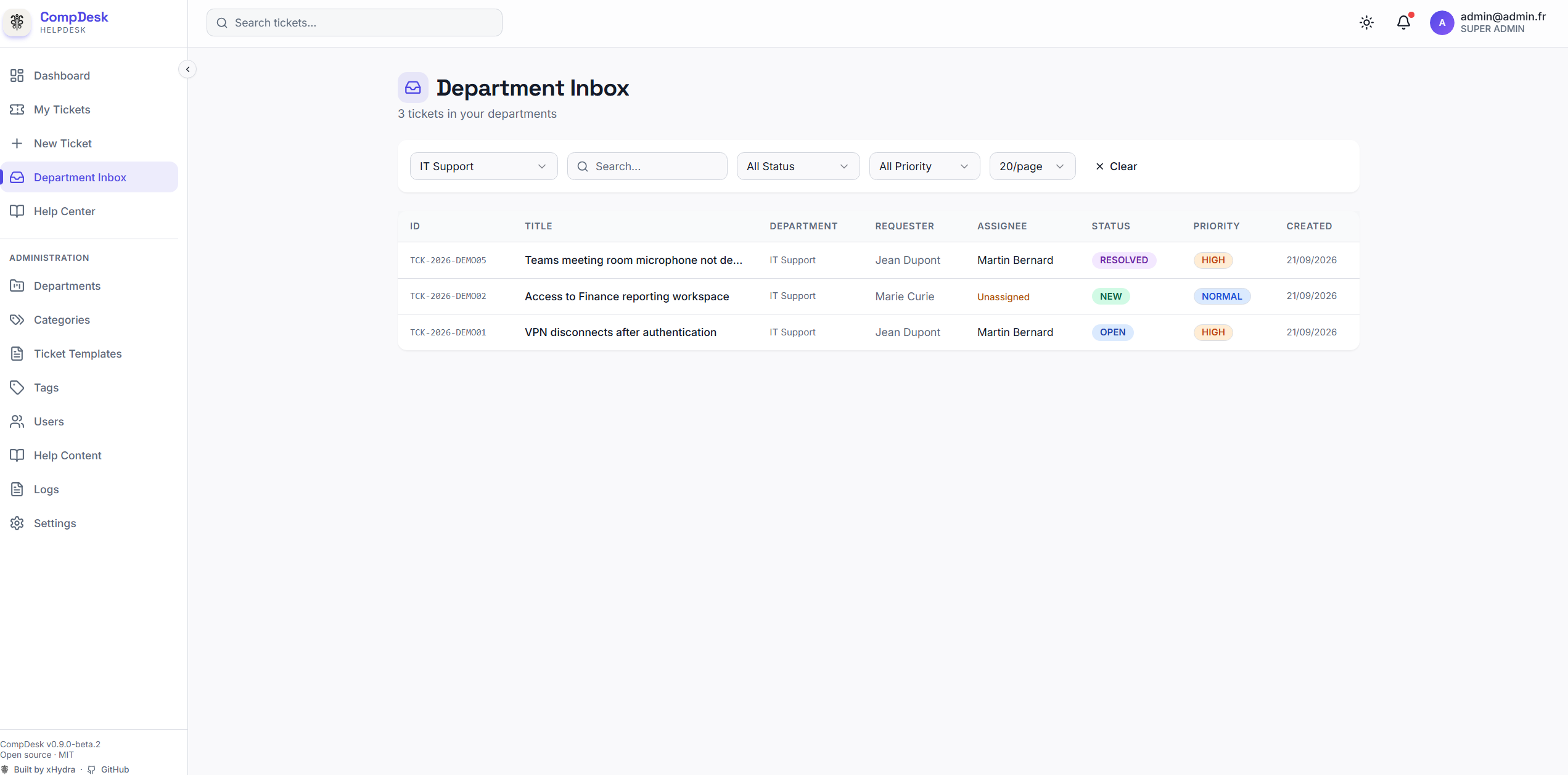 | 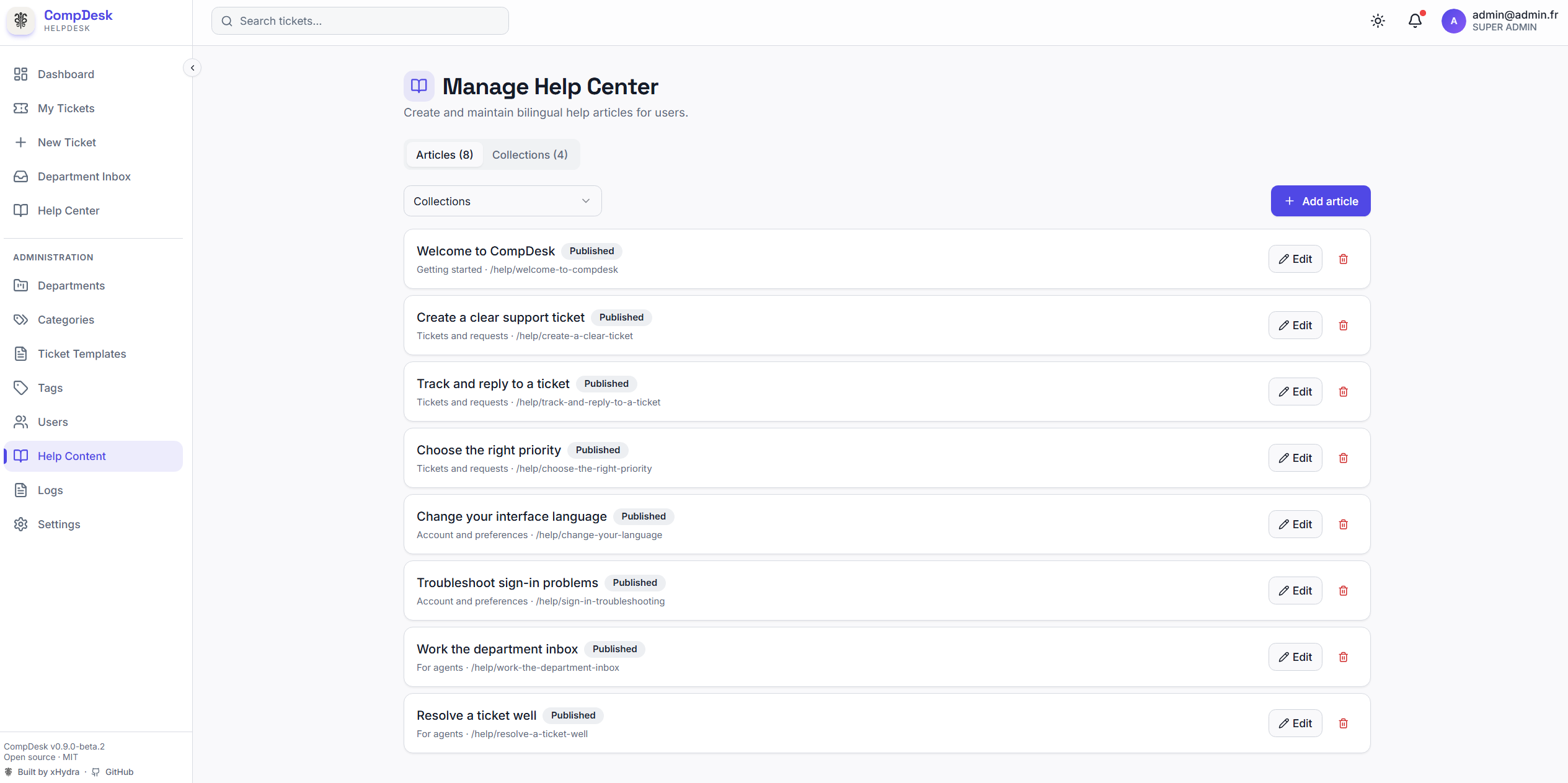 |
More screenshots and setup examples are available in the documentation.
Architecture
Browser
   │ HTTPS
Reverse proxy (Nginx or Caddy)
   │ forwarded origin and client address
Next.js application
   ├── PostgreSQL (tickets, policy, audit, outboxes, presence)
   ├── private attachment storage ── optional ClamAV
   ├── SMTP relay
   ├── Microsoft Entra ID OIDC
   └── signed webhook delivery
Normal application startup requires a completed installation and a migrated database. Readiness additionally checks database connectivity, migration state, and writable private storage. Migrations are not run concurrently by application replicas.
Roles
| Capability | User | Agent | Department Admin | Super Admin |
|---|---|---|---|---|
| View tickets | Own requested tickets | Assigned departments | Administered or assigned departments | Global |
| Public comments | Own tickets | Accessible tickets | Accessible tickets | All tickets |
| Internal notes and assignment | No | Accessible departments | Accessible departments | All departments |
| Configure departments | No | No | Administered departments | All departments |
| Global settings, users, API clients, audit logs | No | No | No | Yes |
The server remains the authorization boundary. See the tested permission matrix for the complete policy.
Security model
- Secrets are never returned by settings or resource APIs. Database-stored integration secrets use authenticated AES-256-GCM envelopes.
- PostgreSQL-backed limits protect credential login, uploads, and external API access across application processes. Setup authentication uses a separate in-memory limit in its single bootstrap process.
- Ticket mutations require the loaded version and return HTTP 409 for stale writes.
- Ticket reads use separate expiring presence records and do not modify ticket business timestamps.
- Webhooks use HTTPS by default, block private and metadata destinations after DNS resolution, sign timestamped bodies, and retry through an outbox.
- Ticket attachments are private and never served from the public static directory.
Read SECURITY.md, the threat model, and production hardening before exposing an installation.
Documentation
| Guide | Purpose |
|---|---|
| First-run setup | Bootstrap token, wizard, recovery, and setup modes |
| Configuration | Runtime variables and their actual behavior |
| Docker deployment | Recommended deployment (bundled PostgreSQL); external-PostgreSQL topology is documented but not yet validated |
| Ubuntu deployment | Docker and standalone Ubuntu paths |
| Windows deployment | Windows and PowerShell instructions |
| macOS development | Local macOS workflow |
| Backup and restore | PostgreSQL, files, configuration, and restore verification |
| Upgrading | Migration, rehearsal, rollback, and compatibility |
| API reference | Authenticated and external endpoints |
| User guide | End-user, agent, and administrator workflows |
Development and verification
npm ci
npm run db:generate
npm run db:migrate:prod
npm run verify
npm run test:e2e
npm audit --omit=dev
npm run verify runs linting, type checking, the Jest suite, and a production build. CI also validates both Compose topologies, runs setup E2E coverage, builds the container, scans dependencies and secrets, performs CodeQL analysis, and scans the built image.
The optional development seed refuses production execution unless explicitly overridden. With no SEED_DEFAULT_PASSWORD, it generates a random password and displays it once. Do not seed a production installation.
Known limitations
- PostgreSQL is the only supported database.
- ClamAV is optional; without a configured scanner, administrators must decide whether their deployment permits clean-status downloads.
- SMTP relay acceptance does not prove final mailbox delivery.
- Webhook delivery and other outbox work require the documented worker schedule.
- Multi-replica deployments require shared durable storage for private attachments and uploaded branding assets.
Contributing and disclosure
See CONTRIBUTING.md and CODE_OF_CONDUCT.md. Report vulnerabilities privately using SECURITY.md; do not open a public issue containing exploit or secret details.
License
CompDesk is licensed under the MIT License. See NOTICE for attribution.
CompDesk was created by Taha Laachari, an xHydra open-source project.
Contributors

77 commits

11 commits
Similar repos


Languages
TypeScript
74.5%
JavaScript
21.2%
HTML
2.0%
PLpgSQL
1.7%
See what people are saying (1)
README
CompDesk
Lightweight, privacy-first, self-hosted help desk and ticketing. Built by xHydra.
xhydra.fr · github.com/TahaHydra · github.com/TahaHydra/CompDesk
Public beta. CompDesk is under active development and is not yet claimed as mature, production-hardened software. See Known limitations and the public release checklist before deploying it for real users.
CompDesk is a self-hosted helpdesk for small organizations: department-scoped ticket routing, role-based access, attachments, search and filtering, and fully customizable organization branding — deployed with Docker in minutes, with no mandatory cloud account. Review the production hardening guide before deployment.
What it provides
- Department-scoped ticket routing, searchable queues, templates, custom fields, SLA policies, escalation, tags, comments, internal notes, and immutable timeline history.
- Four server-enforced roles: User, Agent, department Admin, and Super Admin.
- Local credentials and optional Microsoft Entra ID authentication.
- Runtime branding, SMTP notifications, signed webhooks, and department-scoped external API clients.
- Private ticket attachments with signature validation, quarantine state, quotas, audited removal, and optional ClamAV scanning.
- Optimistic ticket concurrency, PostgreSQL-backed throttling, session revocation after security changes, and normalized email identities.
- English and French interface and Help Center content.
Supported deployment
- Ubuntu 22.04 or 24.04 and modern Debian-based Linux distributions.
- Windows 10, Windows 11, Windows Server, and macOS for standalone development or deployment.
- Docker Compose (bundled PostgreSQL) or standalone Node.js are the validated deployment paths for this beta.
- PostgreSQL 16.x is the supported and CI-tested production database for this release; other database engines and PostgreSQL major versions are not claimed as tested.
- Node.js 24 LTS is recommended; Node.js 22.12 or newer is supported.
docker-compose.external-db.yml (an application container connecting to an external PostgreSQL server) exists in the repository but is not currently validated — a live-deployment test found its app container never reaches the database because the orchestrator's default database host (db) doesn't match an externally hosted PostgreSQL server. Do not use this topology until that is fixed; track it as a known issue rather than a supported beta feature.
CompDesk must be served over HTTPS outside localhost. The production Compose topology keeps PostgreSQL private, runs migrations in the application orchestrator before serving requests, uses persistent volumes, and runs the application as a non-root user.
First run
A fresh installation starts the setup wizard before the main application. It generates a time-limited one-time token, publishes on localhost by default, tests the selected PostgreSQL deployment, writes secrets atomically, runs migrations, creates the first Super Admin, and permanently disables setup after installation.
Docker Compose is the recommended deployment. Download the version-pinned docker-compose.yml asset from the GitHub Release you intend to install into an empty directory, then run there (no Node.js or npm required):
docker compose up -d
The Compose file in a source checkout uses a local-only placeholder image tag. For a source build, use docker compose -f docker-compose.yml -f docker-compose.build.yml up -d --build instead.
Read the clearly boxed one-time token, then open the wizard:
docker compose logs --tail=50 compdesk
Open http://localhost:3000/setup, complete the wizard, and the same container automatically switches itself to production on the same port. The token exists only in the trusted setup process/log output and expires after 30 minutes; it is never sent to the setup page automatically. Follow First-run setup and Docker deployment for remote-server SSH tunneling, source builds, recovery, and HTTPS reverse-proxy guidance. Demo data is optional, disabled by default, and uses generated credentials shown once.
For local development, follow SETUP.md.
Screenshots
Dashboard
| Department Inbox | Help Center |
|---|---|
| |
More screenshots and setup examples are available in the documentation.
Architecture
Browser
   │ HTTPS
Reverse proxy (Nginx or Caddy)
   │ forwarded origin and client address
Next.js application
   ├── PostgreSQL (tickets, policy, audit, outboxes, presence)
   ├── private attachment storage ── optional ClamAV
   ├── SMTP relay
   ├── Microsoft Entra ID OIDC
   └── signed webhook delivery
Normal application startup requires a completed installation and a migrated database. Readiness additionally checks database connectivity, migration state, and writable private storage. Migrations are not run concurrently by application replicas.
Roles
| Capability | User | Agent | Department Admin | Super Admin |
|---|---|---|---|---|
| View tickets | Own requested tickets | Assigned departments | Administered or assigned departments | Global |
| Public comments | Own tickets | Accessible tickets | Accessible tickets | All tickets |
| Internal notes and assignment | No | Accessible departments | Accessible departments | All departments |
| Configure departments | No | No | Administered departments | All departments |
| Global settings, users, API clients, audit logs | No | No | No | Yes |
The server remains the authorization boundary. See the tested permission matrix for the complete policy.
Security model
- Secrets are never returned by settings or resource APIs. Database-stored integration secrets use authenticated AES-256-GCM envelopes.
- PostgreSQL-backed limits protect credential login, uploads, and external API access across application processes. Setup authentication uses a separate in-memory limit in its single bootstrap process.
- Ticket mutations require the loaded version and return HTTP 409 for stale writes.
- Ticket reads use separate expiring presence records and do not modify ticket business timestamps.
- Webhooks use HTTPS by default, block private and metadata destinations after DNS resolution, sign timestamped bodies, and retry through an outbox.
- Ticket attachments are private and never served from the public static directory.
Read SECURITY.md, the threat model, and production hardening before exposing an installation.
Documentation
| Guide | Purpose |
|---|---|
| First-run setup | Bootstrap token, wizard, recovery, and setup modes |
| Configuration | Runtime variables and their actual behavior |
| Docker deployment | Recommended deployment (bundled PostgreSQL); external-PostgreSQL topology is documented but not yet validated |
| Ubuntu deployment | Docker and standalone Ubuntu paths |
| Windows deployment | Windows and PowerShell instructions |
| macOS development | Local macOS workflow |
| Backup and restore | PostgreSQL, files, configuration, and restore verification |
| Upgrading | Migration, rehearsal, rollback, and compatibility |
| API reference | Authenticated and external endpoints |
| User guide | End-user, agent, and administrator workflows |
Development and verification
npm ci
npm run db:generate
npm run db:migrate:prod
npm run verify
npm run test:e2e
npm audit --omit=dev
npm run verify runs linting, type checking, the Jest suite, and a production build. CI also validates both Compose topologies, runs setup E2E coverage, builds the container, scans dependencies and secrets, performs CodeQL analysis, and scans the built image.
The optional development seed refuses production execution unless explicitly overridden. With no SEED_DEFAULT_PASSWORD, it generates a random password and displays it once. Do not seed a production installation.
Known limitations
- PostgreSQL is the only supported database.
- ClamAV is optional; without a configured scanner, administrators must decide whether their deployment permits clean-status downloads.
- SMTP relay acceptance does not prove final mailbox delivery.
- Webhook delivery and other outbox work require the documented worker schedule.
- Multi-replica deployments require shared durable storage for private attachments and uploaded branding assets.
Contributing and disclosure
See CONTRIBUTING.md and CODE_OF_CONDUCT.md. Report vulnerabilities privately using SECURITY.md; do not open a public issue containing exploit or secret details.
License
CompDesk is licensed under the MIT License. See NOTICE for attribution.
CompDesk was created by Taha Laachari, an xHydra open-source project.
Similar repos
Contributors
77 commits
11 commits
Languages
TypeScript
74.5%
JavaScript
21.2%
HTML
2.0%
PLpgSQL
1.7%