
README











GraphGen: Enhancing Supervised Fine-Tuning for LLMs with Knowledge-Driven Synthetic Data Generation
📚 Table of Contents
📝 What is GraphGen?
GraphGen is a framework for synthetic data generation guided by knowledge graphs. Please check the paper and best practice.
Here is post-training result which over 50% SFT data comes from GraphGen and our data clean pipeline.
| Domain | Dataset | Ours | Qwen2.5-7B-Instruct (baseline) |
|---|---|---|---|
| Plant | SeedBench | 65.9 | 51.5 |
| Common | CMMLU | 73.6 | 75.8 |
| Knowledge | GPQA-Diamond | 40.0 | 33.3 |
| Math | AIME24 | 20.6 | 16.7 |
| AIME25 | 22.7 | 7.2 |
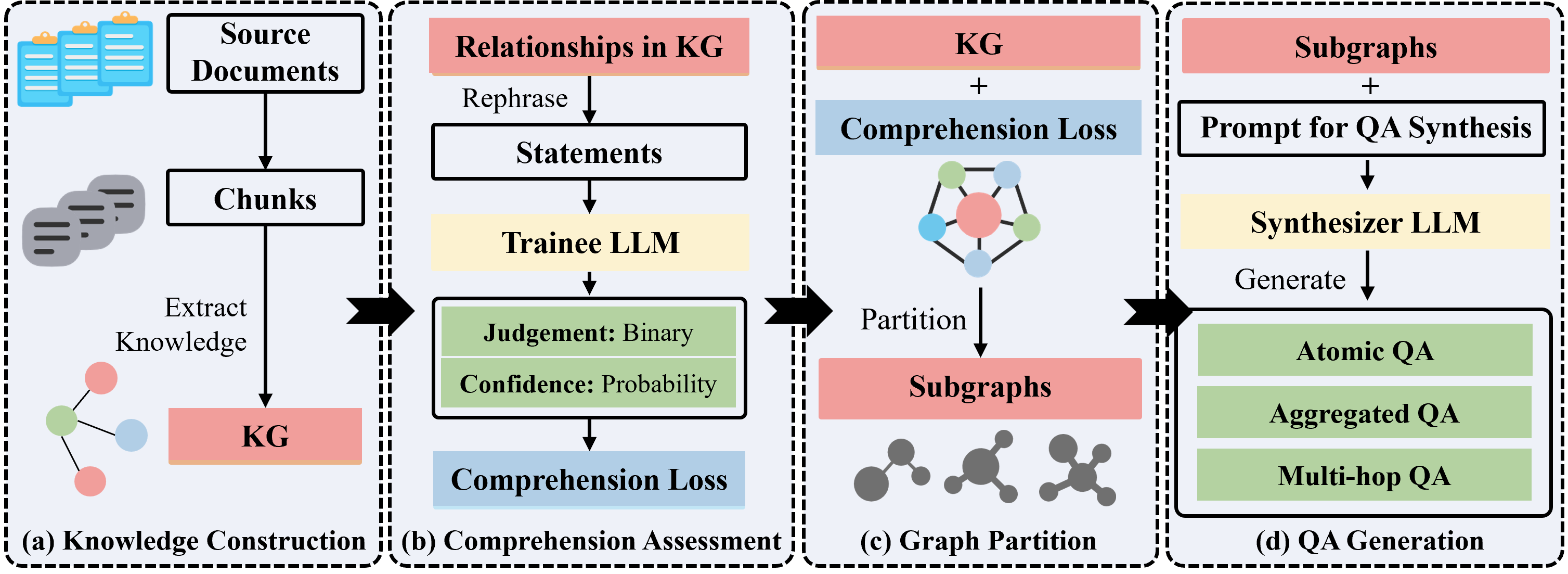
It begins by constructing a fine-grained knowledge graph from the source text,then identifies knowledge gaps in LLMs using the expected calibration error metric, prioritizing the generation of QA pairs that target high-value, long-tail knowledge. Furthermore, GraphGen incorporates multi-hop neighborhood sampling to capture complex relational information and employs style-controlled generation to diversify the resulting QA data.
After data generation, you can use LLaMA-Factory and xtuner to finetune your LLMs.
📌 Latest Updates
- 2026.01.15: LLM benchmark synthesis now supports single/multiple-choice & fill-in-the-blank & true-or-false—ideal for education 🌟🌟
- 2025.12.26: Knowledge graph evaluation metrics about accuracy (entity/relation), consistency (conflict detection), structural robustness (noise, connectivity, degree distribution)
- 2025.12.16: Added rocksdb for key-value storage backend and kuzudb for graph database backend support.
History
- 2025.12.16: Added vllm for local inference backend support.
- 2025.12.16: Refactored the data generation pipeline using ray to improve the efficiency of distributed execution and resource management.
- 2025.12.1: Added search support for NCBI and RNAcentral databases, enabling extraction of DNA and RNA data from these bioinformatics databases.
- 2025.10.30: We support several new LLM clients and inference backends including Ollama_client, http_client, HuggingFace Transformers and SGLang.
- 2025.10.23: We support VQA(Visual Question Answering) data generation now. Run script:
bash scripts/generate/generate_vqa.sh. - 2025.10.21: We support PDF as input format for data generation now via MinerU.
- 2025.09.29: We auto-update gradio demo on Hugging Face and ModelScope.
- 2025.08.14: We have added support for community detection in knowledge graphs using the Leiden algorithm, enabling the synthesis of Chain-of-Thought (CoT) data.
- 2025.07.31: We have added Google, Bing, Wikipedia, and UniProt as search back-ends.
- 2025.04.21: We have released the initial version of GraphGen.
⚙️ Support List
We support various LLM inference servers, API servers, inference clients, input file formats, data modalities, output data formats, and output data types. Users can flexibly configure according to the needs of synthetic data.
| Inference Server | Api Server | Inference Client | Data Source | Data Modal | Data Type |
|---|---|---|---|---|---|
| HTTP | Files(CSV, JSON, PDF, TXT, etc.) Databases( Search Engines( Knowledge Graphs( | TEXT IMAGE | Aggregated Atomic CoT Multi-hop VQA |
🚀 Quick Start
Experience GraphGen Demo through Huggingface or Modelscope.
For any questions, please check FAQ, open new issue or join our wechat group and ask.
Preparation
-
Install uv
# You could try pipx or pip to install uv when meet network issues, refer the uv doc for more details curl -LsSf https://astral.sh/uv/install.sh | sh -
Clone the repository
git clone --depth=1 https://github.com/open-sciencelab/GraphGen cd GraphGen -
Create a new uv environment
uv venv --python 3.10 -
Configure the dependencies
uv pip install -r requirements.txt
Run Gradio Demo
python -m webui.app
Run from PyPI
-
Install GraphGen
uv pip install graphg -
Run in CLI
SYNTHESIZER_MODEL=your_synthesizer_model_name \
SYNTHESIZER_BASE_URL=your_base_url_for_synthesizer_model \
SYNTHESIZER_API_KEY=your_api_key_for_synthesizer_model \
TRAINEE_MODEL=your_trainee_model_name \
TRAINEE_BASE_URL=your_base_url_for_trainee_model \
TRAINEE_API_KEY=your_api_key_for_trainee_model \
graphg --output_dir cache
Run from Source
-
Configure the environment
- Create an
.envfile in the root directorycp .env.example .env - Set the following environment variables:
 # Tokenizer
 TOKENIZER_MODEL=

 # LLM
 # Support different backends: http_api, openai_api, ollama_api, ollama, huggingface, tgi, sglang, tensorrt
 # Synthesizer is the model used to construct KG and generate data
 # Trainee is the model used to train with the generated data

 # http_api / openai_api
 SYNTHESIZER_BACKEND=openai_api
 SYNTHESIZER_MODEL=gpt-4o-mini
 SYNTHESIZER_BASE_URL=
 SYNTHESIZER_API_KEY=
 TRAINEE_BACKEND=openai_api
 TRAINEE_MODEL=gpt-4o-mini
 TRAINEE_BASE_URL=
 TRAINEE_API_KEY=

 # azure_openai_api
 # SYNTHESIZER_BACKEND=azure_openai_api
 # The following is the same as your "Deployment name" in Azure
 # SYNTHESIZER_MODEL=<your-deployment-name>
 # SYNTHESIZER_BASE_URL=https://<your-resource-name>.openai.azure.com/openai/deployments/<your-deployment-name>/chat/completions
 # SYNTHESIZER_API_KEY=
 # SYNTHESIZER_API_VERSION=<api-version>

 # # ollama_api
 # SYNTHESIZER_BACKEND=ollama_api
 # SYNTHESIZER_MODEL=gemma3
 # SYNTHESIZER_BASE_URL=http://localhost:11434
 #
 # Note: TRAINEE with ollama_api backend is not supported yet as ollama_api does not support logprobs.

 # # huggingface
 # SYNTHESIZER_BACKEND=huggingface
 # SYNTHESIZER_MODEL=Qwen/Qwen2.5-0.5B-Instruct
 #
 # TRAINEE_BACKEND=huggingface
 # TRAINEE_MODEL=Qwen/Qwen2.5-0.5B-Instruct

 # # sglang
 # SYNTHESIZER_BACKEND=sglang
 # SYNTHESIZER_MODEL=Qwen/Qwen2.5-0.5B-Instruct
 # SYNTHESIZER_TP_SIZE=1
 # SYNTHESIZER_NUM_GPUS=1

 # TRAINEE_BACKEND=sglang
 # TRAINEE_MODEL=Qwen/Qwen2.5-0.5B-Instruct
 # SYNTHESIZER_TP_SIZE=1
 # SYNTHESIZER_NUM_GPUS=1

 # # vllm
 # SYNTHESIZER_BACKEND=vllm
 # SYNTHESIZER_MODEL=Qwen/Qwen2.5-0.5B-Instruct
 # SYNTHESIZER_NUM_GPUS=1

 # TRAINEE_BACKEND=vllm
 # TRAINEE_MODEL=Qwen/Qwen2.5-0.5B-Instruct
 # TRAINEE_NUM_GPUS=1
- Create an
-
(Optional) Customize generation parameters in
config.yaml.Edit the corresponding YAML file, e.g.:
# examples/generate/generate_aggregated_qa/aggregated_config.yaml global_params: working_dir: cache graph_backend: kuzu # graph database backend, support: kuzu, networkx kv_backend: rocksdb # key-value store backend, support: rocksdb, json_kv nodes: - id: read_files # id is unique in the pipeline, and can be referenced by other steps op_name: read type: source dependencies: [] params: input_path: - examples/input_examples/jsonl_demo.jsonl # input file path, support json, jsonl, txt, pdf. See examples/input_examples for examples # additional settings... -
Generate data
Pick the desired format and run the matching script:
Format Script to run Notes cotbash examples/generate/generate_cot_qa/generate_cot.shChain-of-Thought Q&A pairs atomicbash examples/generate/generate_atomic_qa/generate_atomic.shAtomic Q&A pairs covering basic knowledge aggregatedbash examples/generate/generate_aggregated_qa/generate_aggregated.shAggregated Q&A pairs incorporating complex, integrated knowledge multi-hopexamples/generate/generate_multi_hop_qa/generate_multi_hop.shMulti-hop reasoning Q&A pairs vqabash examples/generate/generate_vqa/generate_vqa.shVisual Question Answering pairs combining visual and textual understanding multi_choicebash examples/generate/generate_multi_choice_qa/generate_multi_choice.shMultiple-choice question-answer pairs multi_answerbash examples/generate/generate_multi_answer_qa/generate_multi_answer.shMultiple-answer question-answer pairs fill_in_blankbash examples/generate/generate_fill_in_blank_qa/generate_fill_in_blank.shFill-in-the-blank question-answer pairs
| | true_false | bash examples/generate/generate_true_false_qa/generate_true_false.sh | True-or-false question-answer pairs |
- Get the generated data
ls cache/output
Run with Docker
- Build the Docker image
docker build -t graphgen . - Run the Docker container
docker run -p 7860:7860 graphgen
🏗️ System Architecture
See analysis by deepwiki for a technical overview of the GraphGen system, its architecture, and core functionalities.
Workflow
🍀 Acknowledgements
- SiliconFlow Abundant LLM API, some models are free
- LightRAG Simple and efficient graph retrieval solution
- ROGRAG A robustly optimized GraphRAG framework
- DB-GPT An AI native data app development framework
📚 Citation
If you find this repository useful, please consider citing our work:
@misc{chen2025graphgenenhancingsupervisedfinetuning,
      title={GraphGen: Enhancing Supervised Fine-Tuning for LLMs with Knowledge-Driven Synthetic Data Generation},
      author={Zihong Chen and Wanli Jiang and Jinzhe Li and Zhonghang Yuan and Huanjun Kong and Wanli Ouyang and Nanqing Dong},
      year={2025},
      eprint={2505.20416},
      archivePrefix={arXiv},
      primaryClass={cs.CL},
      url={https://arxiv.org/abs/2505.20416},
}
📜 License
This project is licensed under the Apache License 2.0.
📅 Star History
Contributors


Similar repos





Languages
Python
99.8%
README
GraphGen: Enhancing Supervised Fine-Tuning for LLMs with Knowledge-Driven Synthetic Data Generation
📚 Table of Contents
📝 What is GraphGen?
GraphGen is a framework for synthetic data generation guided by knowledge graphs. Please check the paper and best practice.
Here is post-training result which over 50% SFT data comes from GraphGen and our data clean pipeline.
| Domain | Dataset | Ours | Qwen2.5-7B-Instruct (baseline) |
|---|---|---|---|
| Plant | SeedBench | 65.9 | 51.5 |
| Common | CMMLU | 73.6 | 75.8 |
| Knowledge | GPQA-Diamond | 40.0 | 33.3 |
| Math | AIME24 | 20.6 | 16.7 |
| AIME25 | 22.7 | 7.2 |
It begins by constructing a fine-grained knowledge graph from the source text,then identifies knowledge gaps in LLMs using the expected calibration error metric, prioritizing the generation of QA pairs that target high-value, long-tail knowledge. Furthermore, GraphGen incorporates multi-hop neighborhood sampling to capture complex relational information and employs style-controlled generation to diversify the resulting QA data.
After data generation, you can use LLaMA-Factory and xtuner to finetune your LLMs.
📌 Latest Updates
- 2026.01.15: LLM benchmark synthesis now supports single/multiple-choice & fill-in-the-blank & true-or-false—ideal for education 🌟🌟
- 2025.12.26: Knowledge graph evaluation metrics about accuracy (entity/relation), consistency (conflict detection), structural robustness (noise, connectivity, degree distribution)
- 2025.12.16: Added rocksdb for key-value storage backend and kuzudb for graph database backend support.
History
- 2025.12.16: Added vllm for local inference backend support.
- 2025.12.16: Refactored the data generation pipeline using ray to improve the efficiency of distributed execution and resource management.
- 2025.12.1: Added search support for NCBI and RNAcentral databases, enabling extraction of DNA and RNA data from these bioinformatics databases.
- 2025.10.30: We support several new LLM clients and inference backends including Ollama_client, http_client, HuggingFace Transformers and SGLang.
- 2025.10.23: We support VQA(Visual Question Answering) data generation now. Run script:
bash scripts/generate/generate_vqa.sh. - 2025.10.21: We support PDF as input format for data generation now via MinerU.
- 2025.09.29: We auto-update gradio demo on Hugging Face and ModelScope.
- 2025.08.14: We have added support for community detection in knowledge graphs using the Leiden algorithm, enabling the synthesis of Chain-of-Thought (CoT) data.
- 2025.07.31: We have added Google, Bing, Wikipedia, and UniProt as search back-ends.
- 2025.04.21: We have released the initial version of GraphGen.
⚙️ Support List
We support various LLM inference servers, API servers, inference clients, input file formats, data modalities, output data formats, and output data types. Users can flexibly configure according to the needs of synthetic data.
| Inference Server | Api Server | Inference Client | Data Source | Data Modal | Data Type |
|---|---|---|---|---|---|
| HTTP | Files(CSV, JSON, PDF, TXT, etc.) Databases( Search Engines( Knowledge Graphs( | TEXT IMAGE | Aggregated Atomic CoT Multi-hop VQA |
🚀 Quick Start
Experience GraphGen Demo through Huggingface or Modelscope.
For any questions, please check FAQ, open new issue or join our wechat group and ask.
Preparation
-
Install uv
# You could try pipx or pip to install uv when meet network issues, refer the uv doc for more details curl -LsSf https://astral.sh/uv/install.sh | sh -
Clone the repository
git clone --depth=1 https://github.com/open-sciencelab/GraphGen cd GraphGen -
Create a new uv environment
uv venv --python 3.10 -
Configure the dependencies
uv pip install -r requirements.txt
Run Gradio Demo
python -m webui.app
Run from PyPI
-
Install GraphGen
uv pip install graphg -
Run in CLI
SYNTHESIZER_MODEL=your_synthesizer_model_name \
SYNTHESIZER_BASE_URL=your_base_url_for_synthesizer_model \
SYNTHESIZER_API_KEY=your_api_key_for_synthesizer_model \
TRAINEE_MODEL=your_trainee_model_name \
TRAINEE_BASE_URL=your_base_url_for_trainee_model \
TRAINEE_API_KEY=your_api_key_for_trainee_model \
graphg --output_dir cache
Run from Source
-
Configure the environment
- Create an
.envfile in the root directorycp .env.example .env - Set the following environment variables:
 # Tokenizer
 TOKENIZER_MODEL=

 # LLM
 # Support different backends: http_api, openai_api, ollama_api, ollama, huggingface, tgi, sglang, tensorrt
 # Synthesizer is the model used to construct KG and generate data
 # Trainee is the model used to train with the generated data

 # http_api / openai_api
 SYNTHESIZER_BACKEND=openai_api
 SYNTHESIZER_MODEL=gpt-4o-mini
 SYNTHESIZER_BASE_URL=
 SYNTHESIZER_API_KEY=
 TRAINEE_BACKEND=openai_api
 TRAINEE_MODEL=gpt-4o-mini
 TRAINEE_BASE_URL=
 TRAINEE_API_KEY=

 # azure_openai_api
 # SYNTHESIZER_BACKEND=azure_openai_api
 # The following is the same as your "Deployment name" in Azure
 # SYNTHESIZER_MODEL=<your-deployment-name>
 # SYNTHESIZER_BASE_URL=https://<your-resource-name>.openai.azure.com/openai/deployments/<your-deployment-name>/chat/completions
 # SYNTHESIZER_API_KEY=
 # SYNTHESIZER_API_VERSION=<api-version>

 # # ollama_api
 # SYNTHESIZER_BACKEND=ollama_api
 # SYNTHESIZER_MODEL=gemma3
 # SYNTHESIZER_BASE_URL=http://localhost:11434
 #
 # Note: TRAINEE with ollama_api backend is not supported yet as ollama_api does not support logprobs.

 # # huggingface
 # SYNTHESIZER_BACKEND=huggingface
 # SYNTHESIZER_MODEL=Qwen/Qwen2.5-0.5B-Instruct
 #
 # TRAINEE_BACKEND=huggingface
 # TRAINEE_MODEL=Qwen/Qwen2.5-0.5B-Instruct

 # # sglang
 # SYNTHESIZER_BACKEND=sglang
 # SYNTHESIZER_MODEL=Qwen/Qwen2.5-0.5B-Instruct
 # SYNTHESIZER_TP_SIZE=1
 # SYNTHESIZER_NUM_GPUS=1

 # TRAINEE_BACKEND=sglang
 # TRAINEE_MODEL=Qwen/Qwen2.5-0.5B-Instruct
 # SYNTHESIZER_TP_SIZE=1
 # SYNTHESIZER_NUM_GPUS=1

 # # vllm
 # SYNTHESIZER_BACKEND=vllm
 # SYNTHESIZER_MODEL=Qwen/Qwen2.5-0.5B-Instruct
 # SYNTHESIZER_NUM_GPUS=1

 # TRAINEE_BACKEND=vllm
 # TRAINEE_MODEL=Qwen/Qwen2.5-0.5B-Instruct
 # TRAINEE_NUM_GPUS=1
- Create an
-
(Optional) Customize generation parameters in
config.yaml.Edit the corresponding YAML file, e.g.:
# examples/generate/generate_aggregated_qa/aggregated_config.yaml global_params: working_dir: cache graph_backend: kuzu # graph database backend, support: kuzu, networkx kv_backend: rocksdb # key-value store backend, support: rocksdb, json_kv nodes: - id: read_files # id is unique in the pipeline, and can be referenced by other steps op_name: read type: source dependencies: [] params: input_path: - examples/input_examples/jsonl_demo.jsonl # input file path, support json, jsonl, txt, pdf. See examples/input_examples for examples # additional settings... -
Generate data
Pick the desired format and run the matching script:
Format Script to run Notes cotbash examples/generate/generate_cot_qa/generate_cot.shChain-of-Thought Q&A pairs atomicbash examples/generate/generate_atomic_qa/generate_atomic.shAtomic Q&A pairs covering basic knowledge aggregatedbash examples/generate/generate_aggregated_qa/generate_aggregated.shAggregated Q&A pairs incorporating complex, integrated knowledge multi-hopexamples/generate/generate_multi_hop_qa/generate_multi_hop.shMulti-hop reasoning Q&A pairs vqabash examples/generate/generate_vqa/generate_vqa.shVisual Question Answering pairs combining visual and textual understanding multi_choicebash examples/generate/generate_multi_choice_qa/generate_multi_choice.shMultiple-choice question-answer pairs multi_answerbash examples/generate/generate_multi_answer_qa/generate_multi_answer.shMultiple-answer question-answer pairs fill_in_blankbash examples/generate/generate_fill_in_blank_qa/generate_fill_in_blank.shFill-in-the-blank question-answer pairs
| | true_false | bash examples/generate/generate_true_false_qa/generate_true_false.sh | True-or-false question-answer pairs |
- Get the generated data
ls cache/output
Run with Docker
- Build the Docker image
docker build -t graphgen . - Run the Docker container
docker run -p 7860:7860 graphgen
🏗️ System Architecture
See analysis by deepwiki for a technical overview of the GraphGen system, its architecture, and core functionalities.
Workflow
🍀 Acknowledgements
- SiliconFlow Abundant LLM API, some models are free
- LightRAG Simple and efficient graph retrieval solution
- ROGRAG A robustly optimized GraphRAG framework
- DB-GPT An AI native data app development framework
📚 Citation
If you find this repository useful, please consider citing our work:
@misc{chen2025graphgenenhancingsupervisedfinetuning,
      title={GraphGen: Enhancing Supervised Fine-Tuning for LLMs with Knowledge-Driven Synthetic Data Generation},
      author={Zihong Chen and Wanli Jiang and Jinzhe Li and Zhonghang Yuan and Huanjun Kong and Wanli Ouyang and Nanqing Dong},
      year={2025},
      eprint={2505.20416},
      archivePrefix={arXiv},
      primaryClass={cs.CL},
      url={https://arxiv.org/abs/2505.20416},
}
📜 License
This project is licensed under the Apache License 2.0.
📅 Star History
Similar repos
Contributors
Languages
Python
99.8%