
Nix substituter proxy with parallel cache queries and latency-aware selection
Rust
46
744 commits
updated Sep 20, 2026
README
selector4nix
A Nix substituter proxy with parallel cache queries and latency-aware selection.
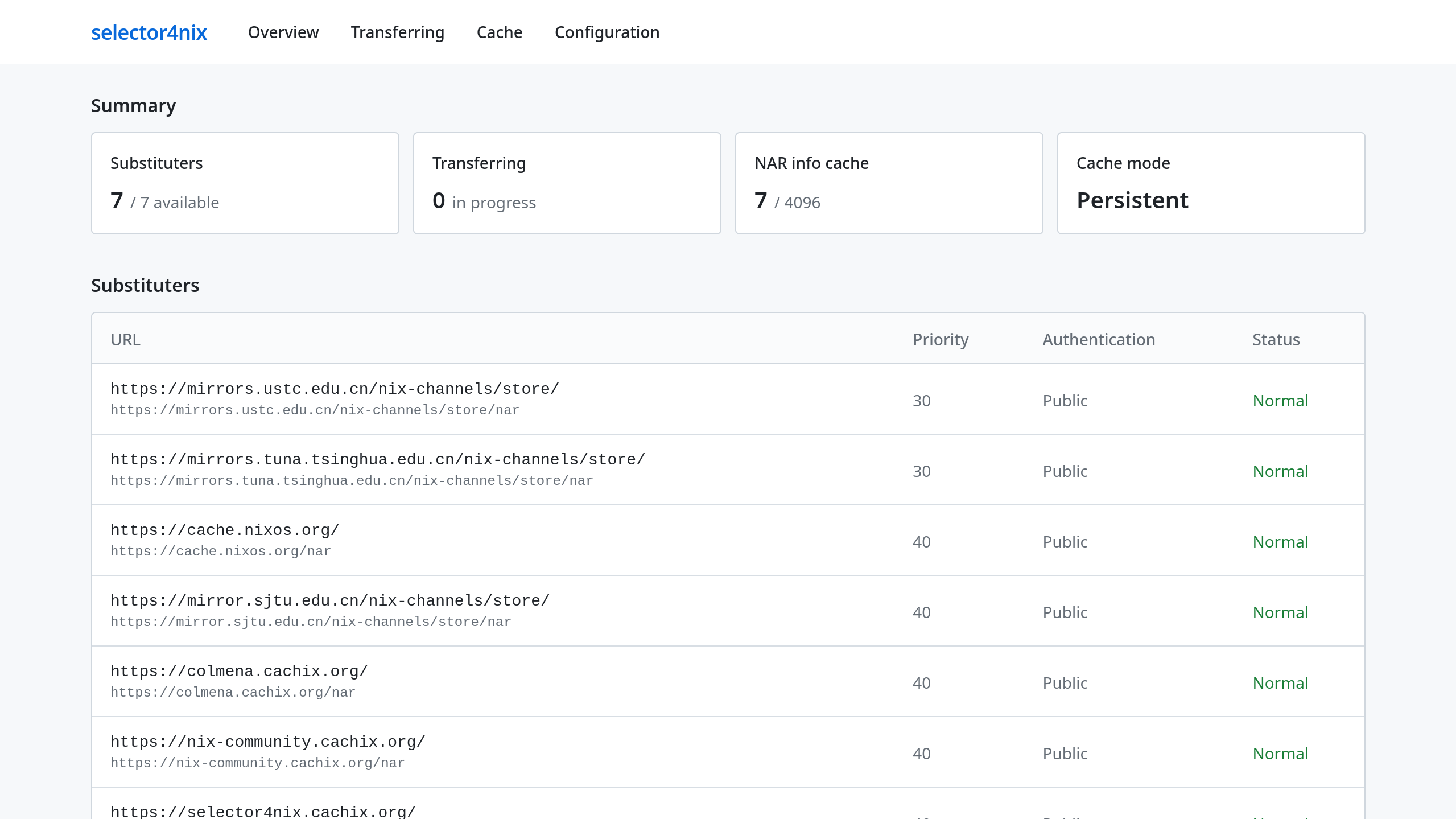
Overview
selector4nix sits between your Nix client and multiple upstream substituters, acting as a smart proxy:
- Queries all configured substituters in parallel for
.narinfolookups - Selects the fastest responding substituter based on latency and priority
- Automatically detects and skips unavailable substituters, retrying them with exponential backoff
- Continuously probes substituters to detect failures early and verify recovery
- Proxy private cache substituters with additional credentials
- Pre-fetch multiple NAR file chunks concurrently to improve network utilization, based on sliding window (Opt-in)
Note that selector4nix only intends to work as a proxy rather than a full-featured cache substituter. NAR files are streamed directly from the best substituter without being cached locally. However, it does cache .narinfo files for better responsiveness.
The recommended way to use selector4nix is deploying it locally on each host. Since no large NAR file caching is used, selector4nix is pretty lightweight in terms of both memory footprint and CPU usage. In contrast, hosting selector4nix on a central node in your LAN for other machines doesn't scale well.
Configuration
General
selector4nix reads a TOML configuration file from the first of these locations:
- The path specified by the
--config-filecommand line argument - The path specified by the
SELECTOR4NIX_CONFIG_FILEenvironment variable ./selector4nix.tomlin the current directory/etc/selector4nix/selector4nix.toml
An example configuration is demonstrated below. For a complete reference of all available fields, see docs/configuration.md. An annotated example configuration file is also available at docs/selector4nix.example.toml.
[server]
ip = "127.0.0.1"
# port = 5496 # Default port

[[substituters]]
url = "https://cache.nixos.org/"
# priority = 40 # Default priority

[[substituters]]
url = "https://mirrors.ustc.edu.cn/nix-channels/store/"
priority = 45 # The higher the value, the lower the priority of this substituter

[[substituters]]
url = "https://selector4nix.cachix.org/"

[[substituters]]
url = "https://cache.garnix.io/"
storage_url = "https://garnix-cache.com/" # Garnix doesn't serve NAR files on https://cache.garnix.io/nar/
For NixOS, nix-darwin, and Home Manager users, it is recommended to use the modules provided by this project for declarative setup and configuration.
Credentials
selector4nix can optionally read a TOML credentials file for authenticating with private caches. It is loaded from the first of these locations:
- The path specified by the
--credential-filecommand line argument - The path specified by the
SELECTOR4NIX_CREDENTIAL_FILEenvironment variable ./credentials.tomlin the current directory/etc/selector4nix/credentials.toml
If no credentials file is found, all upstream requests are made without authentication. Credentials are used for /nix-cache-info lookups, .narinfo queries, and NAR file downloads. This is required for private caches such as Attic.
An example credentials file is demonstrated below. For a complete reference, see docs/credentials.md. An annotated example credentials file is also available at docs/credentials.example.toml.
[[credentials]]
url = "https://my.private-cache.com/"
login = "my-username"
secret = "my-secret"
Caching
selector4nix can optionally persist query results as cache across restarts. The cache directory must be explicitly specified from one of these locations:
- The path specified by the
--cache-dircommand line argument - The path specified by the
SELECTOR4NIX_CACHE_DIRenvironment variable
If neither is provided, an in-memory cache is used and cache is lost on restart.
The cache directory can be safely deleted at any time, though this cause loss of cached query results. Subsequent requests may trigger the fallback strategy, but it may not fully compensate for the missing cache entries.
Usage
Ad-hoc
Start the proxy in an ad-hoc style, on whatever OS:
selector4nix # A configuration file must be discoverable (see Configuration above)
On the same machine, point Nix to the proxy, then everything is done. All NAR info queries and subsequent NAR fetching will transparently go through the selector4nix proxy.
nix build --option substituters "http://127.0.0.1:5496/" ...
If you care about definite robustness, you can place it before other substituters so it takes priority while keeping fallbacks:
nix build --option substituters "http://127.0.0.1:5496/ https://cache.nixos.org/" ...
Use the project's own substituter server
The selector4nix project has a dedicated Cachix substituter. You can optionally add the substituter URL https://selector4nix.cachix.org/ to your configurations, either the vanilla nix.settings.substituters or selector4nix's configuration file itself. Don't forget to add the public key selector4nix.cachix.org-1:wovVlT07In5JCVz2tFgxPQTLpnN8hZT6P/RwfFcz3KE=.
Note that selector4nix.cachix.org depends on nix-community.cachix.org to avoid caching duplicated store paths. It's recommended to also add nix-community.cachix.org to your substituter lists to prevent unexpected cache miss.
Import the NixOS/Nix-darwin/Home Manager Module (flake)
Firstly, the selector4nix module should be imported into your system or home configuration, optionally with a Nixpkgs overlay.
On the usage of Nixpkgs overlay, selector4nix.overlays.default is exposed and you can configure your system Nixpkgs with the overlay. This is useful when you want to build the selector4nix package with the toolchain provided by your system Nixpkgs instance rather than the one defined in the flake output.
For NixOS:
# flake.nix
{
  inputs.selector4nix.url = "github:StarryReverie/selector4nix";

  outputs = { nixpkgs, selector4nix, ... }@inputs: {
    nixosConfigurations.my-host = nixpkgs.lib.nixosSystem {
      system = "x86_64-linux";
      modules = [
        selector4nix.nixosModules.selector4nix
        # Optional: use the overlay to provide `pkgs.selector4nix`
        # { nixpkgs.overlays = [ selector4nix.overlays.selector4nix ]; }
      ];
    };
  };
}
For nix-darwin:
# nix-darwin flake.nix
{
  inputs.selector4nix.url = "github:StarryReverie/selector4nix";

  outputs = { nixpkgs, nix-darwin, selector4nix, ... }@inputs: {
    darwinConfigurations.my-host = nix-darwin.lib.darwinSystem {
      system = "aarch64-darwin";
      modules = [
        selector4nix.darwinModules.selector4nix
        # Optional: use the overlay to provide `pkgs.selector4nix`
        # { nixpkgs.overlays = [ selector4nix.overlays.selector4nix ]; }
      ];
    };
  };
}
For Home Manager:
# Home Manager flake.nix
{
  inputs.selector4nix.url = "github:StarryReverie/selector4nix";

  outputs = { nixpkgs, home-manager, selector4nix, ... }@inputs: {
    homeConfigurations.my-user = home-manager.lib.homeManagerConfiguration {
      modules = [
        selector4nix.homeManagerModules.selector4nix
      ];
      # Optional: use the overlay to provide `pkgs.selector4nix`
      # pkgs = import nixpkgs {
      #   system = "x86_64-linux";
      #   overlays = [ selector4nix.overlays.selector4nix ];
      # };
    };
  };
}
Import the NixOS/Nix-darwin/Home Manager Module (niv, npins, etc.)
For those who don't use flakes, a flake-less setup is also possible.
For NixOS:
# configuration.nix
{ config, ... }:
{
  # Assume that there exists a `selector4nix` input in the lexical scope.
  imports = [ (import "${selector4nix}/nix/modules/nixos.nix" { withSystem = throw "unreachable"; }) ];
  nixpkgs.overlays = [ (import "${selector4nix}/nix/overlay.nix") ];
}
For nix-darwin and Home Manager, the setup is similar. The differences are how you import a module and an overlay, and the corresponding module path:
- NixOS:
"${selector4nix}/nix/modules/nixos.nix" - nix-darwin:
"${selector4nix}/nix/modules/darwin.nix" - Home Manager:
"${selector4nix}/nix/modules/home-manager.nix"
Configure the Service
In your NixOS, nix-darwin, or Home Manager configuration:
# configuration.nix
{ config, ... }:
{
  services.selector4nix = {
    enable = true;

    # This automatically overwrites the substituter list.
    # Alternatives are "keep" (default) and "prepend".
    configureSubstituter = "overwrite";

    # Optional: see Credentials section for detials.
    # credentialFile = "/path/to/my/credentials.toml";

    # Optional: see Caching section for detials.
    # enablePersistentCaching = true;

    settings = {
      substituters = [
        {
          url = "https://cache.nixos.org/";
        }
        {
          url = "https://mirrors.ustc.edu.cn/nix-channels/store/";
          priority = 45;
        }
        {
          url = "https://nix-community.cachix.org/";
        }
        {
          url = "https://selector4nix.cachix.org/";
        }
        {
          url = "https://cache.garnix.io/";
          storage_url = "https://garnix-cache.com/";
        }
      ];
    };
  };

  nix.settings.trusted-public-keys = [
    "cache.nixos.org-1:6NCHdD59X431o0gWypbMrAURkbJ16ZPMQFGspcDShjY="
    "nix-community.cachix.org-1:mB9FSh9qf2dCimDSUo8Zy7bkq5CX+/rkCWyvRCYg3Fs="
    "selector4nix.cachix.org-1:wovVlT07In5JCVz2tFgxPQTLpnN8hZT6P/RwfFcz3KE="
  ];
}
See Configuration above for details.
Build
Cargo
selector4nix uses the Rust 2024 edition, which requires Rust 1.85 or later. It is recommended to build it with the version that matches the rustc used by this flake currently.
cargo build --release
To install the binary to ~/.cargo/bin:
cargo install --path .
Nix
Replace <system> in the commands below with your target platform: x86_64-linux, aarch64-linux, x86_64-darwin, or aarch64-darwin.
Build from the current directory:
nix --extra-experimental-features "nix-command flakes" build .#packages.<system>.selector4nix
Contributing
See CONTRIBUTING.md.
License
This project is licensed under GPL-3.0-or-later for the Rust and frontend source code (crates/ and frontend/), MIT for Nix source code (flake.nix, nix/), and CC-BY-SA-4.0 for documentation (docs/).
Copyright (C) 2026 Justin Chen and contributors
Contributors


Similar repos


Languages
Rust
91.7%
Nix
4.7%
Jinja
3.0%
Nix substituter proxy with parallel cache queries and latency-aware selection
Rust
46
744 commits
updated Sep 20, 2026
README
selector4nix
A Nix substituter proxy with parallel cache queries and latency-aware selection.
Overview
selector4nix sits between your Nix client and multiple upstream substituters, acting as a smart proxy:
- Queries all configured substituters in parallel for
.narinfolookups - Selects the fastest responding substituter based on latency and priority
- Automatically detects and skips unavailable substituters, retrying them with exponential backoff
- Continuously probes substituters to detect failures early and verify recovery
- Proxy private cache substituters with additional credentials
- Pre-fetch multiple NAR file chunks concurrently to improve network utilization, based on sliding window (Opt-in)
Note that selector4nix only intends to work as a proxy rather than a full-featured cache substituter. NAR files are streamed directly from the best substituter without being cached locally. However, it does cache .narinfo files for better responsiveness.
The recommended way to use selector4nix is deploying it locally on each host. Since no large NAR file caching is used, selector4nix is pretty lightweight in terms of both memory footprint and CPU usage. In contrast, hosting selector4nix on a central node in your LAN for other machines doesn't scale well.
Configuration
General
selector4nix reads a TOML configuration file from the first of these locations:
- The path specified by the
--config-filecommand line argument - The path specified by the
SELECTOR4NIX_CONFIG_FILEenvironment variable ./selector4nix.tomlin the current directory/etc/selector4nix/selector4nix.toml
An example configuration is demonstrated below. For a complete reference of all available fields, see docs/configuration.md. An annotated example configuration file is also available at docs/selector4nix.example.toml.
[server]
ip = "127.0.0.1"
# port = 5496 # Default port

[[substituters]]
url = "https://cache.nixos.org/"
# priority = 40 # Default priority

[[substituters]]
url = "https://mirrors.ustc.edu.cn/nix-channels/store/"
priority = 45 # The higher the value, the lower the priority of this substituter

[[substituters]]
url = "https://selector4nix.cachix.org/"

[[substituters]]
url = "https://cache.garnix.io/"
storage_url = "https://garnix-cache.com/" # Garnix doesn't serve NAR files on https://cache.garnix.io/nar/
For NixOS, nix-darwin, and Home Manager users, it is recommended to use the modules provided by this project for declarative setup and configuration.
Credentials
selector4nix can optionally read a TOML credentials file for authenticating with private caches. It is loaded from the first of these locations:
- The path specified by the
--credential-filecommand line argument - The path specified by the
SELECTOR4NIX_CREDENTIAL_FILEenvironment variable ./credentials.tomlin the current directory/etc/selector4nix/credentials.toml
If no credentials file is found, all upstream requests are made without authentication. Credentials are used for /nix-cache-info lookups, .narinfo queries, and NAR file downloads. This is required for private caches such as Attic.
An example credentials file is demonstrated below. For a complete reference, see docs/credentials.md. An annotated example credentials file is also available at docs/credentials.example.toml.
[[credentials]]
url = "https://my.private-cache.com/"
login = "my-username"
secret = "my-secret"
Caching
selector4nix can optionally persist query results as cache across restarts. The cache directory must be explicitly specified from one of these locations:
- The path specified by the
--cache-dircommand line argument - The path specified by the
SELECTOR4NIX_CACHE_DIRenvironment variable
If neither is provided, an in-memory cache is used and cache is lost on restart.
The cache directory can be safely deleted at any time, though this cause loss of cached query results. Subsequent requests may trigger the fallback strategy, but it may not fully compensate for the missing cache entries.
Usage
Ad-hoc
Start the proxy in an ad-hoc style, on whatever OS:
selector4nix # A configuration file must be discoverable (see Configuration above)
On the same machine, point Nix to the proxy, then everything is done. All NAR info queries and subsequent NAR fetching will transparently go through the selector4nix proxy.
nix build --option substituters "http://127.0.0.1:5496/" ...
If you care about definite robustness, you can place it before other substituters so it takes priority while keeping fallbacks:
nix build --option substituters "http://127.0.0.1:5496/ https://cache.nixos.org/" ...
Use the project's own substituter server
The selector4nix project has a dedicated Cachix substituter. You can optionally add the substituter URL https://selector4nix.cachix.org/ to your configurations, either the vanilla nix.settings.substituters or selector4nix's configuration file itself. Don't forget to add the public key selector4nix.cachix.org-1:wovVlT07In5JCVz2tFgxPQTLpnN8hZT6P/RwfFcz3KE=.
Note that selector4nix.cachix.org depends on nix-community.cachix.org to avoid caching duplicated store paths. It's recommended to also add nix-community.cachix.org to your substituter lists to prevent unexpected cache miss.
Import the NixOS/Nix-darwin/Home Manager Module (flake)
Firstly, the selector4nix module should be imported into your system or home configuration, optionally with a Nixpkgs overlay.
On the usage of Nixpkgs overlay, selector4nix.overlays.default is exposed and you can configure your system Nixpkgs with the overlay. This is useful when you want to build the selector4nix package with the toolchain provided by your system Nixpkgs instance rather than the one defined in the flake output.
For NixOS:
# flake.nix
{
  inputs.selector4nix.url = "github:StarryReverie/selector4nix";

  outputs = { nixpkgs, selector4nix, ... }@inputs: {
    nixosConfigurations.my-host = nixpkgs.lib.nixosSystem {
      system = "x86_64-linux";
      modules = [
        selector4nix.nixosModules.selector4nix
        # Optional: use the overlay to provide `pkgs.selector4nix`
        # { nixpkgs.overlays = [ selector4nix.overlays.selector4nix ]; }
      ];
    };
  };
}
For nix-darwin:
# nix-darwin flake.nix
{
  inputs.selector4nix.url = "github:StarryReverie/selector4nix";

  outputs = { nixpkgs, nix-darwin, selector4nix, ... }@inputs: {
    darwinConfigurations.my-host = nix-darwin.lib.darwinSystem {
      system = "aarch64-darwin";
      modules = [
        selector4nix.darwinModules.selector4nix
        # Optional: use the overlay to provide `pkgs.selector4nix`
        # { nixpkgs.overlays = [ selector4nix.overlays.selector4nix ]; }
      ];
    };
  };
}
For Home Manager:
# Home Manager flake.nix
{
  inputs.selector4nix.url = "github:StarryReverie/selector4nix";

  outputs = { nixpkgs, home-manager, selector4nix, ... }@inputs: {
    homeConfigurations.my-user = home-manager.lib.homeManagerConfiguration {
      modules = [
        selector4nix.homeManagerModules.selector4nix
      ];
      # Optional: use the overlay to provide `pkgs.selector4nix`
      # pkgs = import nixpkgs {
      #   system = "x86_64-linux";
      #   overlays = [ selector4nix.overlays.selector4nix ];
      # };
    };
  };
}
Import the NixOS/Nix-darwin/Home Manager Module (niv, npins, etc.)
For those who don't use flakes, a flake-less setup is also possible.
For NixOS:
# configuration.nix
{ config, ... }:
{
  # Assume that there exists a `selector4nix` input in the lexical scope.
  imports = [ (import "${selector4nix}/nix/modules/nixos.nix" { withSystem = throw "unreachable"; }) ];
  nixpkgs.overlays = [ (import "${selector4nix}/nix/overlay.nix") ];
}
For nix-darwin and Home Manager, the setup is similar. The differences are how you import a module and an overlay, and the corresponding module path:
- NixOS:
"${selector4nix}/nix/modules/nixos.nix" - nix-darwin:
"${selector4nix}/nix/modules/darwin.nix" - Home Manager:
"${selector4nix}/nix/modules/home-manager.nix"
Configure the Service
In your NixOS, nix-darwin, or Home Manager configuration:
# configuration.nix
{ config, ... }:
{
  services.selector4nix = {
    enable = true;

    # This automatically overwrites the substituter list.
    # Alternatives are "keep" (default) and "prepend".
    configureSubstituter = "overwrite";

    # Optional: see Credentials section for detials.
    # credentialFile = "/path/to/my/credentials.toml";

    # Optional: see Caching section for detials.
    # enablePersistentCaching = true;

    settings = {
      substituters = [
        {
          url = "https://cache.nixos.org/";
        }
        {
          url = "https://mirrors.ustc.edu.cn/nix-channels/store/";
          priority = 45;
        }
        {
          url = "https://nix-community.cachix.org/";
        }
        {
          url = "https://selector4nix.cachix.org/";
        }
        {
          url = "https://cache.garnix.io/";
          storage_url = "https://garnix-cache.com/";
        }
      ];
    };
  };

  nix.settings.trusted-public-keys = [
    "cache.nixos.org-1:6NCHdD59X431o0gWypbMrAURkbJ16ZPMQFGspcDShjY="
    "nix-community.cachix.org-1:mB9FSh9qf2dCimDSUo8Zy7bkq5CX+/rkCWyvRCYg3Fs="
    "selector4nix.cachix.org-1:wovVlT07In5JCVz2tFgxPQTLpnN8hZT6P/RwfFcz3KE="
  ];
}
See Configuration above for details.
Build
Cargo
selector4nix uses the Rust 2024 edition, which requires Rust 1.85 or later. It is recommended to build it with the version that matches the rustc used by this flake currently.
cargo build --release
To install the binary to ~/.cargo/bin:
cargo install --path .
Nix
Replace <system> in the commands below with your target platform: x86_64-linux, aarch64-linux, x86_64-darwin, or aarch64-darwin.
Build from the current directory:
nix --extra-experimental-features "nix-command flakes" build .#packages.<system>.selector4nix
Contributing
See CONTRIBUTING.md.
License
This project is licensed under GPL-3.0-or-later for the Rust and frontend source code (crates/ and frontend/), MIT for Nix source code (flake.nix, nix/), and CC-BY-SA-4.0 for documentation (docs/).
Copyright (C) 2026 Justin Chen and contributors
Similar repos
Contributors
Languages
Rust
91.7%
Nix
4.7%
Jinja
3.0%