Autoprompt is a coding-agent skill that cuts failures by 45% on agentic coding tasks.
See the code

Autoprompt is a coding-agent workflow that cuts failures by 45% by reviewing, fixing, and rechecking its work.




English | 中文 | 한국어 | Español | العربية
Install · Benchmarks · Invocation · Run controls · Workflow · Agents · Examples · FAQ · License
Use the CLI below, or download an installer from GitHub Releases.
npm install -g https://github.com/Spielewoy/autoprompt-skill/releases/download/v2.1.0/autoprompt-skill-2.1.0.tgz
autoprompt
Choose your coding agent, confirm its path, and install. N means enter another path.
For another CLI or IDE, choose Custom coding agent and use the compatibility guide.
git clone https://github.com/Spielewoy/autoprompt-skill
cd autoprompt-skill
npm install -g .
autoprompt
python3 or python, with PyYAMLwindows.sandbox="elevated" selects that sandbox mode; it does not elevate the Autoprompt controller.| Status | Coding agent | Tested version | Key |
|---|---|---|---|
| Working | Claude Code | 2.1.263 | claude |
| Working | Codex | 0.148.0 | codex |
| Working | OpenCode | 1.18.29 | opencode |
| Working | Kilo Code | 7.5.15 | kilo |
| Working | VS Code | 1.136.1 | vscode |
| Working | Prime Agent | 0.7.2 | prime |
| Working | Oh My Pi | 18.1.14 | omp |
| Working | DeepSeek Harness | 0.1.2-rc.1 | deepseek |
| Working | Reasonix | 1.30.0 | reasonix |
| Working | Hermes Agent | 0.21.1 | hermes |
| Working | Grok Build | 1.0.13 | grok |
These versions passed Linux runs. Model and platform availability varies by provider.
Native Windows execution uses AppContainer isolation and Windows Job process ownership, with Node 20 or 24 on x64 or ARM64. Native macOS execution uses the system sandbox and owned-process controls. Windows command tools include the bundled Bash/MSYS/Node runtime; native paths do not require WSL or a VM.
The ten non-Codex providers can run their local capability checks on Linux,
Windows, and macOS. All eleven checks must pass for the installed runtime before
a mission starts; missing, failed, or skipped checks block activation. Codex uses
its separate canonical validation route. On Windows, that route creates a fresh
offline account and an own-SID Windows Filtering Platform policy for each
activation. Their activation-bound lease is retained for resume. Permanent
cleanup removes the account and policy only after owned Jobs drain; uncertain
verification or cleanup fails closed and retains recovery records. The Linux
version table above does not
certify every provider/platform combination. Installer success and
doctor --strict are prerequisite checks; local-canary-required means native
validation is still pending. See configured Linux runtimes
when a native path is unavailable.
autoprompt doctor --strictautoprompt doctor PROVIDER --strictautoprompt, then choose an installed providerautoprompt uninstallautoprompt uninstall PROVIDERautoprompt helpReplace PROVIDER with a key from the support table, such as claude, codex, or prime.
These are version 1 benchmarks. Version 2 benchmarks will follow.
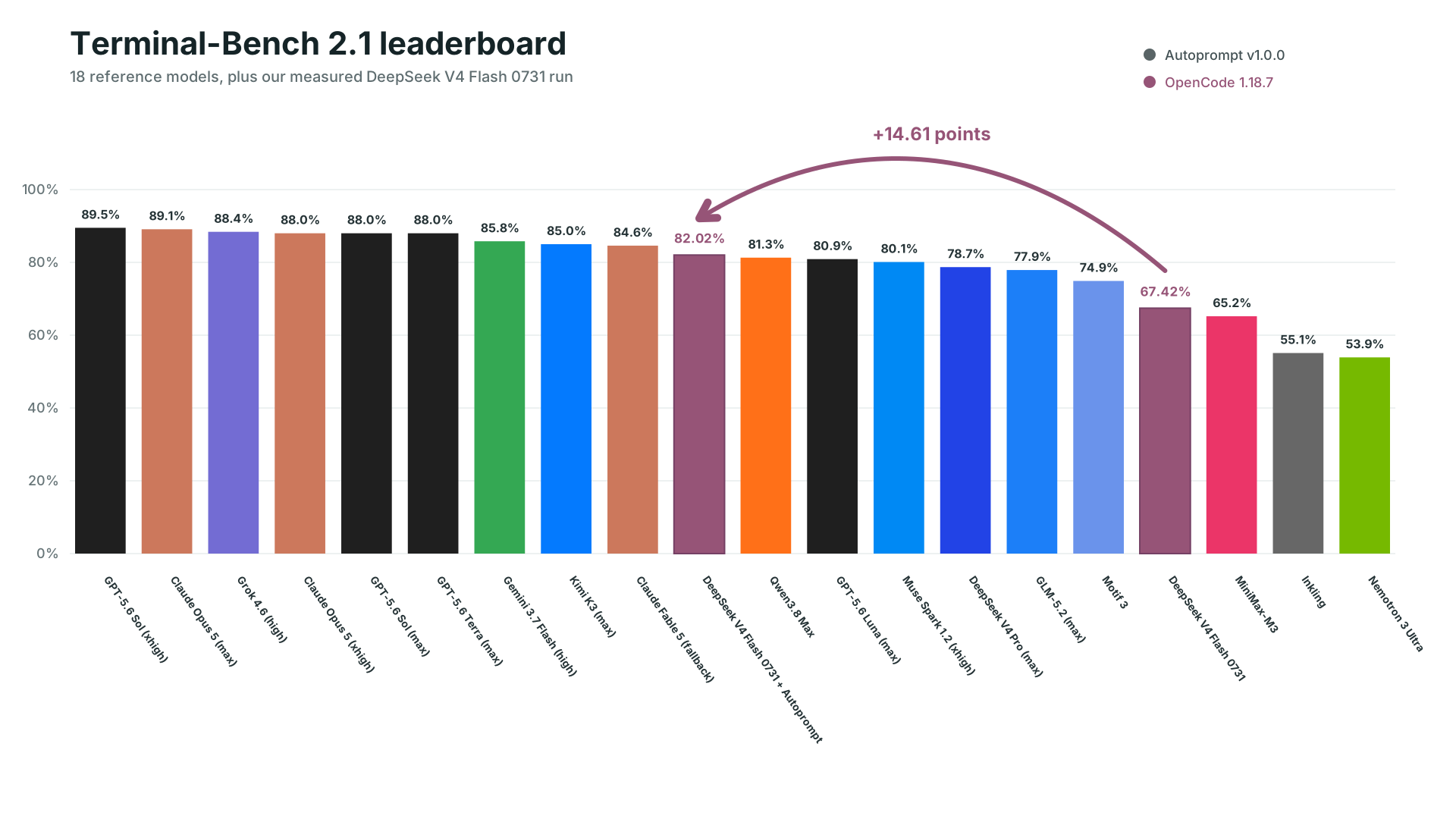
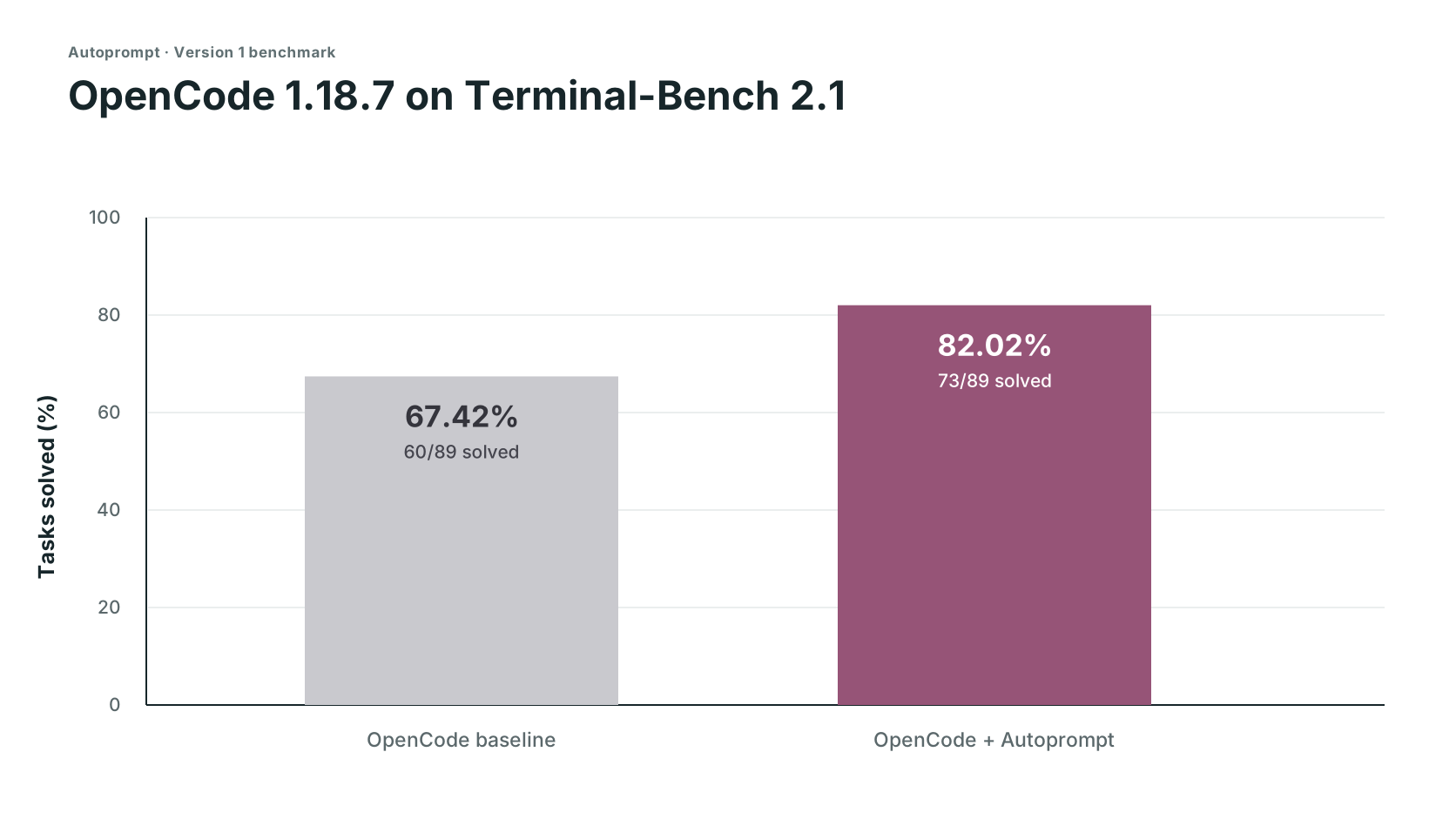
| Track | Solved | Score | Failed |
|---|---|---|---|
| OpenCode | 60/89 | 67.42% | 29 |
| OpenCode + Autoprompt | 73/89 | 82.02% | 16 |
| Change | +13 solves | +14.61 points | 45% fewer |
DeepSeek's 82.7% used its own test setup, so it is a reference point, not a comparable third run. Read the setup and evidence boundaries, or request another benchmark.
Timing and token logs were not retained, so these are planning estimates based on user experience reports, not measured benchmark results. The measured result was 29 to 16 failures (45% fewer) in this run, which translates to about 2x fewer mistakes. Note: for very small tasks, this may differ significantly.
autoprompt activate PROVIDER --target /absolute/project -- "<goal>"
| Part | What it does |
|---|---|
PROVIDER | A key from the support table, such as claude, codex, or grok. |
--target | The project to work on. Omit it to use the current directory. |
-- | Separates launcher options from the request. |
<goal> | The result you want, constraints, and how to check success. |
path= | Optional auto, direct, light, or roadmap, before the quoted goal. See work paths. |
autoprompt activate codex -- path=light "add retries and test the edge cases"
The same controls apply to all eleven providers. Custom model setup
| Control | What it does |
|---|---|
--concurrency tokensaver | Runs at most six subagents at once. |
--concurrency wide | Starts ready, independent work up to the host limit. |
--concurrency custom --max-subs N | Sets your own concurrency limit. |
configure PROVIDER --agents off | Uses the provider's configured model. |
configure PROVIDER --agents MODEL | Selects one model. Add --effort LEVEL where supported. |
configure PROVIDER --agents auto --model-map FILE | Chooses from a measured model registry. A comma-separated model list also requires --model-map. |
Pass concurrency controls after --, before the quoted goal:
autoprompt activate codex -- --concurrency custom --max-subs 4 "add retries and tests"
autoprompt configure claude --agents provider/model --effort low


| Goal | Prompt |
|---|---|
| Fix | autoprompt activate claude -- "fix the registration race and add a regression test" |
| Build | autoprompt activate codex -- --concurrency wide "build the booking flow from API to checkout" |
| Research | autoprompt activate hermes -- "compare job queues against this codebase and recommend one" |
| Limit parallel work | autoprompt activate grok -- --concurrency custom --max-subs 4 "migrate every model" |
Run these commands from your project, or supply --target /absolute/project before --.
No. Give it a clear goal, constraints, and success criteria. Autoprompt handles the execution loop, so you do not have to prompt every step. Details
It can scope, implement, test, review, repair, and verify a goal. It stops for choices that change the result, actions that need your authority, or blockers it cannot safely resolve. Details
The layers separate coordination, management, execution, and independent judgment. That separation keeps one agent from planning, approving, and verifying its own work. Details
path=auto selects a route for the task. direct starts focused work, light adds a short plan, and roadmap organizes dependent work before execution. Every path includes independent verification. Details
--concurrency and --max-subs set parallel work limits. configure --agents selects models, and path= selects how work is planned and coordinated. Details
Because it changes cost, time, and workflow. Start it explicitly with autoprompt activate PROVIDER -- "<goal>".
MIT. Copyright 2026 Spielewoy.
Community: Contributors, Contributing, Code of Conduct, Security, and Support.
johnatag · rollingdice · AincradBot · lunar-me · fatinghenji · c8dhjp4tyv-bit · Alexis-Fiolleau-LaPoste-BGPN · Oscar-Williams
16 followers · starred Aug 2026
269 followers · starred Aug 2026
556 followers · starred Aug 2026
94 followers · starred Aug 2026
Autoprompt is a coding-agent skill that cuts failures by 45% on agentic coding tasks.
See the code
Autoprompt is a coding-agent workflow that cuts failures by 45% by reviewing, fixing, and rechecking its work.
English | 中文 | 한국어 | Español | العربية
Install · Benchmarks · Invocation · Run controls · Workflow · Agents · Examples · FAQ · License
Use the CLI below, or download an installer from GitHub Releases.
npm install -g https://github.com/Spielewoy/autoprompt-skill/releases/download/v2.1.0/autoprompt-skill-2.1.0.tgz
autoprompt
Choose your coding agent, confirm its path, and install. N means enter another path.
For another CLI or IDE, choose Custom coding agent and use the compatibility guide.
git clone https://github.com/Spielewoy/autoprompt-skill
cd autoprompt-skill
npm install -g .
autoprompt
python3 or python, with PyYAMLwindows.sandbox="elevated" selects that sandbox mode; it does not elevate the Autoprompt controller.| Status | Coding agent | Tested version | Key |
|---|---|---|---|
| Working | Claude Code | 2.1.263 | claude |
| Working | Codex | 0.148.0 | codex |
| Working | OpenCode | 1.18.29 | opencode |
| Working | Kilo Code | 7.5.15 | kilo |
| Working | VS Code | 1.136.1 | vscode |
| Working | Prime Agent | 0.7.2 | prime |
| Working | Oh My Pi | 18.1.14 | omp |
| Working | DeepSeek Harness | 0.1.2-rc.1 | deepseek |
| Working | Reasonix | 1.30.0 | reasonix |
| Working | Hermes Agent | 0.21.1 | hermes |
| Working | Grok Build | 1.0.13 | grok |
These versions passed Linux runs. Model and platform availability varies by provider.
Native Windows execution uses AppContainer isolation and Windows Job process ownership, with Node 20 or 24 on x64 or ARM64. Native macOS execution uses the system sandbox and owned-process controls. Windows command tools include the bundled Bash/MSYS/Node runtime; native paths do not require WSL or a VM.
The ten non-Codex providers can run their local capability checks on Linux,
Windows, and macOS. All eleven checks must pass for the installed runtime before
a mission starts; missing, failed, or skipped checks block activation. Codex uses
its separate canonical validation route. On Windows, that route creates a fresh
offline account and an own-SID Windows Filtering Platform policy for each
activation. Their activation-bound lease is retained for resume. Permanent
cleanup removes the account and policy only after owned Jobs drain; uncertain
verification or cleanup fails closed and retains recovery records. The Linux
version table above does not
certify every provider/platform combination. Installer success and
doctor --strict are prerequisite checks; local-canary-required means native
validation is still pending. See configured Linux runtimes
when a native path is unavailable.
autoprompt doctor --strictautoprompt doctor PROVIDER --strictautoprompt, then choose an installed providerautoprompt uninstallautoprompt uninstall PROVIDERautoprompt helpReplace PROVIDER with a key from the support table, such as claude, codex, or prime.
These are version 1 benchmarks. Version 2 benchmarks will follow.
| Track | Solved | Score | Failed |
|---|---|---|---|
| OpenCode | 60/89 | 67.42% | 29 |
| OpenCode + Autoprompt | 73/89 | 82.02% | 16 |
| Change | +13 solves | +14.61 points | 45% fewer |
DeepSeek's 82.7% used its own test setup, so it is a reference point, not a comparable third run. Read the setup and evidence boundaries, or request another benchmark.
Timing and token logs were not retained, so these are planning estimates based on user experience reports, not measured benchmark results. The measured result was 29 to 16 failures (45% fewer) in this run, which translates to about 2x fewer mistakes. Note: for very small tasks, this may differ significantly.
autoprompt activate PROVIDER --target /absolute/project -- "<goal>"
| Part | What it does |
|---|---|
PROVIDER | A key from the support table, such as claude, codex, or grok. |
--target | The project to work on. Omit it to use the current directory. |
-- | Separates launcher options from the request. |
<goal> | The result you want, constraints, and how to check success. |
path= | Optional auto, direct, light, or roadmap, before the quoted goal. See work paths. |
autoprompt activate codex -- path=light "add retries and test the edge cases"
The same controls apply to all eleven providers. Custom model setup
| Control | What it does |
|---|---|
--concurrency tokensaver | Runs at most six subagents at once. |
--concurrency wide | Starts ready, independent work up to the host limit. |
--concurrency custom --max-subs N | Sets your own concurrency limit. |
configure PROVIDER --agents off | Uses the provider's configured model. |
configure PROVIDER --agents MODEL | Selects one model. Add --effort LEVEL where supported. |
configure PROVIDER --agents auto --model-map FILE | Chooses from a measured model registry. A comma-separated model list also requires --model-map. |
Pass concurrency controls after --, before the quoted goal:
autoprompt activate codex -- --concurrency custom --max-subs 4 "add retries and tests"
autoprompt configure claude --agents provider/model --effort low
| Goal | Prompt |
|---|---|
| Fix | autoprompt activate claude -- "fix the registration race and add a regression test" |
| Build | autoprompt activate codex -- --concurrency wide "build the booking flow from API to checkout" |
| Research | autoprompt activate hermes -- "compare job queues against this codebase and recommend one" |
| Limit parallel work | autoprompt activate grok -- --concurrency custom --max-subs 4 "migrate every model" |
Run these commands from your project, or supply --target /absolute/project before --.
No. Give it a clear goal, constraints, and success criteria. Autoprompt handles the execution loop, so you do not have to prompt every step. Details
It can scope, implement, test, review, repair, and verify a goal. It stops for choices that change the result, actions that need your authority, or blockers it cannot safely resolve. Details
The layers separate coordination, management, execution, and independent judgment. That separation keeps one agent from planning, approving, and verifying its own work. Details
path=auto selects a route for the task. direct starts focused work, light adds a short plan, and roadmap organizes dependent work before execution. Every path includes independent verification. Details
--concurrency and --max-subs set parallel work limits. configure --agents selects models, and path= selects how work is planned and coordinated. Details
Because it changes cost, time, and workflow. Start it explicitly with autoprompt activate PROVIDER -- "<goal>".
MIT. Copyright 2026 Spielewoy.
Community: Contributors, Contributing, Code of Conduct, Security, and Support.
johnatag · rollingdice · AincradBot · lunar-me · fatinghenji · c8dhjp4tyv-bit · Alexis-Fiolleau-LaPoste-BGPN · Oscar-Williams
16 followers · starred Aug 2026
269 followers · starred Aug 2026
556 followers · starred Aug 2026
94 followers · starred Aug 2026



