
A lightweight JavaScript game core library for building games and engines.
JavaScript
40
206 commits
updated Sep 18, 2026
See what people are saying (1)
README
KernelPlayJS
A 2D/3D JavaScript game engine that feels like Unity — but lives in your browser. Built on an Entity–Component architecture, fast, flexible, and surprisingly fun to use.
v0.5.1-beta · MIT License · Built by Soubhik Mukherjee
📑 Table of Contents
- 🔴 Live Demo
- ⚡ Why KernelPlayJS?
- 📦 Installation
- 🚀 Quick Start
- 🎮 Core Concepts
- 🎮 New Input System (New in v0.5.0)
- 🖼️ UI System (New in v0.4.0)
- 🎵 AudioSource (New in v0.3.1)
- 🎞️ Animation System (New in v0.3.0)
- ⚡ Performance
- 🎥 Camera System (New in v0.2.3)
- 🔫 Object Pooling
- Physics System
- 🖥️ Renderers
- Frame Rate & Calculation Configs
- 🛠️ Helpers & Utilities
- 🗺️ Roadmap
- 🤝 Contributing
- 🔗 Links
🔴 Live Demo
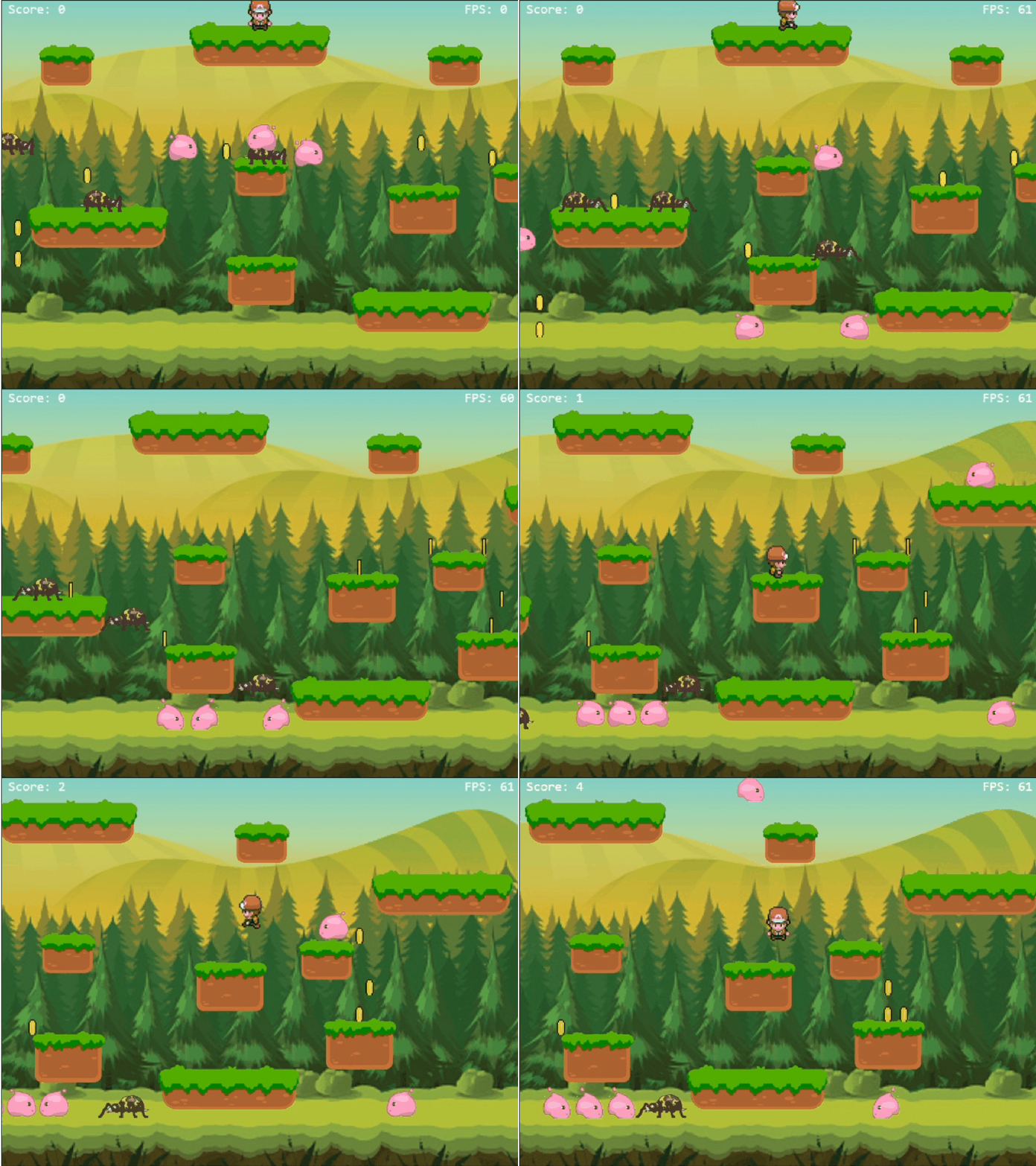
👉 https://soubhik-rjs.github.io/kernelplay-js-demo/examples/parkour-boy/
🏁 Benchmark Demo · 📚 Full Documentation
⚡ Why KernelPlayJS?
Most browser game engines either hold your hand too much or leave you drowning in boilerplate. KernelPlayJS hits the sweet spot — it handles the hard stuff so you can focus on making your game fun.
- Entity–Component–Script architecture — just like Unity
- 3 renderer backends — Canvas 2D, Pixi.js, Three.js — swap with one line
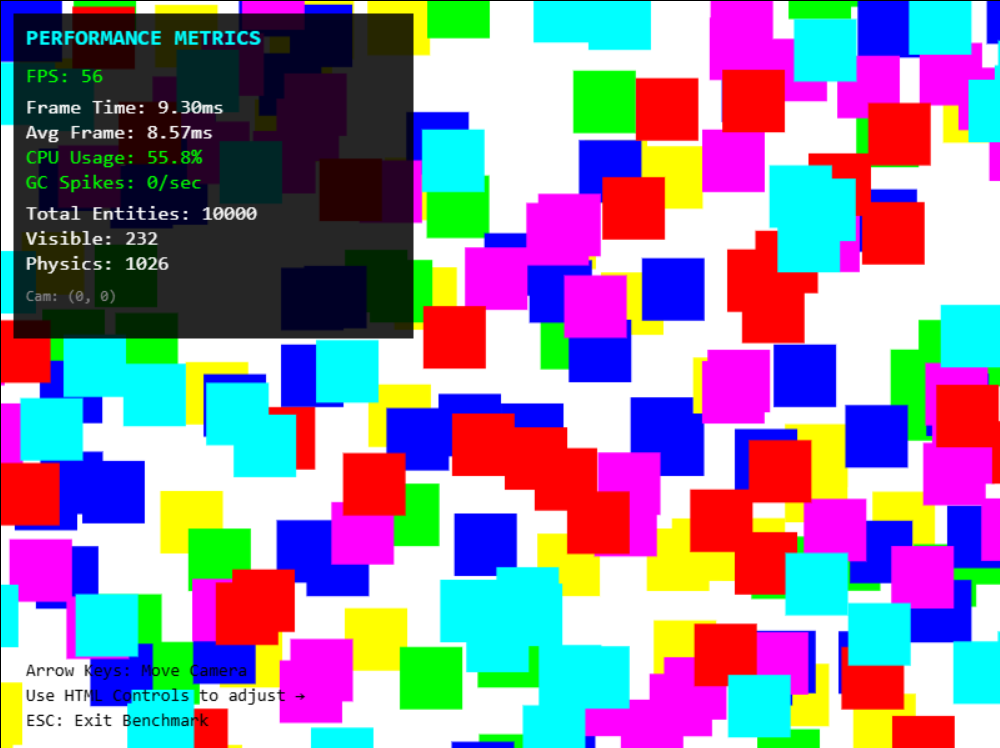
- 10,000+ objects at 60 FPS on a 7th gen i3
- Full animation state machine — triggers, transitions, crossfades
- Zero config object pooling, spatial grid, frustum culling
📦 Installation
npm install kernelplay-js
Or use a CDN:
<script type="importmap">
{
  "imports": {
    "kernelplay-js": "https://cdn.jsdelivr.net/npm/kernelplay-js/dist/kernelplay.es.js"
  }
}
</script>
Optional Renderer Plugins
npm install @kernelplay/pixi-renderer   # GPU-accelerated 2D sprites & effects
npm install @kernelplay/three-renderer   # Full 3D — lights, meshes, shadows
Optional Renderer Plugins Documentation
@kernelplay/pixi-renderer
@kernelplay/three-renderer
🚀 Quick Start
Procedural Approach
import { Game, Scene, Entity, TransformComponent, BoxRenderComponent, CameraComponent, ScriptComponent, Keyboard, KeyCode} from "kernelplay-js";

// function base
const game = new Game({width: 800, height: 600, fps: 60});

const camera = new Entity("MainCamera");

camera.addComponent("transform", new TransformComponent({ position: { x: 400, y: 300, z: 0 } }));
camera.addComponent("camera", new CameraComponent({width: game.config.width, height: game.config.height, isPrimary: true}));

const myScript = {
  onStart() {
    console.log(this);
    this.transform = this.entity.getComponent("transform");
    this.speed = 200;
  },
  update(dt) {
    if(Keyboard.isPressed(KeyCode.W) || Keyboard.isPressed(KeyCode.ArrowUp)){
      this.transform.position.y -= this.speed*dt;
    }
    if(Keyboard.isPressed(KeyCode.S) || Keyboard.isPressed(KeyCode.ArrowDown)){
      this.transform.position.y += this.speed*dt;
    }
    if(Keyboard.isPressed(KeyCode.A) || Keyboard.isPressed(KeyCode.ArrowLeft)){
      this.transform.position.x -= this.speed*dt;
    }
    if(Keyboard.isPressed(KeyCode.D) || Keyboard.isPressed(KeyCode.ArrowRight)){
      this.transform.position.x += this.speed*dt;
    }
  }
}

const box = new Entity();
box.addComponent("transform", new TransformComponent({ position: { x: 300, y: 200 } }));
box.addComponent("renderer", new BoxRenderComponent({ color: "red" }));
box.addComponent("script", new ScriptComponent(myScript));

const MyScene = new Scene("Main");
MyScene.addEntity(camera);
MyScene.addEntity(box);

game.sceneManager.addScene(MyScene);
game.sceneManager.startScene("Main");
game.start();
Instantiated Approach
import { Game, Scene, Entity, TransformComponent, BoxRenderComponent, CameraComponent, ScriptComponent, Keyboard, KeyCode} from "kernelplay-js";

class MyScene extends Scene {
  init() {
    const camera = new Entity("MainCamera");
    camera.addComponent("transform", new TransformComponent({ position: { x: 400, y: 300, z: 0 } }));
    camera.addComponent("camera", new CameraComponent({width: this.game.config.width, height: this.game.config.height, isPrimary: true}));

    const box = new Entity();
    box.addComponent("transform", new TransformComponent({ position: { x: 300, y: 200 } }));
    box.addComponent("renderer", new BoxRenderComponent({ color: "red" }));
    box.addComponent("script", new MyScript({speed: 200}));

    this.addEntity(camera);
    this.addEntity(box);
  }
}

class MyScript extends ScriptComponent{
  onStart() {
    this.transform = this.entity.getComponent("transform");
  }

  update(dt) {
    if (Keyboard.isPressed(KeyCode.W) || Keyboard.isPressed(KeyCode.ArrowUp)) {
      this.transform.position.y -= this.speed * dt;
    }
    if (Keyboard.isPressed(KeyCode.S) || Keyboard.isPressed(KeyCode.ArrowDown)) {
      this.transform.position.y += this.speed * dt;
    }
    if (Keyboard.isPressed(KeyCode.A) || Keyboard.isPressed(KeyCode.ArrowLeft)) {
      this.transform.position.x -= this.speed * dt;
    }
    if (Keyboard.isPressed(KeyCode.D) || Keyboard.isPressed(KeyCode.ArrowRight)) {
      this.transform.position.x += this.speed * dt;
    }
  }
}

class MyGame extends Game {
  init() {
    this.sceneManager.addScene(new MyScene("Main"));
    this.sceneManager.startScene("Main");
  }
}

new MyGame({ width: 800, height: 600, fps: 60 }).start();
🎮 Core Concepts
Everything in KernelPlayJS is built around three ideas:
- Entities — your game objects (player, bullet, enemy, tree)
- Components — data attached to entities (position, physics, renderer)
- Scripts — the brains; custom logic that runs every frame
export class Player extends Entity {
  constructor(x, y) {
    super("Player");
    this.tag = "player";
    this.zIndex = 10;

    this.addComponent("transform",   new TransformComponent({ position: { x, y } }));
    this.addComponent("rigidbody2d", new Rigidbody2DComponent({ mass: 1, gravityScale: 1 }));
    this.addComponent("collider",    new ColliderComponent({ width: 50, height: 50 }));
    this.addComponent("renderer",    new BoxRenderComponent({ color: "red" }));
    this.addComponent("controller",  new PlayerController());
  }
}
Script lifecycle: onAttach → onStart → update → lateUpdate → onDestroy
New Input System (New in v0.5.0)
Unified Keyboard + Gamepad + Touch input through Input.
Touch
Auto-initialized by Game.js.
import { Touch } from "kernelplay-js";
Default joystick zone: left 35% of canvas. getAxis() returns {x,y} in -1..1; no touch = {x:0,y:0}.
update(dt) {
  const a = Touch.getAxis();
  this.rb.addForce(800*a.x, 800*a.y);
}
const LEFT_ZONE = canvas.getBoundingClientRect().width * 0.35;
Swipes are on the right; each returns true once:
if (Touch.swipeUp())    this.rb.addForce(0,-800);
if (Touch.swipeDown())  this.rb.addForce(0,800);
if (Touch.swipeLeft())  this.rb.addForce(-800,0);
if (Touch.swipeRight()) this.rb.addForce(800,0);
Default threshold: 20px.
static #swipe = { threshold: 20 };
Input.TOUCH_SENSITIVITY = 0.6;
Touch API: getAxis(), joystickActive(), joystickOrigin(), joystickCurrent(), joystickRadius(), swipeUp(), swipeDown(), swipeLeft(), swipeRight(), getJoystickState(), update().
Gamepad
Initialize once; call update() once per frame.
import { Gamepad, GamepadButton } from "./Gamepad.js";
Gamepad.init();
function gameLoop() {
  Gamepad.update();
  requestAnimationFrame(gameLoop);
}
Gamepad.isPressed(button);    // held
Gamepad.wasPressed(button);   // pressed this frame
Gamepad.wasReleased(button);  // released this frame
Gamepad.leftStick();          // {x,y,magnitude}
Gamepad.rightStick();         // {x,y,magnitude}
Gamepad.leftTrigger();        // 0..1
Gamepad.rightTrigger();       // 0..1
Gamepad.isLeftTriggerPressed();
Gamepad.isRightTriggerPressed();
Stick x/y = -1..1, magnitude = 0..1. Defaults: DEADZONE=0.15, TRIGGER_THRESHOLD=0.1.
Gamepad.DEADZONE = 0.2;
Gamepad.TRIGGER_THRESHOLD = 0.5;
DEADZONE removes drift and renormalizes values above it.
GamepadButton
A=0, B=1, X=2, Y=3, LB=4, RB=5, LT=6, RT=7, Select=8, Start=9, LS=10, RS=11, DPadUp=12, DPadDown=13, DPadLeft=14, DPadRight=15, Home=16.
InputManager
Input unifies Keyboard, Gamepad, and Touch. No initialization.
import { Input } from "kernelplay-js";
Predefined Actions
moveRight: ArrowRight,D / DPadRight
moveLeft: ArrowLeft,A / DPadLeft
moveUp: ArrowUp,W / DPadUp
moveDown: ArrowDown,S / DPadDown
jump: Space,W / A
attack: Z,J / X
altAttack: X,K / Y
interact: E,F / B
dash: Shift / RB
guard: Ctrl / LB
pause: Escape / Start
confirm: Enter,Space / A
cancel: Escape / B
run: Shift / B
crouch: ArrowDown,S / DPadDown
shoot: Z / RT
reload: R / X
melee: V / RS
aim: X / LT
openMap: M / Select
openInv: I / Y
hotkey1: 1 / DPadUp
hotkey2: 2 / DPadDown
hotkey3: 3 / DPadLeft
hotkey4: 4 / DPadRight
Actions
Input.isPressed("attack");
Input.wasPressed("jump");
Input.wasReleased("jump");
Axes
const h = Input.getAxis("horizontal");
const v = Input.getAxis("vertical");
Priority: Gamepad stick → Touch joystick → Keyboard.
horizontal = left/right; vertical = up/down; horizontalRight = right-stick X; verticalRight = right-stick Y; triggerLeft = LT; triggerRight = RT.
Keyboard axes are -1/0/1; Gamepad/Touch can be fractional.
Custom Actions
Input.registerAction("shoot", {
  keys: [KeyCode.Z, KeyCode.X],
  buttons: [GamepadButton.X, GamepadButton.RB]
});
Input.setBinding("jump", {
  keys: [KeyCode.Space, KeyCode.ArrowUp],
  buttons: [GamepadButton.A, GamepadButton.B]
});
Register before game.start().
JSON Config
{
  "actions": {
    "jump": {"keys":["Space","ArrowUp"],"buttons":["A","B"]},
    "go": {"keys":["x","z"],"buttons":["DPadRight"]}
  }
}
New actions are added; existing actions override defaults; omitted actions remain unchanged.
await Input.loadConfig("./input.config.json");
new MyGame({width:800,height:600,fps:60}).start();
JSON keys match KeyCode; button names match GamepadButton.
Sensitivity
Input.GAMEPAD_SENSITIVITY = 0.8; // default 1.0
Input.TOUCH_SENSITIVITY = 0.6;   // default 1.0
Applied by getAxis(); keyboard is unaffected.
Input API
Input.isPressed(action);
Input.wasPressed(action);
Input.wasReleased(action);
Input.getAxis(axis);

Input.registerAction(name, binding);
Input.setBinding(name, binding);
Input.loadConfig(path);

Input.isTouchDevice();
Input.isGamepadConnected();

Input.keyboard;
Input.gamepad;
Input.touch;
Input.mouse;

Input.GAMEPAD_SENSITIVITY; // 1.0
Input.TOUCH_SENSITIVITY;   // 1.0
Input.DEADZONE;            // 0.15
Typical Controller
import { Input } from "kernelplay-js";

update(dt) {
  const x = Input.getAxis("horizontal");
  const y = Input.getAxis("vertical");
  this.rb.addForce(800*x, 800*y);
  if (Input.wasPressed("jump")) this.jump();
  if (Input.isPressed("attack")) this.attack();
  if (Input.wasPressed("dash")) this.dash();
}
Use Input for normal gameplay; use Gamepad or Touch directly for device-specific behavior.
🖼️ UI System (New in v0.4.0)
A full retained-mode UI layer that sits on top of your game canvas — panels, text, buttons, bars, inputs, and world-space labels, all themeable from one place.
Global Theme
Override any theme value globally — every element inherits it, or reset back to defaults:
game.ui.theme.set({
    primaryColor:    "#e63946",
    fontFamily:      "Press Start 2P, monospace",
    fontSize:        12,
    borderRadius:    4,
    backgroundColor: "#0a0a1a",
});

game.ui.theme.reset();
Core Elements
Every element is created with game.ui.add(new UIElement({...})), positioned with an anchor + offset, and styled per-instance via a style object.
import { UIPanel, UIText, UIButton, UIImage, UIProgressBar, UICheckbox, UISlider, UIInputField } from "./ui/index.js";

// Panel — container / background box
const panel = game.ui.add(new UIPanel({
    anchor: "center", width: 300, height: 200,
    style: { surfaceColor: "#1a1a2e", borderColor: "#e63946", borderWidth: 2, borderRadius: 12 },
}));

// Text — label, update .text anytime
const label = game.ui.add(new UIText({
    text: "Score: 0", anchor: "topLeft", offset: { x: 20, y: 20 },
    style: { textColor: "#ffffff", fontSize: 18, fontWeight: "bold" },
}));
label.text = `Score: ${this.score}`;

// Button — onClick + disabled toggle
const btn = game.ui.add(new UIButton({
    label: "Play", anchor: "center", width: 160, height: 48,
    style: { primaryColor: "#4a90e2", hoverColor: "#5aa0f2", pressColor: "#3a80d2" },
}));
btn.onClick = () => game.sceneManager.startScene("Game");
btn.disabled = true;

// Image — sprite / icon
const icon = game.ui.add(new UIImage({
    src: "./assets/health_icon.png", anchor: "topLeft", offset: { x: 10, y: 10 }, width: 32, height: 32,
}));

// Progress Bar — health / loading, fills in any of 4 directions
const healthBar = game.ui.add(new UIProgressBar({
    value: 1.0, direction: "left", anchor: "topLeft", offset: { x: 20, y: 20 }, width: 200, height: 20,
    style: { progressTrackColor: "#333350", progressFillColor: "#e74c3c", borderRadius: 10 },
}));
healthBar.setValue(this.health / this.maxHealth);

// Checkbox — toggle option
const sfxToggle = game.ui.add(new UICheckbox({
    label: "Sound Effects", checked: true, anchor: "center", offset: { x: 0, y: -20 }, width: 200, height: 30,
}));
sfxToggle.onChange = (checked) => game.audio.setSFXVolume(checked ? 1 : 0);

// Slider — volume / sensitivity
const volumeSlider = game.ui.add(new UISlider({
    value: 0.8, min: 0, max: 1, showValue: true, anchor: "center", offset: { x: 0, y: 40 }, width: 220, height: 30,
}));
volumeSlider.onChange = (value) => game.audio.setMasterVolume(value);

// Input Field — text entry (set password: true for masked input)
const nameField = game.ui.add(new UIInputField({
    placeholder: "Enter your name...", maxLength: 20, anchor: "center", width: 260, height: 42,
}));
nameField.onSubmit = (value) => savePlayerName(value);
UIImageButton — three modes
// 1. Image background + label
new UIImageButton({ src: "./assets/btn.png", label: "Play" })

// 2. Icon only
new UIImageButton({ src: "./assets/settings_icon.png", label: null })

// 3. Sprite-sheet states — different region per state
new UIImageButton({
    src: "./assets/btn_sheet.png",
    states: {
        normal:   { x: 0,   y: 0, w: 160, h: 60 },
        hover:    { x: 160, y: 0, w: 160, h: 60 },
        press:    { x: 320, y: 0, w: 160, h: 60 },
        disabled: { x: 480, y: 0, w: 160, h: 60 },
    }
})
UIBitmapText — pixel-font rendering from a sprite sheet
const score = game.ui.add(new UIBitmapText({
    src: "./assets/font.png", text: "SCORE: 0",
    charWidth: 8, charHeight: 8, sheetCols: 16, charOffset: 32,
    scale: 3, spacing: 1, anchor: "topLeft", offset: { x: 20, y: 20 },
    tint: "#ffdd00",
}));

score.setText(`SCORE: ${this.score}`);
score.setTint("#ff0000");
World Space UI
Set screenSpace: false and the element's offset becomes a world-space position that moves with the camera — great for name tags and boss labels:
const nameTag = game.ui.add(new UIText({
    text: "Boss", screenSpace: false,
    offset: { x: enemy.transform.position.x, y: enemy.transform.position.y - 60 },
    style: { textColor: "#e74c3c", fontSize: 12 },
}));

update(dt) {
    nameTag.offset.x = this.transform.position.x;
    nameTag.offset.y = this.transform.position.y - 60;
}
UILayers (New in v0.4.1)
Default layers — always available, never need to create them:
"World"   order: 0   — world space UI (damage numbers, name tags)
"HUD"     order: 10  — health bars, score, ammo
"Menu"    order: 20  — pause menu, settings
"Overlay" order: 30  — fades, popups, loading screens
// default layers — no setup needed
game.ui.add(new UIProgressBar({ ... }), "HUD");
game.ui.add(new UIButton({ ... }),      "Menu");
game.ui.add(new UIText({ ... }),        "Overlay");

// custom layer
game.ui.addLayer("Minimap", 5);
game.ui.add(new UIImage({ ... }), "Minimap");

// control layers
game.ui.hideLayer("Menu");
game.ui.showLayer("Menu");
game.ui.lockLayer("HUD");      // HUD visible but not clickable
game.ui.toggleLayer("Menu");   // pause menu open/close
UIRaycast — skip game input when UI is hit
update(dt) {
    if (Mouse.wasPressed(MouseButton.Left)) {
        if (game.ui.raycast.isUIAt(Mouse.x, Mouse.y)) return; // UI consumed the click
        const hit = this.raycast(worldPos.x, worldPos.y);
    }
}
Find, update & remove elements
const btn = game.ui.find("UIButton");
btn.label = "Restart";
btn.onClick = () => restartGame();

game.ui.remove(btn);
game.ui.clear();   // clear all UI
HUD example — health, score & pause button
class HUD {
    constructor(game) {
        this.ui = game.ui;
        this.healthBar = this.ui.add(new UIProgressBar({
            anchor: "topLeft", offset: { x: 20, y: 20 }, width: 200, height: 18,
            style: { progressFillColor: "#e74c3c" },
        }));
        this.scoreLabel = this.ui.add(new UIText({
            text: "Score: 0", anchor: "topRight", offset: { x: 20, y: 20 },
            style: { fontSize: 16, fontWeight: "bold", textAlign: "right" },
        }));
        const pauseBtn = this.ui.add(new UIButton({
            label: "⏸", anchor: "topRight", offset: { x: 20, y: 60 }, width: 40, height: 40,
        }));
        pauseBtn.onClick = () => game.paused = !game.paused;
    }

    update(player) {
        this.healthBar.setValue(player.health / player.maxHealth);
        this.scoreLabel.text = `Score: ${player.score}`;
    }
}
Anchor reference
"topLeft"       "topCenter"       "topRight"
"middleLeft"    "center"          "middleRight"
"bottomLeft"    "bottomCenter"    "bottomRight"
offset: { x, y } — pixel offset from that anchor point inward.
🎵 AudioSource (New in v0.3.1)
Setup — attach to any entity
// Minimal — just a default clip
entity.addComponent("audio", new AudioSource({
    clip:        './assets/jump.mp3',
    volume:      0.8,
    playOnStart: false,
}));

// Named clips — recommended way
entity.addComponent("audio", new AudioSource({
    clips: {
        run:    './assets/run.mp3',
        jump:   './assets/jump.mp3',
        hurt:   './assets/hurt.mp3',
        attack: './assets/sword_swing.mp3',
        death:  './assets/death.mp3',
    },
    volume: 1.0,
}));

// Auto-play on spawn (great for ambient objects)
entity.addComponent("audio", new AudioSource({
    clips: {
        ambient: './assets/fire_crackle.mp3',
    },
    clip:        'ambient',
    loop:        true,
    playOnStart: true,
    volume:      0.6,
}));
Pre-load clips (zero delay on first play)
// In your scene's init() — before anything plays
async init() {
    await this.game.audio.loadAll([
        './assets/run.mp3',
        './assets/jump.mp3',
        './assets/hurt.mp3',
        './assets/theme.mp3',
    ]);
}
playOneShot — overlapping SFX
// Uses entity's own transform position automatically
this.audio.playOneShot('jump');

// Override volume
this.audio.playOneShot('attack', { volume: 0.7 });

// Raw path still works if no named clips set up
this.audio.playOneShot('./assets/coin.mp3', { volume: 0.5 });

// Custom world position (e.g. explosion at a different spot)
this.audio.playOneShot('explode', { position: { x: 400, y: 300 } });
playLoop — looping sounds (idempotent — safe to call every frame)
// Safe to call every frame — won't stack
this.audio.playLoop('run', { volume: 0.5 });

// Stop by name
this.audio.stopLoop('run');

// Check if playing
if (this.audio.isPlaying('run')) {
    this.audio.stopLoop('run');
}

// Multiple loops at once (e.g. engine + wind)
this.audio.playLoop('engine', { volume: 0.6 });
this.audio.playLoop('wind',   { volume: 0.3 });

// Stop one, keep the other
this.audio.stopLoop('engine');

// Stop all loops
this.audio.stopAllLoops();
Player controller — run / jump / hurt
update(dt) {
    const isMoving = rb.velocity.x !== 0;

    // Run sound — just two lines, no flags needed
    if (isMoving && rb.isGrounded) {
        this.audio.playLoop('run', { volume: 0.5 });
    } else {
        this.audio.stopLoop('run');
    }

    // Jump
    if (rb.isGrounded && Keyboard.wasPressed(KeyCode.Space)) {
        rb.addForce(0, -600, "impulse");
        this.audio.stopLoop('run');          // cut run sound immediately
        this.audio.playOneShot('jump', { volume: 0.8 });
    }
}

takeDamage() {
    this.audio.playOneShot('hurt', { volume: 1.0 });
}

die() {
    this.audio.stopAll();
    this.audio.playOneShot('death', { volume: 1.0 });
}
Background music — via AudioManager directly
// game.audio is your AudioManager instance

// Start BGM — never fades with distance
game.audio.playBGM('./assets/theme.mp3', { loop: true, fadeDuration: 1.5 });

// Switch track with crossfade
game.audio.playBGM('./assets/boss.mp3', { fadeDuration: 2.0 });

// Stop with fade out
game.audio.stopBGM(1.0);

// Volume controls
game.audio.setMasterVolume(0.8);
game.audio.setBGMVolume(0.6);
game.audio.setSFXVolume(1.0);
Enemy — ambient spatial sound
// Enemy that crackles — gets quieter as player moves away
entity.addComponent("audio", new AudioSource({
    clips: {
        idle:   './assets/monster_idle.mp3',
        attack: './assets/monster_roar.mp3',
        death:  './assets/monster_death.mp3',
    },
    volume: 0.8,
}));

// In enemy script
onStart() {
    this.audio = this.entity.getComponent("audio");
    this.audio.playLoop('idle'); // starts spatialized at entity position
}

onAttack() {
    this.audio.playOneShot('attack');
}

onDeath() {
    this.audio.stopAll();
    this.audio.playOneShot('death');
    this.entity.destroy();
}
Fire / torch — ambient object
entity.addComponent("audio", new AudioSource({
    clips:       { fire: './assets/fire.mp3' },
    clip:        'fire',
    loop:        true,
    playOnStart: true,   // starts automatically on spawn
    volume:      0.7,
}));
// No script needed — just works, fades as player walks away
isPlaying — conditional logic
// Don't interrupt attack sound if already playing
if (!this.audio.isPlaying('attack')) {
    this.audio.playOneShot('attack');
}

// Swap ambient tracks on zone change
if (this.audio.isPlaying('forest')) {
    this.audio.stopLoop('forest');
    this.audio.playLoop('cave');
}
🎧 AudioListener — attach to camera entity
// AudioListener goes on the camera so spatial audio
// is always relative to what the player sees

camera.addComponent("listener", new AudioListener());

// AudioManager.update() must run every frame in your game loop
// game.audio.update()  ← add this to your loop if not already there
Summary
| Method | What it does |
|---|---|
playOneShot(clip, opts) | One-shot SFX, overlaps fine |
playLoop(clip, opts) | Looping sound, safe to call every frame |
stopLoop(clip) | Stop one loop by name |
stopAllLoops() | Stop all loops, keep one-shots |
stopAll() | Stop everything |
isPlaying(clip) | Check if a loop is active |
play() | Play the default clip (respects loop flag) |
🎞️ Animation System (New in v0.3.0)
The animation system has three layers that work together:
AnimationClip        — pure data (frames, tracks, timing)
AnimatorController   — state machine (states, transitions, parameters)
AnimatorComponent    — runtime (drives sprites or 3D properties each frame)
AnimationClip
Define a clip from a sprite sheet using frame indices (KernelPlayJS calculates the source rect for you):
const walkClip = new AnimationClip({
  name:        "walk",
  frames:      [8, 9, 10, 11, 12, 13],
  frameRate:   12,
  loop:        true,
  gridWidth:   8,
  frameWidth:  32,
  frameHeight: 32,
});
Or use explicit pixel rects per frame:
const walkClip = new AnimationClip({
  frames: [
    { x: 0,  y: 32, w: 32, h: 32 },
    { x: 32, y: 32, w: 32, h: 32 },
  ],
  frameRate: 12,
  loop: true,
});
For 3D / property animation, use tracks (no sprite needed):
const bobClip = new AnimationClip({
  name: "bob", loop: true, length: 1.5,
  tracks: {
    "transform.position.y": [
      { time: 0.0,  value: 0   },
      { time: 0.75, value: 1.5 },
      { time: 1.5,  value: 0   },
    ],
  },
});
Track values are linearly interpolated between keyframes. Supported types: number, { x, y, z } vectors.
AnimatorController — State Machine
const controller = new AnimatorController()

  // Parameters drive transitions
  .addParameter("speed",      "float",   0)
  .addParameter("isGrounded", "bool",    false)
  .addParameter("jump",       "trigger")   // auto-resets after firing

  // States (first added = entry state)
  .addState("idle", idleClip)
  .addState("walk", walkClip)
  .addState("jump", jumpClip)

  // Transitions — all conditions must be true
  .addTransition("idle", "walk", {
    conditions:  [{ param: "speed", op: ">", value: 0.1 }],
    hasExitTime: false,
    duration:    0,
  })
  .addTransition("walk", "idle", {
    conditions:  [{ param: "speed", op: "<=", value: 0.1 }],
    hasExitTime: false,
    duration:    0,
  })

  // AnyState → fires from any state (great for jump, hurt, death)
  .addAnyStateTransition("jump", {
    conditions: [{ param: "jump", op: "trigger" }],
    priority:   10,
  });
Condition operators: "true" "false" ">" "<" ">=" "<=" "==" "!=" "trigger"
AnimatorComponent — Runtime
entity.addComponent("sprite",   new SpriteComponent({ image: "./assets/player.png", width: 32, height: 32 }));
entity.addComponent("animator", new AnimatorComponent({ controller, autoPlay: true }));
Driving it from a script each frame:
update(dt) {
  this.animator.setParameter("speed",      this.rb.velocity.x !== 0 ? 1 : 0);
  this.animator.setParameter("isGrounded", this.rb.isGrounded);

  if (Keyboard.wasPressed(KeyCode.Space) && this.rb.isGrounded) {
    this.rb.addForce(0, -600, "impulse");
    this.animator.setTrigger("jump");
  }
}
Useful methods:
animator.play("idle")           // jump to state immediately
animator.crossFade("run", 0.2)  // smooth 200ms blend
animator.stop()                 // freeze on current frame
animator.currentState           // string — current state name
animator.isInState("walk")      // bool
Callbacks:
animator.onStateEnter   = (state) => { if (state === "attack") this.hitbox.enabled = true; };
animator.onStateExit    = (state) => { if (state === "attack") this.hitbox.enabled = false; };
animator.onAnimationEnd = (state) => { if (state === "death")  this.entity.destroy(); };
Legacy Shorthand
Don't need a state machine? Pass clips directly — a simple controller is built automatically:
entity.addComponent("animator", new AnimatorComponent({
  animations: {
    idle: { frames: [0,1,2,3],     frameRate: 8,  loop: true, gridWidth: 8, frameWidth: 32, frameHeight: 32 },
    walk: { frames: [8,9,10,11],   frameRate: 12, loop: true, gridWidth: 8, frameWidth: 32, frameHeight: 32 },
  },
  defaultAnimation: "idle",
}));

animator.play("walk");
animator.play("idle");
Full Platformer Example
const GRID = { gridWidth: 8, frameWidth: 32, frameHeight: 32 };

const idleClip = new AnimationClip({ name: "idle", frames: [0,1,2,3],         frameRate: 8,  loop: true,  ...GRID });
const walkClip = new AnimationClip({ name: "walk", frames: [8,9,10,11,12,13], frameRate: 12, loop: true,  ...GRID });
const jumpClip = new AnimationClip({ name: "jump", frames: [16],              frameRate: 10, loop: false, length: 0.5, ...GRID });
const hurtClip = new AnimationClip({ name: "hurt", frames: [24,25],           frameRate: 10, loop: false, ...GRID });

const controller = new AnimatorController()
  .addParameter("speed",      "float",   0)
  .addParameter("isGrounded", "bool",    false)
  .addParameter("jump",       "trigger")
  .addParameter("hurt",       "trigger")

  .addState("idle", idleClip)
  .addState("walk", walkClip)
  .addState("jump", jumpClip)
  .addState("hurt", hurtClip)

  .addTransition("idle", "walk", { conditions: [{ param: "speed", op: ">",    value: 0.1 }, { param: "isGrounded", op: "true"  }], hasExitTime: false, duration: 0 })
  .addTransition("walk", "idle", { conditions: [{ param: "speed", op: "<=",   value: 0.1 }],                                        hasExitTime: false, duration: 0 })
  .addTransition("walk", "jump", { conditions: [{ param: "isGrounded", op: "false" }],                                              hasExitTime: false, duration: 0 })
  .addTransition("jump", "idle", { conditions: [{ param: "isGrounded", op: "true"  }],                                              hasExitTime: false, duration: 0 })
  .addAnyStateTransition("jump", { conditions: [{ param: "jump", op: "trigger" }], priority: 10 })
  .addAnyStateTransition("hurt", { conditions: [{ param: "hurt", op: "trigger" }], priority: 20 });

entity.addComponent("sprite",   new SpriteComponent({ image: "./assets/player.png", width: 32, height: 32 }));
entity.addComponent("animator", new AnimatorComponent({ controller }));
entity.addComponent("script",   new PlayerScript());
⚡ Performance
Tested on i3 7th Gen, 8GB RAM — a deliberately modest machine:
| Scenario | Objects | Physics | FPS |
|---|---|---|---|
| Light | 1,000 | 10% | 60 |
| Medium | 5,000 | 10% | 60 |
| Heavy | 10,000 | 10% | 50–60 |
| Extreme | 20,000 | 5% | 30–40 |
| Physics Heavy | 3,000 | 100% | 40–45 |
On modern hardware (i5 10th gen+), 60 FPS holds even at Extreme.
How it stays fast:
- Spatial grid — turns O(n²) collision into O(n), automatically
- Frustum culling — skips anything off-screen entirely
- Object pooling — spawn 1000+ bullets/sec with zero GC stutters
- Dirty flag system — 91% fewer transform recalculations for static objects
- Batch rendering — groups draws by color, cuts canvas state changes by 100×
🎥 Camera System (New in v0.2.3)
The camera is now a full Entity in your scene:
const camera = new Entity("MainCamera");

camera.addComponent("transform", new TransformComponent({ position: { x: 400, y: 300, z: 0 } }));
camera.addComponent("camera", new CameraComponent({
  width:       this.game.config.width,
  height:      this.game.config.height,
  target:      player,       // smooth follow
  followSpeed: 5,
  offset:      { x: 0, y: -50, z: 0 },
  bounds:      { minX: 0, maxX: 2000, minY: 0, maxY: 1500 },
  isPrimary:   true,
}));

this.addEntity(camera);
Useful methods:
this.camera.shake(20, 0.5);                         // screen shake — intensity, duration
this.camera.screenToWorld(Mouse.x, Mouse.y);        // screen → world coords
this.camera.worldToScreen(pos.x, pos.y);            // world → screen coords
this.camera.isInView(x, y);                         // visibility check
this.setPrimaryCamera(this.camera2);                // switch cameras
🔫 Object Pooling
No setup needed — KernelPlayJS silently recycles destroyed entities:
this.instantiate(Bullet, x, y);   // reuses a pooled entity if one exists
this.destroy();                    // returns to pool, not the garbage collector
Bullet prefabs must use the function form (not class extends Entity):
export function Bullet(entity, x = 0, y = 0) {
  entity.name = "Bullet";
  entity.tag  = "bullet";
  entity.addComponent("transform",   new TransformComponent({ position: { x, y } }));
  entity.addComponent("rigidbody2d", new Rigidbody2DComponent({ useGravity: false }));
  entity.addComponent("collider",    new ColliderComponent({ isTrigger: true }));
  entity.addComponent("renderer",    new BoxRenderComponent({ color: "#00ff11" }));
  entity.addComponent("script",      new BulletScript());
}
Physics System
Built-in 2D physics with collision detection, rigidbodies, and gravity
Physics-Enabled Entity
Combine a Rigidbody2DComponent and ColliderComponent to get full physics.
const player = new Entity("Player");

player.addComponent("transform", new TransformComponent({
  position: { x: 400, y: 100 }
}));
player.addComponent("rigidbody2d", new Rigidbody2DComponent({
  useGravity: true,
  mass: 1,
  drag: 0.02
}));
player.addComponent("collider", new ColliderComponent());

scene.addEntity(player);
🖥️ Renderers
Swap the backend with one line — your ECS, physics, and scripts stay identical.
| Canvas 2D | Pixi.js 2D | Three.js 3D | |
|---|---|---|---|
| Install | None | @kernelplay/pixi-renderer | @kernelplay/three-renderer |
| Rendering | CPU | GPU (WebGL) | GPU (WebGL) |
| Best for | Prototypes, logic-heavy | Sprite games, VFX | 3D, isometric |
| Object ceiling | ~10,000 | 20,000+ | Scene-dependent |
// Canvas 2D — default, zero dependencies
new MyGame({ width: 800, height: 600, fps: 60 }).start();

// Pixi.js — GPU-accelerated sprites
import { PixiRenderer } from "@kernelplay/pixi-renderer";
new MyGame({ renderer: new PixiRenderer(), width: 800, height: 600 }).start();

// Three.js — full 3D
import { ThreeRenderer } from "@kernelplay/three-renderer";
new MyGame({ renderer: new ThreeRenderer(), width: 800, height: 600 }).start();
Using a CSS selector
const game = new MyGame({
  width: 800,
  height: 600,
  container: "#game-container",
});
<div id="game-container"></div>
The engine will find the element using the selector and append the game canvas to it.
Frame Rate & Calculation Configs
Configure your game's rendering, update, and physics loops independently using the engine initialization object.
const game = new MyGame({
  width: 800,
  height: 600,
  fps: 60,
  calcRate: 60,
  fixedRate: 60,
});
Configuration Properties
| Property | Type | Description |
|---|---|---|
fps | number | Target frames per second for rendering visual updates. |
calcRate | number | Frequency per second for standard game logic updates. |
fixedRate | number | Frequency per second for physics and deterministic updates (fixed delta time). |
Loop Rate Modifiers
Dynamically alter or query the execution frequencies of your rendering, standard logic calculation, and fixed physics loops during runtime.
setFPS(fps)
Sets the target frames per second for rendering visual updates.
- Arguments:
fps(number) — The target frames per second.
getFPS()
Retrieves the current target frames per second for rendering.
- Returns:
number— The target frames per second rounded to the nearest integer.
setcalcRate(rate)
Sets the frequency per second for executing standard game logic updates.
- Arguments:
rate(number) — The target updates per second.
getcalcRate()
Retrieves the current target frequency for standard game logic updates.
- Returns:
number— The updates per second rounded to the nearest integer.
setfixedRate(rate)
Sets the frequency per second for executing physics and deterministic updates.
- Arguments:
rate(number) — The target fixed updates per second.
getfixedRate()
Retrieves the current target frequency for physics and deterministic updates.
- Returns:
number— The fixed updates per second rounded to the nearest integer.
🛠️ Helpers & Utilities
Shorthand API (inside ScriptComponent)
this.destroy()                      // entity.destroy()
this.findByTag("wall")              // scene.findByTag("wall")
this.findAllByTag("wall")           // scene.findAllByTag("wall")
this.raycast(Mouse.x, Mouse.y)      // scene.raycast(...)
this.camera                         // scene.game.camera
Input
if (Keyboard.isDown(KeyCode.ArrowRight))    rb.velocity.x = speed;
if (Keyboard.wasPressed(KeyCode.Space))     rb.velocity.y = -jumpForce;
if (Mouse.wasPressed(MouseButton.Left))     this.instantiate(Bullet, x, y);
Math & Vectors
Vector2.add(a, b)           // → Vector2
Vector2.distance(a, b)      // → number
Vector2.distanceSq(a, b)      // → avoiding Math.sqrt()
Vector2.lerp(a, b, 0.5)     // → smooth midpoint
Mathf.clamp(health, 0, 100)
Mathf.lerp(current, target, 0.1)
Mathf.degToRad(90)
Timer & Cooldown
const waveTimer    = new Timer(5.0, true);    // 5s, auto-starts
const fireCooldown = new Cooldown(0.2);       // 5 shots/sec

update(dt) {
  waveTimer.update(dt);
  if (waveTimer.isFinished()) { spawnNextWave(); waveTimer.start(); }

  fireCooldown.update(dt);
  if (Mouse.wasPressed(MouseButton.Left) && fireCooldown.trigger()) {
    this.instantiate(Bullet, x, y);
  }
}
Prop Injection
import { ref } from "kernelplay-js";

player.addComponent("controller", new PlayerController({
  enemy:   ref(5),    // entity ID 5
  camera1: ref(100),
  force:   800,
}));

// Inside PlayerController — available as this.enemy, this.camera1, this.force
Debug Mode
game.config.debugPhysics = true;   // or press F1 in-game
// 🟢 Green = grounded · 🔴 Red = airborne · 🟡 Yellow = trigger
🗺️ Roadmap
v0.3.0 — Animation System
✅ AnimationClip · ✅ AnimatorController · ✅ AnimatorComponent · ✅ State machine · ✅ Triggers & crossfades · ✅ 3D property tracks
v0.3.1 — Audio system ✅
v0.3.3 — Performance Optimization & Bugs Fixed ✅
v0.4.0 (Current) — UI System ✅
v0.4.x — State machine component · Physics constraints · Tilemap support
v0.5.x — Particle effects · Scene save/load · Static object optimization · Continuous collision detection
🤝 Contributing
Contributions welcome — especially: audio system, particle effects, documentation, bug fixes, renderer plugins.
See CONTRIBUTING.md to get started.
🔗 Links
- GitHub: https://github.com/Soubhik1000/kernelplay
- NPM: https://www.npmjs.com/package/kernelplay-js
- Docs: https://soubhik-rjs.github.io/kernelplay-js-demo/docs/
- Discord https://discord.gg/bHfe96EnNR
Built with ❤️ by Soubhik Mukherjee · KernelPlayJS — Production speed, Unity feel
Contributors


Similar repos


Languages
JavaScript
100.0%
A lightweight JavaScript game core library for building games and engines.
JavaScript
40
206 commits
updated Sep 18, 2026
See what people are saying (1)
README
KernelPlayJS
A 2D/3D JavaScript game engine that feels like Unity — but lives in your browser. Built on an Entity–Component architecture, fast, flexible, and surprisingly fun to use.
v0.5.1-beta · MIT License · Built by Soubhik Mukherjee
📑 Table of Contents
- 🔴 Live Demo
- ⚡ Why KernelPlayJS?
- 📦 Installation
- 🚀 Quick Start
- 🎮 Core Concepts
- 🎮 New Input System (New in v0.5.0)
- 🖼️ UI System (New in v0.4.0)
- 🎵 AudioSource (New in v0.3.1)
- 🎞️ Animation System (New in v0.3.0)
- ⚡ Performance
- 🎥 Camera System (New in v0.2.3)
- 🔫 Object Pooling
- Physics System
- 🖥️ Renderers
- Frame Rate & Calculation Configs
- 🛠️ Helpers & Utilities
- 🗺️ Roadmap
- 🤝 Contributing
- 🔗 Links
🔴 Live Demo
👉 https://soubhik-rjs.github.io/kernelplay-js-demo/examples/parkour-boy/
🏁 Benchmark Demo · 📚 Full Documentation
⚡ Why KernelPlayJS?
Most browser game engines either hold your hand too much or leave you drowning in boilerplate. KernelPlayJS hits the sweet spot — it handles the hard stuff so you can focus on making your game fun.
- Entity–Component–Script architecture — just like Unity
- 3 renderer backends — Canvas 2D, Pixi.js, Three.js — swap with one line
- 10,000+ objects at 60 FPS on a 7th gen i3
- Full animation state machine — triggers, transitions, crossfades
- Zero config object pooling, spatial grid, frustum culling
📦 Installation
npm install kernelplay-js
Or use a CDN:
<script type="importmap">
{
  "imports": {
    "kernelplay-js": "https://cdn.jsdelivr.net/npm/kernelplay-js/dist/kernelplay.es.js"
  }
}
</script>
Optional Renderer Plugins
npm install @kernelplay/pixi-renderer   # GPU-accelerated 2D sprites & effects
npm install @kernelplay/three-renderer   # Full 3D — lights, meshes, shadows
Optional Renderer Plugins Documentation
@kernelplay/pixi-renderer
@kernelplay/three-renderer
🚀 Quick Start
Procedural Approach
import { Game, Scene, Entity, TransformComponent, BoxRenderComponent, CameraComponent, ScriptComponent, Keyboard, KeyCode} from "kernelplay-js";

// function base
const game = new Game({width: 800, height: 600, fps: 60});

const camera = new Entity("MainCamera");

camera.addComponent("transform", new TransformComponent({ position: { x: 400, y: 300, z: 0 } }));
camera.addComponent("camera", new CameraComponent({width: game.config.width, height: game.config.height, isPrimary: true}));

const myScript = {
  onStart() {
    console.log(this);
    this.transform = this.entity.getComponent("transform");
    this.speed = 200;
  },
  update(dt) {
    if(Keyboard.isPressed(KeyCode.W) || Keyboard.isPressed(KeyCode.ArrowUp)){
      this.transform.position.y -= this.speed*dt;
    }
    if(Keyboard.isPressed(KeyCode.S) || Keyboard.isPressed(KeyCode.ArrowDown)){
      this.transform.position.y += this.speed*dt;
    }
    if(Keyboard.isPressed(KeyCode.A) || Keyboard.isPressed(KeyCode.ArrowLeft)){
      this.transform.position.x -= this.speed*dt;
    }
    if(Keyboard.isPressed(KeyCode.D) || Keyboard.isPressed(KeyCode.ArrowRight)){
      this.transform.position.x += this.speed*dt;
    }
  }
}

const box = new Entity();
box.addComponent("transform", new TransformComponent({ position: { x: 300, y: 200 } }));
box.addComponent("renderer", new BoxRenderComponent({ color: "red" }));
box.addComponent("script", new ScriptComponent(myScript));

const MyScene = new Scene("Main");
MyScene.addEntity(camera);
MyScene.addEntity(box);

game.sceneManager.addScene(MyScene);
game.sceneManager.startScene("Main");
game.start();
Instantiated Approach
import { Game, Scene, Entity, TransformComponent, BoxRenderComponent, CameraComponent, ScriptComponent, Keyboard, KeyCode} from "kernelplay-js";

class MyScene extends Scene {
  init() {
    const camera = new Entity("MainCamera");
    camera.addComponent("transform", new TransformComponent({ position: { x: 400, y: 300, z: 0 } }));
    camera.addComponent("camera", new CameraComponent({width: this.game.config.width, height: this.game.config.height, isPrimary: true}));

    const box = new Entity();
    box.addComponent("transform", new TransformComponent({ position: { x: 300, y: 200 } }));
    box.addComponent("renderer", new BoxRenderComponent({ color: "red" }));
    box.addComponent("script", new MyScript({speed: 200}));

    this.addEntity(camera);
    this.addEntity(box);
  }
}

class MyScript extends ScriptComponent{
  onStart() {
    this.transform = this.entity.getComponent("transform");
  }

  update(dt) {
    if (Keyboard.isPressed(KeyCode.W) || Keyboard.isPressed(KeyCode.ArrowUp)) {
      this.transform.position.y -= this.speed * dt;
    }
    if (Keyboard.isPressed(KeyCode.S) || Keyboard.isPressed(KeyCode.ArrowDown)) {
      this.transform.position.y += this.speed * dt;
    }
    if (Keyboard.isPressed(KeyCode.A) || Keyboard.isPressed(KeyCode.ArrowLeft)) {
      this.transform.position.x -= this.speed * dt;
    }
    if (Keyboard.isPressed(KeyCode.D) || Keyboard.isPressed(KeyCode.ArrowRight)) {
      this.transform.position.x += this.speed * dt;
    }
  }
}

class MyGame extends Game {
  init() {
    this.sceneManager.addScene(new MyScene("Main"));
    this.sceneManager.startScene("Main");
  }
}

new MyGame({ width: 800, height: 600, fps: 60 }).start();
🎮 Core Concepts
Everything in KernelPlayJS is built around three ideas:
- Entities — your game objects (player, bullet, enemy, tree)
- Components — data attached to entities (position, physics, renderer)
- Scripts — the brains; custom logic that runs every frame
export class Player extends Entity {
  constructor(x, y) {
    super("Player");
    this.tag = "player";
    this.zIndex = 10;

    this.addComponent("transform",   new TransformComponent({ position: { x, y } }));
    this.addComponent("rigidbody2d", new Rigidbody2DComponent({ mass: 1, gravityScale: 1 }));
    this.addComponent("collider",    new ColliderComponent({ width: 50, height: 50 }));
    this.addComponent("renderer",    new BoxRenderComponent({ color: "red" }));
    this.addComponent("controller",  new PlayerController());
  }
}
Script lifecycle: onAttach → onStart → update → lateUpdate → onDestroy
New Input System (New in v0.5.0)
Unified Keyboard + Gamepad + Touch input through Input.
Touch
Auto-initialized by Game.js.
import { Touch } from "kernelplay-js";
Default joystick zone: left 35% of canvas. getAxis() returns {x,y} in -1..1; no touch = {x:0,y:0}.
update(dt) {
  const a = Touch.getAxis();
  this.rb.addForce(800*a.x, 800*a.y);
}
const LEFT_ZONE = canvas.getBoundingClientRect().width * 0.35;
Swipes are on the right; each returns true once:
if (Touch.swipeUp())    this.rb.addForce(0,-800);
if (Touch.swipeDown())  this.rb.addForce(0,800);
if (Touch.swipeLeft())  this.rb.addForce(-800,0);
if (Touch.swipeRight()) this.rb.addForce(800,0);
Default threshold: 20px.
static #swipe = { threshold: 20 };
Input.TOUCH_SENSITIVITY = 0.6;
Touch API: getAxis(), joystickActive(), joystickOrigin(), joystickCurrent(), joystickRadius(), swipeUp(), swipeDown(), swipeLeft(), swipeRight(), getJoystickState(), update().
Gamepad
Initialize once; call update() once per frame.
import { Gamepad, GamepadButton } from "./Gamepad.js";
Gamepad.init();
function gameLoop() {
  Gamepad.update();
  requestAnimationFrame(gameLoop);
}
Gamepad.isPressed(button);    // held
Gamepad.wasPressed(button);   // pressed this frame
Gamepad.wasReleased(button);  // released this frame
Gamepad.leftStick();          // {x,y,magnitude}
Gamepad.rightStick();         // {x,y,magnitude}
Gamepad.leftTrigger();        // 0..1
Gamepad.rightTrigger();       // 0..1
Gamepad.isLeftTriggerPressed();
Gamepad.isRightTriggerPressed();
Stick x/y = -1..1, magnitude = 0..1. Defaults: DEADZONE=0.15, TRIGGER_THRESHOLD=0.1.
Gamepad.DEADZONE = 0.2;
Gamepad.TRIGGER_THRESHOLD = 0.5;
DEADZONE removes drift and renormalizes values above it.
GamepadButton
A=0, B=1, X=2, Y=3, LB=4, RB=5, LT=6, RT=7, Select=8, Start=9, LS=10, RS=11, DPadUp=12, DPadDown=13, DPadLeft=14, DPadRight=15, Home=16.
InputManager
Input unifies Keyboard, Gamepad, and Touch. No initialization.
import { Input } from "kernelplay-js";
Predefined Actions
moveRight: ArrowRight,D / DPadRight
moveLeft: ArrowLeft,A / DPadLeft
moveUp: ArrowUp,W / DPadUp
moveDown: ArrowDown,S / DPadDown
jump: Space,W / A
attack: Z,J / X
altAttack: X,K / Y
interact: E,F / B
dash: Shift / RB
guard: Ctrl / LB
pause: Escape / Start
confirm: Enter,Space / A
cancel: Escape / B
run: Shift / B
crouch: ArrowDown,S / DPadDown
shoot: Z / RT
reload: R / X
melee: V / RS
aim: X / LT
openMap: M / Select
openInv: I / Y
hotkey1: 1 / DPadUp
hotkey2: 2 / DPadDown
hotkey3: 3 / DPadLeft
hotkey4: 4 / DPadRight
Actions
Input.isPressed("attack");
Input.wasPressed("jump");
Input.wasReleased("jump");
Axes
const h = Input.getAxis("horizontal");
const v = Input.getAxis("vertical");
Priority: Gamepad stick → Touch joystick → Keyboard.
horizontal = left/right; vertical = up/down; horizontalRight = right-stick X; verticalRight = right-stick Y; triggerLeft = LT; triggerRight = RT.
Keyboard axes are -1/0/1; Gamepad/Touch can be fractional.
Custom Actions
Input.registerAction("shoot", {
  keys: [KeyCode.Z, KeyCode.X],
  buttons: [GamepadButton.X, GamepadButton.RB]
});
Input.setBinding("jump", {
  keys: [KeyCode.Space, KeyCode.ArrowUp],
  buttons: [GamepadButton.A, GamepadButton.B]
});
Register before game.start().
JSON Config
{
  "actions": {
    "jump": {"keys":["Space","ArrowUp"],"buttons":["A","B"]},
    "go": {"keys":["x","z"],"buttons":["DPadRight"]}
  }
}
New actions are added; existing actions override defaults; omitted actions remain unchanged.
await Input.loadConfig("./input.config.json");
new MyGame({width:800,height:600,fps:60}).start();
JSON keys match KeyCode; button names match GamepadButton.
Sensitivity
Input.GAMEPAD_SENSITIVITY = 0.8; // default 1.0
Input.TOUCH_SENSITIVITY = 0.6;   // default 1.0
Applied by getAxis(); keyboard is unaffected.
Input API
Input.isPressed(action);
Input.wasPressed(action);
Input.wasReleased(action);
Input.getAxis(axis);

Input.registerAction(name, binding);
Input.setBinding(name, binding);
Input.loadConfig(path);

Input.isTouchDevice();
Input.isGamepadConnected();

Input.keyboard;
Input.gamepad;
Input.touch;
Input.mouse;

Input.GAMEPAD_SENSITIVITY; // 1.0
Input.TOUCH_SENSITIVITY;   // 1.0
Input.DEADZONE;            // 0.15
Typical Controller
import { Input } from "kernelplay-js";

update(dt) {
  const x = Input.getAxis("horizontal");
  const y = Input.getAxis("vertical");
  this.rb.addForce(800*x, 800*y);
  if (Input.wasPressed("jump")) this.jump();
  if (Input.isPressed("attack")) this.attack();
  if (Input.wasPressed("dash")) this.dash();
}
Use Input for normal gameplay; use Gamepad or Touch directly for device-specific behavior.
🖼️ UI System (New in v0.4.0)
A full retained-mode UI layer that sits on top of your game canvas — panels, text, buttons, bars, inputs, and world-space labels, all themeable from one place.
Global Theme
Override any theme value globally — every element inherits it, or reset back to defaults:
game.ui.theme.set({
    primaryColor:    "#e63946",
    fontFamily:      "Press Start 2P, monospace",
    fontSize:        12,
    borderRadius:    4,
    backgroundColor: "#0a0a1a",
});

game.ui.theme.reset();
Core Elements
Every element is created with game.ui.add(new UIElement({...})), positioned with an anchor + offset, and styled per-instance via a style object.
import { UIPanel, UIText, UIButton, UIImage, UIProgressBar, UICheckbox, UISlider, UIInputField } from "./ui/index.js";

// Panel — container / background box
const panel = game.ui.add(new UIPanel({
    anchor: "center", width: 300, height: 200,
    style: { surfaceColor: "#1a1a2e", borderColor: "#e63946", borderWidth: 2, borderRadius: 12 },
}));

// Text — label, update .text anytime
const label = game.ui.add(new UIText({
    text: "Score: 0", anchor: "topLeft", offset: { x: 20, y: 20 },
    style: { textColor: "#ffffff", fontSize: 18, fontWeight: "bold" },
}));
label.text = `Score: ${this.score}`;

// Button — onClick + disabled toggle
const btn = game.ui.add(new UIButton({
    label: "Play", anchor: "center", width: 160, height: 48,
    style: { primaryColor: "#4a90e2", hoverColor: "#5aa0f2", pressColor: "#3a80d2" },
}));
btn.onClick = () => game.sceneManager.startScene("Game");
btn.disabled = true;

// Image — sprite / icon
const icon = game.ui.add(new UIImage({
    src: "./assets/health_icon.png", anchor: "topLeft", offset: { x: 10, y: 10 }, width: 32, height: 32,
}));

// Progress Bar — health / loading, fills in any of 4 directions
const healthBar = game.ui.add(new UIProgressBar({
    value: 1.0, direction: "left", anchor: "topLeft", offset: { x: 20, y: 20 }, width: 200, height: 20,
    style: { progressTrackColor: "#333350", progressFillColor: "#e74c3c", borderRadius: 10 },
}));
healthBar.setValue(this.health / this.maxHealth);

// Checkbox — toggle option
const sfxToggle = game.ui.add(new UICheckbox({
    label: "Sound Effects", checked: true, anchor: "center", offset: { x: 0, y: -20 }, width: 200, height: 30,
}));
sfxToggle.onChange = (checked) => game.audio.setSFXVolume(checked ? 1 : 0);

// Slider — volume / sensitivity
const volumeSlider = game.ui.add(new UISlider({
    value: 0.8, min: 0, max: 1, showValue: true, anchor: "center", offset: { x: 0, y: 40 }, width: 220, height: 30,
}));
volumeSlider.onChange = (value) => game.audio.setMasterVolume(value);

// Input Field — text entry (set password: true for masked input)
const nameField = game.ui.add(new UIInputField({
    placeholder: "Enter your name...", maxLength: 20, anchor: "center", width: 260, height: 42,
}));
nameField.onSubmit = (value) => savePlayerName(value);
UIImageButton — three modes
// 1. Image background + label
new UIImageButton({ src: "./assets/btn.png", label: "Play" })

// 2. Icon only
new UIImageButton({ src: "./assets/settings_icon.png", label: null })

// 3. Sprite-sheet states — different region per state
new UIImageButton({
    src: "./assets/btn_sheet.png",
    states: {
        normal:   { x: 0,   y: 0, w: 160, h: 60 },
        hover:    { x: 160, y: 0, w: 160, h: 60 },
        press:    { x: 320, y: 0, w: 160, h: 60 },
        disabled: { x: 480, y: 0, w: 160, h: 60 },
    }
})
UIBitmapText — pixel-font rendering from a sprite sheet
const score = game.ui.add(new UIBitmapText({
    src: "./assets/font.png", text: "SCORE: 0",
    charWidth: 8, charHeight: 8, sheetCols: 16, charOffset: 32,
    scale: 3, spacing: 1, anchor: "topLeft", offset: { x: 20, y: 20 },
    tint: "#ffdd00",
}));

score.setText(`SCORE: ${this.score}`);
score.setTint("#ff0000");
World Space UI
Set screenSpace: false and the element's offset becomes a world-space position that moves with the camera — great for name tags and boss labels:
const nameTag = game.ui.add(new UIText({
    text: "Boss", screenSpace: false,
    offset: { x: enemy.transform.position.x, y: enemy.transform.position.y - 60 },
    style: { textColor: "#e74c3c", fontSize: 12 },
}));

update(dt) {
    nameTag.offset.x = this.transform.position.x;
    nameTag.offset.y = this.transform.position.y - 60;
}
UILayers (New in v0.4.1)
Default layers — always available, never need to create them:
"World"   order: 0   — world space UI (damage numbers, name tags)
"HUD"     order: 10  — health bars, score, ammo
"Menu"    order: 20  — pause menu, settings
"Overlay" order: 30  — fades, popups, loading screens
// default layers — no setup needed
game.ui.add(new UIProgressBar({ ... }), "HUD");
game.ui.add(new UIButton({ ... }),      "Menu");
game.ui.add(new UIText({ ... }),        "Overlay");

// custom layer
game.ui.addLayer("Minimap", 5);
game.ui.add(new UIImage({ ... }), "Minimap");

// control layers
game.ui.hideLayer("Menu");
game.ui.showLayer("Menu");
game.ui.lockLayer("HUD");      // HUD visible but not clickable
game.ui.toggleLayer("Menu");   // pause menu open/close
UIRaycast — skip game input when UI is hit
update(dt) {
    if (Mouse.wasPressed(MouseButton.Left)) {
        if (game.ui.raycast.isUIAt(Mouse.x, Mouse.y)) return; // UI consumed the click
        const hit = this.raycast(worldPos.x, worldPos.y);
    }
}
Find, update & remove elements
const btn = game.ui.find("UIButton");
btn.label = "Restart";
btn.onClick = () => restartGame();

game.ui.remove(btn);
game.ui.clear();   // clear all UI
HUD example — health, score & pause button
class HUD {
    constructor(game) {
        this.ui = game.ui;
        this.healthBar = this.ui.add(new UIProgressBar({
            anchor: "topLeft", offset: { x: 20, y: 20 }, width: 200, height: 18,
            style: { progressFillColor: "#e74c3c" },
        }));
        this.scoreLabel = this.ui.add(new UIText({
            text: "Score: 0", anchor: "topRight", offset: { x: 20, y: 20 },
            style: { fontSize: 16, fontWeight: "bold", textAlign: "right" },
        }));
        const pauseBtn = this.ui.add(new UIButton({
            label: "⏸", anchor: "topRight", offset: { x: 20, y: 60 }, width: 40, height: 40,
        }));
        pauseBtn.onClick = () => game.paused = !game.paused;
    }

    update(player) {
        this.healthBar.setValue(player.health / player.maxHealth);
        this.scoreLabel.text = `Score: ${player.score}`;
    }
}
Anchor reference
"topLeft"       "topCenter"       "topRight"
"middleLeft"    "center"          "middleRight"
"bottomLeft"    "bottomCenter"    "bottomRight"
offset: { x, y } — pixel offset from that anchor point inward.
🎵 AudioSource (New in v0.3.1)
Setup — attach to any entity
// Minimal — just a default clip
entity.addComponent("audio", new AudioSource({
    clip:        './assets/jump.mp3',
    volume:      0.8,
    playOnStart: false,
}));

// Named clips — recommended way
entity.addComponent("audio", new AudioSource({
    clips: {
        run:    './assets/run.mp3',
        jump:   './assets/jump.mp3',
        hurt:   './assets/hurt.mp3',
        attack: './assets/sword_swing.mp3',
        death:  './assets/death.mp3',
    },
    volume: 1.0,
}));

// Auto-play on spawn (great for ambient objects)
entity.addComponent("audio", new AudioSource({
    clips: {
        ambient: './assets/fire_crackle.mp3',
    },
    clip:        'ambient',
    loop:        true,
    playOnStart: true,
    volume:      0.6,
}));
Pre-load clips (zero delay on first play)
// In your scene's init() — before anything plays
async init() {
    await this.game.audio.loadAll([
        './assets/run.mp3',
        './assets/jump.mp3',
        './assets/hurt.mp3',
        './assets/theme.mp3',
    ]);
}
playOneShot — overlapping SFX
// Uses entity's own transform position automatically
this.audio.playOneShot('jump');

// Override volume
this.audio.playOneShot('attack', { volume: 0.7 });

// Raw path still works if no named clips set up
this.audio.playOneShot('./assets/coin.mp3', { volume: 0.5 });

// Custom world position (e.g. explosion at a different spot)
this.audio.playOneShot('explode', { position: { x: 400, y: 300 } });
playLoop — looping sounds (idempotent — safe to call every frame)
// Safe to call every frame — won't stack
this.audio.playLoop('run', { volume: 0.5 });

// Stop by name
this.audio.stopLoop('run');

// Check if playing
if (this.audio.isPlaying('run')) {
    this.audio.stopLoop('run');
}

// Multiple loops at once (e.g. engine + wind)
this.audio.playLoop('engine', { volume: 0.6 });
this.audio.playLoop('wind',   { volume: 0.3 });

// Stop one, keep the other
this.audio.stopLoop('engine');

// Stop all loops
this.audio.stopAllLoops();
Player controller — run / jump / hurt
update(dt) {
    const isMoving = rb.velocity.x !== 0;

    // Run sound — just two lines, no flags needed
    if (isMoving && rb.isGrounded) {
        this.audio.playLoop('run', { volume: 0.5 });
    } else {
        this.audio.stopLoop('run');
    }

    // Jump
    if (rb.isGrounded && Keyboard.wasPressed(KeyCode.Space)) {
        rb.addForce(0, -600, "impulse");
        this.audio.stopLoop('run');          // cut run sound immediately
        this.audio.playOneShot('jump', { volume: 0.8 });
    }
}

takeDamage() {
    this.audio.playOneShot('hurt', { volume: 1.0 });
}

die() {
    this.audio.stopAll();
    this.audio.playOneShot('death', { volume: 1.0 });
}
Background music — via AudioManager directly
// game.audio is your AudioManager instance

// Start BGM — never fades with distance
game.audio.playBGM('./assets/theme.mp3', { loop: true, fadeDuration: 1.5 });

// Switch track with crossfade
game.audio.playBGM('./assets/boss.mp3', { fadeDuration: 2.0 });

// Stop with fade out
game.audio.stopBGM(1.0);

// Volume controls
game.audio.setMasterVolume(0.8);
game.audio.setBGMVolume(0.6);
game.audio.setSFXVolume(1.0);
Enemy — ambient spatial sound
// Enemy that crackles — gets quieter as player moves away
entity.addComponent("audio", new AudioSource({
    clips: {
        idle:   './assets/monster_idle.mp3',
        attack: './assets/monster_roar.mp3',
        death:  './assets/monster_death.mp3',
    },
    volume: 0.8,
}));

// In enemy script
onStart() {
    this.audio = this.entity.getComponent("audio");
    this.audio.playLoop('idle'); // starts spatialized at entity position
}

onAttack() {
    this.audio.playOneShot('attack');
}

onDeath() {
    this.audio.stopAll();
    this.audio.playOneShot('death');
    this.entity.destroy();
}
Fire / torch — ambient object
entity.addComponent("audio", new AudioSource({
    clips:       { fire: './assets/fire.mp3' },
    clip:        'fire',
    loop:        true,
    playOnStart: true,   // starts automatically on spawn
    volume:      0.7,
}));
// No script needed — just works, fades as player walks away
isPlaying — conditional logic
// Don't interrupt attack sound if already playing
if (!this.audio.isPlaying('attack')) {
    this.audio.playOneShot('attack');
}

// Swap ambient tracks on zone change
if (this.audio.isPlaying('forest')) {
    this.audio.stopLoop('forest');
    this.audio.playLoop('cave');
}
🎧 AudioListener — attach to camera entity
// AudioListener goes on the camera so spatial audio
// is always relative to what the player sees

camera.addComponent("listener", new AudioListener());

// AudioManager.update() must run every frame in your game loop
// game.audio.update()  ← add this to your loop if not already there
Summary
| Method | What it does |
|---|---|
playOneShot(clip, opts) | One-shot SFX, overlaps fine |
playLoop(clip, opts) | Looping sound, safe to call every frame |
stopLoop(clip) | Stop one loop by name |
stopAllLoops() | Stop all loops, keep one-shots |
stopAll() | Stop everything |
isPlaying(clip) | Check if a loop is active |
play() | Play the default clip (respects loop flag) |
🎞️ Animation System (New in v0.3.0)
The animation system has three layers that work together:
AnimationClip        — pure data (frames, tracks, timing)
AnimatorController   — state machine (states, transitions, parameters)
AnimatorComponent    — runtime (drives sprites or 3D properties each frame)
AnimationClip
Define a clip from a sprite sheet using frame indices (KernelPlayJS calculates the source rect for you):
const walkClip = new AnimationClip({
  name:        "walk",
  frames:      [8, 9, 10, 11, 12, 13],
  frameRate:   12,
  loop:        true,
  gridWidth:   8,
  frameWidth:  32,
  frameHeight: 32,
});
Or use explicit pixel rects per frame:
const walkClip = new AnimationClip({
  frames: [
    { x: 0,  y: 32, w: 32, h: 32 },
    { x: 32, y: 32, w: 32, h: 32 },
  ],
  frameRate: 12,
  loop: true,
});
For 3D / property animation, use tracks (no sprite needed):
const bobClip = new AnimationClip({
  name: "bob", loop: true, length: 1.5,
  tracks: {
    "transform.position.y": [
      { time: 0.0,  value: 0   },
      { time: 0.75, value: 1.5 },
      { time: 1.5,  value: 0   },
    ],
  },
});
Track values are linearly interpolated between keyframes. Supported types: number, { x, y, z } vectors.
AnimatorController — State Machine
const controller = new AnimatorController()

  // Parameters drive transitions
  .addParameter("speed",      "float",   0)
  .addParameter("isGrounded", "bool",    false)
  .addParameter("jump",       "trigger")   // auto-resets after firing

  // States (first added = entry state)
  .addState("idle", idleClip)
  .addState("walk", walkClip)
  .addState("jump", jumpClip)

  // Transitions — all conditions must be true
  .addTransition("idle", "walk", {
    conditions:  [{ param: "speed", op: ">", value: 0.1 }],
    hasExitTime: false,
    duration:    0,
  })
  .addTransition("walk", "idle", {
    conditions:  [{ param: "speed", op: "<=", value: 0.1 }],
    hasExitTime: false,
    duration:    0,
  })

  // AnyState → fires from any state (great for jump, hurt, death)
  .addAnyStateTransition("jump", {
    conditions: [{ param: "jump", op: "trigger" }],
    priority:   10,
  });
Condition operators: "true" "false" ">" "<" ">=" "<=" "==" "!=" "trigger"
AnimatorComponent — Runtime
entity.addComponent("sprite",   new SpriteComponent({ image: "./assets/player.png", width: 32, height: 32 }));
entity.addComponent("animator", new AnimatorComponent({ controller, autoPlay: true }));
Driving it from a script each frame:
update(dt) {
  this.animator.setParameter("speed",      this.rb.velocity.x !== 0 ? 1 : 0);
  this.animator.setParameter("isGrounded", this.rb.isGrounded);

  if (Keyboard.wasPressed(KeyCode.Space) && this.rb.isGrounded) {
    this.rb.addForce(0, -600, "impulse");
    this.animator.setTrigger("jump");
  }
}
Useful methods:
animator.play("idle")           // jump to state immediately
animator.crossFade("run", 0.2)  // smooth 200ms blend
animator.stop()                 // freeze on current frame
animator.currentState           // string — current state name
animator.isInState("walk")      // bool
Callbacks:
animator.onStateEnter   = (state) => { if (state === "attack") this.hitbox.enabled = true; };
animator.onStateExit    = (state) => { if (state === "attack") this.hitbox.enabled = false; };
animator.onAnimationEnd = (state) => { if (state === "death")  this.entity.destroy(); };
Legacy Shorthand
Don't need a state machine? Pass clips directly — a simple controller is built automatically:
entity.addComponent("animator", new AnimatorComponent({
  animations: {
    idle: { frames: [0,1,2,3],     frameRate: 8,  loop: true, gridWidth: 8, frameWidth: 32, frameHeight: 32 },
    walk: { frames: [8,9,10,11],   frameRate: 12, loop: true, gridWidth: 8, frameWidth: 32, frameHeight: 32 },
  },
  defaultAnimation: "idle",
}));

animator.play("walk");
animator.play("idle");
Full Platformer Example
const GRID = { gridWidth: 8, frameWidth: 32, frameHeight: 32 };

const idleClip = new AnimationClip({ name: "idle", frames: [0,1,2,3],         frameRate: 8,  loop: true,  ...GRID });
const walkClip = new AnimationClip({ name: "walk", frames: [8,9,10,11,12,13], frameRate: 12, loop: true,  ...GRID });
const jumpClip = new AnimationClip({ name: "jump", frames: [16],              frameRate: 10, loop: false, length: 0.5, ...GRID });
const hurtClip = new AnimationClip({ name: "hurt", frames: [24,25],           frameRate: 10, loop: false, ...GRID });

const controller = new AnimatorController()
  .addParameter("speed",      "float",   0)
  .addParameter("isGrounded", "bool",    false)
  .addParameter("jump",       "trigger")
  .addParameter("hurt",       "trigger")

  .addState("idle", idleClip)
  .addState("walk", walkClip)
  .addState("jump", jumpClip)
  .addState("hurt", hurtClip)

  .addTransition("idle", "walk", { conditions: [{ param: "speed", op: ">",    value: 0.1 }, { param: "isGrounded", op: "true"  }], hasExitTime: false, duration: 0 })
  .addTransition("walk", "idle", { conditions: [{ param: "speed", op: "<=",   value: 0.1 }],                                        hasExitTime: false, duration: 0 })
  .addTransition("walk", "jump", { conditions: [{ param: "isGrounded", op: "false" }],                                              hasExitTime: false, duration: 0 })
  .addTransition("jump", "idle", { conditions: [{ param: "isGrounded", op: "true"  }],                                              hasExitTime: false, duration: 0 })
  .addAnyStateTransition("jump", { conditions: [{ param: "jump", op: "trigger" }], priority: 10 })
  .addAnyStateTransition("hurt", { conditions: [{ param: "hurt", op: "trigger" }], priority: 20 });

entity.addComponent("sprite",   new SpriteComponent({ image: "./assets/player.png", width: 32, height: 32 }));
entity.addComponent("animator", new AnimatorComponent({ controller }));
entity.addComponent("script",   new PlayerScript());
⚡ Performance
Tested on i3 7th Gen, 8GB RAM — a deliberately modest machine:
| Scenario | Objects | Physics | FPS |
|---|---|---|---|
| Light | 1,000 | 10% | 60 |
| Medium | 5,000 | 10% | 60 |
| Heavy | 10,000 | 10% | 50–60 |
| Extreme | 20,000 | 5% | 30–40 |
| Physics Heavy | 3,000 | 100% | 40–45 |
On modern hardware (i5 10th gen+), 60 FPS holds even at Extreme.
How it stays fast:
- Spatial grid — turns O(n²) collision into O(n), automatically
- Frustum culling — skips anything off-screen entirely
- Object pooling — spawn 1000+ bullets/sec with zero GC stutters
- Dirty flag system — 91% fewer transform recalculations for static objects
- Batch rendering — groups draws by color, cuts canvas state changes by 100×
🎥 Camera System (New in v0.2.3)
The camera is now a full Entity in your scene:
const camera = new Entity("MainCamera");

camera.addComponent("transform", new TransformComponent({ position: { x: 400, y: 300, z: 0 } }));
camera.addComponent("camera", new CameraComponent({
  width:       this.game.config.width,
  height:      this.game.config.height,
  target:      player,       // smooth follow
  followSpeed: 5,
  offset:      { x: 0, y: -50, z: 0 },
  bounds:      { minX: 0, maxX: 2000, minY: 0, maxY: 1500 },
  isPrimary:   true,
}));

this.addEntity(camera);
Useful methods:
this.camera.shake(20, 0.5);                         // screen shake — intensity, duration
this.camera.screenToWorld(Mouse.x, Mouse.y);        // screen → world coords
this.camera.worldToScreen(pos.x, pos.y);            // world → screen coords
this.camera.isInView(x, y);                         // visibility check
this.setPrimaryCamera(this.camera2);                // switch cameras
🔫 Object Pooling
No setup needed — KernelPlayJS silently recycles destroyed entities:
this.instantiate(Bullet, x, y);   // reuses a pooled entity if one exists
this.destroy();                    // returns to pool, not the garbage collector
Bullet prefabs must use the function form (not class extends Entity):
export function Bullet(entity, x = 0, y = 0) {
  entity.name = "Bullet";
  entity.tag  = "bullet";
  entity.addComponent("transform",   new TransformComponent({ position: { x, y } }));
  entity.addComponent("rigidbody2d", new Rigidbody2DComponent({ useGravity: false }));
  entity.addComponent("collider",    new ColliderComponent({ isTrigger: true }));
  entity.addComponent("renderer",    new BoxRenderComponent({ color: "#00ff11" }));
  entity.addComponent("script",      new BulletScript());
}
Physics System
Built-in 2D physics with collision detection, rigidbodies, and gravity
Physics-Enabled Entity
Combine a Rigidbody2DComponent and ColliderComponent to get full physics.
const player = new Entity("Player");

player.addComponent("transform", new TransformComponent({
  position: { x: 400, y: 100 }
}));
player.addComponent("rigidbody2d", new Rigidbody2DComponent({
  useGravity: true,
  mass: 1,
  drag: 0.02
}));
player.addComponent("collider", new ColliderComponent());

scene.addEntity(player);
🖥️ Renderers
Swap the backend with one line — your ECS, physics, and scripts stay identical.
| Canvas 2D | Pixi.js 2D | Three.js 3D | |
|---|---|---|---|
| Install | None | @kernelplay/pixi-renderer | @kernelplay/three-renderer |
| Rendering | CPU | GPU (WebGL) | GPU (WebGL) |
| Best for | Prototypes, logic-heavy | Sprite games, VFX | 3D, isometric |
| Object ceiling | ~10,000 | 20,000+ | Scene-dependent |
// Canvas 2D — default, zero dependencies
new MyGame({ width: 800, height: 600, fps: 60 }).start();

// Pixi.js — GPU-accelerated sprites
import { PixiRenderer } from "@kernelplay/pixi-renderer";
new MyGame({ renderer: new PixiRenderer(), width: 800, height: 600 }).start();

// Three.js — full 3D
import { ThreeRenderer } from "@kernelplay/three-renderer";
new MyGame({ renderer: new ThreeRenderer(), width: 800, height: 600 }).start();
Using a CSS selector
const game = new MyGame({
  width: 800,
  height: 600,
  container: "#game-container",
});
<div id="game-container"></div>
The engine will find the element using the selector and append the game canvas to it.
Frame Rate & Calculation Configs
Configure your game's rendering, update, and physics loops independently using the engine initialization object.
const game = new MyGame({
  width: 800,
  height: 600,
  fps: 60,
  calcRate: 60,
  fixedRate: 60,
});
Configuration Properties
| Property | Type | Description |
|---|---|---|
fps | number | Target frames per second for rendering visual updates. |
calcRate | number | Frequency per second for standard game logic updates. |
fixedRate | number | Frequency per second for physics and deterministic updates (fixed delta time). |
Loop Rate Modifiers
Dynamically alter or query the execution frequencies of your rendering, standard logic calculation, and fixed physics loops during runtime.
setFPS(fps)
Sets the target frames per second for rendering visual updates.
- Arguments:
fps(number) — The target frames per second.
getFPS()
Retrieves the current target frames per second for rendering.
- Returns:
number— The target frames per second rounded to the nearest integer.
setcalcRate(rate)
Sets the frequency per second for executing standard game logic updates.
- Arguments:
rate(number) — The target updates per second.
getcalcRate()
Retrieves the current target frequency for standard game logic updates.
- Returns:
number— The updates per second rounded to the nearest integer.
setfixedRate(rate)
Sets the frequency per second for executing physics and deterministic updates.
- Arguments:
rate(number) — The target fixed updates per second.
getfixedRate()
Retrieves the current target frequency for physics and deterministic updates.
- Returns:
number— The fixed updates per second rounded to the nearest integer.
🛠️ Helpers & Utilities
Shorthand API (inside ScriptComponent)
this.destroy()                      // entity.destroy()
this.findByTag("wall")              // scene.findByTag("wall")
this.findAllByTag("wall")           // scene.findAllByTag("wall")
this.raycast(Mouse.x, Mouse.y)      // scene.raycast(...)
this.camera                         // scene.game.camera
Input
if (Keyboard.isDown(KeyCode.ArrowRight))    rb.velocity.x = speed;
if (Keyboard.wasPressed(KeyCode.Space))     rb.velocity.y = -jumpForce;
if (Mouse.wasPressed(MouseButton.Left))     this.instantiate(Bullet, x, y);
Math & Vectors
Vector2.add(a, b)           // → Vector2
Vector2.distance(a, b)      // → number
Vector2.distanceSq(a, b)      // → avoiding Math.sqrt()
Vector2.lerp(a, b, 0.5)     // → smooth midpoint
Mathf.clamp(health, 0, 100)
Mathf.lerp(current, target, 0.1)
Mathf.degToRad(90)
Timer & Cooldown
const waveTimer    = new Timer(5.0, true);    // 5s, auto-starts
const fireCooldown = new Cooldown(0.2);       // 5 shots/sec

update(dt) {
  waveTimer.update(dt);
  if (waveTimer.isFinished()) { spawnNextWave(); waveTimer.start(); }

  fireCooldown.update(dt);
  if (Mouse.wasPressed(MouseButton.Left) && fireCooldown.trigger()) {
    this.instantiate(Bullet, x, y);
  }
}
Prop Injection
import { ref } from "kernelplay-js";

player.addComponent("controller", new PlayerController({
  enemy:   ref(5),    // entity ID 5
  camera1: ref(100),
  force:   800,
}));

// Inside PlayerController — available as this.enemy, this.camera1, this.force
Debug Mode
game.config.debugPhysics = true;   // or press F1 in-game
// 🟢 Green = grounded · 🔴 Red = airborne · 🟡 Yellow = trigger
🗺️ Roadmap
v0.3.0 — Animation System
✅ AnimationClip · ✅ AnimatorController · ✅ AnimatorComponent · ✅ State machine · ✅ Triggers & crossfades · ✅ 3D property tracks
v0.3.1 — Audio system ✅
v0.3.3 — Performance Optimization & Bugs Fixed ✅
v0.4.0 (Current) — UI System ✅
v0.4.x — State machine component · Physics constraints · Tilemap support
v0.5.x — Particle effects · Scene save/load · Static object optimization · Continuous collision detection
🤝 Contributing
Contributions welcome — especially: audio system, particle effects, documentation, bug fixes, renderer plugins.
See CONTRIBUTING.md to get started.
🔗 Links
- GitHub: https://github.com/Soubhik1000/kernelplay
- NPM: https://www.npmjs.com/package/kernelplay-js
- Docs: https://soubhik-rjs.github.io/kernelplay-js-demo/docs/
- Discord https://discord.gg/bHfe96EnNR
Built with ❤️ by Soubhik Mukherjee · KernelPlayJS — Production speed, Unity feel
Similar repos
Contributors
Languages
JavaScript
100.0%