
automatically creates and updates a pull request for unreleased items, tag them when they are merged, and create releases.
See the codeREADME
tagpr


tagpr continuously prepares a release pull request for unreleased changes. Merging that pull request approves the release contents, and tagpr tags the merged commit. The tag then becomes the starting point for the project's release flow. tagpr can also create a GitHub Release.
Release preparation stays automated, visible, and reviewable:
- The proposed version, changelog, and project-specific release changes live in a pull request.
- The release pull request follows new changes on your release branch until you are ready to start the release.
- Merging explicitly approves the release contents instead of relying on a sequence of local commands.
- The tag starts project-specific build, packaging, publishing, and deployment steps.
tagpr supports Semantic Versioning (SemVer) by default, Calendar Versioning (CalVer), tag-only releases, monorepos, and maintenance branches for older major versions.
How it works
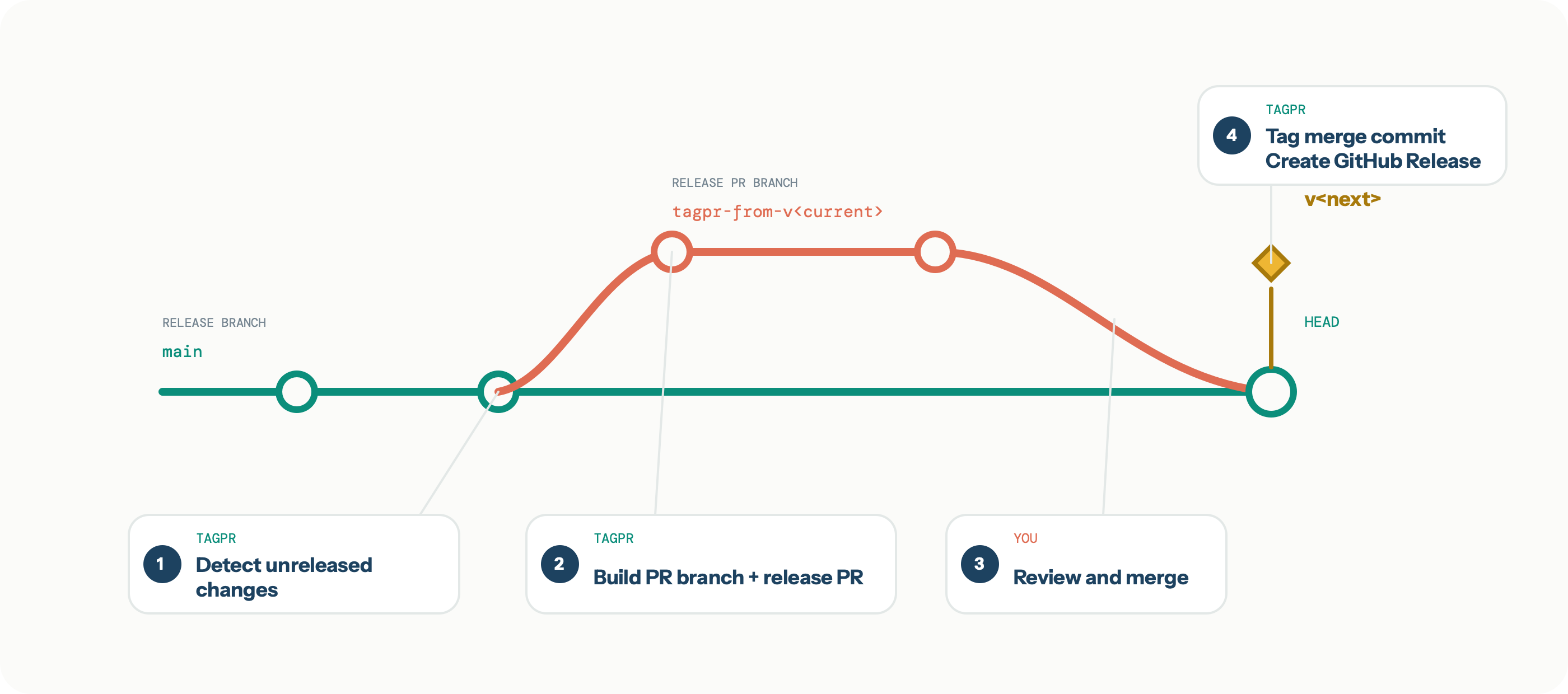
The release branch is the long-lived branch configured by tagpr.releaseBranch,
normally main. The release PR branch is the temporary tagpr-from-* branch that
tagpr manages as the head of the release pull request.
Create, review, and tag
- tagpr detects unreleased changes when a push advances the release branch.
- tagpr creates or rebuilds the release PR branch, then creates or updates a release
pull request. By default, it updates the version file and
CHANGELOG.md. - You review the generated and project-specific release changes, then merge the pull request when you are ready to start the release.
- On the next run, tagpr tags the new head of the release branch and creates a GitHub Release unless configured otherwise. The tag starts the project's release flow. Any of the GitHub merge methods can be used.
Keep the release pull request current
If the release pull request remains open and the release branch advances again, tagpr automatically updates it. tagpr rebuilds the release PR branch from the latest release branch commit, producing a rebase-like result without requiring a manual rebase.
Adjust the release pull request
You can edit the release pull request directly. For example, you can adjust the proposed
version, update dependencies, or add files that your project requires at release time.
These repeatable changes can also be automated with tagpr.command or
tagpr.postVersionCommand. See
Release preparation commands for execution order and
examples.
When tagpr updates the pull request after the release branch advances, it carries additional commits on the release PR branch forward as far as possible. See Release flow and design for the detailed update graph.
Merge when you are ready
You do not need to merge the release pull request immediately. Leave it open until you
want to start the release; tagpr will keep it current as main advances. Having one
continuously open release pull request is the expected workflow. Alternatively, merge
it frequently and ship smaller releases—small, incremental releases are often easier
to review and adopt.
Documentation
- Published documentation
- Documentation index
- Getting started
- Adopting tagpr in an existing project
- Release flow and design
- Versioning and label rules
- Changelog and GitHub Releases
- Release preparation commands
- Tagging and release
- Coordinating Immutable Releases
- Configuration index
- Release pull request templates
Quickstart
tagpr is designed to run in GitHub Actions. Add the following workflow to a repository
that releases from main:
# .github/workflows/tagpr.yml
name: tagpr
on:
  push:
    branches: ["main"]

permissions:
  contents: write
  pull-requests: write
  issues: read

jobs:
  tagpr:
    runs-on: ubuntu-latest
    steps:
    - uses: actions/checkout@v6
      with:
        persist-credentials: false
    - uses: Songmu/tagpr@v1
      env:
        GITHUB_TOKEN: ${{ secrets.GITHUB_TOKEN }}
In the target repository, open Settings > Actions > General > Workflow permissions and enable Allow GitHub Actions to create and approve pull requests.
Commit the workflow and push it to main. On its first run, tagpr:
- Finds the latest SemVer tag, or starts from
v0.0.0if the repository has no release tag. - Creates
.tagprif it does not exist and detects a likely version file. - Creates
.github/release.ymlif neither.github/release.ymlnor.github/release.yamlexists. - Creates a release pull request for the unreleased changes.
Review the generated .tagpr file after the first run. In particular, verify that
tagpr.versionFile points to the files that contain your project's version.
Tag-only releases
If your project does not keep its version in a file, configure tagpr to use Git tags only:
[tagpr]
    versionFile = -
Using a different release branch
Set the branch in both the workflow trigger and .tagpr:
[tagpr]
    releaseBranch = production
What the release pull request contains
By default, tagpr updates:
- the version file or files configured by
tagpr.versionFile; and CHANGELOG.md, using GitHub's generated release notes and.github/release.yml.
tagpr calls GitHub's
Generate release notes API with the previous tag,
release branch, and configured release-note file. Therefore, changelog entries and the
GitHub Release body follow GitHub's generated release-note rules, including the
categories and exclusions in .github/release.yml or .github/release.yaml. See
Changelog and GitHub Releases for the complete
flow.
You can customize these changes:
- Set
tagpr.changelog = falseto leave the changelog unchanged. - Set
tagpr.commandto run a project-specific command before version files are updated. - Set
tagpr.postVersionCommandto run a command after version files are updated. - Set
tagpr.templateortagpr.templateTextto customize the release pull request. - Commit manual release changes directly to the release PR branch.
See Release pull request templates for the available template variables and examples.
Choosing the next version
Semantic Versioning
tagpr proposes the next SemVer version as follows:
- It finds the latest SemVer tag that matches
tagpr.tagPrefix. If no tag exists, tagpr compares changes from the first commit and usesv0.0.0as the current version. - It inspects pull requests merged since the last release. If a pull request has a
label configured in
tagpr.majorLabelsortagpr.minorLabels, tagpr addstagpr:majorortagpr:minorto the release pull request. - A
tagpr:majorortagpr/majorlabel on the release pull request selects a major bump. Atagpr:minorortagpr/minorlabel selects a minor bump. Otherwise, tagpr proposes a patch bump. Major takes precedence when both labels are present. - If you edit the configured version file in the release pull request, that version takes precedence over the labels when the pull request is merged.
tagpr always adds the tagpr label to its own release pull request. Labels on pull
requests created by dependabot[bot] are ignored when determining the next project
version, because those labels describe the dependency's version change rather than the
project's.
See Versioning and label rules for custom label mappings, tag-only releases, CalVer behavior, and monorepo scoping.
Calendar Versioning
Set tagpr.calendarVersioning to use a date-based version instead of SemVer:
[tagpr]
    calendarVersioning = true
true uses YYYY.MM0D.MICRO. You can also specify a custom format such as
YYYY.0M.MICRO. Major and minor labels are ignored in CalVer mode. See
tagpr.calendarVersioning for the complete token
reference.
Tagging and release
tagpr exposes a tag output only when it creates a tag. The tag is the starting point
for project-specific release steps such as building, packaging, publishing, and
deployment. Use the output to conditionally run those steps in the same workflow:
- uses: actions/checkout@v6
  with:
    persist-credentials: false
- id: tagpr
  uses: Songmu/tagpr@v1
  env:
    GITHUB_TOKEN: ${{ secrets.GITHUB_TOKEN }}
- name: Publish
  if: steps.tagpr.outputs.tag != ''
  run: ./scripts/publish "${{ steps.tagpr.outputs.tag }}"
Triggering a separate workflow
Events created with the repository's GITHUB_TOKEN do not normally start another
GitHub Actions workflow. Therefore, a tag created by tagpr with GITHUB_TOKEN will not
trigger a separate tag-based release workflow. Eligible workflows for release pull
requests are an exception: GitHub queues them, but they require approval from a user
with write access before they run.
Either run the release flow in this workflow using steps.tagpr.outputs.tag, or supply
tagpr with a GitHub App installation token when a separate tag-triggered workflow must
run.
See Tagging and release for the tradeoffs, examples,
required permissions, and token setup.
Common configurations
Multiple version files
Separate multiple paths with commas:
[tagpr]
    versionFile = version.go,action.yml
Monorepos
tagpr.tagPrefix scopes tags and release history for independently versioned projects
in a monorepo. A project can keep its configuration in its own directory:
- uses: Songmu/tagpr@v1
  with:
    config: tools/.tagpr
  env:
    GITHUB_TOKEN: ${{ secrets.GITHUB_TOKEN }}
Paths inside tools/.tagpr are still relative to the repository root, not to the
directory containing .tagpr. Include the project directory in each path:
# tools/.tagpr
[tagpr]
    tagPrefix = tools
    versionFile = tools/package.json
    changelogFile = tools/CHANGELOG.md
    releaseYAMLPath = tools/.github/release.yml
This configuration creates tags such as tools/v1.2.3.
Maintaining an older major version
Use tagpr.fixedMajorVersion on a maintenance branch so tagpr considers only tags for
that major version:
[tagpr]
    releaseBranch = v1
    fixedMajorVersion = 1
fixedMajorVersion cannot be combined with calendarVersioning.
Configuration reference
tagpr reads .tagpr from the repository root in Git config format:
[tagpr]
    releaseBranch = main
    versionFile = version.go
    changelog = true
    release = draft
Every setting can also be supplied through its corresponding TAGPR_* environment
variable. Environment variables take precedence over values in .tagpr. The GitHub
Action's config input or TAGPR_CONFIG_FILE can select a different configuration
file.
Path resolution
Relative paths in the configuration are resolved from tagpr's working directory, not
from the directory containing the configuration file. The GitHub Action runs tagpr from
GITHUB_WORKSPACE, so these paths are relative to the repository root:
tagpr.versionFiletagpr.changelogFiletagpr.releaseYAMLPathtagpr.template
tagpr.command and tagpr.postVersionCommand also run from the repository root. If
tagpr.versionFile is omitted, automatic detection scans from the repository root.
For example, when config: tools/.tagpr is used, write
versionFile = tools/package.json, not versionFile = package.json.
Release target and version files
tagpr.releaseBranch
The release branch from which releases are made and into which the release pull request is merged. tagpr tracks this branch and tags its head after the release pull request is merged. The workflow's push trigger must include this branch.
Environment variable: TAGPR_RELEASE_BRANCH.
tagpr.versionFile
One or more comma-separated files that hold the version. tagpr writes the proposed version when preparing the release pull request and reads it at merge time, so a manual edit in the pull request determines the final tag.
If the setting is absent or empty, tagpr scans the repository for a likely version file.
Set it to - to rely on Git tags only.
Environment variable: TAGPR_VERSION_FILE.
tagpr.vPrefix
Whether to add v before a SemVer tag, for example v1.2.3. This setting controls only
the Git tag format, not the value written to the version file.
Environment variable: TAGPR_VPREFIX.
tagpr.tagPrefix (Optional)
A path-like prefix for independently versioned projects in a monorepo. For example,
tools produces tags such as tools/v1.2.3, and backend/api produces tags such as
backend/api/v1.0.0.
Environment variable: TAGPR_TAG_PREFIX.
tagpr.fixedMajorVersion (Optional)
Targets releases at one major version for maintenance branches such as v1 while
main releases v2. tagpr limits current-version and changelog-baseline selection to
existing tags in that major release line. This is not a hard release guard: a
tagpr:major label can still propose the next major version. Both 1 and v1 are
accepted. This option cannot be used with tagpr.calendarVersioning.
Environment variable: TAGPR_FIXED_MAJOR_VERSION.
Version selection
tagpr.majorLabels (Optional)
Comma-separated labels on merged pull requests that indicate a major update. The
default is major.
Environment variable: TAGPR_MAJOR_LABELS.
tagpr.minorLabels (Optional)
Comma-separated labels on merged pull requests that indicate a minor update. The
default is minor.
Environment variable: TAGPR_MINOR_LABELS.
tagpr.calendarVersioning (Optional)
Enables Calendar Versioning. Set it to true for the default format
YYYY.MM0D.MICRO, or specify a custom format.
Available format tokens follow CalVer:
- Year:
YYYY(four digits),YY(two digits),0Y(zero-padded two digits) - Month:
MM(not padded),0M(zero-padded) - Week:
WW(not padded),0W(zero-padded) - Day:
DD(not padded),0D(zero-padded) - Micro:
MICRO(auto-incremented for the same date)
Examples:
trueorYYYY.MM0D.MICROproduces a version such as2026.1203.0.YYYY.0M.MICROproduces a version such as2026.01.0.YY.0M0D.MICROproduces a version such as26.0123.0.
With a version file, tagpr calculates the CalVer value when it prepares or refreshes
the release pull request and writes that value to the file. The merged value becomes
the tag. With versionFile = -, tagpr calculates the value after merge when it creates
the tag.
Environment variable: TAGPR_CALENDAR_VERSIONING.
Generated files and commands
tagpr.changelog (Optional)
Whether to create or update the changelog. Changelog generation is enabled by default.
Environment variable: TAGPR_CHANGELOG.
tagpr.changelogFile (Optional)
The changelog path. The default is CHANGELOG.md.
Environment variable: TAGPR_CHANGELOG_FILE.
tagpr.releaseYAMLPath (Optional)
The GitHub generated release-notes configuration used to build the changelog and GitHub
Release. If this setting is absent, tagpr uses .github/release.yml or
.github/release.yaml and creates .github/release.yml on the first run if neither
file exists.
Environment variable: TAGPR_RELEASE_YAML_PATH.
tagpr.command (Optional)
A command to run before tagpr updates the version file.
Environment variable: TAGPR_COMMAND.
tagpr.postVersionCommand (Optional)
A command to run after tagpr updates the version file.
Environment variable: TAGPR_POST_VERSION_COMMAND.
Both commands receive:
TAGPR_CURRENT_VERSION: the current version tag, for examplev1.2.3TAGPR_NEXT_VERSION: the proposed version tag, for examplev1.3.0
See Release preparation commands for execution order, working-directory behavior, repeated runs, and generated-file handling.
Release pull request
tagpr.template (Optional)
The path to a Go text template used for the release pull request title and body. The first rendered line becomes the title and the remaining content becomes the body. See Release pull request templates.
Environment variable: TAGPR_TEMPLATE.
tagpr.templateText (Optional)
An inline Go text template used for the release pull request title and body. It is used
only when tagpr.template is not set.
Environment variable: TAGPR_TEMPLATE_TEXT.
tagpr.commitPrefix (Optional)
The prefix for commits created by tagpr. The default is [tagpr].
Environment variable: TAGPR_COMMIT_PREFIX.
GitHub Release
tagpr.release (Optional)
Controls GitHub Release creation after tagging:
truecreates and publishes the release. This is the default.draftcreates a draft release.falsedoes not create a GitHub Release.
Environment variable: TAGPR_RELEASE.
GitHub Action reference
Inputs
config (Optional)
The path to the tagpr configuration file. The default is .tagpr.
version (Optional)
The version of the tagpr executable installed by the action. The action supplies a tested default, so most workflows should leave this unset.
Outputs
tag: the created tag. It is empty when tagpr did not create a tag.pull_request: JSON describing the release pull request created or updated by tagpr.base_tag: the base version tag used for comparison. It is empty when no previous tag exists.
GitHub Enterprise
For GitHub Enterprise, use GH_ENTERPRISE_TOKEN instead of GITHUB_TOKEN:
- uses: Songmu/tagpr@v1
  env:
    GH_ENTERPRISE_TOKEN: ${{ secrets.GITHUB_TOKEN }}
Troubleshooting
tagpr cannot create a pull request
Check both the workflow permissions block and the repository's Allow GitHub Actions
to create and approve pull requests setting. tagpr needs contents: write,
pull-requests: write, and issues: read.
A tag does not start another workflow
Tags created with GITHUB_TOKEN do not trigger another workflow. Run the release steps
in the same workflow by checking the tag output, or use a GitHub App installation
token when a separate workflow is required.
tagpr selected the wrong version file
Edit tagpr.versionFile in .tagpr. Use comma-separated paths for multiple files, or
- for tag-only releases. Commit the corrected configuration to the release pull
request.
Files are not found when .tagpr is in a subdirectory
Configuration paths are relative to the repository root when using the GitHub Action;
they are not relative to the .tagpr file. For config: tools/.tagpr, use paths such
as tools/package.json, tools/CHANGELOG.md, and
tools/.github/release.yml.
If the problem persists, open an issue with the workflow, .tagpr
configuration, relevant tags, and the tagpr log.
Project links
Author
Contributors
(top 30 of 39)

570 commits

92 commits
82 commits

50 commits
Similar repos


Languages
Go
99.6%
automatically creates and updates a pull request for unreleased items, tag them when they are merged, and create releases.
See the codeREADME
tagpr
tagpr continuously prepares a release pull request for unreleased changes. Merging that pull request approves the release contents, and tagpr tags the merged commit. The tag then becomes the starting point for the project's release flow. tagpr can also create a GitHub Release.
Release preparation stays automated, visible, and reviewable:
- The proposed version, changelog, and project-specific release changes live in a pull request.
- The release pull request follows new changes on your release branch until you are ready to start the release.
- Merging explicitly approves the release contents instead of relying on a sequence of local commands.
- The tag starts project-specific build, packaging, publishing, and deployment steps.
tagpr supports Semantic Versioning (SemVer) by default, Calendar Versioning (CalVer), tag-only releases, monorepos, and maintenance branches for older major versions.
How it works
The release branch is the long-lived branch configured by tagpr.releaseBranch,
normally main. The release PR branch is the temporary tagpr-from-* branch that
tagpr manages as the head of the release pull request.
Create, review, and tag
- tagpr detects unreleased changes when a push advances the release branch.
- tagpr creates or rebuilds the release PR branch, then creates or updates a release
pull request. By default, it updates the version file and
CHANGELOG.md. - You review the generated and project-specific release changes, then merge the pull request when you are ready to start the release.
- On the next run, tagpr tags the new head of the release branch and creates a GitHub Release unless configured otherwise. The tag starts the project's release flow. Any of the GitHub merge methods can be used.
Keep the release pull request current
If the release pull request remains open and the release branch advances again, tagpr automatically updates it. tagpr rebuilds the release PR branch from the latest release branch commit, producing a rebase-like result without requiring a manual rebase.
Adjust the release pull request
You can edit the release pull request directly. For example, you can adjust the proposed
version, update dependencies, or add files that your project requires at release time.
These repeatable changes can also be automated with tagpr.command or
tagpr.postVersionCommand. See
Release preparation commands for execution order and
examples.
When tagpr updates the pull request after the release branch advances, it carries additional commits on the release PR branch forward as far as possible. See Release flow and design for the detailed update graph.
Merge when you are ready
You do not need to merge the release pull request immediately. Leave it open until you
want to start the release; tagpr will keep it current as main advances. Having one
continuously open release pull request is the expected workflow. Alternatively, merge
it frequently and ship smaller releases—small, incremental releases are often easier
to review and adopt.
Documentation
- Published documentation
- Documentation index
- Getting started
- Adopting tagpr in an existing project
- Release flow and design
- Versioning and label rules
- Changelog and GitHub Releases
- Release preparation commands
- Tagging and release
- Coordinating Immutable Releases
- Configuration index
- Release pull request templates
Quickstart
tagpr is designed to run in GitHub Actions. Add the following workflow to a repository
that releases from main:
# .github/workflows/tagpr.yml
name: tagpr
on:
  push:
    branches: ["main"]

permissions:
  contents: write
  pull-requests: write
  issues: read

jobs:
  tagpr:
    runs-on: ubuntu-latest
    steps:
    - uses: actions/checkout@v6
      with:
        persist-credentials: false
    - uses: Songmu/tagpr@v1
      env:
        GITHUB_TOKEN: ${{ secrets.GITHUB_TOKEN }}
In the target repository, open Settings > Actions > General > Workflow permissions and enable Allow GitHub Actions to create and approve pull requests.
Commit the workflow and push it to main. On its first run, tagpr:
- Finds the latest SemVer tag, or starts from
v0.0.0if the repository has no release tag. - Creates
.tagprif it does not exist and detects a likely version file. - Creates
.github/release.ymlif neither.github/release.ymlnor.github/release.yamlexists. - Creates a release pull request for the unreleased changes.
Review the generated .tagpr file after the first run. In particular, verify that
tagpr.versionFile points to the files that contain your project's version.
Tag-only releases
If your project does not keep its version in a file, configure tagpr to use Git tags only:
[tagpr]
    versionFile = -
Using a different release branch
Set the branch in both the workflow trigger and .tagpr:
[tagpr]
    releaseBranch = production
What the release pull request contains
By default, tagpr updates:
- the version file or files configured by
tagpr.versionFile; and CHANGELOG.md, using GitHub's generated release notes and.github/release.yml.
tagpr calls GitHub's
Generate release notes API with the previous tag,
release branch, and configured release-note file. Therefore, changelog entries and the
GitHub Release body follow GitHub's generated release-note rules, including the
categories and exclusions in .github/release.yml or .github/release.yaml. See
Changelog and GitHub Releases for the complete
flow.
You can customize these changes:
- Set
tagpr.changelog = falseto leave the changelog unchanged. - Set
tagpr.commandto run a project-specific command before version files are updated. - Set
tagpr.postVersionCommandto run a command after version files are updated. - Set
tagpr.templateortagpr.templateTextto customize the release pull request. - Commit manual release changes directly to the release PR branch.
See Release pull request templates for the available template variables and examples.
Choosing the next version
Semantic Versioning
tagpr proposes the next SemVer version as follows:
- It finds the latest SemVer tag that matches
tagpr.tagPrefix. If no tag exists, tagpr compares changes from the first commit and usesv0.0.0as the current version. - It inspects pull requests merged since the last release. If a pull request has a
label configured in
tagpr.majorLabelsortagpr.minorLabels, tagpr addstagpr:majorortagpr:minorto the release pull request. - A
tagpr:majorortagpr/majorlabel on the release pull request selects a major bump. Atagpr:minorortagpr/minorlabel selects a minor bump. Otherwise, tagpr proposes a patch bump. Major takes precedence when both labels are present. - If you edit the configured version file in the release pull request, that version takes precedence over the labels when the pull request is merged.
tagpr always adds the tagpr label to its own release pull request. Labels on pull
requests created by dependabot[bot] are ignored when determining the next project
version, because those labels describe the dependency's version change rather than the
project's.
See Versioning and label rules for custom label mappings, tag-only releases, CalVer behavior, and monorepo scoping.
Calendar Versioning
Set tagpr.calendarVersioning to use a date-based version instead of SemVer:
[tagpr]
    calendarVersioning = true
true uses YYYY.MM0D.MICRO. You can also specify a custom format such as
YYYY.0M.MICRO. Major and minor labels are ignored in CalVer mode. See
tagpr.calendarVersioning for the complete token
reference.
Tagging and release
tagpr exposes a tag output only when it creates a tag. The tag is the starting point
for project-specific release steps such as building, packaging, publishing, and
deployment. Use the output to conditionally run those steps in the same workflow:
- uses: actions/checkout@v6
  with:
    persist-credentials: false
- id: tagpr
  uses: Songmu/tagpr@v1
  env:
    GITHUB_TOKEN: ${{ secrets.GITHUB_TOKEN }}
- name: Publish
  if: steps.tagpr.outputs.tag != ''
  run: ./scripts/publish "${{ steps.tagpr.outputs.tag }}"
Triggering a separate workflow
Events created with the repository's GITHUB_TOKEN do not normally start another
GitHub Actions workflow. Therefore, a tag created by tagpr with GITHUB_TOKEN will not
trigger a separate tag-based release workflow. Eligible workflows for release pull
requests are an exception: GitHub queues them, but they require approval from a user
with write access before they run.
Either run the release flow in this workflow using steps.tagpr.outputs.tag, or supply
tagpr with a GitHub App installation token when a separate tag-triggered workflow must
run.
See Tagging and release for the tradeoffs, examples,
required permissions, and token setup.
Common configurations
Multiple version files
Separate multiple paths with commas:
[tagpr]
    versionFile = version.go,action.yml
Monorepos
tagpr.tagPrefix scopes tags and release history for independently versioned projects
in a monorepo. A project can keep its configuration in its own directory:
- uses: Songmu/tagpr@v1
  with:
    config: tools/.tagpr
  env:
    GITHUB_TOKEN: ${{ secrets.GITHUB_TOKEN }}
Paths inside tools/.tagpr are still relative to the repository root, not to the
directory containing .tagpr. Include the project directory in each path:
# tools/.tagpr
[tagpr]
    tagPrefix = tools
    versionFile = tools/package.json
    changelogFile = tools/CHANGELOG.md
    releaseYAMLPath = tools/.github/release.yml
This configuration creates tags such as tools/v1.2.3.
Maintaining an older major version
Use tagpr.fixedMajorVersion on a maintenance branch so tagpr considers only tags for
that major version:
[tagpr]
    releaseBranch = v1
    fixedMajorVersion = 1
fixedMajorVersion cannot be combined with calendarVersioning.
Configuration reference
tagpr reads .tagpr from the repository root in Git config format:
[tagpr]
    releaseBranch = main
    versionFile = version.go
    changelog = true
    release = draft
Every setting can also be supplied through its corresponding TAGPR_* environment
variable. Environment variables take precedence over values in .tagpr. The GitHub
Action's config input or TAGPR_CONFIG_FILE can select a different configuration
file.
Path resolution
Relative paths in the configuration are resolved from tagpr's working directory, not
from the directory containing the configuration file. The GitHub Action runs tagpr from
GITHUB_WORKSPACE, so these paths are relative to the repository root:
tagpr.versionFiletagpr.changelogFiletagpr.releaseYAMLPathtagpr.template
tagpr.command and tagpr.postVersionCommand also run from the repository root. If
tagpr.versionFile is omitted, automatic detection scans from the repository root.
For example, when config: tools/.tagpr is used, write
versionFile = tools/package.json, not versionFile = package.json.
Release target and version files
tagpr.releaseBranch
The release branch from which releases are made and into which the release pull request is merged. tagpr tracks this branch and tags its head after the release pull request is merged. The workflow's push trigger must include this branch.
Environment variable: TAGPR_RELEASE_BRANCH.
tagpr.versionFile
One or more comma-separated files that hold the version. tagpr writes the proposed version when preparing the release pull request and reads it at merge time, so a manual edit in the pull request determines the final tag.
If the setting is absent or empty, tagpr scans the repository for a likely version file.
Set it to - to rely on Git tags only.
Environment variable: TAGPR_VERSION_FILE.
tagpr.vPrefix
Whether to add v before a SemVer tag, for example v1.2.3. This setting controls only
the Git tag format, not the value written to the version file.
Environment variable: TAGPR_VPREFIX.
tagpr.tagPrefix (Optional)
A path-like prefix for independently versioned projects in a monorepo. For example,
tools produces tags such as tools/v1.2.3, and backend/api produces tags such as
backend/api/v1.0.0.
Environment variable: TAGPR_TAG_PREFIX.
tagpr.fixedMajorVersion (Optional)
Targets releases at one major version for maintenance branches such as v1 while
main releases v2. tagpr limits current-version and changelog-baseline selection to
existing tags in that major release line. This is not a hard release guard: a
tagpr:major label can still propose the next major version. Both 1 and v1 are
accepted. This option cannot be used with tagpr.calendarVersioning.
Environment variable: TAGPR_FIXED_MAJOR_VERSION.
Version selection
tagpr.majorLabels (Optional)
Comma-separated labels on merged pull requests that indicate a major update. The
default is major.
Environment variable: TAGPR_MAJOR_LABELS.
tagpr.minorLabels (Optional)
Comma-separated labels on merged pull requests that indicate a minor update. The
default is minor.
Environment variable: TAGPR_MINOR_LABELS.
tagpr.calendarVersioning (Optional)
Enables Calendar Versioning. Set it to true for the default format
YYYY.MM0D.MICRO, or specify a custom format.
Available format tokens follow CalVer:
- Year:
YYYY(four digits),YY(two digits),0Y(zero-padded two digits) - Month:
MM(not padded),0M(zero-padded) - Week:
WW(not padded),0W(zero-padded) - Day:
DD(not padded),0D(zero-padded) - Micro:
MICRO(auto-incremented for the same date)
Examples:
trueorYYYY.MM0D.MICROproduces a version such as2026.1203.0.YYYY.0M.MICROproduces a version such as2026.01.0.YY.0M0D.MICROproduces a version such as26.0123.0.
With a version file, tagpr calculates the CalVer value when it prepares or refreshes
the release pull request and writes that value to the file. The merged value becomes
the tag. With versionFile = -, tagpr calculates the value after merge when it creates
the tag.
Environment variable: TAGPR_CALENDAR_VERSIONING.
Generated files and commands
tagpr.changelog (Optional)
Whether to create or update the changelog. Changelog generation is enabled by default.
Environment variable: TAGPR_CHANGELOG.
tagpr.changelogFile (Optional)
The changelog path. The default is CHANGELOG.md.
Environment variable: TAGPR_CHANGELOG_FILE.
tagpr.releaseYAMLPath (Optional)
The GitHub generated release-notes configuration used to build the changelog and GitHub
Release. If this setting is absent, tagpr uses .github/release.yml or
.github/release.yaml and creates .github/release.yml on the first run if neither
file exists.
Environment variable: TAGPR_RELEASE_YAML_PATH.
tagpr.command (Optional)
A command to run before tagpr updates the version file.
Environment variable: TAGPR_COMMAND.
tagpr.postVersionCommand (Optional)
A command to run after tagpr updates the version file.
Environment variable: TAGPR_POST_VERSION_COMMAND.
Both commands receive:
TAGPR_CURRENT_VERSION: the current version tag, for examplev1.2.3TAGPR_NEXT_VERSION: the proposed version tag, for examplev1.3.0
See Release preparation commands for execution order, working-directory behavior, repeated runs, and generated-file handling.
Release pull request
tagpr.template (Optional)
The path to a Go text template used for the release pull request title and body. The first rendered line becomes the title and the remaining content becomes the body. See Release pull request templates.
Environment variable: TAGPR_TEMPLATE.
tagpr.templateText (Optional)
An inline Go text template used for the release pull request title and body. It is used
only when tagpr.template is not set.
Environment variable: TAGPR_TEMPLATE_TEXT.
tagpr.commitPrefix (Optional)
The prefix for commits created by tagpr. The default is [tagpr].
Environment variable: TAGPR_COMMIT_PREFIX.
GitHub Release
tagpr.release (Optional)
Controls GitHub Release creation after tagging:
truecreates and publishes the release. This is the default.draftcreates a draft release.falsedoes not create a GitHub Release.
Environment variable: TAGPR_RELEASE.
GitHub Action reference
Inputs
config (Optional)
The path to the tagpr configuration file. The default is .tagpr.
version (Optional)
The version of the tagpr executable installed by the action. The action supplies a tested default, so most workflows should leave this unset.
Outputs
tag: the created tag. It is empty when tagpr did not create a tag.pull_request: JSON describing the release pull request created or updated by tagpr.base_tag: the base version tag used for comparison. It is empty when no previous tag exists.
GitHub Enterprise
For GitHub Enterprise, use GH_ENTERPRISE_TOKEN instead of GITHUB_TOKEN:
- uses: Songmu/tagpr@v1
  env:
    GH_ENTERPRISE_TOKEN: ${{ secrets.GITHUB_TOKEN }}
Troubleshooting
tagpr cannot create a pull request
Check both the workflow permissions block and the repository's Allow GitHub Actions
to create and approve pull requests setting. tagpr needs contents: write,
pull-requests: write, and issues: read.
A tag does not start another workflow
Tags created with GITHUB_TOKEN do not trigger another workflow. Run the release steps
in the same workflow by checking the tag output, or use a GitHub App installation
token when a separate workflow is required.
tagpr selected the wrong version file
Edit tagpr.versionFile in .tagpr. Use comma-separated paths for multiple files, or
- for tag-only releases. Commit the corrected configuration to the release pull
request.
Files are not found when .tagpr is in a subdirectory
Configuration paths are relative to the repository root when using the GitHub Action;
they are not relative to the .tagpr file. For config: tools/.tagpr, use paths such
as tools/package.json, tools/CHANGELOG.md, and
tools/.github/release.yml.
If the problem persists, open an issue with the workflow, .tagpr
configuration, relevant tags, and the tagpr log.
Project links
Author
Similar repos
Contributors
(top 30 of 39)
570 commits
92 commits
82 commits
50 commits
Languages
Go
99.6%