
Local AI deployment made trivial. Run vLLM, SGLang, Ollama, llama.cpp, MLX, STT & TTS — containerized or native — from a single dashboard. Drag-and-drop flow builder for AI automation. App marketplace for instant integrations and tooling. Security-first architecture with full audit logging.
Rust
8
891 commits
updated Sep 18, 2026
README

TentaFlow
An operating system for your AI.
Turn every device you own - a GPU server, your laptop, your phone - into one private AI mesh. Deploy models anywhere, wire them into flows, train your own models, and let TentaFlow pick the right model automatically: the big one on the server when you're connected, the local one on your phone when you're not.




Join us on Discord — questions, help with your setup, and what we are building next.
Install
curl -fsSL https://raw.githubusercontent.com/Slyb00ts/TentaFlow/main/scripts/install/install.sh | sh
Linux on x86_64 and arm64 (glibc ≥ 2.35 — Ubuntu 22.04+, Debian 12+, Fedora, Arch, RHEL 10+) and macOS on Apple Silicon. The installer detects the GPU and picks the build to match — CUDA, Vulkan or Metal, or the slim edition with no local inference — pulls the dependencies your system needs, registers the service (systemd or launchd) and starts it. Then:
tentaflow status          # service state, autostart, /health
tentaflow start | stop | restart
tentaflow update          # newest release, checksum-verified, atomic swap
The dashboard is at https://localhost:8090 — first login admin / admin, change it right away. Full details, editions and uninstall are under Getting started.
What is TentaFlow?
Most AI tools assume one machine, one model, and a cloud account. TentaFlow assumes the opposite: you already have several devices with very different capabilities, and you want them to work together as one private AI system that you fully own.
TentaFlow is the layer that makes that happen. It is a single Rust application that runs on Linux, macOS, Windows, Android and iOS, and turns each device into a node in a peer-to-peer mesh. A node can be a rack server with four GPUs, a MacBook, or a phone in your pocket - they all speak the same protocol, share the same data, and expose the same capabilities.
On top of that mesh you:
- Deploy models to any device - run a 70B model on the GPU box and a small one on the phone, all from the same dashboard.
- Build flows visually — chain LLMs, speech, vision, documents, RAG, memory and tools into multi-step pipelines with the Flow Builder, no code required.
- Define aliases with automatic fallback - point your app at
assistant, and TentaFlow uses the powerful server model when it's reachable and silently falls back to a local laptop/phone model when it isn't. - Train and benchmark your own models — fine-tune LLMs (LoRA/QLoRA/DoRA, SFT/DPO/distillation), run tabular AutoML, annotate datasets and benchmark every model in ML Studio and Benchmark Studio.
- Run agents, meetings, cameras and robots — an agent harness with tools and skills, a meeting bot that transcribes and summarizes calls, a camera analytics pipeline, and robot control with LiDAR/SLAM.
- Extend everything with addons - sandboxed plug-ins (with their own UI) that add tools, integrations and data sources, written against an SDK.
And because the whole thing also runs fully offline on a phone, you get the exact same product whether you're online with a server farm or on a plane with nothing but your handset.
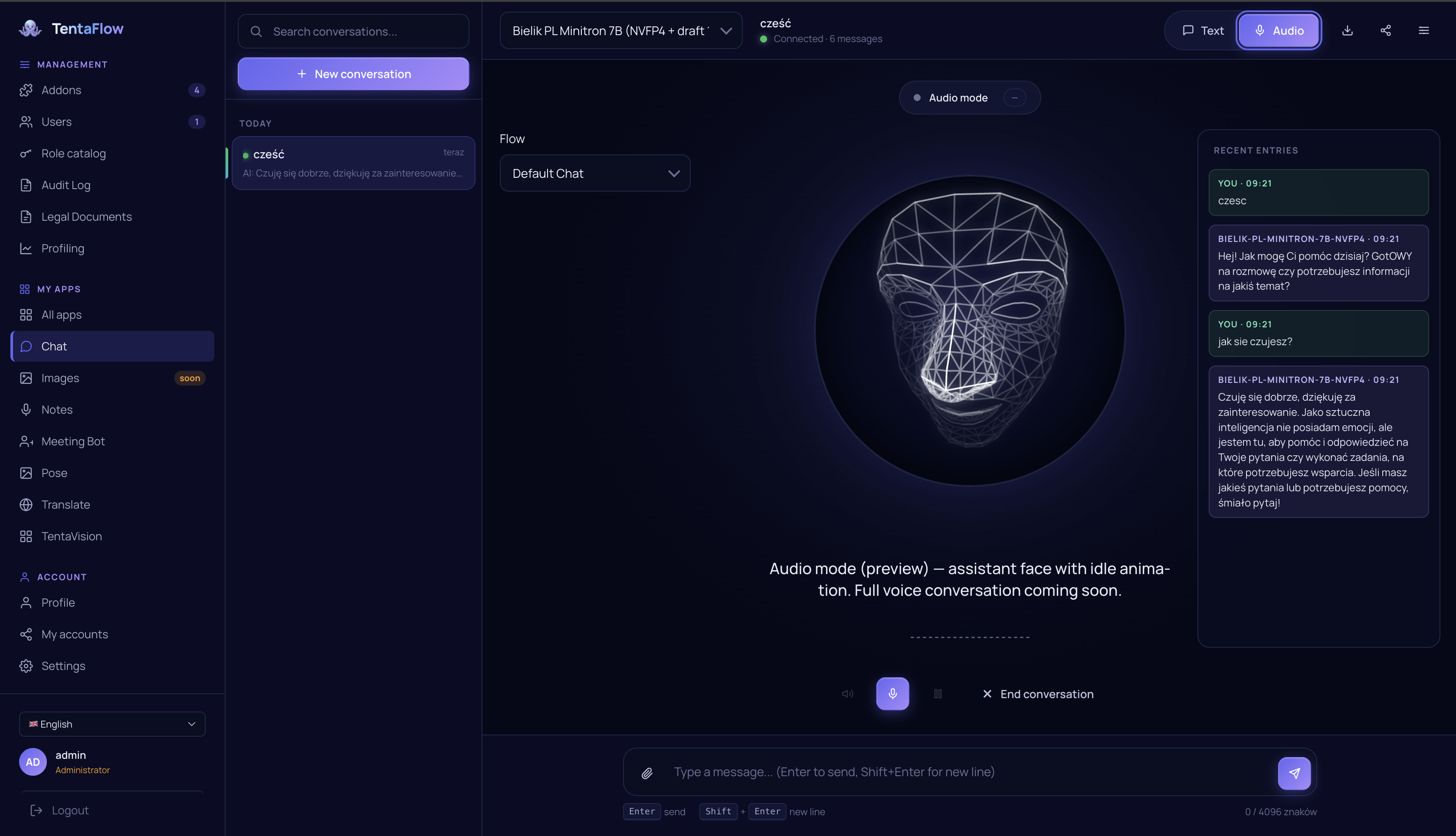
The core ideas
🐙 One mesh, many devices
Every device runs the same node. Nodes find each other automatically over iroh (QUIC with relay,
DHT and LAN discovery), so they connect across the same Wi-Fi or across the internet without manual
port-forwarding. First contact is a simple 6-digit PIN pairing (or QR-code scan on mobile) with
Ed25519 key verification — once two nodes are paired they trust each other. You can even self-host the
relay (iroh-relay ships as a service container).
The device list shows this node, devices discovered locally through mDNS, and devices currently trusted by this node. The relay can run in the background and carry connections between trusted devices; it does not expose a global list of unknown nodes. Contacts received through gossip or an untrusted incoming connection alone are not enough for a device to appear in the list. Trust still propagates through the mesh: if A is paired with B and C, after trusted keys synchronize, B and C also trust and see each other without additional pairing.
A request sent to any node can be served by a service running on any other node: the mesh routes it transparently, including multi-hop relays for peers that aren't directly connected. Your phone can use the LLM on your server as if it were local.
State (your flows, settings, identities, RBAC, addon data) is kept consistent across the mesh by an embedded Sync Ledger - an append-only, hash-chained, signed operation log with per-node cursors, outbox/inbox and snapshots. Sync is permission-gated: a node only receives the resources it's allowed to.
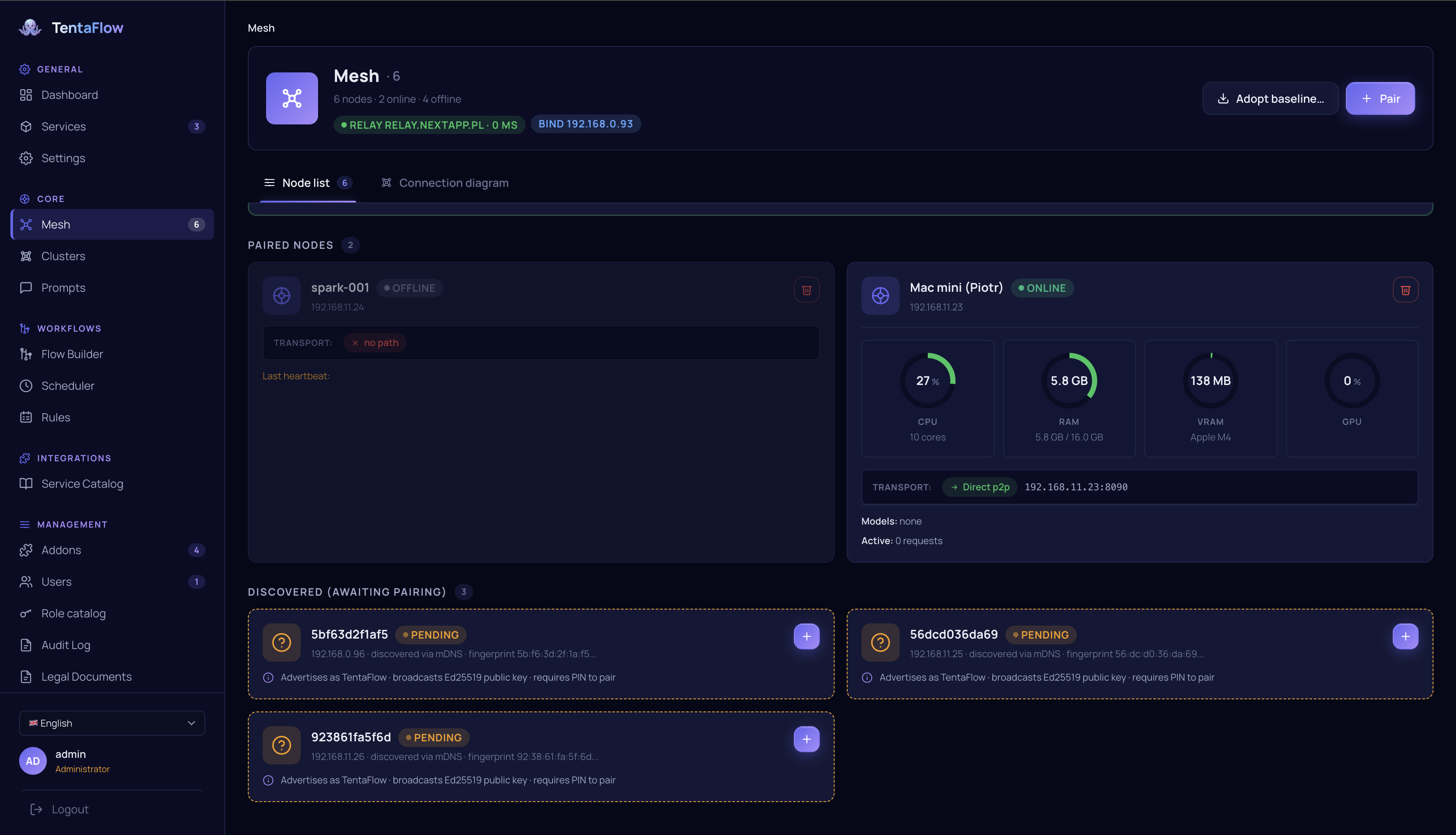
🧮 Clusters: group nodes into one serving unit
Beyond ad-hoc mesh routing, nodes can be grouped into named clusters with a load-balancing strategy and failover policy for distributed model serving. The cluster wizard probes live bandwidth between candidate nodes, and the mesh layer auto-configures RDMA / RoCE where the hardware supports it. Cluster detail shows per-node gauges, a live probe matrix and the models shared across the cluster.
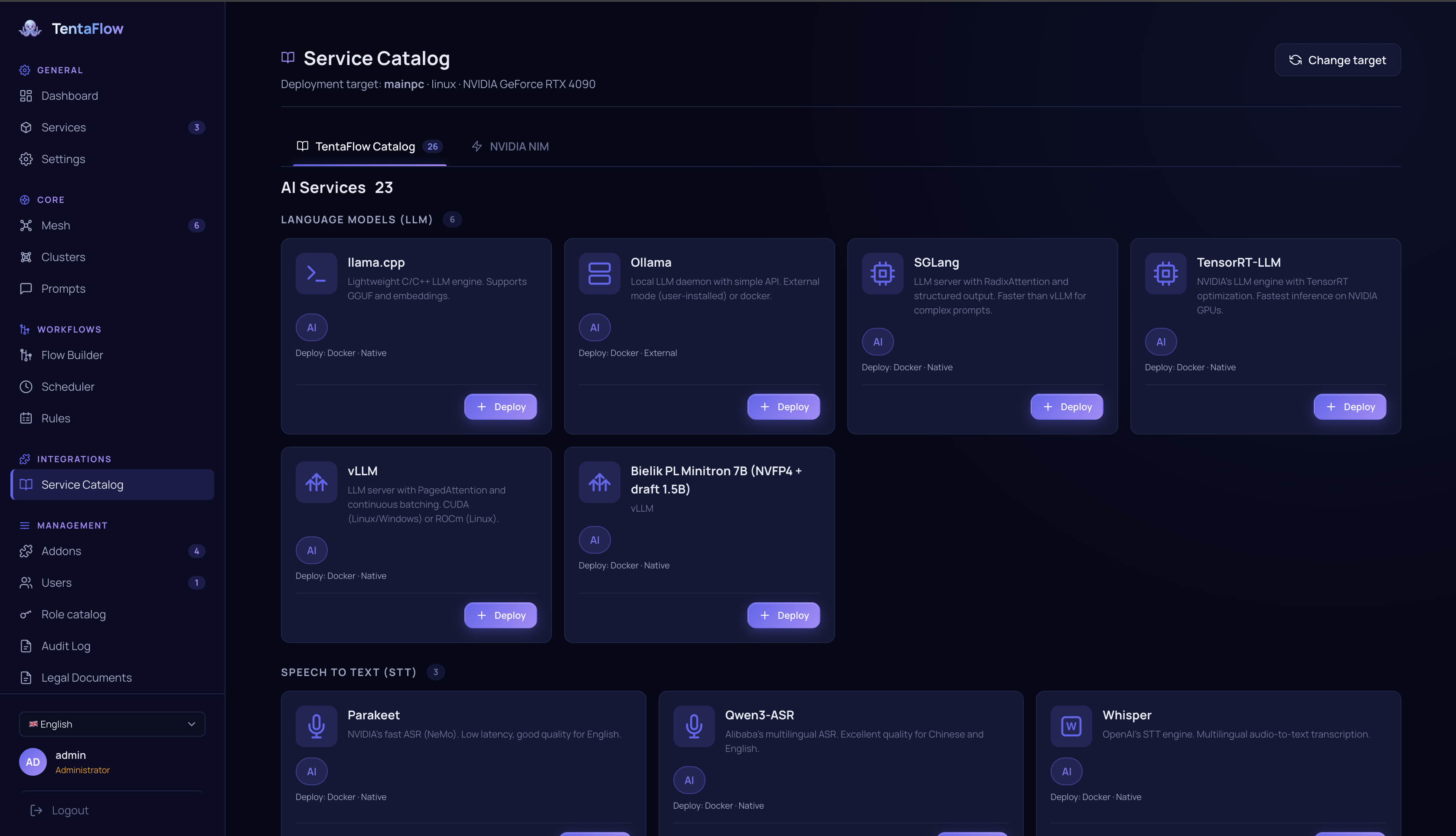
🚀 Deploy any model to any node
TentaFlow runs models locally through several inference backends, and connects to external engines as managed services:
| Capability | Backends |
|---|---|
| LLM (local) | llama.cpp (CPU/GPU, continuous batching + speculative decoding — ngram & self-speculative MTP), Apple MLX (Metal) |
| LLM (managed engines) | vLLM (CUDA/ROCm/Metal/DGX Spark), SGLang, Ollama, ds4 (DeepSeek V4), TensorRT-LLM, NVIDIA NIM containers, Qwen3-VL |
| LLM (cloud APIs) | Anthropic, OpenAI / Azure OpenAI / OpenAI-compatible, Gemini, DeepSeek, Groq, Mistral, Moonshot, Qwen, Together, OpenRouter |
| Speech-to-text | Whisper, MLX-Whisper (Apple), sherpa-onnx, NVIDIA Parakeet, Qwen-ASR, Soniox (cloud) |
| Text-to-speech | Kokoro (MLX/ONNX), Kyutai TTS, sherpa-onnx, Supertonic (31 languages), XTTS (voice cloning), VoxCPM, Apple AVSpeech, ElevenLabs (cloud) |
| Embeddings & rerankers | Jina v5 / Nemotron / IBM Granite embeddings; Jina, Qwen3 and Nemotron rerankers (incl. multimodal) — each in vLLM, MLX and GGUF variants |
| Vision | face (YOLOv8 / SCRFD), pose (MoveNet / YOLOv8-pose), emotion (HSEmotion), object detection (RF-DETR), depth (Depth Anything V2/V3, native Rust ~27 ms), OCR (PaddleOCR, Apple OCR, ONNX OCR, license plates), NVIDIA Nemotron document-AI (parse, page elements, tables, graphics) |
| Image generation | ComfyUI, stable-diffusion.cpp |
| Speaker diarization | pure-Rust VAD + speaker embeddings (tentaflow-voice), voice-profile enrollment |
Services deploy as Docker containers, native bundles (Python venv / prebuilt binaries) or external
endpoints — the 4-step wizard detects your hardware (CUDA / Metal / Vulkan / XPU / CPU),
searches HuggingFace Hub, estimates VRAM and lets you pick GPUs per deployment. GPU acceleration is
available for llama.cpp and Whisper via CUDA, Vulkan and Metal. A built-in vector database
(tentaflow-zvec, embedded on every platform) powers semantic search, RAG and long-term memory;
external Milvus is supported for hybrid dense+sparse retrieval.
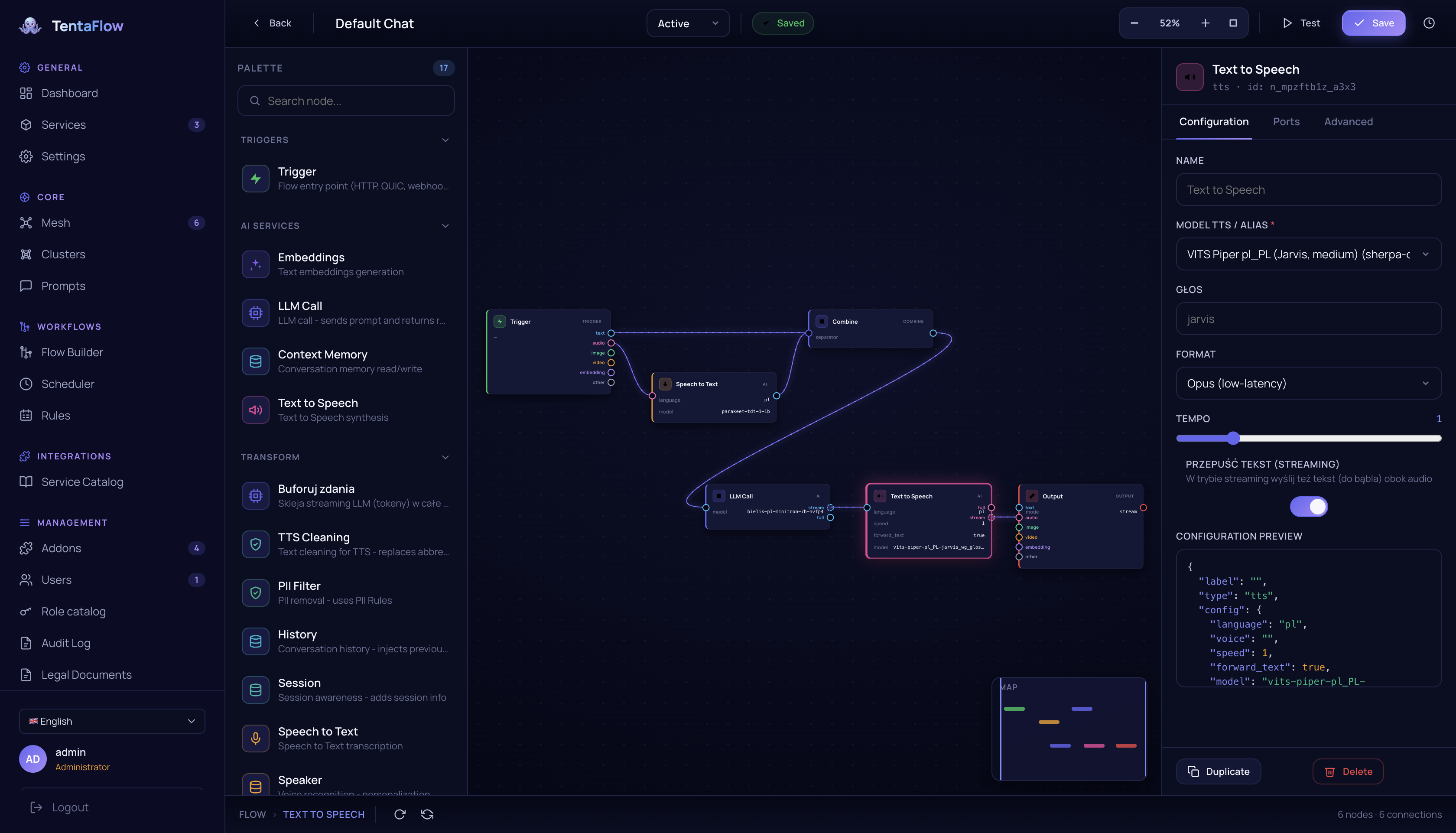
🔀 Flows: compose AI like building blocks
The Flow Builder is a visual, node-based editor (a typed DAG) for turning models and tools into real pipelines - transcribe -> summarize -> translate -> speak, or trigger -> retrieve from memory -> LLM -> filter PII -> output. The node palette spans 60+ block types:
- Models:
llm·vision_llm·stt·tts·embeddings·reranker·vision_classify·ocr - Documents & RAG:
document_parse·text_extract·office_extract·pdf_rasterize·table_structure·chunk/embed_chunks·vector·graph_search·rag_graphrag·rag_multihop - Agents:
agent_block·agent_router·spawn/await_subagents·tool_exec·ask_user - Control & context:
trigger·interval·condition·loop·map·subflow·conversation_history·compact_context·memory·pii_filter·sentence_buffer·combine·output - Cameras:
camera_alert·camera_verdict— plus dynamicaddon.*blocks contributed by addons.
Flows run in two modes: blocking (full DAG, nodes run concurrently as their inputs become ready) and streaming (token-by-token for LLM chat). Every flow is validated on save, autosaved with version history, and can be scheduled or triggered by events.
🎯 Aliases with automatic fallback
This is the feature that makes a multi-device mesh actually pleasant to use.
An alias is a stable name (e.g. assistant, coder, transcriber) that points at a primary model
plus an ordered list of fallback models. Your apps and flows only ever reference the alias:
alias "assistant"
  ├─ primary:   qwen-72b           (on the GPU server)
  └─ fallback:  phi-3-mini-local   (on this laptop / phone)
At request time TentaFlow resolves the alias against what's actually reachable right now. It prefers a
locally deployed model over a remote one, walks the fallback chain on transport failures, and only
surfaces an error if every candidate is unreachable. So when you're at your desk you get the big server
model; when you walk away and lose the connection, the same assistant keeps working on-device - no code
change, no reconfiguration. Every resolution is audited (which target was used, whether a fallback kicked in).
🤖 Agents, skills and prompts
TentaFlow ships an agent harness: agents are defined declaratively (model, tool allowlist, skills,
limits) and the agent loop itself runs as a Flow Builder flow — not hard-coded Rust. Tools come from
addons and core builtins, resolved against per-agent allowlists and the permission system; every run is
recorded and inspectable. A skills registry holds reusable instructions (addon-provided skills can
be forked into editable user copies), with an LLM-assisted curator that proposes merges and cleanups
for admin approval. A central prompt registry gives system prompts stable IDs so engines can reuse
KV-cache across requests. MCP (Model Context Protocol) client addons expose external MCP servers'
tools as agent tools. There is even a dedicated orchestrator model (a fine-tuned 0.8B "conductor",
trained in tentaflow-models) for fast routing, tool selection and plan validation.
🎓 ML Studio: train your own models
ML Studio takes you from raw data to a deployed model, using compute from anywhere in the mesh:
- LLM fine-tuning — QLoRA / LoRA / DoRA / full fine-tune with SFT, DPO or logit-level knowledge distillation; base-model presets or any HuggingFace repo; live loss curves; VRAM estimates per method; export to GGUF/MLX for immediate deployment.
- Model distillation — generate Q→A pairs or preference triples with a teacher model, then train a smaller student.
- Tabular AutoML & anomaly detection — classification/regression leaderboards (AutoGluon) and anomaly detection, with automatic column profiling on upload.
- Image recognition — dataset schema, data collection, annotation with model-assisted pre-labeling (COCO), classifier and RF-DETR detector training, ONNX export.
- Vision/audio fine-tuning — adapt image and audio models to your own data.
Training jobs run as per-job service containers (HF SFT trainer, AutoGluon, timm, RF-DETR), stream progress live to the dashboard, and register versioned artifacts that can be distributed to other nodes over the mesh.
📊 Benchmark Studio
llama-bench-style benchmarking for every model you can reach — local engines, mesh services and external cloud APIs. Wizard-driven target/test selection, live streaming runs, and results with throughput (tokens/s), TTFT, prefill/decode split, latency percentiles (p50/p99) and concurrency sweeps — plus side-by-side comparison of runs.
📷 TentaVision: cameras & video analytics
Ingest RTSP / ONVIF / local cameras (GStreamer) — or use a paired phone as a camera and sensor
node — and run on-frame models: face, pose, emotion, object detection, depth, license plates.
A detection bus feeds live overlays in the dashboard, camera_alert / camera_verdict flow blocks
turn detections into automations (notify, record, run an LLM verdict), and recordings are served
through HMAC-signed, TTL-bounded URLs. The architecture scales up to full surveillance pipelines
(tracking, re-identification, event correlation).
🦿 Robots, LiDAR and SLAM
Robots are first-class mesh citizens. An addon declares a [robot] manifest block (kind, transport,
capabilities, safety envelope with velocity clamps and mandatory e-stop) and the Robots app
renders a capability-driven control surface automatically: live camera, LiDAR 3D view (WebGPU
voxel renderer), controls generated from the robot's advertised actions, telemetry and logs. Robot
commands are allowlisted and clamped at the mesh layer; the e-stop is always available.
The reference integration is the Unitree Go2 quadruped over WebRTC. Under the hood,
tentaflow-slam implements a unified SLAM loop (ESKF, LiDAR odometry, loop closure, pose graph)
and the core maintains a shared, persistent occupancy map folded from every robot's world-frame
LiDAR — including phones, which the phone addon turns into sensor-robots (camera, depth/LiDAR,
IMU, GPS, barometer with ESKF fusion).
🗣️ Meetings
The Meeting Bot joins calls (MS Teams), transcribes them live with speaker diarization, and produces AI summaries and extracted action items in a live two-column view. Each session runs in its own per-meeting container with a VNC window into the bot, and transcripts persist in SQLite — searchable and downloadable after the fact.
🧩 Addons: extend everything, in your language
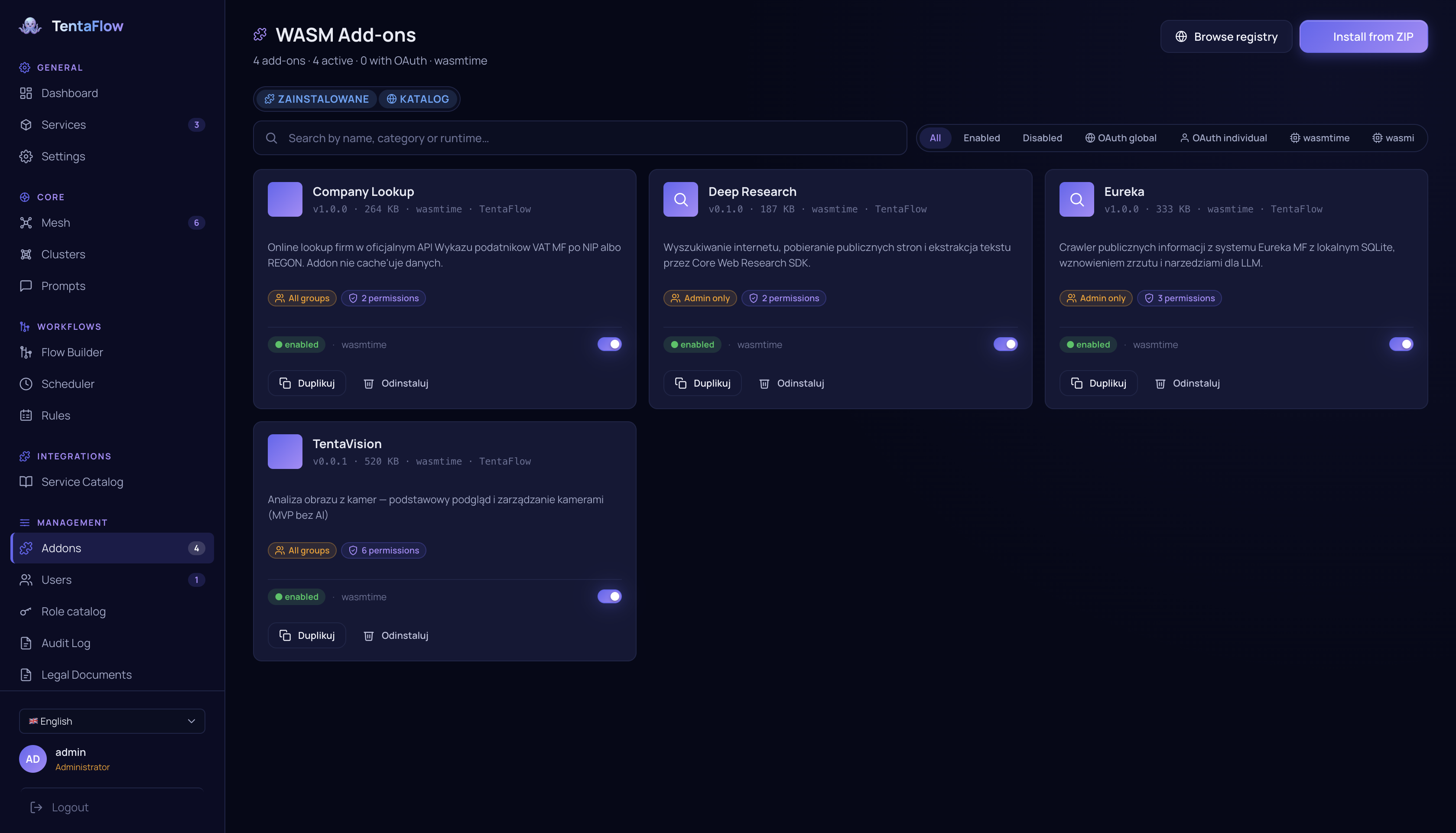
Addons are sandboxed WebAssembly plug-ins (WASM/WASI, run via Wasmtime on desktop, wasmi on mobile). They add tools, data sources, Flow blocks, agent skills and even their own dashboard panels - the UI is described declaratively (a typed CBOR component tree) and rendered natively by the host on web, iOS and desktop.
There is a real SDK with host capabilities exposed through clean wrappers:
- LLM generate / stream / embeddings · per-addon SQLite and key-value storage
- outbound HTTP (fail-closed: admin must approve each network rule) · web research (search + readable-page extraction)
- events, timers, encrypted secrets, OAuth flows, camera / LiDAR / robot / sensor access, vector & graph & memory stores, document parsing, model aliases, and a typed UI builder
All SDK types come from a single source-of-truth spec (tentaflow-sdk-spec) and the SDKs are generated
for Rust, C# and Python (tentaflow-sdk-gen) - so addons aren't locked to one language.
Bundled addons include: memory (knowledge graph + vector memory with REM-style consolidation),
rag (independent RAG instances: ingest, chunk, embed, search), deep-research, contacts + crm +
company-lookup (CRM stack with official registry lookups), mcp / ibm-mcp (MCP clients),
go2 (Unitree robot), phone (mobile sensor node), tentavision, embeddings-chunker, eureka.
📱 The same product, fully offline
The mobile build (Android via JNI, iOS via a Swift bridge) is not a thin client - it's the whole node: local inference, the flow engine, addons, the sync ledger and the dashboard, all on-device. Pair it with your other nodes to share their models, or run it standalone on a plane. Same capabilities either way. The phone's camera, depth sensor, IMU and GPS can also feed the mesh as a roaming sensor node.
More that's built in
- Web dashboard - a fast vanilla-JS SPA on port
8090with 40+ views built from ~80 sharedtf-*web components, localized in 5 languages (pl, en, fr, es, de). It never uses REST — it talks to the core over a binary CBOR protocol. Admins get the full console; regular users get a tiled apps home (Chat, Notes, Translate, Meetings, Robots…). - OpenAI-compatible API —
POST /v1/chat/completions,/v1/audio/*,/v1/embeddings,/v1/images/generations,/v1/rerank+/v1/ranking,/v1/depth,/v1/infer, plus an Anthropic-compatible/v1/messagesendpoint — with API keys, per-model ACLs (denied models return 404) and interactive docs at/docs. External apps can use either direct model passthrough or a flow-as-model (any flow exposed under a model name). - Access control - users, groups, roles catalog, and a tri-state allow/deny/inherit permission matrix over every resource (models, flows, addons, robots, cameras), default-deny, enforced server-side. API keys are scoped, rotatable and sync-aware.
- Compliance core (GDPR/RODO) - built-in AI audit, retention policies, ROPA, DSAR, consents, DPIA, breach register and generated legal documents, with every AI call linked into a tamper-evident audit chain.
- Token accounting - per-org quotas and limits, usage dashboards, model analytics with billing/pricing, and a distributed token-lease coordinator (rendezvous-hash elected) for mesh-wide budget enforcement.
- Scheduler - run addon tools and flows on a cron / interval / one-shot schedule with retry policies and run history.
- Profiling suite - multi-source, mesh-wide profiling sessions (CPU flamegraphs, per-vendor GPU, memory, disk, power; NVIDIA Nsight integration) with a unified timeline, reports and session comparison.
- Web research for addons - pluggable search providers (SearXNG, Brave, Tavily, DuckDuckGo) and a SSRF-guarded readable-page reader, optionally backed by a headless-Chromium renderer service.
- Service containers - ship engines as Docker images or native bundles (Python venv, prebuilt binaries), deployable to any node from the dashboard; includes infra services (SearXNG, browser renderer, Milvus, self-hosted iroh relay).
Security
- TLS 1.3 everywhere (client↔node and node↔node), AEAD ciphers only in production.
- Ed25519 node identities, key-verified pairing (PIN rate-limited), HMAC (constant-time) on REST integration endpoints, optional mTLS client-cert pinning for service callbacks.
- WASM sandbox isolation for addons; host functions are fail-closed and require admin-approved permissions and network rules; addon signature verification; a deliberately malicious test addon guards the sandbox in CI.
- Argon2id password hashing, JWT for the dashboard, scoped API keys for the
/v1API, ACL precedence user-deny > user-allow > group-deny > group-allow > default. - Per-IP + global rate limiting, tamper-evident audit chain, path-traversal containment, unconditional HSTS, SSRF guards on all outbound fetching, signed TTL-bounded download URLs.
Architecture at a glance
                          ┌───────────────── MESH (iroh / QUIC, encrypted) ─────────────────┐
                          │                                                                  │
   ┌──────────────┐       │   ┌──────────────┐        ┌──────────────┐      ┌────────────┐  │
   │  GPU server  │◄──────┼──►│   Laptop     │◄──────►│    Phone     │◄────►│   Robot    │  │
   │  vLLM 72B    │       │   │  llama.cpp   │  multi │  MLX small   │      │  Go2 lidar │  │
   │  training    │       │   │  flows       │  hop   │  offline ok  │      │  camera    │  │
   └──────────────┘       │   └──────────────┘        └──────────────┘      └────────────┘  │
                          │      ▲  Sync Ledger (state) · clusters · alias resolution        │
                          └──────┼───────────────────────────────────────────────────────────┘
                                 │
              ┌──────────────────┼──────────────────────────────┐
              │ binary CBOR (dashboard/SDK)     REST /v1/* (external apps, OpenAI/Anthropic-compatible)
        ┌─────┴─────┐            ┌──────┴──────┐
        │ Dashboard │            │  Your app   │
        │   (SPA)   │            │ (any lang)  │
        └───────────┘            └─────────────┘
Crates
| Crate | Purpose |
|---|---|
tentaflow | Main binary — mesh node + API gateway |
tentaflow-core | The engine — networking, mesh, sync, routing, auth, inference, flows, agents, ML Studio, benchmark, meetings, cameras, robots, addons, API, dashboard |
tentaflow-protocol / -wasm | Wire protocol (CBOR) + browser WASM glue |
tentaflow-transport | Shared iroh + CBOR transport layer |
tentaflow-wrappers | Native engine wrappers — llama.cpp continuous-batching engine with speculative decoding (ngram / MTP), whisper.cpp |
tentaflow-desktop | Native desktop app (egui/wgpu) with system tray — macOS, Windows, Linux |
tentaflow-mobile | Mobile runtime — Android (JNI/Kotlin) + iOS (Swift bridge, MLX/Whisper/Kokoro engines) |
tentaflow-voice | Pure-Rust VAD + speaker embeddings (diarization), no onnxruntime |
tentaflow-zvec / -sys | Embedded vector database |
tentaflow-slam | Unified SLAM core — ESKF, LiDAR odometry, loop closure, pose graph |
tentaflow-voxel-wasm | Browser WebGPU/WebGL point-cloud renderer (LiDAR 3D view) |
tentaflow-hardware | Native device/robot integrations (Unitree Go2 over WebRTC) |
tentaflow-containers | Service container definitions — 80+ engines across LLM/STT/TTS/vision/embeddings/rerankers/training/infra |
tentaflow-sdk-spec / -gen | Addon SDK type spec + Rust/C#/Python code generators |
tentaflow-ui / -ui-schema | Shared UI framework + declarative addon-UI schema |
tentaflow-client | Client SDKs — native Rust FFI + .NET wrapper |
tentaflow-cli | CLI — addon manifest validation, packaging |
tentaflow-models | Training pipeline for the orchestrator ("conductor") model |
Getting started
Install
curl -fsSL https://raw.githubusercontent.com/Slyb00ts/TentaFlow/main/scripts/install/install.sh | sh
The installer asks which edition to install, because hardware alone cannot answer it: the integrated GB10 in a DGX Spark is a real CUDA target and a Strix Halo a real Vulkan one, while the integrated chip in a thin laptop is neither — and with unified memory the reported VRAM does not separate them.
With curl | sh, the prompt and response use the /dev/tty terminal.
Enter full or slim; pressing Enter without a value repeats the prompt,
and end-of-input aborts installation. On macOS, only full is available,
and it also requires confirmation. Without a terminal, set the edition explicitly
in the sh process environment:
curl -fsSL https://raw.githubusercontent.com/Slyb00ts/TentaFlow/main/scripts/install/install.sh | TENTAFLOW_EDITION=slim sh
Use TENTAFLOW_EDITION=full for the full edition. A missing selection without
a terminal, an invalid variable value, or slim on macOS stops the installer
before it downloads the archive or changes the system.
| Edition | Contains | Catalog |
|---|---|---|
full | llama.cpp (Vulkan / Metal), whisper, vision, TTS, diarization | everything |
slim | gateway, mesh, flows, dashboard, addons, containers, meeting bot | cloud providers + utility infra, no local engines |
slim is for machines whose GPU makes local inference pointless — every native library
there is only install weight and another runtime dependency. Cloud services (OpenAI,
Anthropic, …) stay in its catalog; only local model deployment is gone.
It installs into /opt/tentaflow/versions/<version> behind a current symlink, keeps
configuration in /etc/tentaflow and data in /var/lib/tentaflow (neither is touched by
an update), registers a systemd unit and starts it. macOS installs a LaunchDaemon —
a LaunchAgent would wait for a login, which a server cannot depend on — under
/usr/local/{tentaflow,etc,var}, and is full only.
New installations listen on 0.0.0.0:8090 by default with mesh enabled.
From another computer, open https://SERVER_IP:8090 (the server's LAN IP address).
0.0.0.0 means listening on all IPv4 interfaces; it is not an address to enter
in the browser. localhost refers to the computer running the browser.
Updates preserve the existing configuration, including its mesh settings.
The system-wide Linux installer adds rules to active UFW and firewalld instances: TCP for the HTTPS port and UDP when mesh is enabled, according to the configuration. It does not enable an inactive firewall. On macOS and for per-user installations, configure rules manually; other firewalls and network restrictions remain unchanged.
tentaflow status          # service state, autostart, PID, config, /health
tentaflow start | stop | restart
tentaflow update          # newest GitHub release, checksum-verified, atomic swap
tentaflow update --check  # only report whether one exists
Installer options (TENTAFLOW_EDITION is required without a terminal):
TENTAFLOW_EDITION=full|slim, TENTAFLOW_VERSION=v0.1.0,
TENTAFLOW_BIND=0.0.0.0:8090 (default; 127.0.0.1:8090 restricts access to the host),
TENTAFLOW_USER_INSTALL=1 (no sudo, everything under
$HOME, systemd --user), TENTAFLOW_NO_AUTOSTART=1, TENTAFLOW_WITH_DOCKER=1,
TENTAFLOW_SKIP_DEPS=1.
First login: admin / admin — change the password immediately.
uninstall.sh removes the application; --purge also removes data and configuration.
LAN access after an earlier installation
If an earlier installer saved 127.0.0.1:8090, running the installer again
preserves that address. Run tentaflow status, check the reported configuration
path, and change bind to "0.0.0.0:8090" in the existing [protocols.openai_api]
section. Do not replace the entire file with this field. The iroh mesh separately
uses [mesh].port (default 8090) and the network interface settings in Mesh.
For a system-wide Linux installation, after saving the configuration:
sudo systemctl restart tentaflow.service
tentaflow status
sudo ss -ltnp 'sport = :8090'
sudo ss -lunp 'sport = :8090'
For a per-user installation, use systemctl --user restart tentaflow.service.
On macOS, restart the service with tentaflow restart (with sudo for a system service).
Check the local address in ss: 127.0.0.1:8090 means access from this host only,
while 0.0.0.0:8090 means listening on all IPv4 interfaces. TCP serves the HTTPS
dashboard; UDP carries QUIC/mesh traffic. Adjust the commands if you use a different port.
If nothing is listening, check the service and its logs:
sudo journalctl -u tentaflow.service -n 80 --no-pager; a firewall rule alone cannot fix this.
For a user service, read the logs with journalctl --user -u tentaflow.service.
A listening socket does not confirm connectivity through firewalls or across network segments.
Supported: Linux x86_64 with glibc ≥ 2.35 and GLIBCXX ≥ 3.4.30 — Ubuntu 22.04+, Debian 12+, Fedora, Arch/CachyOS, RHEL 10+. The installer checks this floor before it installs anything.
macOS support (Apple Silicon, macOS 15+, launchd) is written and the installer handles it, but no macOS archive has been published yet — until one is, the one-liner has nothing to download there. Older Linux (RHEL 9, Debian 11, Ubuntu 20.04) and Linux aarch64 have to build from source; Windows is packaged separately.
Prerequisites (building from source)
Ubuntu / Debian: sudo apt install build-essential pkg-config libssl-dev
Fedora / RHEL: sudo dnf install gcc pkg-config openssl-devel
Arch: sudo pacman -S base-devel pkg-config openssl
macOS: brew install openssl pkg-config
The dashboard's browser protocol glue needs two WASM targets and a pinned wasm-bindgen:
rustup target add wasm32-wasip1            # sandboxed addons
rustup target add wasm32-unknown-unknown   # browser protocol glue
cargo install wasm-bindgen-cli --version "$(python3 scripts/workspace-version.py wasm-bindgen)" --locked
Without
wasm-bindgen,build.rsskipswww/js/protocol/wasm_glue.{js,wasm}and the dashboard won't load.
One-shot setup (Linux + macOS) handles toolchain, both targets and wasm-bindgen:
./scripts/setup.sh
On Arch/CachyOS, the script performs a full system upgrade and installs dependencies
in a single pacman -Syu --needed transaction. This also updates installed
GStreamer plugins that require matching library versions.
Pacman requires confirmation of the upgrade and user decisions on package conflicts.
On macOS 26+ (Xcode 26) the Metal compiler is a separate component. Without it, MLX models return gibberish with no build error —
setup.shinstalls it andbuild.rsfails loudly if it's missing.
TLS certs are generated automatically on first start (self-signed EC P-256, pure Rust via rcgen)
into <data>/tls/; drop your own cert.pem + key.pem there to override.
Build from source
Run these commands from the repository root. The shared wrapper applies Cargo profiles and automatic artifact retention.
./scripts/build.sh --release --features gpu-cuda
./target_shared/release/tentaflow --config config.toml
On Windows:
scripts\build.bat --release --features gpu-cuda
target_shared\release\tentaflow.exe --config config.toml
Profiles and cache limits: build performance. Dependency versions and purposes: dependency audit.
Open the dashboard at https://localhost:8090.
Useful tentaflow-core features: inference-llamacpp,
inference-whisper (default), inference-sherpa, inference-mlx* (Apple), inference-diarization,
gpu-cuda, gpu-vulkan, docker.
Variants of the main vision path:
# NVIDIA: ORT/TensorRT/CUDA
./scripts/build.sh --release --features gpu-cuda

# AMD/Intel: Burn via WGPU/Vulkan
./scripts/build.sh --release --features gpu-vulkan
AMD and Intel GPUs run on Vulkan/WGPU — both the main vision path (RF-DETR, state
classifier, plate OCR) and llama.cpp. Neither CUDA nor nvcc is involved. HIP/ROCm is
not supported, deliberately: the CUDA and HIP ggml backends export the same symbols and
can never share one static object, so supporting both turned "which driver answered at
build time" into a different artifact. Zero-copy CUDA preprocessing stays an explicit
opt-in behind gpu-cuda/vision-cuda; Supertonic may still use ORT, but no longer
forces ORT for vision. NVIDIA with gpu-cuda keeps the ORT/TensorRT/CUDA path.
Configuration
A single TOML file passed with --config. Main sections: [server], [server.mtls],
[server.tls], [protocols.quic], [mesh], [load_balancing], [monitoring]. Default
HTTPS/QUIC port 8090.
The HTTPS certificate is generated per installation on first start into <data>/tls/
(EC P-256, SANs: localhost, the hostname, every local IP) and regenerated automatically
when the local addresses change. Add names clients will use to reach the node with:
[server.tls]
extra_sans = ["192.168.11.26", "tentaflow.lan"]
License
Apache 2.0 — Copyright 2026 Slyb00ts. See LICENSE.
Contributors

883 commits

8 commits
Similar repos


Languages
Rust
65.1%
JavaScript
14.5%
HTML
8.8%
Mojo
3.3%
CSS
2.7%
Python
2.7%
C#
1.1%
Local AI deployment made trivial. Run vLLM, SGLang, Ollama, llama.cpp, MLX, STT & TTS — containerized or native — from a single dashboard. Drag-and-drop flow builder for AI automation. App marketplace for instant integrations and tooling. Security-first architecture with full audit logging.
Rust
8
891 commits
updated Sep 18, 2026
README
TentaFlow
An operating system for your AI.
Turn every device you own - a GPU server, your laptop, your phone - into one private AI mesh. Deploy models anywhere, wire them into flows, train your own models, and let TentaFlow pick the right model automatically: the big one on the server when you're connected, the local one on your phone when you're not.
Join us on Discord — questions, help with your setup, and what we are building next.
Install
curl -fsSL https://raw.githubusercontent.com/Slyb00ts/TentaFlow/main/scripts/install/install.sh | sh
Linux on x86_64 and arm64 (glibc ≥ 2.35 — Ubuntu 22.04+, Debian 12+, Fedora, Arch, RHEL 10+) and macOS on Apple Silicon. The installer detects the GPU and picks the build to match — CUDA, Vulkan or Metal, or the slim edition with no local inference — pulls the dependencies your system needs, registers the service (systemd or launchd) and starts it. Then:
tentaflow status          # service state, autostart, /health
tentaflow start | stop | restart
tentaflow update          # newest release, checksum-verified, atomic swap
The dashboard is at https://localhost:8090 — first login admin / admin, change it right away. Full details, editions and uninstall are under Getting started.
What is TentaFlow?
Most AI tools assume one machine, one model, and a cloud account. TentaFlow assumes the opposite: you already have several devices with very different capabilities, and you want them to work together as one private AI system that you fully own.
TentaFlow is the layer that makes that happen. It is a single Rust application that runs on Linux, macOS, Windows, Android and iOS, and turns each device into a node in a peer-to-peer mesh. A node can be a rack server with four GPUs, a MacBook, or a phone in your pocket - they all speak the same protocol, share the same data, and expose the same capabilities.
On top of that mesh you:
- Deploy models to any device - run a 70B model on the GPU box and a small one on the phone, all from the same dashboard.
- Build flows visually — chain LLMs, speech, vision, documents, RAG, memory and tools into multi-step pipelines with the Flow Builder, no code required.
- Define aliases with automatic fallback - point your app at
assistant, and TentaFlow uses the powerful server model when it's reachable and silently falls back to a local laptop/phone model when it isn't. - Train and benchmark your own models — fine-tune LLMs (LoRA/QLoRA/DoRA, SFT/DPO/distillation), run tabular AutoML, annotate datasets and benchmark every model in ML Studio and Benchmark Studio.
- Run agents, meetings, cameras and robots — an agent harness with tools and skills, a meeting bot that transcribes and summarizes calls, a camera analytics pipeline, and robot control with LiDAR/SLAM.
- Extend everything with addons - sandboxed plug-ins (with their own UI) that add tools, integrations and data sources, written against an SDK.
And because the whole thing also runs fully offline on a phone, you get the exact same product whether you're online with a server farm or on a plane with nothing but your handset.
The core ideas
🐙 One mesh, many devices
Every device runs the same node. Nodes find each other automatically over iroh (QUIC with relay,
DHT and LAN discovery), so they connect across the same Wi-Fi or across the internet without manual
port-forwarding. First contact is a simple 6-digit PIN pairing (or QR-code scan on mobile) with
Ed25519 key verification — once two nodes are paired they trust each other. You can even self-host the
relay (iroh-relay ships as a service container).
The device list shows this node, devices discovered locally through mDNS, and devices currently trusted by this node. The relay can run in the background and carry connections between trusted devices; it does not expose a global list of unknown nodes. Contacts received through gossip or an untrusted incoming connection alone are not enough for a device to appear in the list. Trust still propagates through the mesh: if A is paired with B and C, after trusted keys synchronize, B and C also trust and see each other without additional pairing.
A request sent to any node can be served by a service running on any other node: the mesh routes it transparently, including multi-hop relays for peers that aren't directly connected. Your phone can use the LLM on your server as if it were local.
State (your flows, settings, identities, RBAC, addon data) is kept consistent across the mesh by an embedded Sync Ledger - an append-only, hash-chained, signed operation log with per-node cursors, outbox/inbox and snapshots. Sync is permission-gated: a node only receives the resources it's allowed to.
🧮 Clusters: group nodes into one serving unit
Beyond ad-hoc mesh routing, nodes can be grouped into named clusters with a load-balancing strategy and failover policy for distributed model serving. The cluster wizard probes live bandwidth between candidate nodes, and the mesh layer auto-configures RDMA / RoCE where the hardware supports it. Cluster detail shows per-node gauges, a live probe matrix and the models shared across the cluster.
🚀 Deploy any model to any node
TentaFlow runs models locally through several inference backends, and connects to external engines as managed services:
| Capability | Backends |
|---|---|
| LLM (local) | llama.cpp (CPU/GPU, continuous batching + speculative decoding — ngram & self-speculative MTP), Apple MLX (Metal) |
| LLM (managed engines) | vLLM (CUDA/ROCm/Metal/DGX Spark), SGLang, Ollama, ds4 (DeepSeek V4), TensorRT-LLM, NVIDIA NIM containers, Qwen3-VL |
| LLM (cloud APIs) | Anthropic, OpenAI / Azure OpenAI / OpenAI-compatible, Gemini, DeepSeek, Groq, Mistral, Moonshot, Qwen, Together, OpenRouter |
| Speech-to-text | Whisper, MLX-Whisper (Apple), sherpa-onnx, NVIDIA Parakeet, Qwen-ASR, Soniox (cloud) |
| Text-to-speech | Kokoro (MLX/ONNX), Kyutai TTS, sherpa-onnx, Supertonic (31 languages), XTTS (voice cloning), VoxCPM, Apple AVSpeech, ElevenLabs (cloud) |
| Embeddings & rerankers | Jina v5 / Nemotron / IBM Granite embeddings; Jina, Qwen3 and Nemotron rerankers (incl. multimodal) — each in vLLM, MLX and GGUF variants |
| Vision | face (YOLOv8 / SCRFD), pose (MoveNet / YOLOv8-pose), emotion (HSEmotion), object detection (RF-DETR), depth (Depth Anything V2/V3, native Rust ~27 ms), OCR (PaddleOCR, Apple OCR, ONNX OCR, license plates), NVIDIA Nemotron document-AI (parse, page elements, tables, graphics) |
| Image generation | ComfyUI, stable-diffusion.cpp |
| Speaker diarization | pure-Rust VAD + speaker embeddings (tentaflow-voice), voice-profile enrollment |
Services deploy as Docker containers, native bundles (Python venv / prebuilt binaries) or external
endpoints — the 4-step wizard detects your hardware (CUDA / Metal / Vulkan / XPU / CPU),
searches HuggingFace Hub, estimates VRAM and lets you pick GPUs per deployment. GPU acceleration is
available for llama.cpp and Whisper via CUDA, Vulkan and Metal. A built-in vector database
(tentaflow-zvec, embedded on every platform) powers semantic search, RAG and long-term memory;
external Milvus is supported for hybrid dense+sparse retrieval.
🔀 Flows: compose AI like building blocks
The Flow Builder is a visual, node-based editor (a typed DAG) for turning models and tools into real pipelines - transcribe -> summarize -> translate -> speak, or trigger -> retrieve from memory -> LLM -> filter PII -> output. The node palette spans 60+ block types:
- Models:
llm·vision_llm·stt·tts·embeddings·reranker·vision_classify·ocr - Documents & RAG:
document_parse·text_extract·office_extract·pdf_rasterize·table_structure·chunk/embed_chunks·vector·graph_search·rag_graphrag·rag_multihop - Agents:
agent_block·agent_router·spawn/await_subagents·tool_exec·ask_user - Control & context:
trigger·interval·condition·loop·map·subflow·conversation_history·compact_context·memory·pii_filter·sentence_buffer·combine·output - Cameras:
camera_alert·camera_verdict— plus dynamicaddon.*blocks contributed by addons.
Flows run in two modes: blocking (full DAG, nodes run concurrently as their inputs become ready) and streaming (token-by-token for LLM chat). Every flow is validated on save, autosaved with version history, and can be scheduled or triggered by events.
🎯 Aliases with automatic fallback
This is the feature that makes a multi-device mesh actually pleasant to use.
An alias is a stable name (e.g. assistant, coder, transcriber) that points at a primary model
plus an ordered list of fallback models. Your apps and flows only ever reference the alias:
alias "assistant"
  ├─ primary:   qwen-72b           (on the GPU server)
  └─ fallback:  phi-3-mini-local   (on this laptop / phone)
At request time TentaFlow resolves the alias against what's actually reachable right now. It prefers a
locally deployed model over a remote one, walks the fallback chain on transport failures, and only
surfaces an error if every candidate is unreachable. So when you're at your desk you get the big server
model; when you walk away and lose the connection, the same assistant keeps working on-device - no code
change, no reconfiguration. Every resolution is audited (which target was used, whether a fallback kicked in).
🤖 Agents, skills and prompts
TentaFlow ships an agent harness: agents are defined declaratively (model, tool allowlist, skills,
limits) and the agent loop itself runs as a Flow Builder flow — not hard-coded Rust. Tools come from
addons and core builtins, resolved against per-agent allowlists and the permission system; every run is
recorded and inspectable. A skills registry holds reusable instructions (addon-provided skills can
be forked into editable user copies), with an LLM-assisted curator that proposes merges and cleanups
for admin approval. A central prompt registry gives system prompts stable IDs so engines can reuse
KV-cache across requests. MCP (Model Context Protocol) client addons expose external MCP servers'
tools as agent tools. There is even a dedicated orchestrator model (a fine-tuned 0.8B "conductor",
trained in tentaflow-models) for fast routing, tool selection and plan validation.
🎓 ML Studio: train your own models
ML Studio takes you from raw data to a deployed model, using compute from anywhere in the mesh:
- LLM fine-tuning — QLoRA / LoRA / DoRA / full fine-tune with SFT, DPO or logit-level knowledge distillation; base-model presets or any HuggingFace repo; live loss curves; VRAM estimates per method; export to GGUF/MLX for immediate deployment.
- Model distillation — generate Q→A pairs or preference triples with a teacher model, then train a smaller student.
- Tabular AutoML & anomaly detection — classification/regression leaderboards (AutoGluon) and anomaly detection, with automatic column profiling on upload.
- Image recognition — dataset schema, data collection, annotation with model-assisted pre-labeling (COCO), classifier and RF-DETR detector training, ONNX export.
- Vision/audio fine-tuning — adapt image and audio models to your own data.
Training jobs run as per-job service containers (HF SFT trainer, AutoGluon, timm, RF-DETR), stream progress live to the dashboard, and register versioned artifacts that can be distributed to other nodes over the mesh.
📊 Benchmark Studio
llama-bench-style benchmarking for every model you can reach — local engines, mesh services and external cloud APIs. Wizard-driven target/test selection, live streaming runs, and results with throughput (tokens/s), TTFT, prefill/decode split, latency percentiles (p50/p99) and concurrency sweeps — plus side-by-side comparison of runs.
📷 TentaVision: cameras & video analytics
Ingest RTSP / ONVIF / local cameras (GStreamer) — or use a paired phone as a camera and sensor
node — and run on-frame models: face, pose, emotion, object detection, depth, license plates.
A detection bus feeds live overlays in the dashboard, camera_alert / camera_verdict flow blocks
turn detections into automations (notify, record, run an LLM verdict), and recordings are served
through HMAC-signed, TTL-bounded URLs. The architecture scales up to full surveillance pipelines
(tracking, re-identification, event correlation).
🦿 Robots, LiDAR and SLAM
Robots are first-class mesh citizens. An addon declares a [robot] manifest block (kind, transport,
capabilities, safety envelope with velocity clamps and mandatory e-stop) and the Robots app
renders a capability-driven control surface automatically: live camera, LiDAR 3D view (WebGPU
voxel renderer), controls generated from the robot's advertised actions, telemetry and logs. Robot
commands are allowlisted and clamped at the mesh layer; the e-stop is always available.
The reference integration is the Unitree Go2 quadruped over WebRTC. Under the hood,
tentaflow-slam implements a unified SLAM loop (ESKF, LiDAR odometry, loop closure, pose graph)
and the core maintains a shared, persistent occupancy map folded from every robot's world-frame
LiDAR — including phones, which the phone addon turns into sensor-robots (camera, depth/LiDAR,
IMU, GPS, barometer with ESKF fusion).
🗣️ Meetings
The Meeting Bot joins calls (MS Teams), transcribes them live with speaker diarization, and produces AI summaries and extracted action items in a live two-column view. Each session runs in its own per-meeting container with a VNC window into the bot, and transcripts persist in SQLite — searchable and downloadable after the fact.
🧩 Addons: extend everything, in your language
Addons are sandboxed WebAssembly plug-ins (WASM/WASI, run via Wasmtime on desktop, wasmi on mobile). They add tools, data sources, Flow blocks, agent skills and even their own dashboard panels - the UI is described declaratively (a typed CBOR component tree) and rendered natively by the host on web, iOS and desktop.
There is a real SDK with host capabilities exposed through clean wrappers:
- LLM generate / stream / embeddings · per-addon SQLite and key-value storage
- outbound HTTP (fail-closed: admin must approve each network rule) · web research (search + readable-page extraction)
- events, timers, encrypted secrets, OAuth flows, camera / LiDAR / robot / sensor access, vector & graph & memory stores, document parsing, model aliases, and a typed UI builder
All SDK types come from a single source-of-truth spec (tentaflow-sdk-spec) and the SDKs are generated
for Rust, C# and Python (tentaflow-sdk-gen) - so addons aren't locked to one language.
Bundled addons include: memory (knowledge graph + vector memory with REM-style consolidation),
rag (independent RAG instances: ingest, chunk, embed, search), deep-research, contacts + crm +
company-lookup (CRM stack with official registry lookups), mcp / ibm-mcp (MCP clients),
go2 (Unitree robot), phone (mobile sensor node), tentavision, embeddings-chunker, eureka.
📱 The same product, fully offline
The mobile build (Android via JNI, iOS via a Swift bridge) is not a thin client - it's the whole node: local inference, the flow engine, addons, the sync ledger and the dashboard, all on-device. Pair it with your other nodes to share their models, or run it standalone on a plane. Same capabilities either way. The phone's camera, depth sensor, IMU and GPS can also feed the mesh as a roaming sensor node.
More that's built in
- Web dashboard - a fast vanilla-JS SPA on port
8090with 40+ views built from ~80 sharedtf-*web components, localized in 5 languages (pl, en, fr, es, de). It never uses REST — it talks to the core over a binary CBOR protocol. Admins get the full console; regular users get a tiled apps home (Chat, Notes, Translate, Meetings, Robots…). - OpenAI-compatible API —
POST /v1/chat/completions,/v1/audio/*,/v1/embeddings,/v1/images/generations,/v1/rerank+/v1/ranking,/v1/depth,/v1/infer, plus an Anthropic-compatible/v1/messagesendpoint — with API keys, per-model ACLs (denied models return 404) and interactive docs at/docs. External apps can use either direct model passthrough or a flow-as-model (any flow exposed under a model name). - Access control - users, groups, roles catalog, and a tri-state allow/deny/inherit permission matrix over every resource (models, flows, addons, robots, cameras), default-deny, enforced server-side. API keys are scoped, rotatable and sync-aware.
- Compliance core (GDPR/RODO) - built-in AI audit, retention policies, ROPA, DSAR, consents, DPIA, breach register and generated legal documents, with every AI call linked into a tamper-evident audit chain.
- Token accounting - per-org quotas and limits, usage dashboards, model analytics with billing/pricing, and a distributed token-lease coordinator (rendezvous-hash elected) for mesh-wide budget enforcement.
- Scheduler - run addon tools and flows on a cron / interval / one-shot schedule with retry policies and run history.
- Profiling suite - multi-source, mesh-wide profiling sessions (CPU flamegraphs, per-vendor GPU, memory, disk, power; NVIDIA Nsight integration) with a unified timeline, reports and session comparison.
- Web research for addons - pluggable search providers (SearXNG, Brave, Tavily, DuckDuckGo) and a SSRF-guarded readable-page reader, optionally backed by a headless-Chromium renderer service.
- Service containers - ship engines as Docker images or native bundles (Python venv, prebuilt binaries), deployable to any node from the dashboard; includes infra services (SearXNG, browser renderer, Milvus, self-hosted iroh relay).
Security
- TLS 1.3 everywhere (client↔node and node↔node), AEAD ciphers only in production.
- Ed25519 node identities, key-verified pairing (PIN rate-limited), HMAC (constant-time) on REST integration endpoints, optional mTLS client-cert pinning for service callbacks.
- WASM sandbox isolation for addons; host functions are fail-closed and require admin-approved permissions and network rules; addon signature verification; a deliberately malicious test addon guards the sandbox in CI.
- Argon2id password hashing, JWT for the dashboard, scoped API keys for the
/v1API, ACL precedence user-deny > user-allow > group-deny > group-allow > default. - Per-IP + global rate limiting, tamper-evident audit chain, path-traversal containment, unconditional HSTS, SSRF guards on all outbound fetching, signed TTL-bounded download URLs.
Architecture at a glance
                          ┌───────────────── MESH (iroh / QUIC, encrypted) ─────────────────┐
                          │                                                                  │
   ┌──────────────┐       │   ┌──────────────┐        ┌──────────────┐      ┌────────────┐  │
   │  GPU server  │◄──────┼──►│   Laptop     │◄──────►│    Phone     │◄────►│   Robot    │  │
   │  vLLM 72B    │       │   │  llama.cpp   │  multi │  MLX small   │      │  Go2 lidar │  │
   │  training    │       │   │  flows       │  hop   │  offline ok  │      │  camera    │  │
   └──────────────┘       │   └──────────────┘        └──────────────┘      └────────────┘  │
                          │      ▲  Sync Ledger (state) · clusters · alias resolution        │
                          └──────┼───────────────────────────────────────────────────────────┘
                                 │
              ┌──────────────────┼──────────────────────────────┐
              │ binary CBOR (dashboard/SDK)     REST /v1/* (external apps, OpenAI/Anthropic-compatible)
        ┌─────┴─────┐            ┌──────┴──────┐
        │ Dashboard │            │  Your app   │
        │   (SPA)   │            │ (any lang)  │
        └───────────┘            └─────────────┘
Crates
| Crate | Purpose |
|---|---|
tentaflow | Main binary — mesh node + API gateway |
tentaflow-core | The engine — networking, mesh, sync, routing, auth, inference, flows, agents, ML Studio, benchmark, meetings, cameras, robots, addons, API, dashboard |
tentaflow-protocol / -wasm | Wire protocol (CBOR) + browser WASM glue |
tentaflow-transport | Shared iroh + CBOR transport layer |
tentaflow-wrappers | Native engine wrappers — llama.cpp continuous-batching engine with speculative decoding (ngram / MTP), whisper.cpp |
tentaflow-desktop | Native desktop app (egui/wgpu) with system tray — macOS, Windows, Linux |
tentaflow-mobile | Mobile runtime — Android (JNI/Kotlin) + iOS (Swift bridge, MLX/Whisper/Kokoro engines) |
tentaflow-voice | Pure-Rust VAD + speaker embeddings (diarization), no onnxruntime |
tentaflow-zvec / -sys | Embedded vector database |
tentaflow-slam | Unified SLAM core — ESKF, LiDAR odometry, loop closure, pose graph |
tentaflow-voxel-wasm | Browser WebGPU/WebGL point-cloud renderer (LiDAR 3D view) |
tentaflow-hardware | Native device/robot integrations (Unitree Go2 over WebRTC) |
tentaflow-containers | Service container definitions — 80+ engines across LLM/STT/TTS/vision/embeddings/rerankers/training/infra |
tentaflow-sdk-spec / -gen | Addon SDK type spec + Rust/C#/Python code generators |
tentaflow-ui / -ui-schema | Shared UI framework + declarative addon-UI schema |
tentaflow-client | Client SDKs — native Rust FFI + .NET wrapper |
tentaflow-cli | CLI — addon manifest validation, packaging |
tentaflow-models | Training pipeline for the orchestrator ("conductor") model |
Getting started
Install
curl -fsSL https://raw.githubusercontent.com/Slyb00ts/TentaFlow/main/scripts/install/install.sh | sh
The installer asks which edition to install, because hardware alone cannot answer it: the integrated GB10 in a DGX Spark is a real CUDA target and a Strix Halo a real Vulkan one, while the integrated chip in a thin laptop is neither — and with unified memory the reported VRAM does not separate them.
With curl | sh, the prompt and response use the /dev/tty terminal.
Enter full or slim; pressing Enter without a value repeats the prompt,
and end-of-input aborts installation. On macOS, only full is available,
and it also requires confirmation. Without a terminal, set the edition explicitly
in the sh process environment:
curl -fsSL https://raw.githubusercontent.com/Slyb00ts/TentaFlow/main/scripts/install/install.sh | TENTAFLOW_EDITION=slim sh
Use TENTAFLOW_EDITION=full for the full edition. A missing selection without
a terminal, an invalid variable value, or slim on macOS stops the installer
before it downloads the archive or changes the system.
| Edition | Contains | Catalog |
|---|---|---|
full | llama.cpp (Vulkan / Metal), whisper, vision, TTS, diarization | everything |
slim | gateway, mesh, flows, dashboard, addons, containers, meeting bot | cloud providers + utility infra, no local engines |
slim is for machines whose GPU makes local inference pointless — every native library
there is only install weight and another runtime dependency. Cloud services (OpenAI,
Anthropic, …) stay in its catalog; only local model deployment is gone.
It installs into /opt/tentaflow/versions/<version> behind a current symlink, keeps
configuration in /etc/tentaflow and data in /var/lib/tentaflow (neither is touched by
an update), registers a systemd unit and starts it. macOS installs a LaunchDaemon —
a LaunchAgent would wait for a login, which a server cannot depend on — under
/usr/local/{tentaflow,etc,var}, and is full only.
New installations listen on 0.0.0.0:8090 by default with mesh enabled.
From another computer, open https://SERVER_IP:8090 (the server's LAN IP address).
0.0.0.0 means listening on all IPv4 interfaces; it is not an address to enter
in the browser. localhost refers to the computer running the browser.
Updates preserve the existing configuration, including its mesh settings.
The system-wide Linux installer adds rules to active UFW and firewalld instances: TCP for the HTTPS port and UDP when mesh is enabled, according to the configuration. It does not enable an inactive firewall. On macOS and for per-user installations, configure rules manually; other firewalls and network restrictions remain unchanged.
tentaflow status          # service state, autostart, PID, config, /health
tentaflow start | stop | restart
tentaflow update          # newest GitHub release, checksum-verified, atomic swap
tentaflow update --check  # only report whether one exists
Installer options (TENTAFLOW_EDITION is required without a terminal):
TENTAFLOW_EDITION=full|slim, TENTAFLOW_VERSION=v0.1.0,
TENTAFLOW_BIND=0.0.0.0:8090 (default; 127.0.0.1:8090 restricts access to the host),
TENTAFLOW_USER_INSTALL=1 (no sudo, everything under
$HOME, systemd --user), TENTAFLOW_NO_AUTOSTART=1, TENTAFLOW_WITH_DOCKER=1,
TENTAFLOW_SKIP_DEPS=1.
First login: admin / admin — change the password immediately.
uninstall.sh removes the application; --purge also removes data and configuration.
LAN access after an earlier installation
If an earlier installer saved 127.0.0.1:8090, running the installer again
preserves that address. Run tentaflow status, check the reported configuration
path, and change bind to "0.0.0.0:8090" in the existing [protocols.openai_api]
section. Do not replace the entire file with this field. The iroh mesh separately
uses [mesh].port (default 8090) and the network interface settings in Mesh.
For a system-wide Linux installation, after saving the configuration:
sudo systemctl restart tentaflow.service
tentaflow status
sudo ss -ltnp 'sport = :8090'
sudo ss -lunp 'sport = :8090'
For a per-user installation, use systemctl --user restart tentaflow.service.
On macOS, restart the service with tentaflow restart (with sudo for a system service).
Check the local address in ss: 127.0.0.1:8090 means access from this host only,
while 0.0.0.0:8090 means listening on all IPv4 interfaces. TCP serves the HTTPS
dashboard; UDP carries QUIC/mesh traffic. Adjust the commands if you use a different port.
If nothing is listening, check the service and its logs:
sudo journalctl -u tentaflow.service -n 80 --no-pager; a firewall rule alone cannot fix this.
For a user service, read the logs with journalctl --user -u tentaflow.service.
A listening socket does not confirm connectivity through firewalls or across network segments.
Supported: Linux x86_64 with glibc ≥ 2.35 and GLIBCXX ≥ 3.4.30 — Ubuntu 22.04+, Debian 12+, Fedora, Arch/CachyOS, RHEL 10+. The installer checks this floor before it installs anything.
macOS support (Apple Silicon, macOS 15+, launchd) is written and the installer handles it, but no macOS archive has been published yet — until one is, the one-liner has nothing to download there. Older Linux (RHEL 9, Debian 11, Ubuntu 20.04) and Linux aarch64 have to build from source; Windows is packaged separately.
Prerequisites (building from source)
Ubuntu / Debian: sudo apt install build-essential pkg-config libssl-dev
Fedora / RHEL: sudo dnf install gcc pkg-config openssl-devel
Arch: sudo pacman -S base-devel pkg-config openssl
macOS: brew install openssl pkg-config
The dashboard's browser protocol glue needs two WASM targets and a pinned wasm-bindgen:
rustup target add wasm32-wasip1            # sandboxed addons
rustup target add wasm32-unknown-unknown   # browser protocol glue
cargo install wasm-bindgen-cli --version "$(python3 scripts/workspace-version.py wasm-bindgen)" --locked
Without
wasm-bindgen,build.rsskipswww/js/protocol/wasm_glue.{js,wasm}and the dashboard won't load.
One-shot setup (Linux + macOS) handles toolchain, both targets and wasm-bindgen:
./scripts/setup.sh
On Arch/CachyOS, the script performs a full system upgrade and installs dependencies
in a single pacman -Syu --needed transaction. This also updates installed
GStreamer plugins that require matching library versions.
Pacman requires confirmation of the upgrade and user decisions on package conflicts.
On macOS 26+ (Xcode 26) the Metal compiler is a separate component. Without it, MLX models return gibberish with no build error —
setup.shinstalls it andbuild.rsfails loudly if it's missing.
TLS certs are generated automatically on first start (self-signed EC P-256, pure Rust via rcgen)
into <data>/tls/; drop your own cert.pem + key.pem there to override.
Build from source
Run these commands from the repository root. The shared wrapper applies Cargo profiles and automatic artifact retention.
./scripts/build.sh --release --features gpu-cuda
./target_shared/release/tentaflow --config config.toml
On Windows:
scripts\build.bat --release --features gpu-cuda
target_shared\release\tentaflow.exe --config config.toml
Profiles and cache limits: build performance. Dependency versions and purposes: dependency audit.
Open the dashboard at https://localhost:8090.
Useful tentaflow-core features: inference-llamacpp,
inference-whisper (default), inference-sherpa, inference-mlx* (Apple), inference-diarization,
gpu-cuda, gpu-vulkan, docker.
Variants of the main vision path:
# NVIDIA: ORT/TensorRT/CUDA
./scripts/build.sh --release --features gpu-cuda

# AMD/Intel: Burn via WGPU/Vulkan
./scripts/build.sh --release --features gpu-vulkan
AMD and Intel GPUs run on Vulkan/WGPU — both the main vision path (RF-DETR, state
classifier, plate OCR) and llama.cpp. Neither CUDA nor nvcc is involved. HIP/ROCm is
not supported, deliberately: the CUDA and HIP ggml backends export the same symbols and
can never share one static object, so supporting both turned "which driver answered at
build time" into a different artifact. Zero-copy CUDA preprocessing stays an explicit
opt-in behind gpu-cuda/vision-cuda; Supertonic may still use ORT, but no longer
forces ORT for vision. NVIDIA with gpu-cuda keeps the ORT/TensorRT/CUDA path.
Configuration
A single TOML file passed with --config. Main sections: [server], [server.mtls],
[server.tls], [protocols.quic], [mesh], [load_balancing], [monitoring]. Default
HTTPS/QUIC port 8090.
The HTTPS certificate is generated per installation on first start into <data>/tls/
(EC P-256, SANs: localhost, the hostname, every local IP) and regenerated automatically
when the local addresses change. Add names clients will use to reach the node with:
[server.tls]
extra_sans = ["192.168.11.26", "tentaflow.lan"]
License
Apache 2.0 — Copyright 2026 Slyb00ts. See LICENSE.
Similar repos
Contributors
883 commits
8 commits
Languages
Rust
65.1%
JavaScript
14.5%
HTML
8.8%
Mojo
3.3%
CSS
2.7%
Python
2.7%
C#
1.1%