
Any track becomes a game soundtrack: AI-detected sections, seamless loops, beat-aligned transitions, intensity layers.
HTML
16
71 commits
updated Sep 15, 2026
README
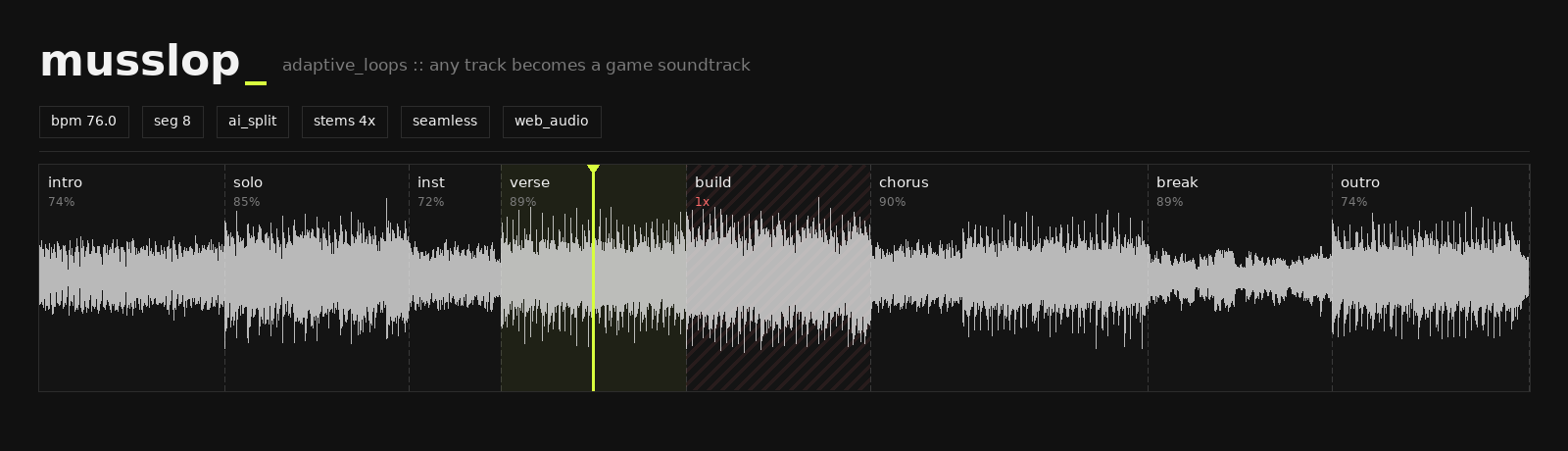
Any track becomes a game soundtrack






Loop any section forever · hit «Next» · the music evolves — seamlessly, on the beat
In games, music reacts: stay in the tavern and its theme loops forever; descend into the dungeon and the score darkens with you. musslop does this with any mp3.
Drop a track → AI finds the musical structure → every section becomes a perfect loop → you drive the music live, like a game audio engine — no editing skills required.
Why it feels magic
| Feature | What it does |
|---|---|
| AI structure analysis | two neural engines find sections and name them (Intro, Verse, Chorus, Solo): SongFormer (2025, faster, best on pop/rock/electronic) and All-In-One (2023, steadier on orchestral); beats/downbeats via Beat This!. Fast heuristic fallback (~2 s) works everywhere |
| Seamless loops | sample-accurate Web Audio scheduling, bar-snapped boundaries, per-section loop-quality score (⟳%), equal-power crossfades |
| Intensity layers | Demucs splits the track into drums / bass / vocals / backing — toggle and mix layers live: calm exploration → full combat, same track |
| Pro transitions | post-exit tails ring out over the next section, bass-swap keeps exactly one bassline at any moment, one-shot stingers (cymbal / boom / riser) punctuate scene changes |
| Knows what not to loop | build-ups are detected by their crescendo shape and play once, as dramatic bridges |
| Full editor | drag boundaries with bar snapping, split/merge, loop-start markers, Ctrl+Z, zoom + scrollbar, everything auto-saved |
Built for the game table
The flagship use case is tabletop RPG: turn any track into a location theme. The party lingers in the tavern — the tavern section loops. They open the dungeon door — one keypress, and the music descends with them, on the beat, mid-session. There is even a Tavern UI theme (wood, parchment & gold) switchable in the header.
Also great for: game dev prototyping (audition adaptive behaviour before wiring FMOD/Wwise, export loop WAVs), streaming, practice looping, focus music.
Quick start
Linux / macOS:
git clone https://github.com/Siziff/musslop.git && cd musslop
./setup.sh   # creates .venv, installs everything (incl. a bundled ffmpeg)
./run.sh     # → http://localhost:8801
Windows (needs Python 3.10+ with "Add to PATH" checked):
git clone https://github.com/Siziff/musslop.git
cd musslop
setup.bat
run.bat      # → http://localhost:8801
ffmpeg is downloaded automatically with the dependencies — no manual install needed.
Optional AI engines (each is one command, both auto-detected by run.sh):
Linux / macOS:
./setup-ai-songformer.sh  # SongFormer 2025 + Beat This! — newer, faster,
                          # best on pop/rock/electronic; plain pip, no compilers
./setup-ai-allin1.sh      # All-In-One 2023 + Demucs — steadier on orchestral,
                          # also powers the stem "layers" feature
Windows:
setup-ai-songformer.bat # needs git in PATH; ~15 min, ~4 GB
The All-In-One engine is not supported natively on Windows (its NATTEN dependency needs a source build); use WSL2 with the Linux script if you need it. SongFormer covers structure analysis fully, and the stem "layers" feature also works through it on Windows.
Works fully offline after setup. First AI analysis of a track: ~1 min on GPU, a few minutes on CPU; results are cached — reopening is instant.
Under the hood
- Beat & downbeat tracking — onset envelope + dynamic programming (Ellis 2007)
- Structure — neural (All-In-One, WASPAA 2023) or Foote novelty on beat-synced chroma+MFCC+RMS self-similarity
- Loop-aware refinement — boundaries move along downbeats maximizing loop closure quality (head/tail spectral similarity), phrase lengths (4/8 bars) and transition audibility
- Build-up detection — normalized RMS slope + trend R² + spectral-centroid rise
- Playback — every loop pass is an independent
AudioBufferSourceNode; transitions land on loop/phrase boundaries with micro-fades, tails and bass-swap
Built on the shoulders of: SongFormer (ASLP-lab, CC-BY-4.0) · All-In-One (Kim & Nam, MIT) · Beat This! (CPJKU, MIT) · Demucs · librosa — plus classic MIR: Ellis 2007 (beat tracking), Foote 2000 (novelty segmentation).
API
| Endpoint | Purpose |
|---|---|
POST /api/upload · POST /api/import_url | file upload / yt-dlp import |
GET /api/analyze/{id}?engine=fast|deep | structure analysis |
POST /api/stems/{id} · GET /api/stems/{id}/{stem} | Demucs 4-stem split |
POST /api/export/{id} | zip of full-quality loop WAVs |
GET/POST /api/markup/{id} | segment markup persistence |
GET /api/tracks · POST /api/favorite/{id} | history & library |
Troubleshooting
curl http://localhost:8801/api/health→ expect{"status":"ok", ...}- Blank page → hard-refresh (
Ctrl+F5), check browser console (F12) - Port busy →
./run.shfrees it; manually:lsof -ti tcp:8801 | xargs kill - No sound → click the ♪? self-test in the volume box (bottom-right)
- Server errors →
server.log
Contributors

71 commits
See what people are saying
Similar repos


Languages
HTML
50.3%
JavaScript
29.8%
Python
15.5%
Shell
3.1%
Batchfile
1.3%
Any track becomes a game soundtrack: AI-detected sections, seamless loops, beat-aligned transitions, intensity layers.
HTML
16
71 commits
updated Sep 15, 2026
README
Any track becomes a game soundtrack
Loop any section forever · hit «Next» · the music evolves — seamlessly, on the beat
In games, music reacts: stay in the tavern and its theme loops forever; descend into the dungeon and the score darkens with you. musslop does this with any mp3.
Drop a track → AI finds the musical structure → every section becomes a perfect loop → you drive the music live, like a game audio engine — no editing skills required.
Why it feels magic
| Feature | What it does |
|---|---|
| AI structure analysis | two neural engines find sections and name them (Intro, Verse, Chorus, Solo): SongFormer (2025, faster, best on pop/rock/electronic) and All-In-One (2023, steadier on orchestral); beats/downbeats via Beat This!. Fast heuristic fallback (~2 s) works everywhere |
| Seamless loops | sample-accurate Web Audio scheduling, bar-snapped boundaries, per-section loop-quality score (⟳%), equal-power crossfades |
| Intensity layers | Demucs splits the track into drums / bass / vocals / backing — toggle and mix layers live: calm exploration → full combat, same track |
| Pro transitions | post-exit tails ring out over the next section, bass-swap keeps exactly one bassline at any moment, one-shot stingers (cymbal / boom / riser) punctuate scene changes |
| Knows what not to loop | build-ups are detected by their crescendo shape and play once, as dramatic bridges |
| Full editor | drag boundaries with bar snapping, split/merge, loop-start markers, Ctrl+Z, zoom + scrollbar, everything auto-saved |
Built for the game table
The flagship use case is tabletop RPG: turn any track into a location theme. The party lingers in the tavern — the tavern section loops. They open the dungeon door — one keypress, and the music descends with them, on the beat, mid-session. There is even a Tavern UI theme (wood, parchment & gold) switchable in the header.
Also great for: game dev prototyping (audition adaptive behaviour before wiring FMOD/Wwise, export loop WAVs), streaming, practice looping, focus music.
Quick start
Linux / macOS:
git clone https://github.com/Siziff/musslop.git && cd musslop
./setup.sh   # creates .venv, installs everything (incl. a bundled ffmpeg)
./run.sh     # → http://localhost:8801
Windows (needs Python 3.10+ with "Add to PATH" checked):
git clone https://github.com/Siziff/musslop.git
cd musslop
setup.bat
run.bat      # → http://localhost:8801
ffmpeg is downloaded automatically with the dependencies — no manual install needed.
Optional AI engines (each is one command, both auto-detected by run.sh):
Linux / macOS:
./setup-ai-songformer.sh  # SongFormer 2025 + Beat This! — newer, faster,
                          # best on pop/rock/electronic; plain pip, no compilers
./setup-ai-allin1.sh      # All-In-One 2023 + Demucs — steadier on orchestral,
                          # also powers the stem "layers" feature
Windows:
setup-ai-songformer.bat # needs git in PATH; ~15 min, ~4 GB
The All-In-One engine is not supported natively on Windows (its NATTEN dependency needs a source build); use WSL2 with the Linux script if you need it. SongFormer covers structure analysis fully, and the stem "layers" feature also works through it on Windows.
Works fully offline after setup. First AI analysis of a track: ~1 min on GPU, a few minutes on CPU; results are cached — reopening is instant.
Under the hood
- Beat & downbeat tracking — onset envelope + dynamic programming (Ellis 2007)
- Structure — neural (All-In-One, WASPAA 2023) or Foote novelty on beat-synced chroma+MFCC+RMS self-similarity
- Loop-aware refinement — boundaries move along downbeats maximizing loop closure quality (head/tail spectral similarity), phrase lengths (4/8 bars) and transition audibility
- Build-up detection — normalized RMS slope + trend R² + spectral-centroid rise
- Playback — every loop pass is an independent
AudioBufferSourceNode; transitions land on loop/phrase boundaries with micro-fades, tails and bass-swap
Built on the shoulders of: SongFormer (ASLP-lab, CC-BY-4.0) · All-In-One (Kim & Nam, MIT) · Beat This! (CPJKU, MIT) · Demucs · librosa — plus classic MIR: Ellis 2007 (beat tracking), Foote 2000 (novelty segmentation).
API
| Endpoint | Purpose |
|---|---|
POST /api/upload · POST /api/import_url | file upload / yt-dlp import |
GET /api/analyze/{id}?engine=fast|deep | structure analysis |
POST /api/stems/{id} · GET /api/stems/{id}/{stem} | Demucs 4-stem split |
POST /api/export/{id} | zip of full-quality loop WAVs |
GET/POST /api/markup/{id} | segment markup persistence |
GET /api/tracks · POST /api/favorite/{id} | history & library |
Troubleshooting
curl http://localhost:8801/api/health→ expect{"status":"ok", ...}- Blank page → hard-refresh (
Ctrl+F5), check browser console (F12) - Port busy →
./run.shfrees it; manually:lsof -ti tcp:8801 | xargs kill - No sound → click the ♪? self-test in the volume box (bottom-right)
- Server errors →
server.log
See what people are saying
Similar repos
Contributors
71 commits
Languages
HTML
50.3%
JavaScript
29.8%
Python
15.5%
Shell
3.1%
Batchfile
1.3%