
[CVPR 2025 Highlight] InterMimic: Towards Universal Whole-Body Control for Physics-Based Human-Object Interactions
See the codeREADME
 InterMimic: Towards Universal Whole-Body Control for Physics-Based Human-Object Interactions
Sirui Xu Hung Yu Ling
  Yu-Xiong Wang
Liang-Yan Gui
Yu-Xiong Wang
Liang-Yan Gui
University of Illinois Urbana-Champaign, Electronic Arts
CVPR 2025 Highlight 🏆






🏠 Overview
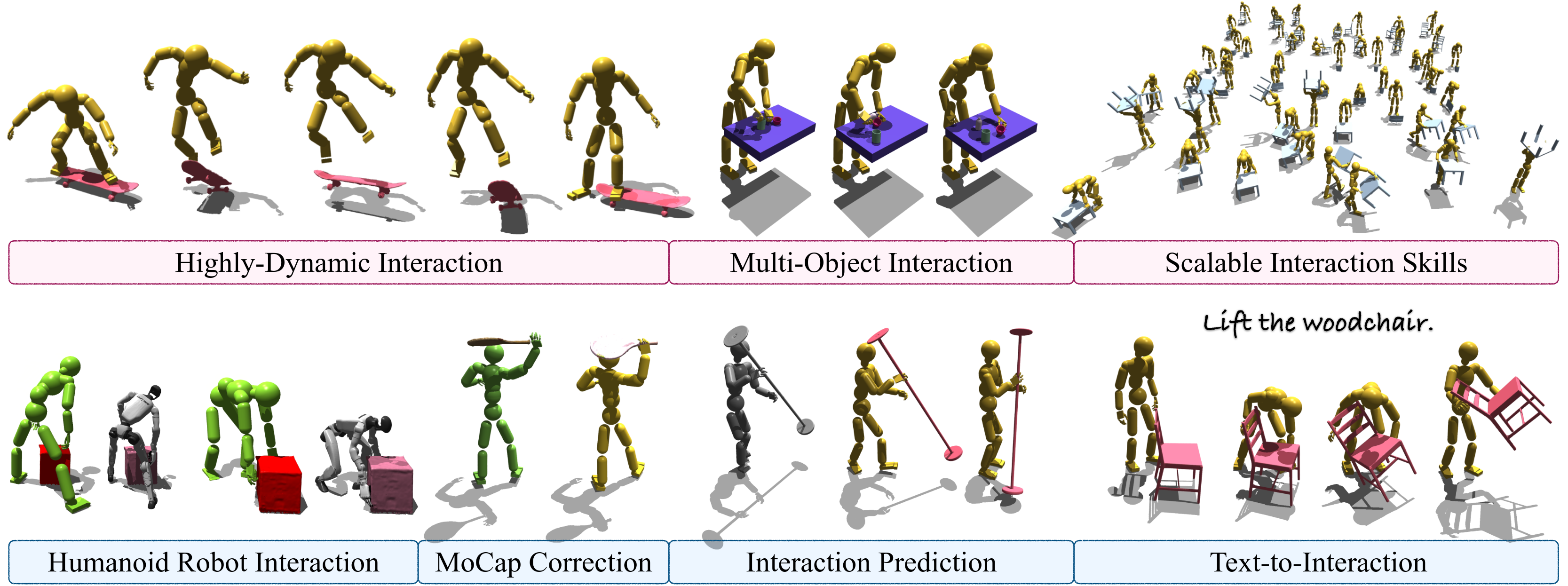
InterMimic features one unified policy, spanning diverse full-body interactions with dynamic, heterogeneous objects—and it works out-of-the-box for both SMPL-X and Unitree G1 humanoids.
📹 Demo
🔥 News
- [2026-02-09] 🚀 Multi-GPU training support is here!
- [2025-12-17] 🚀 Isaac Gym checkpoints are compatible with IsaacLab inference?! Check out the newly released implementation.
- [2025-12-15] IsaacLab support is underway! Data replay is ready—more coming in the next release ☕️
- [2025-12-07] 🚀 Release a data conversion pipeline for bringing InterAct into simulation. The processing code is available in the InterAct repository.
- [2025-06-10] Release the instruction for the student policy inference.
- [2025-06-03] Initial release of PSI and the processed data. Next release: teacher policy inference for dynamics-aware retargeting, and student policy inference.
- [2025-05-26] It's been a while! The student policy training pipeline has been released! The PSI and other data construction pipelines will follow soon.
- [2025-04-18] Release a checkpoint with high‑fidelity physics and enhanced contact precision.
- [2025-04-11] The training code for teacher policies is live—try training your own policy!
- [2025-04-05] We're excited by the overwhelming interest in humanoid robot support and are ahead of schedule in open-sourcing our Unitree-G1 integration—starting with a small demo with support for G1 with its original three-finger dexterous hands. Join us in exploring whole-body loco-manipulation with humanoid robots!
- [2025-04-04] InterMimic has been selected as a CVPR Highlight Paper 🏆. More exciting developments are on the way!
- [2025-03-25] We’ve officially released the codebase and checkpoint for teacher policy inference demo — give it a try! ☕️
📖 Getting Started
Dependencies
Isaac Gym environment
-
Create a dedicated conda environment (Python 3.8) and install PyTorch + repo deps:
conda create -n intermimic-gym python=3.8
conda activate intermimic-gym
conda install pytorch torchvision torchaudio pytorch-cuda=11.6 -c pytorch -c nvidia
pip install -r requirement.txt
(Alternatively, start from environment.yml, though it includes some optional extras.)
-
Install Isaac Gym following NVIDIA’s instructions.
-
Fix the Isaac Gym shared-library lookup when using conda by exporting:
export LD_LIBRARY_PATH="$CONDA_PREFIX/lib${LD_LIBRARY_PATH:+:$LD_LIBRARY_PATH}"Do this after every
conda activate intermimic-gymbefore launching Gym scripts; it ensureslibpython3.8.sois discoverable.
Isaac Lab environment
-
Install Isaac Lab separately by following the official guide and keep that environment isolated (typically via Isaac Sim’s python or the provided uv/conda env). Recommended version: Isaac Sim 5.1.0 with IsaacLab v2.3.1
-
Export
ISAACLAB_PATHonce per shell session so our helper scripts (which source$ISAACLAB_PATH/isaaclab.sh) can locate your install:export ISAACLAB_PATH=/path/to/your/IsaacLab -
Optional: if you plan to use the
--record-videoflag in our replay script, installimageio(andimageio-ffmpegfor MP4 support) inside the Isaac Lab Python environment:$ISAACLAB_PATH/isaaclab.sh -p -m pip install --upgrade imageio imageio-ffmpeg
Data
-
Download the dataset, unzip it, and move the extracted folder to
InterAct/OMOMO_new/. This build contains minor fixes to the original release, so your results may deviate slightly from those reported in the paper. -
🔥 We recommend processing the data using our InterAct to obtain richer HOI skills and higher-quality outputs than the original OMOMO dataset.
Data Replay
To replay the ground-truth data you now have two options:
Isaac Gym
sh isaacgym/scripts/data_replay.sh
Isaac Lab
./isaaclab/scripts/run_data_replay.sh --num-envs 8 --motion-dir InterAct/OMOMO_new
Helpful flags for the Isaac Lab demo:
--num-envs: sets bothcfg.num_envsandcfg.scene.num_envs.--headless: launches Isaac Sim without the viewer.--motion-dir: dataset directory relative to$INTERMIMIC_PATH.--no-playback: disables dataset playback so you can step physics manually.--record-video /path/to/video.mp4: captures RGB frames each step (requiresimageio).--video-fps: frame rate for--record-videocaptures (defaults to 30 FPS).
Teacher Policy Training
To train a teacher policy, execute the following commands:
sh isaacgym/scripts/train_teacher.sh
A higher‑fidelity simulation enough for low-dynamic interaction (trading off some efficiency for realism):
sh isaacgym/scripts/train_teacher_new.sh
How to enable PSI
Open the training config, for example, omomo_train_new.yaml. Set
physicalBufferSize: <integer greater than 1>
Student Policy Training
Download the data from teacher's retargeting and correction, to train a student policy with distillation, execute the following commands:
sh isaacgym/scripts/train_student.sh
To train with transformer network architecture:
sh isaacgym/scripts/train_student_transformer.sh
🔥 Multi-GPU Training
For faster training with multiple GPUs, we provide multi-GPU versions of the training scripts. These scripts use torchrun to launch distributed training across all available GPUs.
Teacher Policy (Multi-GPU)
# Uses all available GPUs by default
sh isaacgym/scripts/train_teacher_multigpu.sh

# High-fidelity simulation variant
sh isaacgym/scripts/train_teacher_new_multigpu.sh
Student Policy (Multi-GPU)
# MLP-based student policy
sh isaacgym/scripts/train_student_multigpu.sh

# Transformer-based student policy
sh isaacgym/scripts/train_student_transformer_multigpu.sh
Specifying the Number of GPUs
By default, all available GPUs are used. To specify a different number:
NUM_GPUS=2 sh isaacgym/scripts/train_teacher_multigpu.sh
Training Hyperparameters for Multi-GPU
With multi-GPU training, gradients are averaged across all GPUs, so each update step effectively processes more data. You may want to adjust the following in your training config (e.g., omomo.yaml):
mini_epochs: can be reducedminibatch_size: can be reduced
Teacher Policy Inference
We’ve released a checkpoint for one (out of 17) teacher policy on OMOMO, along with some sample data. To get started:
-
Download the checkpoints and place them in the current directory.
-
Then, run the following commands:
sh isaacgym/scripts/test_teacher.shFor quantitative evaluation with metrics (execution steps, pose errors, success rate):
sh isaacgym/scripts/eval_teacher.sh -
Run the high‑fidelity modeling (trading off some efficiency for realism):
sh isaacgym/scripts/test_teacher_new.sh -
🔥 To try it on the Unitree G1 with its three-fingered dexterous hand—directly learned from MoCap without any external retargeting:
sh isaacgym/scripts/test_g1.sh -
🔥 Test policy inference on IsaacLab using Isaac Gym checkpoints (requires
ISAACLAB_PATHto be set):export ISAACLAB_PATH=/path/to/IsaacLab ./isaaclab/scripts/test_policy.sh --checkpoint checkpoints/smplx_teachers/sub2.pth --num_envs 16Options:
--checkpoint PATH: Path to checkpoint file--num_envs N: Number of environments (default: 16)--headless: Run without rendering
The test suite validates environment creation, observation dimensions, and basic stepping. Core testing logic is in
isaaclab/examples/test_policy_inference.py.
Student Policy Inference
After finish the student policy training, run the inference with
sh isaacgym/scripts/test_student.sh
For quantitative evaluation with metrics (execution steps, pose errors, success rate):
sh isaacgym/scripts/eval_student.sh
Alternatively, you may try one of our pre-trained checkpoints
📝 TODO List
- Release inference demo for the teacher policy
- Add support for Unitree-G1 with dexterous robot hands
- Release training pipeline for the teacher policy
- Release student policy distillation training
- Release processed MoCap
- Release inference pipeline for the student policy
- Distilled reference data (physically correct HOI data❗️)
- Release all related checkpoints
- Release all data and processing scripts alongside the InterAct launch
- Release multigpu pipeline
- Release the retargeting as tracking for humanoid-object interaction
🔗 Citation
If you find our work helpful, please cite:
@inproceedings{xu2025intermimic,
  title = {{InterMimic}: Towards Universal Whole-Body Control for Physics-Based Human-Object Interactions},
  author = {Xu, Sirui and Ling, Hung Yu and Wang, Yu-Xiong and Gui, Liang-Yan},
  booktitle = {CVPR},
  year = {2025},
}
Our data is sourced from InterAct. Please consider citing:
@inproceedings{xu2025interact,
  title = {{InterAct}: Advancing Large-Scale Versatile 3D Human-Object Interaction Generation},
  author = {Xu, Sirui and Li, Dongting and Zhang, Yucheng and Xu, Xiyan and Long, Qi and Wang, Ziyin and Lu, Yunzhi and Dong, Shuchang and Jiang, Hezi and Gupta, Akshat and Wang, Yu-Xiong and Gui, Liang-Yan},
  booktitle = {CVPR},
  year = {2025},
}
Please also consider citing the specific sub-dataset you used from InterAct.
Our integrated kinematic model builds upon InterDiff, HOI-Diff, and InterDreamer. Please consider citing the following if you find this component useful:
@inproceedings{xu2024interdreamer,
  title = {{InterDreamer}: Zero-Shot Text to 3D Dynamic Human-Object Interaction},
  author = {Xu, Sirui and Wang, Ziyin and Wang, Yu-Xiong and Gui, Liang-Yan},
  booktitle = {NeurIPS},
  year = {2024},
}

@inproceedings{xu2023interdiff,
  title = {{InterDiff}: Generating 3D Human-Object Interactions with Physics-Informed Diffusion},
  author = {Xu, Sirui and Li, Zhengyuan and Wang, Yu-Xiong and Gui, Liang-Yan},
  booktitle = {ICCV},
  year = {2023},
}

@article{peng2023hoi,
  title = {HOI-Diff: Text-Driven Synthesis of 3D Human-Object Interactions using Diffusion Models},
  author = {Peng, Xiaogang and Xie, Yiming and Wu, Zizhao and Jampani, Varun and Sun, Deqing and Jiang, Huaizu},
  journal = {arXiv preprint arXiv:2312.06553},
  year = {2023}
}
Our SMPL-X-based humanoid model is adapted from PHC. Please consider citing:
@inproceedings{Luo2023PerpetualHC,
  author = {Zhengyi Luo and Jinkun Cao and Alexander W. Winkler and Kris Kitani and Weipeng Xu},
  title = {Perpetual Humanoid Control for Real-time Simulated Avatars},
  booktitle = {ICCV},
  year = {2023}
}
👏 Acknowledgements and 📚 License
This repository builds upon the following excellent open-source projects:
- IsaacGymEnvs: Contributes to the environment code
- rl_games: Serves as the core reinforcement learning framework
- PHC: Used for data construction
- PhysHOI: Contributes to the environment code
- InterAct, OMOMO: Core resource for dataset construction
- InterDiff: Supports kinematic generation
- HOI-Diff: Supports kinematic generation
This codebase is released under the MIT License.
Please note that it also relies on external libraries and datasets, each of which may be subject to their own licenses and terms of use.
🌟 Star History
Significant stargazers

203 followers · starred Jun 2025
Similar repos


Languages
Python
97.5%
Shell
2.5%
[CVPR 2025 Highlight] InterMimic: Towards Universal Whole-Body Control for Physics-Based Human-Object Interactions
See the codeREADME
InterMimic: Towards Universal Whole-Body Control for Physics-Based Human-Object Interactions
Sirui Xu
Hung Yu Ling
Yu-Xiong Wang
Liang-Yan Gui
University of Illinois Urbana-Champaign, Electronic Arts
CVPR 2025 Highlight 🏆
🏠 Overview
InterMimic features one unified policy, spanning diverse full-body interactions with dynamic, heterogeneous objects—and it works out-of-the-box for both SMPL-X and Unitree G1 humanoids.
📹 Demo
🔥 News
- [2026-02-09] 🚀 Multi-GPU training support is here!
- [2025-12-17] 🚀 Isaac Gym checkpoints are compatible with IsaacLab inference?! Check out the newly released implementation.
- [2025-12-15] IsaacLab support is underway! Data replay is ready—more coming in the next release ☕️
- [2025-12-07] 🚀 Release a data conversion pipeline for bringing InterAct into simulation. The processing code is available in the InterAct repository.
- [2025-06-10] Release the instruction for the student policy inference.
- [2025-06-03] Initial release of PSI and the processed data. Next release: teacher policy inference for dynamics-aware retargeting, and student policy inference.
- [2025-05-26] It's been a while! The student policy training pipeline has been released! The PSI and other data construction pipelines will follow soon.
- [2025-04-18] Release a checkpoint with high‑fidelity physics and enhanced contact precision.
- [2025-04-11] The training code for teacher policies is live—try training your own policy!
- [2025-04-05] We're excited by the overwhelming interest in humanoid robot support and are ahead of schedule in open-sourcing our Unitree-G1 integration—starting with a small demo with support for G1 with its original three-finger dexterous hands. Join us in exploring whole-body loco-manipulation with humanoid robots!
- [2025-04-04] InterMimic has been selected as a CVPR Highlight Paper 🏆. More exciting developments are on the way!
- [2025-03-25] We’ve officially released the codebase and checkpoint for teacher policy inference demo — give it a try! ☕️
📖 Getting Started
Dependencies
Isaac Gym environment
-
Create a dedicated conda environment (Python 3.8) and install PyTorch + repo deps:
conda create -n intermimic-gym python=3.8
conda activate intermimic-gym
conda install pytorch torchvision torchaudio pytorch-cuda=11.6 -c pytorch -c nvidia
pip install -r requirement.txt
(Alternatively, start from environment.yml, though it includes some optional extras.)
-
Install Isaac Gym following NVIDIA’s instructions.
-
Fix the Isaac Gym shared-library lookup when using conda by exporting:
export LD_LIBRARY_PATH="$CONDA_PREFIX/lib${LD_LIBRARY_PATH:+:$LD_LIBRARY_PATH}"Do this after every
conda activate intermimic-gymbefore launching Gym scripts; it ensureslibpython3.8.sois discoverable.
Isaac Lab environment
-
Install Isaac Lab separately by following the official guide and keep that environment isolated (typically via Isaac Sim’s python or the provided uv/conda env). Recommended version: Isaac Sim 5.1.0 with IsaacLab v2.3.1
-
Export
ISAACLAB_PATHonce per shell session so our helper scripts (which source$ISAACLAB_PATH/isaaclab.sh) can locate your install:export ISAACLAB_PATH=/path/to/your/IsaacLab -
Optional: if you plan to use the
--record-videoflag in our replay script, installimageio(andimageio-ffmpegfor MP4 support) inside the Isaac Lab Python environment:$ISAACLAB_PATH/isaaclab.sh -p -m pip install --upgrade imageio imageio-ffmpeg
Data
-
Download the dataset, unzip it, and move the extracted folder to
InterAct/OMOMO_new/. This build contains minor fixes to the original release, so your results may deviate slightly from those reported in the paper. -
🔥 We recommend processing the data using our InterAct to obtain richer HOI skills and higher-quality outputs than the original OMOMO dataset.
Data Replay
To replay the ground-truth data you now have two options:
Isaac Gym
sh isaacgym/scripts/data_replay.sh
Isaac Lab
./isaaclab/scripts/run_data_replay.sh --num-envs 8 --motion-dir InterAct/OMOMO_new
Helpful flags for the Isaac Lab demo:
--num-envs: sets bothcfg.num_envsandcfg.scene.num_envs.--headless: launches Isaac Sim without the viewer.--motion-dir: dataset directory relative to$INTERMIMIC_PATH.--no-playback: disables dataset playback so you can step physics manually.--record-video /path/to/video.mp4: captures RGB frames each step (requiresimageio).--video-fps: frame rate for--record-videocaptures (defaults to 30 FPS).
Teacher Policy Training
To train a teacher policy, execute the following commands:
sh isaacgym/scripts/train_teacher.sh
A higher‑fidelity simulation enough for low-dynamic interaction (trading off some efficiency for realism):
sh isaacgym/scripts/train_teacher_new.sh
How to enable PSI
Open the training config, for example, omomo_train_new.yaml. Set
physicalBufferSize: <integer greater than 1>
Student Policy Training
Download the data from teacher's retargeting and correction, to train a student policy with distillation, execute the following commands:
sh isaacgym/scripts/train_student.sh
To train with transformer network architecture:
sh isaacgym/scripts/train_student_transformer.sh
🔥 Multi-GPU Training
For faster training with multiple GPUs, we provide multi-GPU versions of the training scripts. These scripts use torchrun to launch distributed training across all available GPUs.
Teacher Policy (Multi-GPU)
# Uses all available GPUs by default
sh isaacgym/scripts/train_teacher_multigpu.sh

# High-fidelity simulation variant
sh isaacgym/scripts/train_teacher_new_multigpu.sh
Student Policy (Multi-GPU)
# MLP-based student policy
sh isaacgym/scripts/train_student_multigpu.sh

# Transformer-based student policy
sh isaacgym/scripts/train_student_transformer_multigpu.sh
Specifying the Number of GPUs
By default, all available GPUs are used. To specify a different number:
NUM_GPUS=2 sh isaacgym/scripts/train_teacher_multigpu.sh
Training Hyperparameters for Multi-GPU
With multi-GPU training, gradients are averaged across all GPUs, so each update step effectively processes more data. You may want to adjust the following in your training config (e.g., omomo.yaml):
mini_epochs: can be reducedminibatch_size: can be reduced
Teacher Policy Inference
We’ve released a checkpoint for one (out of 17) teacher policy on OMOMO, along with some sample data. To get started:
-
Download the checkpoints and place them in the current directory.
-
Then, run the following commands:
sh isaacgym/scripts/test_teacher.shFor quantitative evaluation with metrics (execution steps, pose errors, success rate):
sh isaacgym/scripts/eval_teacher.sh -
Run the high‑fidelity modeling (trading off some efficiency for realism):
sh isaacgym/scripts/test_teacher_new.sh -
🔥 To try it on the Unitree G1 with its three-fingered dexterous hand—directly learned from MoCap without any external retargeting:
sh isaacgym/scripts/test_g1.sh -
🔥 Test policy inference on IsaacLab using Isaac Gym checkpoints (requires
ISAACLAB_PATHto be set):export ISAACLAB_PATH=/path/to/IsaacLab ./isaaclab/scripts/test_policy.sh --checkpoint checkpoints/smplx_teachers/sub2.pth --num_envs 16Options:
--checkpoint PATH: Path to checkpoint file--num_envs N: Number of environments (default: 16)--headless: Run without rendering
The test suite validates environment creation, observation dimensions, and basic stepping. Core testing logic is in
isaaclab/examples/test_policy_inference.py.
Student Policy Inference
After finish the student policy training, run the inference with
sh isaacgym/scripts/test_student.sh
For quantitative evaluation with metrics (execution steps, pose errors, success rate):
sh isaacgym/scripts/eval_student.sh
Alternatively, you may try one of our pre-trained checkpoints
📝 TODO List
- Release inference demo for the teacher policy
- Add support for Unitree-G1 with dexterous robot hands
- Release training pipeline for the teacher policy
- Release student policy distillation training
- Release processed MoCap
- Release inference pipeline for the student policy
- Distilled reference data (physically correct HOI data❗️)
- Release all related checkpoints
- Release all data and processing scripts alongside the InterAct launch
- Release multigpu pipeline
- Release the retargeting as tracking for humanoid-object interaction
🔗 Citation
If you find our work helpful, please cite:
@inproceedings{xu2025intermimic,
  title = {{InterMimic}: Towards Universal Whole-Body Control for Physics-Based Human-Object Interactions},
  author = {Xu, Sirui and Ling, Hung Yu and Wang, Yu-Xiong and Gui, Liang-Yan},
  booktitle = {CVPR},
  year = {2025},
}
Our data is sourced from InterAct. Please consider citing:
@inproceedings{xu2025interact,
  title = {{InterAct}: Advancing Large-Scale Versatile 3D Human-Object Interaction Generation},
  author = {Xu, Sirui and Li, Dongting and Zhang, Yucheng and Xu, Xiyan and Long, Qi and Wang, Ziyin and Lu, Yunzhi and Dong, Shuchang and Jiang, Hezi and Gupta, Akshat and Wang, Yu-Xiong and Gui, Liang-Yan},
  booktitle = {CVPR},
  year = {2025},
}
Please also consider citing the specific sub-dataset you used from InterAct.
Our integrated kinematic model builds upon InterDiff, HOI-Diff, and InterDreamer. Please consider citing the following if you find this component useful:
@inproceedings{xu2024interdreamer,
  title = {{InterDreamer}: Zero-Shot Text to 3D Dynamic Human-Object Interaction},
  author = {Xu, Sirui and Wang, Ziyin and Wang, Yu-Xiong and Gui, Liang-Yan},
  booktitle = {NeurIPS},
  year = {2024},
}

@inproceedings{xu2023interdiff,
  title = {{InterDiff}: Generating 3D Human-Object Interactions with Physics-Informed Diffusion},
  author = {Xu, Sirui and Li, Zhengyuan and Wang, Yu-Xiong and Gui, Liang-Yan},
  booktitle = {ICCV},
  year = {2023},
}

@article{peng2023hoi,
  title = {HOI-Diff: Text-Driven Synthesis of 3D Human-Object Interactions using Diffusion Models},
  author = {Peng, Xiaogang and Xie, Yiming and Wu, Zizhao and Jampani, Varun and Sun, Deqing and Jiang, Huaizu},
  journal = {arXiv preprint arXiv:2312.06553},
  year = {2023}
}
Our SMPL-X-based humanoid model is adapted from PHC. Please consider citing:
@inproceedings{Luo2023PerpetualHC,
  author = {Zhengyi Luo and Jinkun Cao and Alexander W. Winkler and Kris Kitani and Weipeng Xu},
  title = {Perpetual Humanoid Control for Real-time Simulated Avatars},
  booktitle = {ICCV},
  year = {2023}
}
👏 Acknowledgements and 📚 License
This repository builds upon the following excellent open-source projects:
- IsaacGymEnvs: Contributes to the environment code
- rl_games: Serves as the core reinforcement learning framework
- PHC: Used for data construction
- PhysHOI: Contributes to the environment code
- InterAct, OMOMO: Core resource for dataset construction
- InterDiff: Supports kinematic generation
- HOI-Diff: Supports kinematic generation
This codebase is released under the MIT License.
Please note that it also relies on external libraries and datasets, each of which may be subject to their own licenses and terms of use.
🌟 Star History
Similar repos
Significant stargazers
203 followers · starred Jun 2025
Languages
Python
97.5%
Shell
2.5%