👻 A simple & beautiful GUI application for scrcpy.
See the code





Scrcpy GUI discovers Android devices over USB or wireless debugging and launches scrcpy with a reliable, visual configuration. It supports several devices at once, recording, audio, modern keyboard modes, cropping, window placement, and the current scrcpy 4.x command line.
Version 2.4 is the first stable release of the ground-up modernization. When reporting a regression, please include the Logs tab output, your operating system, and your scrcpy version.
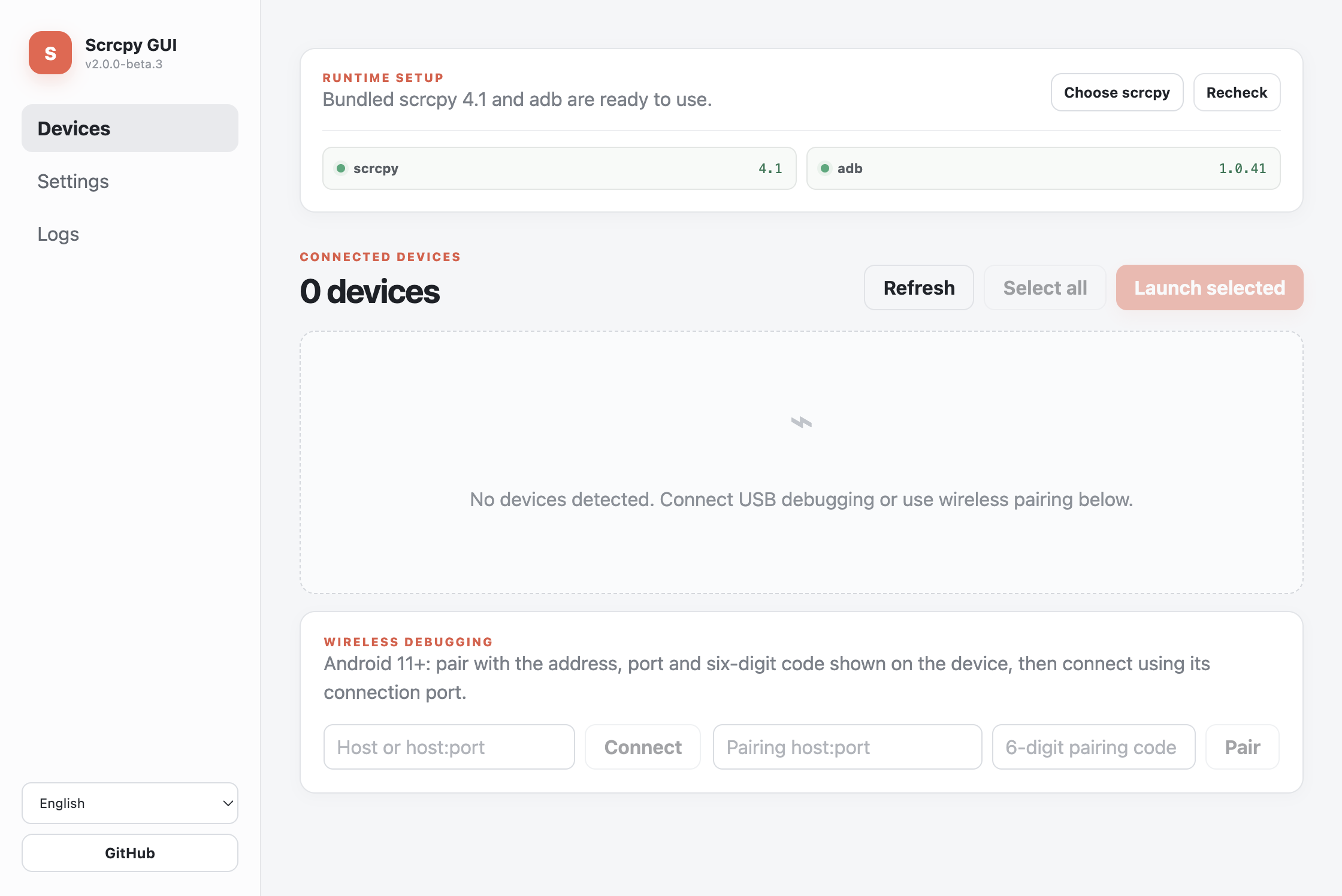
Settings are split into focused General, Video, Controls, Recording, Window, and Advanced sections instead of one long form.
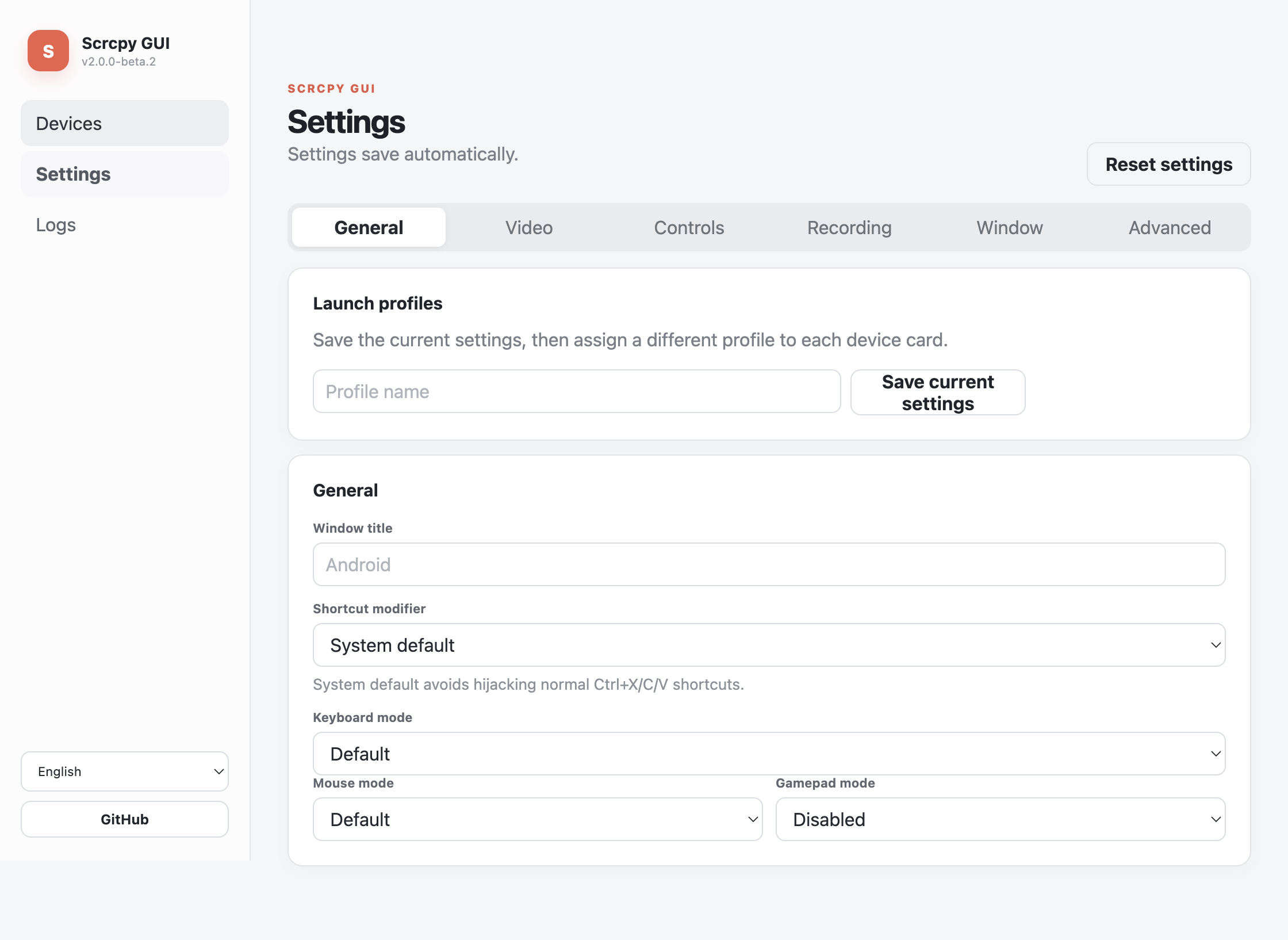
Scrcpy is a fast, lightweight application maintained by Genymobile. It mirrors and controls Android devices connected through USB or TCP/IP without root access and without leaving an application installed on the device. Scrcpy GUI remains a separate frontend; release packages include an unmodified, checksum-verified official scrcpy bundle for easier installation, under scrcpy's own license.
adb pair, plus direct TCP/IP connection for legacy setupsThe 2.0 line replaces the original 2018 Electron/Vue stack and its scrcpy 1.x flags. It includes a new interface, current scrcpy arguments, direct process supervision, Android 11+ pairing, multi-device reliability, diagnostics, security hardening, automated tests, and cross-platform release automation. Existing 1.x configuration is intentionally not imported because several old options no longer have the same scrcpy meaning.
adb bundled in official Scrcpy GUI release packages, or select your own compatible scrcpy 4.x executable.Release packages work without configuring PATH. If you choose another scrcpy executable, Scrcpy GUI also searches its directory, PATH, common Homebrew locations, and standard Android SDK locations for adb.
Download the package for your platform from GitHub Releases:
.exe) / portable .zip.dmg / .zip.AppImage, Debian (.deb), Arch (.pacman), or portable .tar.gzThe current stable artifacts are not code-signed or notarized. Your operating system may ask you to confirm that you trust the downloaded application. Verify the download against the release SHA256SUMS.txt before opening it.
Releases from v2.4.1 also include an SPDX SBOM and GitHub build-provenance attestations. After downloading an asset, verify its workflow identity with gh attestation verify PATH/TO/ASSET -R SimonAKing/scrcpy-gui in addition to checking the SHA-256 manifest.
The exact automated checks, SBOM/provenance evidence, and unverified hardware matrix are recorded in the v2.4.1 release smoke report. The earlier three-platform install/upgrade/uninstall evidence remains in the v2.4.0 report.
The bundled runtime is usually enough. To override it, Windows users can download another official archive from the scrcpy releases page, extract it, then select scrcpy.exe from Scrcpy GUI.
On macOS with Homebrew:
brew install scrcpy android-platform-tools
On Linux, use a current package from your distribution or follow the official scrcpy Linux documentation. Distribution packages may lag behind; Scrcpy GUI 2.0 requires scrcpy 4.x.
unauthorized card means the phone is still waiting for approval.The pairing port and connection port are usually different. Hostnames, IPv4, bracketed IPv6, and ports from 1–65535 are accepted.
Every successful connection address is remembered. Rename it for clarity and enable Connect at startup only for stable addresses that should be retried when Scrcpy GUI opens.
For devices using ADB over TCP/IP, enable the device's TCP/IP mode while connected over USB, then connect to device-ip:5555. Avoid exposing an unauthenticated ADB port outside a trusted local network.
Select several authorized device cards and launch them together. Each scrcpy process is tracked separately, so a failure on one device does not report the others as successful and the same serial cannot be launched twice accidentally.
Save the current Settings as a named launch profile, then assign a profile to each device card. Device aliases are saved by serial and become the scrcpy window title unless the profile supplies an explicit title. Launch automatically is opt-in per device and is guarded against duplicate launches.
Choose a target in the control panel to click Back, Home, recent apps, Menu, volume, power, screen power, rotation, and touch-indicator controls without memorizing scrcpy shortcuts. Screenshot uses adb exec-out screencap and validates the PNG before saving it to the computer.
Choose Record actions, use the control buttons, then stop and save the sequence. The Automations page can also build normalized tap/swipe, non-sensitive text, app-start, screenshot, delay, control, and device-assertion steps. Imported automations open as untrusted previews; arbitrary shell commands and persisted sensitive text are rejected.
Save selected devices as a Device group with a default launch profile and concurrency limit. Before launching, controlling, taking screenshots, pushing files, installing an APK, starting an app, or running an automation, the batch view shows online/authorization state, capabilities, session conflicts, target geometry, and the exact planned action for every device. Failed preflight items stay visible, partial runs never report overall success, and input/overwrite/downgrade actions require confirmation. Active automation runs can be canceled and their per-device reports are saved in Artifacts.
Enable recording in Settings, choose an .mp4 or .mkv destination, then launch the device. No playback records without showing a mirror window. Leaving the Record only scene restores playback defaults; recording explicitly enabled in Settings remains available for playback scenes.
Place one complete scrcpy argument on each line. Scrcpy GUI passes each line as one process argument without a shell. Device serial overrides (-s and --serial) are rejected because the selected device card owns that value.
The optional global Boss key immediately closes every active mirror and hides Scrcpy GUI; restore the main window from its tray icon. The default shortcut is Ctrl/Cmd+Shift+B and can be changed. If this GUI owns your ADB workflow, you may also opt into stopping the shared ADB server on quit; leave that disabled when Android Studio or another tool shares the server.
The shortcut modifier is controlled by scrcpy and may vary by platform. Keep System default unless you deliberately want another modifier. Common shortcuts include:
| Action | Shortcut |
|---|---|
| Toggle fullscreen | MOD + f |
| Resize to pixel-perfect | MOD + g |
| Resize to fit the device | MOD + w |
| Home / Back / App switch | MOD + h / b / s |
| Volume up / down | MOD + ↑ / ↓ |
| Power | MOD + p |
| Turn device screen off / on | MOD + o / Shift + o |
| Rotate the device | MOD + r |
| Copy / Cut / Paste | MOD + c / x / v |
| Toggle FPS counter | MOD + i |
See the current scrcpy control documentation for the complete list. File drag-and-drop, APK installation, clipboard behavior, and these shortcuts are implemented by the launched scrcpy window.
adb devices -l, unlock the device, and accept the authorization prompt.PATH.More diagnostics and known boundaries are tracked in GitHub Issues.
Node.js 22 or later is recommended.
npm ci
npm test
npm run dev
Production checks and packaging:
npm run typecheck
npm run build
npm run build:dir
The app uses Electron, Vue 3, TypeScript, Vite, and electron-builder. Main-process integration lives in src/main/, the sandboxed renderer in src/renderer/, shared IPC contracts in src/shared/, and pure argument/address logic in tests/.
Please read CONTRIBUTING.md before opening a pull request. Bug reports should include reproducible steps, platform and version details, plus the relevant Logs tab output.
The proposed product direction, functional requirements, architecture, security boundaries, and implementation milestones are documented in the Product and technical specification (Simplified Chinese).
If Scrcpy GUI is useful to you, starring the repository, reporting a reproducible issue, improving documentation, or contributing a pull request all help the project. You can also support the original author through PayPal.
Scrcpy GUI releases from v2.4.2 onward are licensed under the MIT License. Tagged releases through v2.4.1 remain available under the GPL-3.0-only license that accompanied them. Bundled scrcpy remains a separate project under its own license; see third-party notices.
100 followers · starred Jul 2026
42 followers · starred Sep 2026
40 followers · starred Oct 2020
6 followers · starred Feb 2020
👻 A simple & beautiful GUI application for scrcpy.
See the code
Scrcpy GUI discovers Android devices over USB or wireless debugging and launches scrcpy with a reliable, visual configuration. It supports several devices at once, recording, audio, modern keyboard modes, cropping, window placement, and the current scrcpy 4.x command line.
Version 2.4 is the first stable release of the ground-up modernization. When reporting a regression, please include the Logs tab output, your operating system, and your scrcpy version.
Settings are split into focused General, Video, Controls, Recording, Window, and Advanced sections instead of one long form.
Scrcpy is a fast, lightweight application maintained by Genymobile. It mirrors and controls Android devices connected through USB or TCP/IP without root access and without leaving an application installed on the device. Scrcpy GUI remains a separate frontend; release packages include an unmodified, checksum-verified official scrcpy bundle for easier installation, under scrcpy's own license.
adb pair, plus direct TCP/IP connection for legacy setupsThe 2.0 line replaces the original 2018 Electron/Vue stack and its scrcpy 1.x flags. It includes a new interface, current scrcpy arguments, direct process supervision, Android 11+ pairing, multi-device reliability, diagnostics, security hardening, automated tests, and cross-platform release automation. Existing 1.x configuration is intentionally not imported because several old options no longer have the same scrcpy meaning.
adb bundled in official Scrcpy GUI release packages, or select your own compatible scrcpy 4.x executable.Release packages work without configuring PATH. If you choose another scrcpy executable, Scrcpy GUI also searches its directory, PATH, common Homebrew locations, and standard Android SDK locations for adb.
Download the package for your platform from GitHub Releases:
.exe) / portable .zip.dmg / .zip.AppImage, Debian (.deb), Arch (.pacman), or portable .tar.gzThe current stable artifacts are not code-signed or notarized. Your operating system may ask you to confirm that you trust the downloaded application. Verify the download against the release SHA256SUMS.txt before opening it.
Releases from v2.4.1 also include an SPDX SBOM and GitHub build-provenance attestations. After downloading an asset, verify its workflow identity with gh attestation verify PATH/TO/ASSET -R SimonAKing/scrcpy-gui in addition to checking the SHA-256 manifest.
The exact automated checks, SBOM/provenance evidence, and unverified hardware matrix are recorded in the v2.4.1 release smoke report. The earlier three-platform install/upgrade/uninstall evidence remains in the v2.4.0 report.
The bundled runtime is usually enough. To override it, Windows users can download another official archive from the scrcpy releases page, extract it, then select scrcpy.exe from Scrcpy GUI.
On macOS with Homebrew:
brew install scrcpy android-platform-tools
On Linux, use a current package from your distribution or follow the official scrcpy Linux documentation. Distribution packages may lag behind; Scrcpy GUI 2.0 requires scrcpy 4.x.
unauthorized card means the phone is still waiting for approval.The pairing port and connection port are usually different. Hostnames, IPv4, bracketed IPv6, and ports from 1–65535 are accepted.
Every successful connection address is remembered. Rename it for clarity and enable Connect at startup only for stable addresses that should be retried when Scrcpy GUI opens.
For devices using ADB over TCP/IP, enable the device's TCP/IP mode while connected over USB, then connect to device-ip:5555. Avoid exposing an unauthenticated ADB port outside a trusted local network.
Select several authorized device cards and launch them together. Each scrcpy process is tracked separately, so a failure on one device does not report the others as successful and the same serial cannot be launched twice accidentally.
Save the current Settings as a named launch profile, then assign a profile to each device card. Device aliases are saved by serial and become the scrcpy window title unless the profile supplies an explicit title. Launch automatically is opt-in per device and is guarded against duplicate launches.
Choose a target in the control panel to click Back, Home, recent apps, Menu, volume, power, screen power, rotation, and touch-indicator controls without memorizing scrcpy shortcuts. Screenshot uses adb exec-out screencap and validates the PNG before saving it to the computer.
Choose Record actions, use the control buttons, then stop and save the sequence. The Automations page can also build normalized tap/swipe, non-sensitive text, app-start, screenshot, delay, control, and device-assertion steps. Imported automations open as untrusted previews; arbitrary shell commands and persisted sensitive text are rejected.
Save selected devices as a Device group with a default launch profile and concurrency limit. Before launching, controlling, taking screenshots, pushing files, installing an APK, starting an app, or running an automation, the batch view shows online/authorization state, capabilities, session conflicts, target geometry, and the exact planned action for every device. Failed preflight items stay visible, partial runs never report overall success, and input/overwrite/downgrade actions require confirmation. Active automation runs can be canceled and their per-device reports are saved in Artifacts.
Enable recording in Settings, choose an .mp4 or .mkv destination, then launch the device. No playback records without showing a mirror window. Leaving the Record only scene restores playback defaults; recording explicitly enabled in Settings remains available for playback scenes.
Place one complete scrcpy argument on each line. Scrcpy GUI passes each line as one process argument without a shell. Device serial overrides (-s and --serial) are rejected because the selected device card owns that value.
The optional global Boss key immediately closes every active mirror and hides Scrcpy GUI; restore the main window from its tray icon. The default shortcut is Ctrl/Cmd+Shift+B and can be changed. If this GUI owns your ADB workflow, you may also opt into stopping the shared ADB server on quit; leave that disabled when Android Studio or another tool shares the server.
The shortcut modifier is controlled by scrcpy and may vary by platform. Keep System default unless you deliberately want another modifier. Common shortcuts include:
| Action | Shortcut |
|---|---|
| Toggle fullscreen | MOD + f |
| Resize to pixel-perfect | MOD + g |
| Resize to fit the device | MOD + w |
| Home / Back / App switch | MOD + h / b / s |
| Volume up / down | MOD + ↑ / ↓ |
| Power | MOD + p |
| Turn device screen off / on | MOD + o / Shift + o |
| Rotate the device | MOD + r |
| Copy / Cut / Paste | MOD + c / x / v |
| Toggle FPS counter | MOD + i |
See the current scrcpy control documentation for the complete list. File drag-and-drop, APK installation, clipboard behavior, and these shortcuts are implemented by the launched scrcpy window.
adb devices -l, unlock the device, and accept the authorization prompt.PATH.More diagnostics and known boundaries are tracked in GitHub Issues.
Node.js 22 or later is recommended.
npm ci
npm test
npm run dev
Production checks and packaging:
npm run typecheck
npm run build
npm run build:dir
The app uses Electron, Vue 3, TypeScript, Vite, and electron-builder. Main-process integration lives in src/main/, the sandboxed renderer in src/renderer/, shared IPC contracts in src/shared/, and pure argument/address logic in tests/.
Please read CONTRIBUTING.md before opening a pull request. Bug reports should include reproducible steps, platform and version details, plus the relevant Logs tab output.
The proposed product direction, functional requirements, architecture, security boundaries, and implementation milestones are documented in the Product and technical specification (Simplified Chinese).
If Scrcpy GUI is useful to you, starring the repository, reporting a reproducible issue, improving documentation, or contributing a pull request all help the project. You can also support the original author through PayPal.
Scrcpy GUI releases from v2.4.2 onward are licensed under the MIT License. Tagged releases through v2.4.1 remain available under the GPL-3.0-only license that accompanied them. Bundled scrcpy remains a separate project under its own license; see third-party notices.
100 followers · starred Jul 2026
42 followers · starred Sep 2026
40 followers · starred Oct 2020
6 followers · starred Feb 2020