Useful tools for Sorbet projects.
Spoom provides a CLI and a Ruby API to inspect Sorbet projects, improve typing coverage, translate signatures, query Sorbet LSP, and find dead code.
Add Spoom to your application's Gemfile:
gem "spoom"
Then install it:
bundle install
Or install it directly:
gem install spoom
Spoom requires Ruby 3.3 or newer.
Run spoom help or spoom help COMMAND to list all available commands.
spoom srb tc runs srb tc and can sort, filter, format, and export errors.
List errors sorted by location:
spoom srb tc --sort loc
List errors sorted by error code:
spoom srb tc --sort code
List only errors with a specific code:
spoom srb tc --code 7004
Limit the number of displayed errors:
spoom srb tc --limit 10
Options can be combined:
spoom srb tc --sort code --code 7004 --limit 10
Remove duplicated error lines:
spoom srb tc --uniq
Format each error line:
spoom srb tc --format "%C - %F:%L: %M"
Format tokens:
%C: error code%F: file path%L: line number%M: error messageHide the final Errors: X count:
spoom srb tc --no-count
List only errors from specific files or directories:
spoom srb tc file1.rb path1/ path2/
Write errors to a JUnit XML file:
spoom srb tc --junit-output-path junit.xml
Pass extra options to Sorbet:
spoom srb tc --sorbet-options="--typed=true"
spoom srb coverage collects Sorbet coverage metrics and can generate an HTML report from Sorbet and Git data.
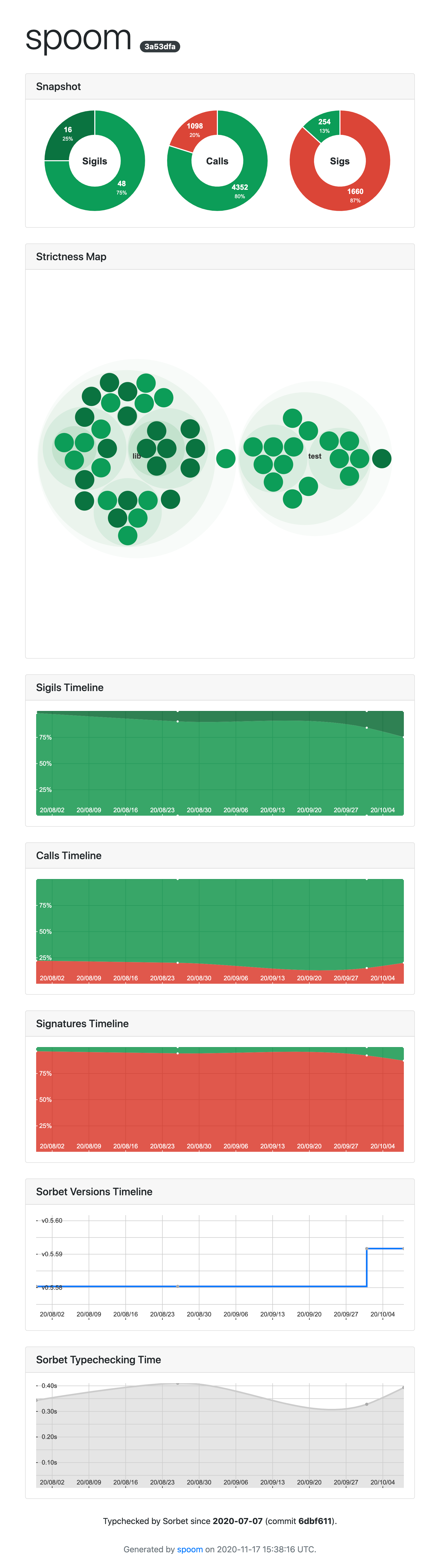
Show a coverage snapshot:
spoom srb coverage
Save a snapshot under spoom_data/:
spoom srb coverage --save
Save a snapshot under a specific directory:
spoom srb coverage --save my_data/
Show typing coverage evolution based on Git history:
spoom srb coverage timeline
Replay a specific date range:
spoom srb coverage timeline --from YYYY-MM-DD --to YYYY-MM-DD
Save timeline snapshots under spoom_data/:
spoom srb coverage timeline --save
Save timeline snapshots under a specific directory:
spoom srb coverage timeline --save my_data/
Run bundle install before collecting each timeline snapshot:
spoom srb coverage timeline --bundle-install
Generate an HTML coverage report from saved snapshots:
spoom srb coverage report
The report is generated at spoom_report.html by default.
Generate a report from a custom data directory:
spoom srb coverage report --data my_data/
Change the generated report path:
spoom srb coverage report --file coverage.html
Change report colors:
spoom srb coverage report \
  --color-true "#648ffe" \
  --color-false "#fe6002" \
  --color-ignore "#feb000" \
  --color-strict "#795ef0" \
  --color-strong "#6444f1"
Open the HTML coverage report:
spoom srb coverage open
Open a report at a custom path:
spoom srb coverage open coverage.html
spoom srb bump changes # typed: sigils when the change does not introduce typechecking errors.
Bump files from typed: false to typed: true:
spoom srb bump --from false --to true
Force the change without typechecking:
spoom srb bump --from false --to true --force
Bump only files listed in a file, one path per line:
spoom srb bump --from false --to true --only list.txt
Check which files can be bumped without applying changes:
spoom srb bump --from false --to true --dry
This command exits with a non-zero status when files can be bumped, which is useful in CI.
Use a custom Sorbet executable:
spoom srb bump --from false --to true --sorbet /path/to/sorbet/bin
Count typechecking errors if all files were bumped:
spoom srb bump --from false --to true --count-errors --dry
spoom srb sigs translates signatures between Sorbet RBI syntax and RBS comments.
Translate signatures from RBI to RBS comments:
spoom srb sigs translate
Translate signatures from RBS comments to RBI:
spoom srb sigs translate --from rbs --to rbi path/to/file.rb
Strip Sorbet signatures from files:
spoom srb sigs strip path/to/file.rb
Export gem signatures to an RBI file:
spoom srb sigs export
Check that the exported RBI file is up to date:
spoom srb sigs export --check-sync
spoom srb assertions translates Sorbet type assertions to RBS comments:
spoom srb assertions translate path/to/file.rb
spoom srb lsp sends requests to Sorbet LSP.
This command group is experimental.
Find symbols matching Foo:
spoom srb lsp find Foo
List symbols in a file:
spoom srb lsp symbols file.rb
List definitions for a code location:
spoom srb lsp defs file.rb 10 4
List references for a code location:
spoom srb lsp refs file.rb 10 4
Show hover information for a code location:
spoom srb lsp hover file.rb 10 4
Show signature information for a code location:
spoom srb lsp sigs file.rb 10 4
Show type information for a code location:
spoom srb lsp types file.rb 10 4
spoom srb metrics collects metrics about Sorbet usage in Ruby files.
Show metrics for the current project:
spoom srb metrics
Show metrics for specific files or directories:
spoom srb metrics lib/ test/foo_test.rb
Dump raw metric keys and values:
spoom srb metrics --dump
spoom deadcode indexes a project and reports definitions that do not appear to be referenced.
Analyze the current project:
spoom deadcode
Analyze specific paths:
spoom deadcode lib/ app/models/
Show files, loaded plugins, definitions, or references used during analysis:
spoom deadcode --show-files
spoom deadcode --show-plugins
spoom deadcode --show-defs
spoom deadcode --show-refs
Remove a reported dead code candidate:
spoom deadcode remove path/to/file.rb:42:18-47:23
Teach spoom deadcode about your project's own DSLs by adding plugins to .spoom/deadcode/plugins/*.rb. Each file should define a subclass of Spoom::Deadcode::Plugins::Base:
# .spoom/deadcode/plugins/my_plugin.rb
class MyPlugin < Spoom::Deadcode::Plugins::Base
  ignore_methods_named("my_dsl_method")
end
[!WARNING] Custom plugins are loaded with
require, sospoom deadcodeexecutes any Ruby code in.spoom/deadcode/plugins/of the project being analyzed. Only runspoom deadcodeon projects you trust, and inspect or remove.spoom/deadcode/plugins/before analyzing untrusted code (such as a pull request from an outside contributor).
Parse a Sorbet config file:
config = Spoom::Sorbet::Config.parse_file("sorbet/config")
puts config.paths
Parse a Sorbet config string:
config = Spoom::Sorbet::Config.parse_string(<<~CONFIG)
  a
  --file=b
  --ignore=c
CONFIG

puts config.paths
puts config.ignore
List all files typechecked by Sorbet:
config = Spoom::Sorbet::Config.parse_file("sorbet/config")
puts Spoom::Context.new(".").srb_files(with_config: config)
Display metrics collected during typechecking:
puts Spoom::Context.new(".").srb_metrics(capture_err: false)
Create an LSP client:
client = Spoom::LSP::Client.new(
  Spoom::Sorbet::BIN_PATH,
  "--lsp",
  "--enable-all-experimental-lsp-features",
  "--disable-watchman",
)
client.open(".")
Find symbols matching a string:
puts client.symbols("Foo")
Find symbols in a file:
puts client.document_symbols("file://path/to/my/file.rb")
Spoom provides a Minitest backtrace filter that removes Sorbet frames from test failures.
Enable it in your test helper:
# test/test_helper.rb
require "spoom/backtrace_filter/minitest"

Minitest.backtrace_filter = Spoom::BacktraceFilter::Minitest.new
After checking out the repo, install dependencies:
bin/setup
Run the tests:
bin/test
Run an interactive console:
bin/console
Run the full local sanity check before pushing:
bin/sanity
Install this gem locally:
bundle exec rake install
lib/spoom/version.rbbundle install to update the version number in Gemfile.lockBump version to vx.y.zmain or open a pull requestgit tag vx.y.zgit push origin vx.y.zThe release workflow publishes new gem versions to RubyGems through Trusted Publishing.
A member of the Ruby and Rails Infrastructure team at Shopify must approve the workflow before it runs. Once approved, it publishes the gem and creates a GitHub release.
Bug reports and pull requests are welcome on GitHub at https://github.com/Shopify/spoom.
This project is intended to be a safe, welcoming space for collaboration. Contributors are expected to follow the Contributor Covenant code of conduct.
The gem is available as open source under the terms of the MIT License.
Everyone interacting in Spoom's codebases, issue trackers, chat rooms, and mailing lists is expected to follow the code of conduct.
299 followers · starred Oct 2022
112 followers · starred Jan 2023
31 followers · starred May 2021
29 followers · starred Jul 2024
Useful tools for Sorbet projects.
Spoom provides a CLI and a Ruby API to inspect Sorbet projects, improve typing coverage, translate signatures, query Sorbet LSP, and find dead code.
Add Spoom to your application's Gemfile:
gem "spoom"
Then install it:
bundle install
Or install it directly:
gem install spoom
Spoom requires Ruby 3.3 or newer.
Run spoom help or spoom help COMMAND to list all available commands.
spoom srb tc runs srb tc and can sort, filter, format, and export errors.
List errors sorted by location:
spoom srb tc --sort loc
List errors sorted by error code:
spoom srb tc --sort code
List only errors with a specific code:
spoom srb tc --code 7004
Limit the number of displayed errors:
spoom srb tc --limit 10
Options can be combined:
spoom srb tc --sort code --code 7004 --limit 10
Remove duplicated error lines:
spoom srb tc --uniq
Format each error line:
spoom srb tc --format "%C - %F:%L: %M"
Format tokens:
%C: error code%F: file path%L: line number%M: error messageHide the final Errors: X count:
spoom srb tc --no-count
List only errors from specific files or directories:
spoom srb tc file1.rb path1/ path2/
Write errors to a JUnit XML file:
spoom srb tc --junit-output-path junit.xml
Pass extra options to Sorbet:
spoom srb tc --sorbet-options="--typed=true"
spoom srb coverage collects Sorbet coverage metrics and can generate an HTML report from Sorbet and Git data.
Show a coverage snapshot:
spoom srb coverage
Save a snapshot under spoom_data/:
spoom srb coverage --save
Save a snapshot under a specific directory:
spoom srb coverage --save my_data/
Show typing coverage evolution based on Git history:
spoom srb coverage timeline
Replay a specific date range:
spoom srb coverage timeline --from YYYY-MM-DD --to YYYY-MM-DD
Save timeline snapshots under spoom_data/:
spoom srb coverage timeline --save
Save timeline snapshots under a specific directory:
spoom srb coverage timeline --save my_data/
Run bundle install before collecting each timeline snapshot:
spoom srb coverage timeline --bundle-install
Generate an HTML coverage report from saved snapshots:
spoom srb coverage report
The report is generated at spoom_report.html by default.
Generate a report from a custom data directory:
spoom srb coverage report --data my_data/
Change the generated report path:
spoom srb coverage report --file coverage.html
Change report colors:
spoom srb coverage report \
  --color-true "#648ffe" \
  --color-false "#fe6002" \
  --color-ignore "#feb000" \
  --color-strict "#795ef0" \
  --color-strong "#6444f1"
Open the HTML coverage report:
spoom srb coverage open
Open a report at a custom path:
spoom srb coverage open coverage.html
spoom srb bump changes # typed: sigils when the change does not introduce typechecking errors.
Bump files from typed: false to typed: true:
spoom srb bump --from false --to true
Force the change without typechecking:
spoom srb bump --from false --to true --force
Bump only files listed in a file, one path per line:
spoom srb bump --from false --to true --only list.txt
Check which files can be bumped without applying changes:
spoom srb bump --from false --to true --dry
This command exits with a non-zero status when files can be bumped, which is useful in CI.
Use a custom Sorbet executable:
spoom srb bump --from false --to true --sorbet /path/to/sorbet/bin
Count typechecking errors if all files were bumped:
spoom srb bump --from false --to true --count-errors --dry
spoom srb sigs translates signatures between Sorbet RBI syntax and RBS comments.
Translate signatures from RBI to RBS comments:
spoom srb sigs translate
Translate signatures from RBS comments to RBI:
spoom srb sigs translate --from rbs --to rbi path/to/file.rb
Strip Sorbet signatures from files:
spoom srb sigs strip path/to/file.rb
Export gem signatures to an RBI file:
spoom srb sigs export
Check that the exported RBI file is up to date:
spoom srb sigs export --check-sync
spoom srb assertions translates Sorbet type assertions to RBS comments:
spoom srb assertions translate path/to/file.rb
spoom srb lsp sends requests to Sorbet LSP.
This command group is experimental.
Find symbols matching Foo:
spoom srb lsp find Foo
List symbols in a file:
spoom srb lsp symbols file.rb
List definitions for a code location:
spoom srb lsp defs file.rb 10 4
List references for a code location:
spoom srb lsp refs file.rb 10 4
Show hover information for a code location:
spoom srb lsp hover file.rb 10 4
Show signature information for a code location:
spoom srb lsp sigs file.rb 10 4
Show type information for a code location:
spoom srb lsp types file.rb 10 4
spoom srb metrics collects metrics about Sorbet usage in Ruby files.
Show metrics for the current project:
spoom srb metrics
Show metrics for specific files or directories:
spoom srb metrics lib/ test/foo_test.rb
Dump raw metric keys and values:
spoom srb metrics --dump
spoom deadcode indexes a project and reports definitions that do not appear to be referenced.
Analyze the current project:
spoom deadcode
Analyze specific paths:
spoom deadcode lib/ app/models/
Show files, loaded plugins, definitions, or references used during analysis:
spoom deadcode --show-files
spoom deadcode --show-plugins
spoom deadcode --show-defs
spoom deadcode --show-refs
Remove a reported dead code candidate:
spoom deadcode remove path/to/file.rb:42:18-47:23
Teach spoom deadcode about your project's own DSLs by adding plugins to .spoom/deadcode/plugins/*.rb. Each file should define a subclass of Spoom::Deadcode::Plugins::Base:
# .spoom/deadcode/plugins/my_plugin.rb
class MyPlugin < Spoom::Deadcode::Plugins::Base
  ignore_methods_named("my_dsl_method")
end
[!WARNING] Custom plugins are loaded with
require, sospoom deadcodeexecutes any Ruby code in.spoom/deadcode/plugins/of the project being analyzed. Only runspoom deadcodeon projects you trust, and inspect or remove.spoom/deadcode/plugins/before analyzing untrusted code (such as a pull request from an outside contributor).
Parse a Sorbet config file:
config = Spoom::Sorbet::Config.parse_file("sorbet/config")
puts config.paths
Parse a Sorbet config string:
config = Spoom::Sorbet::Config.parse_string(<<~CONFIG)
  a
  --file=b
  --ignore=c
CONFIG

puts config.paths
puts config.ignore
List all files typechecked by Sorbet:
config = Spoom::Sorbet::Config.parse_file("sorbet/config")
puts Spoom::Context.new(".").srb_files(with_config: config)
Display metrics collected during typechecking:
puts Spoom::Context.new(".").srb_metrics(capture_err: false)
Create an LSP client:
client = Spoom::LSP::Client.new(
  Spoom::Sorbet::BIN_PATH,
  "--lsp",
  "--enable-all-experimental-lsp-features",
  "--disable-watchman",
)
client.open(".")
Find symbols matching a string:
puts client.symbols("Foo")
Find symbols in a file:
puts client.document_symbols("file://path/to/my/file.rb")
Spoom provides a Minitest backtrace filter that removes Sorbet frames from test failures.
Enable it in your test helper:
# test/test_helper.rb
require "spoom/backtrace_filter/minitest"

Minitest.backtrace_filter = Spoom::BacktraceFilter::Minitest.new
After checking out the repo, install dependencies:
bin/setup
Run the tests:
bin/test
Run an interactive console:
bin/console
Run the full local sanity check before pushing:
bin/sanity
Install this gem locally:
bundle exec rake install
lib/spoom/version.rbbundle install to update the version number in Gemfile.lockBump version to vx.y.zmain or open a pull requestgit tag vx.y.zgit push origin vx.y.zThe release workflow publishes new gem versions to RubyGems through Trusted Publishing.
A member of the Ruby and Rails Infrastructure team at Shopify must approve the workflow before it runs. Once approved, it publishes the gem and creates a GitHub release.
Bug reports and pull requests are welcome on GitHub at https://github.com/Shopify/spoom.
This project is intended to be a safe, welcoming space for collaboration. Contributors are expected to follow the Contributor Covenant code of conduct.
The gem is available as open source under the terms of the MIT License.
Everyone interacting in Spoom's codebases, issue trackers, chat rooms, and mailing lists is expected to follow the code of conduct.
299 followers · starred Oct 2022
112 followers · starred Jan 2023
31 followers · starred May 2021
29 followers · starred Jul 2024