
Official repository for the ECCV 2026 paper "Articulat3D: Reconstructing Articulated Digital Twins From Monocular Videos with Geometric and Motion Constraints".
See the codeREADME
(ECCV 2026) Articulat3D: Reconstructing Articulated Digital Twins From Monocular Videos with Geometric and Motion Constraints
Lijun Guo*1, Haoyu Zhao*2,3, Xingyue Zhao4, Rong Fu5, Linghao Zhuang1 Siteng Huang6 Zhongyu Li2,3 and Hua Zou✉1
1School of Computer Science, Wuhan University 2Hong Kong Embodied AI Lab 3The Chinese University of Hong Kong 4Peking Union Medical College 5University of Macau 6Zhejiang University
arXiv | Project Page | Code | Data
* Equal contribution ✉ Corresponding author
Overall
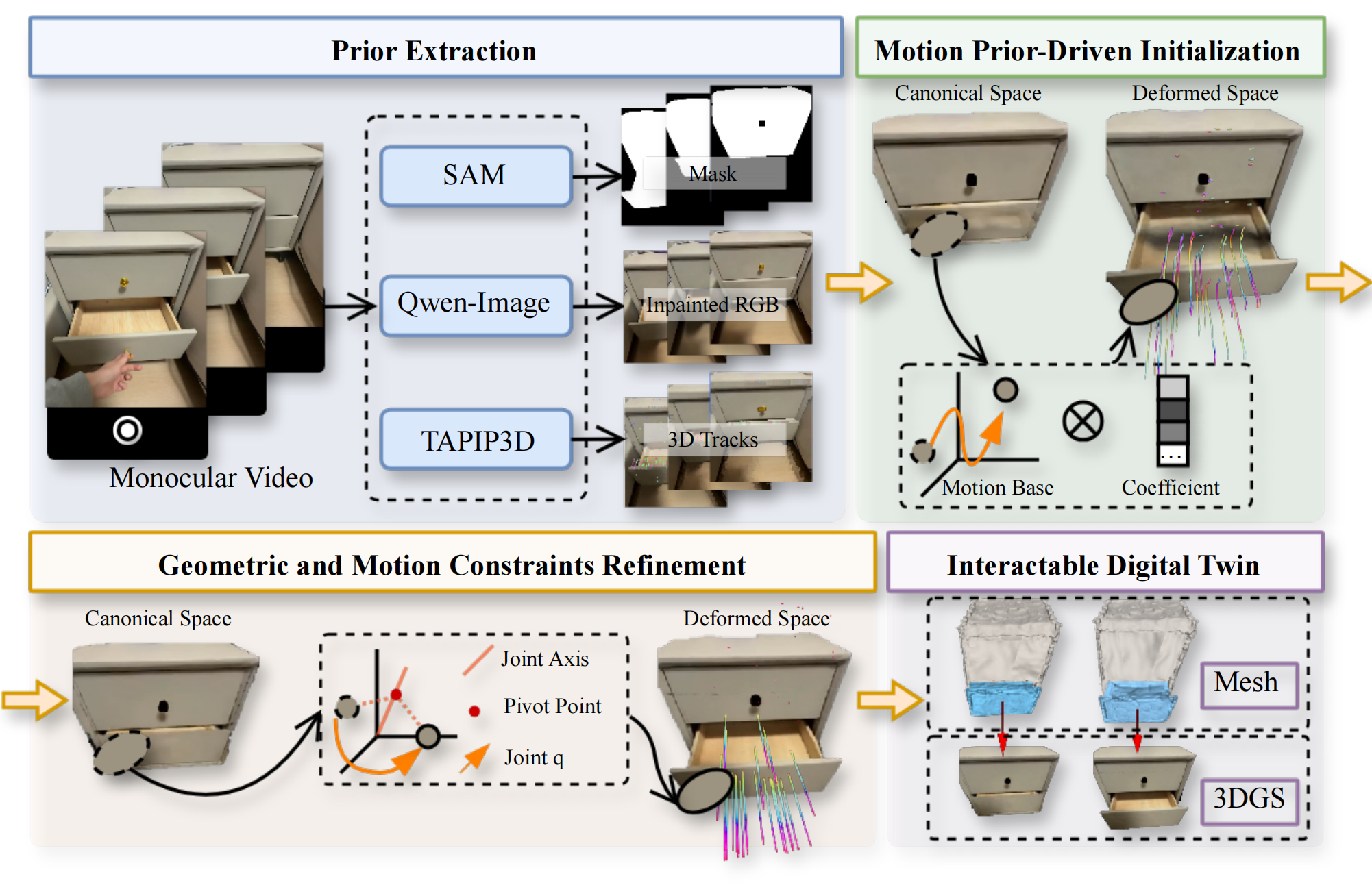
This is the official repository of ECCV 2026 paper: Articulat3D: Reconstructing Articulated Digital Twins From Monocular Videos with Geometric and Motion Constraints. For more information, please visit our project page.
Installation
Installing dependencies
- Prepare the environment from the project root.
conda create -n articulat3d python=3.10
conda activate articulat3d

pip install torch==2.4.1 torchvision==0.19.1 torchaudio==2.4.1 "xformers>=0.0.27" --index-url https://download.pytorch.org/whl/cu124
pip install torch-scatter -f https://data.pyg.org/whl/torch-2.4.1+cu124.html
pip install -r TAPIP3D/requirements.txt
pip install -r requirements.txt
- Compile pointops2
cd TAPIP3D/third_party/pointops2
LIBRARY_PATH=$CONDA_PREFIX/lib:$LIBRARY_PATH python setup.py install
cd ../../..
- Compile pointnet_lib
cd TAPIP3D/third_party/pointnet_lib
LIBRARY_PATH=$CONDA_PREFIX/lib:$LIBRARY_PATH python setup.py install
cd ../../..
- Compile MegaSAM if you add the optional MegaSAM third-party dependency for monocular video input.
cd TAPIP3D/third_party/megasam/base
LIBRARY_PATH=$CONDA_PREFIX/lib:$LIBRARY_PATH python setup.py install
cd ../../../..
Downloading checkpoints
Download our TAPIP3D model checkpoint here to TAPIP3D/checkpoints/tapip3d_final.pth
If you want to run TAPIP3D on monocular videos, you need to prepare the following checkpoints manually to run MegaSAM:
-
Download the DepthAnything V1 checkpoint from here and put it to
TAPIP3D/third_party/megasam/Depth-Anything/checkpoints/depth_anything_vitl14.pth -
Download the RAFT checkpoint from here and put it to
TAPIP3D/third_party/megasam/cvd_opt/raft-things.pth
Additionally, the checkpoints of MoGe and UniDepth will be downloaded automatically when running the demo. Please make sure your network connection is available.
Run
Data Preparation
Put each scene under a dataset root directory. The default training scripts use data/Articulat3DSimECCV as the dataset root and StorageFurniture_45194 as the example scene.
data/
`-- Articulat3DSimECCV/
    `-- StorageFurniture_45194/
        |-- images/
        |   |-- 000000.png
        |   |-- 000001.png
        |   |-- ...
        |   `-- 000749.png
        |-- depth/
        |   |-- 000000.png
        |   |-- 000001.png
        |   |-- ...
        |   `-- 000749.png
        |-- masks/
        |   |-- 000000.png
        |   |-- 000001.png
        |   |-- ...
        |   `-- 000749.png
        |-- camera_pose.json
        |-- intrinsics.json
        `-- gt/
            `-- mobility_v2.json
The expected file formats are:
images/*.png: RGB or RGBA images.depth/*.png: depth maps. The scripts convert them to metric depth withdepth / depth_scale; the defaultdepth_scaleis6553.5.masks/*.png: foreground masks aligned withimages/anddepth/.camera_pose.json: a dictionary keyed by frame id, such as"000000", where each value is a 4x4 camera pose matrix.intrinsics.json: one 3x3 camera intrinsic matrix.gt/mobility_v2.json: mobility annotation used byget_obj_prior.pyto generate the joint prior.
After preprocessing, the same scene directory will also contain:
data/Articulat3DSimECCV/StorageFurniture_45194/
|-- joint_priori.json
|-- joint_details.json
|-- trajectory_tapip3d.npz
`-- trajectory_tapip3d_visualization.npz
Preprocess
Run preprocessing before training. The first step prepares the object and joint prior files for a scene, and the second step runs TAPIP3D to extract 3D trajectories.
Set the scene path variables from the project root:
DATA_DIR=data/Articulat3DSimECCV
SCENE_NAME=StorageFurniture_45194
SCENE_PATH=${DATA_DIR}/${SCENE_NAME}
- Generate the object/joint prior files with get_obj_prior.py.
python preprocess/get_obj_prior.py \
  --scene_path "$SCENE_PATH"
This step writes joint_priori.json under the scene directory. It also validates the static and dynamic frame ranges used by the scene.
- Extract TAPIP3D tracks with extract_tapip3d_track.py.
python preprocess/extract_tapip3d_track.py \
  --data_dir "$DATA_DIR" \
  --scene_name "$SCENE_NAME" \
  --tapip3d_dir TAPIP3D/
This step first runs TAPIP3D to produce the raw scene track file, then builds the motion prior outputs used by training:
joint_details.json, trajectory_tapip3d.npz, and trajectory_tapip3d_visualization.npz.
Training
Run the two training stages in order from the project root.
- Train Stage 1 with run_train_articulat3d.py.
python scripts/run_train_articulat3d.py
This stage initializes the Gaussian scene and free motion bases from trajectory_tapip3d_visualization.npz, then saves the Stage 1 checkpoint under the configured work_dir.
- Train Stage 2 with run_train_articulat3d_stage2.py.
python scripts/run_train_articulat3d_stage2.py
This stage loads the Stage 1 checkpoint, initializes the articulated motion model, and continues optimization with joint-aware motion bases.
Acknowledgement
This code used resources from PARIS, Shape of Motion, TAPIP3D and VideoArtGS. We thank the authors for open-sourcing their awesome projects.
Citation
@article{guo2026articulat3d,
  title={Articulat3D: Reconstructing Articulated Digital Twins From Monocular Videos with Geometric and Motion Constraints},
  author={Guo, Lijun and Zhao, Haoyu and Zhao, Xingyue and Fu, Rong and Zhuang, Linghao and Huang, Siteng and Li, Zhongyu and Zou, Hua},
  journal={arXiv preprint arXiv:2603.11606},
  year={2026}
}
Contributors

3 commits

1 commits
Similar repos


Languages
Python
95.1%
HTML
4.9%
Official repository for the ECCV 2026 paper "Articulat3D: Reconstructing Articulated Digital Twins From Monocular Videos with Geometric and Motion Constraints".
See the codeREADME
(ECCV 2026) Articulat3D: Reconstructing Articulated Digital Twins From Monocular Videos with Geometric and Motion Constraints
Lijun Guo*1, Haoyu Zhao*2,3, Xingyue Zhao4, Rong Fu5, Linghao Zhuang1 Siteng Huang6 Zhongyu Li2,3 and Hua Zou✉1
1School of Computer Science, Wuhan University 2Hong Kong Embodied AI Lab 3The Chinese University of Hong Kong 4Peking Union Medical College 5University of Macau 6Zhejiang University
arXiv | Project Page | Code | Data
* Equal contribution ✉ Corresponding author
Overall
This is the official repository of ECCV 2026 paper: Articulat3D: Reconstructing Articulated Digital Twins From Monocular Videos with Geometric and Motion Constraints. For more information, please visit our project page.
Installation
Installing dependencies
- Prepare the environment from the project root.
conda create -n articulat3d python=3.10
conda activate articulat3d

pip install torch==2.4.1 torchvision==0.19.1 torchaudio==2.4.1 "xformers>=0.0.27" --index-url https://download.pytorch.org/whl/cu124
pip install torch-scatter -f https://data.pyg.org/whl/torch-2.4.1+cu124.html
pip install -r TAPIP3D/requirements.txt
pip install -r requirements.txt
- Compile pointops2
cd TAPIP3D/third_party/pointops2
LIBRARY_PATH=$CONDA_PREFIX/lib:$LIBRARY_PATH python setup.py install
cd ../../..
- Compile pointnet_lib
cd TAPIP3D/third_party/pointnet_lib
LIBRARY_PATH=$CONDA_PREFIX/lib:$LIBRARY_PATH python setup.py install
cd ../../..
- Compile MegaSAM if you add the optional MegaSAM third-party dependency for monocular video input.
cd TAPIP3D/third_party/megasam/base
LIBRARY_PATH=$CONDA_PREFIX/lib:$LIBRARY_PATH python setup.py install
cd ../../../..
Downloading checkpoints
Download our TAPIP3D model checkpoint here to TAPIP3D/checkpoints/tapip3d_final.pth
If you want to run TAPIP3D on monocular videos, you need to prepare the following checkpoints manually to run MegaSAM:
-
Download the DepthAnything V1 checkpoint from here and put it to
TAPIP3D/third_party/megasam/Depth-Anything/checkpoints/depth_anything_vitl14.pth -
Download the RAFT checkpoint from here and put it to
TAPIP3D/third_party/megasam/cvd_opt/raft-things.pth
Additionally, the checkpoints of MoGe and UniDepth will be downloaded automatically when running the demo. Please make sure your network connection is available.
Run
Data Preparation
Put each scene under a dataset root directory. The default training scripts use data/Articulat3DSimECCV as the dataset root and StorageFurniture_45194 as the example scene.
data/
`-- Articulat3DSimECCV/
    `-- StorageFurniture_45194/
        |-- images/
        |   |-- 000000.png
        |   |-- 000001.png
        |   |-- ...
        |   `-- 000749.png
        |-- depth/
        |   |-- 000000.png
        |   |-- 000001.png
        |   |-- ...
        |   `-- 000749.png
        |-- masks/
        |   |-- 000000.png
        |   |-- 000001.png
        |   |-- ...
        |   `-- 000749.png
        |-- camera_pose.json
        |-- intrinsics.json
        `-- gt/
            `-- mobility_v2.json
The expected file formats are:
images/*.png: RGB or RGBA images.depth/*.png: depth maps. The scripts convert them to metric depth withdepth / depth_scale; the defaultdepth_scaleis6553.5.masks/*.png: foreground masks aligned withimages/anddepth/.camera_pose.json: a dictionary keyed by frame id, such as"000000", where each value is a 4x4 camera pose matrix.intrinsics.json: one 3x3 camera intrinsic matrix.gt/mobility_v2.json: mobility annotation used byget_obj_prior.pyto generate the joint prior.
After preprocessing, the same scene directory will also contain:
data/Articulat3DSimECCV/StorageFurniture_45194/
|-- joint_priori.json
|-- joint_details.json
|-- trajectory_tapip3d.npz
`-- trajectory_tapip3d_visualization.npz
Preprocess
Run preprocessing before training. The first step prepares the object and joint prior files for a scene, and the second step runs TAPIP3D to extract 3D trajectories.
Set the scene path variables from the project root:
DATA_DIR=data/Articulat3DSimECCV
SCENE_NAME=StorageFurniture_45194
SCENE_PATH=${DATA_DIR}/${SCENE_NAME}
- Generate the object/joint prior files with get_obj_prior.py.
python preprocess/get_obj_prior.py \
  --scene_path "$SCENE_PATH"
This step writes joint_priori.json under the scene directory. It also validates the static and dynamic frame ranges used by the scene.
- Extract TAPIP3D tracks with extract_tapip3d_track.py.
python preprocess/extract_tapip3d_track.py \
  --data_dir "$DATA_DIR" \
  --scene_name "$SCENE_NAME" \
  --tapip3d_dir TAPIP3D/
This step first runs TAPIP3D to produce the raw scene track file, then builds the motion prior outputs used by training:
joint_details.json, trajectory_tapip3d.npz, and trajectory_tapip3d_visualization.npz.
Training
Run the two training stages in order from the project root.
- Train Stage 1 with run_train_articulat3d.py.
python scripts/run_train_articulat3d.py
This stage initializes the Gaussian scene and free motion bases from trajectory_tapip3d_visualization.npz, then saves the Stage 1 checkpoint under the configured work_dir.
- Train Stage 2 with run_train_articulat3d_stage2.py.
python scripts/run_train_articulat3d_stage2.py
This stage loads the Stage 1 checkpoint, initializes the articulated motion model, and continues optimization with joint-aware motion bases.
Acknowledgement
This code used resources from PARIS, Shape of Motion, TAPIP3D and VideoArtGS. We thank the authors for open-sourcing their awesome projects.
Citation
@article{guo2026articulat3d,
  title={Articulat3D: Reconstructing Articulated Digital Twins From Monocular Videos with Geometric and Motion Constraints},
  author={Guo, Lijun and Zhao, Haoyu and Zhao, Xingyue and Fu, Rong and Zhuang, Linghao and Huang, Siteng and Li, Zhongyu and Zou, Hua},
  journal={arXiv preprint arXiv:2603.11606},
  year={2026}
}
Similar repos
Contributors
3 commits
1 commits
Languages
Python
95.1%
HTML
4.9%