
ARCHIVED legacy compatibility bridge. Active development continues at SergeiNikolenko/Burette.
See the codeREADME
[!IMPORTANT] This repository is an archived legacy compatibility bridge. Active development, releases, documentation, issues, and pull requests are maintained in SergeiNikolenko/Burette.
Burette
A molecular file workspace with macOS Finder Quick Look previews, Mol* 3D, external xyzrender SVG rendering, RDKit molecule grids, Ketcher sketching, a source-built iPhone preview app, and a hosted OpenAI Mol* viewer.





What Is Burette?
Burette is a macOS desktop app, Finder Quick Look extension, and source-built iPhone preview app for molecular structure files. It is built for the small daily loop of computational chemistry, structural biology, and cheminformatics work: open a structure, confirm what it is, switch renderer when needed, compare files in tabs, and recover quickly when Quick Look or renderer caches need maintenance.
Use it in two ways:
- Finder previews: select a molecular file in Finder and press Space.
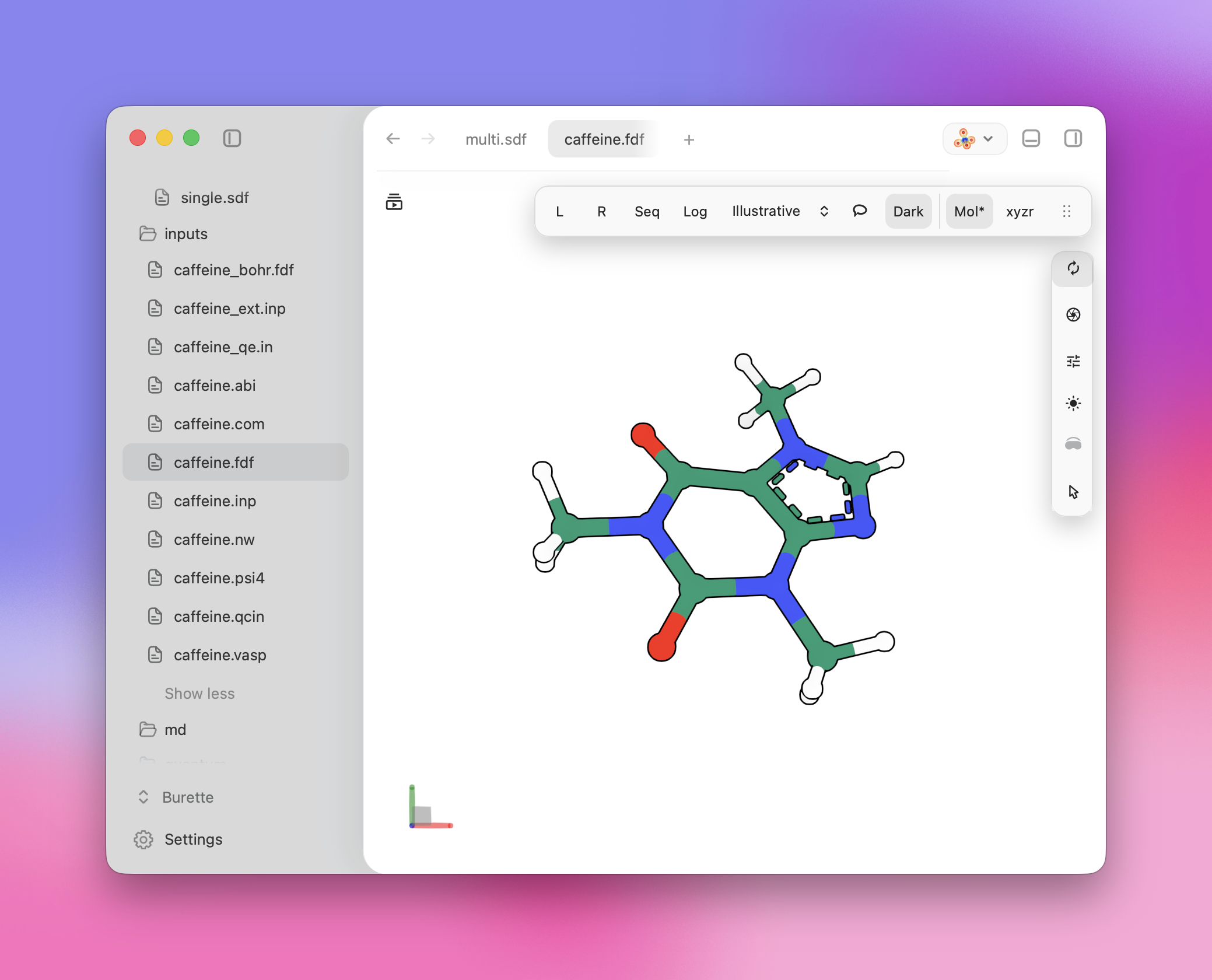
- Desktop workspace: open Burette directly to inspect files in tabs, browse project folders, search commands and structures, sketch molecules, review collections, and send files to external chemistry tools.
- iPhone preview app: build the
BuretteMobileXcode target from source, then open molecular documents from Files or another iOS document provider. - Public molecular plugin: preview an authorized molecular attachment or a public PDB entry directly in the Burette workspace through ChatGPT or Codex.
Burette is intentionally a compact utility, not a full molecular modeling environment.
Download
You can install Burette with the Homebrew tap:
brew tap SergeiNikolenko/burette
brew install --cask burette
Check the cask version when you need to confirm a specific release:
brew info --cask SergeiNikolenko/burette/burette
For the latest stable GitHub release, use the Burette Bun CLI:
bunx burette latest
bunx burette install
bunx burette doctor
The Bun installer places Burette in ~/Applications by default. Use
bunx burette install --system only when you intentionally want the app in
/Applications for all users. If Finder previews do not appear after install,
run bunx burette doctor to check the app bundle, Quick Look extension,
qlmanage, and installed version.
You can also download Burette from the GitHub Releases page:
Download the latest Burette release
- Open the latest release.
- Download the
Burette-<version>.zipfile. - Unzip it.
- Move
Burette.appto yourApplicationsfolder. - Open Burette once from
Applications.
Quick Start
After installation:
- Open
Burette.apponce so macOS registers the app and Quick Look extension. - In Finder, select a supported molecular file and press Space.
- Open Burette directly for the full workspace:
Cmd+Oopens molecular structure files.Cmd+Por/opens the command palette.Cmd+,opens settings.- The sidebar browses project folders, nested structures, and recent files.
- If previews do not appear, run:
bunx burette doctor
Supported Files
Burette supports several preview paths. Some formats open directly in Mol*,
some use the RDKit grid runtime, and some require the external xyzrender
renderer.
| Path | Formats | Notes |
|---|---|---|
| Mol* interactive 3D | PDB, ENT, PDBQT, PQR, CIF, MMCIF, MCIF, BCIF, SDF, SD, MOL, MOL2, XYZ, GRO | Default path for most structure files. XYZ can also use xyzrender. |
| RDKit molecule grids | SDF, SD, SMILES, SMI, CSV, TSV | Collection view with search, sorting, SMARTS filtering/highlighting, selection, append/merge, and export. |
| External xyzrender | XYZ, CUB, CUBE, ABI, COM, FDF, IN, INP, LOG, NW, OUT, PSI4, QCIN, VASP, MAE, MAE.GZ, MAEGZ, CMS | Requires a local xyzrender executable. Used by default for single-frame XYZ and required for external-renderer-only formats. |
| Molecular dynamics / topology | XTC, TRR, DCD, NCTRAJ, LAMMPSTRJ, TOP, PSF, PRMTOP | Registered as molecular files and routed to Mol* where supported by the runtime. |
| OpenMM coordinate artifacts | XML, INPCRD, RST7, CRD, RST, STATE | Render as structures when standalone coordinates are present, with the raw text available in the document surfaces. System XML without positions falls back to text. |
| OpenMM workflow artifacts | PAR, PRM, RTF, STR, KEY, CHK, CHECKPOINT | Open as text/workflow artifacts. Binary checkpoints show metadata because OpenMM checkpoint payloads are tied to the matching system, platform, version, and hardware context. |
| FEP network workspace | GraphML | Opens a ligand network preview workspace rather than a standard molecule preview. |
Multi-frame XYZ files stay in Mol* when Burette detects trajectory content so
the native trajectory controls can show the available frames. When you rotate a
molecule in Mol* and switch to xyzrender, Burette can pass the current
orientation through the renderer handoff. CUBE, CIF, MMCIF, MCIF, XYZ, and
external-renderer input previews expose an optional VESTA handoff when VESTA is
installed.
Desktop Workspace
Opening Burette directly gives you a compact molecular workspace:
- tabbed previews that keep renderer state alive while you switch files
- a project sidebar for folders, nested structures, recent files, and search
- a command palette for opening files, switching renderers, maintenance actions, exports, project navigation, Ketcher, and FEP network previews
- right and bottom docks for comparing structures, text files, Ketcher, grids, and workflow panels
- "Open In" actions for Finder, the default app, or discovered chemistry editors
- text-file viewing for logs, scripts, configs, and related project files
iPhone Preview App
The repository includes a source-built iPhone app target at
ios/BuretteMobile. It is not part of the Homebrew macOS
release, but it shares the project preview runtime and supports iOS document
handoff through Files and "Open In" sheets.
The mobile app focuses on phone-first inspection:
- Apple-style file browser and document opening for molecular project files
- Mol* structure previews in a full-screen mobile viewer
- RDKit-rendered SDF grid and table previews
- trajectory and pose controls surfaced near the bottom of the viewport when a loaded document needs them
- app icon and document-type registration for supported molecular formats
See ios/BuretteMobile/README.md for the target layout, build command, signing notes, and real-device install flow.
Molecule Collections and Ketcher
Burette includes an RDKit-powered collection grid for SDF, SMILES, CSV, and TSV files. The grid supports search, sorting, SMARTS filtering/highlighting, selection, infinite loading, append/merge workflows, and export.
The desktop app also includes a Ketcher small-molecule editor. You can sketch a
molecule, import/export common small-molecule formats, send a sketch to Mol*,
xyzrender, or a collection grid, and edit grid rows through Ketcher.
Macromolecule editing is not enabled in the current Ketcher integration.
Workspace Workflows
Beyond single-file previews, the desktop workspace includes focused workflows for structure triage:
xyzrendersheets for comparing SVG-rendered structures and exported artwork- docking and pose-review surfaces backed by the shared Mol* viewer runtime
- FEP network GraphML previews with ligand cards and grid handoff
- FEP setup panels for assembling ligand-network inputs
These workflows live in the desktop app. Finder Quick Look remains optimized for quick file previews.
Public Plugin and MCP
The hosted Burette plugin exposes a public HTTPS MCP endpoint and renders molecular results directly in the Burette workspace:
- Plugin documentation: https://burette-landing.vercel.app/docs/plugin
- MCP endpoint: https://burette-plugin.vercel.app/mcp
- Source:
apps/burette-public-plugin
Its read-only preview_molecular_file tool accepts one authorized PDB, ENT,
PDBQT, CIF, mmCIF, SDF, SD, XYZ, or extended XYZ attachment. The
preview_pdb_structure tool retrieves one public RCSB entry by PDB ID. Both
return bounded model-visible composition data and render the raw structure only
inside the sandboxed Burette workspace. Files are limited to 3 MiB, processed
in memory, and not written to Burette application storage.
The hosted plugin and the local plugin live in this repository; there is no separate plugin source repository. Public installation through OpenAI's Plugins Directory becomes available after directory review and publisher release.
Burette includes a Codex plugin that turns the local application into an agent-operable molecular workspace. The plugin bundles focused workflow skills with a typed local MCP server, so Codex can:
- open molecular structures, SDF collections, trajectories, and result bundles;
- observe the active document, tabs, panels, viewer readiness, and scene state;
- run allowlisted Mol* actions such as focusing ligands, hiding waters, changing representations, and resetting the camera;
- render bounded markdown, table, chart, and molecular-report panels beside the workspace;
- preserve local-file provenance without exposing an arbitrary shell or unrestricted file-access tool.
Install the self-contained plugin from this repository with:
bun run install:plugin
The installer stages a dedicated local marketplace and uses the current
codex plugin marketplace add and codex plugin add flows when a working
Codex CLI is available. Restart Codex after installation, then mention
@Burette or select it from Plugins.
See the hosted and local agent platform contract, the local plugin architecture and installation guide, and the public plugin guide. Burette remains the canonical source repository for every application and MCP surface.
Settings and Maintenance
Burette settings cover:
- General workspace defaults and open documents
- Appearance, themes, and preview backgrounds
- Keyboard shortcuts and command-palette navigation
- Structure rendering, including Auto, Mol*, and external
xyzrender - Stable and beta update checks
- Files, recent structures, and project folders
- Burette/Codex integration status
- Quick Look reset, preview cache cleanup, logs, diagnostics, and maintenance
Optional integrations include a local xyzrender executable, VESTA, and
external chemistry editors discovered by macOS.
Unsupported file or format?
If Burette cannot open or preview a molecular file, please open an unsupported-file issue. Before submitting:
-
Search existing issues for the extension or format name.
-
Include the exact file extension, where the failure occurs, your Burette and macOS versions, and the installation method.
-
On macOS, include the output of:
mdls -name kMDItemContentType -name kMDItemContentTypeTree "/path/to/file" -
Attach the smallest non-confidential sample that reproduces the problem. If the file is proprietary, do not upload it publicly; describe the format and offer to share a sanitized sample privately.
Docs
- Documentation map
- Changelog
- Installing and building from source
- Configuration
- Security and permissions
- Privacy policy
- Terms of use
- Renderer support
- Quick Look debugging
- iPhone preview app
- Contributing
License
MIT
Contributors


Similar repos


Languages
JavaScript
35.7%
Rust
29.7%
TypeScript
20.0%
CSS
4.7%
Swift
4.3%
Python
2.8%
Metal
1.2%
Shell
1.1%
ARCHIVED legacy compatibility bridge. Active development continues at SergeiNikolenko/Burette.
See the codeREADME
[!IMPORTANT] This repository is an archived legacy compatibility bridge. Active development, releases, documentation, issues, and pull requests are maintained in SergeiNikolenko/Burette.
Burette
A molecular file workspace with macOS Finder Quick Look previews, Mol* 3D, external xyzrender SVG rendering, RDKit molecule grids, Ketcher sketching, a source-built iPhone preview app, and a hosted OpenAI Mol* viewer.
What Is Burette?
Burette is a macOS desktop app, Finder Quick Look extension, and source-built iPhone preview app for molecular structure files. It is built for the small daily loop of computational chemistry, structural biology, and cheminformatics work: open a structure, confirm what it is, switch renderer when needed, compare files in tabs, and recover quickly when Quick Look or renderer caches need maintenance.
Use it in two ways:
- Finder previews: select a molecular file in Finder and press Space.
- Desktop workspace: open Burette directly to inspect files in tabs, browse project folders, search commands and structures, sketch molecules, review collections, and send files to external chemistry tools.
- iPhone preview app: build the
BuretteMobileXcode target from source, then open molecular documents from Files or another iOS document provider. - Public molecular plugin: preview an authorized molecular attachment or a public PDB entry directly in the Burette workspace through ChatGPT or Codex.
Burette is intentionally a compact utility, not a full molecular modeling environment.
Download
You can install Burette with the Homebrew tap:
brew tap SergeiNikolenko/burette
brew install --cask burette
Check the cask version when you need to confirm a specific release:
brew info --cask SergeiNikolenko/burette/burette
For the latest stable GitHub release, use the Burette Bun CLI:
bunx burette latest
bunx burette install
bunx burette doctor
The Bun installer places Burette in ~/Applications by default. Use
bunx burette install --system only when you intentionally want the app in
/Applications for all users. If Finder previews do not appear after install,
run bunx burette doctor to check the app bundle, Quick Look extension,
qlmanage, and installed version.
You can also download Burette from the GitHub Releases page:
Download the latest Burette release
- Open the latest release.
- Download the
Burette-<version>.zipfile. - Unzip it.
- Move
Burette.appto yourApplicationsfolder. - Open Burette once from
Applications.
Quick Start
After installation:
- Open
Burette.apponce so macOS registers the app and Quick Look extension. - In Finder, select a supported molecular file and press Space.
- Open Burette directly for the full workspace:
Cmd+Oopens molecular structure files.Cmd+Por/opens the command palette.Cmd+,opens settings.- The sidebar browses project folders, nested structures, and recent files.
- If previews do not appear, run:
bunx burette doctor
Supported Files
Burette supports several preview paths. Some formats open directly in Mol*,
some use the RDKit grid runtime, and some require the external xyzrender
renderer.
| Path | Formats | Notes |
|---|---|---|
| Mol* interactive 3D | PDB, ENT, PDBQT, PQR, CIF, MMCIF, MCIF, BCIF, SDF, SD, MOL, MOL2, XYZ, GRO | Default path for most structure files. XYZ can also use xyzrender. |
| RDKit molecule grids | SDF, SD, SMILES, SMI, CSV, TSV | Collection view with search, sorting, SMARTS filtering/highlighting, selection, append/merge, and export. |
| External xyzrender | XYZ, CUB, CUBE, ABI, COM, FDF, IN, INP, LOG, NW, OUT, PSI4, QCIN, VASP, MAE, MAE.GZ, MAEGZ, CMS | Requires a local xyzrender executable. Used by default for single-frame XYZ and required for external-renderer-only formats. |
| Molecular dynamics / topology | XTC, TRR, DCD, NCTRAJ, LAMMPSTRJ, TOP, PSF, PRMTOP | Registered as molecular files and routed to Mol* where supported by the runtime. |
| OpenMM coordinate artifacts | XML, INPCRD, RST7, CRD, RST, STATE | Render as structures when standalone coordinates are present, with the raw text available in the document surfaces. System XML without positions falls back to text. |
| OpenMM workflow artifacts | PAR, PRM, RTF, STR, KEY, CHK, CHECKPOINT | Open as text/workflow artifacts. Binary checkpoints show metadata because OpenMM checkpoint payloads are tied to the matching system, platform, version, and hardware context. |
| FEP network workspace | GraphML | Opens a ligand network preview workspace rather than a standard molecule preview. |
Multi-frame XYZ files stay in Mol* when Burette detects trajectory content so
the native trajectory controls can show the available frames. When you rotate a
molecule in Mol* and switch to xyzrender, Burette can pass the current
orientation through the renderer handoff. CUBE, CIF, MMCIF, MCIF, XYZ, and
external-renderer input previews expose an optional VESTA handoff when VESTA is
installed.
Desktop Workspace
Opening Burette directly gives you a compact molecular workspace:
- tabbed previews that keep renderer state alive while you switch files
- a project sidebar for folders, nested structures, recent files, and search
- a command palette for opening files, switching renderers, maintenance actions, exports, project navigation, Ketcher, and FEP network previews
- right and bottom docks for comparing structures, text files, Ketcher, grids, and workflow panels
- "Open In" actions for Finder, the default app, or discovered chemistry editors
- text-file viewing for logs, scripts, configs, and related project files
iPhone Preview App
The repository includes a source-built iPhone app target at
ios/BuretteMobile. It is not part of the Homebrew macOS
release, but it shares the project preview runtime and supports iOS document
handoff through Files and "Open In" sheets.
The mobile app focuses on phone-first inspection:
- Apple-style file browser and document opening for molecular project files
- Mol* structure previews in a full-screen mobile viewer
- RDKit-rendered SDF grid and table previews
- trajectory and pose controls surfaced near the bottom of the viewport when a loaded document needs them
- app icon and document-type registration for supported molecular formats
See ios/BuretteMobile/README.md for the target layout, build command, signing notes, and real-device install flow.
Molecule Collections and Ketcher
Burette includes an RDKit-powered collection grid for SDF, SMILES, CSV, and TSV files. The grid supports search, sorting, SMARTS filtering/highlighting, selection, infinite loading, append/merge workflows, and export.
The desktop app also includes a Ketcher small-molecule editor. You can sketch a
molecule, import/export common small-molecule formats, send a sketch to Mol*,
xyzrender, or a collection grid, and edit grid rows through Ketcher.
Macromolecule editing is not enabled in the current Ketcher integration.
Workspace Workflows
Beyond single-file previews, the desktop workspace includes focused workflows for structure triage:
xyzrendersheets for comparing SVG-rendered structures and exported artwork- docking and pose-review surfaces backed by the shared Mol* viewer runtime
- FEP network GraphML previews with ligand cards and grid handoff
- FEP setup panels for assembling ligand-network inputs
These workflows live in the desktop app. Finder Quick Look remains optimized for quick file previews.
Public Plugin and MCP
The hosted Burette plugin exposes a public HTTPS MCP endpoint and renders molecular results directly in the Burette workspace:
- Plugin documentation: https://burette-landing.vercel.app/docs/plugin
- MCP endpoint: https://burette-plugin.vercel.app/mcp
- Source:
apps/burette-public-plugin
Its read-only preview_molecular_file tool accepts one authorized PDB, ENT,
PDBQT, CIF, mmCIF, SDF, SD, XYZ, or extended XYZ attachment. The
preview_pdb_structure tool retrieves one public RCSB entry by PDB ID. Both
return bounded model-visible composition data and render the raw structure only
inside the sandboxed Burette workspace. Files are limited to 3 MiB, processed
in memory, and not written to Burette application storage.
The hosted plugin and the local plugin live in this repository; there is no separate plugin source repository. Public installation through OpenAI's Plugins Directory becomes available after directory review and publisher release.
Burette includes a Codex plugin that turns the local application into an agent-operable molecular workspace. The plugin bundles focused workflow skills with a typed local MCP server, so Codex can:
- open molecular structures, SDF collections, trajectories, and result bundles;
- observe the active document, tabs, panels, viewer readiness, and scene state;
- run allowlisted Mol* actions such as focusing ligands, hiding waters, changing representations, and resetting the camera;
- render bounded markdown, table, chart, and molecular-report panels beside the workspace;
- preserve local-file provenance without exposing an arbitrary shell or unrestricted file-access tool.
Install the self-contained plugin from this repository with:
bun run install:plugin
The installer stages a dedicated local marketplace and uses the current
codex plugin marketplace add and codex plugin add flows when a working
Codex CLI is available. Restart Codex after installation, then mention
@Burette or select it from Plugins.
See the hosted and local agent platform contract, the local plugin architecture and installation guide, and the public plugin guide. Burette remains the canonical source repository for every application and MCP surface.
Settings and Maintenance
Burette settings cover:
- General workspace defaults and open documents
- Appearance, themes, and preview backgrounds
- Keyboard shortcuts and command-palette navigation
- Structure rendering, including Auto, Mol*, and external
xyzrender - Stable and beta update checks
- Files, recent structures, and project folders
- Burette/Codex integration status
- Quick Look reset, preview cache cleanup, logs, diagnostics, and maintenance
Optional integrations include a local xyzrender executable, VESTA, and
external chemistry editors discovered by macOS.
Unsupported file or format?
If Burette cannot open or preview a molecular file, please open an unsupported-file issue. Before submitting:
-
Search existing issues for the extension or format name.
-
Include the exact file extension, where the failure occurs, your Burette and macOS versions, and the installation method.
-
On macOS, include the output of:
mdls -name kMDItemContentType -name kMDItemContentTypeTree "/path/to/file" -
Attach the smallest non-confidential sample that reproduces the problem. If the file is proprietary, do not upload it publicly; describe the format and offer to share a sanitized sample privately.
Docs
- Documentation map
- Changelog
- Installing and building from source
- Configuration
- Security and permissions
- Privacy policy
- Terms of use
- Renderer support
- Quick Look debugging
- iPhone preview app
- Contributing
License
MIT
Similar repos
Contributors
Languages
JavaScript
35.7%
Rust
29.7%
TypeScript
20.0%
CSS
4.7%
Swift
4.3%
Python
2.8%
Metal
1.2%
Shell
1.1%