
Tinker ↔ KernelBench Integration enabling RL for GPU Kernel Generation
Python
31
91 commits
updated Mar 5, 2026
README
KernelBench - Tinker Integration
This repo shows an end-to-end integration that allows RL training with Tinker on KernelBench-style problems. Concretely, our pipeline enables the policy model to generate kernels, evaluate them on Modal (Cloud GPU), and turn those results into RL rewards. The goal is to provide researchers with a playground to experiment with RL methods on GPU kernel generation and optimization.
Disclaimer: This is a minimal integration. We will continue to add common features and make it more user-friendly. However, please verify your results and adapt the implementation to your own needs.
By @nataliakokoromyti, @simonguozirui, @ethanboneh.
Overview
This repo is a minimal Tinker - KernelBench integration to enable RL fine-tuning of language models, aiming to improve model performance on GPU kernel generation and optimization.
We combine the best of these frameworks to showcase an RL training pipeline:
- KernelBench: KernelBench is a benchmark suite and evaluation framework that examines models' ability to generate and optimize GPU kernels (in CUDA and other kernel frameworks). We leverage its datasets, evaluation code, and checkers.
- Tinker: Tinker by Thinking Machines Lab is a distributed LoRA fine-tuning framework that enables efficient post-training of large language models. We leverage Tinker's framework to author our RL training pipeline while it handles the distributed compute logic.
- Modal: Modal is a cloud computing platform that provides isolated serverless GPU environments for running evaluations. We leverage Modal to scale kernel evaluations (which require GPUs) during rollouts and as consistent and reliable execution environments.
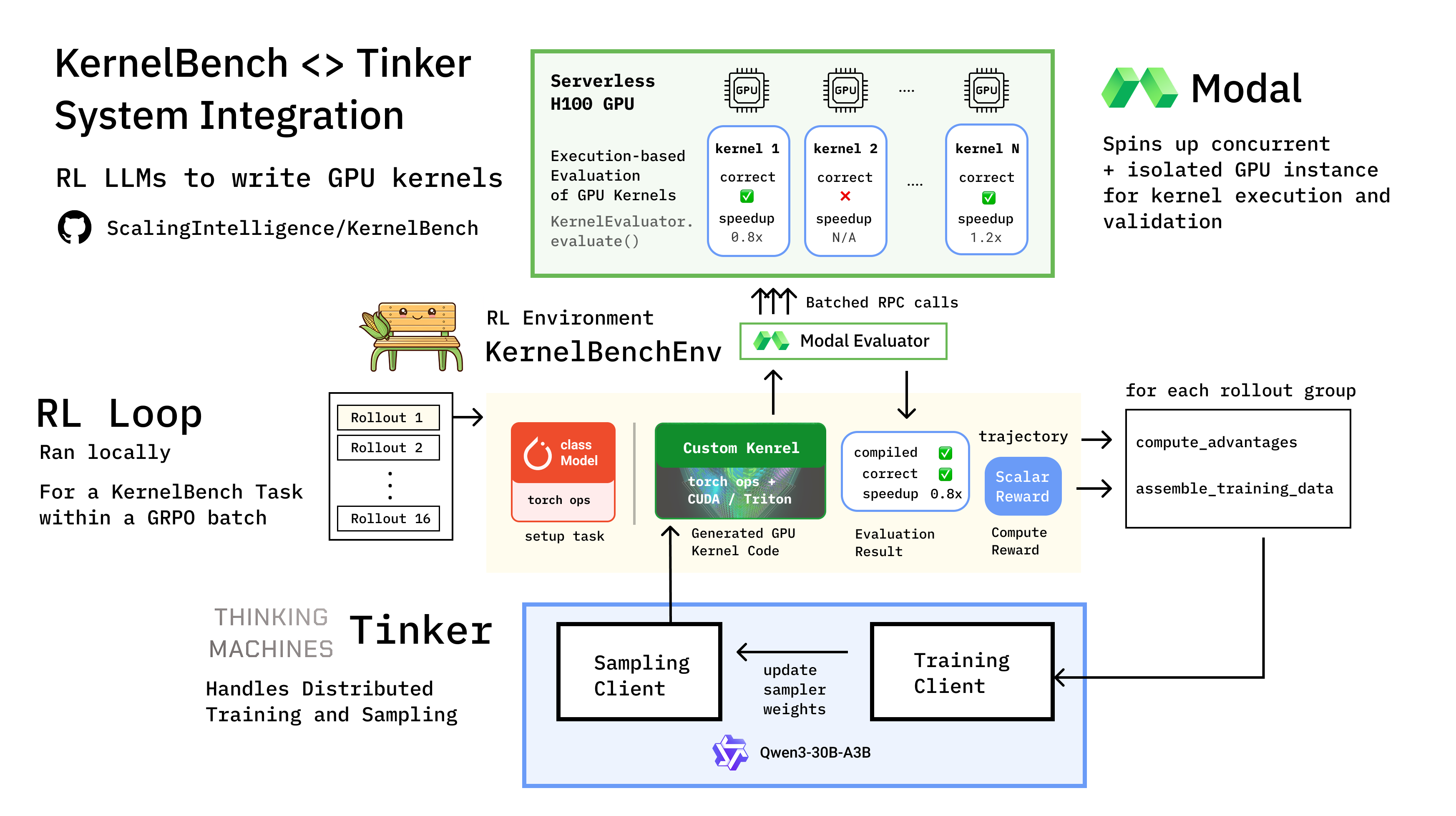
KernelBenchEnv RL Env
We implement KernelBenchEnv, a standard RL environment (inheriting from Tinker's Env base class) that follows a single-turn interaction pattern. KernelBenchEnv serves as the bridge between Tinker's RL training loop and the KernelBench evaluation ecosystem.
- Observation: The environment fetches a problem from KernelBench (e.g., a PyTorch model and its reference implementation) and formats it into a prompt (with KernelBench's task format, like
backend,precision, different context information) using Tinker'sRenderer. - Action: The model generates a candidate GPU kernel implementation based on the prompt.
- Step:
- Parsing: The environment extracts the
<KERNEL>block from the model's response - Evaluation: The kernel is sent to Modal where it's compiled, tested, and profiled against the reference PyTorch implementation in an isolated GPU container.
- Reward Calculation: Results (correctness, speedup, and static analysis warnings) are converted into a scalar reward according to your
RewardConfig.
- Parsing: The environment extracts the
We then extend KernelBenchEnv to support:
- Batching:
KernelBenchEnvGroupBuildergroups multiple rollouts for the same problem, enabling GRPO-style training where rewards are normalized within groups. - Dataset Construction:
KernelBenchDatasetBuilderhandles the iteration over KernelBench levels and problems, partitioning them into training and evaluation sets. You are welcome to extend it to support more problems beyond what is currently in KernelBench.
Directory Structure
kernelbench-tinker/      # This integration repo
├── src/                 # Integration logic (scripts, training loop, envs)
├── KernelBench/         # KernelBench as git submodule
├── pyproject.toml       # Dependencies (including tinker and tinker-cookbook)
└── README.md
KernelBench is included as a git submodule and installed as a Python package from the local submodule path.
We use the latest tinker and tinker-cookbook functions for the training logic.
Detailed Project Structure
src/kernelbench_tinker/
  env.py                        # Environment variable loading
  envs/
    kernelbench_client.py       # KernelBench Python API wrapper
    kernelbench_env.py          # Single-turn RL environment
  training/
    models.py                   # Model/renderer configuration
    reward.py                   # Reward shaping
    loop.py                     # GRPO training loop
    tensorboard_logger.py       # TensorBoard logging
    trace_logger.py             # JSONL trace logging
  evaluation/
    eval_kernelbench.py         # Evaluation utilities
  config/
    configs.py                  # Configuration dataclasses
    rl_kernelbench.yaml         # Default config
  scripts/
    train_kernel_rl.py          # Training CLI
    eval_kernel_rl.py           # Evaluation CLI
    run_and_check.py            # Local execution & verification utility
  modal/
    app.py                      # Modal eval app
    evaluator.py                # Modal evaluator client
Setup
1. Clone repository with KernelBench submodule
We use the most recent KernelBench version; please update often.
git clone --recurse-submodules https://github.com/ScalingIntelligence/kernelbench-tinker.git
cd kernelbench-tinker
This automatically clones KernelBench as a git submodule. If you already cloned without --recurse-submodules, run:
cd kernelbench-tinker
git submodule update --init
2. Install uv (if not already installed)
We use uv to resolve dependencies of the RL loop and inner KernelBench repo. You can do so by curl -LsSf https://astral.sh/uv/install.sh | sh.
3. Install Package Dependencies
# In the repository root
uv sync
This will install KernelBench from the local ./KernelBench submodule (managed by git).
Note that within the Modal image (for kernel evaluation), we have a predefined set of package dependencies to allow kernel execution.
4. Configure environment variables
Copy the example environment file, cp .env.example .env, and edit it to set your Tinker API key from Tinker Console. The .env file is automatically loaded when running scripts.
To use Modal GPUs for rollout, please create a Modal account and set it up using the Modal CLI uv run modal setup.
Launching Training Run
Configure the config/rl_kernelbench.yaml file for your training configuration, dataset definition, evaluation setup, etc.
You must first deploy the modal app for isolated GPU eval (which will scale up per GPU kernel evaluation).
uv run modal deploy src/kernelbench_tinker/modal/app.py
You can start the RL training loop via:
uv run python -m kernelbench_tinker.scripts.train_kernel_rl \
    --config src/kernelbench_tinker/config/rl_kernelbench.yaml \
    log_path=./runs/my_experiment
Or via the just commands:
# Start training
just train run=my_experiment

# Tail logs
just logs run=my_experiment

# Resume if crashed
just resume run=my_experiment

# Check training status
just status run=my_experiment
Checkpoints and Resume
Checkpoints are saved to Tinker Cloud after every batch. The checkpoint paths are recorded in {log_path}/checkpoints.jsonl.
# Resume training after a crash
just resume run=my_experiment

# Or manually:
uv run python -m kernelbench_tinker.scripts.train_kernel_rl \
    --config src/kernelbench_tinker/config/rl_kernelbench.yaml \
    log_path=./runs/my_experiment \
    load_checkpoint_path=./runs/my_experiment
Tracking & Tips
TensorBoard Tracking
Training progress can be monitored in real-time using TensorBoard.
# For a specific run
uv run tensorboard --logdir ./runs/my_experiment/tensorboard --port 6006

# For all runs
uv run tensorboard --logdir ./runs --port 6006
Then open http://localhost:6006 in your browser.
Weights & Biases (WandB) Tracking
The integration supports WandB for experiment tracking. Configure your project in src/kernelbench_tinker/config/rl_kernelbench.yaml, or override in the CLI for wandb_project and wandb_name.
uv run python -m kernelbench_tinker.scripts.train_kernel_rl \
    --config src/kernelbench_tinker/config/rl_kernelbench.yaml \
    wandb_project=<YOUR_WANDB_PROJECT> \
    wandb_name=<YOUR_WANDB_NAME>
Run tracking will automatically start if a project name is provided.
Training Dynamics
Sparse Reward: As we require a successful kernel to be both generated and correct to receive a reward, the reward could be sparse (no success in a group). You might see
tinker_cookbook.rl.data_processing:206 [WARNING] All rewards are uniform. There will be no gradient
This could happen early during training. However, it is also worth switching to a larger model supported by Tinker that has a stronger prior.
Reward Hacking: As we optimize against the objective, kernels might reward hack. This has been documented in work such as Kevin and TritonRL. We integrated KernelBench's ongoing reward hack checker for detection, but feel free to implement your own reward hack detection logic (and contribute back!) See a list of common reward hacks in KernelBench Eval Guide and blog post resources like this one.
You might encounter the following messages or warnings:
kernelbench_tinker.training.reward:344 [WARNING] Static checker warning: Uses torch.nn.functional op: torch.nn.functional.conv_transpose2d
kernelbench_tinker.training.reward:351 [ERROR] Reward hacking detected (reward set to 0): Contains 'pass' statement (inheritance bypass)
kernelbench_tinker.training.reward:344 [WARNING] Static checker warning: Uses torch.nn compute layer (only containers, Parameter, init allowed)
In general, it is extremely important to examine the trajectories and generated kernels carefully rather than solely looking at the reward or metrics.
Long step time: Rollouts can be expensive for this RL loop, and you may face concurrency limits on the number of parallel GPU containers you can spin up at a time on Modal (subject to GPU availability). This dominates the training step time.
Evaluation
Evaluation relies on Modal for GPU kernel execution.
Evaluate a Checkpoint
uv run python -m kernelbench_tinker.scripts.eval_kernel_rl \
    checkpoint_path=./runs/my_experiment/checkpoints/final \
    level=1 \
    output_path=./runs/my_experiment/eval_results.json
Evaluate Base Model
uv run python -m kernelbench_tinker.scripts.eval_kernel_rl \
    model_name=Qwen/Qwen2.5-Coder-7B-Instruct \
    level=1 \
    output_path=./baseline_results.json
You can use the KernelBench Eval scripts as well (also run on Modal).
Troubleshooting
CUDA illegal memory access / Training crashes
Generated kernels can sometimes corrupt GPU memory. This is handled by:
- Checkpoints saved after every batch (
save_every: 1) - Resume capability:
just resume my_experiment
If crashes are frequent:
# Clear GPU memory and restart
nvidia-smi --gpu-reset  # If needed
just resume my_experiment
CUDA out of memory
Reduce batch_size or group_size:
batch_size=2 group_size=2
Tinker API errors
- Check your API key is set:
echo $TINKER_API_KEY - Get a key from https://console.tinker.thinkingmachines.ai
- Check Tinker service status by listing the models. Initial Tinker Rollout may take some time after initialization.
Windows Modal deploy encoding error
If modal deploy fails with a charmap/Unicode error, switch the terminal to UTF-8 and retry:
chcp 65001
$env:PYTHONIOENCODING="utf-8"
modal deploy src/kernelbench_tinker/modal/app.py
Resume not working
Ensure checkpoints.jsonl exists in the run directory:
cat ./runs/my_experiment/checkpoints.jsonl
If empty or missing, training crashed before the first checkpoint was saved.
Future Directions
Note the scope of this repo is an open-source implementation of KernelBench-Tinker integration, not necessarily showcasing novel RL techniques.
- More reward examples leveraging more fine-grained metrics
- More reward hack checking
- Multi-turn RL to have denser reward signal like Kevin
- Improve Step time and training efficiency
References & Acknowledgements
We thank the Thinking Machines Lab for the Tinker Research Grant and Modal Labs for their support for this project.
Contributors


Similar repos


Languages
Python
99.1%
Tinker ↔ KernelBench Integration enabling RL for GPU Kernel Generation
Python
31
91 commits
updated Mar 5, 2026
README
KernelBench - Tinker Integration
This repo shows an end-to-end integration that allows RL training with Tinker on KernelBench-style problems. Concretely, our pipeline enables the policy model to generate kernels, evaluate them on Modal (Cloud GPU), and turn those results into RL rewards. The goal is to provide researchers with a playground to experiment with RL methods on GPU kernel generation and optimization.
Disclaimer: This is a minimal integration. We will continue to add common features and make it more user-friendly. However, please verify your results and adapt the implementation to your own needs.
By @nataliakokoromyti, @simonguozirui, @ethanboneh.
Overview
This repo is a minimal Tinker - KernelBench integration to enable RL fine-tuning of language models, aiming to improve model performance on GPU kernel generation and optimization.
We combine the best of these frameworks to showcase an RL training pipeline:
- KernelBench: KernelBench is a benchmark suite and evaluation framework that examines models' ability to generate and optimize GPU kernels (in CUDA and other kernel frameworks). We leverage its datasets, evaluation code, and checkers.
- Tinker: Tinker by Thinking Machines Lab is a distributed LoRA fine-tuning framework that enables efficient post-training of large language models. We leverage Tinker's framework to author our RL training pipeline while it handles the distributed compute logic.
- Modal: Modal is a cloud computing platform that provides isolated serverless GPU environments for running evaluations. We leverage Modal to scale kernel evaluations (which require GPUs) during rollouts and as consistent and reliable execution environments.
KernelBenchEnv RL Env
We implement KernelBenchEnv, a standard RL environment (inheriting from Tinker's Env base class) that follows a single-turn interaction pattern. KernelBenchEnv serves as the bridge between Tinker's RL training loop and the KernelBench evaluation ecosystem.
- Observation: The environment fetches a problem from KernelBench (e.g., a PyTorch model and its reference implementation) and formats it into a prompt (with KernelBench's task format, like
backend,precision, different context information) using Tinker'sRenderer. - Action: The model generates a candidate GPU kernel implementation based on the prompt.
- Step:
- Parsing: The environment extracts the
<KERNEL>block from the model's response - Evaluation: The kernel is sent to Modal where it's compiled, tested, and profiled against the reference PyTorch implementation in an isolated GPU container.
- Reward Calculation: Results (correctness, speedup, and static analysis warnings) are converted into a scalar reward according to your
RewardConfig.
- Parsing: The environment extracts the
We then extend KernelBenchEnv to support:
- Batching:
KernelBenchEnvGroupBuildergroups multiple rollouts for the same problem, enabling GRPO-style training where rewards are normalized within groups. - Dataset Construction:
KernelBenchDatasetBuilderhandles the iteration over KernelBench levels and problems, partitioning them into training and evaluation sets. You are welcome to extend it to support more problems beyond what is currently in KernelBench.
Directory Structure
kernelbench-tinker/      # This integration repo
├── src/                 # Integration logic (scripts, training loop, envs)
├── KernelBench/         # KernelBench as git submodule
├── pyproject.toml       # Dependencies (including tinker and tinker-cookbook)
└── README.md
KernelBench is included as a git submodule and installed as a Python package from the local submodule path.
We use the latest tinker and tinker-cookbook functions for the training logic.
Detailed Project Structure
src/kernelbench_tinker/
  env.py                        # Environment variable loading
  envs/
    kernelbench_client.py       # KernelBench Python API wrapper
    kernelbench_env.py          # Single-turn RL environment
  training/
    models.py                   # Model/renderer configuration
    reward.py                   # Reward shaping
    loop.py                     # GRPO training loop
    tensorboard_logger.py       # TensorBoard logging
    trace_logger.py             # JSONL trace logging
  evaluation/
    eval_kernelbench.py         # Evaluation utilities
  config/
    configs.py                  # Configuration dataclasses
    rl_kernelbench.yaml         # Default config
  scripts/
    train_kernel_rl.py          # Training CLI
    eval_kernel_rl.py           # Evaluation CLI
    run_and_check.py            # Local execution & verification utility
  modal/
    app.py                      # Modal eval app
    evaluator.py                # Modal evaluator client
Setup
1. Clone repository with KernelBench submodule
We use the most recent KernelBench version; please update often.
git clone --recurse-submodules https://github.com/ScalingIntelligence/kernelbench-tinker.git
cd kernelbench-tinker
This automatically clones KernelBench as a git submodule. If you already cloned without --recurse-submodules, run:
cd kernelbench-tinker
git submodule update --init
2. Install uv (if not already installed)
We use uv to resolve dependencies of the RL loop and inner KernelBench repo. You can do so by curl -LsSf https://astral.sh/uv/install.sh | sh.
3. Install Package Dependencies
# In the repository root
uv sync
This will install KernelBench from the local ./KernelBench submodule (managed by git).
Note that within the Modal image (for kernel evaluation), we have a predefined set of package dependencies to allow kernel execution.
4. Configure environment variables
Copy the example environment file, cp .env.example .env, and edit it to set your Tinker API key from Tinker Console. The .env file is automatically loaded when running scripts.
To use Modal GPUs for rollout, please create a Modal account and set it up using the Modal CLI uv run modal setup.
Launching Training Run
Configure the config/rl_kernelbench.yaml file for your training configuration, dataset definition, evaluation setup, etc.
You must first deploy the modal app for isolated GPU eval (which will scale up per GPU kernel evaluation).
uv run modal deploy src/kernelbench_tinker/modal/app.py
You can start the RL training loop via:
uv run python -m kernelbench_tinker.scripts.train_kernel_rl \
    --config src/kernelbench_tinker/config/rl_kernelbench.yaml \
    log_path=./runs/my_experiment
Or via the just commands:
# Start training
just train run=my_experiment

# Tail logs
just logs run=my_experiment

# Resume if crashed
just resume run=my_experiment

# Check training status
just status run=my_experiment
Checkpoints and Resume
Checkpoints are saved to Tinker Cloud after every batch. The checkpoint paths are recorded in {log_path}/checkpoints.jsonl.
# Resume training after a crash
just resume run=my_experiment

# Or manually:
uv run python -m kernelbench_tinker.scripts.train_kernel_rl \
    --config src/kernelbench_tinker/config/rl_kernelbench.yaml \
    log_path=./runs/my_experiment \
    load_checkpoint_path=./runs/my_experiment
Tracking & Tips
TensorBoard Tracking
Training progress can be monitored in real-time using TensorBoard.
# For a specific run
uv run tensorboard --logdir ./runs/my_experiment/tensorboard --port 6006

# For all runs
uv run tensorboard --logdir ./runs --port 6006
Then open http://localhost:6006 in your browser.
Weights & Biases (WandB) Tracking
The integration supports WandB for experiment tracking. Configure your project in src/kernelbench_tinker/config/rl_kernelbench.yaml, or override in the CLI for wandb_project and wandb_name.
uv run python -m kernelbench_tinker.scripts.train_kernel_rl \
    --config src/kernelbench_tinker/config/rl_kernelbench.yaml \
    wandb_project=<YOUR_WANDB_PROJECT> \
    wandb_name=<YOUR_WANDB_NAME>
Run tracking will automatically start if a project name is provided.
Training Dynamics
Sparse Reward: As we require a successful kernel to be both generated and correct to receive a reward, the reward could be sparse (no success in a group). You might see
tinker_cookbook.rl.data_processing:206 [WARNING] All rewards are uniform. There will be no gradient
This could happen early during training. However, it is also worth switching to a larger model supported by Tinker that has a stronger prior.
Reward Hacking: As we optimize against the objective, kernels might reward hack. This has been documented in work such as Kevin and TritonRL. We integrated KernelBench's ongoing reward hack checker for detection, but feel free to implement your own reward hack detection logic (and contribute back!) See a list of common reward hacks in KernelBench Eval Guide and blog post resources like this one.
You might encounter the following messages or warnings:
kernelbench_tinker.training.reward:344 [WARNING] Static checker warning: Uses torch.nn.functional op: torch.nn.functional.conv_transpose2d
kernelbench_tinker.training.reward:351 [ERROR] Reward hacking detected (reward set to 0): Contains 'pass' statement (inheritance bypass)
kernelbench_tinker.training.reward:344 [WARNING] Static checker warning: Uses torch.nn compute layer (only containers, Parameter, init allowed)
In general, it is extremely important to examine the trajectories and generated kernels carefully rather than solely looking at the reward or metrics.
Long step time: Rollouts can be expensive for this RL loop, and you may face concurrency limits on the number of parallel GPU containers you can spin up at a time on Modal (subject to GPU availability). This dominates the training step time.
Evaluation
Evaluation relies on Modal for GPU kernel execution.
Evaluate a Checkpoint
uv run python -m kernelbench_tinker.scripts.eval_kernel_rl \
    checkpoint_path=./runs/my_experiment/checkpoints/final \
    level=1 \
    output_path=./runs/my_experiment/eval_results.json
Evaluate Base Model
uv run python -m kernelbench_tinker.scripts.eval_kernel_rl \
    model_name=Qwen/Qwen2.5-Coder-7B-Instruct \
    level=1 \
    output_path=./baseline_results.json
You can use the KernelBench Eval scripts as well (also run on Modal).
Troubleshooting
CUDA illegal memory access / Training crashes
Generated kernels can sometimes corrupt GPU memory. This is handled by:
- Checkpoints saved after every batch (
save_every: 1) - Resume capability:
just resume my_experiment
If crashes are frequent:
# Clear GPU memory and restart
nvidia-smi --gpu-reset  # If needed
just resume my_experiment
CUDA out of memory
Reduce batch_size or group_size:
batch_size=2 group_size=2
Tinker API errors
- Check your API key is set:
echo $TINKER_API_KEY - Get a key from https://console.tinker.thinkingmachines.ai
- Check Tinker service status by listing the models. Initial Tinker Rollout may take some time after initialization.
Windows Modal deploy encoding error
If modal deploy fails with a charmap/Unicode error, switch the terminal to UTF-8 and retry:
chcp 65001
$env:PYTHONIOENCODING="utf-8"
modal deploy src/kernelbench_tinker/modal/app.py
Resume not working
Ensure checkpoints.jsonl exists in the run directory:
cat ./runs/my_experiment/checkpoints.jsonl
If empty or missing, training crashed before the first checkpoint was saved.
Future Directions
Note the scope of this repo is an open-source implementation of KernelBench-Tinker integration, not necessarily showcasing novel RL techniques.
- More reward examples leveraging more fine-grained metrics
- More reward hack checking
- Multi-turn RL to have denser reward signal like Kevin
- Improve Step time and training efficiency
References & Acknowledgements
We thank the Thinking Machines Lab for the Tinker Research Grant and Modal Labs for their support for this project.
Similar repos
Contributors
Languages
Python
99.1%