Tellstone is a high-performance in-memory database and drop-in replacement for Redis; Join https://discord.gg/kEf78DUFX
See the code


Tellstone is an ultra‑high‑performance, cloud‑native in‑memory key/value store written entirely in Go. It speaks two protocols over TCP — a compact custom binary protocol and a Redis‑compatible (RESP2) protocol — on top of a shared-nothing (SN) storage engine with optional TTL eviction, at‑rest encryption, and write-ahead log persistence.
       +---------------------------------------------+
       |             Your K8s Cluster                |
       |                                             |
       |  [App Pod] --( binary :9988 / RESP :6379 )->|
       |                                             |
       |     +---------------------------------+     |
       |     |        TELLSTONE CORE           |     |
       |     |  (N Shards, each a goroutine +  |     |
       |     |   sync.RWMutex + map[string]Item)|    |
       |     |  FNV-1a hash → O(1) dispatch    |     |
       |     +---------------------------------+     |
       +---------------------------------------------+
Many managed databases (PostgreSQL, MySQL, …) become bottlenecks under high‑frequency workloads. Tellstone offers a lean, modern, memory‑efficient buffer that:
redis-cli,
redis-benchmark, memtier_benchmark, and existing Redis client libraries (GET/SET/PING/DEL).map[string]Item plus a
sync.RWMutex. Keys are pinned to a shard via FNV-1a hashing so the lock is almost never
contended. No cross-shard coordination, no channel round-trips, no per-request allocations.Write = 0 allocs/op). Disabled by default.For a detailed description of the package structure, request flow, and design decisions, see ARCHITECTURE.md.
| Layer | Package | Notes |
|---|---|---|
| Binary protocol | internal/network | MsgRequest/MsgResponse frames (GET/SET/DEL, TTL, key, value) |
| RESP2 protocol | internal/resp | Redis‑compatible listener reusing the same engine |
| Request router | internal/router | FNV‑1a hash → O(1) shard dispatch |
| Shard runner | internal/shard | Shared‑nothing shard: synchronous Execute(), per‑shard sync.RWMutex |
| Storage engine | internal/storage | Single‑map engine, TTL eviction via timing wheel |
| Persistence | internal/persistence | Per‑shard append‑only WAL, zero‑alloc write path |
| Crypto | internal/crypto | Optional ChaCha20‑Poly1305 |
| Audit | internal/audit | Structured JSON security events (connect, disconnect, auth_*, acl_deny, command); rotating file writer, optional encryption |
| Metrics / tracing | internal/metrics, internal/trace | Prometheus text exporter, OTLP/gRPC tracing |
curl -fsSL https://saxy.github.io/tellstone-apt/saxy-keyring.gpg \
  | sudo gpg --dearmor -o /usr/share/keyrings/saxy-keyring.gpg

echo "deb [signed-by=/usr/share/keyrings/saxy-keyring.gpg] \
  https://saxy.github.io/tellstone-apt stable main" \
  | sudo tee /etc/apt/sources.list.d/saxy-tellstone.list > /dev/null

sudo apt update && sudo apt install tellstone
brew tap Saxy/tellstone-tap
brew install --cask Saxy/tellstone-tap/tellstone
Pre-built binaries are available on the Releases page for Linux, macOS, and Windows (amd64 and arm64).
Requires Go 1.26+ and optionally task (go‑task):
task build # → ./bin/tellstone (or: go build -o bin/tellstone ./cmd/tellstone)
task run            # binary protocol on 127.0.0.1:9988
task run:resp       # binary on :9988  +  Redis-compatible RESP on :6379
Or run the binary directly with flags / environment variables:
./bin/tellstone --addr 127.0.0.1:9988 --enable-resp --resp-addr 127.0.0.1:6379
TSD_ADDR=127.0.0.1:9988 TSD_ENABLE_RESP=true ./bin/tellstone
If a previous run got killed uncleanly and left a server stuck on a port (address already in use), find and stop it with:
task kill                          # checks :19988, :6379, :6060 and any bin/tellstone process
task kill PORTS="9988" NAME=myapp  # override the ports/name to search for
Works on Linux and macOS (lsof/pgrep/pkill, no OS-specific tooling).
Every option is available as a flag and an environment variable.
| Flag | Env | Default | Description |
|---|---|---|---|
--addr | TSD_ADDR | 127.0.0.1:9988 | Binary‑protocol listen address |
--enable-resp | TSD_ENABLE_RESP | false | Enable the Redis‑compatible RESP listener |
--resp-addr | TSD_RESP_ADDR | 127.0.0.1:6379 | RESP listen address |
--resp-starttls | TSD_RESP_STARTTLS | false | Allow RESP plaintext connections to upgrade with TLS |
--shards | TSD_NUM_SHARDS | 0 (auto = CPU) | Number of shared-nothing shards |
--max-msg-size | TSD_MAX_MSG_SIZE | 16MiB | Per‑message size limit |
--max-mem-bytes | TSD_MAX_MEM_BYTES | 0 (unlimited) | Total engine memory ceiling |
--evict-interval | TSD_EVICT_INTERVAL | 1s | Chronometer tick interval (0 disables active eviction) |
--evict-slots | TSD_EVICT_SLOTS | 256 | Timing‑wheel slot count |
--enable-encryption | TSD_ENABLE_ENCRYPTION | false | Enable ChaCha20‑Poly1305 at‑rest encryption |
--encryption-key | TSD_ENCRYPTION_KEY | (none) | Base‑64 encoded 32‑byte key (one key source is required when encryption is on) |
--encryption-key-file | TSD_ENCRYPTION_KEY_FILE | (none) | Path to a file holding the raw 32‑byte key; mutually exclusive with --encryption-key |
--enable-metrics | TSD_ENABLE_METRICS | false | Enable the Prometheus exporter |
--metrics-addr | TSD_METRICS_ADDR | :9100 | Prometheus exporter address (/metrics) |
--trace-ratio | TSD_TRACE_RATIO | 0.0 | OpenTelemetry sample ratio (0 disables) |
--enable-persistence | TSD_ENABLE_PERSISTENCE | false | Enable write-ahead log persistence for crash recovery |
--persistence-dir | TSD_PERSISTENCE_DIR | (platform) | Directory for WAL data files |
--snapshot-interval | TSD_SNAPSHOT_INTERVAL | 0 (disabled) | Time between periodic snapshots (e.g. 5m); requires --enable-persistence |
--snapshot-bytes | TSD_SNAPSHOT_BYTES | 64MiB | WAL size threshold that triggers a snapshot; requires --enable-persistence |
--tls-cert | TSD_TLS_CERT | (none) | TLS certificate path; watched for automatic rotation |
--tls-key | TSD_TLS_KEY | (none) | TLS private key path; watched for automatic rotation |
--tls-ca | TSD_TLS_CA | (none) | Client CA path for mTLS; watched for automatic rotation |
--require-pass | TSD_REQUIRE_PASS | (none) | Single password required via AUTH; empty disables it |
--rbac-config | TSD_RBAC_CONFIG | (none) | YAML/JSON RBAC policy file (roles, users, default role); hot-reloaded on SIGHUP |
--oauth-provider | TSD_OAUTH_PROVIDER | (none) | OAuth preset (google|stackit); empty + --oauth-issuer → generic OIDC |
--oauth-issuer | TSD_OAUTH_ISSUER | (none) | OIDC issuer / discovery base URL of the identity provider |
--oauth-client-id | TSD_OAUTH_CLIENT_ID | (none) | OAuth2 client ID used as the expected token audience |
--enable-audit | TSD_ENABLE_AUDIT | false | Enable structured audit logging |
--audit-log-path | TSD_AUDIT_LOG_PATH | stdout | Audit destination: a directory (rotated 0600 files) or stdout |
--audit-events | TSD_AUDIT_EVENTS | auth,acl | Comma-separated event types: auth, acl, connect, disconnect, command, or all |
--shutdown-timeout | TSD_SHUTDOWN_TIMEOUT | 10s | Max wait for graceful shutdown on SIGINT/SIGTERM |
Runtime tuning (environment only): TSD_GC_PERCENT (default -1, GC off for a zero‑GC hot
path), TSD_MEM_LIMIT_BYTES (soft heap ceiling), TSD_ENABLE_PROFILING (serves pprof on
127.0.0.1:6060).
At-rest encryption takes its 32-byte key from exactly one source. --encryption-key carries it
base64-encoded, because process arguments and environment variables are NUL-terminated and
roughly 1 in 8 random 32-byte keys contains a 0x00 byte that cannot survive them:
tellstone --enable-encryption --encryption-key "$(openssl rand -base64 32)"
--encryption-key-file carries the same key as raw, unencoded bytes, which suits a mounted
Kubernetes Secret or a vault-agent-rendered file. Every byte of the file is significant, so it must
be exactly 32 bytes with no trailing newline:
# umask 077 in a subshell so the file is created 0600; a later chmod would leave
# the key world-readable in between.
(umask 077; head -c 32 /dev/urandom > /etc/tellstone/key)
tellstone --enable-encryption --encryption-key-file /etc/tellstone/key
The key is read once at startup; rotating it requires a restart. Enabling encryption without either source is refused at startup rather than silently falling back to plaintext.
Deprecated:
--encryption-keypreviously used the value as raw text, so a literal 32-character key such as0123456789abcdef0123456789abcdefwas accepted. That form still works and logs a warning at startup, but it is insecure and will be removed in the next major release. Re-encode an existing key withbase64 < <keyfile>, or move it to--encryption-key-file. The two forms are never ambiguous: a base64 key is 44 characters (43 unpadded), while a 32-character value can only decode to 24 bytes.
When TLS is enabled, Tellstone watches the parent directories of the certificate, key, and optional client CA. Valid replacements are applied after a 500 ms debounce; existing TLS connections continue uninterrupted. Directory watching supports atomic file renames and Kubernetes projected Secret updates.
By default, both listeners require TLS from the first byte. Setting --resp-starttls keeps only the
RESP listener plaintext until a client sends STARTTLS; Tellstone replies +OK in plaintext and
then requires an immediate TLS 1.3 handshake on the same socket. STARTTLS is allowed before
AUTH so credentials need not cross plaintext. The command must not be pipelined with any other
plaintext bytes. The binary listener always retains implicit TLS, and each RESP upgrade loads the
latest rotated certificate configuration. Once a RESP connection is handed to the TLS state machine
— on accept for implicit TLS, or after a STARTTLS acceptance — it must complete the handshake
within 10 seconds; the listener closes it at the deadline even if the client sends nothing further,
so stalled connections cannot pile up.
Start with task run:resp, then use any Redis client:
redis-cli -p 6379 PING            # PONG
redis-cli -p 6379 SET foo bar     # OK
redis-cli -p 6379 GET foo         # "bar"
redis-cli -p 6379 SET k v EX 60   # OK (60s TTL)
redis-cli -p 6379 DEL foo         # (integer) 1
Supported commands today: PING, GET, SET (with EX/PX), DEL, AUTH, COMMAND,
ROLE (CREATE/SETUSER/DELUSER/DELETE/LIST/GETUSER), ACL
(SETUSER/DELUSER/LIST/LOG). Unknown commands return a
-ERR reply without dropping the connection. STARTTLS is additionally available when
--resp-starttls is enabled.
Start with --require-pass for a single shared password, or --rbac-config for per-user
authentication with role-based access control (supersedes --require-pass):
# policy.yaml — loaded at startup and hot-reloaded on SIGHUP.
# Passwords are bcrypt hashes, e.g. of "adminsecret" / "alicepw"; a password
# is required unless the user is explicitly marked nopass.
roles:
  - name: admin
    rules: ["+@all", "~*"]
  - name: readonly
    rules: ["+get", "~*"]
users:
  - name: admin
    role: admin
    password: "$2a$10$pcaKkTfRy.KSdNUgKszYYedE7L32P9fSEG3x1phq0EbjeYkn5WpEi"
  - name: alice
    role: readonly
    password: "$2a$10$sslrTYVwaIaA7O1lhokY2OgnojP5bB8YJ/o2MXaFP1v49lG8fqJYK"
default_role: readonly    # least privilege: fallback for users without an explicit role
Generate a password hash with htpasswd -nbBC 10 "" PASSWORD | tr -d ':\n' or
mkpasswd -m bcrypt PASSWORD (bcrypt, cost 10, $2a$10$...). Do not use openssl passwd —
it emits SHA-512-crypt, not bcrypt. ROLE SETUSER accepts a raw >password and bcrypt-hashes it
server-side, so runtime-created users need no tooling.
./bin/tellstone --rbac-config policy.yaml --enable-resp
redis-cli AUTH admin adminsecret                 # +OK
redis-cli ROLE CREATE operator +get '~users:*'   # +OK (runtime roles)
redis-cli ROLE SETUSER bob operator '>bobpw'     # +OK
redis-cli ROLE GETUSER bob                       # bob / operator / 1
Roles are user-defined; a role's rules are Redis-style tokens: +cmd / -cmd grant or revoke
one command, +@cat / -@cat a whole category, and ~prefix whitelists a key namespace (an
empty list or ~* allows every key). - rules override + rules. The built-in categories:
| Category | Grants |
|---|---|
login | AUTH, PING, COMMAND |
read | GET, INFO |
write | SET, DEL |
readwrite | read + write + login |
operator | readwrite + FLUSH |
maintenance | FLUSH, SHUTDOWN, CONFIG, DEBUG, MONITOR |
admin | AUTH, ROLE, ACL, USER, GRANT, REVOKE |
all / none | every registered command / nothing |
A ready-to-run policy file ships with the role example at cmd/example/role/policy.yaml.
Unauthenticated data commands return -NOAUTH; commands a user's role does not grant return
-NOPERM. The native binary client offers the same via client.AuthUser and RoleCreate /
RoleSetUser (see cmd/example/role). The ACL command family (ACL SETUSER / ACL DELUSER /
ACL LIST / ACL LOG) manages the same policy store through a Redis-flavored alias, driven
end-to-end in cmd/example/acl.
Connections can present an OIDC id_token (a signed JWT) as their credential instead of a
password. The token's claims map to a role through the policy file's oauth.rules (claims +
match pattern + role, first match wins), and that role is pinned to the connection like any
other. Requires --rbac-config — a token can only map to a role through the policy. The server
needs no client secret: verification is signature + issuer + audience against the provider's
public JWKS.
./bin/tellstone --rbac-config policy.yaml --oauth-provider google --oauth-client-id 1234.apps.googleusercontent.com
redis-cli AUTH <id_token>              # +OK — claims map to a role via oauth.rules
Supported presets: google, stackit; set --oauth-issuer for any other OIDC provider. How
the provider pipeline, claim matching, and fail-closed semantics work is documented in
internal/oauth/README.md. A runnable client example lives in
cmd/example/oauth.
Opt-in structured audit trail via --enable-audit. Each selected audit event is written
as one JSON line carrying "level": "AUDIT", so log aggregators can separate it from operational
INFO/WARN/ERROR output without custom parsing:
./bin/tellstone --enable-audit --audit-log-path /var/log/tellstone --audit-events all
--audit-log-path is stdout (the default) or a directory. In directory mode the server creates
rotating files named <unix-timestamp>_<dir-fingerprint>_tsd.log with 0600 permissions,
rotating to a fresh file once a file reaches 50 MiB (history is never truncated or renamed). When
--enable-encryption is set, every record is sealed with the crypto engine before it is flushed.
The engine is a no-op when audit logging is disabled, so the hot path pays nothing.
--audit-events selects which event types are logged (default auth,acl; all enables every
type). connect, disconnect, and command are high-volume and must be opted into explicitly:
| Event | Fires on | Fields |
|---|---|---|
connect / disconnect | TCP connection open/close, both protocols | remote_addr, protocol, shard_id |
auth_success | successful AUTH | user, remote_addr, protocol |
auth_failure | rejected AUTH (bad password, unknown user, malformed request) | user, reason, remote_addr, protocol |
acl_deny | command blocked by RBAC (-NOPERM) | user, command, key, remote_addr, protocol |
command | every dispatched data/admin command | command, key, user, remote_addr, protocol |
{"event":"acl_deny","level":"AUDIT","msg":"command denied by rbac policy","protocol":"binary","remote_addr":"127.0.0.1:51642","command":"SET","key":"config:key","user":"reader","time":"2026-08-05T10:40:32.908569649+02:00"}
The native protocol is the fastest path. Use the bundled client in internal/network:
import "github.com/Saxy/Tellstone/internal/network"

c, _ := network.Dial("127.0.0.1:9988", 2*time.Second)
defer c.Close()

scratch := make([]byte, 4096)              // reusable response buffer (zero-alloc)
c.Set([]byte("hello"), []byte("world"), 0, scratch)   // ttlMs=0 → no expiry
val, _ := c.Get([]byte("hello"), scratch)             // val == "world"
A runnable example lives in cmd/example/client.
Methodology matters. A naive local benchmark runs the load generator on the same cores as the server's event loops, so the two contend for CPU and the latency tail balloons. All tasks below pin the server and the load generator to disjoint core sets (
taskset) so the numbers reflect the server, not scheduler contention. For absolute comparisons, run the load generator on a separate host.
task bench:native # pinned: server cpu0-15, generator cpu16-31
task bench:resp                 # latency run (pipeline=1)
task bench:resp:pipeline        # throughput ceiling (pipeline=16)
task bench:resp:hits            # preload then read-heavy (realistic ~100% hit rate)
task bench:resp:correctness     # preload then read back — proves GET returns what SET stored
Override workload knobs on the command line, e.g.:
task bench:resp PIPELINE=16 DURATION=30 CONNS=50 RATIO=1:4 KEYSPACE=1000000
You can point memtier_benchmark/redis-benchmark at :6379 directly and run the identical
command against Redis, Dragonfly, Valkey (or --protocol=memcache_text against memcached) for
an apples‑to‑apples comparison.
memtier_benchmark — 100k requests, 256-byte values, --ratio=1:10 (1:10 read:write),
pipeline 10, uniform random keys, preloaded key set. All four systems tested with identical
parameters on the same hardware.
In-memory database benchmarks are highly sensitive to the underlying network infrastructure. To provide an honest and comprehensive view of Tellstone's performance, we categorize our results into two distinct scenarios: Cloud SDN Constraints (simulating a standard production microservice mesh) and Raw Engine Capabilities (eliminating the network stack to test core architectural limits).
Methodology: memtier_benchmark executed from a separate client VM against a remote target VM via a virtual Software-Defined Network. 100k requests, 256-byte values, --ratio=1:10, pipeline=10. At higher concurrency levels (16_64 and 60_128), all engines run directly into the physical Packets Per Second (PPS) ceiling imposed by the cloud provider's virtual switches, capping out at roughly 850K ops/s. Tellstone successfully saturates the cloud network infrastructure, operating at the absolute limit of the hardware while maintaining lower or equivalent tail latencies compared to Redis, Valkey, and Dragonfly.
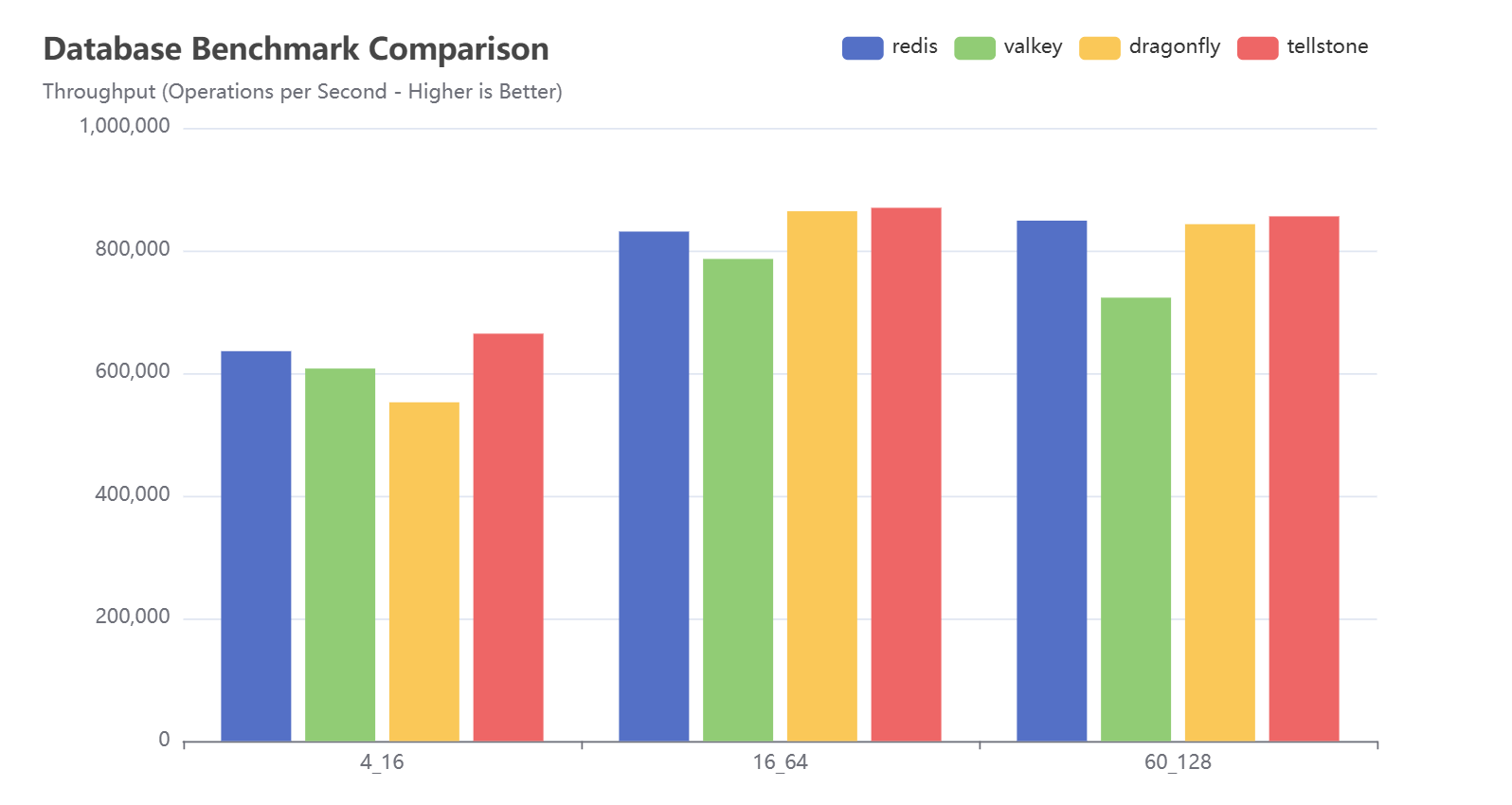
| System | Throughput | vs Redis | avg | p50 | p99 | p99.9 |
|---|---|---|---|---|---|---|
| Tellstone | 664K ops/s | 1.04x | 0.96ms | 0.97ms | 1.35ms | 1.54ms |
| Redis | 636K ops/s | 1.0x | 0.99ms | 0.98ms | 1.45ms | 1.70ms |
| Valkey | 607K ops/s | 0.96x | 1.05ms | 1.04ms | 1.50ms | 1.72ms |
| Dragonfly | 552K ops/s | 0.87x | 1.18ms | 1.10ms | 2.35ms | 2.85ms |
| System | Throughput | vs Redis | avg | p50 | p99 | p99.9 |
|---|---|---|---|---|---|---|
| Tellstone | 870K ops/s | 1.05x | 11.76ms | 11.78ms | 12.67ms | 17.02ms |
| Redis | 831K ops/s | 1.0x | 12.32ms | 11.65ms | 19.97ms | 22.27ms |
| Valkey | 786K ops/s | 0.95x | 13.02ms | 12.99ms | 19.58ms | 20.48ms |
| Dragonfly | 864K ops/s | 1.04x | 11.85ms | 10.05ms | 40.96ms | 62.98ms |
| System | Throughput | vs Redis | avg | p50 | p99 | p99.9 |
|---|---|---|---|---|---|---|
| Tellstone | 856K ops/s | 1.01x | 89.63ms | 20.22ms | 913.41ms | 1867.78ms |
| Redis | 849K ops/s | 1.0x | 90.34ms | 23.17ms | 712.70ms | 1818.62ms |
| Valkey | 723K ops/s | 0.85x | 106.19ms | 112.13ms | 178.18ms | 415.74ms |
| Dragonfly | 843K ops/s | 0.99x | 90.86ms | 64.51ms | 481.28ms | 1073.15ms |
Tellstone leads throughput across all three environments (up to 10.5% faster than Redis, 20% faster than Valkey, 20% faster than Dragonfly at small scale). Its p50 latency is consistently the lowest or near-lowest at every concurrency level.
Throughput with the native binary protocol (no pipelining, read-heavy):
| Connections | Throughput | p50 |
|---|---|---|
| 32 | 940K RPS | 99us |
| 200 | 940K RPS | 99us |
| 1000 | 1.47M RPS | 470us |
| 2000 | 1.35M RPS | 1.2ms |
Numbers are environment-specific; reproduce with
task bench:respand thebenchmark/benchmark.shscript.
Same memtier_benchmark parameters (256 B values, --ratio=1:10, pipeline 10, uniform random
keys) but executed on a dedicated bare‑metal server (Intel Xeon Platinum 8580, 56 cores,
118 GB RAM, Debian). The load generator and server share the same machine, with taskset
pining the server process to the requested core set. This isolates raw engine throughput and
latency from any cloud‑SDN constraints.
500K requests per client, 4 clients per memtier thread. Server
taskset -c 0-N, memtier runs unpinned.
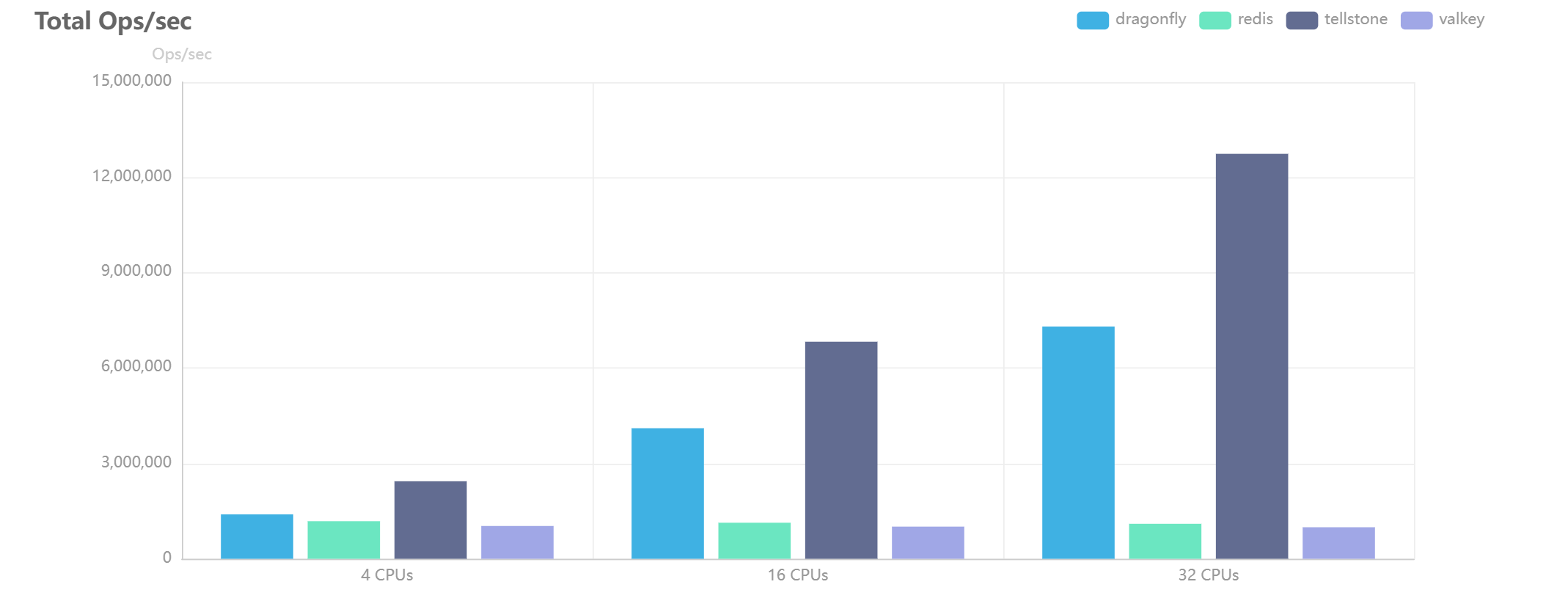
| System | Total Ops/s | vs Redis | avg | p50 | p99 | p99.9 |
|---|---|---|---|---|---|---|
| Tellstone | 2,448K | 2.06x | 0.06ms | 0.06ms | 0.23ms | 0.41ms |
| Dragonfly | 1,404K | 1.18x | 0.11ms | 0.11ms | 0.17ms | 0.22ms |
| Redis | 1,186K | 1.0x | 0.13ms | 0.12ms | 0.21ms | 0.25ms |
| Valkey | 1,036K | 0.87x | 0.15ms | 0.14ms | 0.23ms | 0.26ms |
| System | Total Ops/s | vs Redis | avg | p50 | p99 | p99.9 |
|---|---|---|---|---|---|---|
| Tellstone | 6,806K | 5.98x | 0.09ms | 0.07ms | 0.41ms | 0.70ms |
| Dragonfly | 4,122K | 3.62x | 0.15ms | 0.15ms | 0.26ms | 0.32ms |
| Redis | 1,139K | 1.0x | 0.56ms | 0.54ms | 1.06ms | 1.09ms |
| Valkey | 1,016K | 0.89x | 0.63ms | 0.60ms | 1.19ms | 1.22ms |
| System | Total Ops/s | vs Redis | avg | p50 | p99 | p99.9 |
|---|---|---|---|---|---|---|
| Tellstone | 12,738K | 11.53x | 0.10ms | 0.08ms | 0.44ms | 0.78ms |
| Dragonfly | 7,286K | 6.59x | 0.18ms | 0.17ms | 0.61ms | 1.29ms |
| Redis | 1,105K | 1.0x | 1.16ms | 1.15ms | 2.33ms | 2.38ms |
| Valkey | 996K | 0.90x | 1.29ms | 1.27ms | 2.56ms | 2.61ms |
On bare metal Tellstone scales nearly linearly with available cores — 11.5x Redis at 32 CPUs — while Redis and Valkey flatline around 1 M ops/s regardless of core count. Dragonfly scales well (6.6x) but Tellstone maintains a ~1.75x lead at every level, with the lowest p50 latency across the board (0.06 – 0.08 ms).
task test           # go test ./...
task test:race      # go test -race ./...
task vet            # go vet ./...
task check          # vet + race tests (run before committing)
task fmt            # format
Pull requests and pushes to main trigger the CI workflow:
go build ./...go vet ./...go test ./...go test -race ./...Benchmarks are not run automatically on every push due to resource constraints.
Run them locally with task bench:native or task bench:resp:precise.
task run:resp with --enable-metrics exposes Prometheus text at
http://<metrics-addr>/metrics (default :9100).--enable-audit writes structured security events (see
Audit logging); run with --audit-events all to capture every event type.Two independent workflows, both built on the stock Go toolchain (pprof / trace). Neither
assumes a specific core count, OS, or machine — every variable below is overridable on the CLI,
so the same commands work on a laptop, a CI runner, or a dedicated benchmarking host.
1) Profile a package's benchmarks directly — no server involved, good for isolating one function (e.g. the storage engine or the RESP parser):
task profile:pkg                                          # ./internal/storage/..., all benchmarks
task profile:pkg PKG=./internal/resp/... BENCH=BenchmarkParseGet
task profile:view FILE=tmp/profile/cpu.out                # opens the CPU profile in the browser
task profile:view FILE=tmp/profile/mem.out ARGS=-alloc_space
2) Profile the running server under real load, generated from a second terminal:
task run:profiling # foreground server, RESP + live pprof on :6060
# in a second terminal, generate load, e.g.:
task bench:resp:pipeline
# or: ./bin/benchmark -addr 127.0.0.1:19988 -c 32 -n 1000000 -read-ratio 0.95 -skew 1.5
# while load is running, pull a profile and open it in the browser:
task profile:live                     # CPU, 30s sample (default)
task profile:live KIND=heap
task profile:live KIND=mutex
task profile:live KIND=block
task profile:live:trace               # execution trace, opened via `go tool trace`
go tool pprof -http starts a local web server and opens your default browser automatically.
On a headless/remote host, set PORT=<port> and open http://<host>:<port> yourself (e.g. via
an SSH tunnel), or browse the raw index at http://127.0.0.1:6060/debug/pprof/ directly.
Contributions are welcome — especially around networking, replication, persistence, and RESP command coverage. See CONTRIBUTING.md for the full guide (DCO sign-off required, core principles, workflow).
“A contest of focus. Keep yours made of steel.” — Tellstone
499 followers · starred Jul 2026
228 followers · starred Jul 2026
1,067 followers · starred Jul 2026
299 followers · starred Jul 2026
Tellstone is a high-performance in-memory database and drop-in replacement for Redis; Join https://discord.gg/kEf78DUFX
See the code
Tellstone is an ultra‑high‑performance, cloud‑native in‑memory key/value store written entirely in Go. It speaks two protocols over TCP — a compact custom binary protocol and a Redis‑compatible (RESP2) protocol — on top of a shared-nothing (SN) storage engine with optional TTL eviction, at‑rest encryption, and write-ahead log persistence.
       +---------------------------------------------+
       |             Your K8s Cluster                |
       |                                             |
       |  [App Pod] --( binary :9988 / RESP :6379 )->|
       |                                             |
       |     +---------------------------------+     |
       |     |        TELLSTONE CORE           |     |
       |     |  (N Shards, each a goroutine +  |     |
       |     |   sync.RWMutex + map[string]Item)|    |
       |     |  FNV-1a hash → O(1) dispatch    |     |
       |     +---------------------------------+     |
       +---------------------------------------------+
Many managed databases (PostgreSQL, MySQL, …) become bottlenecks under high‑frequency workloads. Tellstone offers a lean, modern, memory‑efficient buffer that:
redis-cli,
redis-benchmark, memtier_benchmark, and existing Redis client libraries (GET/SET/PING/DEL).map[string]Item plus a
sync.RWMutex. Keys are pinned to a shard via FNV-1a hashing so the lock is almost never
contended. No cross-shard coordination, no channel round-trips, no per-request allocations.Write = 0 allocs/op). Disabled by default.For a detailed description of the package structure, request flow, and design decisions, see ARCHITECTURE.md.
| Layer | Package | Notes |
|---|---|---|
| Binary protocol | internal/network | MsgRequest/MsgResponse frames (GET/SET/DEL, TTL, key, value) |
| RESP2 protocol | internal/resp | Redis‑compatible listener reusing the same engine |
| Request router | internal/router | FNV‑1a hash → O(1) shard dispatch |
| Shard runner | internal/shard | Shared‑nothing shard: synchronous Execute(), per‑shard sync.RWMutex |
| Storage engine | internal/storage | Single‑map engine, TTL eviction via timing wheel |
| Persistence | internal/persistence | Per‑shard append‑only WAL, zero‑alloc write path |
| Crypto | internal/crypto | Optional ChaCha20‑Poly1305 |
| Audit | internal/audit | Structured JSON security events (connect, disconnect, auth_*, acl_deny, command); rotating file writer, optional encryption |
| Metrics / tracing | internal/metrics, internal/trace | Prometheus text exporter, OTLP/gRPC tracing |
curl -fsSL https://saxy.github.io/tellstone-apt/saxy-keyring.gpg \
  | sudo gpg --dearmor -o /usr/share/keyrings/saxy-keyring.gpg

echo "deb [signed-by=/usr/share/keyrings/saxy-keyring.gpg] \
  https://saxy.github.io/tellstone-apt stable main" \
  | sudo tee /etc/apt/sources.list.d/saxy-tellstone.list > /dev/null

sudo apt update && sudo apt install tellstone
brew tap Saxy/tellstone-tap
brew install --cask Saxy/tellstone-tap/tellstone
Pre-built binaries are available on the Releases page for Linux, macOS, and Windows (amd64 and arm64).
Requires Go 1.26+ and optionally task (go‑task):
task build # → ./bin/tellstone (or: go build -o bin/tellstone ./cmd/tellstone)
task run            # binary protocol on 127.0.0.1:9988
task run:resp       # binary on :9988  +  Redis-compatible RESP on :6379
Or run the binary directly with flags / environment variables:
./bin/tellstone --addr 127.0.0.1:9988 --enable-resp --resp-addr 127.0.0.1:6379
TSD_ADDR=127.0.0.1:9988 TSD_ENABLE_RESP=true ./bin/tellstone
If a previous run got killed uncleanly and left a server stuck on a port (address already in use), find and stop it with:
task kill                          # checks :19988, :6379, :6060 and any bin/tellstone process
task kill PORTS="9988" NAME=myapp  # override the ports/name to search for
Works on Linux and macOS (lsof/pgrep/pkill, no OS-specific tooling).
Every option is available as a flag and an environment variable.
| Flag | Env | Default | Description |
|---|---|---|---|
--addr | TSD_ADDR | 127.0.0.1:9988 | Binary‑protocol listen address |
--enable-resp | TSD_ENABLE_RESP | false | Enable the Redis‑compatible RESP listener |
--resp-addr | TSD_RESP_ADDR | 127.0.0.1:6379 | RESP listen address |
--resp-starttls | TSD_RESP_STARTTLS | false | Allow RESP plaintext connections to upgrade with TLS |
--shards | TSD_NUM_SHARDS | 0 (auto = CPU) | Number of shared-nothing shards |
--max-msg-size | TSD_MAX_MSG_SIZE | 16MiB | Per‑message size limit |
--max-mem-bytes | TSD_MAX_MEM_BYTES | 0 (unlimited) | Total engine memory ceiling |
--evict-interval | TSD_EVICT_INTERVAL | 1s | Chronometer tick interval (0 disables active eviction) |
--evict-slots | TSD_EVICT_SLOTS | 256 | Timing‑wheel slot count |
--enable-encryption | TSD_ENABLE_ENCRYPTION | false | Enable ChaCha20‑Poly1305 at‑rest encryption |
--encryption-key | TSD_ENCRYPTION_KEY | (none) | Base‑64 encoded 32‑byte key (one key source is required when encryption is on) |
--encryption-key-file | TSD_ENCRYPTION_KEY_FILE | (none) | Path to a file holding the raw 32‑byte key; mutually exclusive with --encryption-key |
--enable-metrics | TSD_ENABLE_METRICS | false | Enable the Prometheus exporter |
--metrics-addr | TSD_METRICS_ADDR | :9100 | Prometheus exporter address (/metrics) |
--trace-ratio | TSD_TRACE_RATIO | 0.0 | OpenTelemetry sample ratio (0 disables) |
--enable-persistence | TSD_ENABLE_PERSISTENCE | false | Enable write-ahead log persistence for crash recovery |
--persistence-dir | TSD_PERSISTENCE_DIR | (platform) | Directory for WAL data files |
--snapshot-interval | TSD_SNAPSHOT_INTERVAL | 0 (disabled) | Time between periodic snapshots (e.g. 5m); requires --enable-persistence |
--snapshot-bytes | TSD_SNAPSHOT_BYTES | 64MiB | WAL size threshold that triggers a snapshot; requires --enable-persistence |
--tls-cert | TSD_TLS_CERT | (none) | TLS certificate path; watched for automatic rotation |
--tls-key | TSD_TLS_KEY | (none) | TLS private key path; watched for automatic rotation |
--tls-ca | TSD_TLS_CA | (none) | Client CA path for mTLS; watched for automatic rotation |
--require-pass | TSD_REQUIRE_PASS | (none) | Single password required via AUTH; empty disables it |
--rbac-config | TSD_RBAC_CONFIG | (none) | YAML/JSON RBAC policy file (roles, users, default role); hot-reloaded on SIGHUP |
--oauth-provider | TSD_OAUTH_PROVIDER | (none) | OAuth preset (google|stackit); empty + --oauth-issuer → generic OIDC |
--oauth-issuer | TSD_OAUTH_ISSUER | (none) | OIDC issuer / discovery base URL of the identity provider |
--oauth-client-id | TSD_OAUTH_CLIENT_ID | (none) | OAuth2 client ID used as the expected token audience |
--enable-audit | TSD_ENABLE_AUDIT | false | Enable structured audit logging |
--audit-log-path | TSD_AUDIT_LOG_PATH | stdout | Audit destination: a directory (rotated 0600 files) or stdout |
--audit-events | TSD_AUDIT_EVENTS | auth,acl | Comma-separated event types: auth, acl, connect, disconnect, command, or all |
--shutdown-timeout | TSD_SHUTDOWN_TIMEOUT | 10s | Max wait for graceful shutdown on SIGINT/SIGTERM |
Runtime tuning (environment only): TSD_GC_PERCENT (default -1, GC off for a zero‑GC hot
path), TSD_MEM_LIMIT_BYTES (soft heap ceiling), TSD_ENABLE_PROFILING (serves pprof on
127.0.0.1:6060).
At-rest encryption takes its 32-byte key from exactly one source. --encryption-key carries it
base64-encoded, because process arguments and environment variables are NUL-terminated and
roughly 1 in 8 random 32-byte keys contains a 0x00 byte that cannot survive them:
tellstone --enable-encryption --encryption-key "$(openssl rand -base64 32)"
--encryption-key-file carries the same key as raw, unencoded bytes, which suits a mounted
Kubernetes Secret or a vault-agent-rendered file. Every byte of the file is significant, so it must
be exactly 32 bytes with no trailing newline:
# umask 077 in a subshell so the file is created 0600; a later chmod would leave
# the key world-readable in between.
(umask 077; head -c 32 /dev/urandom > /etc/tellstone/key)
tellstone --enable-encryption --encryption-key-file /etc/tellstone/key
The key is read once at startup; rotating it requires a restart. Enabling encryption without either source is refused at startup rather than silently falling back to plaintext.
Deprecated:
--encryption-keypreviously used the value as raw text, so a literal 32-character key such as0123456789abcdef0123456789abcdefwas accepted. That form still works and logs a warning at startup, but it is insecure and will be removed in the next major release. Re-encode an existing key withbase64 < <keyfile>, or move it to--encryption-key-file. The two forms are never ambiguous: a base64 key is 44 characters (43 unpadded), while a 32-character value can only decode to 24 bytes.
When TLS is enabled, Tellstone watches the parent directories of the certificate, key, and optional client CA. Valid replacements are applied after a 500 ms debounce; existing TLS connections continue uninterrupted. Directory watching supports atomic file renames and Kubernetes projected Secret updates.
By default, both listeners require TLS from the first byte. Setting --resp-starttls keeps only the
RESP listener plaintext until a client sends STARTTLS; Tellstone replies +OK in plaintext and
then requires an immediate TLS 1.3 handshake on the same socket. STARTTLS is allowed before
AUTH so credentials need not cross plaintext. The command must not be pipelined with any other
plaintext bytes. The binary listener always retains implicit TLS, and each RESP upgrade loads the
latest rotated certificate configuration. Once a RESP connection is handed to the TLS state machine
— on accept for implicit TLS, or after a STARTTLS acceptance — it must complete the handshake
within 10 seconds; the listener closes it at the deadline even if the client sends nothing further,
so stalled connections cannot pile up.
Start with task run:resp, then use any Redis client:
redis-cli -p 6379 PING            # PONG
redis-cli -p 6379 SET foo bar     # OK
redis-cli -p 6379 GET foo         # "bar"
redis-cli -p 6379 SET k v EX 60   # OK (60s TTL)
redis-cli -p 6379 DEL foo         # (integer) 1
Supported commands today: PING, GET, SET (with EX/PX), DEL, AUTH, COMMAND,
ROLE (CREATE/SETUSER/DELUSER/DELETE/LIST/GETUSER), ACL
(SETUSER/DELUSER/LIST/LOG). Unknown commands return a
-ERR reply without dropping the connection. STARTTLS is additionally available when
--resp-starttls is enabled.
Start with --require-pass for a single shared password, or --rbac-config for per-user
authentication with role-based access control (supersedes --require-pass):
# policy.yaml — loaded at startup and hot-reloaded on SIGHUP.
# Passwords are bcrypt hashes, e.g. of "adminsecret" / "alicepw"; a password
# is required unless the user is explicitly marked nopass.
roles:
  - name: admin
    rules: ["+@all", "~*"]
  - name: readonly
    rules: ["+get", "~*"]
users:
  - name: admin
    role: admin
    password: "$2a$10$pcaKkTfRy.KSdNUgKszYYedE7L32P9fSEG3x1phq0EbjeYkn5WpEi"
  - name: alice
    role: readonly
    password: "$2a$10$sslrTYVwaIaA7O1lhokY2OgnojP5bB8YJ/o2MXaFP1v49lG8fqJYK"
default_role: readonly    # least privilege: fallback for users without an explicit role
Generate a password hash with htpasswd -nbBC 10 "" PASSWORD | tr -d ':\n' or
mkpasswd -m bcrypt PASSWORD (bcrypt, cost 10, $2a$10$...). Do not use openssl passwd —
it emits SHA-512-crypt, not bcrypt. ROLE SETUSER accepts a raw >password and bcrypt-hashes it
server-side, so runtime-created users need no tooling.
./bin/tellstone --rbac-config policy.yaml --enable-resp
redis-cli AUTH admin adminsecret                 # +OK
redis-cli ROLE CREATE operator +get '~users:*'   # +OK (runtime roles)
redis-cli ROLE SETUSER bob operator '>bobpw'     # +OK
redis-cli ROLE GETUSER bob                       # bob / operator / 1
Roles are user-defined; a role's rules are Redis-style tokens: +cmd / -cmd grant or revoke
one command, +@cat / -@cat a whole category, and ~prefix whitelists a key namespace (an
empty list or ~* allows every key). - rules override + rules. The built-in categories:
| Category | Grants |
|---|---|
login | AUTH, PING, COMMAND |
read | GET, INFO |
write | SET, DEL |
readwrite | read + write + login |
operator | readwrite + FLUSH |
maintenance | FLUSH, SHUTDOWN, CONFIG, DEBUG, MONITOR |
admin | AUTH, ROLE, ACL, USER, GRANT, REVOKE |
all / none | every registered command / nothing |
A ready-to-run policy file ships with the role example at cmd/example/role/policy.yaml.
Unauthenticated data commands return -NOAUTH; commands a user's role does not grant return
-NOPERM. The native binary client offers the same via client.AuthUser and RoleCreate /
RoleSetUser (see cmd/example/role). The ACL command family (ACL SETUSER / ACL DELUSER /
ACL LIST / ACL LOG) manages the same policy store through a Redis-flavored alias, driven
end-to-end in cmd/example/acl.
Connections can present an OIDC id_token (a signed JWT) as their credential instead of a
password. The token's claims map to a role through the policy file's oauth.rules (claims +
match pattern + role, first match wins), and that role is pinned to the connection like any
other. Requires --rbac-config — a token can only map to a role through the policy. The server
needs no client secret: verification is signature + issuer + audience against the provider's
public JWKS.
./bin/tellstone --rbac-config policy.yaml --oauth-provider google --oauth-client-id 1234.apps.googleusercontent.com
redis-cli AUTH <id_token>              # +OK — claims map to a role via oauth.rules
Supported presets: google, stackit; set --oauth-issuer for any other OIDC provider. How
the provider pipeline, claim matching, and fail-closed semantics work is documented in
internal/oauth/README.md. A runnable client example lives in
cmd/example/oauth.
Opt-in structured audit trail via --enable-audit. Each selected audit event is written
as one JSON line carrying "level": "AUDIT", so log aggregators can separate it from operational
INFO/WARN/ERROR output without custom parsing:
./bin/tellstone --enable-audit --audit-log-path /var/log/tellstone --audit-events all
--audit-log-path is stdout (the default) or a directory. In directory mode the server creates
rotating files named <unix-timestamp>_<dir-fingerprint>_tsd.log with 0600 permissions,
rotating to a fresh file once a file reaches 50 MiB (history is never truncated or renamed). When
--enable-encryption is set, every record is sealed with the crypto engine before it is flushed.
The engine is a no-op when audit logging is disabled, so the hot path pays nothing.
--audit-events selects which event types are logged (default auth,acl; all enables every
type). connect, disconnect, and command are high-volume and must be opted into explicitly:
| Event | Fires on | Fields |
|---|---|---|
connect / disconnect | TCP connection open/close, both protocols | remote_addr, protocol, shard_id |
auth_success | successful AUTH | user, remote_addr, protocol |
auth_failure | rejected AUTH (bad password, unknown user, malformed request) | user, reason, remote_addr, protocol |
acl_deny | command blocked by RBAC (-NOPERM) | user, command, key, remote_addr, protocol |
command | every dispatched data/admin command | command, key, user, remote_addr, protocol |
{"event":"acl_deny","level":"AUDIT","msg":"command denied by rbac policy","protocol":"binary","remote_addr":"127.0.0.1:51642","command":"SET","key":"config:key","user":"reader","time":"2026-08-05T10:40:32.908569649+02:00"}
The native protocol is the fastest path. Use the bundled client in internal/network:
import "github.com/Saxy/Tellstone/internal/network"

c, _ := network.Dial("127.0.0.1:9988", 2*time.Second)
defer c.Close()

scratch := make([]byte, 4096)              // reusable response buffer (zero-alloc)
c.Set([]byte("hello"), []byte("world"), 0, scratch)   // ttlMs=0 → no expiry
val, _ := c.Get([]byte("hello"), scratch)             // val == "world"
A runnable example lives in cmd/example/client.
Methodology matters. A naive local benchmark runs the load generator on the same cores as the server's event loops, so the two contend for CPU and the latency tail balloons. All tasks below pin the server and the load generator to disjoint core sets (
taskset) so the numbers reflect the server, not scheduler contention. For absolute comparisons, run the load generator on a separate host.
task bench:native # pinned: server cpu0-15, generator cpu16-31
task bench:resp                 # latency run (pipeline=1)
task bench:resp:pipeline        # throughput ceiling (pipeline=16)
task bench:resp:hits            # preload then read-heavy (realistic ~100% hit rate)
task bench:resp:correctness     # preload then read back — proves GET returns what SET stored
Override workload knobs on the command line, e.g.:
task bench:resp PIPELINE=16 DURATION=30 CONNS=50 RATIO=1:4 KEYSPACE=1000000
You can point memtier_benchmark/redis-benchmark at :6379 directly and run the identical
command against Redis, Dragonfly, Valkey (or --protocol=memcache_text against memcached) for
an apples‑to‑apples comparison.
memtier_benchmark — 100k requests, 256-byte values, --ratio=1:10 (1:10 read:write),
pipeline 10, uniform random keys, preloaded key set. All four systems tested with identical
parameters on the same hardware.
In-memory database benchmarks are highly sensitive to the underlying network infrastructure. To provide an honest and comprehensive view of Tellstone's performance, we categorize our results into two distinct scenarios: Cloud SDN Constraints (simulating a standard production microservice mesh) and Raw Engine Capabilities (eliminating the network stack to test core architectural limits).
Methodology: memtier_benchmark executed from a separate client VM against a remote target VM via a virtual Software-Defined Network. 100k requests, 256-byte values, --ratio=1:10, pipeline=10. At higher concurrency levels (16_64 and 60_128), all engines run directly into the physical Packets Per Second (PPS) ceiling imposed by the cloud provider's virtual switches, capping out at roughly 850K ops/s. Tellstone successfully saturates the cloud network infrastructure, operating at the absolute limit of the hardware while maintaining lower or equivalent tail latencies compared to Redis, Valkey, and Dragonfly.
| System | Throughput | vs Redis | avg | p50 | p99 | p99.9 |
|---|---|---|---|---|---|---|
| Tellstone | 664K ops/s | 1.04x | 0.96ms | 0.97ms | 1.35ms | 1.54ms |
| Redis | 636K ops/s | 1.0x | 0.99ms | 0.98ms | 1.45ms | 1.70ms |
| Valkey | 607K ops/s | 0.96x | 1.05ms | 1.04ms | 1.50ms | 1.72ms |
| Dragonfly | 552K ops/s | 0.87x | 1.18ms | 1.10ms | 2.35ms | 2.85ms |
| System | Throughput | vs Redis | avg | p50 | p99 | p99.9 |
|---|---|---|---|---|---|---|
| Tellstone | 870K ops/s | 1.05x | 11.76ms | 11.78ms | 12.67ms | 17.02ms |
| Redis | 831K ops/s | 1.0x | 12.32ms | 11.65ms | 19.97ms | 22.27ms |
| Valkey | 786K ops/s | 0.95x | 13.02ms | 12.99ms | 19.58ms | 20.48ms |
| Dragonfly | 864K ops/s | 1.04x | 11.85ms | 10.05ms | 40.96ms | 62.98ms |
| System | Throughput | vs Redis | avg | p50 | p99 | p99.9 |
|---|---|---|---|---|---|---|
| Tellstone | 856K ops/s | 1.01x | 89.63ms | 20.22ms | 913.41ms | 1867.78ms |
| Redis | 849K ops/s | 1.0x | 90.34ms | 23.17ms | 712.70ms | 1818.62ms |
| Valkey | 723K ops/s | 0.85x | 106.19ms | 112.13ms | 178.18ms | 415.74ms |
| Dragonfly | 843K ops/s | 0.99x | 90.86ms | 64.51ms | 481.28ms | 1073.15ms |
Tellstone leads throughput across all three environments (up to 10.5% faster than Redis, 20% faster than Valkey, 20% faster than Dragonfly at small scale). Its p50 latency is consistently the lowest or near-lowest at every concurrency level.
Throughput with the native binary protocol (no pipelining, read-heavy):
| Connections | Throughput | p50 |
|---|---|---|
| 32 | 940K RPS | 99us |
| 200 | 940K RPS | 99us |
| 1000 | 1.47M RPS | 470us |
| 2000 | 1.35M RPS | 1.2ms |
Numbers are environment-specific; reproduce with
task bench:respand thebenchmark/benchmark.shscript.
Same memtier_benchmark parameters (256 B values, --ratio=1:10, pipeline 10, uniform random
keys) but executed on a dedicated bare‑metal server (Intel Xeon Platinum 8580, 56 cores,
118 GB RAM, Debian). The load generator and server share the same machine, with taskset
pining the server process to the requested core set. This isolates raw engine throughput and
latency from any cloud‑SDN constraints.
500K requests per client, 4 clients per memtier thread. Server
taskset -c 0-N, memtier runs unpinned.
| System | Total Ops/s | vs Redis | avg | p50 | p99 | p99.9 |
|---|---|---|---|---|---|---|
| Tellstone | 2,448K | 2.06x | 0.06ms | 0.06ms | 0.23ms | 0.41ms |
| Dragonfly | 1,404K | 1.18x | 0.11ms | 0.11ms | 0.17ms | 0.22ms |
| Redis | 1,186K | 1.0x | 0.13ms | 0.12ms | 0.21ms | 0.25ms |
| Valkey | 1,036K | 0.87x | 0.15ms | 0.14ms | 0.23ms | 0.26ms |
| System | Total Ops/s | vs Redis | avg | p50 | p99 | p99.9 |
|---|---|---|---|---|---|---|
| Tellstone | 6,806K | 5.98x | 0.09ms | 0.07ms | 0.41ms | 0.70ms |
| Dragonfly | 4,122K | 3.62x | 0.15ms | 0.15ms | 0.26ms | 0.32ms |
| Redis | 1,139K | 1.0x | 0.56ms | 0.54ms | 1.06ms | 1.09ms |
| Valkey | 1,016K | 0.89x | 0.63ms | 0.60ms | 1.19ms | 1.22ms |
| System | Total Ops/s | vs Redis | avg | p50 | p99 | p99.9 |
|---|---|---|---|---|---|---|
| Tellstone | 12,738K | 11.53x | 0.10ms | 0.08ms | 0.44ms | 0.78ms |
| Dragonfly | 7,286K | 6.59x | 0.18ms | 0.17ms | 0.61ms | 1.29ms |
| Redis | 1,105K | 1.0x | 1.16ms | 1.15ms | 2.33ms | 2.38ms |
| Valkey | 996K | 0.90x | 1.29ms | 1.27ms | 2.56ms | 2.61ms |
On bare metal Tellstone scales nearly linearly with available cores — 11.5x Redis at 32 CPUs — while Redis and Valkey flatline around 1 M ops/s regardless of core count. Dragonfly scales well (6.6x) but Tellstone maintains a ~1.75x lead at every level, with the lowest p50 latency across the board (0.06 – 0.08 ms).
task test           # go test ./...
task test:race      # go test -race ./...
task vet            # go vet ./...
task check          # vet + race tests (run before committing)
task fmt            # format
Pull requests and pushes to main trigger the CI workflow:
go build ./...go vet ./...go test ./...go test -race ./...Benchmarks are not run automatically on every push due to resource constraints.
Run them locally with task bench:native or task bench:resp:precise.
task run:resp with --enable-metrics exposes Prometheus text at
http://<metrics-addr>/metrics (default :9100).--enable-audit writes structured security events (see
Audit logging); run with --audit-events all to capture every event type.Two independent workflows, both built on the stock Go toolchain (pprof / trace). Neither
assumes a specific core count, OS, or machine — every variable below is overridable on the CLI,
so the same commands work on a laptop, a CI runner, or a dedicated benchmarking host.
1) Profile a package's benchmarks directly — no server involved, good for isolating one function (e.g. the storage engine or the RESP parser):
task profile:pkg                                          # ./internal/storage/..., all benchmarks
task profile:pkg PKG=./internal/resp/... BENCH=BenchmarkParseGet
task profile:view FILE=tmp/profile/cpu.out                # opens the CPU profile in the browser
task profile:view FILE=tmp/profile/mem.out ARGS=-alloc_space
2) Profile the running server under real load, generated from a second terminal:
task run:profiling # foreground server, RESP + live pprof on :6060
# in a second terminal, generate load, e.g.:
task bench:resp:pipeline
# or: ./bin/benchmark -addr 127.0.0.1:19988 -c 32 -n 1000000 -read-ratio 0.95 -skew 1.5
# while load is running, pull a profile and open it in the browser:
task profile:live                     # CPU, 30s sample (default)
task profile:live KIND=heap
task profile:live KIND=mutex
task profile:live KIND=block
task profile:live:trace               # execution trace, opened via `go tool trace`
go tool pprof -http starts a local web server and opens your default browser automatically.
On a headless/remote host, set PORT=<port> and open http://<host>:<port> yourself (e.g. via
an SSH tunnel), or browse the raw index at http://127.0.0.1:6060/debug/pprof/ directly.
Contributions are welcome — especially around networking, replication, persistence, and RESP command coverage. See CONTRIBUTING.md for the full guide (DCO sign-off required, core principles, workflow).
“A contest of focus. Keep yours made of steel.” — Tellstone
499 followers · starred Jul 2026
228 followers · starred Jul 2026
1,067 followers · starred Jul 2026
299 followers · starred Jul 2026