Low-cost pothole detector: YOLOv8 + ESP32 + accelerometer. Logs a pothole only if the camera sees it AND the car feels it, with GPS & severity. Try it in Colab.
See the codeA low-cost dual-ESP32 + YOLOv8 rig that detects potholes in real time, tracks them, confirms each one with an accelerometer, and logs it with a severity score, GPS position and timestamp.





Website · Paper · Colab · Wokwi Simulation · Docs · Contribute
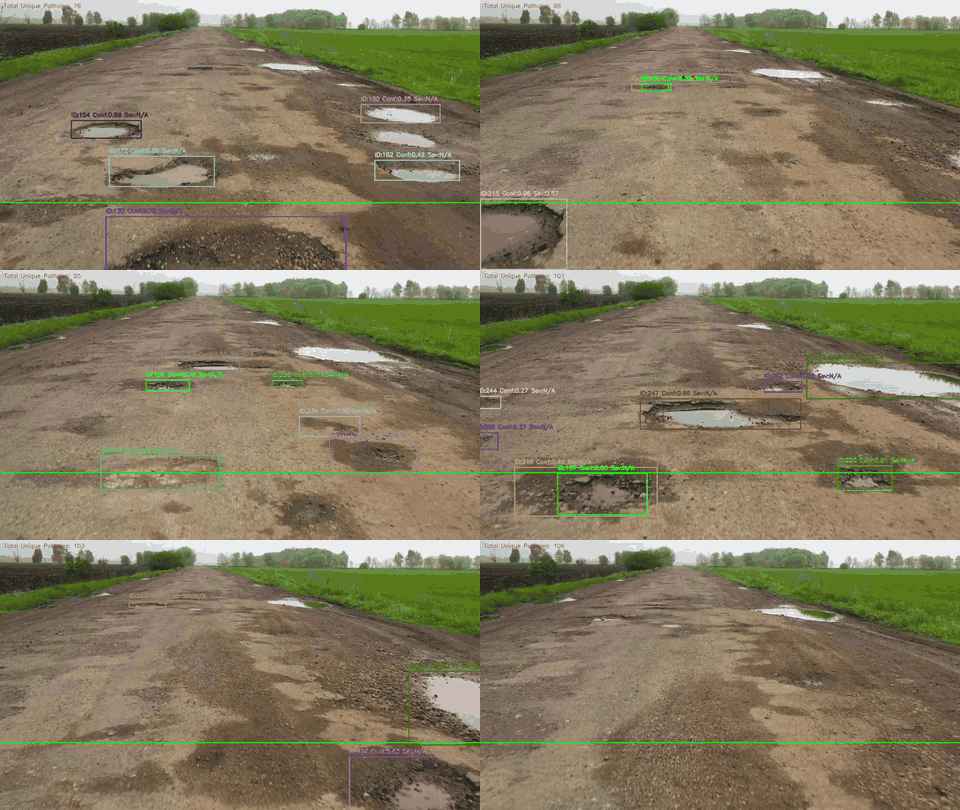
YOLOv8m detections + SORT tracking on a sample road video. Each pothole keeps one ID and is logged once when it crosses the green reference line.
Most pothole projects stop at "draw a box on an image". IPDS goes all the way from camera to a geo-tagged, severity-ranked maintenance log.
DetectYOLOv8m fine-tuned for potholes, reaching [email protected] = 81.7%. |
TrackSORT (Kalman filter + Hungarian matching) gives every pothole a stable ID, so each one is counted once, not once per frame. |
FeelWhen a tracked pothole reaches the wheel line, the hub asks a second ESP32 for an MPU6050 accelerometer burst and computes peak jerk. |
FuseA pothole is logged only if the camera sees it and the accelerometer feels it. Severity (0–1) = 70% detection confidence + 30% measured impact. |
LogEvery event goes to CSV with a DS3231 RTC timestamp and NEO-6M GPS fields, alongside an annotated MP4. |
CheapTwo ESP32 boards and common breakout modules, under ₹2,500 per unit (as reported in the paper). Inference runs on a laptop. |
No hardware? No problem. Pick whichever suits you:
| Option | What you get | Hardware needed |
|---|---|---|
 | Run detection + tracking on a sample image or your own video | None |
 | The ESP32 sensor node (MPU6050, NEO-6M GPS, DS3231) running in your browser | None |
demo/app.py | Gradio web UI for images and videos (deployable as a Hugging Face Space) | None |
| Local install (below) | The full pipeline: offline on video, or live with ESP32 boards | Optional |
git clone https://github.com/SanTiwari07/PotHoleDetection.git
cd PotHoleDetection
pip install -r requirements.txt

# Vision-only on any road video (weights auto-download on first run)
python python/main.py --source path/to/road_video.mp4
Outputs land in outputs/videos/ (annotated MP4) and outputs/logs/ (CSV). Press q to stop; add --no-display on servers.
flowchart LR
    subgraph CAM["ESP32-CAM · vision node"]
        OV["OV2640 camera"]
    end

    subgraph HUB["Python processing hub"]
        direction TB
        Y["YOLOv8m detector"] --> S["SORT tracker"]
        S --> F["Geometric filters"]
        F -->|"pothole crosses line"| Q["Query sensor node"]
        Q --> G{"Impact felt?"}
        G -->|"yes"| SEV["Severity fusion"]
        G -->|"no"| X["Reject"]
        SEV --> OUT["CSV log + annotated MP4"]
    end

    subgraph SENSE["ESP32 · sensor node"]
        IMU["MPU6050 IMU"]
        GPS["NEO-6M GPS"]
        RTC["DS3231 RTC"]
    end

    OV -->|"WiFi · MJPEG"| Y
    Q -->|"GET /query?pothole_id=N"| SENSE
    SENSE -->|"JSON: accel, time, GPS"| G
Why two ESP32s? Reading I²C sensors on the ESP32-CAM blocks
esp_camera_fb_get()and tanks the frame rate. Moving all sensor I/O to a second, event-driven board keeps the video stream smooth, and both boards stay cheap.
| Step | Where | What happens |
|---|---|---|
| 1 | ESP32-CAM | Streams 320×240 MJPEG frames over WiFi |
| 2 | Hub | YOLOv8m detects → SORT assigns persistent IDs |
| 3 | Hub | Holds back tracks that are too large (> 25% of frame), too wide (aspect ratio > 3) or stationary for more than 10 frames |
| 4 | Hub | When a track's centre crosses the reference line, sends GET /query?pothole_id=N |
| 5 | Sensor node | Returns accelerometer, RTC timestamp and GPS fields as JSON |
| 6 | Hub | Computes peak jerk. No impact means the event is rejected; otherwise it computes severity, appends a CSV row and annotates the video |
jerk_norm = min(peak_jerk / 20 m/s³, 1)
severity  = 0.7 × YOLO confidence + 0.3 × jerk_norm
These are Eqs. 6–7 of the paper, implemented in python/pothole_detection/fusion.py. Events whose peak jerk is below --jerk-threshold (default 1.5 m/s³; calibrate it for your vehicle) are rejected by the fusion gate. In offline mode there is no sensor node, so the gate is skipped, severity is vision-only, and the jerk/GPS columns are left empty.
Deep dives: Architecture · Hardware & wiring · Full technical spec · Paper (PDF) · Project website
| [email protected] | [email protected]:0.95 | Precision | Recall |
|---|---|---|---|
| 81.68% | 55.95% | 82.33% | 74.42% |
YOLOv8m, 640×640 input, single class (pothole), trained on the Pothole Detection dataset by andrewmvd on Kaggle (665 images with bounding boxes; Pascal VOC XML converted to YOLO format; 598 training / 67 validation images). Weights: Releases → v1.0.
from ultralytics import YOLO
model = YOLO("assets/models/pothole_yolov8.pt")
model.predict("road.jpg", conf=0.25)[0].show()
| Measure | Result |
|---|---|
| Inference speed | 10–15 FPS on a CPU-only laptop (320×240 input) |
| Latency, frame capture → CSV row | ~170–200 ms |
| Hardware cost | under ₹2,500 per unit |
The paper also reports false-positive trials (shadows, manhole covers, speed bumps and others); see docs/DETAIL.md.
outputs/sample_logs/output.csv has 50 logged potholes from a drive between 1:56 and 2:08 pm. This file records severity as text bands by peak jerk, while the current main.py writes the numeric 0–1 score instead:
| Band | Peak jerk in the file | Rows | Share |
|---|---|---|---|
| Low | 1.6 – 2.7 | 8 | 16% |
| Medium | 3.0 – 5.9 | 22 | 44% |
| High | 6.0 – 9.4 | 20 | 40% |
| Column | Description |
|---|---|
date, time | Detection timestamp (DS3231 RTC; falls back to host clock) |
frame_id | Video frame number when the event was triggered |
pothole_id | Unique SORT track ID |
confidence | YOLOv8 detection confidence (0–1) |
bounding_box_area | Box area in px² |
aspect_ratio | Box width / height |
peak_jerk | Peak jerk from the MPU6050 burst (m/s³; empty in offline mode) |
severity | Severity score 0–1 (the sample file uses Low / Medium / High bands instead) |
latitude, longitude | WGS-84 position from the NEO-6M (0 without a GPS fix; empty in offline mode) |
# 1. Download and unzip https://www.kaggle.com/datasets/andrewmvd/pothole-detection
python training/prepare_dataset.py --src path/to/pothole-detection   # VOC XML -> YOLO, 598 train / 67 val
python training/train.py                                              # YOLOv8m, 640px, 100 epochs, AdamW
The best checkpoint is copied to assets/models/pothole_yolov8.pt and validation metrics are printed at the end. The split sizes match the paper, but the paper doesn't publish which images were in each split, so your metrics may differ slightly.
Two hand-wired perfboard decks: the ESP32-CAM vision node on top, and the ESP32 sensor node with the MPU6050, DS3231 and NEO-6M below. The custom PCB replaces the lower deck.
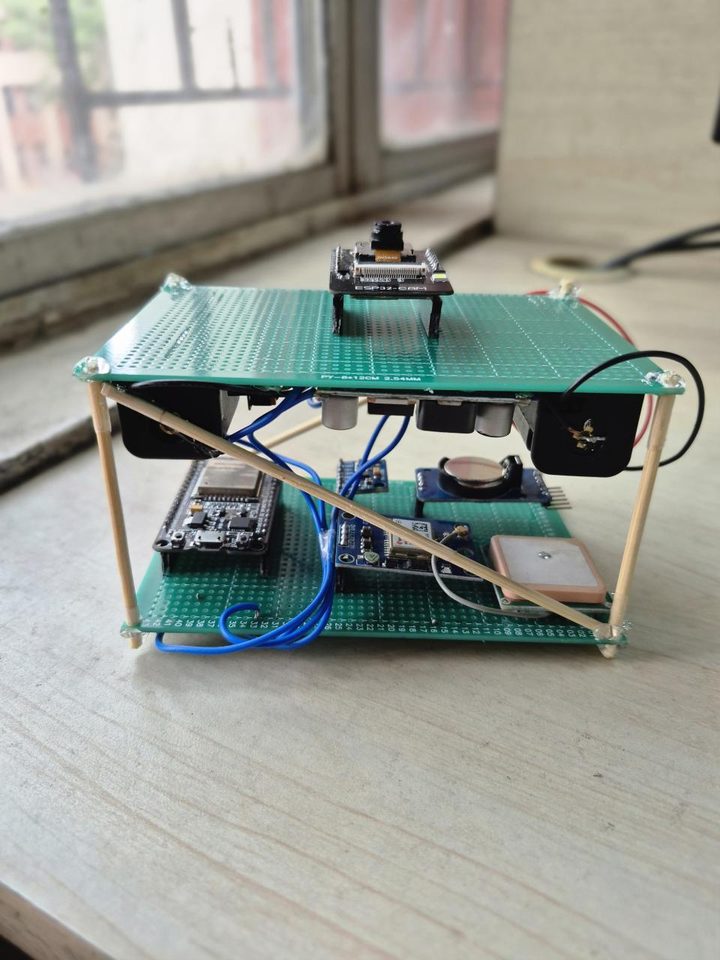 Assembled rig: camera deck above, sensor deck below | 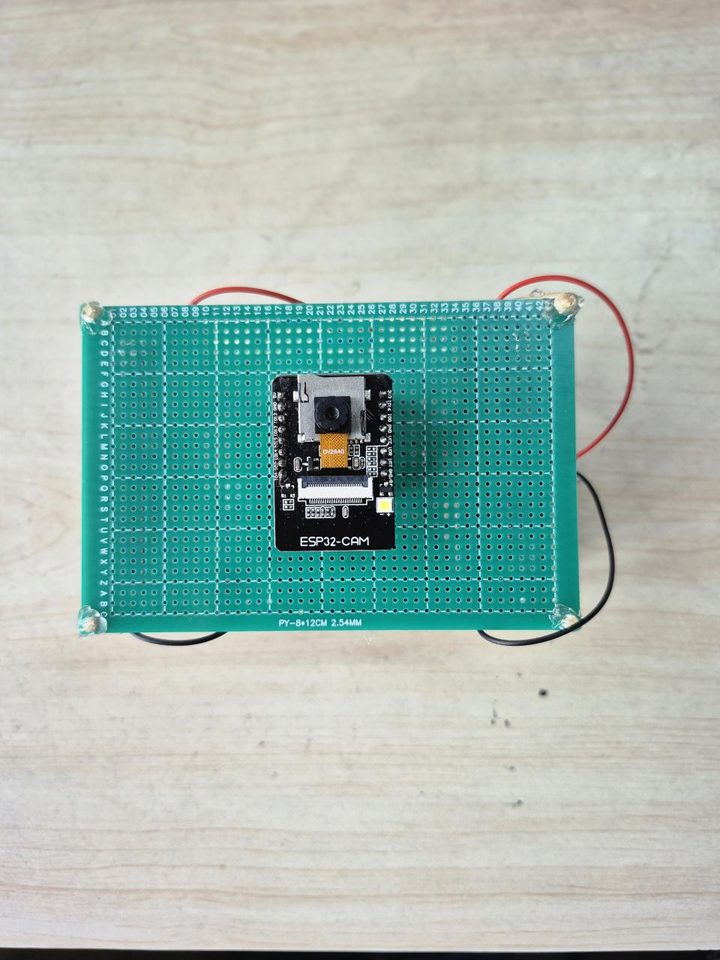 Vision node: ESP32-CAM with the OV2640 camera | 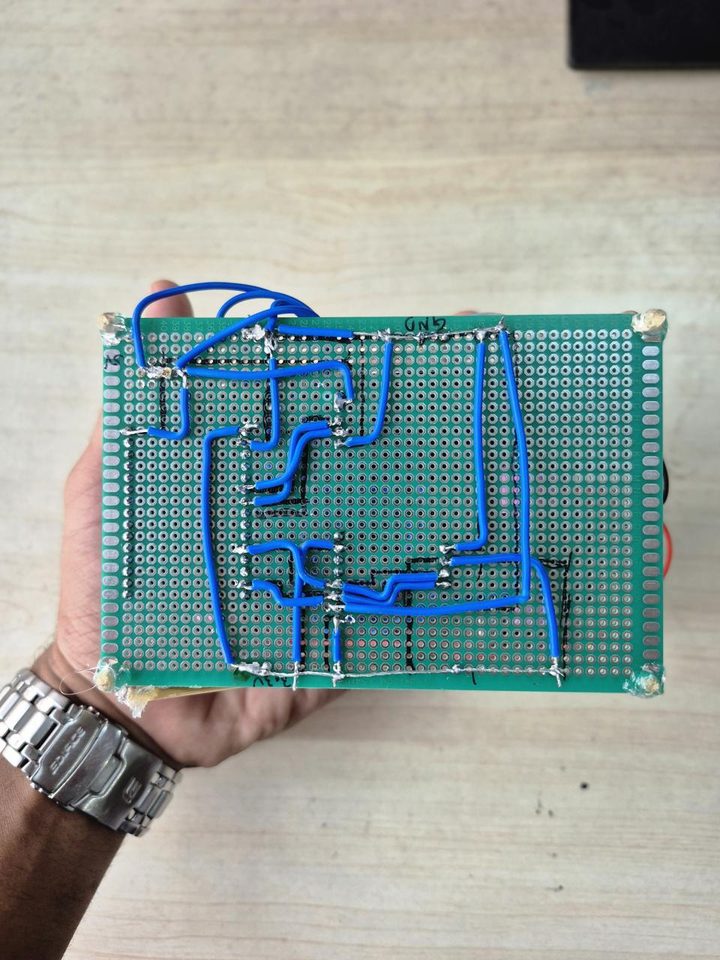 Hand-wired underside: point-to-point wiring of the sensor deck |
| Component | Role |
|---|---|
| ESP32-CAM (AI-Thinker, OV2640) | Vision node: continuous MJPEG stream |
| ESP32 dev board | Sensor node: answers HTTP queries on demand |
| MPU6050 | 6-axis IMU: peak jerk while crossing the pothole |
| NEO-6M GPS | Latitude / longitude |
| DS3231 RTC | Accurate timestamps without internet |
| Laptop or edge device | Runs YOLOv8 inference (e.g. Jetson Nano) |
| Module pin | ESP32 pin |
|---|---|
| MPU6050 SDA / DS3231 SDA | GPIO21 (+ 4.7 kΩ pull-up to 3V3) |
| MPU6050 SCL / DS3231 SCL | GPIO22 (+ 4.7 kΩ pull-up to 3V3) |
| MPU6050 AD0 | 3V3 (sets address 0x69; the DS3231 already uses 0x68) |
| NEO-6M TX → | GPIO16 (RX2) |
| NEO-6M RX ← | GPIO17 (TX2) |
| All VCC / GND | 3V3 / GND |
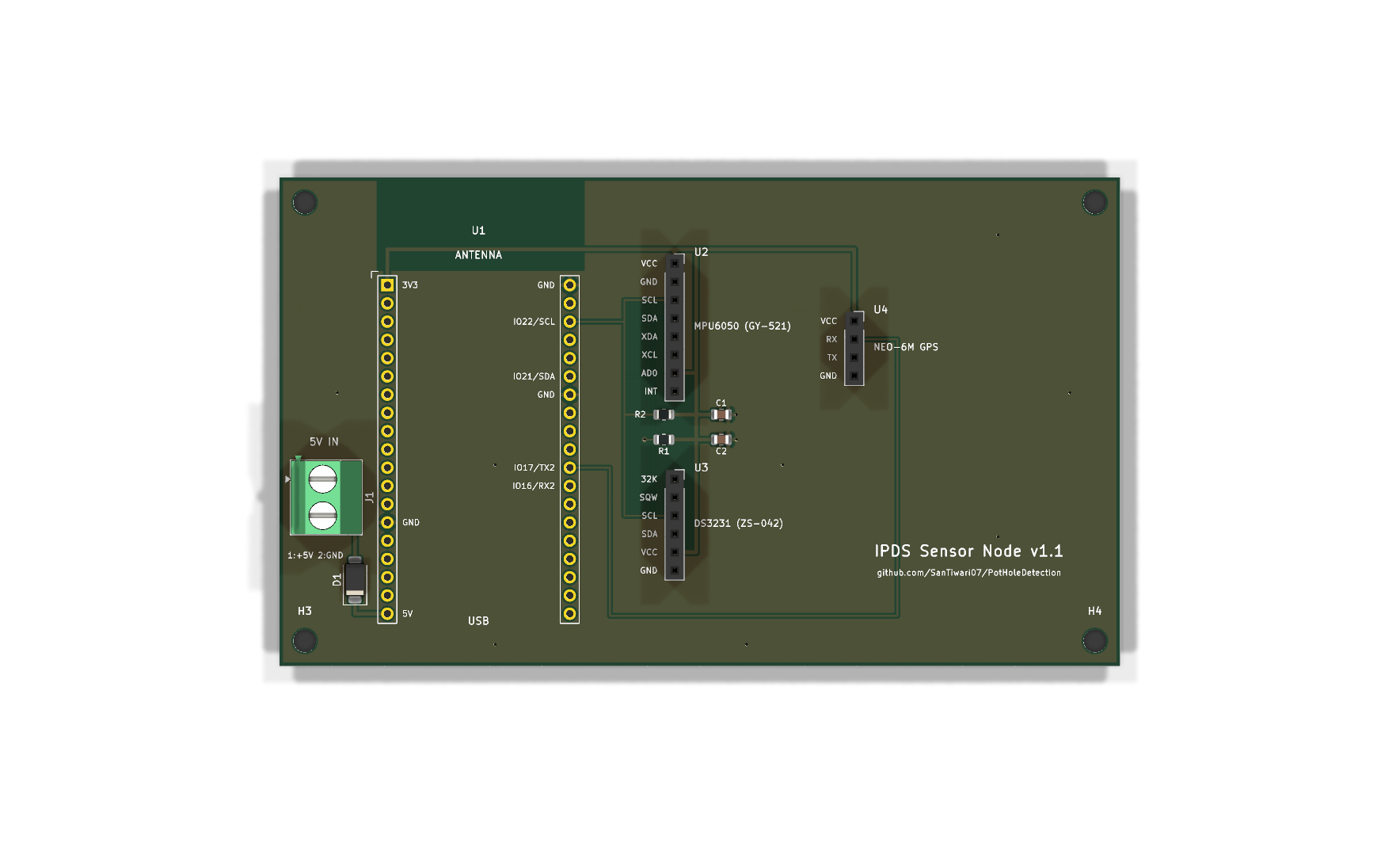
A 2-layer carrier board for the ESP32-DevKitC and the three modules is in KiCad/IPDS_SensorNode/. It passes KiCad's ERC/DRC with 0 violations, and ready-to-order Gerbers, a BOM and a schematic PDF are in its fabrication/ folder. Interactive diagrams: Diagrams/.
WiFi credentials. Both boards and the laptop join the same network (a phone hotspot works):
cp .env.example .env        # then edit WIFI_SSID / WIFI_PASSWORD
python update_wifi.py       # generates credentials.h for both sketches (git-ignored)
Flash the firmware with Arduino IDE 2.x + ESP32 core 3.x (sensor node also needs the RTClib and TinyGPSPlus libraries):
| Sketch | Board |
|---|---|
ESP_32_Code/esp_32_cam_final/ | AI-Thinker ESP32-CAM |
ESP_32_Code/esp_32_final/ | ESP32 Dev Module |
Set the device IPs printed on each Serial Monitor (115200 baud) in .env (ESP32_CAM_IP, ESP32_SENSOR_IP). Open http://<sensor-ip>/ in a browser to check that the MPU6050, RTC and GPS are all detected (the GPS needs a clear sky view for its first fix).
Calibrate the MPU6050 once, mounted in the vehicle: flash ESP_32_Code/mpu6050_calibration, paste the printed offsets into esp_32_final.ino and re-flash it (details).
Run live:
python python/main.py --live
| Flag | Default | Description |
|---|---|---|
--source | first .mp4 in assets/videos/ | Offline mode: video path or webcam index |
--live | off | Stream from the ESP32-CAM and query the sensor node |
--cam-ip, --sensor-ip | from .env | Override device IPs |
--model | assets/models/pothole_yolov8.pt | Weights (auto-downloaded if missing) |
--conf | 0.25 | Detection confidence threshold |
--jerk-threshold | 1.5 | Live mode: minimum peak jerk (m/s³) that confirms an impact |
--output-dir | outputs/ | Where the MP4 and CSV are written |
--no-display | off | Headless mode |
PotHoleDetection/
├── python/
│   ├── main.py                    # Entry point: detection → tracking → fusion → logging
│   └── pothole_detection/
│       ├── detector.py            # YOLOv8 wrapper
│       ├── tracker.py             # SORT wrapper with unique-ID counting
│       ├── sort.py                # SORT (Bewley et al., GPL-3.0)
│       ├── filters.py             # Area / aspect-ratio / persistence filters
│       └── fusion.py              # Jerk, fusion gate, severity score
├── ESP_32_Code/
│   ├── esp_32_cam_final/          # Vision node firmware (MJPEG server)
│   ├── esp_32_final/              # Sensor node firmware (HTTP /query API)
│   └── mpu6050_calibration/       # One-time MPU6050 offset calibration
├── PotHoleSimu/                   # Wokwi simulation of the sensor node
├── demo/                          # Gradio app / Hugging Face Space
├── notebooks/quickstart.ipynb     # Colab quickstart
├── training/                      # Dataset conversion + YOLOv8 training scripts
├── KiCad/                         # Sensor-node schematic and PCB
├── Diagrams/                      # Interactive HTML block diagrams
├── assets/                        # Demo GIF and hardware photos
├── index.html                     # Project website (GitHub Pages)
├── docs/                          # Architecture, hardware, full spec, paper PDF
├── outputs/sample_logs/           # Field-test CSV
├── tests/                         # Unit tests (pytest)
├── update_wifi.py                 # .env → credentials.h generator
└── .env.example                   # Config template (copy to .env)
IPDS is open source and built to be extended. Contributions of every size are welcome, from a typo fix to a whole new hardware port. Field data from roads in your city is especially valuable.
Good places to start
good first issue and help wanted.Dev setup in four commands
git clone https://github.com/SanTiwari07/PotHoleDetection.git
cd PotHoleDetection
pip install -r requirements-dev.txt
pytest tests
Then fork, branch from main, keep each PR focused, and make sure pytest tests passes. Never commit credentials (.env and credentials.h are git-ignored). The full guide is in CONTRIBUTING.md.
If you use IPDS in your research, please cite the paper (Zenodo record) or the software:
@software{tiwari2026ipds,
  author    = {Tiwari, Sanskar and Bansod, Swarali and Kognole, Eshwari and Shinde, Shruti},
  title     = {Real-Time Pothole Detection Based on Vision-Dominant Sensor Fusion
               and Dual ESP32 Architecture},
  year      = {2026},
  version   = {1.0.0},
  license   = {MIT},
  url       = {https://github.com/SanTiwari07/PotHoleDetection}
}
A machine-readable CITATION.cff is included; GitHub's "Cite this repository" button uses it.
| Name | Role |
|---|---|
| Sanskar Tiwari | Core architecture & ML pipeline |
| Swarali Bansod | Sensor integration & firmware |
| Eshwari Kognole | Hardware design & testing |
| Shruti Shinde | Data collection & validation |
Project code is released under the MIT License.
Third-party components keep their own licenses: sort.py is © Alex Bewley under GPL-3.0, and Ultralytics YOLOv8 is AGPL-3.0.

Low-cost pothole detector: YOLOv8 + ESP32 + accelerometer. Logs a pothole only if the camera sees it AND the car feels it, with GPS & severity. Try it in Colab.
See the codeA low-cost dual-ESP32 + YOLOv8 rig that detects potholes in real time, tracks them, confirms each one with an accelerometer, and logs it with a severity score, GPS position and timestamp.
Website · Paper · Colab · Wokwi Simulation · Docs · Contribute
YOLOv8m detections + SORT tracking on a sample road video. Each pothole keeps one ID and is logged once when it crosses the green reference line.
Most pothole projects stop at "draw a box on an image". IPDS goes all the way from camera to a geo-tagged, severity-ranked maintenance log.
DetectYOLOv8m fine-tuned for potholes, reaching [email protected] = 81.7%. |
TrackSORT (Kalman filter + Hungarian matching) gives every pothole a stable ID, so each one is counted once, not once per frame. |
FeelWhen a tracked pothole reaches the wheel line, the hub asks a second ESP32 for an MPU6050 accelerometer burst and computes peak jerk. |
FuseA pothole is logged only if the camera sees it and the accelerometer feels it. Severity (0–1) = 70% detection confidence + 30% measured impact. |
LogEvery event goes to CSV with a DS3231 RTC timestamp and NEO-6M GPS fields, alongside an annotated MP4. |
CheapTwo ESP32 boards and common breakout modules, under ₹2,500 per unit (as reported in the paper). Inference runs on a laptop. |
No hardware? No problem. Pick whichever suits you:
| Option | What you get | Hardware needed |
|---|---|---|
| Run detection + tracking on a sample image or your own video | None |
| The ESP32 sensor node (MPU6050, NEO-6M GPS, DS3231) running in your browser | None |
demo/app.py | Gradio web UI for images and videos (deployable as a Hugging Face Space) | None |
| Local install (below) | The full pipeline: offline on video, or live with ESP32 boards | Optional |
git clone https://github.com/SanTiwari07/PotHoleDetection.git
cd PotHoleDetection
pip install -r requirements.txt

# Vision-only on any road video (weights auto-download on first run)
python python/main.py --source path/to/road_video.mp4
Outputs land in outputs/videos/ (annotated MP4) and outputs/logs/ (CSV). Press q to stop; add --no-display on servers.
flowchart LR
    subgraph CAM["ESP32-CAM · vision node"]
        OV["OV2640 camera"]
    end

    subgraph HUB["Python processing hub"]
        direction TB
        Y["YOLOv8m detector"] --> S["SORT tracker"]
        S --> F["Geometric filters"]
        F -->|"pothole crosses line"| Q["Query sensor node"]
        Q --> G{"Impact felt?"}
        G -->|"yes"| SEV["Severity fusion"]
        G -->|"no"| X["Reject"]
        SEV --> OUT["CSV log + annotated MP4"]
    end

    subgraph SENSE["ESP32 · sensor node"]
        IMU["MPU6050 IMU"]
        GPS["NEO-6M GPS"]
        RTC["DS3231 RTC"]
    end

    OV -->|"WiFi · MJPEG"| Y
    Q -->|"GET /query?pothole_id=N"| SENSE
    SENSE -->|"JSON: accel, time, GPS"| G
Why two ESP32s? Reading I²C sensors on the ESP32-CAM blocks
esp_camera_fb_get()and tanks the frame rate. Moving all sensor I/O to a second, event-driven board keeps the video stream smooth, and both boards stay cheap.
| Step | Where | What happens |
|---|---|---|
| 1 | ESP32-CAM | Streams 320×240 MJPEG frames over WiFi |
| 2 | Hub | YOLOv8m detects → SORT assigns persistent IDs |
| 3 | Hub | Holds back tracks that are too large (> 25% of frame), too wide (aspect ratio > 3) or stationary for more than 10 frames |
| 4 | Hub | When a track's centre crosses the reference line, sends GET /query?pothole_id=N |
| 5 | Sensor node | Returns accelerometer, RTC timestamp and GPS fields as JSON |
| 6 | Hub | Computes peak jerk. No impact means the event is rejected; otherwise it computes severity, appends a CSV row and annotates the video |
jerk_norm = min(peak_jerk / 20 m/s³, 1)
severity  = 0.7 × YOLO confidence + 0.3 × jerk_norm
These are Eqs. 6–7 of the paper, implemented in python/pothole_detection/fusion.py. Events whose peak jerk is below --jerk-threshold (default 1.5 m/s³; calibrate it for your vehicle) are rejected by the fusion gate. In offline mode there is no sensor node, so the gate is skipped, severity is vision-only, and the jerk/GPS columns are left empty.
Deep dives: Architecture · Hardware & wiring · Full technical spec · Paper (PDF) · Project website
| [email protected] | [email protected]:0.95 | Precision | Recall |
|---|---|---|---|
| 81.68% | 55.95% | 82.33% | 74.42% |
YOLOv8m, 640×640 input, single class (pothole), trained on the Pothole Detection dataset by andrewmvd on Kaggle (665 images with bounding boxes; Pascal VOC XML converted to YOLO format; 598 training / 67 validation images). Weights: Releases → v1.0.
from ultralytics import YOLO
model = YOLO("assets/models/pothole_yolov8.pt")
model.predict("road.jpg", conf=0.25)[0].show()
| Measure | Result |
|---|---|
| Inference speed | 10–15 FPS on a CPU-only laptop (320×240 input) |
| Latency, frame capture → CSV row | ~170–200 ms |
| Hardware cost | under ₹2,500 per unit |
The paper also reports false-positive trials (shadows, manhole covers, speed bumps and others); see docs/DETAIL.md.
outputs/sample_logs/output.csv has 50 logged potholes from a drive between 1:56 and 2:08 pm. This file records severity as text bands by peak jerk, while the current main.py writes the numeric 0–1 score instead:
| Band | Peak jerk in the file | Rows | Share |
|---|---|---|---|
| Low | 1.6 – 2.7 | 8 | 16% |
| Medium | 3.0 – 5.9 | 22 | 44% |
| High | 6.0 – 9.4 | 20 | 40% |
| Column | Description |
|---|---|
date, time | Detection timestamp (DS3231 RTC; falls back to host clock) |
frame_id | Video frame number when the event was triggered |
pothole_id | Unique SORT track ID |
confidence | YOLOv8 detection confidence (0–1) |
bounding_box_area | Box area in px² |
aspect_ratio | Box width / height |
peak_jerk | Peak jerk from the MPU6050 burst (m/s³; empty in offline mode) |
severity | Severity score 0–1 (the sample file uses Low / Medium / High bands instead) |
latitude, longitude | WGS-84 position from the NEO-6M (0 without a GPS fix; empty in offline mode) |
# 1. Download and unzip https://www.kaggle.com/datasets/andrewmvd/pothole-detection
python training/prepare_dataset.py --src path/to/pothole-detection   # VOC XML -> YOLO, 598 train / 67 val
python training/train.py                                              # YOLOv8m, 640px, 100 epochs, AdamW
The best checkpoint is copied to assets/models/pothole_yolov8.pt and validation metrics are printed at the end. The split sizes match the paper, but the paper doesn't publish which images were in each split, so your metrics may differ slightly.
Two hand-wired perfboard decks: the ESP32-CAM vision node on top, and the ESP32 sensor node with the MPU6050, DS3231 and NEO-6M below. The custom PCB replaces the lower deck.
Assembled rig: camera deck above, sensor deck below | Vision node: ESP32-CAM with the OV2640 camera | Hand-wired underside: point-to-point wiring of the sensor deck |
| Component | Role |
|---|---|
| ESP32-CAM (AI-Thinker, OV2640) | Vision node: continuous MJPEG stream |
| ESP32 dev board | Sensor node: answers HTTP queries on demand |
| MPU6050 | 6-axis IMU: peak jerk while crossing the pothole |
| NEO-6M GPS | Latitude / longitude |
| DS3231 RTC | Accurate timestamps without internet |
| Laptop or edge device | Runs YOLOv8 inference (e.g. Jetson Nano) |
| Module pin | ESP32 pin |
|---|---|
| MPU6050 SDA / DS3231 SDA | GPIO21 (+ 4.7 kΩ pull-up to 3V3) |
| MPU6050 SCL / DS3231 SCL | GPIO22 (+ 4.7 kΩ pull-up to 3V3) |
| MPU6050 AD0 | 3V3 (sets address 0x69; the DS3231 already uses 0x68) |
| NEO-6M TX → | GPIO16 (RX2) |
| NEO-6M RX ← | GPIO17 (TX2) |
| All VCC / GND | 3V3 / GND |
A 2-layer carrier board for the ESP32-DevKitC and the three modules is in KiCad/IPDS_SensorNode/. It passes KiCad's ERC/DRC with 0 violations, and ready-to-order Gerbers, a BOM and a schematic PDF are in its fabrication/ folder. Interactive diagrams: Diagrams/.
WiFi credentials. Both boards and the laptop join the same network (a phone hotspot works):
cp .env.example .env        # then edit WIFI_SSID / WIFI_PASSWORD
python update_wifi.py       # generates credentials.h for both sketches (git-ignored)
Flash the firmware with Arduino IDE 2.x + ESP32 core 3.x (sensor node also needs the RTClib and TinyGPSPlus libraries):
| Sketch | Board |
|---|---|
ESP_32_Code/esp_32_cam_final/ | AI-Thinker ESP32-CAM |
ESP_32_Code/esp_32_final/ | ESP32 Dev Module |
Set the device IPs printed on each Serial Monitor (115200 baud) in .env (ESP32_CAM_IP, ESP32_SENSOR_IP). Open http://<sensor-ip>/ in a browser to check that the MPU6050, RTC and GPS are all detected (the GPS needs a clear sky view for its first fix).
Calibrate the MPU6050 once, mounted in the vehicle: flash ESP_32_Code/mpu6050_calibration, paste the printed offsets into esp_32_final.ino and re-flash it (details).
Run live:
python python/main.py --live
| Flag | Default | Description |
|---|---|---|
--source | first .mp4 in assets/videos/ | Offline mode: video path or webcam index |
--live | off | Stream from the ESP32-CAM and query the sensor node |
--cam-ip, --sensor-ip | from .env | Override device IPs |
--model | assets/models/pothole_yolov8.pt | Weights (auto-downloaded if missing) |
--conf | 0.25 | Detection confidence threshold |
--jerk-threshold | 1.5 | Live mode: minimum peak jerk (m/s³) that confirms an impact |
--output-dir | outputs/ | Where the MP4 and CSV are written |
--no-display | off | Headless mode |
PotHoleDetection/
├── python/
│   ├── main.py                    # Entry point: detection → tracking → fusion → logging
│   └── pothole_detection/
│       ├── detector.py            # YOLOv8 wrapper
│       ├── tracker.py             # SORT wrapper with unique-ID counting
│       ├── sort.py                # SORT (Bewley et al., GPL-3.0)
│       ├── filters.py             # Area / aspect-ratio / persistence filters
│       └── fusion.py              # Jerk, fusion gate, severity score
├── ESP_32_Code/
│   ├── esp_32_cam_final/          # Vision node firmware (MJPEG server)
│   ├── esp_32_final/              # Sensor node firmware (HTTP /query API)
│   └── mpu6050_calibration/       # One-time MPU6050 offset calibration
├── PotHoleSimu/                   # Wokwi simulation of the sensor node
├── demo/                          # Gradio app / Hugging Face Space
├── notebooks/quickstart.ipynb     # Colab quickstart
├── training/                      # Dataset conversion + YOLOv8 training scripts
├── KiCad/                         # Sensor-node schematic and PCB
├── Diagrams/                      # Interactive HTML block diagrams
├── assets/                        # Demo GIF and hardware photos
├── index.html                     # Project website (GitHub Pages)
├── docs/                          # Architecture, hardware, full spec, paper PDF
├── outputs/sample_logs/           # Field-test CSV
├── tests/                         # Unit tests (pytest)
├── update_wifi.py                 # .env → credentials.h generator
└── .env.example                   # Config template (copy to .env)
IPDS is open source and built to be extended. Contributions of every size are welcome, from a typo fix to a whole new hardware port. Field data from roads in your city is especially valuable.
Good places to start
good first issue and help wanted.Dev setup in four commands
git clone https://github.com/SanTiwari07/PotHoleDetection.git
cd PotHoleDetection
pip install -r requirements-dev.txt
pytest tests
Then fork, branch from main, keep each PR focused, and make sure pytest tests passes. Never commit credentials (.env and credentials.h are git-ignored). The full guide is in CONTRIBUTING.md.
If you use IPDS in your research, please cite the paper (Zenodo record) or the software:
@software{tiwari2026ipds,
  author    = {Tiwari, Sanskar and Bansod, Swarali and Kognole, Eshwari and Shinde, Shruti},
  title     = {Real-Time Pothole Detection Based on Vision-Dominant Sensor Fusion
               and Dual ESP32 Architecture},
  year      = {2026},
  version   = {1.0.0},
  license   = {MIT},
  url       = {https://github.com/SanTiwari07/PotHoleDetection}
}
A machine-readable CITATION.cff is included; GitHub's "Cite this repository" button uses it.
| Name | Role |
|---|---|
| Sanskar Tiwari | Core architecture & ML pipeline |
| Swarali Bansod | Sensor integration & firmware |
| Eshwari Kognole | Hardware design & testing |
| Shruti Shinde | Data collection & validation |
Project code is released under the MIT License.
Third-party components keep their own licenses: sort.py is © Alex Bewley under GPL-3.0, and Ultralytics YOLOv8 is AGPL-3.0.






