
DeskForge: Dense Supervision from Desktop Environments for Computer-Use Agents
See the codeREADME
DeskForge
Dense Supervision from Desktop Environments for Computer-Use Agents
A. Said Gurbuz1,2 · Ahmed Nassar2 · Sunghwan Hong1 · Marc Pollefeys1,3 · Peter W. J. Staar2
1ETH Zurich · 2IBM Research Zurich · 3Microsoft
Project page · Paper · DeskForge-1M · Model
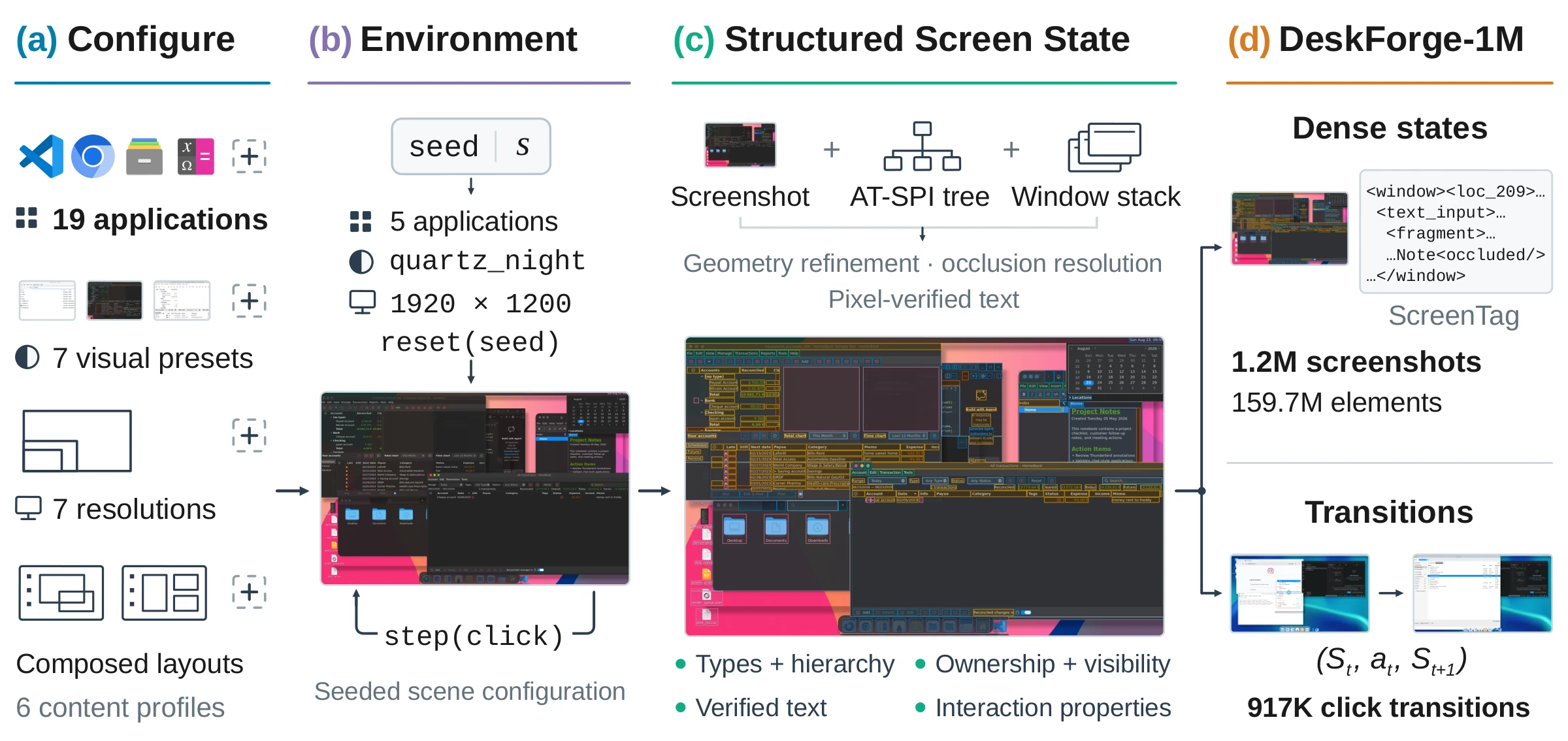
DeskForge generates desktops instead of recording them. It composes real Linux applications into controlled multi-window scenes, varies their state, content, layout, appearance and resolution, and fuses screenshots, accessibility trees and window geometry into dense annotations of every visible element. Each executed click is recorded with the screen before and after it.
This repository contains the environment and the full generation pipeline used to build DeskForge-1M: 1.21M annotated desktop observations, 159.7M element instances and 917K recorded click transitions.
| Controllable scenes Applications, initial states, staged content, window layout and stacking, appearance presets and display resolution are all set by a seeded scene specification. | Dense, occlusion-aware labels Every visible element with type, text, geometry, hierarchy and window ownership; partly covered controls keep only their exposed region. | Recorded interactions Clicks inside visible regions, each stored as a (St, at, St+1) transition with what changed. |
Demo
https://github.com/user-attachments/assets/2f4c5406-7ca3-48d3-8215-5df6f703c540
The same planner drives InternVL3.5-8B before (left) and after (right) fine-tuning on DeskForge-1M, on a WebArena-Infinity GitLab task. The full demo is on the project page.
Contents
- Installation
- Quick start
- What a capture contains
- Configuring scenes
- Generating at scale
- Quality checks and inspection
- Repository layout
- Citation
Installation
Requirements. An x86_64 Linux machine with dnf (developed and run on
RHEL 9) and the system Python 3 (≥ 3.9) with PyGObject, which capture needs to
talk to the accessibility bus. No root access, desktop session or physical
display is needed: every scene runs in its own headless Xvfb session.
git clone https://github.com/Saidgurbuz/deskforge.git
cd deskforge

# Python dependencies for the system interpreter (PyGObject is python3-gobject).
python3 -m pip install --user pyyaml pillow numpy tqdm

# Download and extract Xvfb, D-Bus, xdotool, Xfce and the desktop applications
# into ./tools (userland only, nothing is installed system-wide), then the
# theme, icon and dock packs used by the appearance presets.
bash scripts/setup_tools.sh
export PYTHONPATH=$PWD/src
alias deskforge="python3 -m deskshot.cli"
deskforge install-styles

# Check that a headless session starts and the accessibility bus answers,
# then that every application launches on this machine.
deskforge validate
deskforge preflight
The package's working name is deskshot. With pip ≥ 21.3, pip install -e .
installs the same CLI as deskforge (and dsd).
Quick start
1. Compose a scene without running it. A seed fully determines the scene: applications, their states and content, layout, appearance and resolution.
deskforge scene --seed 820000 --describe-only
2. Capture it. One headless desktop is started, the applications are launched and arranged, and the screen is annotated.
deskforge scene --seed 820000 --include-chrome --output runs/first_scene
3. Record an interaction episode. After the first observation, DeskForge clicks sampled actionable elements inside their visible regions and captures the screen after every step.
deskforge scene-episode --seed 820001 --steps 5 --output runs/first_episode
4. Look at the result. Render boxes over a capture, or browse a whole run in the local inspector (boxes, per-sample statistics and audit flags).
python3 scripts/render_annotations.py runs/first_scene --out runs/first_scene_viz
python3 scripts/inspect_annotations.py        # http://localhost:8000
What a capture contains
Every observation is written as a set of files sharing one stem:
| File | Content |
|---|---|
<stem>.png | the screenshot |
<stem>.elements.leaf.json | the visible, redundancy-reduced element view used for parsing and training |
<stem>.elements.json | all retained elements, including structural nodes |
<stem>.elements.amodal.json | full element extents, as if nothing covered them |
<stem>.elements.unfiltered.json | the full reconciled tree, before occlusion clipping and deduplication |
<stem>.screentag.txt | the screen serialized as ScreenTag markup (0–500 location grid) |
<stem>.meta.json | scene specification, applications, window stack, theme and resolution |
<stem>.verdict.json | automated quality verdicts for this capture |
episode.json | for episodes: the executed actions, their targets and what changed |
Element records carry the element's type, text, geometry (full extent and the visible fragments left by overlapping windows), interaction properties, parent–child structure, reading order, and owning application and window.
Configuring scenes
| What | Where |
|---|---|
| Applications | configs/apps/*.yaml — one manifest per application: launch command, staged documents, scripted interactions. DeskForge-1M uses 19 of them. |
| Staged content | assets/audit/ — the documents, projects, archives and data the applications open |
| Appearance presets | src/deskshot/environment/themes.py — linux_classic, ubuntu_like, windows_redmond, macos_tahoe_like, macos_tahoe_glass, quartz_night, quartz_night_nord (deskforge themes lists them) |
| Resolutions and scene sampling | src/deskshot/generation/scene_composer.py — sampling weights for applications, window counts, layouts, presets and the seven resolutions (1366×768 to 3840×2160) |
| Pipeline defaults | configs/pipeline.yaml |
An application is added with a manifest, provided its accessibility tree exposes the main interface content. All presets run on the same Linux backend: they reproduce the visual conventions of other desktops (widgets, icons, window decorations, panels and docks) rather than executing native Windows or macOS applications.
Generating at scale
scene-batch runs many scenes with persistent workers, each owning its own X
display; the pixel audit runs on every capture.
# Freeze a plan of scenes, then run it (sharded and resumable).
deskforge scene-plan  --start-seed 900000 --count 1000 --output runs/plan.jsonl
deskforge scene-batch --plan runs/plan.jsonl --output runs/batch \
    --parallel-workers 4 --scene-timeout 1200 --include-chrome
Use scripts/lease_display.py to reserve free display numbers when several runs
share a machine, and scripts/cleanup_stale_sessions.py --apply to reclaim
sessions left by interrupted runs. scripts/submit_generation.sh,
scripts/supervise_generation.py and scripts/watch_generation.py submit,
supervise and monitor sharded generation on an LSF cluster, the setup used for
DeskForge-1M. scripts/build_release_manifests.py, scripts/build_eval_splits.py
and scripts/pack_hf_release.py turn a finished corpus into the released
WebDataset shards, Parquet indexes and scene-level evaluation splits
(release_assets/ holds the dataset card and loading examples).
Quality checks and inspection
python3 scripts/qa.py audit   --root runs/batch    # quality.json
python3 scripts/qa.py compare --before <run> --after runs/batch
python3 scripts/qa.py gate    --root runs/batch    # pass/fail against the baseline
Three pixel-level audits target both failure directions: text drawn over
nothing (audit_annotation_pixels.py), visible ink without an element
(audit_element_coverage.py) and boxes with nothing behind them
(audit_blank_widgets.py). scripts/show_flagged.py shows what a metric
flagged before acting on it, and scripts/check_scene_determinism.py confirms
that a seed reproduces its scene.
The unit tests need no display; the few that start a desktop or a browser are
skipped until scripts/setup_tools.sh has run.
python3 -m pip install --user pytest pymupdf pyarrow
python3 -m pytest tests -q
Repository layout
src/deskshot/
  generation/      scene composition, layouts, sampling, episode and task logic
  environment/     Xvfb/D-Bus/Xfce sessions, themes, panels, docks, wallpapers, fixtures
  automation/      application launching and input (xdotool)
  extraction/      AT-SPI walking, occlusion and visibility, text checks, ScreenTag
  pipeline/        batch orchestration and persistent workers
  postprocessing/  filtering and quality scoring
  release/         release schema, keys, splits and transitions
  inspector/       local web inspector and annotation audit
configs/           application manifests and pipeline defaults
assets/            staged documents, wallpapers and the browser site list
scripts/           setup, generation, audits, release packing, website tools
tests/             unit tests
docs/              project page (GitHub Pages)
Citation
@misc{gurbuz2026deskforge,
      title={DeskForge: Dense Supervision from Desktop Environments for Computer-Use Agents},
      author={A. Said Gurbuz and Ahmed Nassar and Sunghwan Hong and Marc Pollefeys and Peter W. J. Staar},
      year={2026},
      eprint={2610.02320},
      archivePrefix={arXiv},
      primaryClass={cs.CV},
      url={https://arxiv.org/abs/2610.02320},
}
Acknowledgements
The annotation vocabulary and the ScreenTag serialization build on ScreenParse. DeskForge is developed at ETH Zurich and at IBM Research Zurich by members of the Docling team.
Similar repos






DeskForge: Dense Supervision from Desktop Environments for Computer-Use Agents
See the codeREADME
DeskForge
Dense Supervision from Desktop Environments for Computer-Use Agents
A. Said Gurbuz1,2 · Ahmed Nassar2 · Sunghwan Hong1 · Marc Pollefeys1,3 · Peter W. J. Staar2
1ETH Zurich · 2IBM Research Zurich · 3Microsoft
Project page · Paper · DeskForge-1M · Model
DeskForge generates desktops instead of recording them. It composes real Linux applications into controlled multi-window scenes, varies their state, content, layout, appearance and resolution, and fuses screenshots, accessibility trees and window geometry into dense annotations of every visible element. Each executed click is recorded with the screen before and after it.
This repository contains the environment and the full generation pipeline used to build DeskForge-1M: 1.21M annotated desktop observations, 159.7M element instances and 917K recorded click transitions.
| Controllable scenes Applications, initial states, staged content, window layout and stacking, appearance presets and display resolution are all set by a seeded scene specification. | Dense, occlusion-aware labels Every visible element with type, text, geometry, hierarchy and window ownership; partly covered controls keep only their exposed region. | Recorded interactions Clicks inside visible regions, each stored as a (St, at, St+1) transition with what changed. |
Demo
https://github.com/user-attachments/assets/2f4c5406-7ca3-48d3-8215-5df6f703c540
The same planner drives InternVL3.5-8B before (left) and after (right) fine-tuning on DeskForge-1M, on a WebArena-Infinity GitLab task. The full demo is on the project page.
Contents
- Installation
- Quick start
- What a capture contains
- Configuring scenes
- Generating at scale
- Quality checks and inspection
- Repository layout
- Citation
Installation
Requirements. An x86_64 Linux machine with dnf (developed and run on
RHEL 9) and the system Python 3 (≥ 3.9) with PyGObject, which capture needs to
talk to the accessibility bus. No root access, desktop session or physical
display is needed: every scene runs in its own headless Xvfb session.
git clone https://github.com/Saidgurbuz/deskforge.git
cd deskforge

# Python dependencies for the system interpreter (PyGObject is python3-gobject).
python3 -m pip install --user pyyaml pillow numpy tqdm

# Download and extract Xvfb, D-Bus, xdotool, Xfce and the desktop applications
# into ./tools (userland only, nothing is installed system-wide), then the
# theme, icon and dock packs used by the appearance presets.
bash scripts/setup_tools.sh
export PYTHONPATH=$PWD/src
alias deskforge="python3 -m deskshot.cli"
deskforge install-styles

# Check that a headless session starts and the accessibility bus answers,
# then that every application launches on this machine.
deskforge validate
deskforge preflight
The package's working name is deskshot. With pip ≥ 21.3, pip install -e .
installs the same CLI as deskforge (and dsd).
Quick start
1. Compose a scene without running it. A seed fully determines the scene: applications, their states and content, layout, appearance and resolution.
deskforge scene --seed 820000 --describe-only
2. Capture it. One headless desktop is started, the applications are launched and arranged, and the screen is annotated.
deskforge scene --seed 820000 --include-chrome --output runs/first_scene
3. Record an interaction episode. After the first observation, DeskForge clicks sampled actionable elements inside their visible regions and captures the screen after every step.
deskforge scene-episode --seed 820001 --steps 5 --output runs/first_episode
4. Look at the result. Render boxes over a capture, or browse a whole run in the local inspector (boxes, per-sample statistics and audit flags).
python3 scripts/render_annotations.py runs/first_scene --out runs/first_scene_viz
python3 scripts/inspect_annotations.py        # http://localhost:8000
What a capture contains
Every observation is written as a set of files sharing one stem:
| File | Content |
|---|---|
<stem>.png | the screenshot |
<stem>.elements.leaf.json | the visible, redundancy-reduced element view used for parsing and training |
<stem>.elements.json | all retained elements, including structural nodes |
<stem>.elements.amodal.json | full element extents, as if nothing covered them |
<stem>.elements.unfiltered.json | the full reconciled tree, before occlusion clipping and deduplication |
<stem>.screentag.txt | the screen serialized as ScreenTag markup (0–500 location grid) |
<stem>.meta.json | scene specification, applications, window stack, theme and resolution |
<stem>.verdict.json | automated quality verdicts for this capture |
episode.json | for episodes: the executed actions, their targets and what changed |
Element records carry the element's type, text, geometry (full extent and the visible fragments left by overlapping windows), interaction properties, parent–child structure, reading order, and owning application and window.
Configuring scenes
| What | Where |
|---|---|
| Applications | configs/apps/*.yaml — one manifest per application: launch command, staged documents, scripted interactions. DeskForge-1M uses 19 of them. |
| Staged content | assets/audit/ — the documents, projects, archives and data the applications open |
| Appearance presets | src/deskshot/environment/themes.py — linux_classic, ubuntu_like, windows_redmond, macos_tahoe_like, macos_tahoe_glass, quartz_night, quartz_night_nord (deskforge themes lists them) |
| Resolutions and scene sampling | src/deskshot/generation/scene_composer.py — sampling weights for applications, window counts, layouts, presets and the seven resolutions (1366×768 to 3840×2160) |
| Pipeline defaults | configs/pipeline.yaml |
An application is added with a manifest, provided its accessibility tree exposes the main interface content. All presets run on the same Linux backend: they reproduce the visual conventions of other desktops (widgets, icons, window decorations, panels and docks) rather than executing native Windows or macOS applications.
Generating at scale
scene-batch runs many scenes with persistent workers, each owning its own X
display; the pixel audit runs on every capture.
# Freeze a plan of scenes, then run it (sharded and resumable).
deskforge scene-plan  --start-seed 900000 --count 1000 --output runs/plan.jsonl
deskforge scene-batch --plan runs/plan.jsonl --output runs/batch \
    --parallel-workers 4 --scene-timeout 1200 --include-chrome
Use scripts/lease_display.py to reserve free display numbers when several runs
share a machine, and scripts/cleanup_stale_sessions.py --apply to reclaim
sessions left by interrupted runs. scripts/submit_generation.sh,
scripts/supervise_generation.py and scripts/watch_generation.py submit,
supervise and monitor sharded generation on an LSF cluster, the setup used for
DeskForge-1M. scripts/build_release_manifests.py, scripts/build_eval_splits.py
and scripts/pack_hf_release.py turn a finished corpus into the released
WebDataset shards, Parquet indexes and scene-level evaluation splits
(release_assets/ holds the dataset card and loading examples).
Quality checks and inspection
python3 scripts/qa.py audit   --root runs/batch    # quality.json
python3 scripts/qa.py compare --before <run> --after runs/batch
python3 scripts/qa.py gate    --root runs/batch    # pass/fail against the baseline
Three pixel-level audits target both failure directions: text drawn over
nothing (audit_annotation_pixels.py), visible ink without an element
(audit_element_coverage.py) and boxes with nothing behind them
(audit_blank_widgets.py). scripts/show_flagged.py shows what a metric
flagged before acting on it, and scripts/check_scene_determinism.py confirms
that a seed reproduces its scene.
The unit tests need no display; the few that start a desktop or a browser are
skipped until scripts/setup_tools.sh has run.
python3 -m pip install --user pytest pymupdf pyarrow
python3 -m pytest tests -q
Repository layout
src/deskshot/
  generation/      scene composition, layouts, sampling, episode and task logic
  environment/     Xvfb/D-Bus/Xfce sessions, themes, panels, docks, wallpapers, fixtures
  automation/      application launching and input (xdotool)
  extraction/      AT-SPI walking, occlusion and visibility, text checks, ScreenTag
  pipeline/        batch orchestration and persistent workers
  postprocessing/  filtering and quality scoring
  release/         release schema, keys, splits and transitions
  inspector/       local web inspector and annotation audit
configs/           application manifests and pipeline defaults
assets/            staged documents, wallpapers and the browser site list
scripts/           setup, generation, audits, release packing, website tools
tests/             unit tests
docs/              project page (GitHub Pages)
Citation
@misc{gurbuz2026deskforge,
      title={DeskForge: Dense Supervision from Desktop Environments for Computer-Use Agents},
      author={A. Said Gurbuz and Ahmed Nassar and Sunghwan Hong and Marc Pollefeys and Peter W. J. Staar},
      year={2026},
      eprint={2610.02320},
      archivePrefix={arXiv},
      primaryClass={cs.CV},
      url={https://arxiv.org/abs/2610.02320},
}
Acknowledgements
The annotation vocabulary and the ScreenTag serialization build on ScreenParse. DeskForge is developed at ETH Zurich and at IBM Research Zurich by members of the Docling team.