
Updater is an open-source shipping log for work done with coding agents. When an agent finishes and verifies a feature, it calls an MCP tool that saves the what, why, how, expected impact, tradeoffs, files, and repo link.
See the codeSee what people are saying
README

Updater — your shipping memory



Updater is an open-source shipping log for work done with coding agents. When an agent finishes and verifies a feature, it calls an MCP tool that saves the what, why, how, expected impact, tradeoffs, files, and repo link. The React workspace lets you search history, record what actually happened over time, and ask questions inside each update.
Screenshots and the demo recording below are the real app running locally with demo content.
Live deployment
Deployed API: https://updaterapi.rveybox.dev
- Health: https://updaterapi.rveybox.dev/api/health
- API docs: https://updaterapi.rveybox.dev/docs
- MCP endpoint: https://updaterapi.rveybox.dev/mcp
- Connect script: https://updaterapi.rveybox.dev/connect.sh
Connect an agent to the deployed version:
curl -fsSL https://updaterapi.rveybox.dev/connect.sh | bash
It prompts for your API key (upk_… from the web UI Settings → API keys), then lets you pick agents (one or many). No --url / --agents flags needed — the script already defaults to this server.
Screenshots
Demo — watch an agent ship a feature
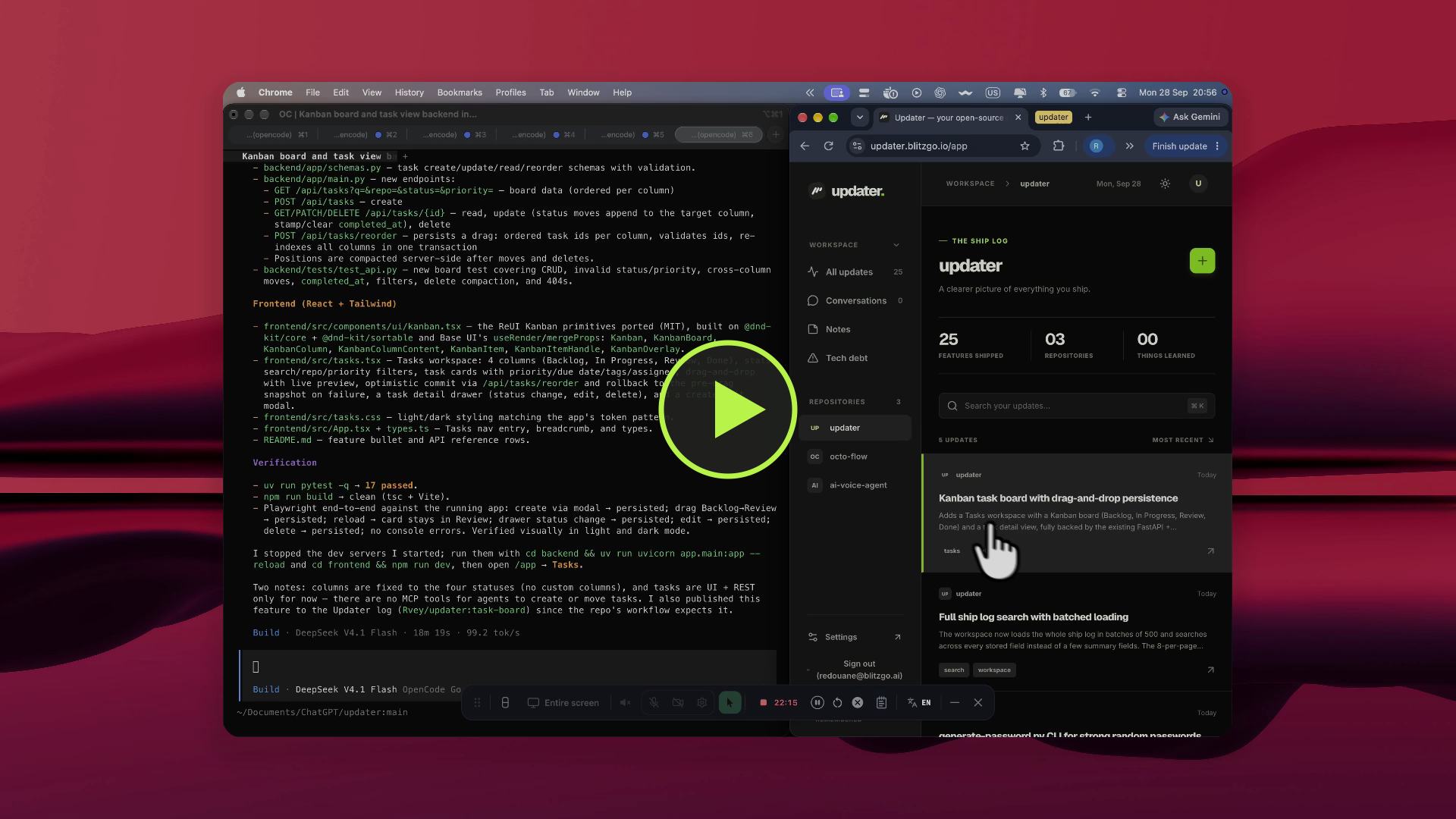
A raw 29-second screen recording: the agent implements and verifies the Kanban board feature in the terminal, publishes it over MCP, and the update lands at the top of Updater's ship log — 25 features shipped, including this one. The same recording plays inline on the landing page Demo section.
The real thing — workspace, ship log, and update detail
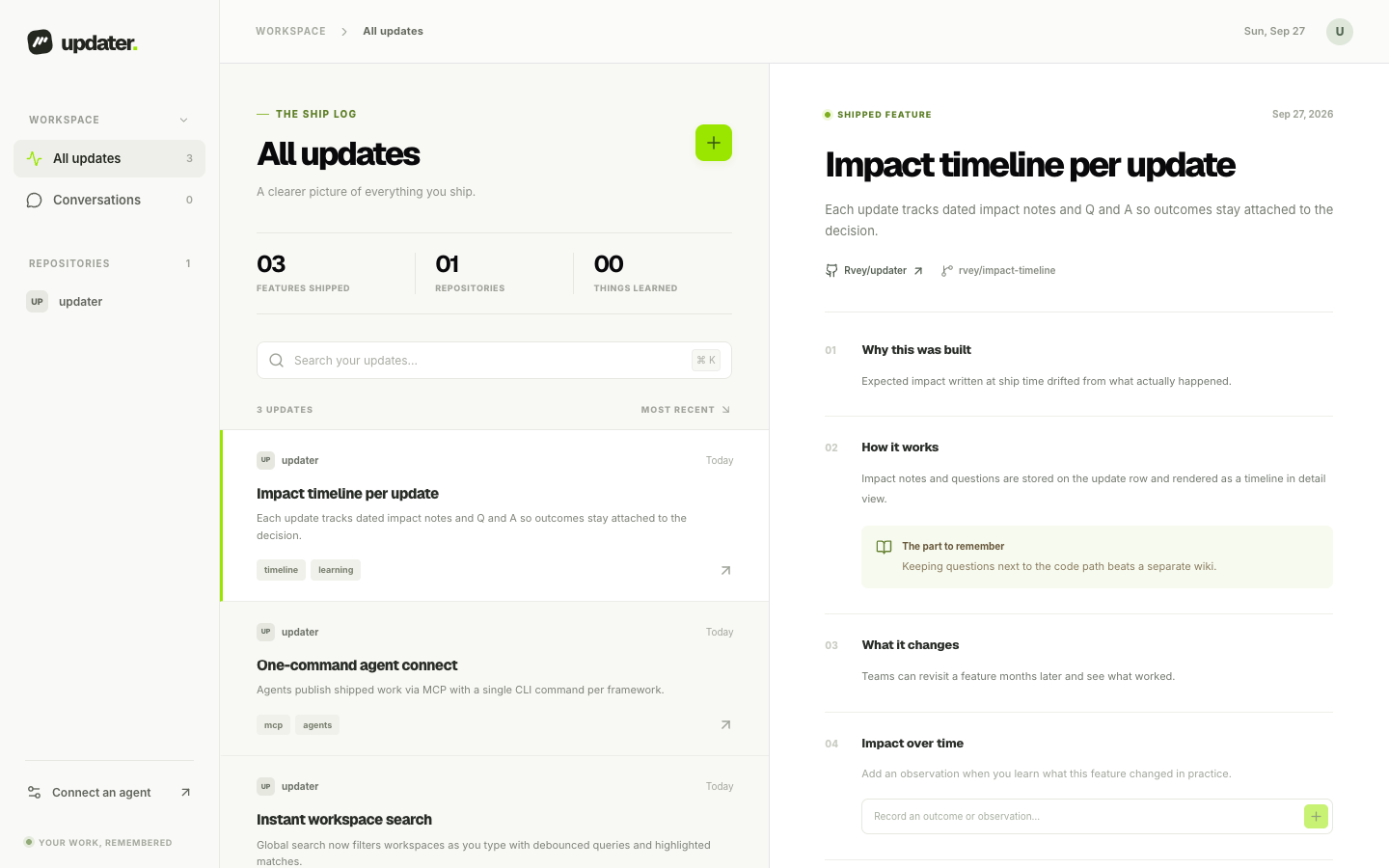
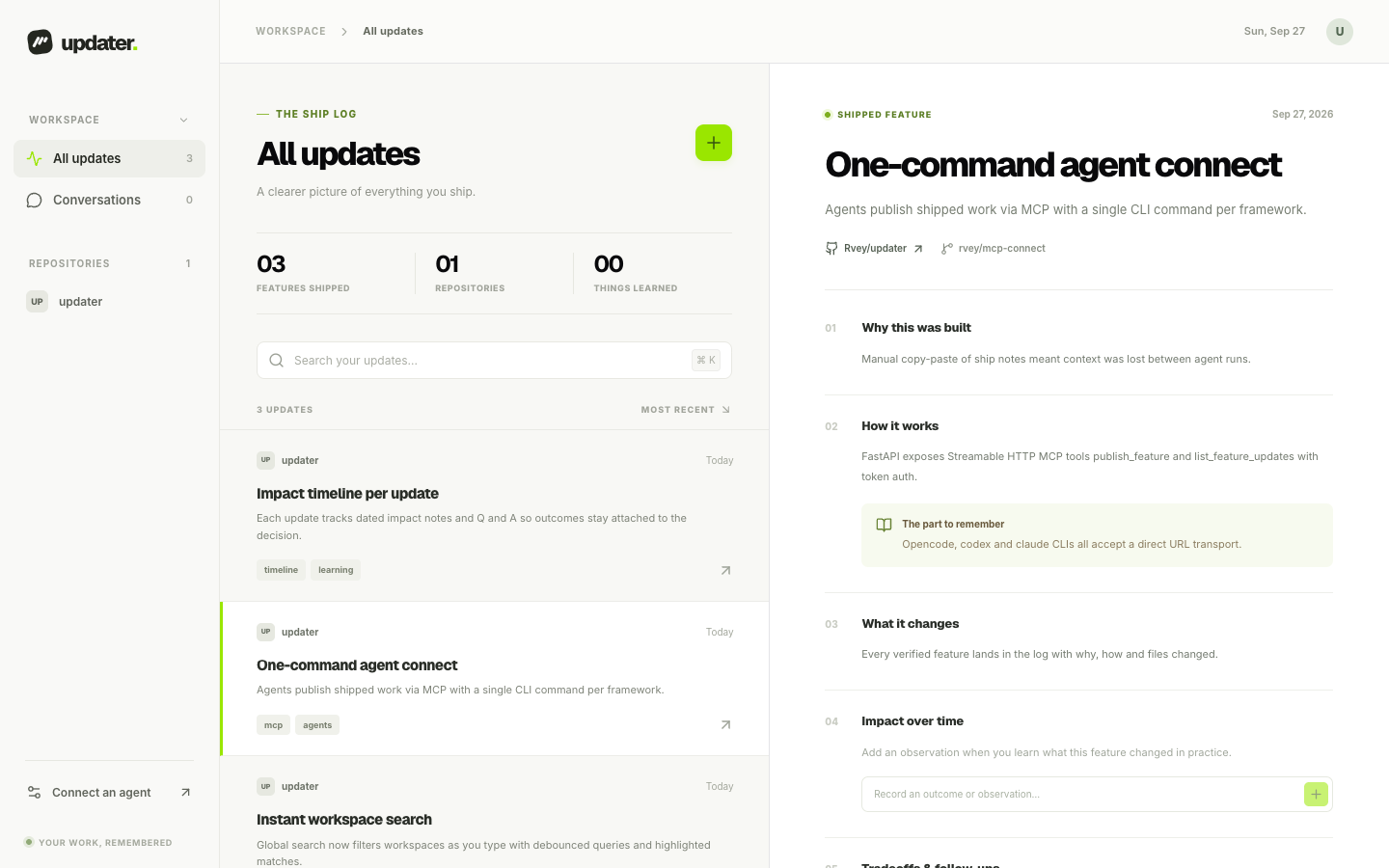
The left column is the searchable ship log. The right pane is the selected update: why it was built, how it works, expected impact, files, tags, branch, and commit.
Work in action — update detail
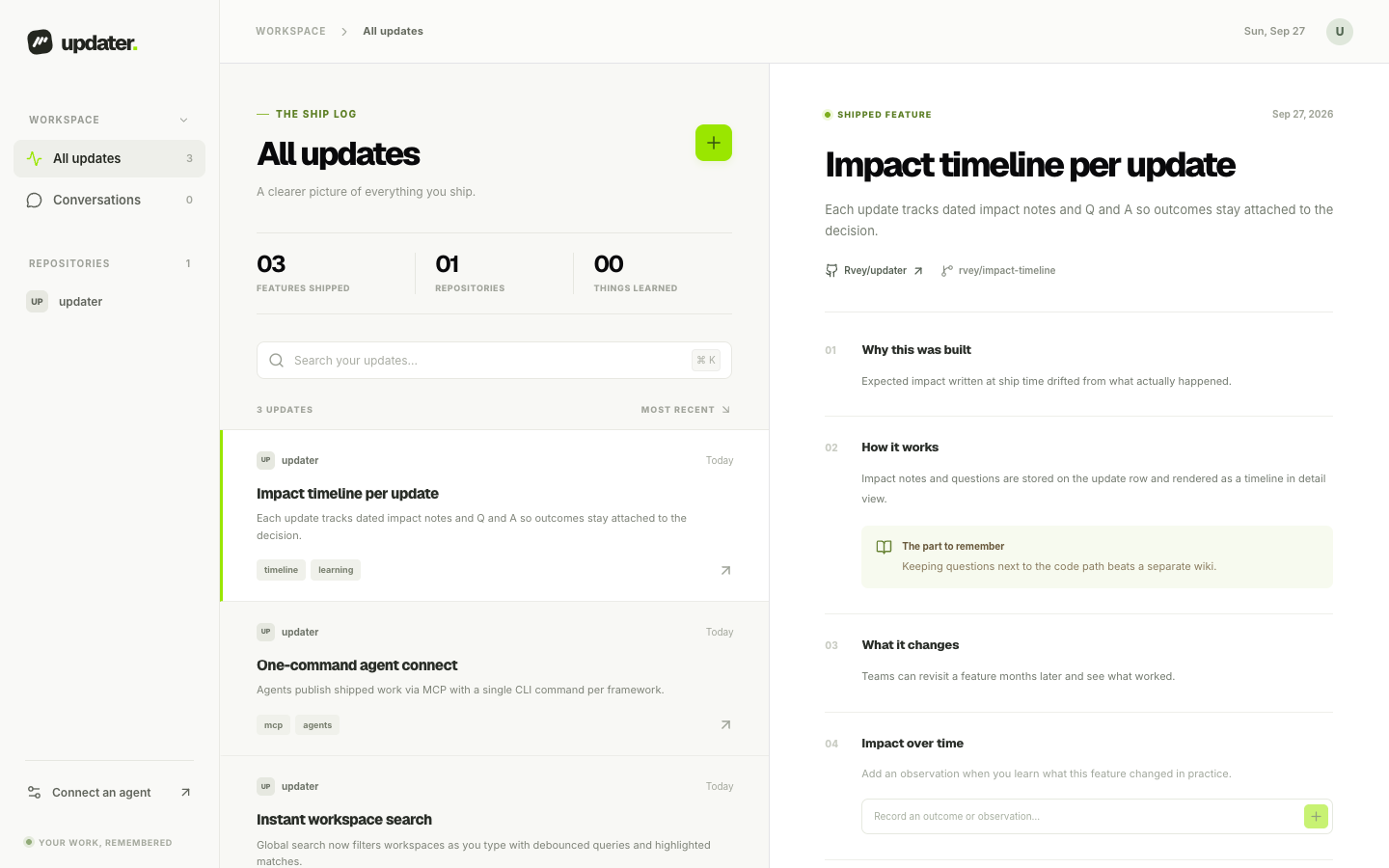
Each update keeps its context together: reason, implementation notes, learning notes, files changed, dated impact observations, and a question thread.
Work in action — instant search
Search filters as you type across titles, summaries, code paths, tags, and repos. Try mcp, search, or a repo name.
Work in action — connect an agent in one command
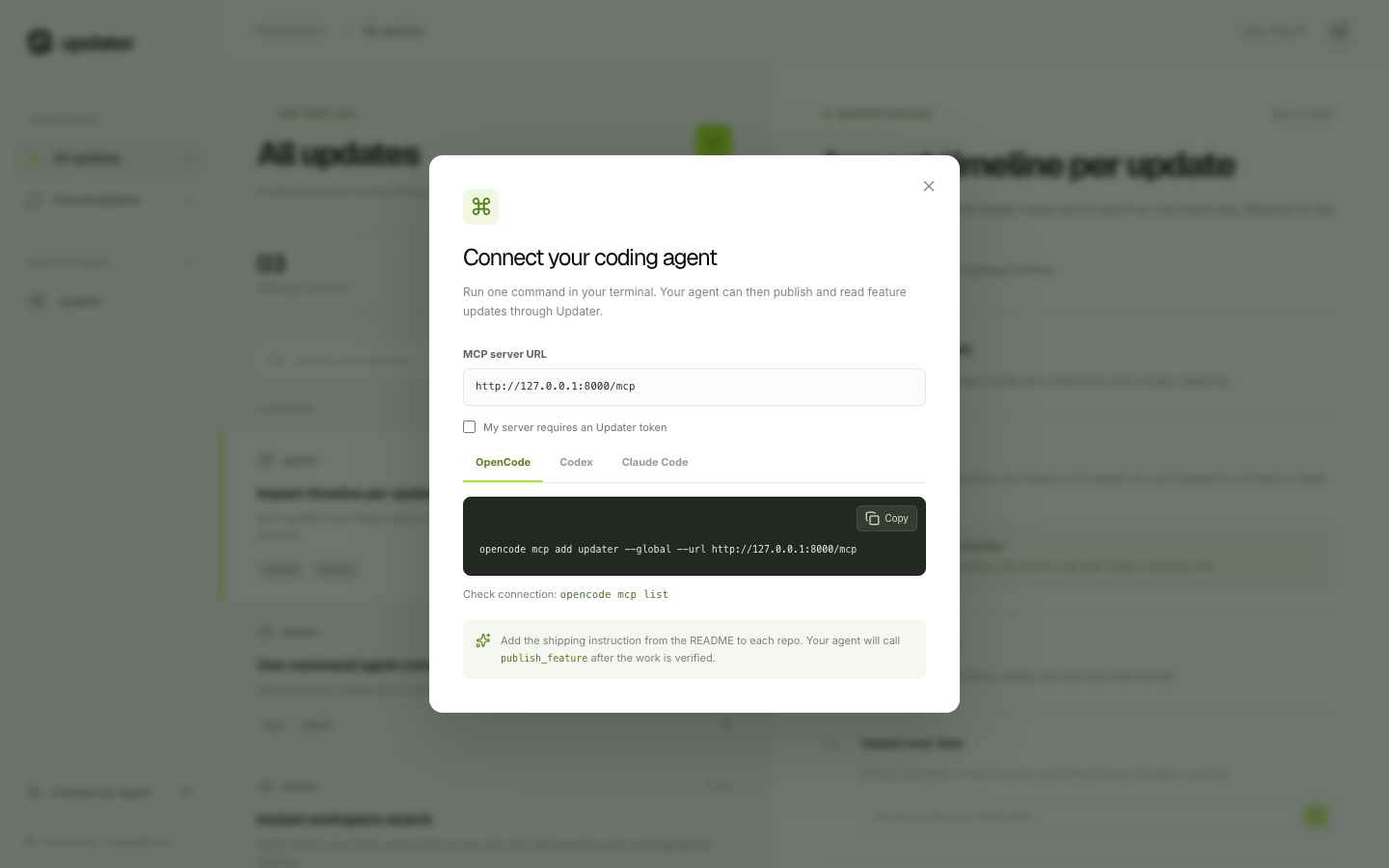
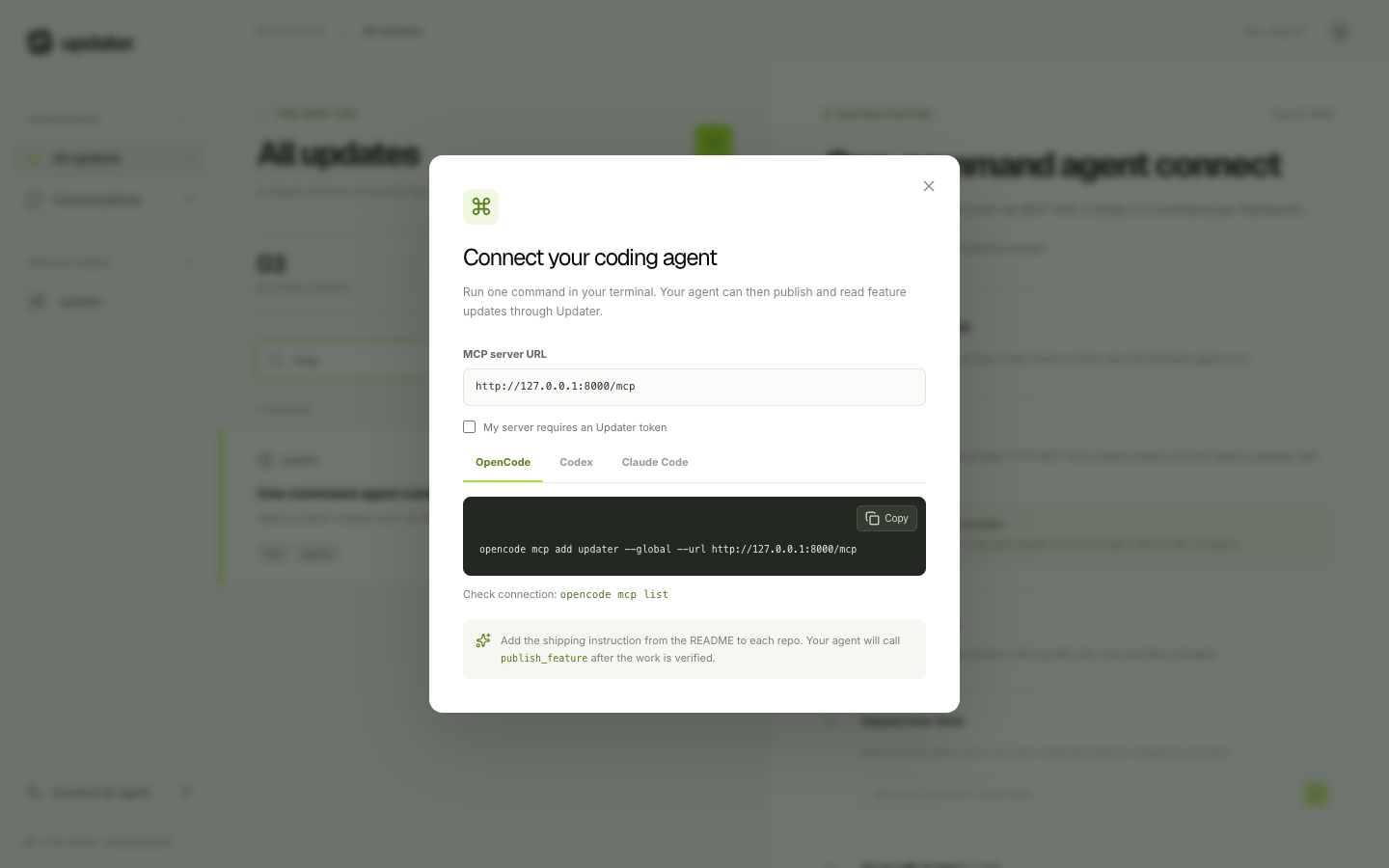
Run one CLI command and your agent can publish and read updates through MCP. No manual MCP JSON editing.
Features
- Ship log UI — browse, search, and filter every verified feature.
- Update detail — why, how it works, impact, tradeoffs, learning notes, files, tags, branch, commit, PR.
- Impact over time — add dated observations when you learn what a feature actually changed.
- Tech debt inbox — run
/tech-depthin your agent checkout to scan for tech debt and rushed decisions; each finding lands in the app with scope, description, mitigation, urgency, impact, and what is covered today. - Kanban task board — plan follow-up work on a drag-and-drop board (Backlog, In Progress, Review, Done). Create and edit tasks with priority, repo, branch, assignee, due date, and tags; every move is persisted, and the task view keeps status changes, edits, and deletes in one place.
- Quick notes — scratch space with per-note colors for follow-ups, reminders, and ideas.
- Q&A per update — ask questions inside the update; answers stay attached to the decision.
- Manual add — capture an update from the UI when no agent was involved.
- MCP server —
publish_feature,list_feature_updates,get_feature_update,add_feature_impact,report_tech_debt,list_tech_debt,get_tech_debt,update_tech_debtover Streamable HTTP at/mcp(stdio fallback included). - Auth + settings page — log in with email + password, update your email or change your password in Settings (other sessions are signed out), and issue per-agent API keys (
upk_…). Or keep the singleUPDATER_TOKENenv secret. Either unlocks the API + MCP. - Postgres in prod, SQLite locally — zero-config local preview, persistent deployment with
DATABASE_URL. - Dokploy-ready — separate
web+apiservices incompose.dokploy.yml.
How it works
- Your coding agent finishes a feature and verifies it works.
- Before replying, the agent sends an update to Updater over MCP — you only ever run one command to set that up.
- The update lands in your ship log with the story behind the code.
- Later, when a question needs code detail, Updater asks the agent — which already works inside your codebase — to send just the relevant snippets. The app itself never downloads your code.
Stack
- Frontend: Vite 7 + React 19 + TypeScript + Tailwind CSS 4 + shadcn/ui (
base-rhea, zinc, lime primary, Inter/Geist) - Backend: FastAPI + SQLAlchemy 2 + Pydantic Settings
- DB: PostgreSQL via
DATABASE_URLin prod; SQLite fallback (backend/updater.db) locally - MCP:
mcp>=1.0,<2over Streamable HTTP at/mcp, pluspython -m app.mcp_serverover stdio - Optional AI answers: OpenRouter (
OPENROUTER_API_KEY,LLM_MODEL) with saved-context fallback
The UI theme and Button component were generated from the requested shadcn preset. The agent-skills project informed the verify-then-ship workflow; it is not an app dependency.
Quickstart
Requirements: Node.js 20.19+ or 22.12+, Python 3.11+, and uv.
# 1. API (terminal 1)
cd backend
uv sync --extra test
uv run uvicorn app.main:app --reload --host 127.0.0.1 --port 8000

# 2. Web (terminal 2)
cd frontend
npm install
npm run dev
Open http://localhost:5173. Without a .env file the API creates backend/updater.db for local preview. API docs: http://127.0.0.1:8000/docs. Health: http://127.0.0.1:8000/api/health.
Connect an agent
One command sets up everything — MCP access plus the /updater, /updater-ship, /updater-check, /updater-impact, /tech-depth commands — for opencode, codex, Claude Code, and Cursor. It prompts for your API key, then lets you pick agents (one or many). (The in-app Settings → Connected agents section builds the same command for any URL.)
Deployed version:
curl -fsSL https://updaterapi.rveybox.dev/connect.sh | bash
Local preview:
curl -fsSL http://127.0.0.1:8000/connect.sh | bash
Flags (--url … --agents all --token …) are only needed for non-interactive / CI use. Interactive use needs no flags.
The installer validates the token before changing anything: a wrong, revoked, or expired token aborts the setup. Use --validate-only to check a token without installing, or --skip-token-check to bypass (not recommended).
Verify with opencode mcp list, codex mcp list, or claude mcp list (Cursor: Settings → MCP Tools shows a green dot). The mcp add CLIs cannot register slash commands on their own — that is what the installer adds.
If UPDATER_TOKEN is set on the API, export it where you launch the agent before running the installer (it is stored by reference, not pasted):
export UPDATER_TOKEN='your-long-random-secret'
Prefer per-agent credentials: sign in to the web UI, open Settings → API keys, and create a key per agent. A key (upk_…) works anywhere the token does — Authorization: Bearer upk_… — and can be revoked individually without touching other agents.
Each key scopes the workspace to its account: updates, notes, tasks, and tech debt are only listed and edited for the account that owns them, whether you call the REST API or an MCP tool. The agent's own key travels with every MCP call, so a publish is attributed to the right account instead of the server's shared token. The legacy UPDATER_TOKEN (and a fresh server with no accounts) keeps the unrestricted view on purpose.
Upgrading a server that already has rows
Entries created before per-account scoping have no owner (user_id IS NULL) and stay visible to every signed-in account. Deploying the fix therefore changes nobody's view: each account keeps seeing exactly what it saw before, and only new publishes are scoped to the agent that sent them. Adopt the old rows when you are ready, not as part of the deploy.
cd backend
uv run python -m app.backfill_ownership                              # inventory only; never writes
uv run python -m app.backfill_ownership --list --table updates       # inspect the rows
uv run python -m app.backfill_ownership --email you@example.com --repo github.com/you
Adopt one table or one repo at a time (use --table / --repo); assigned rows never leave their owner's view, so each step is safe to check before the next. Every write is recorded, and --undo --run-id <id> returns exactly the rows that run adopted — leaving anything the account already owned untouched.
If several people share the server and their rows are mixed together, ownership cannot be recovered from data alone (the bug recorded no owner). Give each person their own account, deploy the fix, and let new publishes self-attribute; then leave the ambiguous backfill history unowned so everyone still sees it, or --repo-filter the rows you can attribute with confidence.
Then copy the short rule in docs/agent-instructions.md into each target repo AGENTS.md / CLAUDE.md so the agent calls publish_feature after shipped work is verified. One feature keeps one key (owner/repo:feature-slug, slug is the branch name after the last slash, lowercased): the agent checks list_feature_updates first and reuses the key when the same branch, PR, or overlapping files are already shipped; re-publishing merges the new commit under that entry instead of duplicating it.
Stdio fallback (local subprocess transport): cd backend && uv run python -m app.mcp_server with UPDATER_API_URL + UPDATER_TOKEN set.
If POST /mcp answers 421 Invalid Host header, the fix is server-side: set MCP_ALLOWED_HOSTS to the public API hostname (see Configuration) and redeploy the API — reloading or re-adding the MCP client cannot fix a 421.
What gets saved
Title, summary, repo URL, reason, implementation explanation, expected impact, optional tradeoffs + learning notes, files changed, tags, agent name, branch, commit, PR link, shipping date. Dated impact notes and question threads stay attached to the update. You can also add updates manually from the UI.
Configuration
Create backend/.env from backend/.env.example:
DATABASE_URL=postgresql://user:password@host:5432/updater?sslmode=require
UPDATER_TOKEN=your-long-random-secret
ALLOW_OPEN_REGISTRATION=True
CORS_ORIGINS=http://localhost:5173
UPDATER_API_URL=http://127.0.0.1:8000
MCP_ALLOWED_HOSTS=api.example.com
OPENROUTER_API_KEY=
LLM_MODEL=google/gemini-3.5-flash-lite
- Omit
DATABASE_URLlocally for SQLite preview. UPDATER_TOKENis required whenever PostgreSQL is configured until an account exists — afterwards you may remove it and rely on logins + API keys (the server keeps booting once a user row is present).- Sign in from the web UI (email + password). Set
ALLOW_OPEN_REGISTRATION=Falseafter the first account to close sign-ups; the env token keeps working as a fallback either way. postgres://andpostgresql://URLs are accepted. Tables are created on startup.- For separate web/API origins, set
CORS_ORIGINSto the web origin and build the frontend withVITE_API_BASE_URLpointing at the API. - For a deployed MCP endpoint, set
MCP_ALLOWED_HOSTSto its public API hostname (bare hostname is enough — any port on it is accepted). The hostname fromUPDATER_API_URLis used as a fallback for the same check. Without this, every remotePOST /mcpis rejected with421 Invalid Host headerbefore any MCP logic runs. - Without
OPENROUTER_API_KEY, questions still work from saved context and say so. - Never commit
.env,*.db, or tokens. They are gitignored.
Deploy
See DEPLOY.md for Dokploy (Compose app, external Postgres, compose.dokploy.yml, web on port 80 + api on port 8000, HTTPS for both).
Deployed version: API is live at https://updaterapi.rveybox.dev (compose.dokploy.yml already defaults UPDATER_API_URL / MCP_ALLOWED_HOSTS to that host).
curl -f https://api.example.com/api/health
curl -f https://app.example.com/healthz
curl -f https://updaterapi.rveybox.dev/api/health
API + MCP reference
| Method | Path | Description |
|---|---|---|
| GET | /api/health | Liveness check |
| GET | /api/config | Token-protected config flag |
| GET | /api/updates?q=&repo=&tag= | Search + filter updates |
| POST | /api/updates | Publish an update (same external_id merges under one entry) |
| GET | /api/updates/{id} | Fetch one update with questions + impact notes |
| POST | /api/updates/{id}/questions | Ask about an update |
| POST | /api/updates/{id}/impact-notes | Record observed impact |
| GET | /api/notes | List notes (newest first) |
| POST | /api/notes | Create a note with a color |
| PATCH | /api/notes/{id} | Update a note title, content, or color |
| DELETE | /api/notes/{id} | Delete a note |
| GET | /api/tech-debt?q=&repo=&urgency=&status= | Search + filter tech debt |
| POST | /api/tech-debt | Report tech debt (scope, description, mitigation, urgency, impact, current state) |
| GET | /api/tech-debt/{id} | Fetch one tech-debt item |
| PATCH | /api/tech-debt/{id} | Update status, urgency, mitigation, current state |
| DELETE | /api/tech-debt/{id} | Delete a tech-debt item |
| GET | /api/tasks?q=&repo=&status=&priority= | List tasks in board order |
| POST | /api/tasks | Create a task |
| GET | /api/tasks/{id} | Fetch one task |
| PATCH | /api/tasks/{id} | Update a task, move it between columns |
| POST | /api/tasks/reorder | Persist drag-and-drop board order (task ids per column) |
| DELETE | /api/tasks/{id} | Delete a task |
| POST | /mcp | MCP tools: publish_feature, list_feature_updates, get_feature_update, add_feature_impact, list_context_requests, fulfill_context_request, report_tech_debt, list_tech_debt, get_tech_debt, update_tech_debt |
| POST | /api/auth/register | Create an account (first login session returned) |
| POST | /api/auth/login | Sign in (login session returned) |
| POST | /api/auth/logout | Revoke the current login session |
| GET | /api/auth/me | Who the current credential belongs to |
| PATCH | /api/auth/account | Update the signed-in account: email and/or password (other sessions are revoked) |
| GET/POST | /api/auth/keys | List / issue API keys (shown once at creation) |
| DELETE | /api/auth/keys/{id} | Revoke an API key |
Checks
cd backend && uv run pytest -q
cd frontend && npm run build
Backend tests cover merge-on-republish, search, question persistence, and invalid repo URLs.
Contributing
Issues and PRs are welcome. For big changes, open an issue first to discuss what you want to change.
git checkout -b rvey/my-feature
# make changes, add tests when it makes sense
cd backend && uv run pytest -q
cd frontend && npm run build
git commit -m "feat: describe the change"
git push -u origin rvey/my-feature
- Follow Conventional Commits.
- Keep secrets out of Git. Use
backend/.envlocally and Dokploy env in prod. - Screenshots live in
docs/screenshots/and demo media infrontend/public/media/; both are referenced by relative path so they render on GitHub and are served by the web app.
License
MIT — see LICENSE.
Acknowledgments
- agent-skills for the verify-then-ship inspiration.
- shadcn/ui for the component preset.
Codebase context via the connected agent (proxy)
Updater never clones repositories and never gets full file access. The agent already runs inside your codebase (opencode, Codex, Claude Code), so the app treats it as a codebase proxy and only receives the excerpts it needs:
- You ask a question that needs code detail, or hit Ask my agent for code context in the update view.
- Updater stores a
context-request(update + question) and shows it as waiting on your agent. - In your project checkout, the agent polls
list_context_requests, reads the local files, and answers withfulfill_context_request— short excerpts (path,content,start_line,end_line, max 8 files). - Excerpts are saved on the update, shown as CODE FROM YOUR AGENT, and included in follow-up answers. Private repos stay private: nothing leaves the agent host except the snippets it chooses to send.
Agents can also attach code_context up front in publish_feature (1–5 focused snippets). The agent rule for both flows lives in docs/agent-instructions.md.
| Method | Path | Description |
|---|---|---|
| POST | /api/updates/{id}/context-requests | Ask the connected agent for code excerpts |
| GET | /api/context-requests?status=pending&repo= | Agent polls waiting requests |
| POST | /api/context-requests/{id}/fulfill | Agent sends back excerpts (also saved on the update) |
Similar repos


Languages
TypeScript
38.5%
Python
26.3%
CSS
20.3%
Shell
14.5%
Updater is an open-source shipping log for work done with coding agents. When an agent finishes and verifies a feature, it calls an MCP tool that saves the what, why, how, expected impact, tradeoffs, files, and repo link.
See the codeSee what people are saying
README
Updater — your shipping memory
Updater is an open-source shipping log for work done with coding agents. When an agent finishes and verifies a feature, it calls an MCP tool that saves the what, why, how, expected impact, tradeoffs, files, and repo link. The React workspace lets you search history, record what actually happened over time, and ask questions inside each update.
Screenshots and the demo recording below are the real app running locally with demo content.
Live deployment
Deployed API: https://updaterapi.rveybox.dev
- Health: https://updaterapi.rveybox.dev/api/health
- API docs: https://updaterapi.rveybox.dev/docs
- MCP endpoint: https://updaterapi.rveybox.dev/mcp
- Connect script: https://updaterapi.rveybox.dev/connect.sh
Connect an agent to the deployed version:
curl -fsSL https://updaterapi.rveybox.dev/connect.sh | bash
It prompts for your API key (upk_… from the web UI Settings → API keys), then lets you pick agents (one or many). No --url / --agents flags needed — the script already defaults to this server.
Screenshots
Demo — watch an agent ship a feature
A raw 29-second screen recording: the agent implements and verifies the Kanban board feature in the terminal, publishes it over MCP, and the update lands at the top of Updater's ship log — 25 features shipped, including this one. The same recording plays inline on the landing page Demo section.
The real thing — workspace, ship log, and update detail
The left column is the searchable ship log. The right pane is the selected update: why it was built, how it works, expected impact, files, tags, branch, and commit.
Work in action — update detail
Each update keeps its context together: reason, implementation notes, learning notes, files changed, dated impact observations, and a question thread.
Work in action — instant search
Search filters as you type across titles, summaries, code paths, tags, and repos. Try mcp, search, or a repo name.
Work in action — connect an agent in one command
Run one CLI command and your agent can publish and read updates through MCP. No manual MCP JSON editing.
Features
- Ship log UI — browse, search, and filter every verified feature.
- Update detail — why, how it works, impact, tradeoffs, learning notes, files, tags, branch, commit, PR.
- Impact over time — add dated observations when you learn what a feature actually changed.
- Tech debt inbox — run
/tech-depthin your agent checkout to scan for tech debt and rushed decisions; each finding lands in the app with scope, description, mitigation, urgency, impact, and what is covered today. - Kanban task board — plan follow-up work on a drag-and-drop board (Backlog, In Progress, Review, Done). Create and edit tasks with priority, repo, branch, assignee, due date, and tags; every move is persisted, and the task view keeps status changes, edits, and deletes in one place.
- Quick notes — scratch space with per-note colors for follow-ups, reminders, and ideas.
- Q&A per update — ask questions inside the update; answers stay attached to the decision.
- Manual add — capture an update from the UI when no agent was involved.
- MCP server —
publish_feature,list_feature_updates,get_feature_update,add_feature_impact,report_tech_debt,list_tech_debt,get_tech_debt,update_tech_debtover Streamable HTTP at/mcp(stdio fallback included). - Auth + settings page — log in with email + password, update your email or change your password in Settings (other sessions are signed out), and issue per-agent API keys (
upk_…). Or keep the singleUPDATER_TOKENenv secret. Either unlocks the API + MCP. - Postgres in prod, SQLite locally — zero-config local preview, persistent deployment with
DATABASE_URL. - Dokploy-ready — separate
web+apiservices incompose.dokploy.yml.
How it works
- Your coding agent finishes a feature and verifies it works.
- Before replying, the agent sends an update to Updater over MCP — you only ever run one command to set that up.
- The update lands in your ship log with the story behind the code.
- Later, when a question needs code detail, Updater asks the agent — which already works inside your codebase — to send just the relevant snippets. The app itself never downloads your code.
Stack
- Frontend: Vite 7 + React 19 + TypeScript + Tailwind CSS 4 + shadcn/ui (
base-rhea, zinc, lime primary, Inter/Geist) - Backend: FastAPI + SQLAlchemy 2 + Pydantic Settings
- DB: PostgreSQL via
DATABASE_URLin prod; SQLite fallback (backend/updater.db) locally - MCP:
mcp>=1.0,<2over Streamable HTTP at/mcp, pluspython -m app.mcp_serverover stdio - Optional AI answers: OpenRouter (
OPENROUTER_API_KEY,LLM_MODEL) with saved-context fallback
The UI theme and Button component were generated from the requested shadcn preset. The agent-skills project informed the verify-then-ship workflow; it is not an app dependency.
Quickstart
Requirements: Node.js 20.19+ or 22.12+, Python 3.11+, and uv.
# 1. API (terminal 1)
cd backend
uv sync --extra test
uv run uvicorn app.main:app --reload --host 127.0.0.1 --port 8000

# 2. Web (terminal 2)
cd frontend
npm install
npm run dev
Open http://localhost:5173. Without a .env file the API creates backend/updater.db for local preview. API docs: http://127.0.0.1:8000/docs. Health: http://127.0.0.1:8000/api/health.
Connect an agent
One command sets up everything — MCP access plus the /updater, /updater-ship, /updater-check, /updater-impact, /tech-depth commands — for opencode, codex, Claude Code, and Cursor. It prompts for your API key, then lets you pick agents (one or many). (The in-app Settings → Connected agents section builds the same command for any URL.)
Deployed version:
curl -fsSL https://updaterapi.rveybox.dev/connect.sh | bash
Local preview:
curl -fsSL http://127.0.0.1:8000/connect.sh | bash
Flags (--url … --agents all --token …) are only needed for non-interactive / CI use. Interactive use needs no flags.
The installer validates the token before changing anything: a wrong, revoked, or expired token aborts the setup. Use --validate-only to check a token without installing, or --skip-token-check to bypass (not recommended).
Verify with opencode mcp list, codex mcp list, or claude mcp list (Cursor: Settings → MCP Tools shows a green dot). The mcp add CLIs cannot register slash commands on their own — that is what the installer adds.
If UPDATER_TOKEN is set on the API, export it where you launch the agent before running the installer (it is stored by reference, not pasted):
export UPDATER_TOKEN='your-long-random-secret'
Prefer per-agent credentials: sign in to the web UI, open Settings → API keys, and create a key per agent. A key (upk_…) works anywhere the token does — Authorization: Bearer upk_… — and can be revoked individually without touching other agents.
Each key scopes the workspace to its account: updates, notes, tasks, and tech debt are only listed and edited for the account that owns them, whether you call the REST API or an MCP tool. The agent's own key travels with every MCP call, so a publish is attributed to the right account instead of the server's shared token. The legacy UPDATER_TOKEN (and a fresh server with no accounts) keeps the unrestricted view on purpose.
Upgrading a server that already has rows
Entries created before per-account scoping have no owner (user_id IS NULL) and stay visible to every signed-in account. Deploying the fix therefore changes nobody's view: each account keeps seeing exactly what it saw before, and only new publishes are scoped to the agent that sent them. Adopt the old rows when you are ready, not as part of the deploy.
cd backend
uv run python -m app.backfill_ownership                              # inventory only; never writes
uv run python -m app.backfill_ownership --list --table updates       # inspect the rows
uv run python -m app.backfill_ownership --email you@example.com --repo github.com/you
Adopt one table or one repo at a time (use --table / --repo); assigned rows never leave their owner's view, so each step is safe to check before the next. Every write is recorded, and --undo --run-id <id> returns exactly the rows that run adopted — leaving anything the account already owned untouched.
If several people share the server and their rows are mixed together, ownership cannot be recovered from data alone (the bug recorded no owner). Give each person their own account, deploy the fix, and let new publishes self-attribute; then leave the ambiguous backfill history unowned so everyone still sees it, or --repo-filter the rows you can attribute with confidence.
Then copy the short rule in docs/agent-instructions.md into each target repo AGENTS.md / CLAUDE.md so the agent calls publish_feature after shipped work is verified. One feature keeps one key (owner/repo:feature-slug, slug is the branch name after the last slash, lowercased): the agent checks list_feature_updates first and reuses the key when the same branch, PR, or overlapping files are already shipped; re-publishing merges the new commit under that entry instead of duplicating it.
Stdio fallback (local subprocess transport): cd backend && uv run python -m app.mcp_server with UPDATER_API_URL + UPDATER_TOKEN set.
If POST /mcp answers 421 Invalid Host header, the fix is server-side: set MCP_ALLOWED_HOSTS to the public API hostname (see Configuration) and redeploy the API — reloading or re-adding the MCP client cannot fix a 421.
What gets saved
Title, summary, repo URL, reason, implementation explanation, expected impact, optional tradeoffs + learning notes, files changed, tags, agent name, branch, commit, PR link, shipping date. Dated impact notes and question threads stay attached to the update. You can also add updates manually from the UI.
Configuration
Create backend/.env from backend/.env.example:
DATABASE_URL=postgresql://user:password@host:5432/updater?sslmode=require
UPDATER_TOKEN=your-long-random-secret
ALLOW_OPEN_REGISTRATION=True
CORS_ORIGINS=http://localhost:5173
UPDATER_API_URL=http://127.0.0.1:8000
MCP_ALLOWED_HOSTS=api.example.com
OPENROUTER_API_KEY=
LLM_MODEL=google/gemini-3.5-flash-lite
- Omit
DATABASE_URLlocally for SQLite preview. UPDATER_TOKENis required whenever PostgreSQL is configured until an account exists — afterwards you may remove it and rely on logins + API keys (the server keeps booting once a user row is present).- Sign in from the web UI (email + password). Set
ALLOW_OPEN_REGISTRATION=Falseafter the first account to close sign-ups; the env token keeps working as a fallback either way. postgres://andpostgresql://URLs are accepted. Tables are created on startup.- For separate web/API origins, set
CORS_ORIGINSto the web origin and build the frontend withVITE_API_BASE_URLpointing at the API. - For a deployed MCP endpoint, set
MCP_ALLOWED_HOSTSto its public API hostname (bare hostname is enough — any port on it is accepted). The hostname fromUPDATER_API_URLis used as a fallback for the same check. Without this, every remotePOST /mcpis rejected with421 Invalid Host headerbefore any MCP logic runs. - Without
OPENROUTER_API_KEY, questions still work from saved context and say so. - Never commit
.env,*.db, or tokens. They are gitignored.
Deploy
See DEPLOY.md for Dokploy (Compose app, external Postgres, compose.dokploy.yml, web on port 80 + api on port 8000, HTTPS for both).
Deployed version: API is live at https://updaterapi.rveybox.dev (compose.dokploy.yml already defaults UPDATER_API_URL / MCP_ALLOWED_HOSTS to that host).
curl -f https://api.example.com/api/health
curl -f https://app.example.com/healthz
curl -f https://updaterapi.rveybox.dev/api/health
API + MCP reference
| Method | Path | Description |
|---|---|---|
| GET | /api/health | Liveness check |
| GET | /api/config | Token-protected config flag |
| GET | /api/updates?q=&repo=&tag= | Search + filter updates |
| POST | /api/updates | Publish an update (same external_id merges under one entry) |
| GET | /api/updates/{id} | Fetch one update with questions + impact notes |
| POST | /api/updates/{id}/questions | Ask about an update |
| POST | /api/updates/{id}/impact-notes | Record observed impact |
| GET | /api/notes | List notes (newest first) |
| POST | /api/notes | Create a note with a color |
| PATCH | /api/notes/{id} | Update a note title, content, or color |
| DELETE | /api/notes/{id} | Delete a note |
| GET | /api/tech-debt?q=&repo=&urgency=&status= | Search + filter tech debt |
| POST | /api/tech-debt | Report tech debt (scope, description, mitigation, urgency, impact, current state) |
| GET | /api/tech-debt/{id} | Fetch one tech-debt item |
| PATCH | /api/tech-debt/{id} | Update status, urgency, mitigation, current state |
| DELETE | /api/tech-debt/{id} | Delete a tech-debt item |
| GET | /api/tasks?q=&repo=&status=&priority= | List tasks in board order |
| POST | /api/tasks | Create a task |
| GET | /api/tasks/{id} | Fetch one task |
| PATCH | /api/tasks/{id} | Update a task, move it between columns |
| POST | /api/tasks/reorder | Persist drag-and-drop board order (task ids per column) |
| DELETE | /api/tasks/{id} | Delete a task |
| POST | /mcp | MCP tools: publish_feature, list_feature_updates, get_feature_update, add_feature_impact, list_context_requests, fulfill_context_request, report_tech_debt, list_tech_debt, get_tech_debt, update_tech_debt |
| POST | /api/auth/register | Create an account (first login session returned) |
| POST | /api/auth/login | Sign in (login session returned) |
| POST | /api/auth/logout | Revoke the current login session |
| GET | /api/auth/me | Who the current credential belongs to |
| PATCH | /api/auth/account | Update the signed-in account: email and/or password (other sessions are revoked) |
| GET/POST | /api/auth/keys | List / issue API keys (shown once at creation) |
| DELETE | /api/auth/keys/{id} | Revoke an API key |
Checks
cd backend && uv run pytest -q
cd frontend && npm run build
Backend tests cover merge-on-republish, search, question persistence, and invalid repo URLs.
Contributing
Issues and PRs are welcome. For big changes, open an issue first to discuss what you want to change.
git checkout -b rvey/my-feature
# make changes, add tests when it makes sense
cd backend && uv run pytest -q
cd frontend && npm run build
git commit -m "feat: describe the change"
git push -u origin rvey/my-feature
- Follow Conventional Commits.
- Keep secrets out of Git. Use
backend/.envlocally and Dokploy env in prod. - Screenshots live in
docs/screenshots/and demo media infrontend/public/media/; both are referenced by relative path so they render on GitHub and are served by the web app.
License
MIT — see LICENSE.
Acknowledgments
- agent-skills for the verify-then-ship inspiration.
- shadcn/ui for the component preset.
Codebase context via the connected agent (proxy)
Updater never clones repositories and never gets full file access. The agent already runs inside your codebase (opencode, Codex, Claude Code), so the app treats it as a codebase proxy and only receives the excerpts it needs:
- You ask a question that needs code detail, or hit Ask my agent for code context in the update view.
- Updater stores a
context-request(update + question) and shows it as waiting on your agent. - In your project checkout, the agent polls
list_context_requests, reads the local files, and answers withfulfill_context_request— short excerpts (path,content,start_line,end_line, max 8 files). - Excerpts are saved on the update, shown as CODE FROM YOUR AGENT, and included in follow-up answers. Private repos stay private: nothing leaves the agent host except the snippets it chooses to send.
Agents can also attach code_context up front in publish_feature (1–5 focused snippets). The agent rule for both flows lives in docs/agent-instructions.md.
| Method | Path | Description |
|---|---|---|
| POST | /api/updates/{id}/context-requests | Ask the connected agent for code excerpts |
| GET | /api/context-requests?status=pending&repo= | Agent polls waiting requests |
| POST | /api/context-requests/{id}/fulfill | Agent sends back excerpts (also saved on the update) |
Similar repos
Languages
TypeScript
38.5%
Python
26.3%
CSS
20.3%
Shell
14.5%