
Chat and Image Generation for a Tandy 1000 TL/3 286 PC with 16 color dithering coupled with a remote PC over a LAN connection.
C++
0
2 commits
updated Oct 1, 2026
See what people are saying
README
DeskMind + MindServer
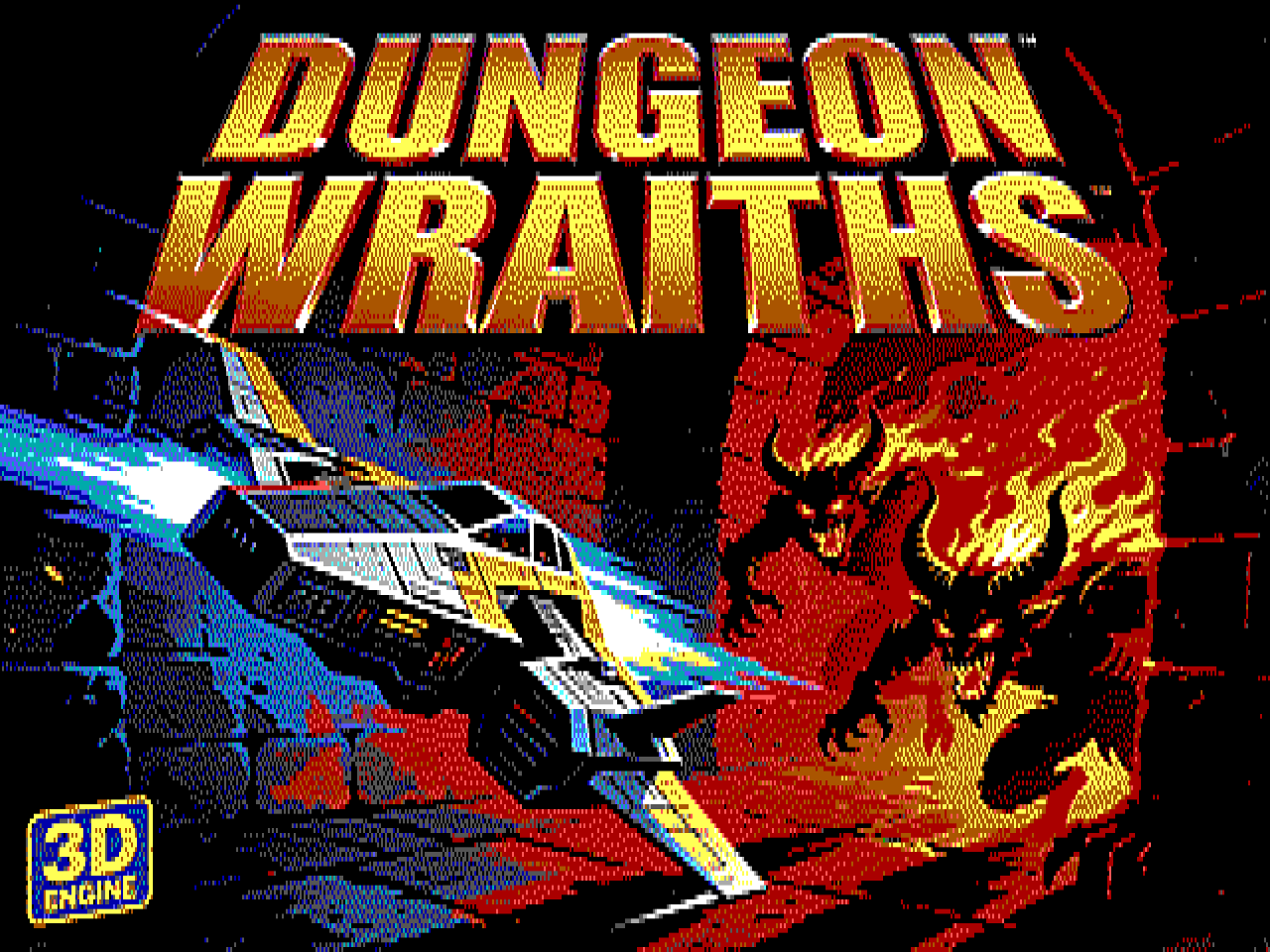
A Krea 2 picture as DeskMind shows it: dithered to 16 colours at 640x200, stretched here to the 4:3 shape of the Tandy's screen.
AI chat and AI pictures on a Tandy 1000 TL/3 (10 MHz 286, 640K, Tandy Video II), in 640x200 with 16 colours.
- DeskMind (
C:\DESKMIND\DESKMIND.EXEon the Tandy) is a DeskMate-style DOS program. You chat with the Qwen AI, have it draw pictures, keep a gallery, and play slideshows. It talks over the PicoMEM WiFi to MindServer. - MindServer (
helper\on this PC) does the heavy work. It runs Qwen (NInfer on the RTX 5090) for chat, prompt improvement and looking at pictures, and Krea 2 (ComfyUI on the RTX 4090) for drawing. It dithers each picture to the Tandy's 16 colours and sends it over ready to show. - SLIDES (
C:\DESKMIND\SLIDES.EXE) is a stand-alone slideshow. It needs no network and works in any boot mode.
Tandy (boot W) --WiFi, HTTP port 8286--> MindServer (this PC)
                                            |-> NInfer / Qwen    127.0.0.1:1234  (RTX 5090)
                                            '-> ComfyUI / Krea 2 127.0.0.1:8188  (RTX 4090)
On the PC: MindServer
First time only
- The Python environment is
helper\.venv. If it's missing,START-MINDSERVER.batprints the two commands that create it. - Run
setup-firewall.batonce. It asks for administrator rights and opens TCP port 8286 to the local network only.
Every time
| Command | What it starts |
|---|---|
START-MINDSERVER.bat | NInfer (Qwen), ComfyUI (Krea 2) and MindServer, each in its own window |
START-MINDSERVER.bat noqwen | ComfyUI and MindServer only. Pictures work, chat doesn't |
START-MINDSERVER.bat server | MindServer only (Dither Lab, tests) |
STOP-MINDSERVER.bat | Stops all three |
A service that already answers is not started twice.
NInfer needs about 22 GB free on GPU 0, so start it right after a clean boot, before browsers or games. If Qwen isn't running, DeskMind says so and names this PC's address. Create can still draw your prompt as typed, without Qwen.
The MindServer window
| Tab | What it's for |
|---|---|
| Services | Status lights for NInfer, ComfyUI and MindServer, start/stop buttons, the log, and which Tandy is connected |
| Generation | Krea 2 settings (steps, picture size, LoRA) and a test generation |
| Dither Lab | Try dithering settings on any picture: the original beside the Tandy version at the right shape, plus a pixel zoom. Save the settings as the default |
| Gallery | The pictures MindServer holds |
| AI | Qwen settings and the three instruction texts: chat, prompt improvement, and picture questions (helper\prompts\*.txt) |
| Tandy | Port, optional token, and the 16-colour palette |
Pictures are kept in helper\data\images\ (the original PNG plus the Tandy files) and chats in helper\data\chats\.
On the Tandy: DeskMind
Boot with W (the PicoMEM WiFi boot), then type DESKMIND at any prompt. C:\PLAY\DESKMIND.BAT goes to C:\DESKMIND
and starts it. Without WiFi, DeskMind starts offline: the Gallery and slideshow work, Chat and Create don't.
The first time, open Settings (F5) and check the MindServer address (this PC's LAN IP, e.g. 192.168.2.192) and port 8286.
Options: DESKMIND /NONET (start offline), DESKMIND /NOMOUSE (keyboard only).
Keys everywhere
| Key | |
|---|---|
| F2 Chat, F3 Create, F4 Gallery, F5 Settings, F6 Slideshow | Switch screens |
| F10 or Alt + first letter | Menus (DeskMind, Chat, Pictures) |
| Tab / Shift+Tab | Next or previous control |
| Enter | The default (outlined) button |
| Esc | Cancel a dialog, or stop a reply or drawing in progress |
Everything also works with the mouse (CuteMouse must be loaded).
Chat (F2)
- Type and press Enter (or Send). The reply streams in. PgUp/PgDn and the arrow keys scroll.
- Ask for a picture in plain words ("draw a castle at sunset"). Qwen draws it, and the thumbnail appears in the chat. Click a thumbnail to see it full screen.
- Picture attaches a gallery picture to your next message, so you can ask about it ("what's in this picture?"). Qwen sees both the original and the 16-colour version. It keeps the latest picture in mind for follow-up questions.
- Chats lists the chats saved on this Tandy (newest first) to reopen or delete. New starts a fresh chat.
- Every chat is saved as
C:\DESKMIND\CHATS\<id>.TCHafter each reply, and MindServer keeps a copy. - Long chats: when a chat is nearly full, a notice says so. When it's full, Send offers Continue, which hides the older messages (they stay saved) and goes on, or New. A long chat always reopens at its newest part, with a note at the top.
Create (F3)
- Describe the picture, in any language and at any length.
- With Let Qwen improve my prompt ticked, Qwen rewrites it into a prompt that dithers well (bold shapes, strong contrast). With Let me edit the improved prompt ticked, you can change the rewrite before drawing.
- Krea 2 draws it (about 10 seconds). A progress bar shows each step, and the picture opens full screen.
- Again draws the same prompt with a new seed.
Enhance rules (Pictures menu) edits the instructions Qwen follows when it improves prompts. They are saved on MindServer.
Gallery (F4)
- Grid of thumbnails (6 per page) or a list with dates (List/Grid button). Arrows, PgUp/PgDn, Home/End move. Enter or a double-click views full screen.
- Rename changes the title (the file keeps its 8-character ID name). Delete removes the picture from the Tandy only. Everywhere removes it from MindServer too.
- Ask Qwen opens Chat with the picture attached.
- Sync downloads the pictures MindServer has and the Tandy doesn't (e.g. ones made in the Dither Lab).
- Slideshow starts with the selected picture.
Settings (F5)
| Setting | |
|---|---|
| MindServer address / Port / Token | Where MindServer runs. Set the token only if you set one in the Tandy tab on the PC |
| Sound effects | Tandy sound: start-up chime, reply blip, "picture ready" and error sounds |
| Create: improve my prompt with Qwen | The default for the Create screen |
| Create: let me edit the improved prompt first | The default for the Create screen |
| Chat: also improve prompts of pictures Qwen draws | Better pictures, a few seconds slower |
| Slideshow seconds / Effect / random order | Used by the Gallery slideshow and by SLIDES |
Saved in C:\DESKMIND\DESKMIND.CFG.
Slideshows
In DeskMind: F6, the Gallery's Slideshow button, or Pictures > Slideshow. From DOS: SLIDES.
SLIDES [folder] [/D seconds] [/E effect] [/R] [/NOTITLE] [/ONCE] [/LIST]

  folder     default: DeskMind's PICS folder
  /D n       seconds per picture (default from DeskMind's Settings, else 8)
  /E n       0 random, 1 cut, 2 wipe right, 3 wipe down, 4 blinds, 5 interlace,
             6 dissolve, 7 box out, 8 box in, 9 slide in
  /R         random order
  /NOTITLE   no title strip
  /ONCE      stop after the last picture (default: loop)
  /LIST      print the play order and exit
| Key | |
|---|---|
| Space, Enter, Right | Next picture |
| Left | Previous picture |
| P | Pause / go on |
| T | Title strip on / off |
| E | Try the effects one after another |
| Esc, Q, mouse click | Quit |
The title strip shows for 3 seconds. "7/16" means the 7th-newest of 16 pictures, the same order as the Gallery, even in random order.
Limits
Nothing crashes at these limits. DeskMind says when a list is cut short.
| What | Limit | When you reach it |
|---|---|---|
| Pictures in the Gallery | 500 | The newest 500 show, with "Showing the newest 500 of N". Sync stops when the Gallery is full |
| Pictures in SLIDES | 500 | The newest 500 play |
| Pictures in the "attach a picture" list | 200 | The newest 200 are listed |
| Saved chats in the Chats list | 100 | The newest 100 are listed, with "newest 100 of N" |
| One chat on screen | about 40,000 characters, 300 messages | Notice when nearly full. Then Continue (hide the older part) or New |
| Disk | about 68 KB per picture | About 5,000 pictures fit in the free space. Long before that, the Gallery gets slow to open |
| MindServer's memory of a chat | the last 24,000 characters | Qwen forgets the start of very long chats; the transcript is still saved |
Files
| On the Tandy | |
|---|---|
C:\DESKMIND\DESKMIND.EXE, SLIDES.EXE | The programs |
C:\DESKMIND\DESKMIND.CFG | Settings |
C:\DESKMIND\PICS\<id>.TPI | Pictures: header, prompt, thumbnail and the full 640x200 picture in one file |
C:\DESKMIND\CHATS\<id>.TCH | Chat transcripts (plain text) |
C:\DESKMIND\README.TXT | Short version of this guide |
C:\PLAY\DESKMIND.BAT, SLIDES.BAT | Launchers (made by the games project's tools\stage.py) |
Troubleshooting
| Problem | Fix |
|---|---|
| "No network ... DeskMind starts offline" | Boot with W. The packet driver only loads in the WiFi boot |
| "MindServer is not answering" | Start START-MINDSERVER.bat on the PC. Check the address in Settings, and run setup-firewall.bat once |
| "Qwen (NInfer) is not running on the MindServer PC" | Start NInfer after a clean boot of the PC (it needs the 5090's memory), or wait until it has loaded |
| "Not enough memory for the slideshow" | The slideshow needs 64K. Start a new chat or restart DeskMind |
| Colours look off | Brown (colour 6) differs between monitors. Change it in MindServer's Tandy tab. Pictures made after that use it |
For developers
Building from source
The toolchains aren't in the repository. Put them here first:
| Folder | What | From |
|---|---|---|
tools\ow2\ | Open Watcom v2 snapshot (extract the tarball so that tools\ow2\binnt64\wpp.exe exists) | github.com/open-watcom/open-watcom-v2 releases |
tools\mtcp\mTCP-src_2025-01-10\ | mTCP source 2025-01-10 (compiled in place, never edited) | brutman.com/mTCP |
tools\didder\didder.exe | Optional dither engine for MindServer | github.com/makew0rld/didder |
helper\.venv\ | py -3.13 -m venv helper\.venv, then helper\.venv\Scripts\pip install numpy pillow httpx websocket-client PySide6 git+https://github.com/hbldh/hitherdither |
MindServer writes helper\settings.json the first time you save a setting; it runs on built-in defaults until then.
Working on it
- Build:
dos\build.bat(output indos\out\). MindServer tests:helper\tests\. - Install on the card:
tools\card_install.ps1 -Tag <what> -Folder DESKMIND -Files ...(dated backups, checks, compare). - Design, protocol and history:
PLAN.md,CLAUDE.md,TESTING.md. - DeskMind includes mTCP, so it is GPLv3.
Similar repos


Languages
C++
56.0%
Python
33.3%
C
5.7%
PowerShell
2.6%
Batchfile
1.7%
Chat and Image Generation for a Tandy 1000 TL/3 286 PC with 16 color dithering coupled with a remote PC over a LAN connection.
C++
0
2 commits
updated Oct 1, 2026
See what people are saying
README
DeskMind + MindServer
A Krea 2 picture as DeskMind shows it: dithered to 16 colours at 640x200, stretched here to the 4:3 shape of the Tandy's screen.
AI chat and AI pictures on a Tandy 1000 TL/3 (10 MHz 286, 640K, Tandy Video II), in 640x200 with 16 colours.
- DeskMind (
C:\DESKMIND\DESKMIND.EXEon the Tandy) is a DeskMate-style DOS program. You chat with the Qwen AI, have it draw pictures, keep a gallery, and play slideshows. It talks over the PicoMEM WiFi to MindServer. - MindServer (
helper\on this PC) does the heavy work. It runs Qwen (NInfer on the RTX 5090) for chat, prompt improvement and looking at pictures, and Krea 2 (ComfyUI on the RTX 4090) for drawing. It dithers each picture to the Tandy's 16 colours and sends it over ready to show. - SLIDES (
C:\DESKMIND\SLIDES.EXE) is a stand-alone slideshow. It needs no network and works in any boot mode.
Tandy (boot W) --WiFi, HTTP port 8286--> MindServer (this PC)
                                            |-> NInfer / Qwen    127.0.0.1:1234  (RTX 5090)
                                            '-> ComfyUI / Krea 2 127.0.0.1:8188  (RTX 4090)
On the PC: MindServer
First time only
- The Python environment is
helper\.venv. If it's missing,START-MINDSERVER.batprints the two commands that create it. - Run
setup-firewall.batonce. It asks for administrator rights and opens TCP port 8286 to the local network only.
Every time
| Command | What it starts |
|---|---|
START-MINDSERVER.bat | NInfer (Qwen), ComfyUI (Krea 2) and MindServer, each in its own window |
START-MINDSERVER.bat noqwen | ComfyUI and MindServer only. Pictures work, chat doesn't |
START-MINDSERVER.bat server | MindServer only (Dither Lab, tests) |
STOP-MINDSERVER.bat | Stops all three |
A service that already answers is not started twice.
NInfer needs about 22 GB free on GPU 0, so start it right after a clean boot, before browsers or games. If Qwen isn't running, DeskMind says so and names this PC's address. Create can still draw your prompt as typed, without Qwen.
The MindServer window
| Tab | What it's for |
|---|---|
| Services | Status lights for NInfer, ComfyUI and MindServer, start/stop buttons, the log, and which Tandy is connected |
| Generation | Krea 2 settings (steps, picture size, LoRA) and a test generation |
| Dither Lab | Try dithering settings on any picture: the original beside the Tandy version at the right shape, plus a pixel zoom. Save the settings as the default |
| Gallery | The pictures MindServer holds |
| AI | Qwen settings and the three instruction texts: chat, prompt improvement, and picture questions (helper\prompts\*.txt) |
| Tandy | Port, optional token, and the 16-colour palette |
Pictures are kept in helper\data\images\ (the original PNG plus the Tandy files) and chats in helper\data\chats\.
On the Tandy: DeskMind
Boot with W (the PicoMEM WiFi boot), then type DESKMIND at any prompt. C:\PLAY\DESKMIND.BAT goes to C:\DESKMIND
and starts it. Without WiFi, DeskMind starts offline: the Gallery and slideshow work, Chat and Create don't.
The first time, open Settings (F5) and check the MindServer address (this PC's LAN IP, e.g. 192.168.2.192) and port 8286.
Options: DESKMIND /NONET (start offline), DESKMIND /NOMOUSE (keyboard only).
Keys everywhere
| Key | |
|---|---|
| F2 Chat, F3 Create, F4 Gallery, F5 Settings, F6 Slideshow | Switch screens |
| F10 or Alt + first letter | Menus (DeskMind, Chat, Pictures) |
| Tab / Shift+Tab | Next or previous control |
| Enter | The default (outlined) button |
| Esc | Cancel a dialog, or stop a reply or drawing in progress |
Everything also works with the mouse (CuteMouse must be loaded).
Chat (F2)
- Type and press Enter (or Send). The reply streams in. PgUp/PgDn and the arrow keys scroll.
- Ask for a picture in plain words ("draw a castle at sunset"). Qwen draws it, and the thumbnail appears in the chat. Click a thumbnail to see it full screen.
- Picture attaches a gallery picture to your next message, so you can ask about it ("what's in this picture?"). Qwen sees both the original and the 16-colour version. It keeps the latest picture in mind for follow-up questions.
- Chats lists the chats saved on this Tandy (newest first) to reopen or delete. New starts a fresh chat.
- Every chat is saved as
C:\DESKMIND\CHATS\<id>.TCHafter each reply, and MindServer keeps a copy. - Long chats: when a chat is nearly full, a notice says so. When it's full, Send offers Continue, which hides the older messages (they stay saved) and goes on, or New. A long chat always reopens at its newest part, with a note at the top.
Create (F3)
- Describe the picture, in any language and at any length.
- With Let Qwen improve my prompt ticked, Qwen rewrites it into a prompt that dithers well (bold shapes, strong contrast). With Let me edit the improved prompt ticked, you can change the rewrite before drawing.
- Krea 2 draws it (about 10 seconds). A progress bar shows each step, and the picture opens full screen.
- Again draws the same prompt with a new seed.
Enhance rules (Pictures menu) edits the instructions Qwen follows when it improves prompts. They are saved on MindServer.
Gallery (F4)
- Grid of thumbnails (6 per page) or a list with dates (List/Grid button). Arrows, PgUp/PgDn, Home/End move. Enter or a double-click views full screen.
- Rename changes the title (the file keeps its 8-character ID name). Delete removes the picture from the Tandy only. Everywhere removes it from MindServer too.
- Ask Qwen opens Chat with the picture attached.
- Sync downloads the pictures MindServer has and the Tandy doesn't (e.g. ones made in the Dither Lab).
- Slideshow starts with the selected picture.
Settings (F5)
| Setting | |
|---|---|
| MindServer address / Port / Token | Where MindServer runs. Set the token only if you set one in the Tandy tab on the PC |
| Sound effects | Tandy sound: start-up chime, reply blip, "picture ready" and error sounds |
| Create: improve my prompt with Qwen | The default for the Create screen |
| Create: let me edit the improved prompt first | The default for the Create screen |
| Chat: also improve prompts of pictures Qwen draws | Better pictures, a few seconds slower |
| Slideshow seconds / Effect / random order | Used by the Gallery slideshow and by SLIDES |
Saved in C:\DESKMIND\DESKMIND.CFG.
Slideshows
In DeskMind: F6, the Gallery's Slideshow button, or Pictures > Slideshow. From DOS: SLIDES.
SLIDES [folder] [/D seconds] [/E effect] [/R] [/NOTITLE] [/ONCE] [/LIST]

  folder     default: DeskMind's PICS folder
  /D n       seconds per picture (default from DeskMind's Settings, else 8)
  /E n       0 random, 1 cut, 2 wipe right, 3 wipe down, 4 blinds, 5 interlace,
             6 dissolve, 7 box out, 8 box in, 9 slide in
  /R         random order
  /NOTITLE   no title strip
  /ONCE      stop after the last picture (default: loop)
  /LIST      print the play order and exit
| Key | |
|---|---|
| Space, Enter, Right | Next picture |
| Left | Previous picture |
| P | Pause / go on |
| T | Title strip on / off |
| E | Try the effects one after another |
| Esc, Q, mouse click | Quit |
The title strip shows for 3 seconds. "7/16" means the 7th-newest of 16 pictures, the same order as the Gallery, even in random order.
Limits
Nothing crashes at these limits. DeskMind says when a list is cut short.
| What | Limit | When you reach it |
|---|---|---|
| Pictures in the Gallery | 500 | The newest 500 show, with "Showing the newest 500 of N". Sync stops when the Gallery is full |
| Pictures in SLIDES | 500 | The newest 500 play |
| Pictures in the "attach a picture" list | 200 | The newest 200 are listed |
| Saved chats in the Chats list | 100 | The newest 100 are listed, with "newest 100 of N" |
| One chat on screen | about 40,000 characters, 300 messages | Notice when nearly full. Then Continue (hide the older part) or New |
| Disk | about 68 KB per picture | About 5,000 pictures fit in the free space. Long before that, the Gallery gets slow to open |
| MindServer's memory of a chat | the last 24,000 characters | Qwen forgets the start of very long chats; the transcript is still saved |
Files
| On the Tandy | |
|---|---|
C:\DESKMIND\DESKMIND.EXE, SLIDES.EXE | The programs |
C:\DESKMIND\DESKMIND.CFG | Settings |
C:\DESKMIND\PICS\<id>.TPI | Pictures: header, prompt, thumbnail and the full 640x200 picture in one file |
C:\DESKMIND\CHATS\<id>.TCH | Chat transcripts (plain text) |
C:\DESKMIND\README.TXT | Short version of this guide |
C:\PLAY\DESKMIND.BAT, SLIDES.BAT | Launchers (made by the games project's tools\stage.py) |
Troubleshooting
| Problem | Fix |
|---|---|
| "No network ... DeskMind starts offline" | Boot with W. The packet driver only loads in the WiFi boot |
| "MindServer is not answering" | Start START-MINDSERVER.bat on the PC. Check the address in Settings, and run setup-firewall.bat once |
| "Qwen (NInfer) is not running on the MindServer PC" | Start NInfer after a clean boot of the PC (it needs the 5090's memory), or wait until it has loaded |
| "Not enough memory for the slideshow" | The slideshow needs 64K. Start a new chat or restart DeskMind |
| Colours look off | Brown (colour 6) differs between monitors. Change it in MindServer's Tandy tab. Pictures made after that use it |
For developers
Building from source
The toolchains aren't in the repository. Put them here first:
| Folder | What | From |
|---|---|---|
tools\ow2\ | Open Watcom v2 snapshot (extract the tarball so that tools\ow2\binnt64\wpp.exe exists) | github.com/open-watcom/open-watcom-v2 releases |
tools\mtcp\mTCP-src_2025-01-10\ | mTCP source 2025-01-10 (compiled in place, never edited) | brutman.com/mTCP |
tools\didder\didder.exe | Optional dither engine for MindServer | github.com/makew0rld/didder |
helper\.venv\ | py -3.13 -m venv helper\.venv, then helper\.venv\Scripts\pip install numpy pillow httpx websocket-client PySide6 git+https://github.com/hbldh/hitherdither |
MindServer writes helper\settings.json the first time you save a setting; it runs on built-in defaults until then.
Working on it
- Build:
dos\build.bat(output indos\out\). MindServer tests:helper\tests\. - Install on the card:
tools\card_install.ps1 -Tag <what> -Folder DESKMIND -Files ...(dated backups, checks, compare). - Design, protocol and history:
PLAN.md,CLAUDE.md,TESTING.md. - DeskMind includes mTCP, so it is GPLv3.
Similar repos
Languages
C++
56.0%
Python
33.3%
C
5.7%
PowerShell
2.6%
Batchfile
1.7%