
Open-source tools for training and evaluating Vision Language Models for OCR
Python
191
63 commits
updated Sep 22, 2026
README

GutenOCR
Open-source tools for training and evaluating Vision Language Models for OCR



Overview
GutenOCR provides a complete toolkit for building OCR systems powered by Vision Language Models (VLMs).
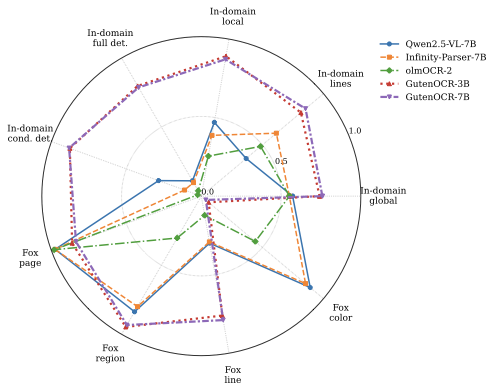
What's Inside
| Component | Description |
|---|---|
| Data Pipelines | Data utilities for 6+ document sources |
| Multi-GPU Training | Full-weight VLM fine-tuning with DeepSpeed ZeRO-3 |
| vLLM Evaluation | OCR benchmarking framework |
Models
We release state-of-the-art OCR models trained using this toolkit:
| Model | Parameters | Link |
|---|---|---|
| GutenOCR-3B | 3B | 🤗 rootsautomation/GutenOCR-3B |
| GutenOCR-7B | 7B | 🤗 rootsautomation/GutenOCR-7B |
Note: These model weights are released under the CC-BY-NC license.
Try our Live Demo to see them in action.
Model Usage
You can easily use the released models with the transformers library.
Quick Start
import torch
from transformers import Qwen2_5_VLForConditionalGeneration, AutoProcessor
from qwen_vl_utils import process_vision_info
from PIL import Image

# 1. Load model and processor
model_id = "rootsautomation/GutenOCR-3B"
model = Qwen2_5_VLForConditionalGeneration.from_pretrained(model_id, torch_dtype=torch.bfloat16, device_map="auto")
processor = AutoProcessor.from_pretrained(model_id)

# 2. Prepare inputs
image = Image.open("document.png")

# Example: Read all text
prompt = "Read all text in {image} and return a single TEXT string, linearized left-to-right/top-to-bottom."

messages = [
    {
        "role": "user",
        "content": [
            {"type": "image", "image": image},
            {"type": "text", "text": prompt},
        ],
    }
]

# 3. Process and Generate
text = processor.apply_chat_template(messages, tokenize=False, add_generation_prompt=True)
image_inputs, video_inputs = process_vision_info(messages)
inputs = processor(
    text=[text],
    images=image_inputs,
    videos=video_inputs,
    padding=True,
    return_tensors="pt",
)
inputs = inputs.to("cuda")

generated_ids = model.generate(**inputs, max_new_tokens=4096)
generated_ids_trimmed = [out_ids[len(in_ids) :] for in_ids, out_ids in zip(inputs.input_ids, generated_ids)]
output_text = processor.batch_decode(
    generated_ids_trimmed, skip_special_tokens=True, clean_up_tokenization_spaces=False
)

print(output_text[0])
Task Gallery
GutenOCR is steered by specific prompt templates. Below are common tasks:
Full OCR Reading
Extract text from the entire page.
Prompt: Return a layout-sensitive TEXT2D representation of the image.
Output:
This is the text found in the document.
It preserves line breaks.
Text Detection
Locate regions of text (lines, paragraphs, math) without transcribing them.
Prompt: Highlight all math in the image by returning their bounding boxes as a JSON array.
Output:
[[100, 200, 400, 250], [500, 600, 800, 650]]
Localized Reading
Read the text contained strictly within a specific bounding box.
Prompt: What does it say in [100, 200, 500, 600] of the image?
Output:
Content of the specific box.
Conditional Detection (Search)
Find the bounding box locations of a specific query string.
Prompt: Ground "Invoice #12345" in the image.
Output:
[[100, 200, 400, 250]]
System Prompt
The model relies on a specific system prompt to enforce output formats (JSON, bounding box normalization, etc.). This is automatically injected by the chat template, but included below for reference.
Click to view the full System Prompt
Your task is to read and localize text data from documents and images.

GEOMETRY:
    - Coordinates: integer pixels; origin (0,0) top-left; [x1,y1,x2,y2] with x1<x2, y1<y2.
    - Clip all boxes to the image bounds; drop boxes with zero/negative area.
    - Reading order: read text in natural reading order: top-to-bottom, left-to-right.
    - Rotated/angled text: return the axis-aligned bounding box of the minimal enclosing rectangle (no rotated boxes).

TASK TYPES:
    - reading: a full-text reading task on the entire image.
    - localized_reading: read text within a specified bounding box in the image.
    - detection: detect text regions in the image without transcription.
    - conditional_detection: detect text regions in the image based on a provided text query.

OUTPUT TYPES:
    - TEXT: one plain string; collapse multiple spaces to one; preserve line breaks. Non-grounded output only.
    - TEXT2D: one plain string; preserve whitespace as layout cue (spaces + `\n` only; no coordinates). Non-grounded output only.
    - LINES: JSON array of objects, corresponding to line-by-line OCR: `{"text": string, "bbox": [x1,y1,x2,y2]}`. When locally reading, only return the text: `string`.
    - WORDS: JSON array of objects, corresponding to word-by-word OCR: `{"text": string, "bbox": [x1,y1,x2,y2]}`.
    - PARAGRAPHS: JSON array of objects, corresponding to paragraph-wise OCR: `{"text": string, "bbox": [x1,y1,x2,y2]}`. When locally reading, only return the text: `string`.
    - LATEX: JSON array of objects, corresponding to LaTeX expressions: `{"text": string, "bbox": [x1,y1,x2,y2]}`. When locally reading, only return the latex: `string`.
    - BOX: JSON array of bounding boxes only: `[ [x1,y1,x2,y2], ... ]`. For detection and conditional_detection tasks only.

OUTPUT FORMAT
    - For non-grounded outputs, return a string.
    - For grounded outputs, return a JSON array of objects when performing reading tasks.
    - For detection tasks, return a JSON array of bounding boxes only.
    - For localized reading tasks, return the recognized text within the specified bounding box.
Data Pipelines
Standardized data processing pipelines that output a unified format with bounding boxes and text at word, line, and paragraph levels.
| Pipeline | Source | Description |
|---|---|---|
| Google Vision OCR | Cloud API | Text/document/PDF modes with polygon coordinates |
| Grounded LaTeX | LaTeX sources | Math equations with rotation variants & bbox annotations |
| IDL | Industry docs | Industry Document Library standardization |
| PubMed | Scientific papers | ~2M paper processing with failure recovery |
| SynthDoG Grounding | Synthetic | Multi-language doc generation (EN/ZH/JA/KO), text+bbox |
| TabMe++ | Industry docs | Azure-based OCR |
All pipelines output WebDataset tar shards with standardized JSON:
{
  "text": {
    "lines": [{"text": "Hello world", "bbox": [x1, y1, x2, y2]}],
    "text": "Full document text",
    "text2d": "Layout-preserved\ntext rendering"
  },
  "image": {"width": 1000, "height": 1400}
}
Training
Full-weight fine-tuning of Vision Language Models with multi-GPU support.
Location: experiments/qwen-multigpu-sft/
Features
- DeepSpeed ZeRO-3 optimization for memory-efficient training
- WebDataset streaming for large-scale data handling
- Flexible task system via CSV configuration
- Checkpoint resume with model-only loading option
Supported Tasks
| Task | Description |
|---|---|
reading | Full document OCR (text, text2d, lines+bbox, paragraphs+bbox) |
detection | Locate text regions without transcription |
localized_reading | Read text within a specified bounding box |
conditional_detection | Find bounding boxes for given text queries |
Quick Start
cd experiments/qwen-multigpu-sft

# Install dependencies
uv sync
uv pip install flash-attn --no-build-isolation

# Launch training (8 GPUs)
accelerate launch --config_file acc.yaml sft_clean.py \
    --train-shards "path/to/train/*.tar" \
    --val-shards "path/to/val/*.tar" \
    --output-dir ./checkpoints
Evaluation
Batch OCR evaluation using vLLM for fast inference across multiple GPUs.
| Framework | Description |
|---|---|
| vLLM OCR Eval | General OCR benchmarking (CER, WER, detection) |
| vLLM Fox | Fox benchmark for fine-grained document OCR |
Location: experiments/vllm-ocr-eval/
Metrics
| Category | Metrics |
|---|---|
| Text Quality | CER, WER, ANLS, Exact Match |
| Detection | Precision, Recall, F1 @ IoU thresholds |
| Structured | Combined bbox + text matching |
Quick Start
cd experiments/vllm-ocr-eval

# Generate predictions
uv run python run_evaluation.py \
    --model-name "Qwen/Qwen2.5-VL-7B-Instruct" \
    --shard-path data.tar \
    --task-types reading \
    --output-types text \
    --csv-output predictions.csv

# Score results
uv run python score_text_reading.py predictions.csv
Multi-GPU Evaluation
uv run python run_evaluation.py \
    --num-workers 4 \
    --shard-path "data/*.tar" \
    ...
Compatibility Notes
transformers>=5.0 and tied lm_head weights
Older GutenOCR checkpoints were saved with tie_word_embeddings: true, which omits lm_head.weight from the safetensors files. Starting with transformers>=5.0, the weight-tying resolution changed for *ForConditionalGeneration models with nested configs, causing lm_head.weight to be randomly initialized and producing gibberish output.
The Hub checkpoints will be updated so that new downloads work with any transformers version. In the meantime, if you experience gibberish output with transformers>=5.0, run the fix script on your local checkpoint:
python scripts/fix_tied_weights.py \
    --model-path /path/to/cached/GutenOCR-7B \
    --output-path /path/to/fixed/GutenOCR-7B
See Issue #5 for details.
Installation
Each component has its own dependencies. We recommend using uv for fast, reliable Python package management.
# Clone the repository
git clone https://github.com/Roots-Automation/GutenOCR.git
cd GutenOCR

# Install component-specific dependencies
cd experiments/qwen-multigpu-sft && uv sync
cd experiments/vllm-ocr-eval && uv sync
Development Setup
We use pre-commit to enforce linting and formatting before commits land.
pip install pre-commit
pre-commit install
Once installed, ruff lint/format checks and other hooks will run automatically on every git commit.
Contributing
We welcome contributions! Please see CONTRIBUTING.md for guidelines on reporting bugs, proposing features, and submitting pull requests.
Citation
@misc{heidenreich2026gutenocrgroundedvisionlanguagefrontend,
      title={GutenOCR: A Grounded Vision-Language Front-End for Documents},
      author={Hunter Heidenreich and Ben Elliott and Olivia Dinica and Yosheb Getachew},
      year={2026},
      eprint={2601.14490},
      archivePrefix={arXiv},
      primaryClass={cs.CV},
      url={https://arxiv.org/abs/2601.14490},
}

@misc{heidenreich2026pubmedocrpmcopenaccess,
      title={PubMed-OCR: PMC Open Access OCR Annotations},
      author={Hunter Heidenreich and Yosheb Getachew and Olivia Dinica and Ben Elliott},
      year={2026},
      eprint={2601.11425},
      archivePrefix={arXiv},
      primaryClass={cs.CV},
      url={https://arxiv.org/abs/2601.11425},
}
Acknowledgments
- Fox from UCAS --- fine-grained document understanding benchmark
- SynthDoG from NAVER Corp (MIT License) --- basis for our synthetic document generation
- Built with Qwen2.5-VL, vLLM, DeepSpeed
License
The code in this repository is licensed under the Apache License 2.0. The released model weights are licensed under CC-BY-NC.
Built with ❤️ for the open-source community
Significant stargazers

4,008 followers · starred Jan 2026

216 followers · starred Jan 2026
Similar repos






Languages
Python
91.1%
Shell
7.6%
Jupyter Notebook
1.4%
Open-source tools for training and evaluating Vision Language Models for OCR
Python
191
63 commits
updated Sep 22, 2026
README
GutenOCR
Open-source tools for training and evaluating Vision Language Models for OCR
Overview
GutenOCR provides a complete toolkit for building OCR systems powered by Vision Language Models (VLMs).
What's Inside
| Component | Description |
|---|---|
| Data Pipelines | Data utilities for 6+ document sources |
| Multi-GPU Training | Full-weight VLM fine-tuning with DeepSpeed ZeRO-3 |
| vLLM Evaluation | OCR benchmarking framework |
Models
We release state-of-the-art OCR models trained using this toolkit:
| Model | Parameters | Link |
|---|---|---|
| GutenOCR-3B | 3B | 🤗 rootsautomation/GutenOCR-3B |
| GutenOCR-7B | 7B | 🤗 rootsautomation/GutenOCR-7B |
Note: These model weights are released under the CC-BY-NC license.
Try our Live Demo to see them in action.
Model Usage
You can easily use the released models with the transformers library.
Quick Start
import torch
from transformers import Qwen2_5_VLForConditionalGeneration, AutoProcessor
from qwen_vl_utils import process_vision_info
from PIL import Image

# 1. Load model and processor
model_id = "rootsautomation/GutenOCR-3B"
model = Qwen2_5_VLForConditionalGeneration.from_pretrained(model_id, torch_dtype=torch.bfloat16, device_map="auto")
processor = AutoProcessor.from_pretrained(model_id)

# 2. Prepare inputs
image = Image.open("document.png")

# Example: Read all text
prompt = "Read all text in {image} and return a single TEXT string, linearized left-to-right/top-to-bottom."

messages = [
    {
        "role": "user",
        "content": [
            {"type": "image", "image": image},
            {"type": "text", "text": prompt},
        ],
    }
]

# 3. Process and Generate
text = processor.apply_chat_template(messages, tokenize=False, add_generation_prompt=True)
image_inputs, video_inputs = process_vision_info(messages)
inputs = processor(
    text=[text],
    images=image_inputs,
    videos=video_inputs,
    padding=True,
    return_tensors="pt",
)
inputs = inputs.to("cuda")

generated_ids = model.generate(**inputs, max_new_tokens=4096)
generated_ids_trimmed = [out_ids[len(in_ids) :] for in_ids, out_ids in zip(inputs.input_ids, generated_ids)]
output_text = processor.batch_decode(
    generated_ids_trimmed, skip_special_tokens=True, clean_up_tokenization_spaces=False
)

print(output_text[0])
Task Gallery
GutenOCR is steered by specific prompt templates. Below are common tasks:
Full OCR Reading
Extract text from the entire page.
Prompt: Return a layout-sensitive TEXT2D representation of the image.
Output:
This is the text found in the document.
It preserves line breaks.
Text Detection
Locate regions of text (lines, paragraphs, math) without transcribing them.
Prompt: Highlight all math in the image by returning their bounding boxes as a JSON array.
Output:
[[100, 200, 400, 250], [500, 600, 800, 650]]
Localized Reading
Read the text contained strictly within a specific bounding box.
Prompt: What does it say in [100, 200, 500, 600] of the image?
Output:
Content of the specific box.
Conditional Detection (Search)
Find the bounding box locations of a specific query string.
Prompt: Ground "Invoice #12345" in the image.
Output:
[[100, 200, 400, 250]]
System Prompt
The model relies on a specific system prompt to enforce output formats (JSON, bounding box normalization, etc.). This is automatically injected by the chat template, but included below for reference.
Click to view the full System Prompt
Your task is to read and localize text data from documents and images.

GEOMETRY:
    - Coordinates: integer pixels; origin (0,0) top-left; [x1,y1,x2,y2] with x1<x2, y1<y2.
    - Clip all boxes to the image bounds; drop boxes with zero/negative area.
    - Reading order: read text in natural reading order: top-to-bottom, left-to-right.
    - Rotated/angled text: return the axis-aligned bounding box of the minimal enclosing rectangle (no rotated boxes).

TASK TYPES:
    - reading: a full-text reading task on the entire image.
    - localized_reading: read text within a specified bounding box in the image.
    - detection: detect text regions in the image without transcription.
    - conditional_detection: detect text regions in the image based on a provided text query.

OUTPUT TYPES:
    - TEXT: one plain string; collapse multiple spaces to one; preserve line breaks. Non-grounded output only.
    - TEXT2D: one plain string; preserve whitespace as layout cue (spaces + `\n` only; no coordinates). Non-grounded output only.
    - LINES: JSON array of objects, corresponding to line-by-line OCR: `{"text": string, "bbox": [x1,y1,x2,y2]}`. When locally reading, only return the text: `string`.
    - WORDS: JSON array of objects, corresponding to word-by-word OCR: `{"text": string, "bbox": [x1,y1,x2,y2]}`.
    - PARAGRAPHS: JSON array of objects, corresponding to paragraph-wise OCR: `{"text": string, "bbox": [x1,y1,x2,y2]}`. When locally reading, only return the text: `string`.
    - LATEX: JSON array of objects, corresponding to LaTeX expressions: `{"text": string, "bbox": [x1,y1,x2,y2]}`. When locally reading, only return the latex: `string`.
    - BOX: JSON array of bounding boxes only: `[ [x1,y1,x2,y2], ... ]`. For detection and conditional_detection tasks only.

OUTPUT FORMAT
    - For non-grounded outputs, return a string.
    - For grounded outputs, return a JSON array of objects when performing reading tasks.
    - For detection tasks, return a JSON array of bounding boxes only.
    - For localized reading tasks, return the recognized text within the specified bounding box.
Data Pipelines
Standardized data processing pipelines that output a unified format with bounding boxes and text at word, line, and paragraph levels.
| Pipeline | Source | Description |
|---|---|---|
| Google Vision OCR | Cloud API | Text/document/PDF modes with polygon coordinates |
| Grounded LaTeX | LaTeX sources | Math equations with rotation variants & bbox annotations |
| IDL | Industry docs | Industry Document Library standardization |
| PubMed | Scientific papers | ~2M paper processing with failure recovery |
| SynthDoG Grounding | Synthetic | Multi-language doc generation (EN/ZH/JA/KO), text+bbox |
| TabMe++ | Industry docs | Azure-based OCR |
All pipelines output WebDataset tar shards with standardized JSON:
{
  "text": {
    "lines": [{"text": "Hello world", "bbox": [x1, y1, x2, y2]}],
    "text": "Full document text",
    "text2d": "Layout-preserved\ntext rendering"
  },
  "image": {"width": 1000, "height": 1400}
}
Training
Full-weight fine-tuning of Vision Language Models with multi-GPU support.
Location: experiments/qwen-multigpu-sft/
Features
- DeepSpeed ZeRO-3 optimization for memory-efficient training
- WebDataset streaming for large-scale data handling
- Flexible task system via CSV configuration
- Checkpoint resume with model-only loading option
Supported Tasks
| Task | Description |
|---|---|
reading | Full document OCR (text, text2d, lines+bbox, paragraphs+bbox) |
detection | Locate text regions without transcription |
localized_reading | Read text within a specified bounding box |
conditional_detection | Find bounding boxes for given text queries |
Quick Start
cd experiments/qwen-multigpu-sft

# Install dependencies
uv sync
uv pip install flash-attn --no-build-isolation

# Launch training (8 GPUs)
accelerate launch --config_file acc.yaml sft_clean.py \
    --train-shards "path/to/train/*.tar" \
    --val-shards "path/to/val/*.tar" \
    --output-dir ./checkpoints
Evaluation
Batch OCR evaluation using vLLM for fast inference across multiple GPUs.
| Framework | Description |
|---|---|
| vLLM OCR Eval | General OCR benchmarking (CER, WER, detection) |
| vLLM Fox | Fox benchmark for fine-grained document OCR |
Location: experiments/vllm-ocr-eval/
Metrics
| Category | Metrics |
|---|---|
| Text Quality | CER, WER, ANLS, Exact Match |
| Detection | Precision, Recall, F1 @ IoU thresholds |
| Structured | Combined bbox + text matching |
Quick Start
cd experiments/vllm-ocr-eval

# Generate predictions
uv run python run_evaluation.py \
    --model-name "Qwen/Qwen2.5-VL-7B-Instruct" \
    --shard-path data.tar \
    --task-types reading \
    --output-types text \
    --csv-output predictions.csv

# Score results
uv run python score_text_reading.py predictions.csv
Multi-GPU Evaluation
uv run python run_evaluation.py \
    --num-workers 4 \
    --shard-path "data/*.tar" \
    ...
Compatibility Notes
transformers>=5.0 and tied lm_head weights
Older GutenOCR checkpoints were saved with tie_word_embeddings: true, which omits lm_head.weight from the safetensors files. Starting with transformers>=5.0, the weight-tying resolution changed for *ForConditionalGeneration models with nested configs, causing lm_head.weight to be randomly initialized and producing gibberish output.
The Hub checkpoints will be updated so that new downloads work with any transformers version. In the meantime, if you experience gibberish output with transformers>=5.0, run the fix script on your local checkpoint:
python scripts/fix_tied_weights.py \
    --model-path /path/to/cached/GutenOCR-7B \
    --output-path /path/to/fixed/GutenOCR-7B
See Issue #5 for details.
Installation
Each component has its own dependencies. We recommend using uv for fast, reliable Python package management.
# Clone the repository
git clone https://github.com/Roots-Automation/GutenOCR.git
cd GutenOCR

# Install component-specific dependencies
cd experiments/qwen-multigpu-sft && uv sync
cd experiments/vllm-ocr-eval && uv sync
Development Setup
We use pre-commit to enforce linting and formatting before commits land.
pip install pre-commit
pre-commit install
Once installed, ruff lint/format checks and other hooks will run automatically on every git commit.
Contributing
We welcome contributions! Please see CONTRIBUTING.md for guidelines on reporting bugs, proposing features, and submitting pull requests.
Citation
@misc{heidenreich2026gutenocrgroundedvisionlanguagefrontend,
      title={GutenOCR: A Grounded Vision-Language Front-End for Documents},
      author={Hunter Heidenreich and Ben Elliott and Olivia Dinica and Yosheb Getachew},
      year={2026},
      eprint={2601.14490},
      archivePrefix={arXiv},
      primaryClass={cs.CV},
      url={https://arxiv.org/abs/2601.14490},
}

@misc{heidenreich2026pubmedocrpmcopenaccess,
      title={PubMed-OCR: PMC Open Access OCR Annotations},
      author={Hunter Heidenreich and Yosheb Getachew and Olivia Dinica and Ben Elliott},
      year={2026},
      eprint={2601.11425},
      archivePrefix={arXiv},
      primaryClass={cs.CV},
      url={https://arxiv.org/abs/2601.11425},
}
Acknowledgments
- Fox from UCAS --- fine-grained document understanding benchmark
- SynthDoG from NAVER Corp (MIT License) --- basis for our synthetic document generation
- Built with Qwen2.5-VL, vLLM, DeepSpeed
License
The code in this repository is licensed under the Apache License 2.0. The released model weights are licensed under CC-BY-NC.
Built with ❤️ for the open-source community
Similar repos
Significant stargazers
4,008 followers · starred Jan 2026
216 followers · starred Jan 2026
Languages
Python
91.1%
Shell
7.6%
Jupyter Notebook
1.4%