
See what people are saying (1)
README
semantic font
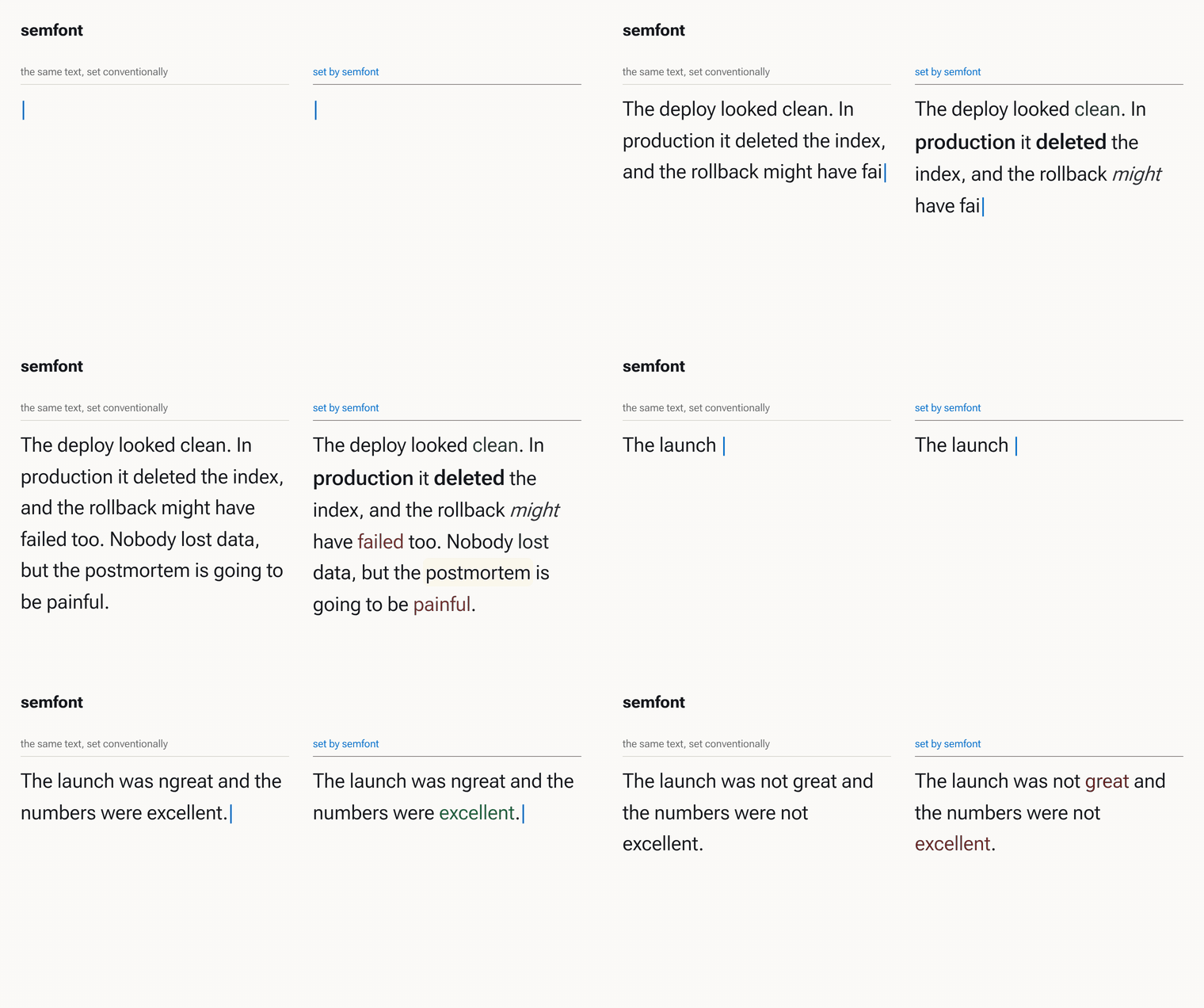
Typography that modulates on meaning instead of on markup. Negative things render red, important things get heavier, surprising things get highlighted, hedged things lean, and nothing in the pipeline is a model.
import { SemanticText } from 'semfont';

<SemanticText as="p">
  The migration ran clean on staging. In production it deleted the index,
  and the rollback failed too.
</SemanticText>
No markup went in. clean comes out green, deleted heavier and larger, and
failed red, because the engine read the sentence.
What this is not
The closest things a reader already has, and why each is a different shape of problem:
| you might reach for | what it keys on | why this is not that |
|---|---|---|
| syntax highlighting | grammar, from a parser | the categories are fixed by the language. Prose has no keywords, and failed is not a token type |
| Bionic Reading | word position, first n letters | one rule applied uniformly. It never reads a word, so every word gets the same treatment |
| a sentiment dashboard | a document, after the fact | reports a number about your text somewhere else. This sets the text itself, in place, as you write it |
<em> and <strong> | your decision, hand-made | the file keeps the emphasis and forgets the reason, so it stays put when the sentence changes |
| an LLM | everything, better | see below. It reads sarcasm; it cannot run inside a keystroke |
| variable font sliders | nothing | a control surface, not a decision. Something still has to decide what wght should be for this word |
The line through all of them: this is the only one where the typography is a function of the sentence, recomputed whenever the sentence changes.
Why not an LLM
Because typography has to keep up with typing. analyze() is a pure
synchronous function over lexicons and local rules: about a millisecond for a
page of prose, no network, no key, no async, nothing leaving the browser, and
the same input always gives the same output. That is what makes it usable as
a font rather than as a feature: it can run on every keystroke, in a
useMemo, during SSR, on a plane.
An LLM would read sarcasm better. It could not run 60 times a second inside a textarea.
The channels
Every token gets a score per channel, and each score drives a different typographic axis so they compose instead of collide:
| channel | range | signals | typography |
|---|---|---|---|
valence | −1..1 | sentiment lexicon, negation, intensifiers | colour |
salience | 0..1 | emphasis lexicon, caps, numerals, repeated rare words | weight (wght), size |
surprise | 0..1 | surprise markers, contrast conjunctions, local rarity spikes | highlight |
certainty | −1..1 | hedges and assertions, spread over the clause | slant (slnt), opacity |
technicality | 0..1 | camelCase, underscores, letters welded to digits, a short jargon list | MONO, in the technical theme |
The first four are on in every theme. technicality is scored always and
mapped only by technical, which is the pattern for adding your own: scoring a
channel costs a lookup per token, and a theme that ignores it pays nothing.
Two rules do most of the work. Negation flips and damps: not great is
mildly negative, not the mirror image of great. Rarity is relative to the
passage: a word is only remarkable next to the company it keeps, so the
threshold comes from this text rather than from a global corpus, which is how the
topic terms of a paragraph float up without anyone tagging them.
API
npm install semfont # react is a peer, only needed for the component
import { SemanticText, useSemanticText, analyze, themes, styleFor } from 'semfont';
The root import needs React present, because it exports the component. For the engine alone, with no React installed at all, import the subpaths:
import { analyze } from 'semfont/analyze';
import { styleFor, themes } from 'semfont/theme';
<SemanticText> props:
| prop | default | |
|---|---|---|
text / children | none | the passage |
theme | 'editorial' | 'editorial', 'loud', 'monochrome', or a theme object |
channels | all four | which channels may style |
sensitivity | 1 | global gain on every score |
lexicon | none | extra entries per channel, merged over the defaults |
as | 'span' | element to render |
debug | false | emit the scores as data-* attributes |
onAnalyze | none | passage-level readout |
useSemanticText(text, options) returns the scored tokens and the runs, for
rendering it yourself. analyze(text, options) is the engine alone, without
React, and styleFor(token, theme) is the mapping alone.
Teach it your vocabulary with a lexicon:
<SemanticText
  lexicon={{ valence: { flaky: -0.7, oncall: -0.4 }, salience: { rollback: 0.8 } }}
  text={incident}
/>
Taking only the part you want
The four channels are independent all the way down, and there are four places to cut, from coarsest to finest.
Pick channels. Nothing but colour:
<SemanticText text={incident} channels={['valence']} />
Every other channel scores 0 and emits nothing, so the spans carry exactly one
CSS property. demo/react.html mounts the same paragraph three times this
way.
Pick axes. A theme's map is a list of rows, one per channel-to-axis
pairing, so how many modulations you get is yours to set. Weight without the
size change is one row removed:
import { themes } from 'semfont';

<SemanticText
  theme={{ map: themes.editorial.map.filter((row) => row.render !== 'size') }}
  text={incident}
/>
A row is { channel, render, ...options }, plus an optional
side: 'negative' | 'positive' to fire on only half of a bipolar channel. The
renderers are color, weight, size, highlight, slant, tracking,
fade, underline, and Recursive's own mono, casual and cursive. Rows
are independent and additive, so another one is a line of data:
<SemanticText
  theme={{ map: [...themes.editorial.map,
                 { channel: 'technicality', render: 'mono' }] }}
  text={incident}
/>
Cost, measured on a 2,875-character page: scoring five channels takes 1.43ms, and running a nine-row map over every token takes 0.47ms. The ceiling on how many modulations to use is legibility rather than speed, since emphasis works by contrast and a page where everything moves has nothing left to move against.
Keep the scores, render it yourself. useSemanticText hands back the
tokens and runs, so the styling can be your own classes, a <mark>, an
ARIA annotation, a minimap, anything.
Or skip the typography entirely. analyze(text) is the engine alone: no
React, no CSS, four numbers per token. It is also useful as a plain text
signal: sorting a log by salience, flagging hedged sentences in review.
As a static site
Everything is client-side; there is no server component to any of it.
src/analyze.js and src/theme.js import nothing at all, so a static page
can load them directly, which is exactly what demo/index.html does, and it
needs only a file server (python3 -m http.server, GitHub Pages, an S3
bucket). ES modules do need HTTP rather than file://.
SemanticText.js imports react as a bare specifier. Inside any bundler or
static-site generator that resolves itself. In a page with no bundler, one
import map is the whole setup:
<script type="importmap">
  { "imports": { "react": "https://esm.sh/react@18.3.1",
                 "react-dom/client": "https://esm.sh/react-dom@18.3.1/client" } }
</script>
See demo/react.html, which runs the component with no build step of any
kind. And because analyze() is synchronous and pure, the component renders
under renderToStaticMarkup, so a static site can prerender the typography
into the HTML and ship no JavaScript at all.
Speed
analyze() runs in under a millisecond per hundred words on a laptop, linear
in the length of the text, and that is a budget rather than a measurement. A
rule that would put the default engine over it does not go in. If one earns
its place at a higher cost it ships as a separate model, selected explicitly,
so the default never gets slower.
npm run bench                 # ms per hundred words on this README
npm run bench -- essay.md     # or on your own text
Vocabulary
Valence comes from two layers. The hand-written table in src/lexicon.js is
the vocabulary of software and incidents, a few hundred words with the scores
the demos were tuned on. Under it sits about four thousand everyday words from
the VADER sentiment lexicon
(Hutto and Gilbert, 2014, MIT), filtered to the words its raters felt at least
moderately about, minus anything that belongs to another channel and a short
list of words VADER rates by their happiest sense. The hand table wins wherever
they overlap. node scripts/vader.mjs regenerates src/vader.js.
Two passes
The first pass gives each word its lexicon entry and a fixed window of two or
three neighbours. On its own that reads fixed the crash as one good word and
one bad word, leaves great green six words after a not, and takes Great, another outage at face value.
The second pass re-derives valence over clauses instead of windows. Still no model, still deterministic, about half the total cost. Five rules:
| rule | example | window alone | with the clause pass |
|---|---|---|---|
| a negator reaches to the end of its clause | I would not go so far as to call it great | great | |
| a resolver flips the harm it resolves | we fixed the crash; the leak is gone | crash, leak | crash, leak |
| less of a bad thing is good | less broken, fewer complaints | broken | broken |
| too turns praise into a complaint | too simple | simple | simple |
| a lone opener before bad news is sarcasm; a quote the writer calls wrong is not the writer's word | Great, another outage. / called it "terrible", which is wrong | Great, terrible | Great, terrible |
Every change the clause pass makes is written to token.notes, so a debug
panel can say why a word came out the colour it did:
['resolved by "fixed"'].
Themes
editorial is deliberately quiet: high thresholds, small ranges, most words
left completely alone. If every word is styled, none of them is emphasised.
loud turns the same scores up for a headline or a demo. monochrome emits
no colour at all, for print, e-ink, and for the fact that colour alone is not
an accessible channel. Losing colour means the four channels have to be
re-seated rather than merely recoloured, so valence takes the slant, salience
keeps weight and size, surprise takes an underline, and certainty rides
tracking in both directions, loosening when hedged and tightening when
assertive. technical adds the fifth channel on MONO, so identifiers shift
toward monospace, and puts hedges on CASL as well as slnt.
Running it
node --test test/*.test.js      # engine + theme tests, no dependencies
npm install react react-dom     # only for the React render tests
python3 -m http.server          # then open /demo/, or / for a whole page of it
demo/ is the fastest way to see it: five sample passages, live editing,
per-channel toggles, and a hover readout of every score.
index.html at the root is the engine set loose on a whole page. Every word of
it is scored and styled at load, the rail re-runs the page when you change a
channel, the sensitivity or the theme, and the box at the top takes your own
text. It imports src/ directly, so there is no second copy of the engine and
no build step.
src/ has no dependencies and no build step. It is ESM that runs in Node and
in the browser as-is, using createElement rather than JSX so it needs no
transform. React is a peer, and only SemanticText.js imports it.
What it gets wrong
Sarcasm, irony, and domain jargon it has not been taught. The lexicons are a
few hundred entries, so anything specialised needs a lexicon prop. It scores
English only. And it reads words, not arguments: it will not notice that a
calm sentence is describing a catastrophe.
Contributors

33 commits
Similar repos


Languages
JavaScript
75.8%
HTML
24.2%
See what people are saying (1)
README
semantic font
Typography that modulates on meaning instead of on markup. Negative things render red, important things get heavier, surprising things get highlighted, hedged things lean, and nothing in the pipeline is a model.
import { SemanticText } from 'semfont';

<SemanticText as="p">
  The migration ran clean on staging. In production it deleted the index,
  and the rollback failed too.
</SemanticText>
No markup went in. clean comes out green, deleted heavier and larger, and
failed red, because the engine read the sentence.
What this is not
The closest things a reader already has, and why each is a different shape of problem:
| you might reach for | what it keys on | why this is not that |
|---|---|---|
| syntax highlighting | grammar, from a parser | the categories are fixed by the language. Prose has no keywords, and failed is not a token type |
| Bionic Reading | word position, first n letters | one rule applied uniformly. It never reads a word, so every word gets the same treatment |
| a sentiment dashboard | a document, after the fact | reports a number about your text somewhere else. This sets the text itself, in place, as you write it |
<em> and <strong> | your decision, hand-made | the file keeps the emphasis and forgets the reason, so it stays put when the sentence changes |
| an LLM | everything, better | see below. It reads sarcasm; it cannot run inside a keystroke |
| variable font sliders | nothing | a control surface, not a decision. Something still has to decide what wght should be for this word |
The line through all of them: this is the only one where the typography is a function of the sentence, recomputed whenever the sentence changes.
Why not an LLM
Because typography has to keep up with typing. analyze() is a pure
synchronous function over lexicons and local rules: about a millisecond for a
page of prose, no network, no key, no async, nothing leaving the browser, and
the same input always gives the same output. That is what makes it usable as
a font rather than as a feature: it can run on every keystroke, in a
useMemo, during SSR, on a plane.
An LLM would read sarcasm better. It could not run 60 times a second inside a textarea.
The channels
Every token gets a score per channel, and each score drives a different typographic axis so they compose instead of collide:
| channel | range | signals | typography |
|---|---|---|---|
valence | −1..1 | sentiment lexicon, negation, intensifiers | colour |
salience | 0..1 | emphasis lexicon, caps, numerals, repeated rare words | weight (wght), size |
surprise | 0..1 | surprise markers, contrast conjunctions, local rarity spikes | highlight |
certainty | −1..1 | hedges and assertions, spread over the clause | slant (slnt), opacity |
technicality | 0..1 | camelCase, underscores, letters welded to digits, a short jargon list | MONO, in the technical theme |
The first four are on in every theme. technicality is scored always and
mapped only by technical, which is the pattern for adding your own: scoring a
channel costs a lookup per token, and a theme that ignores it pays nothing.
Two rules do most of the work. Negation flips and damps: not great is
mildly negative, not the mirror image of great. Rarity is relative to the
passage: a word is only remarkable next to the company it keeps, so the
threshold comes from this text rather than from a global corpus, which is how the
topic terms of a paragraph float up without anyone tagging them.
API
npm install semfont # react is a peer, only needed for the component
import { SemanticText, useSemanticText, analyze, themes, styleFor } from 'semfont';
The root import needs React present, because it exports the component. For the engine alone, with no React installed at all, import the subpaths:
import { analyze } from 'semfont/analyze';
import { styleFor, themes } from 'semfont/theme';
<SemanticText> props:
| prop | default | |
|---|---|---|
text / children | none | the passage |
theme | 'editorial' | 'editorial', 'loud', 'monochrome', or a theme object |
channels | all four | which channels may style |
sensitivity | 1 | global gain on every score |
lexicon | none | extra entries per channel, merged over the defaults |
as | 'span' | element to render |
debug | false | emit the scores as data-* attributes |
onAnalyze | none | passage-level readout |
useSemanticText(text, options) returns the scored tokens and the runs, for
rendering it yourself. analyze(text, options) is the engine alone, without
React, and styleFor(token, theme) is the mapping alone.
Teach it your vocabulary with a lexicon:
<SemanticText
  lexicon={{ valence: { flaky: -0.7, oncall: -0.4 }, salience: { rollback: 0.8 } }}
  text={incident}
/>
Taking only the part you want
The four channels are independent all the way down, and there are four places to cut, from coarsest to finest.
Pick channels. Nothing but colour:
<SemanticText text={incident} channels={['valence']} />
Every other channel scores 0 and emits nothing, so the spans carry exactly one
CSS property. demo/react.html mounts the same paragraph three times this
way.
Pick axes. A theme's map is a list of rows, one per channel-to-axis
pairing, so how many modulations you get is yours to set. Weight without the
size change is one row removed:
import { themes } from 'semfont';

<SemanticText
  theme={{ map: themes.editorial.map.filter((row) => row.render !== 'size') }}
  text={incident}
/>
A row is { channel, render, ...options }, plus an optional
side: 'negative' | 'positive' to fire on only half of a bipolar channel. The
renderers are color, weight, size, highlight, slant, tracking,
fade, underline, and Recursive's own mono, casual and cursive. Rows
are independent and additive, so another one is a line of data:
<SemanticText
  theme={{ map: [...themes.editorial.map,
                 { channel: 'technicality', render: 'mono' }] }}
  text={incident}
/>
Cost, measured on a 2,875-character page: scoring five channels takes 1.43ms, and running a nine-row map over every token takes 0.47ms. The ceiling on how many modulations to use is legibility rather than speed, since emphasis works by contrast and a page where everything moves has nothing left to move against.
Keep the scores, render it yourself. useSemanticText hands back the
tokens and runs, so the styling can be your own classes, a <mark>, an
ARIA annotation, a minimap, anything.
Or skip the typography entirely. analyze(text) is the engine alone: no
React, no CSS, four numbers per token. It is also useful as a plain text
signal: sorting a log by salience, flagging hedged sentences in review.
As a static site
Everything is client-side; there is no server component to any of it.
src/analyze.js and src/theme.js import nothing at all, so a static page
can load them directly, which is exactly what demo/index.html does, and it
needs only a file server (python3 -m http.server, GitHub Pages, an S3
bucket). ES modules do need HTTP rather than file://.
SemanticText.js imports react as a bare specifier. Inside any bundler or
static-site generator that resolves itself. In a page with no bundler, one
import map is the whole setup:
<script type="importmap">
  { "imports": { "react": "https://esm.sh/react@18.3.1",
                 "react-dom/client": "https://esm.sh/react-dom@18.3.1/client" } }
</script>
See demo/react.html, which runs the component with no build step of any
kind. And because analyze() is synchronous and pure, the component renders
under renderToStaticMarkup, so a static site can prerender the typography
into the HTML and ship no JavaScript at all.
Speed
analyze() runs in under a millisecond per hundred words on a laptop, linear
in the length of the text, and that is a budget rather than a measurement. A
rule that would put the default engine over it does not go in. If one earns
its place at a higher cost it ships as a separate model, selected explicitly,
so the default never gets slower.
npm run bench                 # ms per hundred words on this README
npm run bench -- essay.md     # or on your own text
Vocabulary
Valence comes from two layers. The hand-written table in src/lexicon.js is
the vocabulary of software and incidents, a few hundred words with the scores
the demos were tuned on. Under it sits about four thousand everyday words from
the VADER sentiment lexicon
(Hutto and Gilbert, 2014, MIT), filtered to the words its raters felt at least
moderately about, minus anything that belongs to another channel and a short
list of words VADER rates by their happiest sense. The hand table wins wherever
they overlap. node scripts/vader.mjs regenerates src/vader.js.
Two passes
The first pass gives each word its lexicon entry and a fixed window of two or
three neighbours. On its own that reads fixed the crash as one good word and
one bad word, leaves great green six words after a not, and takes Great, another outage at face value.
The second pass re-derives valence over clauses instead of windows. Still no model, still deterministic, about half the total cost. Five rules:
| rule | example | window alone | with the clause pass |
|---|---|---|---|
| a negator reaches to the end of its clause | I would not go so far as to call it great | great | |
| a resolver flips the harm it resolves | we fixed the crash; the leak is gone | crash, leak | crash, leak |
| less of a bad thing is good | less broken, fewer complaints | broken | broken |
| too turns praise into a complaint | too simple | simple | simple |
| a lone opener before bad news is sarcasm; a quote the writer calls wrong is not the writer's word | Great, another outage. / called it "terrible", which is wrong | Great, terrible | Great, terrible |
Every change the clause pass makes is written to token.notes, so a debug
panel can say why a word came out the colour it did:
['resolved by "fixed"'].
Themes
editorial is deliberately quiet: high thresholds, small ranges, most words
left completely alone. If every word is styled, none of them is emphasised.
loud turns the same scores up for a headline or a demo. monochrome emits
no colour at all, for print, e-ink, and for the fact that colour alone is not
an accessible channel. Losing colour means the four channels have to be
re-seated rather than merely recoloured, so valence takes the slant, salience
keeps weight and size, surprise takes an underline, and certainty rides
tracking in both directions, loosening when hedged and tightening when
assertive. technical adds the fifth channel on MONO, so identifiers shift
toward monospace, and puts hedges on CASL as well as slnt.
Running it
node --test test/*.test.js      # engine + theme tests, no dependencies
npm install react react-dom     # only for the React render tests
python3 -m http.server          # then open /demo/, or / for a whole page of it
demo/ is the fastest way to see it: five sample passages, live editing,
per-channel toggles, and a hover readout of every score.
index.html at the root is the engine set loose on a whole page. Every word of
it is scored and styled at load, the rail re-runs the page when you change a
channel, the sensitivity or the theme, and the box at the top takes your own
text. It imports src/ directly, so there is no second copy of the engine and
no build step.
src/ has no dependencies and no build step. It is ESM that runs in Node and
in the browser as-is, using createElement rather than JSX so it needs no
transform. React is a peer, and only SemanticText.js imports it.
What it gets wrong
Sarcasm, irony, and domain jargon it has not been taught. The lexicons are a
few hundred entries, so anything specialised needs a lexicon prop. It scores
English only. And it reads words, not arguments: it will not notice that a
calm sentence is describing a catastrophe.
Similar repos
Contributors
33 commits
Languages
JavaScript
75.8%
HTML
24.2%