
OmniReasoner: Thinking with Long Audio-Video via Native Tool Use
Python
35
8 commits
updated Jul 22, 2026
README





Long audio-video reasoning is difficult for omnimodal LLMs because the decisive evidence is often sparse, cross-modal, and too expensive to preserve with uniformly high-fidelity inputs. OmniReasoner is a tool-use post-training framework for Thinking with Long Audio-Video: omni-modal LLMs learn, via supervised fine-tuning and reinforcement learning, to decide whether and where to call a native zoom-in tool before answering. It first builds a low-cost global preview of the full stream and then, when needed, calls the zoom-in tool with a TimeAnchor-grounded temporal interval for higher-fidelity visual and audio inspection.
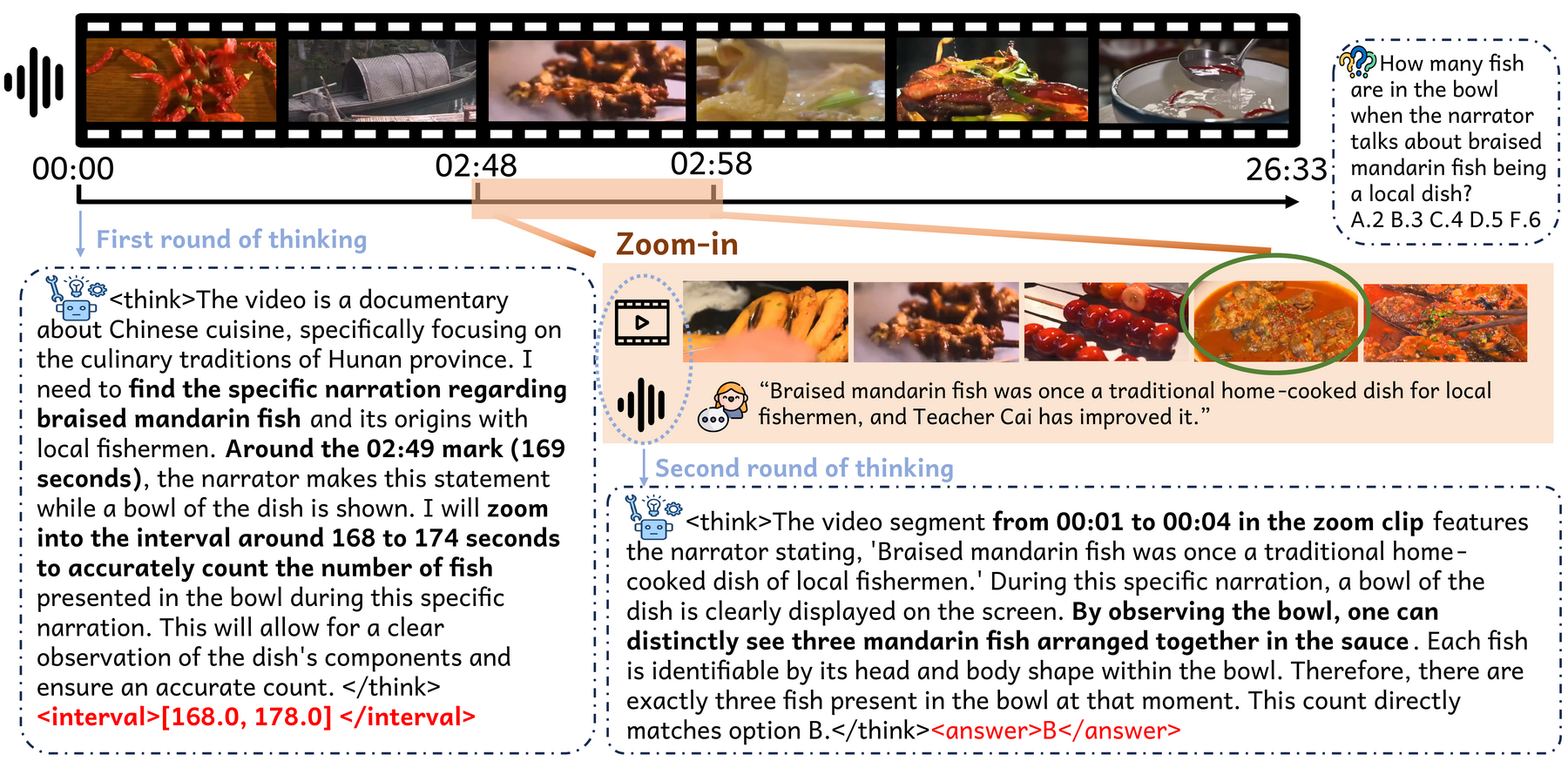
An OmniReasoner inference example. The question asks how many fish are in the bowl when the narrator talks about braised mandarin fish. OmniReasoner identifies the relevant narration around the 02:49 mark, requests a zoom-in interval, and in the returned clip observes the narration and the bowl together to count three mandarin fish — answer B.
Highlights
Three pieces make native long audio-video tool use practical:
- Zoom-in tool use — trains the model to choose between direct answering and calling a tool that retrieves a higher-fidelity local audio-video clip.
- TimeAnchor — grounds tool arguments on a shared absolute-time timeline (seconds, not frame indices) so the requested interval stays valid across the sparse global preview and the dense returned clip.
- Temporal Augmented Data Engine — creates temporally grounded long audio-video tasks by video editing and composition, providing scalable supervision for when to call the tool, where to point it, and how to answer from retrieved evidence.
Overview
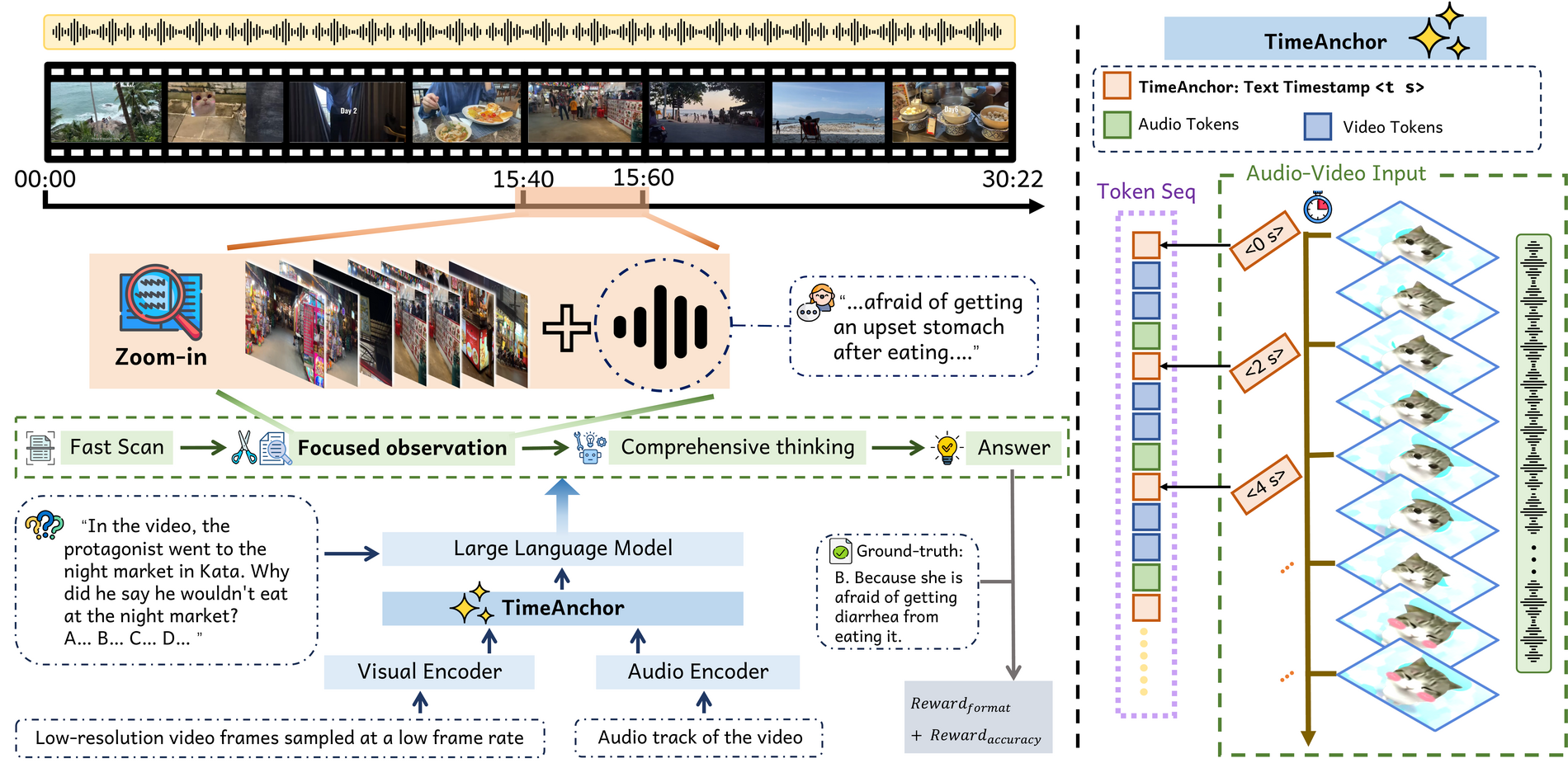
Given a long audio-video input and a question, OmniReasoner performs a low-cost global scan, then either answers directly or emits a TimeAnchor-grounded zoom-in tool call. The media environment returns the requested local audio-video interval at higher fidelity, and the model produces the final answer from the global context and retrieved evidence. The post-training objective therefore teaches not only how to answer, but also when to call the tool and where it should be pointed.
Two-Stage Reasoning Protocol
Stage 1  — global low-cost scan of the full audio-video stream
  model output: <think>...</think><interval>[start, end]</interval>
               (interval in absolute seconds via TimeAnchor)

Stage 2  — high-fidelity zoom into the requested interval
  model output: <think>...</think><answer>...</answer>
The model learns to decide whether and where to call the zoom-in tool. When Stage 1 has enough evidence to answer directly, the tool call is skipped.
Temporal Augmented Data Engine
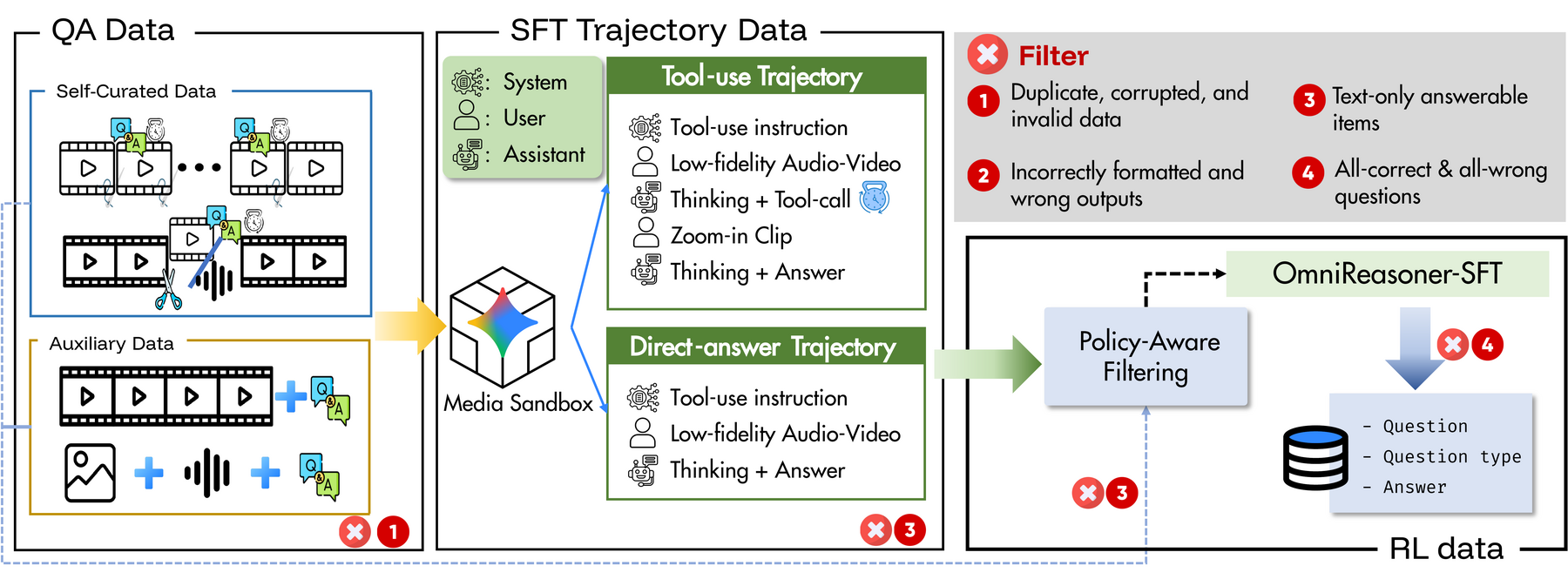
Temporal editing creates long audio-video tasks with constructed evidence intervals. MediaSandbox converts these tasks into global-to-local tool-use trajectories, and filtering yields the SFT and difficulty-aware RL mixtures used to train OmniReasoner.
Training Data
| Split | Source | Samples | Purpose |
|---|---|---|---|
| SFT | Multi-segment composition | 13,222 | temporal localization and zoom-in QA |
| SFT | Anomaly insertion | 5,319 | audio-video anomaly grounding |
| SFT | FineVideo online tool-use | 2,581 | open-ended long-video QA tool-use |
| SFT | AVQA-R1 | 2,988 | image-audio generalization |
| SFT | CG-Bench auxiliary | 1,729 | public long-video QA diversity |
| RL | Composition rejection sampling | 1,366 | mixed-outcome MCQ reasoning |
| RL | CG-Bench pass@k mining | 658 | hard MCQ cases |
| RL | FineVideo pass@k mining | 707 | hard open-ended cases |
The SFT mixture (25,839 total) provides answer, interval, and tool-use trajectory
supervision. The RL mixture (2,731 total) contains examples selected to produce
non-degenerate group-relative rewards under the SFT policy. The released dataset is
available at
Rocky131/OmniReasoner-SFT.
Repository Map
OmniReasoner/
├── data_factory/
│   ├── video_construction/         # Temporal Augmented Data Engine
│   │   ├── anomaly/                #   anomaly insertion pipeline
│   │   └── composition/            #   multi-segment composition pipeline
│   ├── sft-cot/                    # teacher CoT generation, filtering, SFT export
│   └── rl_mcq/                     # RL MCQ mining (pass@k, rejection sampling)
├── utils/                          # video preprocessing and verification
├── lmms-engine/                    # SFT training framework
├── src/r1-v/                       # GRPO/RL training code
├── src/qwen-omni-utils/            # Qwen-Omni media processing utilities
├── lmms-eval/                      # benchmark evaluation framework
├── evalkit/                        # additional OmniReasoner eval runners
├── configs/                        # training and eval config templates
├── examples/                       # launcher scripts
└── docs/                           # architecture and usage notes
Quick Start
System Dependencies
Install FFmpeg (tested against 4.4–7.x):
# Debian / Ubuntu
sudo apt-get update && sudo apt-get install -y ffmpeg

# macOS
brew install ffmpeg

# conda
conda install -c conda-forge ffmpeg
decord is optional (used for frame-level validation in preprocessing scripts):
pip install decord
Python Install
cd OmniReasoner
pip install -e src/qwen-omni-utils
pip install -e lmms-engine
pip install -e lmms-eval
pip install -e src/r1-v
Data Construction
# Anomaly insertion (Temporal Augmented Data Engine — anomaly branch)
python data_factory/video_construction/anomaly/main.py --help

# Multi-segment composition (Temporal Augmented Data Engine — composition branch)
python data_factory/video_construction/composition/long_video_reasoning_generator.py --help

# SFT CoT generation and filtering pipeline
ls data_factory/sft-cot/scripts

# Preprocess and verify generated videos
python utils/preprocess_composition_dataset.py --help
python utils/verify_anomaly_dataset.py --help
SFT Training
MODEL_PATH=/path/to/Qwen2.5-Omni-Thinker-7B \
DATASET_PATH=/path/to/sft_train.jsonl \
OUTPUT_DIR=/path/to/output \
bash examples/sft_lmms_engine/run_omnireasoner_sft_template.sh
RL Training
MODEL_PATH=/path/to/sft_checkpoint \
UNIFIED_DATASET_PATH=/path/to/rl_train.jsonl \
bash src/r1-v/scripts/run_grpo_unified_single_node.sh
Evaluation
bash examples/eval_lmms_eval/run_qwen2_5_omni_two_stage_template.sh
Documentation
- Architecture Overview
- Data Factory
- SFT CoT Construction
- SFT Training with lmms-engine
- RL Training with src/r1-v
- Evaluation with lmms-eval
- Data Schemas
- Utility Workflows
Data and Checkpoints
Generated datasets, videos, logs, checkpoints, and benchmark outputs are not
stored in this code repository. Use the scripts and templates here with your
own dataset roots and model checkpoints. The released SFT dataset is available
on Hugging Face at
Rocky131/OmniReasoner-SFT.
License
This project is released under the Apache License 2.0. The vendored
lmms-eval/ and src/r1-v/ components retain their own upstream licenses (see the
LICENSE file inside each directory).
Citation
If you find this work useful, please cite:
@misc{chen2026omnireasonerthinkinglongaudiovideo,
      title={OmniReasoner: Thinking with Long Audio-Video via Native Tool Use},
      author={Yu Chen and Caorui Li and Ziyu Xiong and Yidong Wang and Mingqi Gao and Shuman Liu and Biao Liu and Chunfeng Yang and Anxiang Zeng and Haibo Zhang and Chaofan Chen},
      year={2026},
      eprint={2607.19339},
      archivePrefix={arXiv},
      primaryClass={cs.CV},
      url={https://arxiv.org/abs/2607.19339},
}
Similar repos


OmniReasoner: Thinking with Long Audio-Video via Native Tool Use
Python
35
8 commits
updated Jul 22, 2026
README
Long audio-video reasoning is difficult for omnimodal LLMs because the decisive evidence is often sparse, cross-modal, and too expensive to preserve with uniformly high-fidelity inputs. OmniReasoner is a tool-use post-training framework for Thinking with Long Audio-Video: omni-modal LLMs learn, via supervised fine-tuning and reinforcement learning, to decide whether and where to call a native zoom-in tool before answering. It first builds a low-cost global preview of the full stream and then, when needed, calls the zoom-in tool with a TimeAnchor-grounded temporal interval for higher-fidelity visual and audio inspection.
An OmniReasoner inference example. The question asks how many fish are in the bowl when the narrator talks about braised mandarin fish. OmniReasoner identifies the relevant narration around the 02:49 mark, requests a zoom-in interval, and in the returned clip observes the narration and the bowl together to count three mandarin fish — answer B.
Highlights
Three pieces make native long audio-video tool use practical:
- Zoom-in tool use — trains the model to choose between direct answering and calling a tool that retrieves a higher-fidelity local audio-video clip.
- TimeAnchor — grounds tool arguments on a shared absolute-time timeline (seconds, not frame indices) so the requested interval stays valid across the sparse global preview and the dense returned clip.
- Temporal Augmented Data Engine — creates temporally grounded long audio-video tasks by video editing and composition, providing scalable supervision for when to call the tool, where to point it, and how to answer from retrieved evidence.
Overview
Given a long audio-video input and a question, OmniReasoner performs a low-cost global scan, then either answers directly or emits a TimeAnchor-grounded zoom-in tool call. The media environment returns the requested local audio-video interval at higher fidelity, and the model produces the final answer from the global context and retrieved evidence. The post-training objective therefore teaches not only how to answer, but also when to call the tool and where it should be pointed.
Two-Stage Reasoning Protocol
Stage 1  — global low-cost scan of the full audio-video stream
  model output: <think>...</think><interval>[start, end]</interval>
               (interval in absolute seconds via TimeAnchor)

Stage 2  — high-fidelity zoom into the requested interval
  model output: <think>...</think><answer>...</answer>
The model learns to decide whether and where to call the zoom-in tool. When Stage 1 has enough evidence to answer directly, the tool call is skipped.
Temporal Augmented Data Engine
Temporal editing creates long audio-video tasks with constructed evidence intervals. MediaSandbox converts these tasks into global-to-local tool-use trajectories, and filtering yields the SFT and difficulty-aware RL mixtures used to train OmniReasoner.
Training Data
| Split | Source | Samples | Purpose |
|---|---|---|---|
| SFT | Multi-segment composition | 13,222 | temporal localization and zoom-in QA |
| SFT | Anomaly insertion | 5,319 | audio-video anomaly grounding |
| SFT | FineVideo online tool-use | 2,581 | open-ended long-video QA tool-use |
| SFT | AVQA-R1 | 2,988 | image-audio generalization |
| SFT | CG-Bench auxiliary | 1,729 | public long-video QA diversity |
| RL | Composition rejection sampling | 1,366 | mixed-outcome MCQ reasoning |
| RL | CG-Bench pass@k mining | 658 | hard MCQ cases |
| RL | FineVideo pass@k mining | 707 | hard open-ended cases |
The SFT mixture (25,839 total) provides answer, interval, and tool-use trajectory
supervision. The RL mixture (2,731 total) contains examples selected to produce
non-degenerate group-relative rewards under the SFT policy. The released dataset is
available at
Rocky131/OmniReasoner-SFT.
Repository Map
OmniReasoner/
├── data_factory/
│   ├── video_construction/         # Temporal Augmented Data Engine
│   │   ├── anomaly/                #   anomaly insertion pipeline
│   │   └── composition/            #   multi-segment composition pipeline
│   ├── sft-cot/                    # teacher CoT generation, filtering, SFT export
│   └── rl_mcq/                     # RL MCQ mining (pass@k, rejection sampling)
├── utils/                          # video preprocessing and verification
├── lmms-engine/                    # SFT training framework
├── src/r1-v/                       # GRPO/RL training code
├── src/qwen-omni-utils/            # Qwen-Omni media processing utilities
├── lmms-eval/                      # benchmark evaluation framework
├── evalkit/                        # additional OmniReasoner eval runners
├── configs/                        # training and eval config templates
├── examples/                       # launcher scripts
└── docs/                           # architecture and usage notes
Quick Start
System Dependencies
Install FFmpeg (tested against 4.4–7.x):
# Debian / Ubuntu
sudo apt-get update && sudo apt-get install -y ffmpeg

# macOS
brew install ffmpeg

# conda
conda install -c conda-forge ffmpeg
decord is optional (used for frame-level validation in preprocessing scripts):
pip install decord
Python Install
cd OmniReasoner
pip install -e src/qwen-omni-utils
pip install -e lmms-engine
pip install -e lmms-eval
pip install -e src/r1-v
Data Construction
# Anomaly insertion (Temporal Augmented Data Engine — anomaly branch)
python data_factory/video_construction/anomaly/main.py --help

# Multi-segment composition (Temporal Augmented Data Engine — composition branch)
python data_factory/video_construction/composition/long_video_reasoning_generator.py --help

# SFT CoT generation and filtering pipeline
ls data_factory/sft-cot/scripts

# Preprocess and verify generated videos
python utils/preprocess_composition_dataset.py --help
python utils/verify_anomaly_dataset.py --help
SFT Training
MODEL_PATH=/path/to/Qwen2.5-Omni-Thinker-7B \
DATASET_PATH=/path/to/sft_train.jsonl \
OUTPUT_DIR=/path/to/output \
bash examples/sft_lmms_engine/run_omnireasoner_sft_template.sh
RL Training
MODEL_PATH=/path/to/sft_checkpoint \
UNIFIED_DATASET_PATH=/path/to/rl_train.jsonl \
bash src/r1-v/scripts/run_grpo_unified_single_node.sh
Evaluation
bash examples/eval_lmms_eval/run_qwen2_5_omni_two_stage_template.sh
Documentation
- Architecture Overview
- Data Factory
- SFT CoT Construction
- SFT Training with lmms-engine
- RL Training with src/r1-v
- Evaluation with lmms-eval
- Data Schemas
- Utility Workflows
Data and Checkpoints
Generated datasets, videos, logs, checkpoints, and benchmark outputs are not
stored in this code repository. Use the scripts and templates here with your
own dataset roots and model checkpoints. The released SFT dataset is available
on Hugging Face at
Rocky131/OmniReasoner-SFT.
License
This project is released under the Apache License 2.0. The vendored
lmms-eval/ and src/r1-v/ components retain their own upstream licenses (see the
LICENSE file inside each directory).
Citation
If you find this work useful, please cite:
@misc{chen2026omnireasonerthinkinglongaudiovideo,
      title={OmniReasoner: Thinking with Long Audio-Video via Native Tool Use},
      author={Yu Chen and Caorui Li and Ziyu Xiong and Yidong Wang and Mingqi Gao and Shuman Liu and Biao Liu and Chunfeng Yang and Anxiang Zeng and Haibo Zhang and Chaofan Chen},
      year={2026},
      eprint={2607.19339},
      archivePrefix={arXiv},
      primaryClass={cs.CV},
      url={https://arxiv.org/abs/2607.19339},
}