
README
LingBot-VLA 2.0: From Foundation to Application





Overview
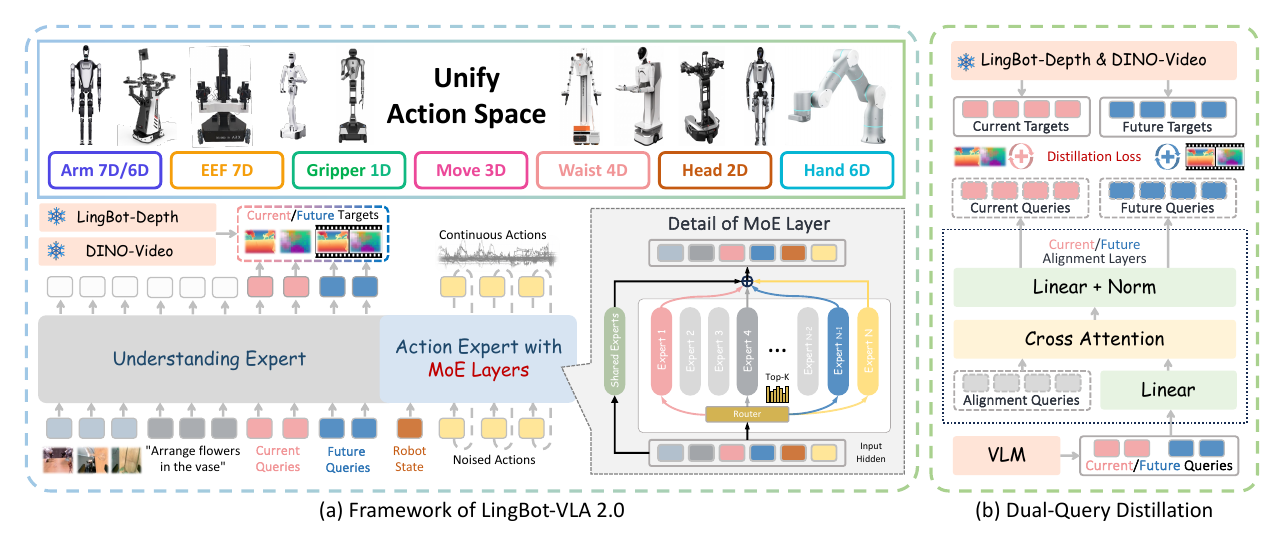
LingBot-VLA 2.0 is a practical Vision-Language-Action foundation model designed to move from large-scale pre-training toward reliable real-world robot applications.
Compared with LingBot-VLA 1.0, LingBot-VLA 2.0 improves three core capabilities:
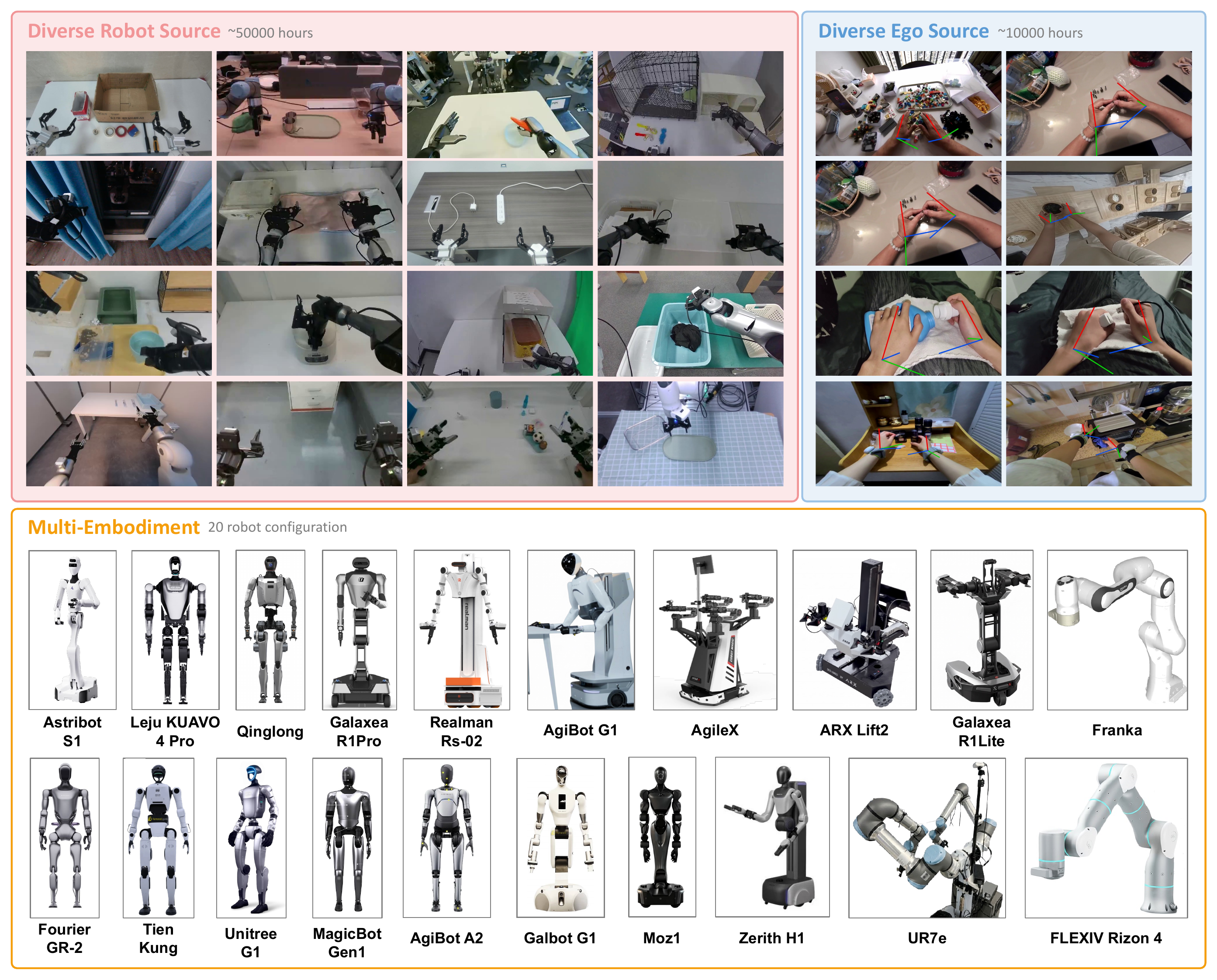
- Generalization across tasks and embodiments: a redesigned data pipeline curates around 60,000 hours of pre-training data, including 50,000 hours of robot trajectories across 20 robot configurations and 10,000 hours of egocentric human videos.
- Expanded action space: the unified representation supports arms, end-effectors, grippers, dexterous hands, waist, head, and mobile-base signals instead of only standard dual-arm manipulation.
- Predictive dynamics modeling: future prediction is used as a proxy task, with DINO-Video providing semantic temporal priors and LingBot-Depth providing geometric cues.
News
- [2026-09-22] Added Distributed Muon to improve training efficiency. It improves single-node H20 post-training speed by 37.6% over Muon.
- [2026-07-25] RoboTwin post-training weights: lingbot-vla-v2-6b-robotwin.
- [2026-07-08] LingBot-VLA 2.0 technical report and pre-trained weights are prepared.
Installation
Requirements:
- Miniconda or Anaconda
- Python 3.12
- PyTorch 2.8.0
Before running the setup script, make sure Conda is initialized in your shell and conda activate works.
git clone https://github.com/Robbyant/lingbot-vla-v2.git
cd lingbot-vla-v2

bash tools/create_train_env.sh
By default, the script installs flash-attn==2.8.3 from pip. If you already have a matching local wheel, pass it explicitly:
bash tools/create_train_env.sh \
  --flash-attn-wheel /path/to/flash_attn-2.8.3+cu12torch2.8cxx11abiTRUE-cp312-cp312-linux_x86_64.whl
You can also choose the environment name or force a rebuild:
bash tools/create_train_env.sh \
  --env-name lingbotvla \
  --recreate
Model Download
We release LingBot-VLA 2.0 pre-trained weights as a native-depth model.
| Model Name | Hugging Face | ModelScope | Description |
|---|---|---|---|
| LingBot-VLA 2.0 | lingbot-vla-v2-6b | lingbot-vla-v2-6b | Native Depth |
To train LingBot-VLA 2.0 with this codebase, weights from Qwen3-VL-4B-Instruct, MoGe-2-vitb-normal, LingBot-Depth, and DINO-VIDEO teacher checkpoint/config are also required. See Training_Config.md.
python3 scripts/download_hf_model.py --repo_id robbyant/lingbot-vla-v2-6b --local_dir lingbot-vla
Pre-Training Data
LingBot-VLA 2.0 uses a large, heterogeneous pre-training corpus that covers single-arm, dual-arm, half-humanoid, humanoid, and egocentric sources.
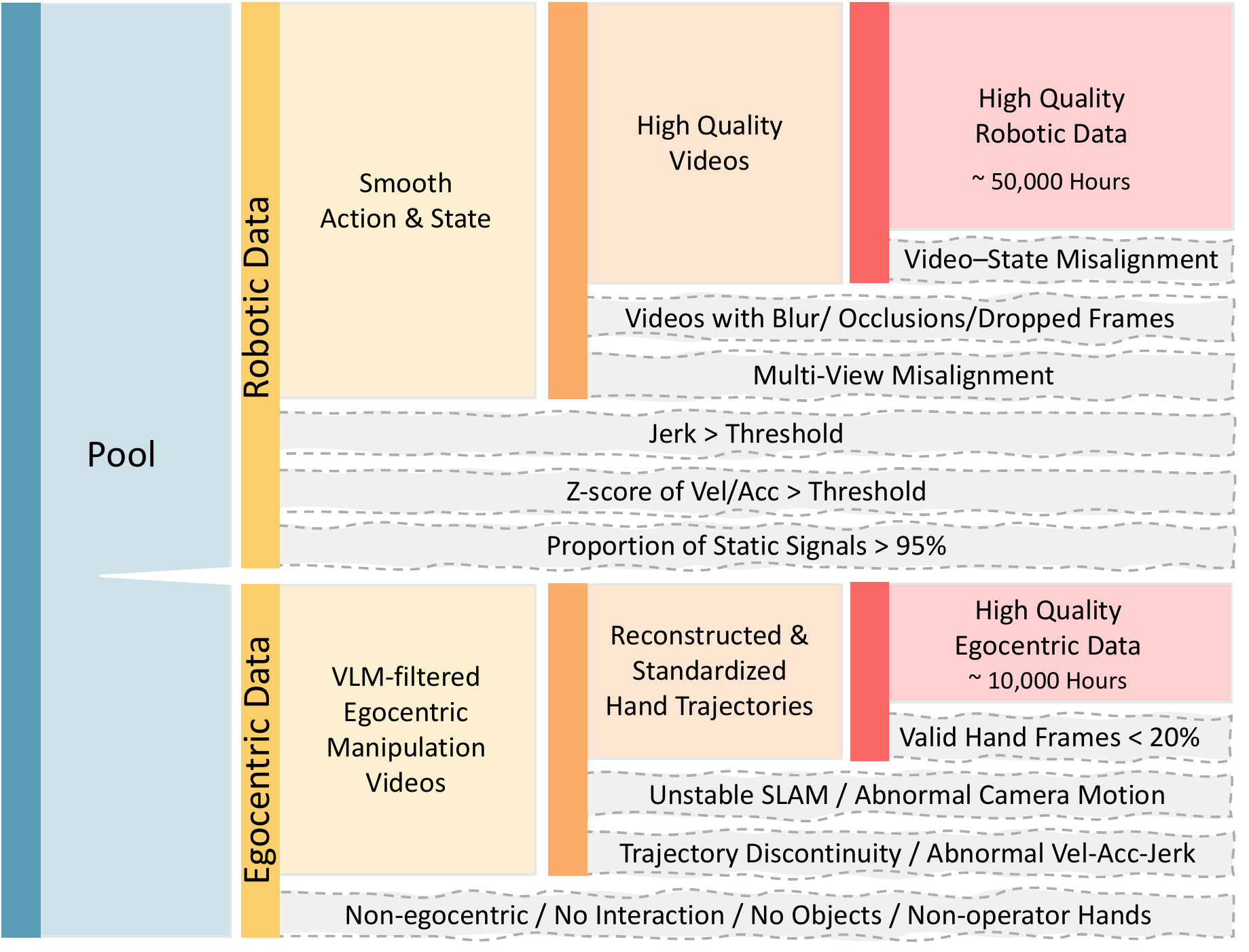
The raw pool is filtered into high-quality robotic and egocentric streams. The robotic side removes video-state misalignment, blurry or occluded videos, multi-view misalignment, abnormal velocity/acceleration/jerk, and static-signal episodes. The egocentric side keeps manipulation-centric videos, reconstructs and standardizes hand trajectories, and filters unstable camera or hand-motion estimates.
Model Design
Unified Action Representation
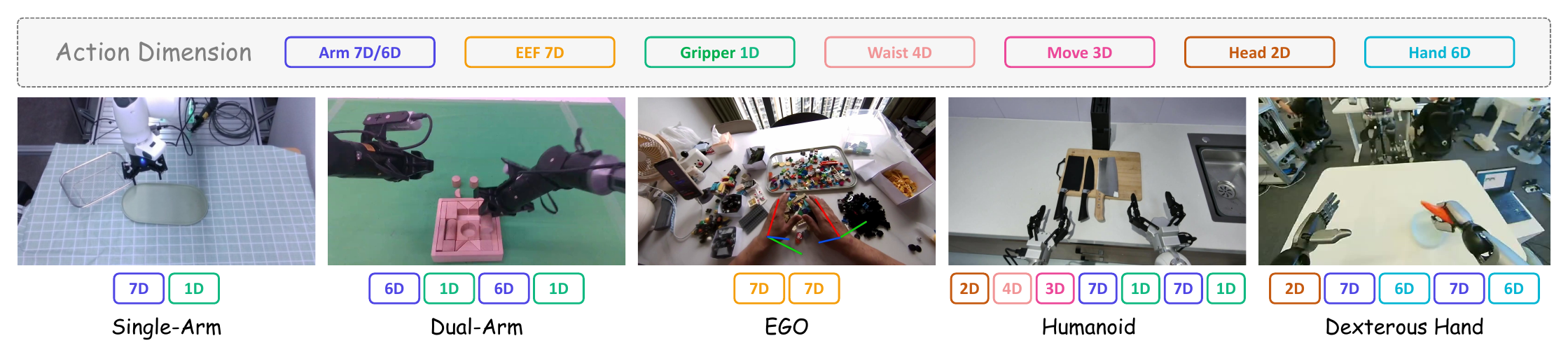
LingBot-VLA 2.0 maps heterogeneous embodiments into a 55-dimensional canonical state/action vector:
- 14 dimensions for arm joint position
- 14 dimensions for end-effector pose
- 2 dimensions for gripper position
- 12 dimensions for hand joint position
- 4 dimensions for waist position
- 2 dimensions for head position
- 3 dimensions for mobility signal
- 4 reserved dimensions
MoE Action Expert
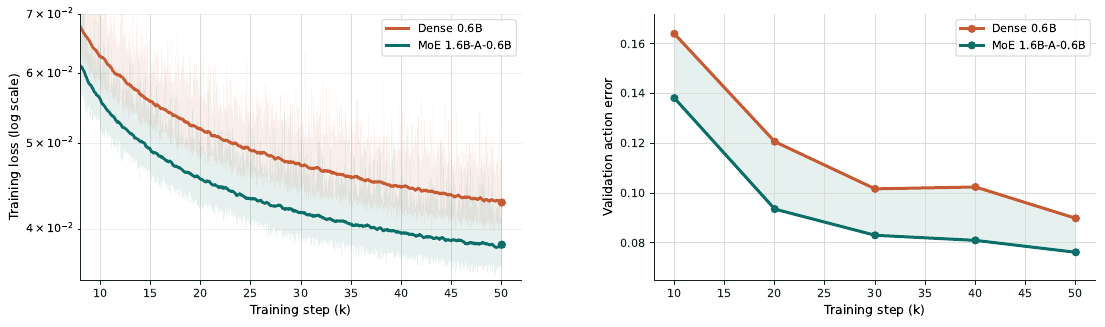
To improve cross-embodiment scaling, LingBot-VLA 2.0 uses sparse MoE layers inside the action expert. Fine-grained expert segmentation and shared expert isolation allow universal priors and specialized embodiment/task patterns to coexist under the same active compute budget.
Dual-Query Distillation
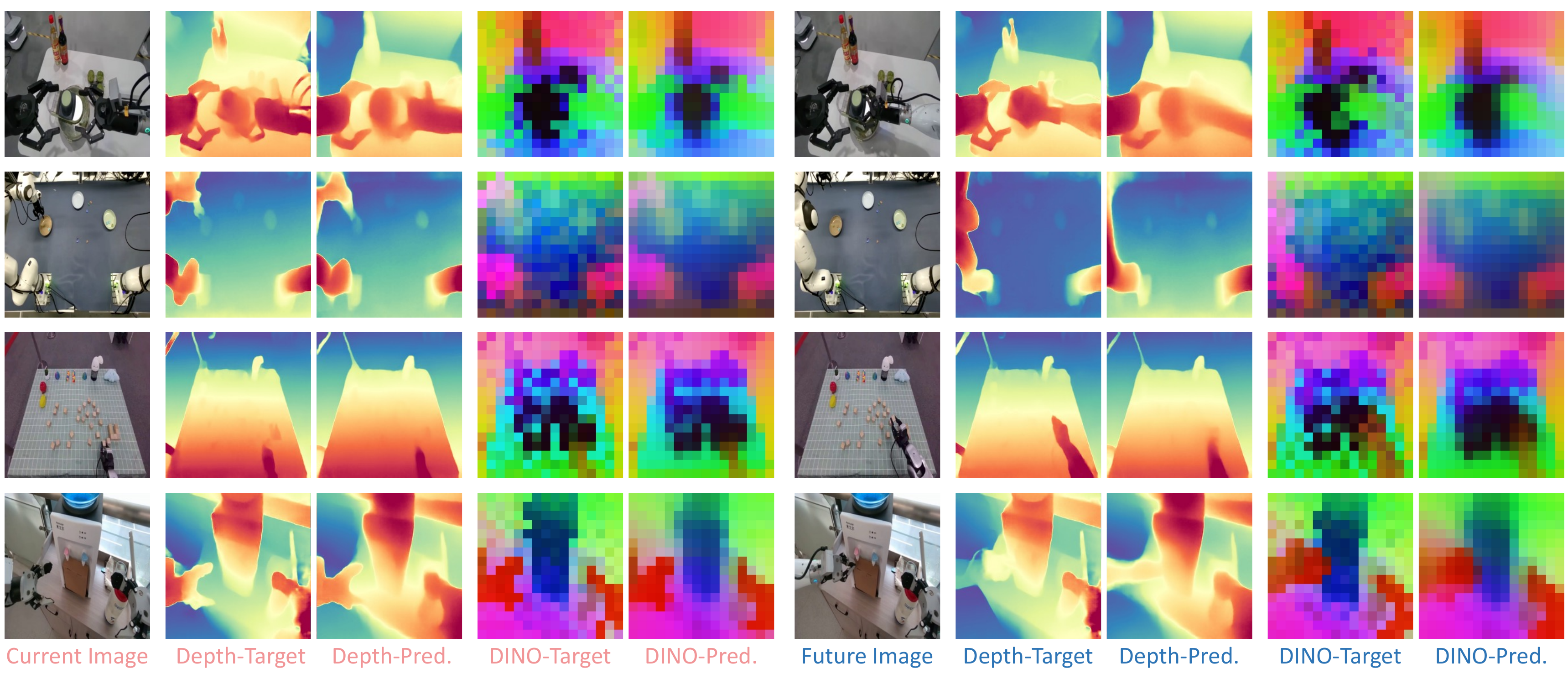
LingBot-VLA 2.0 appends current and future perceptual queries to the visual/text tokens. These queries are distilled from LingBot-Depth and DINO-Video, encouraging causal inference to capture both current scene geometry and future scene evolution.
Post-Training Example
Data Preparation
Post-training requires three preparation steps. For a complete guide on customizing your own dataset, see the Custom Data Guide.
| Step | Description | Output |
|---|---|---|
| 1. Prepare LeRobot Dataset | Prepare a LeRobot v2.1 or v3.0 dataset directory | LeRobot dataset directory |
| 2. Prepare Robot Config | Define feature mapping from raw states/actions/images to the unified feature space | configs/robot_configs/<data_name>.yaml |
| 3. Compute Norm Statistics | Calculate normalization statistics over your dataset | assets/norm_stats/<name>.json |
Below we use RoboTwin 2.0 50 tasks, trained with clean and randomized data together, as an example.
- Step 1 - RoboTwin Data: Follow RoboTwin2.0 Preparation to download and prepare the dataset.
- Step 2 - Robot Config: See configs/robot_configs/robotwin.yaml for the RoboTwin feature mapping.
- Step 3 - Normalization: Pre-computed stats are provided at
assets/norm_stats/robotwin.json. To recompute for a custom task subset, see the Custom Data Guide.
Training
We provide a post-training example of LingBot-VLA 2.0 on RoboTwin 2.0 50 tasks with clean and randomized data:
bash train.sh tasks/vla/train_lingbotvla.py ./configs/vla/robotwin/robotwin.yaml \
  --data.train_path assets/training_data/robotwin.txt \
  --data.data_name multi \
  --train.output_dir output/
The post-training config uses sequence-wise auxiliary loss (sequence_wise_mode: "per_sequence", sequence_wise_loss_coeff: 1e-3) together with z-loss (router_z_loss_coeff: 1e-4) for MoE routing. These terms can be adjusted or disabled depending on the downstream task. To use a loss-free routing setup, comment out the sequence-wise auxiliary loss and z-loss options, and set bias_update_speed: 0.00025.
The post-training config also enables the Muon optimizer. Muon can produce a better-converged loss, but it increases training time. To use the default AdamW optimizer instead, comment out optimizer: muon.
We also support Distributed Muon, adapted from TorchTitan's FlexShard implementation, to improve training efficiency. See robotwin_dist_muon.yaml for an example and optimizer parameter settings. This implementation requires FSDP2 with at least two data-parallel ranks.
Comparison of RoboTwin 2.0 success rates after post-training on clean and randomized data, and single-node post-training speed on NVIDIA H20 GPUs:
| Optimizer | Clean | Randomized | iteration time (s/it) |
|---|---|---|---|
| Muon | 93.52 | 92.80 | 5.93 |
| Distributed Muon | 91.56 | 91.34 | 4.31 |
The parameter settings in robotwin_dist_muon.yaml are provided as an example for a fair comparison with the Muon optimizer. You can adjust the optimizer settings and other parameters to suit your setup and pursue better performance.
For real-world scenarios, see the native-depth training configuration real_robot.yaml. For detailed explanations of batch size, gradient accumulation, checkpointing, depth/video distillation, MoE, and optimizer settings, see Training_Config.md.
Evaluation and Deployment
Open-Loop Evaluation
export QWEN3_PATH=Qwen/Qwen3-VL-4B-Instruct
python scripts/open_loop_eval.py \
  --model_path path_to_posttraining_ckpt \
  --robo_name robotwin \
  --data_path path_to_validation_data \
  --use_length 50
--robo_name is required for open-loop evaluation. It selects the robot config from configs/robot_configs/{robo_name}.yaml, for example --robo_name robotwin uses configs/robot_configs/robotwin.yaml.
RoboTwin Deployment
After installing RoboTwin 2.0 and the LingBot-VLA inference environment, use the launcher below to evaluate all 50 tasks. For reproducible benchmark comparisons, use the RoboTwin setup guide, including its pinned RoboTwin revision. Release validation of the published checkpoint uses FP32 inference; BF16 uses less GPU memory, but can produce materially different success rates. --model_path must point to the exported hf_ckpt directory rather than the model repository root.
Clean evaluation:
QWEN3VL_PATH=/path/to/Qwen3-VL-4B-Instruct/ \
EVAL_WORKDIR=/path/to/RoboTwin/ \
bash experiment/robotwin/start_robotwin_infer_and_eval.sh \
  --model_path /path/to/lingbot-vla-v2-6b-robotwin/checkpoints/global_step_50000/hf_ckpt/ \
  --output_base /path/to/your/eval_output \
  --task_config demo_clean \
  --num_gpus 8 \
  --num_per_gpu 1
For randomized evaluation, use the same command with --task_config demo_randomized. num_gpus is the number of GPUs to use, and num_per_gpu is the number of resident inference servers (and concurrent simulation tasks) on each GPU. Tune both values for your GPU memory and host load; one FP32 server needs substantially more memory than BF16.
Real-Robot Deployment
export QWEN3VL_PATH=path_to_Qwen3-VL-4B-Instruct
python -m deploy.lingbot_vla_v2_policy \
  --model_path path_to_posttraining_ckpt \
  --use_compile \
  --use_length 25 \
  --port port
Using deploy.lingbot_vla_v2_policy, one inference call on an NVIDIA GeForce RTX 4090D takes about 130 ms with 10 denoising steps.
Performance
Real-world Benchmarks
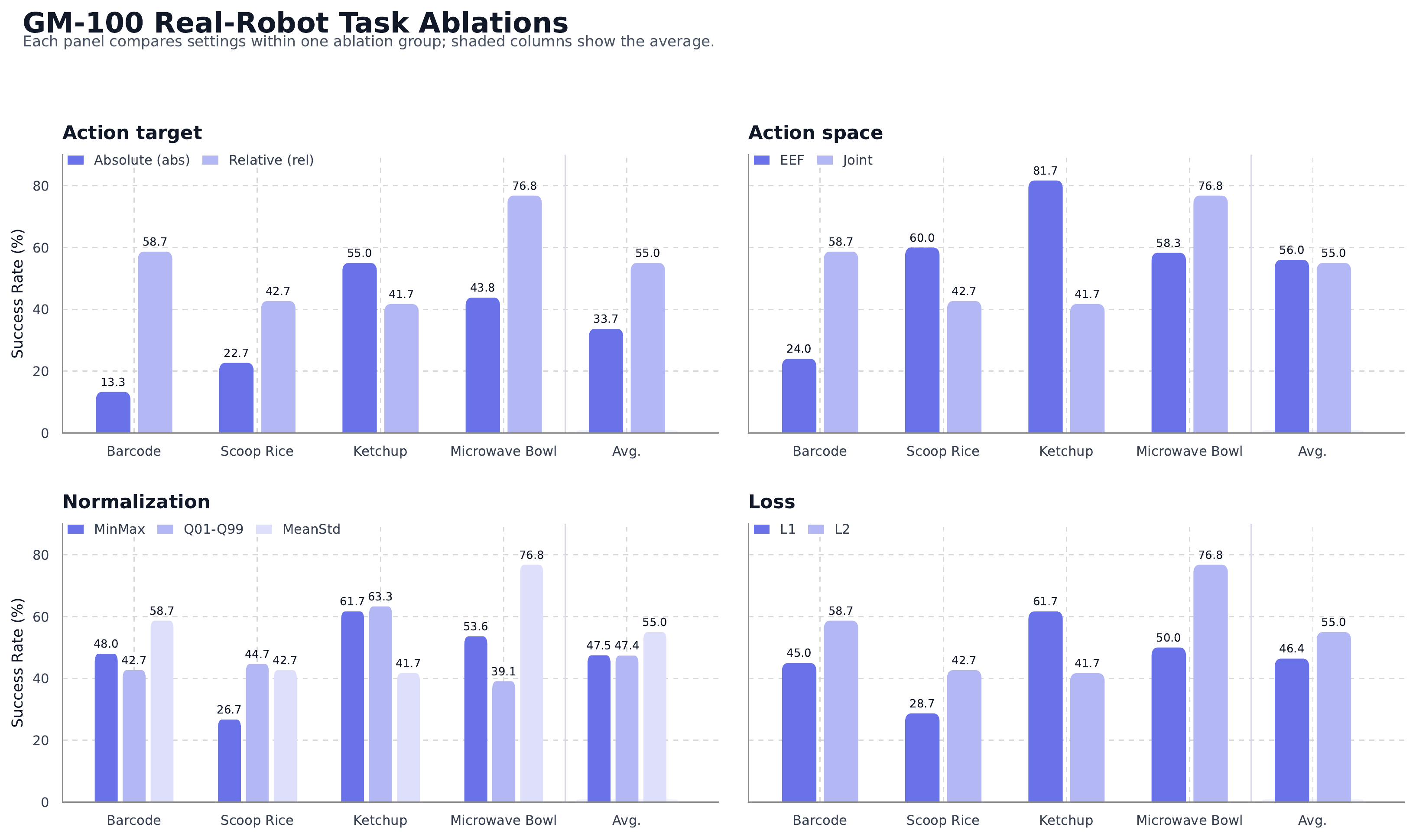
LingBot-VLA 2.0 is evaluated in a generalist setting on GM-100 bimanual manipulation and long-horizon mobile manipulation. Metrics are reported as progress score / success rate where applicable.
GM-100 Bimanual Manipulation
| Platform | GR00T N1.7 | π0.5 | LingBot-VLA-1.0 | LingBot-VLA 2.0 |
|---|---|---|---|---|
| AgileX Cobot Magic | 36.3 / 17.8 | 59.1 / 32.2 | 58.2 / 30.0 | 66.2 / 34.4 |
| Galaxea R1Pro | 16.4 / 5.6 | 27.4 / 8.9 | 32.7 / 15.6 | 34.6 / 15.6 |
Long-Horizon Mobile Manipulation
| Embodiment | Task | Setting | LingBot-VLA 2.0 | π0.5 |
|---|---|---|---|---|
| Astribot S1 | Refrigerator sorting | In-domain | 77.1 / 60.0 | 65.3 / 46.7 |
| Astribot S1 | Refrigerator sorting | Out-of-domain | 37.0 / 13.3 | 30.3 / 6.7 |
| Cobot Magic-ARX X5 | Stove cleaning | In-domain | 84.3 / 66.7 | 79.9 / 60.0 |
| Cobot Magic-ARX X5 | Stove cleaning | Out-of-domain | 67.5 / 40.0 | 62.5 / 33.3 |
Simulation Benchmark
RoboTwin 2.0
| Task | π0.5 | LingBot-VLA-1.0 | LingBot-VLA 2.0 |
|---|---|---|---|
| Clean | 82.74% | 88.56% | 93.52% |
| Randomized | 76.76% | 86.68% | 92.80% |
Citation
If you find our work useful in your research, please cite:
@article{lingbotvla2,
      title={From Foundation to Application: Improving VLA Models in Practice},
      author={Wei Wu and Fangjing Wang and Fan Lu and He Sun and Shi Liu and Yunnan Wang and Yibin Yan and Yong Wang and Shuailei Ma and Xinyang Wang and Yibin Liu and Shuai Yang and Tianxiang Zhou and Kejia Zhang and Lei Zhou and Cheng Su and Nan Xue and Bin Tan and Han Zhang and Youchao Zhang and Fei Liao and Xing Zhu and Yujun Shen and Kecheng Zheng},
      journal={arXiv preprint arXiv:2607.06403},
      year={2026}
}
License
This project is licensed under the Apache-2.0 License.
Acknowledgement
We sincerely thank the developers of VeOmni and LeRobot. This project benefits from their contributions to the open-source community. We also thank the TorchTitan team for their Distributed Muon implementations, which our Distributed Muon integration is based on.


Similar repos


Languages
Python
98.2%
Shell
1.7%
README
LingBot-VLA 2.0: From Foundation to Application
Overview
LingBot-VLA 2.0 is a practical Vision-Language-Action foundation model designed to move from large-scale pre-training toward reliable real-world robot applications.
Compared with LingBot-VLA 1.0, LingBot-VLA 2.0 improves three core capabilities:
- Generalization across tasks and embodiments: a redesigned data pipeline curates around 60,000 hours of pre-training data, including 50,000 hours of robot trajectories across 20 robot configurations and 10,000 hours of egocentric human videos.
- Expanded action space: the unified representation supports arms, end-effectors, grippers, dexterous hands, waist, head, and mobile-base signals instead of only standard dual-arm manipulation.
- Predictive dynamics modeling: future prediction is used as a proxy task, with DINO-Video providing semantic temporal priors and LingBot-Depth providing geometric cues.
News
- [2026-09-22] Added Distributed Muon to improve training efficiency. It improves single-node H20 post-training speed by 37.6% over Muon.
- [2026-07-25] RoboTwin post-training weights: lingbot-vla-v2-6b-robotwin.
- [2026-07-08] LingBot-VLA 2.0 technical report and pre-trained weights are prepared.
Installation
Requirements:
- Miniconda or Anaconda
- Python 3.12
- PyTorch 2.8.0
Before running the setup script, make sure Conda is initialized in your shell and conda activate works.
git clone https://github.com/Robbyant/lingbot-vla-v2.git
cd lingbot-vla-v2

bash tools/create_train_env.sh
By default, the script installs flash-attn==2.8.3 from pip. If you already have a matching local wheel, pass it explicitly:
bash tools/create_train_env.sh \
  --flash-attn-wheel /path/to/flash_attn-2.8.3+cu12torch2.8cxx11abiTRUE-cp312-cp312-linux_x86_64.whl
You can also choose the environment name or force a rebuild:
bash tools/create_train_env.sh \
  --env-name lingbotvla \
  --recreate
Model Download
We release LingBot-VLA 2.0 pre-trained weights as a native-depth model.
| Model Name | Hugging Face | ModelScope | Description |
|---|---|---|---|
| LingBot-VLA 2.0 | lingbot-vla-v2-6b | lingbot-vla-v2-6b | Native Depth |
To train LingBot-VLA 2.0 with this codebase, weights from Qwen3-VL-4B-Instruct, MoGe-2-vitb-normal, LingBot-Depth, and DINO-VIDEO teacher checkpoint/config are also required. See Training_Config.md.
python3 scripts/download_hf_model.py --repo_id robbyant/lingbot-vla-v2-6b --local_dir lingbot-vla
Pre-Training Data
LingBot-VLA 2.0 uses a large, heterogeneous pre-training corpus that covers single-arm, dual-arm, half-humanoid, humanoid, and egocentric sources.
The raw pool is filtered into high-quality robotic and egocentric streams. The robotic side removes video-state misalignment, blurry or occluded videos, multi-view misalignment, abnormal velocity/acceleration/jerk, and static-signal episodes. The egocentric side keeps manipulation-centric videos, reconstructs and standardizes hand trajectories, and filters unstable camera or hand-motion estimates.
Model Design
Unified Action Representation
LingBot-VLA 2.0 maps heterogeneous embodiments into a 55-dimensional canonical state/action vector:
- 14 dimensions for arm joint position
- 14 dimensions for end-effector pose
- 2 dimensions for gripper position
- 12 dimensions for hand joint position
- 4 dimensions for waist position
- 2 dimensions for head position
- 3 dimensions for mobility signal
- 4 reserved dimensions
MoE Action Expert
To improve cross-embodiment scaling, LingBot-VLA 2.0 uses sparse MoE layers inside the action expert. Fine-grained expert segmentation and shared expert isolation allow universal priors and specialized embodiment/task patterns to coexist under the same active compute budget.
Dual-Query Distillation
LingBot-VLA 2.0 appends current and future perceptual queries to the visual/text tokens. These queries are distilled from LingBot-Depth and DINO-Video, encouraging causal inference to capture both current scene geometry and future scene evolution.
Post-Training Example
Data Preparation
Post-training requires three preparation steps. For a complete guide on customizing your own dataset, see the Custom Data Guide.
| Step | Description | Output |
|---|---|---|
| 1. Prepare LeRobot Dataset | Prepare a LeRobot v2.1 or v3.0 dataset directory | LeRobot dataset directory |
| 2. Prepare Robot Config | Define feature mapping from raw states/actions/images to the unified feature space | configs/robot_configs/<data_name>.yaml |
| 3. Compute Norm Statistics | Calculate normalization statistics over your dataset | assets/norm_stats/<name>.json |
Below we use RoboTwin 2.0 50 tasks, trained with clean and randomized data together, as an example.
- Step 1 - RoboTwin Data: Follow RoboTwin2.0 Preparation to download and prepare the dataset.
- Step 2 - Robot Config: See configs/robot_configs/robotwin.yaml for the RoboTwin feature mapping.
- Step 3 - Normalization: Pre-computed stats are provided at
assets/norm_stats/robotwin.json. To recompute for a custom task subset, see the Custom Data Guide.
Training
We provide a post-training example of LingBot-VLA 2.0 on RoboTwin 2.0 50 tasks with clean and randomized data:
bash train.sh tasks/vla/train_lingbotvla.py ./configs/vla/robotwin/robotwin.yaml \
  --data.train_path assets/training_data/robotwin.txt \
  --data.data_name multi \
  --train.output_dir output/
The post-training config uses sequence-wise auxiliary loss (sequence_wise_mode: "per_sequence", sequence_wise_loss_coeff: 1e-3) together with z-loss (router_z_loss_coeff: 1e-4) for MoE routing. These terms can be adjusted or disabled depending on the downstream task. To use a loss-free routing setup, comment out the sequence-wise auxiliary loss and z-loss options, and set bias_update_speed: 0.00025.
The post-training config also enables the Muon optimizer. Muon can produce a better-converged loss, but it increases training time. To use the default AdamW optimizer instead, comment out optimizer: muon.
We also support Distributed Muon, adapted from TorchTitan's FlexShard implementation, to improve training efficiency. See robotwin_dist_muon.yaml for an example and optimizer parameter settings. This implementation requires FSDP2 with at least two data-parallel ranks.
Comparison of RoboTwin 2.0 success rates after post-training on clean and randomized data, and single-node post-training speed on NVIDIA H20 GPUs:
| Optimizer | Clean | Randomized | iteration time (s/it) |
|---|---|---|---|
| Muon | 93.52 | 92.80 | 5.93 |
| Distributed Muon | 91.56 | 91.34 | 4.31 |
The parameter settings in robotwin_dist_muon.yaml are provided as an example for a fair comparison with the Muon optimizer. You can adjust the optimizer settings and other parameters to suit your setup and pursue better performance.
For real-world scenarios, see the native-depth training configuration real_robot.yaml. For detailed explanations of batch size, gradient accumulation, checkpointing, depth/video distillation, MoE, and optimizer settings, see Training_Config.md.
Evaluation and Deployment
Open-Loop Evaluation
export QWEN3_PATH=Qwen/Qwen3-VL-4B-Instruct
python scripts/open_loop_eval.py \
  --model_path path_to_posttraining_ckpt \
  --robo_name robotwin \
  --data_path path_to_validation_data \
  --use_length 50
--robo_name is required for open-loop evaluation. It selects the robot config from configs/robot_configs/{robo_name}.yaml, for example --robo_name robotwin uses configs/robot_configs/robotwin.yaml.
RoboTwin Deployment
After installing RoboTwin 2.0 and the LingBot-VLA inference environment, use the launcher below to evaluate all 50 tasks. For reproducible benchmark comparisons, use the RoboTwin setup guide, including its pinned RoboTwin revision. Release validation of the published checkpoint uses FP32 inference; BF16 uses less GPU memory, but can produce materially different success rates. --model_path must point to the exported hf_ckpt directory rather than the model repository root.
Clean evaluation:
QWEN3VL_PATH=/path/to/Qwen3-VL-4B-Instruct/ \
EVAL_WORKDIR=/path/to/RoboTwin/ \
bash experiment/robotwin/start_robotwin_infer_and_eval.sh \
  --model_path /path/to/lingbot-vla-v2-6b-robotwin/checkpoints/global_step_50000/hf_ckpt/ \
  --output_base /path/to/your/eval_output \
  --task_config demo_clean \
  --num_gpus 8 \
  --num_per_gpu 1
For randomized evaluation, use the same command with --task_config demo_randomized. num_gpus is the number of GPUs to use, and num_per_gpu is the number of resident inference servers (and concurrent simulation tasks) on each GPU. Tune both values for your GPU memory and host load; one FP32 server needs substantially more memory than BF16.
Real-Robot Deployment
export QWEN3VL_PATH=path_to_Qwen3-VL-4B-Instruct
python -m deploy.lingbot_vla_v2_policy \
  --model_path path_to_posttraining_ckpt \
  --use_compile \
  --use_length 25 \
  --port port
Using deploy.lingbot_vla_v2_policy, one inference call on an NVIDIA GeForce RTX 4090D takes about 130 ms with 10 denoising steps.
Performance
Real-world Benchmarks
LingBot-VLA 2.0 is evaluated in a generalist setting on GM-100 bimanual manipulation and long-horizon mobile manipulation. Metrics are reported as progress score / success rate where applicable.
GM-100 Bimanual Manipulation
| Platform | GR00T N1.7 | π0.5 | LingBot-VLA-1.0 | LingBot-VLA 2.0 |
|---|---|---|---|---|
| AgileX Cobot Magic | 36.3 / 17.8 | 59.1 / 32.2 | 58.2 / 30.0 | 66.2 / 34.4 |
| Galaxea R1Pro | 16.4 / 5.6 | 27.4 / 8.9 | 32.7 / 15.6 | 34.6 / 15.6 |
Long-Horizon Mobile Manipulation
| Embodiment | Task | Setting | LingBot-VLA 2.0 | π0.5 |
|---|---|---|---|---|
| Astribot S1 | Refrigerator sorting | In-domain | 77.1 / 60.0 | 65.3 / 46.7 |
| Astribot S1 | Refrigerator sorting | Out-of-domain | 37.0 / 13.3 | 30.3 / 6.7 |
| Cobot Magic-ARX X5 | Stove cleaning | In-domain | 84.3 / 66.7 | 79.9 / 60.0 |
| Cobot Magic-ARX X5 | Stove cleaning | Out-of-domain | 67.5 / 40.0 | 62.5 / 33.3 |
Simulation Benchmark
RoboTwin 2.0
| Task | π0.5 | LingBot-VLA-1.0 | LingBot-VLA 2.0 |
|---|---|---|---|
| Clean | 82.74% | 88.56% | 93.52% |
| Randomized | 76.76% | 86.68% | 92.80% |
Citation
If you find our work useful in your research, please cite:
@article{lingbotvla2,
      title={From Foundation to Application: Improving VLA Models in Practice},
      author={Wei Wu and Fangjing Wang and Fan Lu and He Sun and Shi Liu and Yunnan Wang and Yibin Yan and Yong Wang and Shuailei Ma and Xinyang Wang and Yibin Liu and Shuai Yang and Tianxiang Zhou and Kejia Zhang and Lei Zhou and Cheng Su and Nan Xue and Bin Tan and Han Zhang and Youchao Zhang and Fei Liao and Xing Zhu and Yujun Shen and Kecheng Zheng},
      journal={arXiv preprint arXiv:2607.06403},
      year={2026}
}
License
This project is licensed under the Apache-2.0 License.
Acknowledgement
We sincerely thank the developers of VeOmni and LeRobot. This project benefits from their contributions to the open-source community. We also thank the TorchTitan team for their Distributed Muon implementations, which our Distributed Muon integration is based on.
Similar repos
Languages
Python
98.2%
Shell
1.7%