
Conway's Game of Life as a terminal screensaver in C++ and ncurses, with a toroidal grid, custom glyphs, colors, rainbow mode and auto-restart.
C++
0
14 commits
updated Oct 5, 2026
See what people are saying
README
cppautomata
Conway's Game of Life as a terminal screensaver, written in C++ with ncurses.
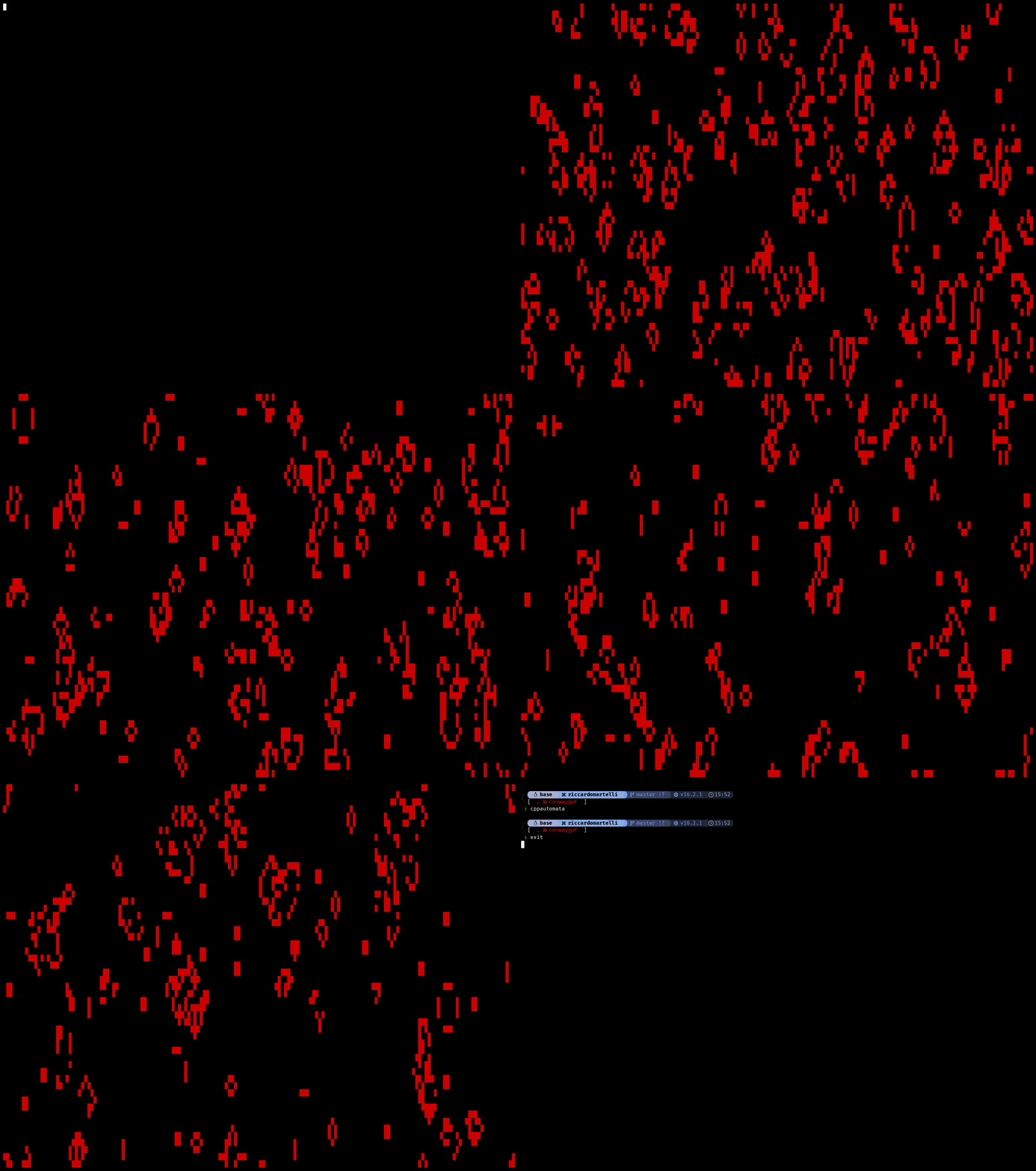
cppautomata
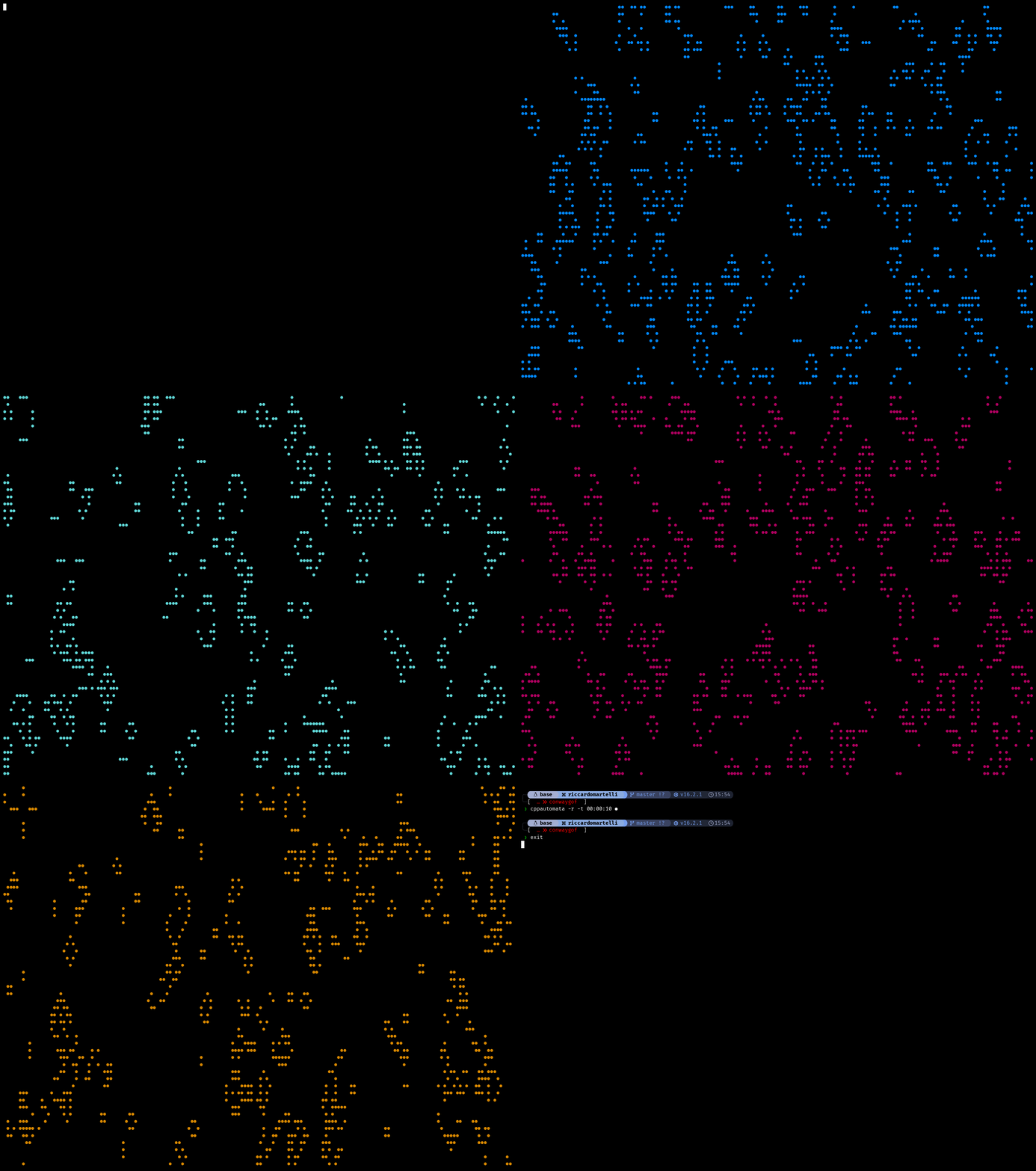
cppautomata -r -t 00:10:00 ●
cppautomata 🐉
- Full screen grid sized to your terminal, with toroidal wrapping: whatever leaves one edge comes back from the opposite one
- Random, glider or blinker starting pattern
- Any string as the live cell glyph: a block, an emoji, a Nerd Font icon
- Eight foreground and background colors, plus a rainbow mode that cycles the 256 color palette
- Automatic restart after N generations or after a set run time, so it can run unattended
- Live keys to restart and switch colors without quitting
- Man page included:
man cppautomata
Contents
Requirements
- A C++ compiler (
g++) make- ncurses with wide character support (
ncursesw), needed for Unicode glyphs
| Distribution | Command |
|---|---|
| Fedora | sudo dnf install gcc-c++ make ncurses-devel |
| Debian / Ubuntu | sudo apt install g++ make libncurses-dev |
| Arch | sudo pacman -S gcc make ncurses |
| macOS (untested) | brew install ncurses |
Install
git clone https://github.com/Riccardo-Martelli/cppautomata.git
cd cppautomata
make
This compiles the program and installs the binary to ~/.local/bin and the man page to ~/.local/share/man/man1. Then run it from anywhere:
cppautomata
man cppautomata
If the shell says command not found, ~/.local/bin is not in your PATH. Add it:
echo 'export PATH="$HOME/.local/bin:$PATH"' >> ~/.bashrc
source ~/.bashrc
Other targets:
| Command | Effect |
|---|---|
sudo make PREFIX=/usr/local | install for all users |
make uninstall | remove the binary and the man page |
make clean | delete the compiled binary from the repository folder |
Usage
cppautomata [options] [glyph]

  --version     show cppautomata version and exit
  -c COLOR      foreground color of live cells (default: red)
  -b COLOR      background color (default: black)
  -v MS         milliseconds between generations, integer > 0 (default: 100)
  -s N          restart every N generations, 0 = never (default: 0)
  -t HH:MM:SS   restart after this much run time (default: never)
  -m MODE       initial pattern: random, glider, blinker (default: random)
  -r            rainbow mode: change the foreground color at every generation
  -h            show help and exit

colors:
  black, red, green, yellow, blue, magenta, cyan, white
glyph is the string drawn for each live cell. The default is a full block █.
Keys
| Key | Action |
|---|---|
q | quit |
r | restart from the initial pattern |
c | next foreground color |
b | next background color |
Examples
cppautomata                          # default: random start, red blocks on black
cppautomata -c green -v 50 -s 500    # faster, restarts every 500 generations
cppautomata -m glider -c cyan o      # a single glider drawn with the letter o
cppautomata -r -t 00:10:00 ●         # rainbow dots, restart every 10 minutes
cppautomata 🐉                       # dragons
How it works
Each generation is computed on a fresh copy of the grid, so every cell sees the previous state of its neighbours. A cell counts its eight neighbours, with the indices wrapped around the edges so the board is a torus, and the standard rules apply:
| Current state | Live neighbours | Next state |
|---|---|---|
| alive | fewer than 2 | dies |
| alive | 2 or 3 | survives |
| alive | more than 3 | dies |
| dead | exactly 3 | becomes alive |
The new grid is then drawn cell by cell with ncurses and the program sleeps for the interval set by -v.
Notes
- Wide glyphs (emoji, some Nerd Font icons) take two terminal columns, so they overlap their right neighbour. Single width glyphs give the cleanest grid.
- The grid size is read once at startup: resizing the terminal does not resize the board.
- The
-ttimer counts the sleep intervals, not wall clock time, so on large grids the real time before a restart is slightly longer. - Rainbow mode looks best in a 256 color terminal.
- There is a universe behind cellular automata and more can be done to make this simulation more interesting, for more information see Conway's Game of Life.
License
MIT, see LICENSE.
Similar repos


Conway's Game of Life as a terminal screensaver in C++ and ncurses, with a toroidal grid, custom glyphs, colors, rainbow mode and auto-restart.
C++
0
14 commits
updated Oct 5, 2026
See what people are saying
README
cppautomata
Conway's Game of Life as a terminal screensaver, written in C++ with ncurses.
cppautomata
cppautomata -r -t 00:10:00 ●
cppautomata 🐉
- Full screen grid sized to your terminal, with toroidal wrapping: whatever leaves one edge comes back from the opposite one
- Random, glider or blinker starting pattern
- Any string as the live cell glyph: a block, an emoji, a Nerd Font icon
- Eight foreground and background colors, plus a rainbow mode that cycles the 256 color palette
- Automatic restart after N generations or after a set run time, so it can run unattended
- Live keys to restart and switch colors without quitting
- Man page included:
man cppautomata
Contents
Requirements
- A C++ compiler (
g++) make- ncurses with wide character support (
ncursesw), needed for Unicode glyphs
| Distribution | Command |
|---|---|
| Fedora | sudo dnf install gcc-c++ make ncurses-devel |
| Debian / Ubuntu | sudo apt install g++ make libncurses-dev |
| Arch | sudo pacman -S gcc make ncurses |
| macOS (untested) | brew install ncurses |
Install
git clone https://github.com/Riccardo-Martelli/cppautomata.git
cd cppautomata
make
This compiles the program and installs the binary to ~/.local/bin and the man page to ~/.local/share/man/man1. Then run it from anywhere:
cppautomata
man cppautomata
If the shell says command not found, ~/.local/bin is not in your PATH. Add it:
echo 'export PATH="$HOME/.local/bin:$PATH"' >> ~/.bashrc
source ~/.bashrc
Other targets:
| Command | Effect |
|---|---|
sudo make PREFIX=/usr/local | install for all users |
make uninstall | remove the binary and the man page |
make clean | delete the compiled binary from the repository folder |
Usage
cppautomata [options] [glyph]

  --version     show cppautomata version and exit
  -c COLOR      foreground color of live cells (default: red)
  -b COLOR      background color (default: black)
  -v MS         milliseconds between generations, integer > 0 (default: 100)
  -s N          restart every N generations, 0 = never (default: 0)
  -t HH:MM:SS   restart after this much run time (default: never)
  -m MODE       initial pattern: random, glider, blinker (default: random)
  -r            rainbow mode: change the foreground color at every generation
  -h            show help and exit

colors:
  black, red, green, yellow, blue, magenta, cyan, white
glyph is the string drawn for each live cell. The default is a full block █.
Keys
| Key | Action |
|---|---|
q | quit |
r | restart from the initial pattern |
c | next foreground color |
b | next background color |
Examples
cppautomata                          # default: random start, red blocks on black
cppautomata -c green -v 50 -s 500    # faster, restarts every 500 generations
cppautomata -m glider -c cyan o      # a single glider drawn with the letter o
cppautomata -r -t 00:10:00 ●         # rainbow dots, restart every 10 minutes
cppautomata 🐉                       # dragons
How it works
Each generation is computed on a fresh copy of the grid, so every cell sees the previous state of its neighbours. A cell counts its eight neighbours, with the indices wrapped around the edges so the board is a torus, and the standard rules apply:
| Current state | Live neighbours | Next state |
|---|---|---|
| alive | fewer than 2 | dies |
| alive | 2 or 3 | survives |
| alive | more than 3 | dies |
| dead | exactly 3 | becomes alive |
The new grid is then drawn cell by cell with ncurses and the program sleeps for the interval set by -v.
Notes
- Wide glyphs (emoji, some Nerd Font icons) take two terminal columns, so they overlap their right neighbour. Single width glyphs give the cleanest grid.
- The grid size is read once at startup: resizing the terminal does not resize the board.
- The
-ttimer counts the sleep intervals, not wall clock time, so on large grids the real time before a restart is slightly longer. - Rainbow mode looks best in a 256 color terminal.
- There is a universe behind cellular automata and more can be done to make this simulation more interesting, for more information see Conway's Game of Life.
License
MIT, see LICENSE.