A high-performance proxy pool gateway. Turn massive proxy subscriptions into a stable, smart, and observable network with sticky sessions.
Go
2,440
376 commits
updated Oct 13, 2026

Turn massive proxy subscriptions into a stable, smart, observable unified proxy entrypoint with sticky sessions.







Resin is a high-performance intelligent proxy pool gateway built for operating massive numbers of proxy nodes.
It helps shield your services from unstable underlying proxy nodes by aggregating distributed proxy resources into a unified proxy entrypoint with session stickiness (sticky routing).
[!TIP] You can feed this README and
DESIGN.mdto AI and ask it anything about the project.
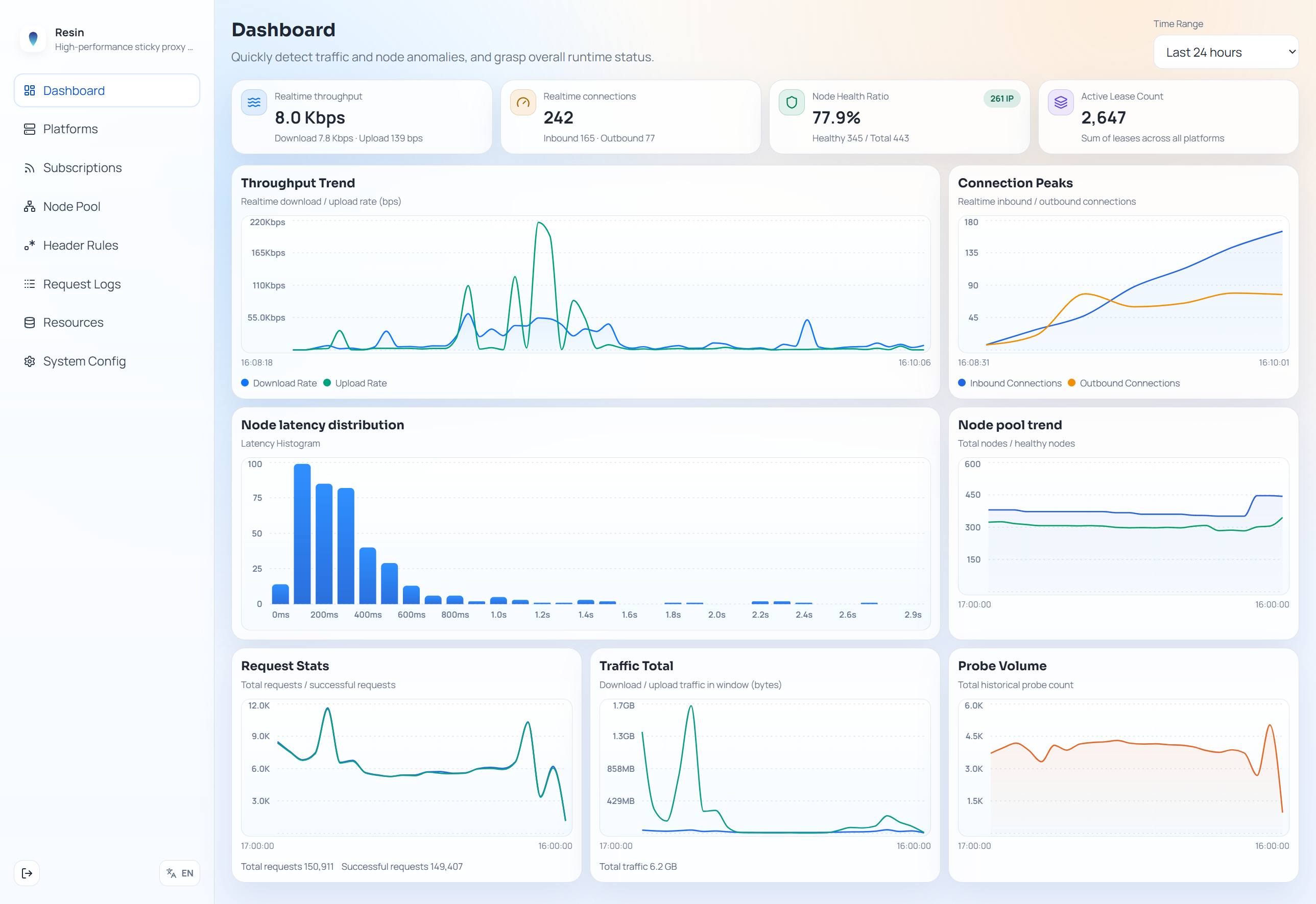
http:// or https://.{"outbounds":[...]} or raw outbound array [...].{"proxies":[...]} or YAML proxies:.vmess://, vless://, trojan://, ss://, hysteria2://, http://, https://, socks5://, socks5h://.
For http://, https://, socks5://, socks5h://, use scheme://[user:pass@]host:port (optional #tag; https also supports sni/servername/peer and allowInsecure/insecure query parameters).IP:PORT or IP:PORT:USER:PASS (IPv4 and IPv6).socks, http, shadowsocks, vmess, trojan, wireguard, hysteria, vless, shadowtls, tuic, hysteria2, anytls, ssh.ss/shadowsocks, socks/socks4/socks4a/socks5, http, vmess, vless, trojan, wireguard/wg, hysteria, hysteria2/hy2, tuic, anytls, ssh.In just three steps, you can turn your proxy subscriptions into a highly available proxy pool.
Docker Compose is the recommended quick-start path:
# docker-compose.yml
services:
  resin:
    image: ghcr.io/resinat/resin:latest
    container_name: resin
    restart: unless-stopped
    environment:
      RESIN_ADMIN_TOKEN: "admin123" # Change to your admin dashboard password
      RESIN_PROXY_TOKEN: "my-token" # Change to your proxy password
      RESIN_LISTEN_ADDRESS: 0.0.0.0
      RESIN_PORT: 2260
    ports:
      - "2260:2260"
    volumes:
      - ./data/cache:/var/cache/resin
      - ./data/state:/var/lib/resin
      - ./data/log:/var/log/resin
Run docker compose up -d to start the service.
Custom endpoint ports must also be reachable from outside the container. Docker cannot add published ports to an already-running container, so pre-publish the required port range in ports (for example "2300-2399:2300-2399") or use host networking where appropriate.
(If you don't want Docker, jump to Other Deployment Options.)
http://127.0.0.1:2260 in your browser (replace with your server IP if needed).RESIN_ADMIN_TOKEN you set.See the following sections for client access modes. In common scenarios, you can choose HTTP forward proxy, SOCKS5 forward proxy, or reverse proxy based on what your client supports.
If you just need a high-performance, large-capacity proxy pool with automatic health management, Resin works out of the box.
Once Resin is running, you can choose HTTP forward proxy, SOCKS5 forward proxy, or reverse proxy based on what your client supports.
If you do not want a proxy password, explicitly set RESIN_PROXY_TOKEN="" (the variable must still be defined). Then HTTP forward proxy is available at http://127.0.0.1:2260, and SOCKS5 forward proxy is available at socks5://127.0.0.1:2260.
For binary/source runs, Resin also loads a .env file from the current working directory before reading configuration. Environment variables already set by the OS or shell take precedence over .env values.
HTTP forward proxy example:
curl -x http://127.0.0.1:2260 \
  -U ":my-token" \
  https://api.ipify.org
SOCKS5 forward proxy example:
curl --proxy socks5h://127.0.0.1:2260 \
  -U "Default:my-token" \
  https://api.ipify.org
When RESIN_PROXY_TOKEN="", SOCKS5 also allows unauthenticated access.
If your client supports overriding BASE_URL, you can also use reverse-proxy mode.
URL format: /token/Platform(optional).Account(optional)/protocol/target.
Example request to https://api.ipify.org:
curl http://127.0.0.1:2260/my-token/./https/api.ipify.org
Choosing forward vs reverse proxy: when possible, reverse proxy is recommended for better observability. If your client cannot change BaseURL, or requires scenarios better served by forward proxy (such as uTLS or non-WebAPI traffic), use forward proxy.
If your service needs specific nodes (for example by region, subscription source, or name regex), use Resin's Platform feature.
Open http://127.0.0.1:2260/ui/platforms and create a Platform. For example, to use only US and HK nodes, create MyPlatform and set region filters to:
us
hk
Node tag rules match <SubscriptionName>/<NodeTag>, with one regular expression per line. Plain rules are ORed, a leading * marks a required rule, and a leading ! excludes a node on any match. For example, this selects dedicated Hong Kong or Japan nodes while excluding expired and invalid nodes:
Hong Kong
Japan
*Dedicated
!Expired
!Invalid
Only the first character is interpreted as a rule prefix; the rest remains a Go regular expression. Escape a literal leading ! as \!.
For forward proxy (HTTP / SOCKS5), include Platform in the auth info. Examples:
curl -x http://127.0.0.1:2260 \
  -U "MyPlatform:my-token" \
  https://api.ipify.org
curl --proxy socks5h://127.0.0.1:2260 \
  -U "MyPlatform:my-token" \
  https://api.ipify.org
For reverse proxy, include Platform in the URL prefix:
curl http://127.0.0.1:2260/my-token/MyPlatform/https/api.ipify.org
When your business depends on IP continuity or long-lived interactions, use Resin's core feature: sticky proxying.
First, understand two core concepts:
Default platform containing all available nodes.Tom or user_1). For requests carrying an Account, Resin anchors traffic to a dedicated high-quality outbound node. If that node fails, Resin retries seamlessly and switches to another node with the same IP.HTTP forward proxy and SOCKS5 forward proxy share the same identity format: Platform.Account:RESIN_PROXY_TOKEN.
Just put the identity in proxy authentication:
# HTTP forward proxy: bind business account user_tom to a stable dedicated outbound IP
curl -x http://127.0.0.1:2260 \
  -U "Default.user_tom:my-token" \
  https://api.ipify.org
# SOCKS5 forward proxy: uses the same identity format as HTTP forward proxy
curl --proxy socks5h://127.0.0.1:2260 \
  -U "Default.user_tom:my-token" \
  https://api.ipify.org
By replacing your service BaseURL with Resin reverse-proxy URL, traffic goes through Resin directly.
Advanced URL format: http://host:2260/token/platform.account/protocol/target:
# Example: user_tom accesses api.ipify.org over https
curl "http://127.0.0.1:2260/my-token/Default.user_tom/https/api.ipify.org"
The URL Account segment is designed for quick use and manual debugging. For long-running production integrations, prefer passing Account by header (
X-Resin-Account).
X-Resin-Account header (recommended production integration)If your client/SDK supports custom request headers, pass Account explicitly with X-Resin-Account.
This is the recommended and most stable method.
Account source priority: X-Resin-Account header > Account in reverse-proxy URL > header extraction rules.
Example:
curl "http://127.0.0.1:2260/my-token/MyPlatform/https/api.example.com/v1/orders" \
  -H "X-Resin-Account: user_tom"
If your client cannot set X-Resin-Account, Resin can still extract Account from existing business headers (for example API Key, Token, Cookie) via header rules.
Assume your requests already include an Authorization header:
Reverse-proxy empty-account behavior to Extract specified request headers as Account.Headers used to extract Account to Authorization.Then even if Account is omitted in URL, Resin can still parse it from headers:
curl "http://127.0.0.1:2260/my-token/MyPlatform/https/api.example.com/v1/orders" \
  -H "Authorization: sk-abc123"
In this example, Resin uses sk-abc123 as Account. Future requests with the same key are intended to stay bound to the same outbound IP whenever routing conditions allow.
[!TIP] Beyond Platform header config, Resin also supports advanced rules that pick extraction headers by URL prefix. You can ask AI to explain both modes with this README and DESIGN.md.
Enable header-based Account extraction only when you have a valid legal basis (for example user authorization or contractual permission), and ensure your logging, retention, and access-control policies comply with applicable laws and target-service terms.
Different clients integrate Resin differently, with different code-intrusion levels.
💡 If you do not need sticky proxying
| Access Method | Code Intrusion | Notes |
|---|---|---|
| Forward proxy | 🟢 Zero intrusion | Just configure an HTTP or SOCKS5 proxy address plus credentials. |
| Reverse proxy | 🟢 Zero/low intrusion | Usually only requires changing service BaseURL. |
💡 If you need sticky proxying
| Access Method | Code Intrusion | Notes |
|---|---|---|
| Forward proxy | 🟡 Medium intrusion | Per-user requests need different auth info. Both HTTP and SOCKS5 use platform.account:token. |
| Reverse proxy | 🟡 Medium intrusion | Add X-Resin-Account request header or build reverse-proxy URL paths dynamically with account information. |
| Reverse proxy + header rules | 🟢 Zero/low intrusion | Resin can extract Account from original headers (for example Authorization) and bind IP automatically. |
👉 Fast integration script/prompt: If you are a developer and want AI to help modify an existing project for native Resin sticky integration, use:
resin.
RESIN_ADMIN_TOKEN=<admin-dashboard-password> \
RESIN_PROXY_TOKEN=<proxy-password> \
RESIN_STATE_DIR=./data/state \
RESIN_CACHE_DIR=./data/cache \
RESIN_LOG_DIR=./data/log \
RESIN_LISTEN_ADDRESS=0.0.0.0 \
RESIN_PORT=2260 \
./resin
Alternatively, create a .env file in the working directory and run ./resin:
RESIN_ADMIN_TOKEN=<admin-dashboard-password>
RESIN_PROXY_TOKEN=<proxy-password>
RESIN_STATE_DIR=./data/state
RESIN_CACHE_DIR=./data/cache
RESIN_LOG_DIR=./data/log
RESIN_LISTEN_ADDRESS=0.0.0.0
RESIN_PORT=2260
# 1. Clone Resin source
git clone https://github.com/Resinat/Resin.git

# 2. Build WebUI
cd Resin/webui
npm install && npm run build
cd ..

# 3. Build Resin core
go build -tags "with_quic with_wireguard with_grpc with_utls" -o resin ./cmd/resin

# 4. Run
RESIN_ADMIN_TOKEN=<admin-dashboard-password> \
RESIN_PROXY_TOKEN=<proxy-password> \
RESIN_STATE_DIR=./data/state \
RESIN_CACHE_DIR=./data/cache \
RESIN_LOG_DIR=./data/log \
RESIN_LISTEN_ADDRESS=127.0.0.1 \
RESIN_PORT=2260 \
./resin
RESIN_PROXY_BYPASS to a semicolon/comma/newline-separated rule list. Matching requests are dialed directly by Resin instead of through a proxy node. Example: RESIN_PROXY_BYPASS="localhost;127.*;10.*;172.16.0.0/12;192.168.*;<local>". Supported rules include exact hosts, */? wildcards, CIDR ranges, and <local> for hostnames without dots.RESIN_PROXY_TOKEN undefined?
RESIN_PROXY_TOKEN="". On shells that drop empty environment variables, create a .env file with RESIN_PROXY_TOKEN=.RESIN_AUTH_VERSION=LEGACY_V0?
LEGACY_V0 is no longer supported. Remove RESIN_AUTH_VERSION or set it to V1. If you are upgrading from a release that used legacy authentication, see the v1.0.0 auth migration guide.RESIN_PROXY_TOKEN is non-empty, the client must send SOCKS5 username/password authentication. If it is explicitly set to an empty string, NO AUTH is also allowed.http or https (not ws/wss). Resin auto-detects and handles WebSocket upgrade.59 followers · starred Mar 2026
202 followers · starred Aug 2026
8 followers · starred Mar 2026
132 followers · starred Mar 2026
A high-performance proxy pool gateway. Turn massive proxy subscriptions into a stable, smart, and observable network with sticky sessions.
Go
2,440
376 commits
updated Oct 13, 2026
Turn massive proxy subscriptions into a stable, smart, observable unified proxy entrypoint with sticky sessions.
Resin is a high-performance intelligent proxy pool gateway built for operating massive numbers of proxy nodes.
It helps shield your services from unstable underlying proxy nodes by aggregating distributed proxy resources into a unified proxy entrypoint with session stickiness (sticky routing).
[!TIP] You can feed this README and
DESIGN.mdto AI and ask it anything about the project.
http:// or https://.{"outbounds":[...]} or raw outbound array [...].{"proxies":[...]} or YAML proxies:.vmess://, vless://, trojan://, ss://, hysteria2://, http://, https://, socks5://, socks5h://.
For http://, https://, socks5://, socks5h://, use scheme://[user:pass@]host:port (optional #tag; https also supports sni/servername/peer and allowInsecure/insecure query parameters).IP:PORT or IP:PORT:USER:PASS (IPv4 and IPv6).socks, http, shadowsocks, vmess, trojan, wireguard, hysteria, vless, shadowtls, tuic, hysteria2, anytls, ssh.ss/shadowsocks, socks/socks4/socks4a/socks5, http, vmess, vless, trojan, wireguard/wg, hysteria, hysteria2/hy2, tuic, anytls, ssh.In just three steps, you can turn your proxy subscriptions into a highly available proxy pool.
Docker Compose is the recommended quick-start path:
# docker-compose.yml
services:
  resin:
    image: ghcr.io/resinat/resin:latest
    container_name: resin
    restart: unless-stopped
    environment:
      RESIN_ADMIN_TOKEN: "admin123" # Change to your admin dashboard password
      RESIN_PROXY_TOKEN: "my-token" # Change to your proxy password
      RESIN_LISTEN_ADDRESS: 0.0.0.0
      RESIN_PORT: 2260
    ports:
      - "2260:2260"
    volumes:
      - ./data/cache:/var/cache/resin
      - ./data/state:/var/lib/resin
      - ./data/log:/var/log/resin
Run docker compose up -d to start the service.
Custom endpoint ports must also be reachable from outside the container. Docker cannot add published ports to an already-running container, so pre-publish the required port range in ports (for example "2300-2399:2300-2399") or use host networking where appropriate.
(If you don't want Docker, jump to Other Deployment Options.)
http://127.0.0.1:2260 in your browser (replace with your server IP if needed).RESIN_ADMIN_TOKEN you set.See the following sections for client access modes. In common scenarios, you can choose HTTP forward proxy, SOCKS5 forward proxy, or reverse proxy based on what your client supports.
If you just need a high-performance, large-capacity proxy pool with automatic health management, Resin works out of the box.
Once Resin is running, you can choose HTTP forward proxy, SOCKS5 forward proxy, or reverse proxy based on what your client supports.
If you do not want a proxy password, explicitly set RESIN_PROXY_TOKEN="" (the variable must still be defined). Then HTTP forward proxy is available at http://127.0.0.1:2260, and SOCKS5 forward proxy is available at socks5://127.0.0.1:2260.
For binary/source runs, Resin also loads a .env file from the current working directory before reading configuration. Environment variables already set by the OS or shell take precedence over .env values.
HTTP forward proxy example:
curl -x http://127.0.0.1:2260 \
  -U ":my-token" \
  https://api.ipify.org
SOCKS5 forward proxy example:
curl --proxy socks5h://127.0.0.1:2260 \
  -U "Default:my-token" \
  https://api.ipify.org
When RESIN_PROXY_TOKEN="", SOCKS5 also allows unauthenticated access.
If your client supports overriding BASE_URL, you can also use reverse-proxy mode.
URL format: /token/Platform(optional).Account(optional)/protocol/target.
Example request to https://api.ipify.org:
curl http://127.0.0.1:2260/my-token/./https/api.ipify.org
Choosing forward vs reverse proxy: when possible, reverse proxy is recommended for better observability. If your client cannot change BaseURL, or requires scenarios better served by forward proxy (such as uTLS or non-WebAPI traffic), use forward proxy.
If your service needs specific nodes (for example by region, subscription source, or name regex), use Resin's Platform feature.
Open http://127.0.0.1:2260/ui/platforms and create a Platform. For example, to use only US and HK nodes, create MyPlatform and set region filters to:
us
hk
Node tag rules match <SubscriptionName>/<NodeTag>, with one regular expression per line. Plain rules are ORed, a leading * marks a required rule, and a leading ! excludes a node on any match. For example, this selects dedicated Hong Kong or Japan nodes while excluding expired and invalid nodes:
Hong Kong
Japan
*Dedicated
!Expired
!Invalid
Only the first character is interpreted as a rule prefix; the rest remains a Go regular expression. Escape a literal leading ! as \!.
For forward proxy (HTTP / SOCKS5), include Platform in the auth info. Examples:
curl -x http://127.0.0.1:2260 \
  -U "MyPlatform:my-token" \
  https://api.ipify.org
curl --proxy socks5h://127.0.0.1:2260 \
  -U "MyPlatform:my-token" \
  https://api.ipify.org
For reverse proxy, include Platform in the URL prefix:
curl http://127.0.0.1:2260/my-token/MyPlatform/https/api.ipify.org
When your business depends on IP continuity or long-lived interactions, use Resin's core feature: sticky proxying.
First, understand two core concepts:
Default platform containing all available nodes.Tom or user_1). For requests carrying an Account, Resin anchors traffic to a dedicated high-quality outbound node. If that node fails, Resin retries seamlessly and switches to another node with the same IP.HTTP forward proxy and SOCKS5 forward proxy share the same identity format: Platform.Account:RESIN_PROXY_TOKEN.
Just put the identity in proxy authentication:
# HTTP forward proxy: bind business account user_tom to a stable dedicated outbound IP
curl -x http://127.0.0.1:2260 \
  -U "Default.user_tom:my-token" \
  https://api.ipify.org
# SOCKS5 forward proxy: uses the same identity format as HTTP forward proxy
curl --proxy socks5h://127.0.0.1:2260 \
  -U "Default.user_tom:my-token" \
  https://api.ipify.org
By replacing your service BaseURL with Resin reverse-proxy URL, traffic goes through Resin directly.
Advanced URL format: http://host:2260/token/platform.account/protocol/target:
# Example: user_tom accesses api.ipify.org over https
curl "http://127.0.0.1:2260/my-token/Default.user_tom/https/api.ipify.org"
The URL Account segment is designed for quick use and manual debugging. For long-running production integrations, prefer passing Account by header (
X-Resin-Account).
X-Resin-Account header (recommended production integration)If your client/SDK supports custom request headers, pass Account explicitly with X-Resin-Account.
This is the recommended and most stable method.
Account source priority: X-Resin-Account header > Account in reverse-proxy URL > header extraction rules.
Example:
curl "http://127.0.0.1:2260/my-token/MyPlatform/https/api.example.com/v1/orders" \
  -H "X-Resin-Account: user_tom"
If your client cannot set X-Resin-Account, Resin can still extract Account from existing business headers (for example API Key, Token, Cookie) via header rules.
Assume your requests already include an Authorization header:
Reverse-proxy empty-account behavior to Extract specified request headers as Account.Headers used to extract Account to Authorization.Then even if Account is omitted in URL, Resin can still parse it from headers:
curl "http://127.0.0.1:2260/my-token/MyPlatform/https/api.example.com/v1/orders" \
  -H "Authorization: sk-abc123"
In this example, Resin uses sk-abc123 as Account. Future requests with the same key are intended to stay bound to the same outbound IP whenever routing conditions allow.
[!TIP] Beyond Platform header config, Resin also supports advanced rules that pick extraction headers by URL prefix. You can ask AI to explain both modes with this README and DESIGN.md.
Enable header-based Account extraction only when you have a valid legal basis (for example user authorization or contractual permission), and ensure your logging, retention, and access-control policies comply with applicable laws and target-service terms.
Different clients integrate Resin differently, with different code-intrusion levels.
💡 If you do not need sticky proxying
| Access Method | Code Intrusion | Notes |
|---|---|---|
| Forward proxy | 🟢 Zero intrusion | Just configure an HTTP or SOCKS5 proxy address plus credentials. |
| Reverse proxy | 🟢 Zero/low intrusion | Usually only requires changing service BaseURL. |
💡 If you need sticky proxying
| Access Method | Code Intrusion | Notes |
|---|---|---|
| Forward proxy | 🟡 Medium intrusion | Per-user requests need different auth info. Both HTTP and SOCKS5 use platform.account:token. |
| Reverse proxy | 🟡 Medium intrusion | Add X-Resin-Account request header or build reverse-proxy URL paths dynamically with account information. |
| Reverse proxy + header rules | 🟢 Zero/low intrusion | Resin can extract Account from original headers (for example Authorization) and bind IP automatically. |
👉 Fast integration script/prompt: If you are a developer and want AI to help modify an existing project for native Resin sticky integration, use:
resin.
RESIN_ADMIN_TOKEN=<admin-dashboard-password> \
RESIN_PROXY_TOKEN=<proxy-password> \
RESIN_STATE_DIR=./data/state \
RESIN_CACHE_DIR=./data/cache \
RESIN_LOG_DIR=./data/log \
RESIN_LISTEN_ADDRESS=0.0.0.0 \
RESIN_PORT=2260 \
./resin
Alternatively, create a .env file in the working directory and run ./resin:
RESIN_ADMIN_TOKEN=<admin-dashboard-password>
RESIN_PROXY_TOKEN=<proxy-password>
RESIN_STATE_DIR=./data/state
RESIN_CACHE_DIR=./data/cache
RESIN_LOG_DIR=./data/log
RESIN_LISTEN_ADDRESS=0.0.0.0
RESIN_PORT=2260
# 1. Clone Resin source
git clone https://github.com/Resinat/Resin.git

# 2. Build WebUI
cd Resin/webui
npm install && npm run build
cd ..

# 3. Build Resin core
go build -tags "with_quic with_wireguard with_grpc with_utls" -o resin ./cmd/resin

# 4. Run
RESIN_ADMIN_TOKEN=<admin-dashboard-password> \
RESIN_PROXY_TOKEN=<proxy-password> \
RESIN_STATE_DIR=./data/state \
RESIN_CACHE_DIR=./data/cache \
RESIN_LOG_DIR=./data/log \
RESIN_LISTEN_ADDRESS=127.0.0.1 \
RESIN_PORT=2260 \
./resin
RESIN_PROXY_BYPASS to a semicolon/comma/newline-separated rule list. Matching requests are dialed directly by Resin instead of through a proxy node. Example: RESIN_PROXY_BYPASS="localhost;127.*;10.*;172.16.0.0/12;192.168.*;<local>". Supported rules include exact hosts, */? wildcards, CIDR ranges, and <local> for hostnames without dots.RESIN_PROXY_TOKEN undefined?
RESIN_PROXY_TOKEN="". On shells that drop empty environment variables, create a .env file with RESIN_PROXY_TOKEN=.RESIN_AUTH_VERSION=LEGACY_V0?
LEGACY_V0 is no longer supported. Remove RESIN_AUTH_VERSION or set it to V1. If you are upgrading from a release that used legacy authentication, see the v1.0.0 auth migration guide.RESIN_PROXY_TOKEN is non-empty, the client must send SOCKS5 username/password authentication. If it is explicitly set to an empty string, NO AUTH is also allowed.http or https (not ws/wss). Resin auto-detects and handles WebSocket upgrade.59 followers · starred Mar 2026
202 followers · starred Aug 2026
8 followers · starred Mar 2026
132 followers · starred Mar 2026