
A local-first desktop app for building a more intentional YouTube feed.
See the codeSee what people are saying
README
Gretel
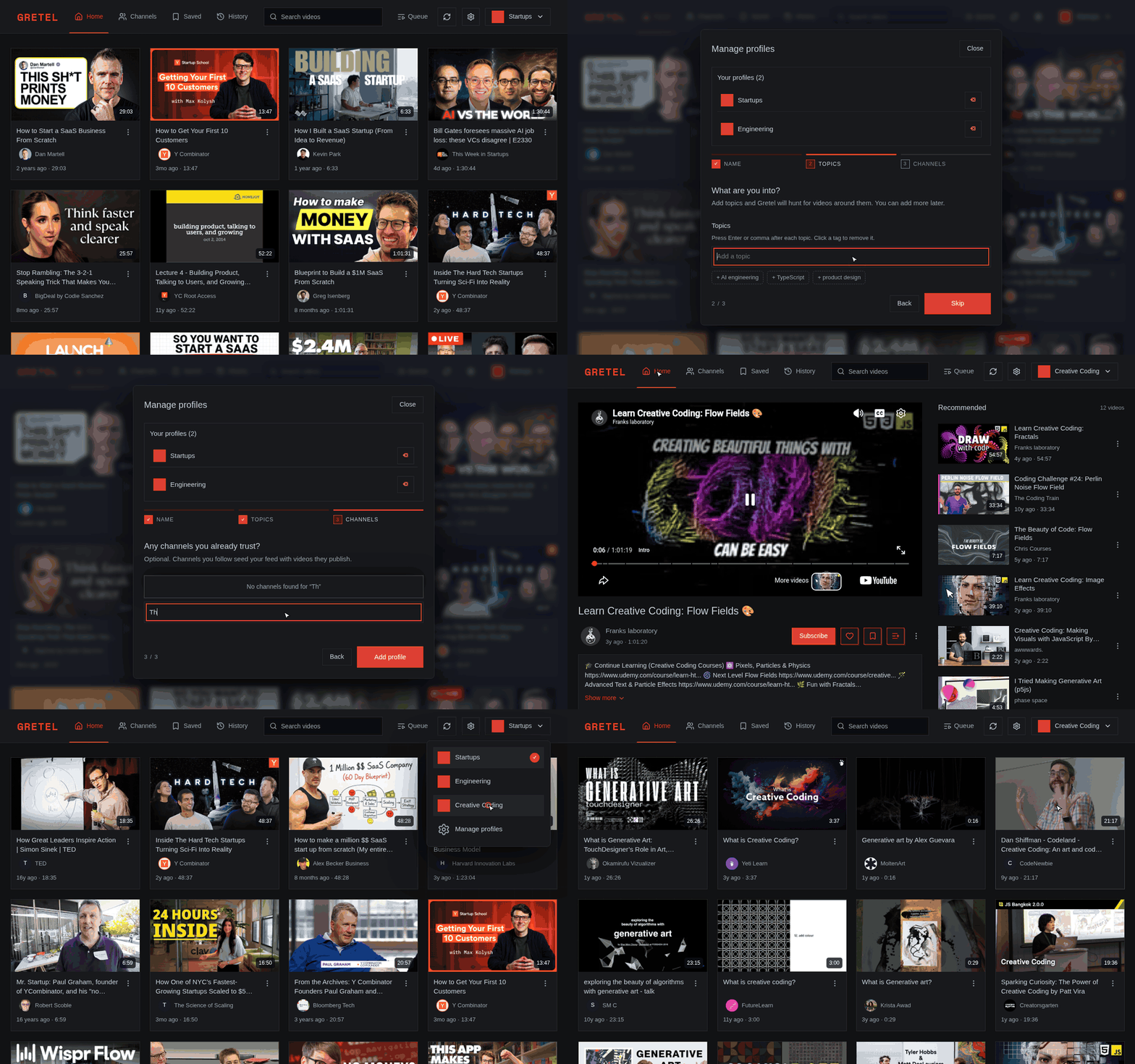
Gretel is a local desktop app for building focused YouTube feeds around separate interests without creating extra Google accounts. Each profile starts with a few topics and channels; Gretel uses YouTube's own recommendations through YT.js to discover candidate videos, then embeddings keep expansion relevant and adapt the profile as videos are watched—preserving YouTube's useful surprises while giving people control over what earns a place in their feed.
Current status: public beta. Expect rough edges, unsigned installers, and possible platform-specific bugs. Please report problems through GitHub Issues.
Showcase
From an empty install: create a profile, seed it with topics and channels, watch Gretel build and rank the feed, then save, queue and organise what you find.
Install the beta
Download the newest beta installer for your platform from Gretel Releases:
- Windows:
.exe - macOS (Apple silicon):
.dmg - Linux:
.deb,.rpm,.AppImage, or Arch package
The installers are currently unsigned, so your operating system may show an unfamiliar-developer warning. Gretel installs signed in-app updates on Windows, macOS, AppImage, .deb, and .rpm installations. Arch packages link to the matching release and update through pacman.
Features
- Personalized YouTube feed by profile
- Topic and channel based discovery
- Saved videos, liked videos, and watch history
- Local SQLite storage
- Managed embeddings after Google sign-in or access-code redemption
- Optional bring-your-own OpenRouter key mode
- Desktop builds for Linux, Windows, and macOS through Tauri
Requirements
- Node.js 24.x
- npm
- Rust 1.77+ and the platform prerequisites listed by Tauri (Windows builds need Visual Studio Build Tools with the MSVC and Windows SDK workloads)
- A Supabase project and OpenRouter key only when operating Gretel's managed service
Developers using bring-your-own-key mode can create an OpenRouter key at:
Development Setup
Clone the repo and install dependencies:
git clone https://github.com/Relic-a/gretel.git
cd gretel
npm install
Create a local environment file:
cp .env.example .env
Then add your OpenRouter API key:
OPENROUTER_API_KEY=your_openrouter_key_here
OPENROUTER_SITE_URL=http://localhost:3000
OPENROUTER_APP_NAME=Gretel
OPENROUTER_KEY is also accepted as an API-key environment variable.
Run the web app only:
npm run dev
Run the Tauri desktop app in development:
npm run tauri:dev
Website
The Next.js app serves both the marketing pages and the desktop application UI:
/is the public landing page, with direct download buttons for every platform installer plus links to Gretel Releases./privacyand/termsare the privacy policy and terms of service, linked from the landing page footer./appis the desktop application itself. The Tauri launcher opens this route, so the marketing page can load in a normal browser without exposing the app shell.
Set NEXT_PUBLIC_SITE_URL to the public origin when deploying the marketing site so canonical URLs and link previews resolve. Leave it unset for local and desktop builds.
App Settings
Most users can continue with Google or redeem an access code; Gretel then sends authenticated embedding requests through its Supabase Edge Function. Developers can instead enter an OpenRouter API key inside the app settings UI. Gretel stores local settings in the app data directory, not in the public repo.
The key is stored locally as plain text so the bundled server can use it. On macOS and Linux, Gretel restricts the settings file to the current OS user. Use a dedicated OpenRouter key with a spending limit and revoke it if the device is lost or shared. See Privacy for the complete data flow.
Approximate data locations:
- Linux:
~/.local/share/com.ezana.gretel/data - Windows:
%APPDATA%/com.ezana.gretel/data - macOS:
~/Library/Application Support/com.ezana.gretel/data
Existing Electron data in the previous Gretel/data location is reused automatically when the new Tauri data directory is empty.
Managed embedding service
The versioned Supabase schema and Edge Function live under supabase/. Before releasing managed access:
- Enable Google under Supabase Authentication → Providers and set the Google OAuth client ID and secret.
- Add
https://grcoyidmgrxiumrezagz.supabase.co/auth/v1/callbackas the authorized redirect URI in Google Cloud. - Add
gretel://auth/callbackto Supabase Authentication → URL Configuration → Redirect URLs. - Enable anonymous sign-ins for access-code users.
- Set
OPENROUTER_API_KEYin Supabase Edge Functions → Secrets.
Create a one-use beta code from the Supabase SQL editor. The plaintext code is returned once; only its SHA-256 hash is stored:
select public.gretel_create_access_code(
  p_label := 'Beta invite',
  p_max_redemptions := 1,
  p_expires_at := now() + interval '30 days',
  p_monthly_input_limit := 25000
);
To adjust an existing user's monthly managed-input allowance, run the audited, admin-only database function from the Supabase SQL editor (never from the desktop client). Use a negative amount to reduce an allowance; the result cannot go below zero:
select * from public.gretel_grant_managed_inputs(
  p_user_id := '<USER_UUID>'::uuid,
  p_amount := 5000,
  p_reason := '<OPERATOR_REASON>'
);
Linux rendering compatibility
Gretel leaves WebKitGTK's renderer defaults unchanged. If an NVIDIA system running Wayland crashes in libnvidia-gpucomp or libEGL_nvidia, launch Gretel with the narrow explicit-sync workaround first:
GRETEL_RENDER_MODE=nvidia-wayland gretel
This mode sets __NV_DISABLE_EXPLICIT_SYNC=1 only when Gretel detects both Wayland and an NVIDIA GPU. If the problem continues, use the stronger and potentially slower DMA-BUF fallback:
GRETEL_RENDER_MODE=disable-dmabuf gretel
The fallback sets WEBKIT_DISABLE_DMABUF_RENDERER=1. On Linux, startup logs include the display protocol, detected GPU vendors, discoverable WebKitGTK version, requested mode, and selected mode. Unset GRETEL_RENDER_MODE (or set it to default) to use normal rendering.
Build Locally
Tauri bundles the Next.js standalone server and a matching Node.js runtime, so installed desktop builds do not require Node.js on the end user's machine. Rust (with the platform's Tauri prerequisites) and Node.js are required when building from source.
Build each package on its target OS and architecture; the preparation step intentionally rejects cross-target builds because it embeds the host Node.js runtime.
Build Linux packages:
npm run dist:linux
Build Windows packages:
npm run dist:win
Build macOS packages:
npm run dist:mac
Notes:
- Linux release builds compile once and produce verified
.deb,.rpm, and AppImage artifacts; the Arch package is then derived from that exact.debartifact. Publication is blocked unless every supported platform package is present. The native packages declare the GStreamer demuxer and software-decoder plugins needed by WebKitGTK; the AppImage bundles its media framework. - For a release from
main, push the version commit and wait for Warm Linux release cache to finish before pushing its tag. The tag build can then restore the compiled Linux binary and dependencies from the default-branch cache. The RPM uses zstd level 3 to shorten packaging; the release workflow verifies the payload codec before publication. A tag from another commit still builds normally, but may miss this cache. - Linux source/development environments must provide WebKitGTK plus GStreamer's base, good, bad, and libav plugin sets. The package names vary by distribution.
- Windows builds produce
.exeinstallers. Prerelease builds use Tauri's NSIS target because MSI only accepts numeric prerelease identifiers. - macOS builds require macOS for best results.
- Local builds are unsigned by default.
Performance Diagnostics
Performance analytics are off by default. Enable Developer analytics in Settings, then open /diagnostics (or use the activity icon in the app header) to inspect locally persisted performance telemetry. When enabled, Gretel records initial feed builds, load-more and exhaustion expansions, preemptive expansions, profile creation, and comment fetching. The dashboard reports run counts, errors, total measured time, p50/p95/p99 latency, and operation-level hotspots.
Metrics are stored in data/gretel.sqlite and retained for 30 days by default. Set GRETEL_METRICS_RETENTION_DAYS to change the retention window. A machine-readable report is available at /api/performance?hours=168; optional workflow and profileId parameters narrow it.
Operation percentages are hotspot indicators. Some operations are nested or concurrent, so they do not necessarily add to 100%.
Project Scripts
npm run dev            # Start Next.js dev server
npm run tauri:dev      # Start Next.js and Tauri together
npm run build          # Build Next.js
npm run tauri:build    # Build Tauri desktop packages for the host platform
npm run dist:linux     # Build Linux desktop packages (from Linux)
npm run dist:win       # Build Windows desktop packages (from Windows)
npm run dist:mac       # Build macOS desktop packages (from macOS)
npm test               # Run tests
License
Licensed under the Apache License, Version 2.0. See LICENSE.
Similar repos


A local-first desktop app for building a more intentional YouTube feed.
See the codeSee what people are saying
README
Gretel
Gretel is a local desktop app for building focused YouTube feeds around separate interests without creating extra Google accounts. Each profile starts with a few topics and channels; Gretel uses YouTube's own recommendations through YT.js to discover candidate videos, then embeddings keep expansion relevant and adapt the profile as videos are watched—preserving YouTube's useful surprises while giving people control over what earns a place in their feed.
Current status: public beta. Expect rough edges, unsigned installers, and possible platform-specific bugs. Please report problems through GitHub Issues.
Showcase
From an empty install: create a profile, seed it with topics and channels, watch Gretel build and rank the feed, then save, queue and organise what you find.
Install the beta
Download the newest beta installer for your platform from Gretel Releases:
- Windows:
.exe - macOS (Apple silicon):
.dmg - Linux:
.deb,.rpm,.AppImage, or Arch package
The installers are currently unsigned, so your operating system may show an unfamiliar-developer warning. Gretel installs signed in-app updates on Windows, macOS, AppImage, .deb, and .rpm installations. Arch packages link to the matching release and update through pacman.
Features
- Personalized YouTube feed by profile
- Topic and channel based discovery
- Saved videos, liked videos, and watch history
- Local SQLite storage
- Managed embeddings after Google sign-in or access-code redemption
- Optional bring-your-own OpenRouter key mode
- Desktop builds for Linux, Windows, and macOS through Tauri
Requirements
- Node.js 24.x
- npm
- Rust 1.77+ and the platform prerequisites listed by Tauri (Windows builds need Visual Studio Build Tools with the MSVC and Windows SDK workloads)
- A Supabase project and OpenRouter key only when operating Gretel's managed service
Developers using bring-your-own-key mode can create an OpenRouter key at:
Development Setup
Clone the repo and install dependencies:
git clone https://github.com/Relic-a/gretel.git
cd gretel
npm install
Create a local environment file:
cp .env.example .env
Then add your OpenRouter API key:
OPENROUTER_API_KEY=your_openrouter_key_here
OPENROUTER_SITE_URL=http://localhost:3000
OPENROUTER_APP_NAME=Gretel
OPENROUTER_KEY is also accepted as an API-key environment variable.
Run the web app only:
npm run dev
Run the Tauri desktop app in development:
npm run tauri:dev
Website
The Next.js app serves both the marketing pages and the desktop application UI:
/is the public landing page, with direct download buttons for every platform installer plus links to Gretel Releases./privacyand/termsare the privacy policy and terms of service, linked from the landing page footer./appis the desktop application itself. The Tauri launcher opens this route, so the marketing page can load in a normal browser without exposing the app shell.
Set NEXT_PUBLIC_SITE_URL to the public origin when deploying the marketing site so canonical URLs and link previews resolve. Leave it unset for local and desktop builds.
App Settings
Most users can continue with Google or redeem an access code; Gretel then sends authenticated embedding requests through its Supabase Edge Function. Developers can instead enter an OpenRouter API key inside the app settings UI. Gretel stores local settings in the app data directory, not in the public repo.
The key is stored locally as plain text so the bundled server can use it. On macOS and Linux, Gretel restricts the settings file to the current OS user. Use a dedicated OpenRouter key with a spending limit and revoke it if the device is lost or shared. See Privacy for the complete data flow.
Approximate data locations:
- Linux:
~/.local/share/com.ezana.gretel/data - Windows:
%APPDATA%/com.ezana.gretel/data - macOS:
~/Library/Application Support/com.ezana.gretel/data
Existing Electron data in the previous Gretel/data location is reused automatically when the new Tauri data directory is empty.
Managed embedding service
The versioned Supabase schema and Edge Function live under supabase/. Before releasing managed access:
- Enable Google under Supabase Authentication → Providers and set the Google OAuth client ID and secret.
- Add
https://grcoyidmgrxiumrezagz.supabase.co/auth/v1/callbackas the authorized redirect URI in Google Cloud. - Add
gretel://auth/callbackto Supabase Authentication → URL Configuration → Redirect URLs. - Enable anonymous sign-ins for access-code users.
- Set
OPENROUTER_API_KEYin Supabase Edge Functions → Secrets.
Create a one-use beta code from the Supabase SQL editor. The plaintext code is returned once; only its SHA-256 hash is stored:
select public.gretel_create_access_code(
  p_label := 'Beta invite',
  p_max_redemptions := 1,
  p_expires_at := now() + interval '30 days',
  p_monthly_input_limit := 25000
);
To adjust an existing user's monthly managed-input allowance, run the audited, admin-only database function from the Supabase SQL editor (never from the desktop client). Use a negative amount to reduce an allowance; the result cannot go below zero:
select * from public.gretel_grant_managed_inputs(
  p_user_id := '<USER_UUID>'::uuid,
  p_amount := 5000,
  p_reason := '<OPERATOR_REASON>'
);
Linux rendering compatibility
Gretel leaves WebKitGTK's renderer defaults unchanged. If an NVIDIA system running Wayland crashes in libnvidia-gpucomp or libEGL_nvidia, launch Gretel with the narrow explicit-sync workaround first:
GRETEL_RENDER_MODE=nvidia-wayland gretel
This mode sets __NV_DISABLE_EXPLICIT_SYNC=1 only when Gretel detects both Wayland and an NVIDIA GPU. If the problem continues, use the stronger and potentially slower DMA-BUF fallback:
GRETEL_RENDER_MODE=disable-dmabuf gretel
The fallback sets WEBKIT_DISABLE_DMABUF_RENDERER=1. On Linux, startup logs include the display protocol, detected GPU vendors, discoverable WebKitGTK version, requested mode, and selected mode. Unset GRETEL_RENDER_MODE (or set it to default) to use normal rendering.
Build Locally
Tauri bundles the Next.js standalone server and a matching Node.js runtime, so installed desktop builds do not require Node.js on the end user's machine. Rust (with the platform's Tauri prerequisites) and Node.js are required when building from source.
Build each package on its target OS and architecture; the preparation step intentionally rejects cross-target builds because it embeds the host Node.js runtime.
Build Linux packages:
npm run dist:linux
Build Windows packages:
npm run dist:win
Build macOS packages:
npm run dist:mac
Notes:
- Linux release builds compile once and produce verified
.deb,.rpm, and AppImage artifacts; the Arch package is then derived from that exact.debartifact. Publication is blocked unless every supported platform package is present. The native packages declare the GStreamer demuxer and software-decoder plugins needed by WebKitGTK; the AppImage bundles its media framework. - For a release from
main, push the version commit and wait for Warm Linux release cache to finish before pushing its tag. The tag build can then restore the compiled Linux binary and dependencies from the default-branch cache. The RPM uses zstd level 3 to shorten packaging; the release workflow verifies the payload codec before publication. A tag from another commit still builds normally, but may miss this cache. - Linux source/development environments must provide WebKitGTK plus GStreamer's base, good, bad, and libav plugin sets. The package names vary by distribution.
- Windows builds produce
.exeinstallers. Prerelease builds use Tauri's NSIS target because MSI only accepts numeric prerelease identifiers. - macOS builds require macOS for best results.
- Local builds are unsigned by default.
Performance Diagnostics
Performance analytics are off by default. Enable Developer analytics in Settings, then open /diagnostics (or use the activity icon in the app header) to inspect locally persisted performance telemetry. When enabled, Gretel records initial feed builds, load-more and exhaustion expansions, preemptive expansions, profile creation, and comment fetching. The dashboard reports run counts, errors, total measured time, p50/p95/p99 latency, and operation-level hotspots.
Metrics are stored in data/gretel.sqlite and retained for 30 days by default. Set GRETEL_METRICS_RETENTION_DAYS to change the retention window. A machine-readable report is available at /api/performance?hours=168; optional workflow and profileId parameters narrow it.
Operation percentages are hotspot indicators. Some operations are nested or concurrent, so they do not necessarily add to 100%.
Project Scripts
npm run dev            # Start Next.js dev server
npm run tauri:dev      # Start Next.js and Tauri together
npm run build          # Build Next.js
npm run tauri:build    # Build Tauri desktop packages for the host platform
npm run dist:linux     # Build Linux desktop packages (from Linux)
npm run dist:win       # Build Windows desktop packages (from Windows)
npm run dist:mac       # Build macOS desktop packages (from macOS)
npm test               # Run tests
License
Licensed under the Apache License, Version 2.0. See LICENSE.