
README
MLX Web UI
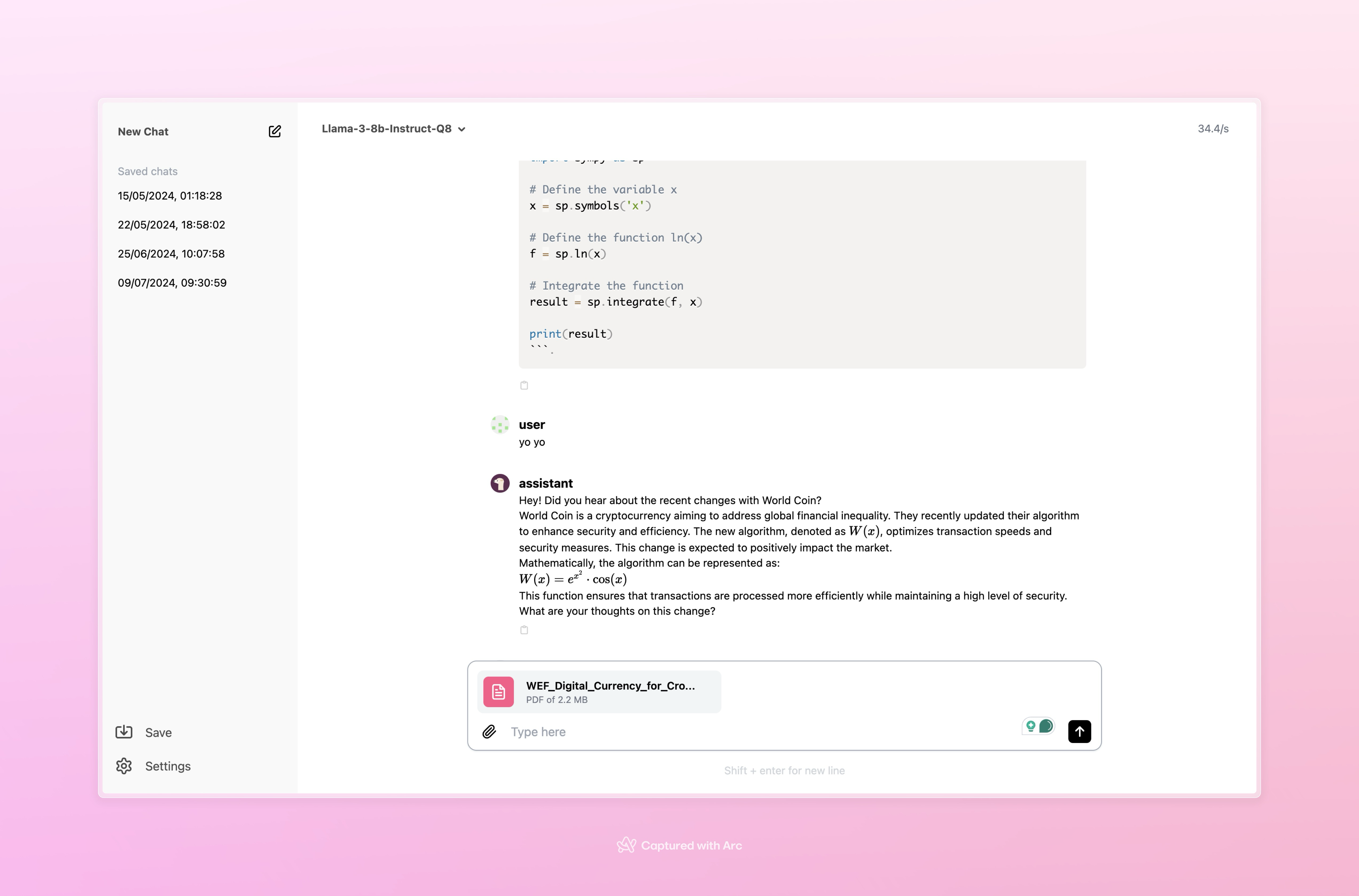
Hello, this repo is an easy way to run a web server for MLX. The design is very minimalistic and contains multiple features like:
- Supports RAG
- Tokens per sec info on screen
- Support for Latex and code formatting (allows to copy the code snippet )
- Ability to set model params (top p, temp, role mapping...)
- Ability to set default params
- Install model from Web server itself
- Save previous conversations and load from there
- Copy response through a button
- Chat with models, stop conversation
- Swap models easily
And more coming soon like:
- Multi-model support
- Dark mode
- Togglable Sidebar
Here is photo of the UI
Installation
No pre-requisites or dependencies needed.
You would only need to run this command to install:
bash -c "$(curl -s https://raw.githubusercontent.com/Rehan-shah/mlx-web-ui/main/install.sh)"
Getting Started
After installation, navigate to the mlx-web-ui directory:
cd mlx-web-ui
To start the server, run:
sudo bash main.sh
This will start the web server on http://localhost:5173.The backend is running on port 8000.
Troubleshooting
Try updating the web-ui version and running again. It can be done using this script:
sudo bash update.sh
If the issue still exists, please open an issue in this repo.
Using RAG
To use rag you could click the paper pin icon in the textbox and then select the file you want to use.
Contributors

27 commits
Similar repos


Languages
TypeScript
67.8%
Python
26.6%
Shell
3.4%
JavaScript
1.8%
README
MLX Web UI
Hello, this repo is an easy way to run a web server for MLX. The design is very minimalistic and contains multiple features like:
- Supports RAG
- Tokens per sec info on screen
- Support for Latex and code formatting (allows to copy the code snippet )
- Ability to set model params (top p, temp, role mapping...)
- Ability to set default params
- Install model from Web server itself
- Save previous conversations and load from there
- Copy response through a button
- Chat with models, stop conversation
- Swap models easily
And more coming soon like:
- Multi-model support
- Dark mode
- Togglable Sidebar
Here is photo of the UI
Installation
No pre-requisites or dependencies needed.
You would only need to run this command to install:
bash -c "$(curl -s https://raw.githubusercontent.com/Rehan-shah/mlx-web-ui/main/install.sh)"
Getting Started
After installation, navigate to the mlx-web-ui directory:
cd mlx-web-ui
To start the server, run:
sudo bash main.sh
This will start the web server on http://localhost:5173.The backend is running on port 8000.
Troubleshooting
Try updating the web-ui version and running again. It can be done using this script:
sudo bash update.sh
If the issue still exists, please open an issue in this repo.
Using RAG
To use rag you could click the paper pin icon in the textbox and then select the file you want to use.
Similar repos
Contributors
27 commits
Languages
TypeScript
67.8%
Python
26.6%
Shell
3.4%
JavaScript
1.8%