
Capture, annotate, and send multiple screenshots to one Linear issue. A focused desktop app for Windows, macOS, and Linux.
See the codeSee what people are saying
README
Snipflag
Snip it. Mark it. Flag it.
Turn one or more screenshots into one clear Linear issue.
Features · Getting started · Connecting Linear · Privacy · Contributing
Snipflag is a focused desktop app for reporting visual problems. Capture a region of your screen, mark what matters, capture another, add a title, and send everything to Linear as a single issue with the screenshots in order. It runs on Windows (primary), macOS, and Linux, and is built with Tauri 2, Rust, React, and TypeScript.
Website: razee4315.github.io/snipflag · v1.2.0: Download the release (unsigned installers). Native runtime acceptance and signing are still pending; see verification status.
See it in action
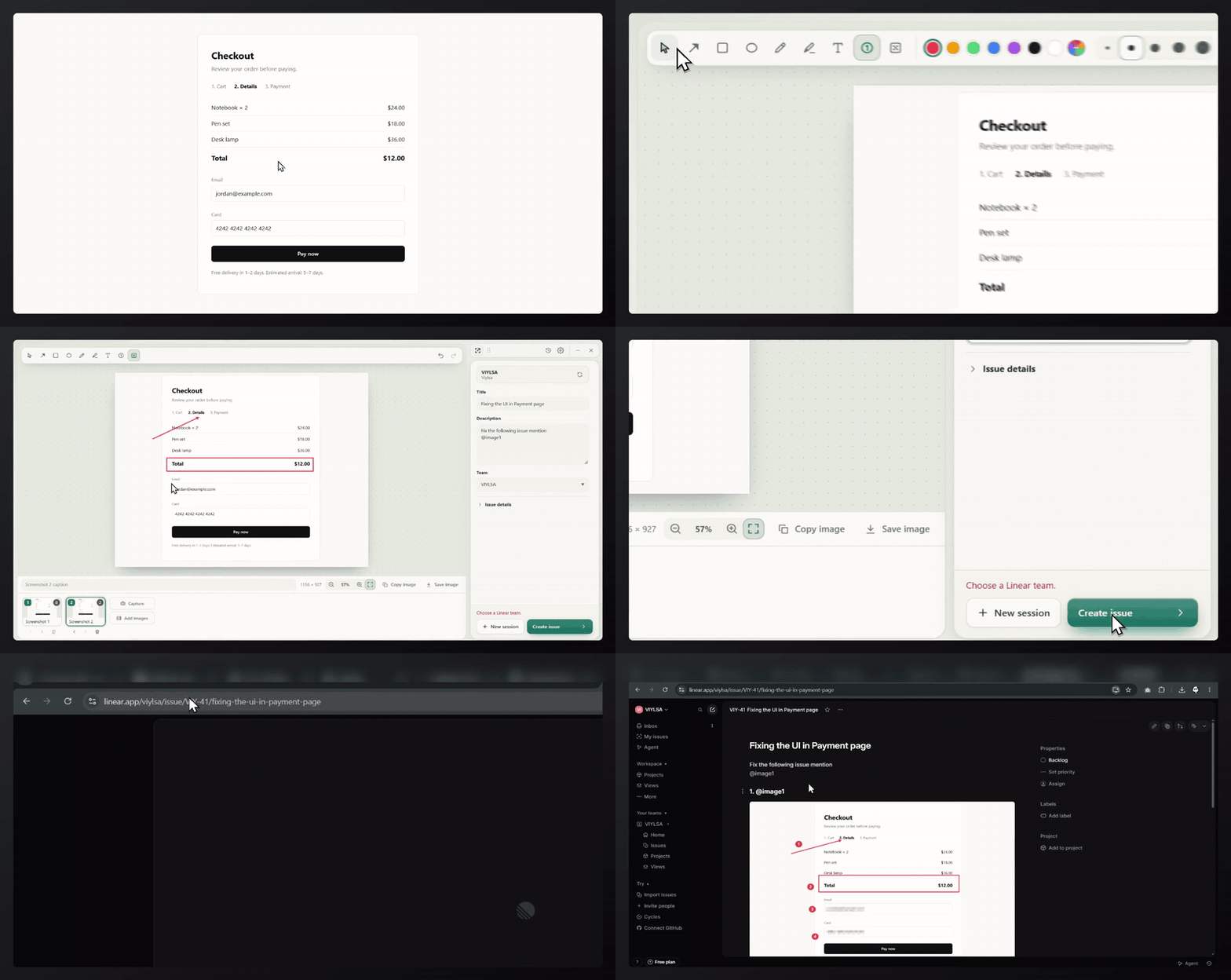
A real recording: capture, annotate, pixelate private fields, create the issue, and open it in Linear.
More screenshots (light and dark)
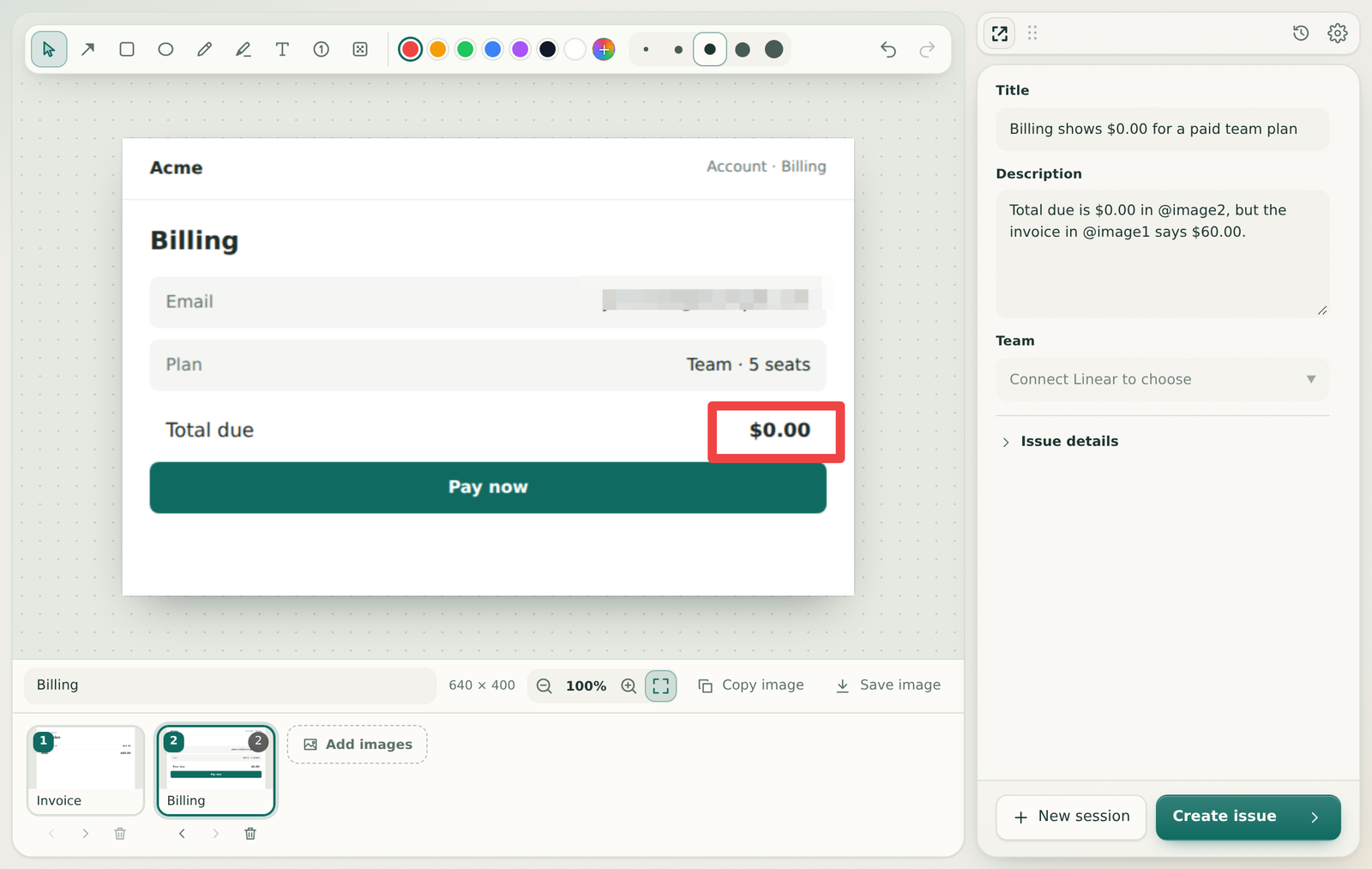
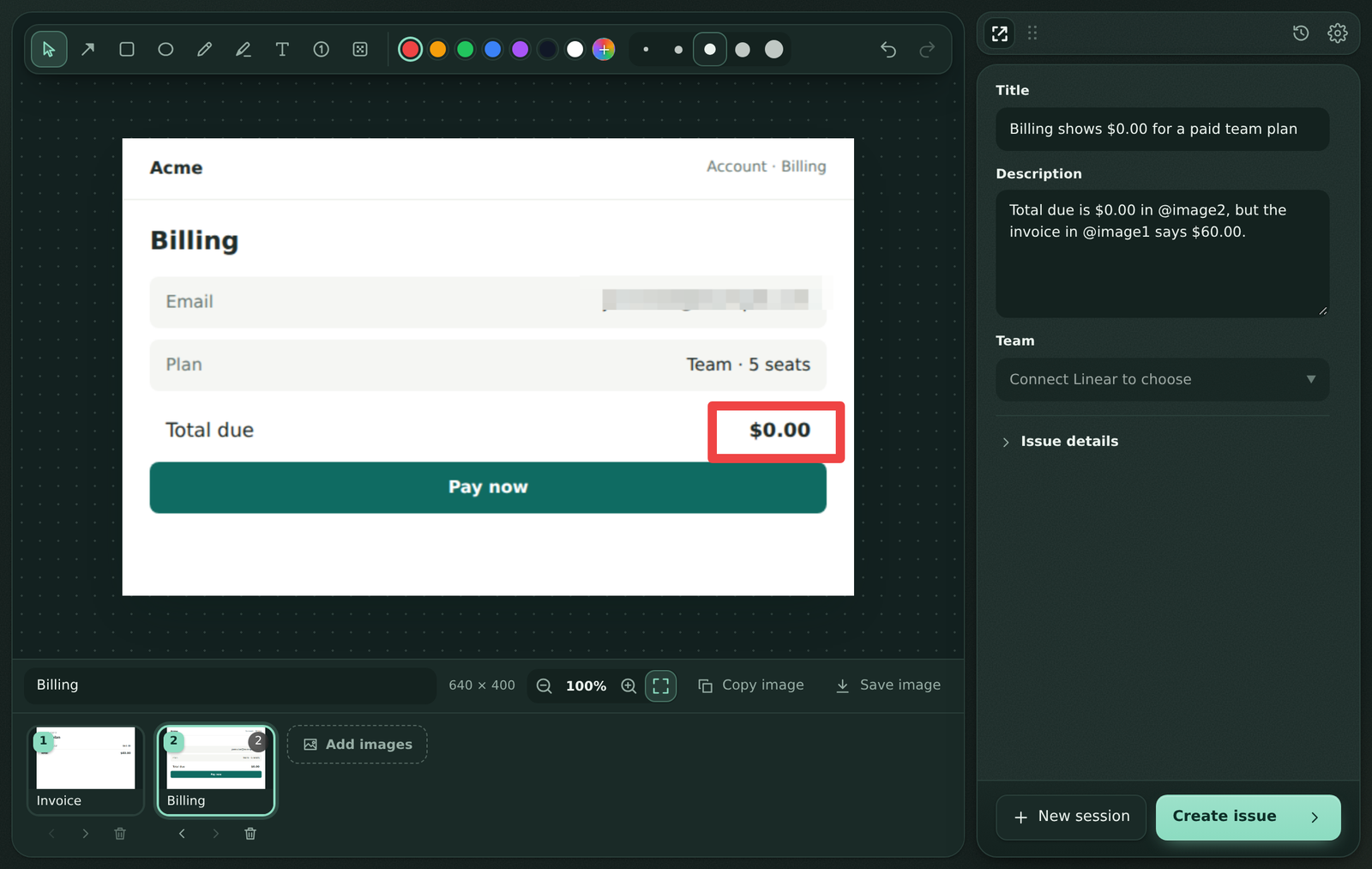
UI rendered on CI with synthetic sample content. Native window controls and the connected Linear state differ slightly in the desktop app.
Features
Capture
- Lives in the system tray with a global shortcut (default
Ctrl+Shift+2,Cmd+Shift+2on macOS). - Freezes every monitor, then you drag a region. Enter captures the whole screen, Escape cancels.
- Also add images from files (PNG, JPEG, WebP), paste from the clipboard, or drag and drop.
Annotate
- Arrow, rectangle, ellipse, pen, highlighter, text, numbered steps, and pixelate.
- Built-in palettes plus a custom color picker for pens and highlighter inks; your custom colors are remembered.
- Hold Shift for 15° arrow/pen snapping, square rectangles or round ellipses.
- Select, move, and resize marks; change color, width, and text size; zoom, fit, and 100%.
- Each screenshot keeps its own annotations and undo history, so you can move between them freely.
- Exports keep the original pixel dimensions, and pixelation is burned into the pixels.
Report
- Up to 10 screenshots per session, reorderable and captioned, sent as one issue.
- Title, description, team, project, assignee, labels, and priority, without leaving the app.
- Type
@in Description to choose a screenshot. References survive reordering and become clickable image links in Linear. - Safe retries: each session has a stable issue ID, so a retry after a network failure checks Linear first and never creates a duplicate.
Keep your work
- Drafts save automatically and come back after a restart.
- History to reopen or delete past sessions, with a retention setting.
Keyboard shortcuts
| Action | Shortcut |
|---|---|
| Capture (global) | Ctrl/Cmd + Shift + 2 (configurable) |
| Select, Arrow, Rectangle, Ellipse | V, A, R, E |
| Pen, Highlighter, Text | P, H, T |
| Numbered step, Pixelate | N, B |
| Undo, Redo | Ctrl/Cmd + Z, Ctrl/Cmd + Shift + Z |
| Delete selected mark | Delete |
| Create issue | Ctrl/Cmd + Enter |
| Zoom | Ctrl/Cmd + mouse wheel |
Creator
Snipflag is designed and built by Saqlain Razee (GitHub · LinkedIn).
Getting started
Download v1.2.0 installers from GitHub Releases. All installers are built on GitHub Actions.
Additional development installers are produced by the Development installers workflow:
| Platform | Artifact | Formats |
|---|---|---|
| Windows x64 | snipflag-development-unsigned-x86_64-pc-windows-msvc | NSIS .exe, .msi |
| macOS Apple Silicon | snipflag-development-unsigned-aarch64-apple-darwin | .dmg |
| macOS Intel | snipflag-development-unsigned-x86_64-apple-darwin | .dmg |
| Linux x64 | snipflag-development-unsigned-x86_64-unknown-linux-gnu | .deb, .AppImage |
These builds are not code-signed, so Windows SmartScreen and macOS Gatekeeper will warn before opening them. Actions artifacts expire after 7 days; the release downloads remain available.
On macOS, grant Screen Recording permission when asked. On Linux Wayland, some compositors block direct capture; adding or pasting images still works.
Connecting Linear
Snipflag signs in to Linear with OAuth and PKCE. No client secret is used, and the resulting token is kept in your operating system's credential store.
Choose Connect Linear, approve access in your browser, then return to Snipflag. From v1.2.0, Snipflag also checks for signed updates and offers an Update button; installs from v1.1.0 or earlier need one manual upgrade.
Self-builds can use Settings → Advanced: custom Linear application: register an OAuth application with callback http://127.0.0.1:47839/callback and enter its public client ID. Leave the field blank to use the installer's built-in connection. Maintainers configure that connection through the SNIPFLAG_LINEAR_CLIENT_ID repository variable; no client secret is embedded. More detail is in docs/LINEAR.md.
Privacy
- Screenshots stay on your computer until you choose Create issue.
- Linear is contacted only to sign in, load your teams and fields, and create the issue you submit.
- No analytics, no screenshot cloud, and no account needed to capture or annotate.
- Use Pixelate for private details. It replaces the area with large averaged color blocks that are burned into every export. For long secrets such as API keys, prefer not capturing them at all.
- Drafts are stored unencrypted in the app data folder. You can delete them from History or Settings.
Details are in docs/SECURITY.md. To report a vulnerability, see SECURITY.md.
Development
All builds, tests, and packaging run on GitHub Actions. The contributing guide covers the project layout, engineering rules, running the app locally, and how to open a pull request.
Documentation
| Topic | Document |
|---|---|
| Product scope and acceptance criteria | docs/PRODUCT.md |
| Screens and interaction flows | docs/UX.md |
| Visual language and brand | docs/DESIGN.md |
| Architecture and data lifecycle | docs/ARCHITECTURE.md |
| Linear integration | docs/LINEAR.md |
| Privacy and command boundaries | docs/SECURITY.md |
| Builds and releases | docs/CI.md |
| Test matrix | docs/TESTING.md |
| Current status and next steps | docs/STATUS.md |
| Name research | docs/NAME.md |
| Changes | CHANGELOG.md |
| Help | SUPPORT.md |
License
Snipflag is released under the MIT License.
Linear is a trademark of Linear Orbit, Inc. Snipflag is an independent project and is not affiliated with or endorsed by Linear.
Contributors

75 commits
Similar repos


Languages
TypeScript
44.1%
Rust
19.0%
HTML
16.6%
CSS
12.4%
Python
6.4%
JavaScript
1.6%
Capture, annotate, and send multiple screenshots to one Linear issue. A focused desktop app for Windows, macOS, and Linux.
See the codeSee what people are saying
README
Snipflag
Snip it. Mark it. Flag it.
Turn one or more screenshots into one clear Linear issue.
Features · Getting started · Connecting Linear · Privacy · Contributing
Snipflag is a focused desktop app for reporting visual problems. Capture a region of your screen, mark what matters, capture another, add a title, and send everything to Linear as a single issue with the screenshots in order. It runs on Windows (primary), macOS, and Linux, and is built with Tauri 2, Rust, React, and TypeScript.
Website: razee4315.github.io/snipflag · v1.2.0: Download the release (unsigned installers). Native runtime acceptance and signing are still pending; see verification status.
See it in action
A real recording: capture, annotate, pixelate private fields, create the issue, and open it in Linear.
More screenshots (light and dark)
UI rendered on CI with synthetic sample content. Native window controls and the connected Linear state differ slightly in the desktop app.
Features
Capture
- Lives in the system tray with a global shortcut (default
Ctrl+Shift+2,Cmd+Shift+2on macOS). - Freezes every monitor, then you drag a region. Enter captures the whole screen, Escape cancels.
- Also add images from files (PNG, JPEG, WebP), paste from the clipboard, or drag and drop.
Annotate
- Arrow, rectangle, ellipse, pen, highlighter, text, numbered steps, and pixelate.
- Built-in palettes plus a custom color picker for pens and highlighter inks; your custom colors are remembered.
- Hold Shift for 15° arrow/pen snapping, square rectangles or round ellipses.
- Select, move, and resize marks; change color, width, and text size; zoom, fit, and 100%.
- Each screenshot keeps its own annotations and undo history, so you can move between them freely.
- Exports keep the original pixel dimensions, and pixelation is burned into the pixels.
Report
- Up to 10 screenshots per session, reorderable and captioned, sent as one issue.
- Title, description, team, project, assignee, labels, and priority, without leaving the app.
- Type
@in Description to choose a screenshot. References survive reordering and become clickable image links in Linear. - Safe retries: each session has a stable issue ID, so a retry after a network failure checks Linear first and never creates a duplicate.
Keep your work
- Drafts save automatically and come back after a restart.
- History to reopen or delete past sessions, with a retention setting.
Keyboard shortcuts
| Action | Shortcut |
|---|---|
| Capture (global) | Ctrl/Cmd + Shift + 2 (configurable) |
| Select, Arrow, Rectangle, Ellipse | V, A, R, E |
| Pen, Highlighter, Text | P, H, T |
| Numbered step, Pixelate | N, B |
| Undo, Redo | Ctrl/Cmd + Z, Ctrl/Cmd + Shift + Z |
| Delete selected mark | Delete |
| Create issue | Ctrl/Cmd + Enter |
| Zoom | Ctrl/Cmd + mouse wheel |
Creator
Snipflag is designed and built by Saqlain Razee (GitHub · LinkedIn).
Getting started
Download v1.2.0 installers from GitHub Releases. All installers are built on GitHub Actions.
Additional development installers are produced by the Development installers workflow:
| Platform | Artifact | Formats |
|---|---|---|
| Windows x64 | snipflag-development-unsigned-x86_64-pc-windows-msvc | NSIS .exe, .msi |
| macOS Apple Silicon | snipflag-development-unsigned-aarch64-apple-darwin | .dmg |
| macOS Intel | snipflag-development-unsigned-x86_64-apple-darwin | .dmg |
| Linux x64 | snipflag-development-unsigned-x86_64-unknown-linux-gnu | .deb, .AppImage |
These builds are not code-signed, so Windows SmartScreen and macOS Gatekeeper will warn before opening them. Actions artifacts expire after 7 days; the release downloads remain available.
On macOS, grant Screen Recording permission when asked. On Linux Wayland, some compositors block direct capture; adding or pasting images still works.
Connecting Linear
Snipflag signs in to Linear with OAuth and PKCE. No client secret is used, and the resulting token is kept in your operating system's credential store.
Choose Connect Linear, approve access in your browser, then return to Snipflag. From v1.2.0, Snipflag also checks for signed updates and offers an Update button; installs from v1.1.0 or earlier need one manual upgrade.
Self-builds can use Settings → Advanced: custom Linear application: register an OAuth application with callback http://127.0.0.1:47839/callback and enter its public client ID. Leave the field blank to use the installer's built-in connection. Maintainers configure that connection through the SNIPFLAG_LINEAR_CLIENT_ID repository variable; no client secret is embedded. More detail is in docs/LINEAR.md.
Privacy
- Screenshots stay on your computer until you choose Create issue.
- Linear is contacted only to sign in, load your teams and fields, and create the issue you submit.
- No analytics, no screenshot cloud, and no account needed to capture or annotate.
- Use Pixelate for private details. It replaces the area with large averaged color blocks that are burned into every export. For long secrets such as API keys, prefer not capturing them at all.
- Drafts are stored unencrypted in the app data folder. You can delete them from History or Settings.
Details are in docs/SECURITY.md. To report a vulnerability, see SECURITY.md.
Development
All builds, tests, and packaging run on GitHub Actions. The contributing guide covers the project layout, engineering rules, running the app locally, and how to open a pull request.
Documentation
| Topic | Document |
|---|---|
| Product scope and acceptance criteria | docs/PRODUCT.md |
| Screens and interaction flows | docs/UX.md |
| Visual language and brand | docs/DESIGN.md |
| Architecture and data lifecycle | docs/ARCHITECTURE.md |
| Linear integration | docs/LINEAR.md |
| Privacy and command boundaries | docs/SECURITY.md |
| Builds and releases | docs/CI.md |
| Test matrix | docs/TESTING.md |
| Current status and next steps | docs/STATUS.md |
| Name research | docs/NAME.md |
| Changes | CHANGELOG.md |
| Help | SUPPORT.md |
License
Snipflag is released under the MIT License.
Linear is a trademark of Linear Orbit, Inc. Snipflag is an independent project and is not affiliated with or endorsed by Linear.
Similar repos
Contributors
75 commits
Languages
TypeScript
44.1%
Rust
19.0%
HTML
16.6%
CSS
12.4%
Python
6.4%
JavaScript
1.6%