
Pace Claude Code against your 5-hour and weekly limits: fewer lockouts, fewer compactions, and an audit of what you waste.
Python
0
2 commits
updated Oct 5, 2026
See what people are saying
README
cc-limit-pacer
Paces Claude Code against your 5-hour and weekly plan limits, so you get locked out less and see what you waste. It does three things:
-
Paces your usage. A hook watches your 5-hour and weekly usage. When you're on track to run out ("hot": a window is at least 50% used and on pace to hit its limit), it:
- starts new sessions one model tier down (Fable → Opus, Opus → Sonnet) with the advisor off;
- holds automated runs (SDK /
claude -p, or sessions working in a temp directory) until the window resets.
When usage cools down, it restores your model and advisor settings. Your interactive sessions are never held.
-
Compacts later. On 1M-window models, sessions auto-compact at about 830k tokens instead of about 570k, so you keep more context and compact less.
-
Audits your usage. What pacing would have saved, what you wasted (compacting, lockouts, unused weekly and Fable allowance), and how full your limits get, as text or a stats page.
Formerly autocompact-gate; state in ~/.claude/state/autocompact-gate moves to ~/.claude/state/cc-limit-pacer on first run.
Python 3.9+, standard library only.
Install as a Claude Code plugin
Before you start
- You need Claude Code with plugin support, and
python3(3.9+) on yourPATH. The hooks and commands run Python. - The repo is private. Claude Code clones it with your normal git credentials, so
git clone https://github.com/RahulBalakavi/cc-limit-pacerhas to work for you first (for examplegh auth login, or access granted to your GitHub account).
1. Install. From a terminal:
claude plugin marketplace add RahulBalakavi/cc-limit-pacer
claude plugin install cc-limit-pacer@cc-limit-pacer
Or from inside Claude Code:
/plugin marketplace add RahulBalakavi/cc-limit-pacer
/plugin install cc-limit-pacer@cc-limit-pacer
Restart Claude Code (or start a new session) so the hooks and commands load.
2. Check it's installed.
claude plugin details cc-limit-pacer@cc-limit-pacer
cc-limit-pacer 0.1.1
Component inventory
  Skills (6)  backtest, calibrate, setup, simulate, status, uninstall
  Hooks (2)  SessionStart, UserPromptSubmit  (harness-only — no model context cost)
Projected token cost
  Always-on:   ~233 tok   added to every session
3. Set it up inside Claude Code.
/cc-limit-pacer:calibrate 36 24 "2026-10-09 11:00"
/cc-limit-pacer:simulate
/cc-limit-pacer:setup
/cc-limit-pacer:status
Run them in that order. The calibrate numbers are your 5-hour %, your weekly %, and the weekly reset time, all from /usage.
| Command | What it does | Changes anything? |
|---|---|---|
/cc-limit-pacer:calibrate <5h%> <weekly%> "<weekly reset>" | learns your budget from one /usage reading | writes its own state only |
/cc-limit-pacer:simulate [--days N] | replays your last month under each policy, so you can see if it helps you | no |
/cc-limit-pacer:backtest [--days N] | lists every real lockout in your transcripts and replays each one | no |
/cc-limit-pacer:setup [--compact-at TOKENS] | sets autoCompactWindow so sessions compact at about 830k, after backing up settings.json | yes, one setting |
/cc-limit-pacer:status | shows whether you're hot or cool, which levers are active, held runs, and lockouts per week before vs. since install | no |
/cc-limit-pacer:audit [--days N | --since YYYY-MM-DD] [--fable-pct P] | over the last 23 days by default, or from a fixed start date: what the pacer would have saved (compactions, lockouts, hours locked), what you wasted (compacting, lockouts, unused weekly and Fable allowance, advisor), and how full your limits get | no |
/cc-limit-pacer:stats [--days N | --since YYYY-MM-DD] [--fable-pct P] | the same as a stats page, published as an artifact (or opened locally) | no |
/cc-limit-pacer:report [--hours N] | bug checklist: errors, slow runs, missed lockouts, sensor drift, settings changes | no |
/cc-limit-pacer:verbose [on|off] | log every hook run in full (for trials and debugging); off by default | its own config only |
/cc-limit-pacer:uninstall | restores autoCompactWindow and any model or advisor setting the pacer changed | yes, restores |
- The pacer hooks start with the plugin. They change nothing until you've calibrated and your usage actually runs hot.
- Plugins can't change
autoCompactWindowthemselves, which is whysetupexists.
Update
claude plugin marketplace update cc-limit-pacer
claude plugin update cc-limit-pacer@cc-limit-pacer
Then restart Claude Code. Your calibration and logs live in ~/.claude/state/cc-limit-pacer/, so updates keep them.
Uninstall
/cc-limit-pacer:uninstall
claude plugin uninstall cc-limit-pacer@cc-limit-pacer
claude plugin marketplace remove cc-limit-pacer
Run /cc-limit-pacer:uninstall first. Once the plugin is removed, its command to restore your settings is gone too.
Install from a local checkout (to try changes before pushing):
git clone https://github.com/RahulBalakavi/cc-limit-pacer ~/cc-limit-pacer
claude plugin marketplace add ~/cc-limit-pacer
claude plugin install cc-limit-pacer@cc-limit-pacer
After editing, bump version in .claude-plugin/plugin.json, then run the two update commands above. claude plugin validate . checks the manifest.
Troubleshooting
marketplace addfails with an auth or "not found" error: you don't have access to the private repo yet, or git isn't signed in to GitHub.- The commands don't appear: restart Claude Code after installing or updating.
- The hooks fire twice: you also ran the script install (
python3 limit_pacer.py installwithout--plugin). Runpython3 limit_pacer.py install --pluginonce; it removes the duplicate hooks fromsettings.jsonand keeps the plugin's. - An automated run was "held": that's the pacer protecting your limit. Set
LIMIT_PACER_ALLOW=1to let it through, or wait for the reset time in the message.
Or run the scripts directly
The outputs below are sample numbers; yours will differ.
Every step before install is read-only.
1. Get the code.
git clone https://github.com/RahulBalakavi/cc-limit-pacer && cd cc-limit-pacer
2. Check it works on your machine. This uses a fake ~/.claude in a temp directory and touches nothing real.
python3 test_pacer.py
ok
pacer ok
3. Teach it your budget. Take the numbers from /usage in the CLI, or from the usage card in the app.
python3 limit_pacer.py calibrate --five-hour 36 --weekly 24 --weekly-reset "2026-10-09 11:00"
budgets (API-equivalent $): {'five_hour': 150.0, 'seven_day': 1100.0}
local estimate now: {'five_hour': '36%', 'seven_day': '24%'} (should match what you entered)
4. Replay your last month under each policy. This is the main evidence.
python3 simulate.py --days 32
41210 events over 4.3 weeks; budgets from calibration (5h=150, week=1.1e+03)
real lockouts found in transcripts: 5 5h, 1 weekly

real compactions leave a median 100k context; the simulation compacts to that

policy         compactions/wk 5h lockouts  weekly hours locked  usage  held back
today                    18.0           4       1         74.0   100%         $0
compact@830k             11.5           4       1         81.0   103%         $0
830k + pacer             13.0           2       1         38.0    98%        $62
How to read the rows:
todayis the sanity check. It replays what actually happened, and its lockout counts should roughly match the real ones on the line above (here 4 vs 5 five-hour, 1 vs 1 weekly).compact@830kgives about a third fewer compactions, but the extra usage brings lockouts sooner.830k + paceris whatinstallsets up: 28% fewer compactions and about half the hours locked. In exchange, $62 of batch work waits during hot stretches.
5. Replay each real lockout one by one.
python3 backtest.py --days 32
2410 sessions; 6 lockouts found

lockout (local time)    locked 500k if hot 250k if hot  result
5h   Sep 14 21:10         1.4h         99%         86%  no help
5h   Sep 19 16:05         1.8h        103%         95%  no help
week Sep 20 11:40        60.1h         98%         89%  0.4h later
...
5h   Sep 30 22:15         0.2h        101%         91%  no help

locked out 71.0h total; gate would have given back ~0.5h
if every session compacted at 500k: 3% less usage over 32d (only 41 of 2410 sessions ever passed 500k)
This is why compaction alone is the wrong knob.
- The percentage columns are your usage at the moment of lockout, replayed with early compaction while hot, as a share of the limit.
- Compacting earlier barely moves them, because only a few dozen sessions ever go past 500k.
- Lockouts come from volume. That's what the pacer's other levers go after: holding batch runs and dropping a model tier.
6. Install.
python3 limit_pacer.py install
installed: compaction at ~830k (autoCompactWindow=862000); pacer on SessionStart, UserPromptSubmit; hook=~/.claude/hooks/limit_pacer.py
Add --compact-at 700000 to compact earlier.
7. Check on it. The lockouts-per-week line is the number that proves the value over time.
python3 ~/.claude/hooks/limit_pacer.py status
usage-source=local-estimate  state=cool
  five_hour used= 12.0%  pace=0.50  resets in   3.0h
  seven_day used= 39.0%  pace=0.80  resets in  91.0h
80 hook runs; hot on 0; held 0 automated prompts
lockouts: 6 in the 30d before install (1.4/wk); 0 since install (0.0/wk over 1.0d)
8. Undo everything.
python3 limit_pacer.py uninstall
How it behaves once installed
- Settings:
installbacks up~/.claude/settings.json, setsautoCompactWindow, and adds aSessionStartand aUserPromptSubmithook. Each runs in about 0.2s. - While hot: it writes
modelone tier down andadvisorModel: "off"into your settings, so new sessions pick them up. It shows a one-line notice when it switches state. - When it cools down: it restores those settings, unless you changed them yourself in the meantime.
- Held runs: automated prompts are refused with
holding automated run … retry after Mon 04:40. When a held run needs to go now, setLIMIT_PACER_ALLOW=1. - Logs: every hook run is written to
~/.claude/state/cc-limit-pacer/pacer.jsonl. - What the replay leaves out: quality loss from compacting or from cheaper models, and held work running later, so the lockout gains are optimistic.
Config (~/.claude/state/cc-limit-pacer/config.json) | Default | |
|---|---|---|
levers | true | switch model and advisor while hot |
hold_batch | true | hold automated runs while hot |
use_statusline | true | trust the statusline's rate_limits. Set false if several accounts share one ~/.claude |
Logs and the daily check
Logs live in ~/.claude/state/cc-limit-pacer/ and rotate at 5 MB.
errors.jsonl, always on. Any exception is written with its full traceback, and the prompt still goes through. A bug in this plugin never blocks your session.pacer.jsonl, quiet by default. It logs only runs where something happened: a hot↔cool switch, a settings change by the levers (or a restore skipped because you changed it yourself), or a held prompt.- Verbose mode logs every hook run in full: session, entrypoint, cwd, the usage estimate and its source, time to reset, calibration age and budgets, and how long the hook took. Turn it on when you try the plugin or chase a bug, and off again afterwards:
/cc-limit-pacer:verbose on                    # or: python3 limit_pacer.py verbose on
/cc-limit-pacer:verbose off
LIMIT_PACER_VERBOSE=1 claude ...           # verbose for one process only
/cc-limit-pacer:report # or: python3 limit_pacer.py report --hours 24
cc-limit-pacer 0.3.0 — last 24h: 29 logged hook runs, 0 errors
  latency  p50=96ms  p95=155ms  max=155ms  (12 timed runs)
  usage source {'local-estimate': 29}
  now  cool  {'five_hour': '12% (pace 0.5)', 'seven_day': '39% (pace 0.8)'}

OK — nothing to look at
report exits 1 and lists what needs a look when it finds any of these. The latency, sensor and coverage checks need verbose logs.
- Hook errors, with the latest error message.
- A slow hook: p95 over 1s. Every prompt waits on it.
- A missed lockout: a real lockout in your transcripts while the pacer was cool in the hour before it.
- Sensor drift: the estimate read under 80% just before a lockout.
- No usable reading: usage is uncalibrated, the calibration is more than 3 days old, or the sensor failed.
- A held interactive prompt, meaning a prompt that wasn't batch work got held.
- A skipped restore: you changed
modeloradvisorModelwhile hot, so the pacer left your choice in place. - Hooks not loaded: no
UserPromptSubmitruns were logged.
Audit and stats page
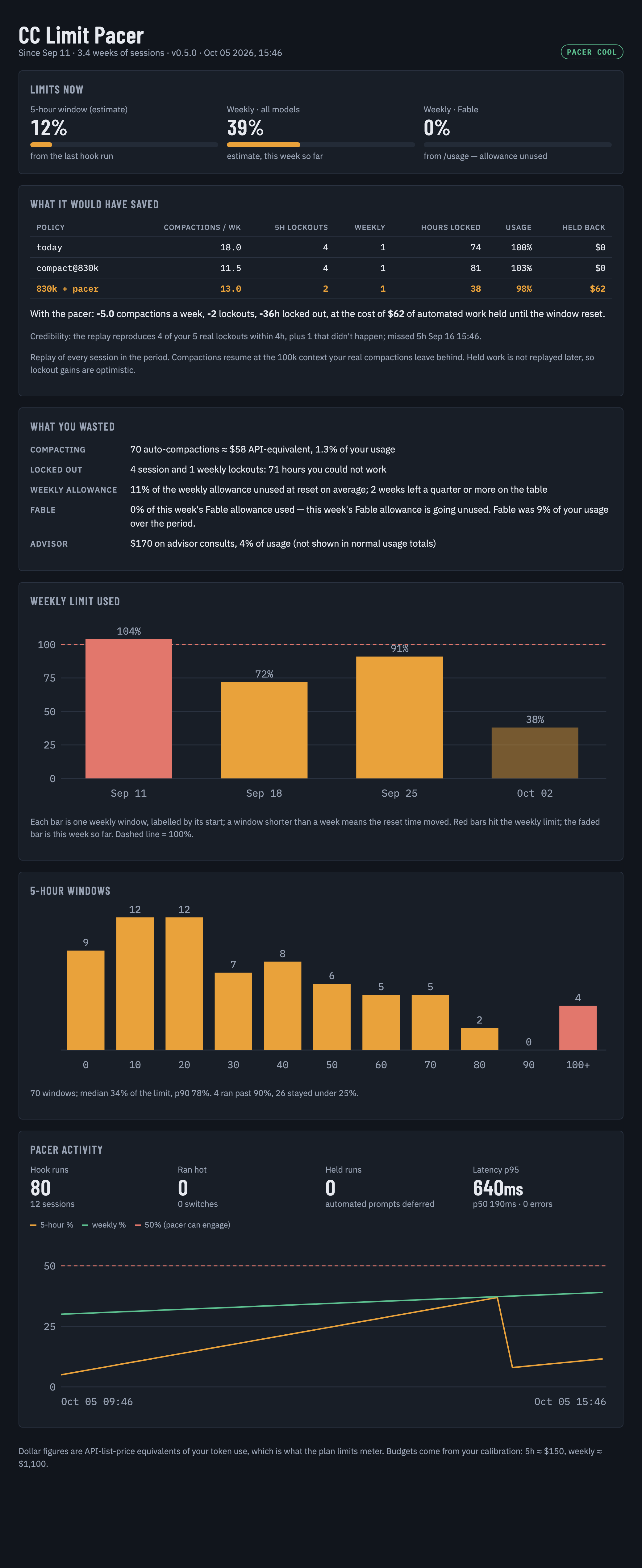
Sample data (python3 docs/sample_stats.py); your page shows your own numbers.
/cc-limit-pacer:audit                         # or: python3 audit.py --fable-pct 0
/cc-limit-pacer:stats                         # or: python3 audit.py --html stats.html
WHAT IT WOULD HAVE SAVED (replay of your sessions)
  policy         compactions/wk 5h lockouts  weekly hours locked  usage  held back
  today                    18.0           4       1         74.0   100%         $0
  compact@830k             11.5           4       1         81.0   103%         $0
  830k + pacer             13.0           2       1         38.0    98%        $62
  → -5.0 compactions/wk, -2 lockouts, -36h locked

WHAT YOU WASTED
  compacting      70 auto-compactions ≈ $58 API-equivalent (1.3% of your usage)
  locked out      4 session + 1 weekly lockouts, 71h unable to work
  advisor         $170 (4% of usage) on advisor consults
  Fable           0% used this week — the whole Fable allowance is going unused

HOW MUCH OF EACH LIMIT YOU USE
  Sep 25 – Oct 02     91%
  Oct 02 – Oct 09     38%  (so far)
  5h windows      70 used; median 34%, p90 78%; 4 ran ≥90%, 26 stayed under 25%
- Saved reuses the
simulatereplay. Its credibility line compares the replay's lockouts with your real ones; a big gap means the calibration is off. - Wasted is measured from transcripts: the summary call plus cache rebuild of every auto-compaction, hours between each lockout and its reset, weekly allowance left at reset (full weeks only), advisor consults.
- Fable has its own weekly allowance that only
/usagereports. Pass--fable-pctwith the "Weekly · Fable" %; the commands read it for you when Claude has a usage tool. statswrites~/.claude/state/cc-limit-pacer/stats.html: current meters, the savings table, the waste ledger, weekly and 5h usage charts, and pacer activity (usage over time needs verbose logs).
What's verified
- Model and advisor changes only reach new sessions. Changing
modelin settings during a run doesn't affect it.advisorModel: "off"turns the advisor off;nulland""do not. - Held headless runs: a held
claude -prun returns the hold message as its result and exits 0. Batch scripts should check the result text. - Compaction timing: Claude Code compacts about 32k tokens below
autoCompactWindow. If one turn jumps past the model's real window, the session ends withPrompt is too longand nothing recovers it. - The usage estimate is approximate. It only sees this machine's transcripts. Usage from claude.ai or other machines is invisible, so recalibrate if the
statusnumbers drift from/usage.
Files
| File | What |
|---|---|
limit_pacer.py | the pacer hook, plus the install / uninstall / calibrate / status commands |
.claude-plugin/, hooks/, commands/ | the plugin: manifest, the two hooks, and the /cc-limit-pacer:* commands |
audit.py | the audit and the stats page |
docs/sample_stats.py | renders the stats page from sample data, for the screenshot |
simulate.py | replays a month of your history under each policy and lever |
backtest.py | lockout finder and per-window replay |
test_pacer.py | python3 test_pacer.py, uses a fake ~/.claude in a temp directory |
Similar repos


Pace Claude Code against your 5-hour and weekly limits: fewer lockouts, fewer compactions, and an audit of what you waste.
Python
0
2 commits
updated Oct 5, 2026
See what people are saying
README
cc-limit-pacer
Paces Claude Code against your 5-hour and weekly plan limits, so you get locked out less and see what you waste. It does three things:
-
Paces your usage. A hook watches your 5-hour and weekly usage. When you're on track to run out ("hot": a window is at least 50% used and on pace to hit its limit), it:
- starts new sessions one model tier down (Fable → Opus, Opus → Sonnet) with the advisor off;
- holds automated runs (SDK /
claude -p, or sessions working in a temp directory) until the window resets.
When usage cools down, it restores your model and advisor settings. Your interactive sessions are never held.
-
Compacts later. On 1M-window models, sessions auto-compact at about 830k tokens instead of about 570k, so you keep more context and compact less.
-
Audits your usage. What pacing would have saved, what you wasted (compacting, lockouts, unused weekly and Fable allowance), and how full your limits get, as text or a stats page.
Formerly autocompact-gate; state in ~/.claude/state/autocompact-gate moves to ~/.claude/state/cc-limit-pacer on first run.
Python 3.9+, standard library only.
Install as a Claude Code plugin
Before you start
- You need Claude Code with plugin support, and
python3(3.9+) on yourPATH. The hooks and commands run Python. - The repo is private. Claude Code clones it with your normal git credentials, so
git clone https://github.com/RahulBalakavi/cc-limit-pacerhas to work for you first (for examplegh auth login, or access granted to your GitHub account).
1. Install. From a terminal:
claude plugin marketplace add RahulBalakavi/cc-limit-pacer
claude plugin install cc-limit-pacer@cc-limit-pacer
Or from inside Claude Code:
/plugin marketplace add RahulBalakavi/cc-limit-pacer
/plugin install cc-limit-pacer@cc-limit-pacer
Restart Claude Code (or start a new session) so the hooks and commands load.
2. Check it's installed.
claude plugin details cc-limit-pacer@cc-limit-pacer
cc-limit-pacer 0.1.1
Component inventory
  Skills (6)  backtest, calibrate, setup, simulate, status, uninstall
  Hooks (2)  SessionStart, UserPromptSubmit  (harness-only — no model context cost)
Projected token cost
  Always-on:   ~233 tok   added to every session
3. Set it up inside Claude Code.
/cc-limit-pacer:calibrate 36 24 "2026-10-09 11:00"
/cc-limit-pacer:simulate
/cc-limit-pacer:setup
/cc-limit-pacer:status
Run them in that order. The calibrate numbers are your 5-hour %, your weekly %, and the weekly reset time, all from /usage.
| Command | What it does | Changes anything? |
|---|---|---|
/cc-limit-pacer:calibrate <5h%> <weekly%> "<weekly reset>" | learns your budget from one /usage reading | writes its own state only |
/cc-limit-pacer:simulate [--days N] | replays your last month under each policy, so you can see if it helps you | no |
/cc-limit-pacer:backtest [--days N] | lists every real lockout in your transcripts and replays each one | no |
/cc-limit-pacer:setup [--compact-at TOKENS] | sets autoCompactWindow so sessions compact at about 830k, after backing up settings.json | yes, one setting |
/cc-limit-pacer:status | shows whether you're hot or cool, which levers are active, held runs, and lockouts per week before vs. since install | no |
/cc-limit-pacer:audit [--days N | --since YYYY-MM-DD] [--fable-pct P] | over the last 23 days by default, or from a fixed start date: what the pacer would have saved (compactions, lockouts, hours locked), what you wasted (compacting, lockouts, unused weekly and Fable allowance, advisor), and how full your limits get | no |
/cc-limit-pacer:stats [--days N | --since YYYY-MM-DD] [--fable-pct P] | the same as a stats page, published as an artifact (or opened locally) | no |
/cc-limit-pacer:report [--hours N] | bug checklist: errors, slow runs, missed lockouts, sensor drift, settings changes | no |
/cc-limit-pacer:verbose [on|off] | log every hook run in full (for trials and debugging); off by default | its own config only |
/cc-limit-pacer:uninstall | restores autoCompactWindow and any model or advisor setting the pacer changed | yes, restores |
- The pacer hooks start with the plugin. They change nothing until you've calibrated and your usage actually runs hot.
- Plugins can't change
autoCompactWindowthemselves, which is whysetupexists.
Update
claude plugin marketplace update cc-limit-pacer
claude plugin update cc-limit-pacer@cc-limit-pacer
Then restart Claude Code. Your calibration and logs live in ~/.claude/state/cc-limit-pacer/, so updates keep them.
Uninstall
/cc-limit-pacer:uninstall
claude plugin uninstall cc-limit-pacer@cc-limit-pacer
claude plugin marketplace remove cc-limit-pacer
Run /cc-limit-pacer:uninstall first. Once the plugin is removed, its command to restore your settings is gone too.
Install from a local checkout (to try changes before pushing):
git clone https://github.com/RahulBalakavi/cc-limit-pacer ~/cc-limit-pacer
claude plugin marketplace add ~/cc-limit-pacer
claude plugin install cc-limit-pacer@cc-limit-pacer
After editing, bump version in .claude-plugin/plugin.json, then run the two update commands above. claude plugin validate . checks the manifest.
Troubleshooting
marketplace addfails with an auth or "not found" error: you don't have access to the private repo yet, or git isn't signed in to GitHub.- The commands don't appear: restart Claude Code after installing or updating.
- The hooks fire twice: you also ran the script install (
python3 limit_pacer.py installwithout--plugin). Runpython3 limit_pacer.py install --pluginonce; it removes the duplicate hooks fromsettings.jsonand keeps the plugin's. - An automated run was "held": that's the pacer protecting your limit. Set
LIMIT_PACER_ALLOW=1to let it through, or wait for the reset time in the message.
Or run the scripts directly
The outputs below are sample numbers; yours will differ.
Every step before install is read-only.
1. Get the code.
git clone https://github.com/RahulBalakavi/cc-limit-pacer && cd cc-limit-pacer
2. Check it works on your machine. This uses a fake ~/.claude in a temp directory and touches nothing real.
python3 test_pacer.py
ok
pacer ok
3. Teach it your budget. Take the numbers from /usage in the CLI, or from the usage card in the app.
python3 limit_pacer.py calibrate --five-hour 36 --weekly 24 --weekly-reset "2026-10-09 11:00"
budgets (API-equivalent $): {'five_hour': 150.0, 'seven_day': 1100.0}
local estimate now: {'five_hour': '36%', 'seven_day': '24%'} (should match what you entered)
4. Replay your last month under each policy. This is the main evidence.
python3 simulate.py --days 32
41210 events over 4.3 weeks; budgets from calibration (5h=150, week=1.1e+03)
real lockouts found in transcripts: 5 5h, 1 weekly

real compactions leave a median 100k context; the simulation compacts to that

policy         compactions/wk 5h lockouts  weekly hours locked  usage  held back
today                    18.0           4       1         74.0   100%         $0
compact@830k             11.5           4       1         81.0   103%         $0
830k + pacer             13.0           2       1         38.0    98%        $62
How to read the rows:
todayis the sanity check. It replays what actually happened, and its lockout counts should roughly match the real ones on the line above (here 4 vs 5 five-hour, 1 vs 1 weekly).compact@830kgives about a third fewer compactions, but the extra usage brings lockouts sooner.830k + paceris whatinstallsets up: 28% fewer compactions and about half the hours locked. In exchange, $62 of batch work waits during hot stretches.
5. Replay each real lockout one by one.
python3 backtest.py --days 32
2410 sessions; 6 lockouts found

lockout (local time)    locked 500k if hot 250k if hot  result
5h   Sep 14 21:10         1.4h         99%         86%  no help
5h   Sep 19 16:05         1.8h        103%         95%  no help
week Sep 20 11:40        60.1h         98%         89%  0.4h later
...
5h   Sep 30 22:15         0.2h        101%         91%  no help

locked out 71.0h total; gate would have given back ~0.5h
if every session compacted at 500k: 3% less usage over 32d (only 41 of 2410 sessions ever passed 500k)
This is why compaction alone is the wrong knob.
- The percentage columns are your usage at the moment of lockout, replayed with early compaction while hot, as a share of the limit.
- Compacting earlier barely moves them, because only a few dozen sessions ever go past 500k.
- Lockouts come from volume. That's what the pacer's other levers go after: holding batch runs and dropping a model tier.
6. Install.
python3 limit_pacer.py install
installed: compaction at ~830k (autoCompactWindow=862000); pacer on SessionStart, UserPromptSubmit; hook=~/.claude/hooks/limit_pacer.py
Add --compact-at 700000 to compact earlier.
7. Check on it. The lockouts-per-week line is the number that proves the value over time.
python3 ~/.claude/hooks/limit_pacer.py status
usage-source=local-estimate  state=cool
  five_hour used= 12.0%  pace=0.50  resets in   3.0h
  seven_day used= 39.0%  pace=0.80  resets in  91.0h
80 hook runs; hot on 0; held 0 automated prompts
lockouts: 6 in the 30d before install (1.4/wk); 0 since install (0.0/wk over 1.0d)
8. Undo everything.
python3 limit_pacer.py uninstall
How it behaves once installed
- Settings:
installbacks up~/.claude/settings.json, setsautoCompactWindow, and adds aSessionStartand aUserPromptSubmithook. Each runs in about 0.2s. - While hot: it writes
modelone tier down andadvisorModel: "off"into your settings, so new sessions pick them up. It shows a one-line notice when it switches state. - When it cools down: it restores those settings, unless you changed them yourself in the meantime.
- Held runs: automated prompts are refused with
holding automated run … retry after Mon 04:40. When a held run needs to go now, setLIMIT_PACER_ALLOW=1. - Logs: every hook run is written to
~/.claude/state/cc-limit-pacer/pacer.jsonl. - What the replay leaves out: quality loss from compacting or from cheaper models, and held work running later, so the lockout gains are optimistic.
Config (~/.claude/state/cc-limit-pacer/config.json) | Default | |
|---|---|---|
levers | true | switch model and advisor while hot |
hold_batch | true | hold automated runs while hot |
use_statusline | true | trust the statusline's rate_limits. Set false if several accounts share one ~/.claude |
Logs and the daily check
Logs live in ~/.claude/state/cc-limit-pacer/ and rotate at 5 MB.
errors.jsonl, always on. Any exception is written with its full traceback, and the prompt still goes through. A bug in this plugin never blocks your session.pacer.jsonl, quiet by default. It logs only runs where something happened: a hot↔cool switch, a settings change by the levers (or a restore skipped because you changed it yourself), or a held prompt.- Verbose mode logs every hook run in full: session, entrypoint, cwd, the usage estimate and its source, time to reset, calibration age and budgets, and how long the hook took. Turn it on when you try the plugin or chase a bug, and off again afterwards:
/cc-limit-pacer:verbose on                    # or: python3 limit_pacer.py verbose on
/cc-limit-pacer:verbose off
LIMIT_PACER_VERBOSE=1 claude ...           # verbose for one process only
/cc-limit-pacer:report # or: python3 limit_pacer.py report --hours 24
cc-limit-pacer 0.3.0 — last 24h: 29 logged hook runs, 0 errors
  latency  p50=96ms  p95=155ms  max=155ms  (12 timed runs)
  usage source {'local-estimate': 29}
  now  cool  {'five_hour': '12% (pace 0.5)', 'seven_day': '39% (pace 0.8)'}

OK — nothing to look at
report exits 1 and lists what needs a look when it finds any of these. The latency, sensor and coverage checks need verbose logs.
- Hook errors, with the latest error message.
- A slow hook: p95 over 1s. Every prompt waits on it.
- A missed lockout: a real lockout in your transcripts while the pacer was cool in the hour before it.
- Sensor drift: the estimate read under 80% just before a lockout.
- No usable reading: usage is uncalibrated, the calibration is more than 3 days old, or the sensor failed.
- A held interactive prompt, meaning a prompt that wasn't batch work got held.
- A skipped restore: you changed
modeloradvisorModelwhile hot, so the pacer left your choice in place. - Hooks not loaded: no
UserPromptSubmitruns were logged.
Audit and stats page
Sample data (python3 docs/sample_stats.py); your page shows your own numbers.
/cc-limit-pacer:audit                         # or: python3 audit.py --fable-pct 0
/cc-limit-pacer:stats                         # or: python3 audit.py --html stats.html
WHAT IT WOULD HAVE SAVED (replay of your sessions)
  policy         compactions/wk 5h lockouts  weekly hours locked  usage  held back
  today                    18.0           4       1         74.0   100%         $0
  compact@830k             11.5           4       1         81.0   103%         $0
  830k + pacer             13.0           2       1         38.0    98%        $62
  → -5.0 compactions/wk, -2 lockouts, -36h locked

WHAT YOU WASTED
  compacting      70 auto-compactions ≈ $58 API-equivalent (1.3% of your usage)
  locked out      4 session + 1 weekly lockouts, 71h unable to work
  advisor         $170 (4% of usage) on advisor consults
  Fable           0% used this week — the whole Fable allowance is going unused

HOW MUCH OF EACH LIMIT YOU USE
  Sep 25 – Oct 02     91%
  Oct 02 – Oct 09     38%  (so far)
  5h windows      70 used; median 34%, p90 78%; 4 ran ≥90%, 26 stayed under 25%
- Saved reuses the
simulatereplay. Its credibility line compares the replay's lockouts with your real ones; a big gap means the calibration is off. - Wasted is measured from transcripts: the summary call plus cache rebuild of every auto-compaction, hours between each lockout and its reset, weekly allowance left at reset (full weeks only), advisor consults.
- Fable has its own weekly allowance that only
/usagereports. Pass--fable-pctwith the "Weekly · Fable" %; the commands read it for you when Claude has a usage tool. statswrites~/.claude/state/cc-limit-pacer/stats.html: current meters, the savings table, the waste ledger, weekly and 5h usage charts, and pacer activity (usage over time needs verbose logs).
What's verified
- Model and advisor changes only reach new sessions. Changing
modelin settings during a run doesn't affect it.advisorModel: "off"turns the advisor off;nulland""do not. - Held headless runs: a held
claude -prun returns the hold message as its result and exits 0. Batch scripts should check the result text. - Compaction timing: Claude Code compacts about 32k tokens below
autoCompactWindow. If one turn jumps past the model's real window, the session ends withPrompt is too longand nothing recovers it. - The usage estimate is approximate. It only sees this machine's transcripts. Usage from claude.ai or other machines is invisible, so recalibrate if the
statusnumbers drift from/usage.
Files
| File | What |
|---|---|
limit_pacer.py | the pacer hook, plus the install / uninstall / calibrate / status commands |
.claude-plugin/, hooks/, commands/ | the plugin: manifest, the two hooks, and the /cc-limit-pacer:* commands |
audit.py | the audit and the stats page |
docs/sample_stats.py | renders the stats page from sample data, for the screenshot |
simulate.py | replays a month of your history under each policy and lever |
backtest.py | lockout finder and per-window replay |
test_pacer.py | python3 test_pacer.py, uses a fake ~/.claude in a temp directory |