📦 Pack and unpack conda environments created with pixi
See the code






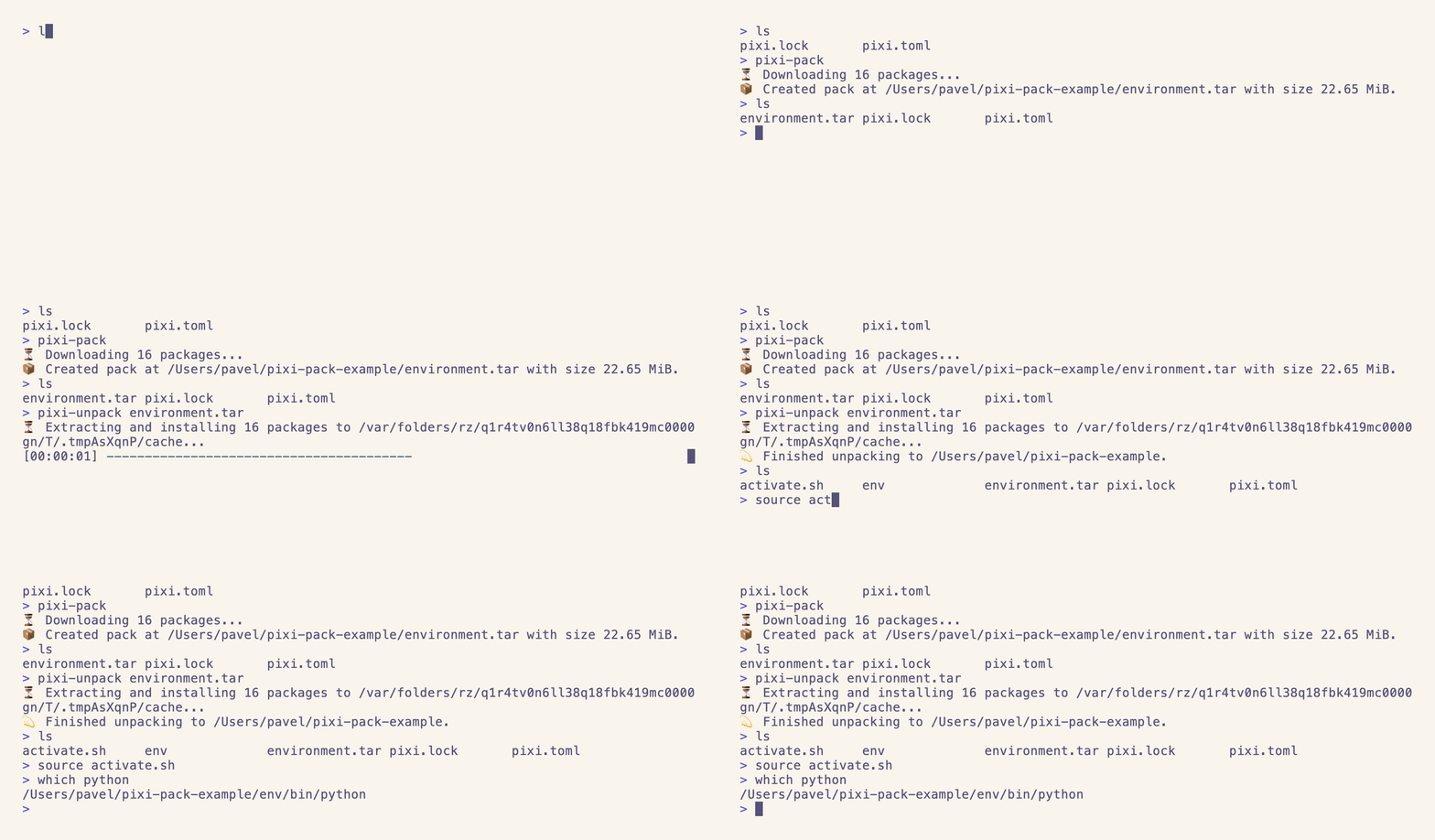

Starting with a pixi lockfile pixi.lock, you can create a packed environment that can be shared with others.
This environment can be unpacked on any system using pixi-unpack to recreate the original environment.
In contrast to conda-pack, pixi-pack does not require the original conda environment to be present on the system for packing.
Instead, it uses the lockfile to download the required packages and puts them into a .tar archive.
This archive can then be shared with others and installed using pixi-unpack to recreate the original environment.
The original motivation behind pixi-pack was to create a conda-pack alternative that does not have the same reproducibility issues as conda-pack.
It also aims to allow cross-platform building packs, so you can create a pack for win-64 on a linux-64 system.
You can install pixi-pack and pixi-unpack using pixi:
pixi global install pixi-pack
pixi global install pixi-unpack
Or using cargo:
cargo install --locked --git https://github.com/quantco/pixi-pack.git
Or by downloading our pre-built binaries from the releases page.
Instead of installing pixi-pack and pixi-unpack globally, you can also use pixi exec to run pixi-pack in a temporary environment:
pixi exec pixi-pack
pixi exec pixi-unpack environment.tar
[!NOTE] You can also write
pixi pack(andpixi unpack) if you havepixi-packandpixi-unpackinstalled globally.
pixi-pack: Packing an environmentWith pixi-pack, you can pack a conda environment into a environment.tar file:
pixi-pack --environment prod --platform linux-64 pixi.toml
This will create an environment.tar file that contains all conda packages required to create the environment.
# environment.tar
| pixi-pack.json
| environment.yml
| channel
|    ├── noarch
|    |    ├── tzdata-2024a-h0c530f3_0.conda
|    |    ├── ...
|    |    └── repodata.json
|    └── linux-64
|         ├── ca-certificates-2024.2.2-hbcca054_0.conda
|         ├── ...
|         └── repodata.json
pixi-unpack: Unpacking an environmentWith pixi-unpack environment.tar, you can unpack the environment on your target system.
This will create a new conda environment in ./env that contains all packages specified in your pixi.toml.
It also creates an activate.sh (or activate.bat on Windows) file that lets you activate the environment
without needing to have conda or micromamba installed.
$ pixi-unpack environment.tar
$ ls
env/
activate.sh
environment.tar
$ cat activate.sh
export PATH="/home/user/project/env/bin:..."
export CONDA_PREFIX="/home/user/project/env"
. "/home/user/project/env/etc/conda/activate.d/activate_custom_package.sh"
Since pixi-pack just downloads the .conda and .tar.bz2 files from the conda repositories, you can trivially create packs for different platforms.
pixi-pack --platform win-64
[!NOTE] You can only
pixi-unpacka pack on a system that has the same platform as the pack was created for.
If your pixi.toml defines named platforms (requires a lockfile in version 7 or later), you can pack them by name.
platforms = [{ name = "jetson", platform = "linux-aarch64", cuda = "13" }]
pixi-pack --platform jetson
You can still pass the underlying conda platform (e.g. linux-aarch64) as long as only one named platform uses it; otherwise pixi-pack asks you to use one of the platform names instead.
You can create a self-extracting binary that contains the packed environment and a script that unpacks the environment.
This can be useful if you want to distribute the environment to users that don't have pixi-unpack installed.
# unix
$ pixi-pack --create-executable
$ ls
environment.sh
$ ./environment.sh
$ ls
env/
activate.sh
environment.sh
# windows
PS > pixi-pack --create-executable
PS > ls
environment.ps1
PS > .\environment.ps1
PS > ls
env/
activate.sh
environment.ps1
When creating a self-extracting binary, you can specify a custom path or URL to a pixi-unpack executable to avoid downloading it from the default location.
You can provide one of the following as the --pixi-unpack-source:
pixi-unpack executable like https://my.mirror/pixi-pack/pixi-unpack-x86_64-unknown-linux-muslpixi-unpack binary like ./pixi-unpack-x86_64-unknown-linux-muslUsing a URL:
pixi-pack --create-executable --pixi-unpack-source https://my.mirror/pixi-pack/pixi-unpack-x86_64-unknown-linux-musl
Using a path:
pixi-pack --create-executable --pixi-unpack-source ./pixi-unpack-x86_64-unknown-linux-musl
[!TIP] The produced executable is a simple shell script that contains both the
pixi-unpackbinary as well as the packed environment.
You can inject additional packages into the environment that are not specified in pixi.lock by using the --inject flag:
pixi-pack --inject local-package-1.0.0-hbefa133_0.conda pixi.toml
This can be particularly useful if you build the project itself and want to include the built package in the environment but still want to use pixi.lock from the project.
Before creating the pack, pixi-pack will ensure that the injected packages' dependencies and constraints are compatible with the packages in the environment.
You can also pack PyPi wheel packages into your environment.
pixi-pack only supports wheel packages and not source distributions.
If you happen to use source distributions, you can ignore them by using the --ignore-pypi-non-wheel flag.
This will skip the bundling of all PyPi source distributions.
The --inject option also supports wheels.
pixi-pack --ignore-pypi-non-wheel --inject my_webserver-0.1.0-py3-none-any.whl
[!WARNING] In contrast to injecting from conda packages, we cannot verify that injected wheels are compatible with the target environment. Please make sure the packages are compatible.
You can use mirror middleware by creating a configuration file as described in the pixi documentation and referencing it using --config.
[mirrors]
"https://conda.anaconda.org/conda-forge" = ["https://my.artifactory/conda-forge"]
If you are using S3 in pixi, you can also add the appropriate S3 config in your config file and reference it.
[s3-options.my-s3-bucket]
endpoint-url = "https://s3.eu-central-1.amazonaws.com"
region = "eu-central-1"
force-path-style = false
[concurrency]
downloads = 5
Use pixi-pack --config config.toml to use the custom configuration file.
See pixi docs for more information.
You can cache downloaded packages to speed up subsequent pack operations by using the --use-cache flag:
pixi-pack --use-cache ~/.pixi-pack/cache
This will store all downloaded packages in the specified directory and reuse them in future pack operations. The cache follows the same structure as conda channels, organizing packages by platform subdirectories (e.g., linux-64, win-64, etc.).
Using a cache is particularly useful when:
pixi-unpackIf you don't have pixi-unpack available on your target system, you can still install the environment if you have conda or micromamba available.
Just unarchive the environment.tar, then you have a local channel named pixi-unpack on your system where all necessary packages are available.
Next to this local channel, you will find an environment.yml file that contains the environment specification.
You can then install the environment using conda or micromamba:
tar -xvf environment.tar
micromamba create -p ./env --file environment.yml
# or
conda env create -p ./env --file environment.yml
[!NOTE] The
environment.ymlandrepodata.jsonfiles are only for this use case,pixi-unpackdoes not use them.
[!NOTE] Both
condaandmambaare always installing pip as a side effect when they install python, seeconda's documentation. This is different from howpixiworks and can lead to solver errors when usingpixi-pack's compatibility mode sincepixidoesn't includepipby default. You can fix this issue in two ways:
- Add
pipto yourpixi.lockfile usingpixi add pip.- Configuring
conda(ormamba) to not installpipby default by runningconda config --set add_pip_as_python_dependency false(or by addingadd_pip_as_python_dependency: Falseto your~/.condarc)
Build attestations are uploaded to GitHub Artifact Attestations.
You can verify a binary using the gh CLI:
gh attestation verify --repo Quantco/pixi-pack pixi-pack-<architecture>
1,167 followers · starred Jul 2024
410 followers · starred Jan 2025
161 followers · starred Jul 2024
127 followers · starred Sep 2025
📦 Pack and unpack conda environments created with pixi
See the code
Starting with a pixi lockfile pixi.lock, you can create a packed environment that can be shared with others.
This environment can be unpacked on any system using pixi-unpack to recreate the original environment.
In contrast to conda-pack, pixi-pack does not require the original conda environment to be present on the system for packing.
Instead, it uses the lockfile to download the required packages and puts them into a .tar archive.
This archive can then be shared with others and installed using pixi-unpack to recreate the original environment.
The original motivation behind pixi-pack was to create a conda-pack alternative that does not have the same reproducibility issues as conda-pack.
It also aims to allow cross-platform building packs, so you can create a pack for win-64 on a linux-64 system.
You can install pixi-pack and pixi-unpack using pixi:
pixi global install pixi-pack
pixi global install pixi-unpack
Or using cargo:
cargo install --locked --git https://github.com/quantco/pixi-pack.git
Or by downloading our pre-built binaries from the releases page.
Instead of installing pixi-pack and pixi-unpack globally, you can also use pixi exec to run pixi-pack in a temporary environment:
pixi exec pixi-pack
pixi exec pixi-unpack environment.tar
[!NOTE] You can also write
pixi pack(andpixi unpack) if you havepixi-packandpixi-unpackinstalled globally.
pixi-pack: Packing an environmentWith pixi-pack, you can pack a conda environment into a environment.tar file:
pixi-pack --environment prod --platform linux-64 pixi.toml
This will create an environment.tar file that contains all conda packages required to create the environment.
# environment.tar
| pixi-pack.json
| environment.yml
| channel
|    ├── noarch
|    |    ├── tzdata-2024a-h0c530f3_0.conda
|    |    ├── ...
|    |    └── repodata.json
|    └── linux-64
|         ├── ca-certificates-2024.2.2-hbcca054_0.conda
|         ├── ...
|         └── repodata.json
pixi-unpack: Unpacking an environmentWith pixi-unpack environment.tar, you can unpack the environment on your target system.
This will create a new conda environment in ./env that contains all packages specified in your pixi.toml.
It also creates an activate.sh (or activate.bat on Windows) file that lets you activate the environment
without needing to have conda or micromamba installed.
$ pixi-unpack environment.tar
$ ls
env/
activate.sh
environment.tar
$ cat activate.sh
export PATH="/home/user/project/env/bin:..."
export CONDA_PREFIX="/home/user/project/env"
. "/home/user/project/env/etc/conda/activate.d/activate_custom_package.sh"
Since pixi-pack just downloads the .conda and .tar.bz2 files from the conda repositories, you can trivially create packs for different platforms.
pixi-pack --platform win-64
[!NOTE] You can only
pixi-unpacka pack on a system that has the same platform as the pack was created for.
If your pixi.toml defines named platforms (requires a lockfile in version 7 or later), you can pack them by name.
platforms = [{ name = "jetson", platform = "linux-aarch64", cuda = "13" }]
pixi-pack --platform jetson
You can still pass the underlying conda platform (e.g. linux-aarch64) as long as only one named platform uses it; otherwise pixi-pack asks you to use one of the platform names instead.
You can create a self-extracting binary that contains the packed environment and a script that unpacks the environment.
This can be useful if you want to distribute the environment to users that don't have pixi-unpack installed.
# unix
$ pixi-pack --create-executable
$ ls
environment.sh
$ ./environment.sh
$ ls
env/
activate.sh
environment.sh
# windows
PS > pixi-pack --create-executable
PS > ls
environment.ps1
PS > .\environment.ps1
PS > ls
env/
activate.sh
environment.ps1
When creating a self-extracting binary, you can specify a custom path or URL to a pixi-unpack executable to avoid downloading it from the default location.
You can provide one of the following as the --pixi-unpack-source:
pixi-unpack executable like https://my.mirror/pixi-pack/pixi-unpack-x86_64-unknown-linux-muslpixi-unpack binary like ./pixi-unpack-x86_64-unknown-linux-muslUsing a URL:
pixi-pack --create-executable --pixi-unpack-source https://my.mirror/pixi-pack/pixi-unpack-x86_64-unknown-linux-musl
Using a path:
pixi-pack --create-executable --pixi-unpack-source ./pixi-unpack-x86_64-unknown-linux-musl
[!TIP] The produced executable is a simple shell script that contains both the
pixi-unpackbinary as well as the packed environment.
You can inject additional packages into the environment that are not specified in pixi.lock by using the --inject flag:
pixi-pack --inject local-package-1.0.0-hbefa133_0.conda pixi.toml
This can be particularly useful if you build the project itself and want to include the built package in the environment but still want to use pixi.lock from the project.
Before creating the pack, pixi-pack will ensure that the injected packages' dependencies and constraints are compatible with the packages in the environment.
You can also pack PyPi wheel packages into your environment.
pixi-pack only supports wheel packages and not source distributions.
If you happen to use source distributions, you can ignore them by using the --ignore-pypi-non-wheel flag.
This will skip the bundling of all PyPi source distributions.
The --inject option also supports wheels.
pixi-pack --ignore-pypi-non-wheel --inject my_webserver-0.1.0-py3-none-any.whl
[!WARNING] In contrast to injecting from conda packages, we cannot verify that injected wheels are compatible with the target environment. Please make sure the packages are compatible.
You can use mirror middleware by creating a configuration file as described in the pixi documentation and referencing it using --config.
[mirrors]
"https://conda.anaconda.org/conda-forge" = ["https://my.artifactory/conda-forge"]
If you are using S3 in pixi, you can also add the appropriate S3 config in your config file and reference it.
[s3-options.my-s3-bucket]
endpoint-url = "https://s3.eu-central-1.amazonaws.com"
region = "eu-central-1"
force-path-style = false
[concurrency]
downloads = 5
Use pixi-pack --config config.toml to use the custom configuration file.
See pixi docs for more information.
You can cache downloaded packages to speed up subsequent pack operations by using the --use-cache flag:
pixi-pack --use-cache ~/.pixi-pack/cache
This will store all downloaded packages in the specified directory and reuse them in future pack operations. The cache follows the same structure as conda channels, organizing packages by platform subdirectories (e.g., linux-64, win-64, etc.).
Using a cache is particularly useful when:
pixi-unpackIf you don't have pixi-unpack available on your target system, you can still install the environment if you have conda or micromamba available.
Just unarchive the environment.tar, then you have a local channel named pixi-unpack on your system where all necessary packages are available.
Next to this local channel, you will find an environment.yml file that contains the environment specification.
You can then install the environment using conda or micromamba:
tar -xvf environment.tar
micromamba create -p ./env --file environment.yml
# or
conda env create -p ./env --file environment.yml
[!NOTE] The
environment.ymlandrepodata.jsonfiles are only for this use case,pixi-unpackdoes not use them.
[!NOTE] Both
condaandmambaare always installing pip as a side effect when they install python, seeconda's documentation. This is different from howpixiworks and can lead to solver errors when usingpixi-pack's compatibility mode sincepixidoesn't includepipby default. You can fix this issue in two ways:
- Add
pipto yourpixi.lockfile usingpixi add pip.- Configuring
conda(ormamba) to not installpipby default by runningconda config --set add_pip_as_python_dependency false(or by addingadd_pip_as_python_dependency: Falseto your~/.condarc)
Build attestations are uploaded to GitHub Artifact Attestations.
You can verify a binary using the gh CLI:
gh attestation verify --repo Quantco/pixi-pack pixi-pack-<architecture>
1,167 followers · starred Jul 2024
410 followers · starred Jan 2025
161 followers · starred Jul 2024
127 followers · starred Sep 2025





