Firefox CSS Theme/Style for manual customization
CSS
1,247
3,631 commits
updated Oct 12, 2026
Download Firefox / Download WaveFox / WaveFox Nightly
Download the chrome folder and put it in your user profile folder
Go to about:config and activate the key toolkit.legacyUserProfileCustomizations.stylesheets and browser.nova.enabled
These are very rough options. There's no guarantee they'll make it into the final release.
WaveFox.VerticalTabs.Tests > 1 or 2This setting makes tabs one with the browser toolbar. Depends on the corner rounding settings or custom tab shapes.
WaveFox.HorizontalTabs.AttachedTabs > true
WaveFox.HorizontalTabs.AttachedTabs.Shape > 1 or 2 or 3 or 4
WaveFox.HorizontalTabs.AttachedTabs.Shape.Mode > 1 or 2Requires OS with transparency support. Works only with the system theme.
WaveFox.HorizontalTabs.OS.SystemThemeWaveFox.VerticalTabs.OS.SystemThemeAbility to control the rounding of browser bar elements.
WaveFox.Toolbar.Roundings > 1 or 2 or 3 or 4 or 5
WaveFox.HorizontalTabs.Tabs.Separators > 1 or 2
WaveFox.HorizontalTabs.Tabs.ShadowsThis is third-party code. I will update this code according to the original source.
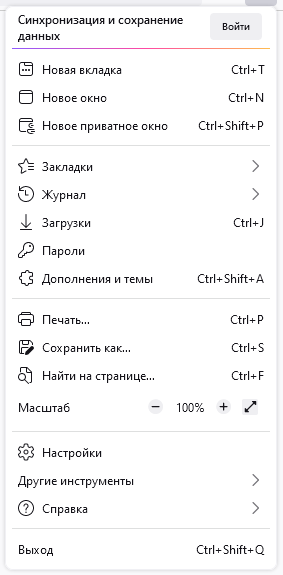
svg.context-properties.content.enabled (Required key)WaveFox.Icons > 1 or 2 (Required key)The keys below are relevant only for the second option.
userChrome.icon.panel_full or userChrome.icon.panel_photonuserChrome.icon.libraryuserChrome.icon.paneluserChrome.icon.menuuserChrome.icon.context_menuuserChrome.icon.global_menuuserChrome.icon.global_menubaruserChrome.icon.1-25px_strokeuserChrome.icon.account_image_to_rightuserChrome.icon.account_label_to_rightuserChrome.icon.menu.fulluserChrome.icon.global_menu.mac
WaveFox.HorizontalTabs.AttachedTabs.DragSpace > 1 or 2 or 3WaveFox.HorizontalTabs.FloatingTabs.TabsBelowURLWaveFox.HorizontalTabs.FloatingTabs.OneLineDownload the chrome folder and put it in your user profile folder
Go to about:config and activate the key toolkit.legacyUserProfileCustomizations.stylesheets
This setting makes tabs one with the browser toolbar. Depends on the corner rounding settings or custom tab shapes.
WaveFox.HorizontalTabs.AttachedTabs > true
WaveFox.HorizontalTabs.AttachedTabs.Shape > 1 or 2 or 3 or 4
WaveFox.HorizontalTabs.AttachedTabs.Shape.Mode > 1 or 2Install DWMBlurGlass. Configure to your liking and activate the keys below. Works only with the system theme.
WaveFox.Windows10.Transparency.Enabled and browser.tabs.inTitlebar > 1Requires Linux with transparency support. Works only with the system theme.
WaveFox.Linux.Transparency.Enabled and browser.tabs.inTitlebar > 1
WaveFox.Linux.Transparency.TextColor.White.EnabledAbility to control the rounding of browser bar elements.
WaveFox.Toolbar.Roundings > 1 or 2 or 3 or 4 or 5Works only with System / Light / Dark theme.
WaveFox.HorizontalTabs.AttachedTabs.Shadows.Mode > 1
WaveFox.HorizontalTabs.Tabs.Separators > 1 or 2This is third-party code. I will update this code according to the original source.
svg.context-properties.content.enabled (Required key)WaveFox.Icons > 1 or 2 (Required key)The keys below are relevant only for the second option.
userChrome.icon.panel_full or userChrome.icon.panel_photonuserChrome.icon.libraryuserChrome.icon.paneluserChrome.icon.menuuserChrome.icon.context_menuuserChrome.icon.global_menuuserChrome.icon.global_menubaruserChrome.icon.1-25px_strokeuserChrome.icon.account_image_to_rightuserChrome.icon.account_label_to_rightuserChrome.icon.menu.fulluserChrome.icon.global_menu.mac
WaveFox.HorizontalTabs.AttachedTabs.DragSpace > 1 or 2 or 3WaveFox.HorizontalTabs.FloatingTabs.TabsBelowURLWaveFox.HorizontalTabs.FloatingTabs.OneLineWaveFox.HorizontalTabs.FloatingWebPageWaveFox.VerticalTabs.FloatingWebPageWaveFox.VerticalTabs.Toolbar.Autohide.EnabledDownload the chrome folder and put it in your user profile folder
Go to about:config and activate the key toolkit.legacyUserProfileCustomizations.stylesheets
WaveFox.Tabs.Shape > 1WaveFox.Tabs.Shape > 2WaveFox.Tabs.Shape > 3WaveFox.Tabs.Shape > 4WaveFox.Tabs.Shape > 5WaveFox.Tabs.Shape > 6WaveFox.Tabs.Shape > 7WaveFox.Tabs.Shape > 8WaveFox.Tabs.Shape > 9WaveFox.Tabs.Shape > 10WaveFox.Tabs.Shape > 11WaveFox.Tabs.Shape > 12Install DWMBlurGlass. Configure to your liking and activate the keys below. Works only with the system theme.
WaveFox.Windows10.Transparency.Enabled and browser.tabs.inTitlebar > 1Requires Linux with transparency support. Works only with the system theme.
WaveFox.Linux.Transparency.Enabled and browser.tabs.inTitlebar > 1Works only with the system theme.

WaveFox.Toolbar.Transparency > 1 or 2 or 3 or 4 and browser.tabs.inTitlebar > 1Works only with System / Light / Dark theme.
WaveFox.LightTheme.Tabs.Shadows > 1 or 2 or 3 or 4WaveFox.DarkTheme.Tabs.Shadows > 1 or 2 or 3 or 4
WaveFox.Tabs.Separators > 1 or 2 or 3 or 4WaveFox.Tabs.Background.Inactive.EnabledThis is third-party code. I will update this code according to the original source.
svg.context-properties.content.enabled (Required key)WaveFox.Icons > 1 or 2 (Required key)The keys below are relevant only for the second option.
userChrome.icon.panel_full or userChrome.icon.panel_photonuserChrome.icon.libraryuserChrome.icon.paneluserChrome.icon.menuuserChrome.icon.context_menuuserChrome.icon.global_menuuserChrome.icon.global_menubaruserChrome.icon.1-25px_strokeuserChrome.icon.account_image_to_rightuserChrome.icon.account_label_to_rightuserChrome.icon.menu.fulluserChrome.icon.global_menu.mac
WaveFox.DragSpace.Tabs > 1 or 2 or 3WaveFox.DragSpace.TabBarLeftSide.DisabledWaveFox.DragSpace.TabBarRightSide.DisabledWaveFox.Tabs.SelectedTabIndicator.EnabledWaveFox.TabsBelowURL.Enabled and browser.tabs.inTitlebar > 0WaveFox.OneLine > 1 or 2WaveFox.WebPage.Floating.EnabledWorks only with system theme. Requires transparency support from the operating system. The quality of this option depends heavily on the specific website.
WaveFox.WebPage.Transparency > 1 or 2 and browser.tabs.allow_transparent_browser (1 - New tab page only / 2 - All browser windows and all websites)
WaveFox.WebPage.Background.Saturation > 1 or 2 or 3Download the chrome folder and put it in your user profile folder
Go to about:config and activate the key toolkit.legacyUserProfileCustomizations.stylesheets
Specify the desired shape of the tabs

userChrome.Tabs.Option1.Enabled
userChrome.Tabs.Option2.Enabled
userChrome.Tabs.Option3.Enabled
userChrome.Tabs.Option4.Enabled
userChrome.Tabs.Option5.Enabled
userChrome.Tabs.Option6.Enabled
userChrome.Tabs.Option7.Enabled
userChrome.Tabs.Option8.Enabled
userChrome.Tabs.Option9.Enabled
userChrome.Tabs.Option10.Enabled
userChrome.Tabs.Option11.Enabled
userChrome.Tabs.Option12.EnableduserChrome.Tabs.Option13.EnabledGo to the chrome folder and paste the desired styles inside the third_party_custom_styles.css file. Please note that this file has maximum execution priority. It will overwrite all styles, regardless of selector specificity. I make no guarantees of compatibility and will not resolve any style conflicts you may encounter.
userChrome.Style.ThirdParty.EnabledFunctionality that will not be part of the style will be published in the discussions section as requests from users.
Requires Linux with transparency support. Works only with the system theme.
userChrome.Linux.Transparency.Low.EnableduserChrome.Linux.Transparency.Medium.EnableduserChrome.Linux.Transparency.High.EnableduserChrome.Linux.Transparency.VeryHigh.Enabledbrowser.tabs.inTitlebar > 1 (Required key)Works only with the system theme.
userChrome.Toolbar.Transparency.Low.EnableduserChrome.Toolbar.Transparency.Medium.EnableduserChrome.Toolbar.Transparency.High.EnableduserChrome.Toolbar.Transparency.VeryHigh.EnabledIncompatible with AMO themes.
userChrome.LightTheme.Tabs.Borders.Saturation.Low.EnableduserChrome.LightTheme.Tabs.Borders.Saturation.Medium.EnableduserChrome.LightTheme.Tabs.Borders.Saturation.High.EnableduserChrome.LightTheme.Tabs.Borders.Saturation.VeryHigh.EnableduserChrome.DarkTheme.Tabs.Borders.Saturation.Low.EnableduserChrome.DarkTheme.Tabs.Borders.Saturation.Medium.EnableduserChrome.DarkTheme.Tabs.Borders.Saturation.High.EnableduserChrome.DarkTheme.Tabs.Borders.Saturation.VeryHigh.EnableduserChrome.LightTheme.Tabs.Shadows.Saturation.Low.EnableduserChrome.LightTheme.Tabs.Shadows.Saturation.Medium.EnableduserChrome.LightTheme.Tabs.Shadows.Saturation.High.EnableduserChrome.LightTheme.Tabs.Shadows.Saturation.VeryHigh.EnableduserChrome.DarkTheme.Tabs.Shadows.Saturation.Low.EnableduserChrome.DarkTheme.Tabs.Shadows.Saturation.Medium.EnableduserChrome.DarkTheme.Tabs.Shadows.Saturation.High.EnableduserChrome.DarkTheme.Tabs.Shadows.Saturation.VeryHigh.Enabled
userChrome.TabSeparators.Saturation.Low.EnableduserChrome.TabSeparators.Saturation.Medium.EnabledBy default context menus follow the selected interface density, but it is possible to set a fixed size.
| Compact | Normal | Touch |
|---|---|---|
 |  | 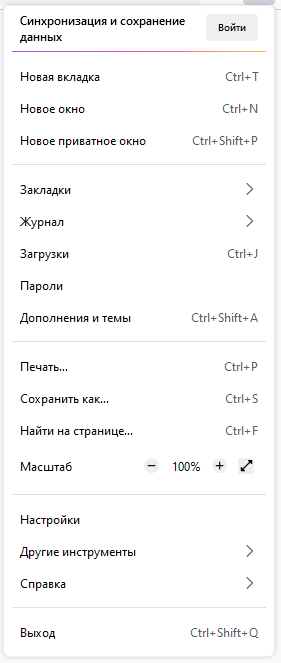 |
userChrome.Menu.Size.Compact.EnableduserChrome.Menu.Size.Normal.EnableduserChrome.Menu.Size.Touch.Enabled| Regular | Filled |
|---|---|
|  |
userChrome.Menu.Icons.Regular.EnableduserChrome.Menu.Icons.Filled.EnabledIcons from Lepton.css are now available. Please note that this is third-party code. I am not its author and do not support it. I will not solve any problems associated with these icons. They were added at the request of some users and work "As is". I will update this code according to the original source.
svg.context-properties.content.enableduserChrome.Menu.Icons.LeptonIcons.Enabled
userChrome.icon.panel_full or userChrome.icon.panel_photonuserChrome.icon.libraryuserChrome.icon.paneluserChrome.icon.menuuserChrome.icon.context_menuuserChrome.icon.global_menuuserChrome.icon.global_menubaruserChrome.icon.1-25px_strokeuserChrome.icon.account_image_to_rightuserChrome.icon.account_label_to_rightuserChrome.icon.menu.fulluserChrome.icon.global_menu.mac
userChrome.DragSpace.Left.DisableduserChrome.DragSpace.Right.DisableduserChrome.DragSpace.Top.Windowed.EnableduserChrome.DragSpace.Top.Maximized.EnableduserChrome.DragSpace.Top.Fullscreen.Enabled
userChrome.Tabs.Pinned.Width.LowOffset.EnableduserChrome.Tabs.Pinned.Width.HighOffset.EnableduserChrome.Tabs.SelectedTabIndicator.EnableduserChrome.Tabs.TabsOnBottom.Enabledbrowser.tabs.inTitlebar (Required key. Set the value to 0)userChrome.OneLine.TabBarFirst.EnableduserChrome.OneLine.NavBarFirst.EnabledDownload the chrome folder and put it in your user profile folder
Go to about:config and activate the keys below
toolkit.legacyUserProfileCustomizations.stylesheetslayout.css.has-selector.enabledsvg.context-properties.content.enabledSpecify the desired shape of the tabs
userChrome.Tabs.Option1.Enabled
userChrome.Tabs.Option2.Enabled
userChrome.Tabs.Option3.Enabled
userChrome.Tabs.Option4.Enabled
userChrome.Tabs.Option5.Enabled
userChrome.Tabs.Option6.Enabled
userChrome.Tabs.Option7.Enabled
userChrome.Tabs.Option8.Enabled
userChrome.Tabs.Option9.Enabled
userChrome.Tabs.Option10.Enabled
userChrome.Tabs.Option11.Enabled
userChrome.Tabs.Option12.EnabledWorks with modern versions of Windows 11 / Windows 10. System effects must be supported on the operating system side. Otherwise, you need third-party software, such as Mica For Everyone. You also need to disable the accent color in the operating system settings, if it was enabled. Works only with the system theme.

Download and install Mica For Everyone from here.
userChrome.Windows.SystemEffects.EnabledWorks only with the system theme.
userChrome.Toolbar.Transparency.Low.EnableduserChrome.Toolbar.Transparency.Medium.EnableduserChrome.Toolbar.Transparency.High.EnableduserChrome.Toolbar.Transparency.VeryHigh.EnabledRequires Linux with transparency support. Works only with the system theme.

userChrome.Linux.Transparency.Enabledgfx.webrender.all (Required key)The tab frame consists of type, color and saturation. Not compatible with themes that use a translucent toolbar.
userChrome.LightTheme.TabFrameType.Border.EnableduserChrome.LightTheme.TabFrameType.Shadow.EnableduserChrome.LightTheme.TabFrameColor.Auto.EnableduserChrome.LightTheme.TabFrameColor.White.EnableduserChrome.LightTheme.TabFrameColor.Black.EnableduserChrome.LightTheme.TabFrameSaturation.Low.EnableduserChrome.LightTheme.TabFrameSaturation.Medium.EnableduserChrome.LightTheme.TabFrameSaturation.High.EnableduserChrome.LightTheme.TabFrameSaturation.VeryHigh.EnableduserChrome.DarkTheme.TabFrameType.Border.EnableduserChrome.DarkTheme.TabFrameType.Shadow.EnableduserChrome.DarkTheme.TabFrameColor.Auto.EnableduserChrome.DarkTheme.TabFrameColor.White.EnableduserChrome.DarkTheme.TabFrameColor.Black.EnableduserChrome.DarkTheme.TabFrameSaturation.Low.EnableduserChrome.DarkTheme.TabFrameSaturation.Medium.EnableduserChrome.DarkTheme.TabFrameSaturation.High.EnableduserChrome.DarkTheme.TabFrameSaturation.VeryHigh.Enabled
userChrome.TabSeparatorsLowSaturation-EnableduserChrome.TabSeparatorsMediumSaturation-EnabledBy default context menus follow the selected interface density, but it is possible to set a fixed size.
| Compact | Normal | Touch |
|---|---|---|
| | |
userChrome.CompactContextMenu-EnableduserChrome.NormalContextMenu-EnableduserChrome.TouchContextMenu-Enabled| Regular | Filled |
|---|---|
| |
userChrome.RegularMenuIcons-EnableduserChrome.FilledMenuIcons-Enabled
userChrome.DragSpace.Left.DisableduserChrome.DragSpace.Right.DisableduserChrome.DragSpace.Top.Windowed.EnableduserChrome.DragSpace.Top.Maximized.EnableduserChrome.DragSpace.Top.Fullscreen.Enabled
userChrome.PinnedTabsWidthLowIncrease-EnableduserChrome.PinnedTabsWidthHighIncrease-EnableduserChrome.Tabs.SelectedTabIndicator.Enabled
userChrome.OneLine.TabBarFirst.EnableduserChrome.OneLine.NavBarFirst.Enabledbrowser.tabs.inTitlebar (Enable this key if there are problems with window control buttons. Set the value to 0)Low values are more suitable for high resolution monitors.
userChrome.OneLine.NavBarWidth.Low.EnableduserChrome.OneLine.NavBarWidth.Medium.EnableduserChrome.OneLine.NavBarWidth.High.Enabled
userChrome.TabsOnBottom-Enabledbrowser.tabs.inTitlebar (Required key. Set the value to 0)
Open userChrome.css and paste your code under the appropriate comment. Your code has the highest priority by default.
browser.theme.windows.accent-color-in-tabs.enabledwidget.windows.mica
widget.windows.mica.toplevel-backdrop > 0 or 1 or 2 or 3 (Auto / Mica / Acrylic / MicaAlt)widget.windows.mica.popups > 0 or 1 or 2 (Disabled / Enabled / Auto)browser.theme.native-themewidget.macos.titlebar-blend-mode.behind-windowwidget.macos.sidebar-blend-mode.behind-window2,154 followers · starred Aug 2022
111 followers · starred Mar 2022
277 followers · starred Aug 2022
306 followers · starred Mar 2023
Firefox CSS Theme/Style for manual customization
CSS
1,247
3,631 commits
updated Oct 12, 2026
Download Firefox / Download WaveFox / WaveFox Nightly
Download the chrome folder and put it in your user profile folder
Go to about:config and activate the key toolkit.legacyUserProfileCustomizations.stylesheets and browser.nova.enabled
These are very rough options. There's no guarantee they'll make it into the final release.
WaveFox.VerticalTabs.Tests > 1 or 2This setting makes tabs one with the browser toolbar. Depends on the corner rounding settings or custom tab shapes.
WaveFox.HorizontalTabs.AttachedTabs > true
WaveFox.HorizontalTabs.AttachedTabs.Shape > 1 or 2 or 3 or 4
WaveFox.HorizontalTabs.AttachedTabs.Shape.Mode > 1 or 2Requires OS with transparency support. Works only with the system theme.
WaveFox.HorizontalTabs.OS.SystemThemeWaveFox.VerticalTabs.OS.SystemThemeAbility to control the rounding of browser bar elements.
WaveFox.Toolbar.Roundings > 1 or 2 or 3 or 4 or 5
WaveFox.HorizontalTabs.Tabs.Separators > 1 or 2
WaveFox.HorizontalTabs.Tabs.ShadowsThis is third-party code. I will update this code according to the original source.
svg.context-properties.content.enabled (Required key)WaveFox.Icons > 1 or 2 (Required key)The keys below are relevant only for the second option.
userChrome.icon.panel_full or userChrome.icon.panel_photonuserChrome.icon.libraryuserChrome.icon.paneluserChrome.icon.menuuserChrome.icon.context_menuuserChrome.icon.global_menuuserChrome.icon.global_menubaruserChrome.icon.1-25px_strokeuserChrome.icon.account_image_to_rightuserChrome.icon.account_label_to_rightuserChrome.icon.menu.fulluserChrome.icon.global_menu.mac
WaveFox.HorizontalTabs.AttachedTabs.DragSpace > 1 or 2 or 3WaveFox.HorizontalTabs.FloatingTabs.TabsBelowURLWaveFox.HorizontalTabs.FloatingTabs.OneLineDownload the chrome folder and put it in your user profile folder
Go to about:config and activate the key toolkit.legacyUserProfileCustomizations.stylesheets
This setting makes tabs one with the browser toolbar. Depends on the corner rounding settings or custom tab shapes.
WaveFox.HorizontalTabs.AttachedTabs > true
WaveFox.HorizontalTabs.AttachedTabs.Shape > 1 or 2 or 3 or 4
WaveFox.HorizontalTabs.AttachedTabs.Shape.Mode > 1 or 2Install DWMBlurGlass. Configure to your liking and activate the keys below. Works only with the system theme.
WaveFox.Windows10.Transparency.Enabled and browser.tabs.inTitlebar > 1Requires Linux with transparency support. Works only with the system theme.
WaveFox.Linux.Transparency.Enabled and browser.tabs.inTitlebar > 1
WaveFox.Linux.Transparency.TextColor.White.EnabledAbility to control the rounding of browser bar elements.
WaveFox.Toolbar.Roundings > 1 or 2 or 3 or 4 or 5Works only with System / Light / Dark theme.
WaveFox.HorizontalTabs.AttachedTabs.Shadows.Mode > 1
WaveFox.HorizontalTabs.Tabs.Separators > 1 or 2This is third-party code. I will update this code according to the original source.
svg.context-properties.content.enabled (Required key)WaveFox.Icons > 1 or 2 (Required key)The keys below are relevant only for the second option.
userChrome.icon.panel_full or userChrome.icon.panel_photonuserChrome.icon.libraryuserChrome.icon.paneluserChrome.icon.menuuserChrome.icon.context_menuuserChrome.icon.global_menuuserChrome.icon.global_menubaruserChrome.icon.1-25px_strokeuserChrome.icon.account_image_to_rightuserChrome.icon.account_label_to_rightuserChrome.icon.menu.fulluserChrome.icon.global_menu.mac
WaveFox.HorizontalTabs.AttachedTabs.DragSpace > 1 or 2 or 3WaveFox.HorizontalTabs.FloatingTabs.TabsBelowURLWaveFox.HorizontalTabs.FloatingTabs.OneLineWaveFox.HorizontalTabs.FloatingWebPageWaveFox.VerticalTabs.FloatingWebPageWaveFox.VerticalTabs.Toolbar.Autohide.EnabledDownload the chrome folder and put it in your user profile folder
Go to about:config and activate the key toolkit.legacyUserProfileCustomizations.stylesheets
WaveFox.Tabs.Shape > 1WaveFox.Tabs.Shape > 2WaveFox.Tabs.Shape > 3WaveFox.Tabs.Shape > 4WaveFox.Tabs.Shape > 5WaveFox.Tabs.Shape > 6WaveFox.Tabs.Shape > 7WaveFox.Tabs.Shape > 8WaveFox.Tabs.Shape > 9WaveFox.Tabs.Shape > 10WaveFox.Tabs.Shape > 11WaveFox.Tabs.Shape > 12Install DWMBlurGlass. Configure to your liking and activate the keys below. Works only with the system theme.
WaveFox.Windows10.Transparency.Enabled and browser.tabs.inTitlebar > 1Requires Linux with transparency support. Works only with the system theme.
WaveFox.Linux.Transparency.Enabled and browser.tabs.inTitlebar > 1Works only with the system theme.
WaveFox.Toolbar.Transparency > 1 or 2 or 3 or 4 and browser.tabs.inTitlebar > 1Works only with System / Light / Dark theme.
WaveFox.LightTheme.Tabs.Shadows > 1 or 2 or 3 or 4WaveFox.DarkTheme.Tabs.Shadows > 1 or 2 or 3 or 4
WaveFox.Tabs.Separators > 1 or 2 or 3 or 4WaveFox.Tabs.Background.Inactive.EnabledThis is third-party code. I will update this code according to the original source.
svg.context-properties.content.enabled (Required key)WaveFox.Icons > 1 or 2 (Required key)The keys below are relevant only for the second option.
userChrome.icon.panel_full or userChrome.icon.panel_photonuserChrome.icon.libraryuserChrome.icon.paneluserChrome.icon.menuuserChrome.icon.context_menuuserChrome.icon.global_menuuserChrome.icon.global_menubaruserChrome.icon.1-25px_strokeuserChrome.icon.account_image_to_rightuserChrome.icon.account_label_to_rightuserChrome.icon.menu.fulluserChrome.icon.global_menu.mac
WaveFox.DragSpace.Tabs > 1 or 2 or 3WaveFox.DragSpace.TabBarLeftSide.DisabledWaveFox.DragSpace.TabBarRightSide.DisabledWaveFox.Tabs.SelectedTabIndicator.EnabledWaveFox.TabsBelowURL.Enabled and browser.tabs.inTitlebar > 0WaveFox.OneLine > 1 or 2WaveFox.WebPage.Floating.EnabledWorks only with system theme. Requires transparency support from the operating system. The quality of this option depends heavily on the specific website.
WaveFox.WebPage.Transparency > 1 or 2 and browser.tabs.allow_transparent_browser (1 - New tab page only / 2 - All browser windows and all websites)
WaveFox.WebPage.Background.Saturation > 1 or 2 or 3Download the chrome folder and put it in your user profile folder
Go to about:config and activate the key toolkit.legacyUserProfileCustomizations.stylesheets
Specify the desired shape of the tabs
userChrome.Tabs.Option1.Enabled
userChrome.Tabs.Option2.Enabled
userChrome.Tabs.Option3.Enabled
userChrome.Tabs.Option4.Enabled
userChrome.Tabs.Option5.Enabled
userChrome.Tabs.Option6.Enabled
userChrome.Tabs.Option7.Enabled
userChrome.Tabs.Option8.Enabled
userChrome.Tabs.Option9.Enabled
userChrome.Tabs.Option10.Enabled
userChrome.Tabs.Option11.Enabled
userChrome.Tabs.Option12.EnableduserChrome.Tabs.Option13.EnabledGo to the chrome folder and paste the desired styles inside the third_party_custom_styles.css file. Please note that this file has maximum execution priority. It will overwrite all styles, regardless of selector specificity. I make no guarantees of compatibility and will not resolve any style conflicts you may encounter.
userChrome.Style.ThirdParty.EnabledFunctionality that will not be part of the style will be published in the discussions section as requests from users.
Requires Linux with transparency support. Works only with the system theme.
userChrome.Linux.Transparency.Low.EnableduserChrome.Linux.Transparency.Medium.EnableduserChrome.Linux.Transparency.High.EnableduserChrome.Linux.Transparency.VeryHigh.Enabledbrowser.tabs.inTitlebar > 1 (Required key)Works only with the system theme.
userChrome.Toolbar.Transparency.Low.EnableduserChrome.Toolbar.Transparency.Medium.EnableduserChrome.Toolbar.Transparency.High.EnableduserChrome.Toolbar.Transparency.VeryHigh.EnabledIncompatible with AMO themes.
userChrome.LightTheme.Tabs.Borders.Saturation.Low.EnableduserChrome.LightTheme.Tabs.Borders.Saturation.Medium.EnableduserChrome.LightTheme.Tabs.Borders.Saturation.High.EnableduserChrome.LightTheme.Tabs.Borders.Saturation.VeryHigh.EnableduserChrome.DarkTheme.Tabs.Borders.Saturation.Low.EnableduserChrome.DarkTheme.Tabs.Borders.Saturation.Medium.EnableduserChrome.DarkTheme.Tabs.Borders.Saturation.High.EnableduserChrome.DarkTheme.Tabs.Borders.Saturation.VeryHigh.EnableduserChrome.LightTheme.Tabs.Shadows.Saturation.Low.EnableduserChrome.LightTheme.Tabs.Shadows.Saturation.Medium.EnableduserChrome.LightTheme.Tabs.Shadows.Saturation.High.EnableduserChrome.LightTheme.Tabs.Shadows.Saturation.VeryHigh.EnableduserChrome.DarkTheme.Tabs.Shadows.Saturation.Low.EnableduserChrome.DarkTheme.Tabs.Shadows.Saturation.Medium.EnableduserChrome.DarkTheme.Tabs.Shadows.Saturation.High.EnableduserChrome.DarkTheme.Tabs.Shadows.Saturation.VeryHigh.Enabled
userChrome.TabSeparators.Saturation.Low.EnableduserChrome.TabSeparators.Saturation.Medium.EnabledBy default context menus follow the selected interface density, but it is possible to set a fixed size.
| Compact | Normal | Touch |
|---|---|---|
| | |
userChrome.Menu.Size.Compact.EnableduserChrome.Menu.Size.Normal.EnableduserChrome.Menu.Size.Touch.Enabled| Regular | Filled |
|---|---|
| |
userChrome.Menu.Icons.Regular.EnableduserChrome.Menu.Icons.Filled.EnabledIcons from Lepton.css are now available. Please note that this is third-party code. I am not its author and do not support it. I will not solve any problems associated with these icons. They were added at the request of some users and work "As is". I will update this code according to the original source.
svg.context-properties.content.enableduserChrome.Menu.Icons.LeptonIcons.Enabled
userChrome.icon.panel_full or userChrome.icon.panel_photonuserChrome.icon.libraryuserChrome.icon.paneluserChrome.icon.menuuserChrome.icon.context_menuuserChrome.icon.global_menuuserChrome.icon.global_menubaruserChrome.icon.1-25px_strokeuserChrome.icon.account_image_to_rightuserChrome.icon.account_label_to_rightuserChrome.icon.menu.fulluserChrome.icon.global_menu.mac
userChrome.DragSpace.Left.DisableduserChrome.DragSpace.Right.DisableduserChrome.DragSpace.Top.Windowed.EnableduserChrome.DragSpace.Top.Maximized.EnableduserChrome.DragSpace.Top.Fullscreen.Enabled
userChrome.Tabs.Pinned.Width.LowOffset.EnableduserChrome.Tabs.Pinned.Width.HighOffset.EnableduserChrome.Tabs.SelectedTabIndicator.EnableduserChrome.Tabs.TabsOnBottom.Enabledbrowser.tabs.inTitlebar (Required key. Set the value to 0)userChrome.OneLine.TabBarFirst.EnableduserChrome.OneLine.NavBarFirst.EnabledDownload the chrome folder and put it in your user profile folder
Go to about:config and activate the keys below
toolkit.legacyUserProfileCustomizations.stylesheetslayout.css.has-selector.enabledsvg.context-properties.content.enabledSpecify the desired shape of the tabs
userChrome.Tabs.Option1.Enabled
userChrome.Tabs.Option2.Enabled
userChrome.Tabs.Option3.Enabled
userChrome.Tabs.Option4.Enabled
userChrome.Tabs.Option5.Enabled
userChrome.Tabs.Option6.Enabled
userChrome.Tabs.Option7.Enabled
userChrome.Tabs.Option8.Enabled
userChrome.Tabs.Option9.Enabled
userChrome.Tabs.Option10.Enabled
userChrome.Tabs.Option11.Enabled
userChrome.Tabs.Option12.EnabledWorks with modern versions of Windows 11 / Windows 10. System effects must be supported on the operating system side. Otherwise, you need third-party software, such as Mica For Everyone. You also need to disable the accent color in the operating system settings, if it was enabled. Works only with the system theme.
Download and install Mica For Everyone from here.
userChrome.Windows.SystemEffects.EnabledWorks only with the system theme.
userChrome.Toolbar.Transparency.Low.EnableduserChrome.Toolbar.Transparency.Medium.EnableduserChrome.Toolbar.Transparency.High.EnableduserChrome.Toolbar.Transparency.VeryHigh.EnabledRequires Linux with transparency support. Works only with the system theme.
userChrome.Linux.Transparency.Enabledgfx.webrender.all (Required key)The tab frame consists of type, color and saturation. Not compatible with themes that use a translucent toolbar.
userChrome.LightTheme.TabFrameType.Border.EnableduserChrome.LightTheme.TabFrameType.Shadow.EnableduserChrome.LightTheme.TabFrameColor.Auto.EnableduserChrome.LightTheme.TabFrameColor.White.EnableduserChrome.LightTheme.TabFrameColor.Black.EnableduserChrome.LightTheme.TabFrameSaturation.Low.EnableduserChrome.LightTheme.TabFrameSaturation.Medium.EnableduserChrome.LightTheme.TabFrameSaturation.High.EnableduserChrome.LightTheme.TabFrameSaturation.VeryHigh.EnableduserChrome.DarkTheme.TabFrameType.Border.EnableduserChrome.DarkTheme.TabFrameType.Shadow.EnableduserChrome.DarkTheme.TabFrameColor.Auto.EnableduserChrome.DarkTheme.TabFrameColor.White.EnableduserChrome.DarkTheme.TabFrameColor.Black.EnableduserChrome.DarkTheme.TabFrameSaturation.Low.EnableduserChrome.DarkTheme.TabFrameSaturation.Medium.EnableduserChrome.DarkTheme.TabFrameSaturation.High.EnableduserChrome.DarkTheme.TabFrameSaturation.VeryHigh.Enabled
userChrome.TabSeparatorsLowSaturation-EnableduserChrome.TabSeparatorsMediumSaturation-EnabledBy default context menus follow the selected interface density, but it is possible to set a fixed size.
| Compact | Normal | Touch |
|---|---|---|
| | |
userChrome.CompactContextMenu-EnableduserChrome.NormalContextMenu-EnableduserChrome.TouchContextMenu-Enabled| Regular | Filled |
|---|---|
| |
userChrome.RegularMenuIcons-EnableduserChrome.FilledMenuIcons-Enabled
userChrome.DragSpace.Left.DisableduserChrome.DragSpace.Right.DisableduserChrome.DragSpace.Top.Windowed.EnableduserChrome.DragSpace.Top.Maximized.EnableduserChrome.DragSpace.Top.Fullscreen.Enabled
userChrome.PinnedTabsWidthLowIncrease-EnableduserChrome.PinnedTabsWidthHighIncrease-EnableduserChrome.Tabs.SelectedTabIndicator.Enabled
userChrome.OneLine.TabBarFirst.EnableduserChrome.OneLine.NavBarFirst.Enabledbrowser.tabs.inTitlebar (Enable this key if there are problems with window control buttons. Set the value to 0)Low values are more suitable for high resolution monitors.
userChrome.OneLine.NavBarWidth.Low.EnableduserChrome.OneLine.NavBarWidth.Medium.EnableduserChrome.OneLine.NavBarWidth.High.Enabled
userChrome.TabsOnBottom-Enabledbrowser.tabs.inTitlebar (Required key. Set the value to 0)
Open userChrome.css and paste your code under the appropriate comment. Your code has the highest priority by default.
browser.theme.windows.accent-color-in-tabs.enabledwidget.windows.mica
widget.windows.mica.toplevel-backdrop > 0 or 1 or 2 or 3 (Auto / Mica / Acrylic / MicaAlt)widget.windows.mica.popups > 0 or 1 or 2 (Disabled / Enabled / Auto)browser.theme.native-themewidget.macos.titlebar-blend-mode.behind-windowwidget.macos.sidebar-blend-mode.behind-window2,154 followers · starred Aug 2022
111 followers · starred Mar 2022
277 followers · starred Aug 2022
306 followers · starred Mar 2023