
Live share to a browser the drawing made on a ReMarkable tablet
Python
56
20 commits
updated Jun 6, 2025
README
Pipes and paper enhanced
This is the fork of the pipes-and-paper experiment by Joe Wass.
This project aims to enable screen sharing between the ReMarkable tablet and a browser, without having an account on ReMarkable, nor having anything to install on the device itself, nor having the desktop app.
Copies pen strokes, not the contents of the screen, but that's fine for live-sharing sketches.
Support:
- Tested on Linux
- Mac works fine
- ReMarkable 2
- Might work for the ReMarkable 1 (untested)
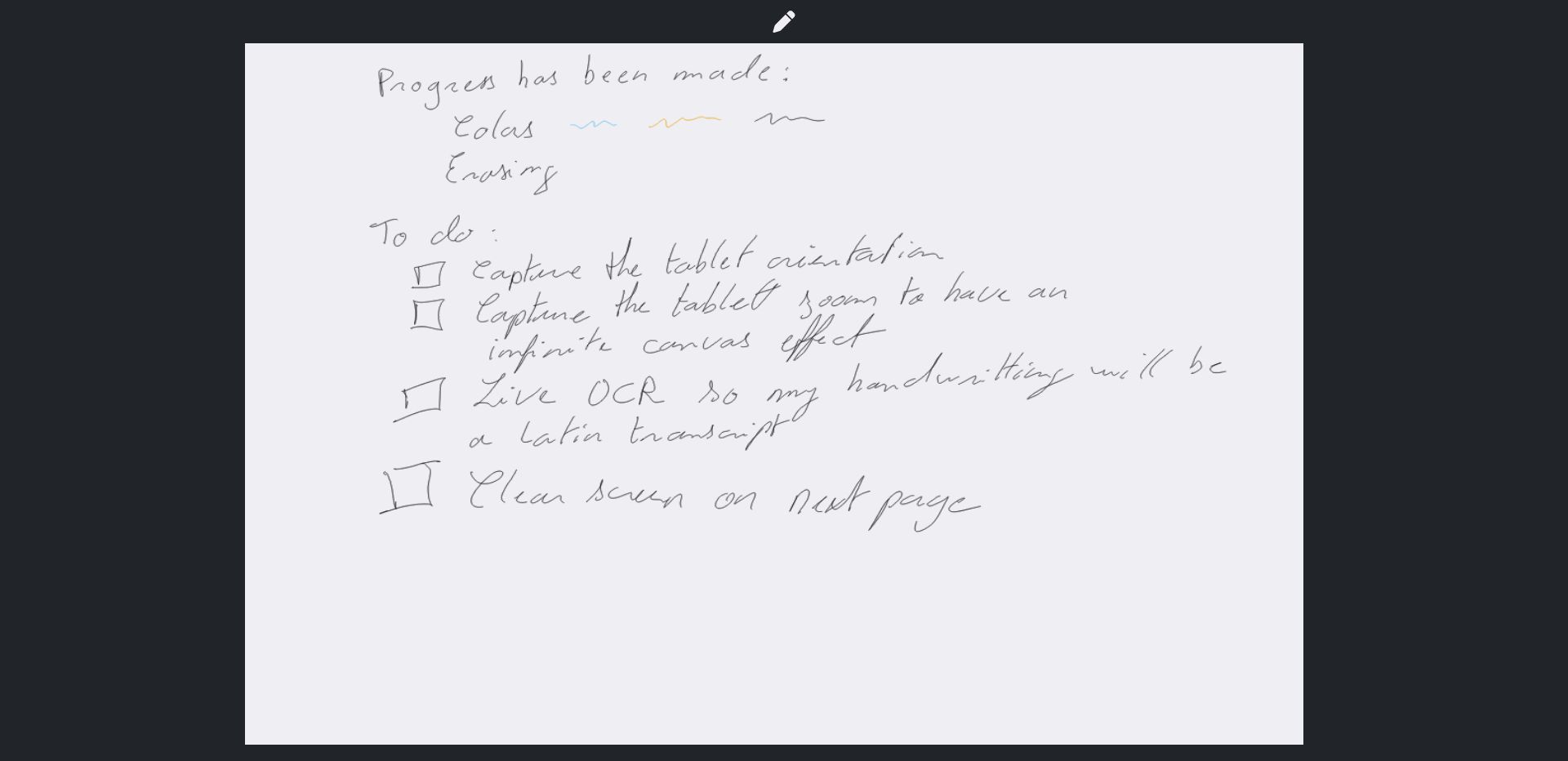
Features
- Write with the stylus (contributions from Joe Wass)
- Erase with the stylus (contributions from Alex Riesen)
- Change color (with 1 to 8) (contributions from Trevor Spiteri)
- Clear the screen with space (contributions from Joe Wass)
- Presentation mode: a mode where writing and erasing is disable, but a pointer allows to highlight elements to the viewers. Use P to enter/leave this mode (a feature made by RedTartan04)
- Responsive interface
Planned features
- Capture next page on tablet to clear the screen (prerequirements WIP)
- Pages navigations on swipes left-right (browser should remember the drawings on the previous/next pages) (prerequirements WIP)
- In-Page navigation on swipes up-down (prerequirements WIP)
- Copy-paste, move, selection, etc. from the tablet
- Change canvas orientation according to the tablet portrait/landscape modes
- Capture zoom in/out to have kind-of infinite canvas
- Live OCR to transcribe latin handwriting to font
Installation
Assuming you have Python 3 (at least 3.8.5, previous versions are not supported) installed.
Setup:
- Set up SSH private keys and config so that running
ssh remsucceeds. This works via USB connection. - Install the requirements for the python script that runs on your computer:
- Optional: set a virtual environnement
python3 -m venv .venv - Optional: activate the virtual environnement
source .venv/bin/activate - Install the project dependencies
pip3 install -r requirements.txt
For MacOS users
A convenience script that one can use as any other MacOS application can be found rMwhiteboard.command.
It provides the following advantages:
- behave like any MacOS app
- tries two hostnames until one is reachable (for a setup one in wifi, the other in usb)
- open automatically the browser with the proper address when the server is ready
Some customization might be required and are marked within the script by #TODO.
For it to work without modification, please follow this requirements:
- An SSH hostname named
rm2and an alternate onerm2usb - The repo has been cloned in
~/Develop/pipes-and-paper-enhanced
Usage
./run.shwith the following optional options
usage: main.py [-h] [-p PORT] [-s SSH_HOSTNAME] [--screen-debug]

Screen share in browser for ReMarkable tablets.

options:
  -h, --help            show this help message and exit
  -p PORT, --port PORT  The port to use to expose the website on localhost.
  -s SSH_HOSTNAME, --ssh-hostname SSH_HOSTNAME
                        The name of the ReMarkable SSH host.
  --screen-debug        Instead of running the web server, run in screen input debug mode.
- Visit http://localhost:8001/
Original motivation of Joe Wass
For quick white-boarding screenshare. The other solutions didn't quite work for me.
- The official one requires an account so I never tried it.
- reStream captures the frame buffer but in the latest ReMarkable firmware crawls, giving about 0.5 fps.
- This requires no compilation or execution on the tablet.
And I wanted a little project. Part of the reason I bought this tablet was the ability to hack it.
How does it work?
The Remarkable tablet has access to the binary event stream for its input sensors in /dev/input/event0. It also allows SSH access. This streams the sensor data over SSH, parses the binary stream and sends it over a websocket to a browser.
The browser has some rudimentary smoothing, plus hover indicator.
Contributors
- Joe Wass: original repo
- Alex Riesen
- Trevor Spiteri
- RedTartan04
Contributors


Similar repos


Languages
Python
48.3%
JavaScript
38.3%
HTML
7.0%
Shell
6.4%
Live share to a browser the drawing made on a ReMarkable tablet
Python
56
20 commits
updated Jun 6, 2025
README
Pipes and paper enhanced
This is the fork of the pipes-and-paper experiment by Joe Wass.
This project aims to enable screen sharing between the ReMarkable tablet and a browser, without having an account on ReMarkable, nor having anything to install on the device itself, nor having the desktop app.
Copies pen strokes, not the contents of the screen, but that's fine for live-sharing sketches.
Support:
- Tested on Linux
- Mac works fine
- ReMarkable 2
- Might work for the ReMarkable 1 (untested)
Features
- Write with the stylus (contributions from Joe Wass)
- Erase with the stylus (contributions from Alex Riesen)
- Change color (with 1 to 8) (contributions from Trevor Spiteri)
- Clear the screen with space (contributions from Joe Wass)
- Presentation mode: a mode where writing and erasing is disable, but a pointer allows to highlight elements to the viewers. Use P to enter/leave this mode (a feature made by RedTartan04)
- Responsive interface
Planned features
- Capture next page on tablet to clear the screen (prerequirements WIP)
- Pages navigations on swipes left-right (browser should remember the drawings on the previous/next pages) (prerequirements WIP)
- In-Page navigation on swipes up-down (prerequirements WIP)
- Copy-paste, move, selection, etc. from the tablet
- Change canvas orientation according to the tablet portrait/landscape modes
- Capture zoom in/out to have kind-of infinite canvas
- Live OCR to transcribe latin handwriting to font
Installation
Assuming you have Python 3 (at least 3.8.5, previous versions are not supported) installed.
Setup:
- Set up SSH private keys and config so that running
ssh remsucceeds. This works via USB connection. - Install the requirements for the python script that runs on your computer:
- Optional: set a virtual environnement
python3 -m venv .venv - Optional: activate the virtual environnement
source .venv/bin/activate - Install the project dependencies
pip3 install -r requirements.txt
For MacOS users
A convenience script that one can use as any other MacOS application can be found rMwhiteboard.command.
It provides the following advantages:
- behave like any MacOS app
- tries two hostnames until one is reachable (for a setup one in wifi, the other in usb)
- open automatically the browser with the proper address when the server is ready
Some customization might be required and are marked within the script by #TODO.
For it to work without modification, please follow this requirements:
- An SSH hostname named
rm2and an alternate onerm2usb - The repo has been cloned in
~/Develop/pipes-and-paper-enhanced
Usage
./run.shwith the following optional options
usage: main.py [-h] [-p PORT] [-s SSH_HOSTNAME] [--screen-debug]

Screen share in browser for ReMarkable tablets.

options:
  -h, --help            show this help message and exit
  -p PORT, --port PORT  The port to use to expose the website on localhost.
  -s SSH_HOSTNAME, --ssh-hostname SSH_HOSTNAME
                        The name of the ReMarkable SSH host.
  --screen-debug        Instead of running the web server, run in screen input debug mode.
- Visit http://localhost:8001/
Original motivation of Joe Wass
For quick white-boarding screenshare. The other solutions didn't quite work for me.
- The official one requires an account so I never tried it.
- reStream captures the frame buffer but in the latest ReMarkable firmware crawls, giving about 0.5 fps.
- This requires no compilation or execution on the tablet.
And I wanted a little project. Part of the reason I bought this tablet was the ability to hack it.
How does it work?
The Remarkable tablet has access to the binary event stream for its input sensors in /dev/input/event0. It also allows SSH access. This streams the sensor data over SSH, parses the binary stream and sends it over a websocket to a browser.
The browser has some rudimentary smoothing, plus hover indicator.
Contributors
- Joe Wass: original repo
- Alex Riesen
- Trevor Spiteri
- RedTartan04
Similar repos
Contributors
Languages
Python
48.3%
JavaScript
38.3%
HTML
7.0%
Shell
6.4%