
Retrieves IMDB trailers of your movies and imports them as background video themes in Jellyfin using .strm files
Python
43
25 commits
updated Jul 12, 2025
README






Automatically manage IMDb trailers for your media library.
Trailerfin
Trailerfin is a tool for automatically retrieving and refreshing IMDb trailer links for your media library as the backdrop video.
Instead of downloading the trailer locally, it will create a .strm file that Jellyfin can use to play the video.
It will check the expiration of the link and only update when the link has expired.
Features
- Scans directories for IMDb IDs and updates trailer links
- Fetches the latest trailer or video from IMDb
- Prioritizes trailers over clips when both are available
- Maintains an ignore list for movies without trailers
- Continuous monitoring mode for automatic updates
- Configurable via environment variables
- Docker and Docker Compose support
- Robust logging for monitoring and troubleshooting
Requirements
- Python 3.11+
- Docker (recommended)
- IMDb IDs in your media folder structure
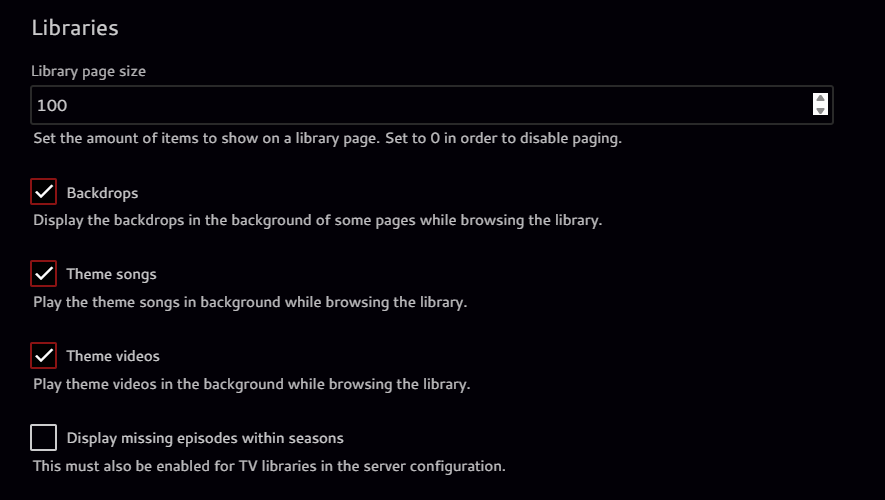
- Make sure Theme videos are enabled in Settings > Display > Libraies per device
Setup
1. Clone the repository
git clone https://github.com/Pukabyte/trailerfin.git
cd trailerfin
2. Configure Environment Variables
Create a .env file in the project root with the following variables:
SCAN_PATH=/path/to/your/media
VIDEO_FILENAME=trailer.strm
WORKERS=4
VIDEO_START_TIME=10
SCAN_PATH: Directory to scan for IMDb IDsVIDEO_FILENAME: Name of the .strm file to updateWORKERS: Amount of workers to useVIDEO_START_TIME: Start time in seconds for the video (default: 10)
3. Build and Run with Docker
Build the Docker image
docker build -t trailerfin .
Run the container
docker run --env-file .env -v /path/to/your/media:/mnt/plex trailerfin
4. Using Docker Compose
A sample docker-compose.yml is provided:
services:
  trailerfin:
    build: .
    container_name: trailerfin
    environment:
      - PUID=1000
      - PGID=1000
      - TZ=Etc/UTC
    volumes:
      - /mnt:/mnt # Make sure this directory is where your content can be found in
      - /opt/trailerfin:/app
      - /etc/localtime:/etc/localtime:ro
    restart: unless-stopped
Start with:
docker-compose up -d
Usage
Manual Run
python trailerfin.py --dir /path/to/your/media
Continuous Monitoring Mode (Recommended)
python trailerfin.py --dir /path/to/your/media --monitor
This mode will:
- Continuously monitor for new media
- Check for expiring links
- Automatically refresh links before they expire
- Skip movies without trailers
- Run in the background
Features in Detail
Ignore List
- Automatically maintains a list of movies without trailers
- Prevents repeated attempts to fetch non-existent trailers
- Stored in
ignored_titles.json - Can be manually edited to retry specific movies
Video Prioritization
- Prioritizes trailers over clips
- Falls back to clips if no trailer is available
- Ensures best quality video content
Expiration Management
- Tracks expiration times for all links
- Shows remaining time in minutes and seconds
- Automatically refreshes links before they expire
- Maintains state between runs
Logging
Logs are output to stdout and can be viewed with Docker logs or Compose logs. The logging includes:
- Link expiration times in readable format
- New media detection
- Ignored titles
- Error handling and troubleshooting information
License
MIT License
Similar repos


Languages
Python
99.1%
Retrieves IMDB trailers of your movies and imports them as background video themes in Jellyfin using .strm files
Python
43
25 commits
updated Jul 12, 2025
README
Automatically manage IMDb trailers for your media library.
Trailerfin
Trailerfin is a tool for automatically retrieving and refreshing IMDb trailer links for your media library as the backdrop video.
Instead of downloading the trailer locally, it will create a .strm file that Jellyfin can use to play the video.
It will check the expiration of the link and only update when the link has expired.
Features
- Scans directories for IMDb IDs and updates trailer links
- Fetches the latest trailer or video from IMDb
- Prioritizes trailers over clips when both are available
- Maintains an ignore list for movies without trailers
- Continuous monitoring mode for automatic updates
- Configurable via environment variables
- Docker and Docker Compose support
- Robust logging for monitoring and troubleshooting
Requirements
- Python 3.11+
- Docker (recommended)
- IMDb IDs in your media folder structure
- Make sure Theme videos are enabled in Settings > Display > Libraies per device
Setup
1. Clone the repository
git clone https://github.com/Pukabyte/trailerfin.git
cd trailerfin
2. Configure Environment Variables
Create a .env file in the project root with the following variables:
SCAN_PATH=/path/to/your/media
VIDEO_FILENAME=trailer.strm
WORKERS=4
VIDEO_START_TIME=10
SCAN_PATH: Directory to scan for IMDb IDsVIDEO_FILENAME: Name of the .strm file to updateWORKERS: Amount of workers to useVIDEO_START_TIME: Start time in seconds for the video (default: 10)
3. Build and Run with Docker
Build the Docker image
docker build -t trailerfin .
Run the container
docker run --env-file .env -v /path/to/your/media:/mnt/plex trailerfin
4. Using Docker Compose
A sample docker-compose.yml is provided:
services:
  trailerfin:
    build: .
    container_name: trailerfin
    environment:
      - PUID=1000
      - PGID=1000
      - TZ=Etc/UTC
    volumes:
      - /mnt:/mnt # Make sure this directory is where your content can be found in
      - /opt/trailerfin:/app
      - /etc/localtime:/etc/localtime:ro
    restart: unless-stopped
Start with:
docker-compose up -d
Usage
Manual Run
python trailerfin.py --dir /path/to/your/media
Continuous Monitoring Mode (Recommended)
python trailerfin.py --dir /path/to/your/media --monitor
This mode will:
- Continuously monitor for new media
- Check for expiring links
- Automatically refresh links before they expire
- Skip movies without trailers
- Run in the background
Features in Detail
Ignore List
- Automatically maintains a list of movies without trailers
- Prevents repeated attempts to fetch non-existent trailers
- Stored in
ignored_titles.json - Can be manually edited to retry specific movies
Video Prioritization
- Prioritizes trailers over clips
- Falls back to clips if no trailer is available
- Ensures best quality video content
Expiration Management
- Tracks expiration times for all links
- Shows remaining time in minutes and seconds
- Automatically refreshes links before they expire
- Maintains state between runs
Logging
Logs are output to stdout and can be viewed with Docker logs or Compose logs. The logging includes:
- Link expiration times in readable format
- New media detection
- Ignored titles
- Error handling and troubleshooting information
License
MIT License
Similar repos
Languages
Python
99.1%