Free, open-source anti-detect browser launcher for web scraping and multi-accounting. By the ProxyShard team. Engine-level fingerprint spoofing in Chromium 152 (WebGL / WebGPU / Client Hints / fonts / TLS), 220+ device profiles bundled, stable QUIC + WebRTC over SOCKS5.
TypeScript
1,284
43 commits
updated Sep 13, 2026

A free, open-source anti-detect browser launcher for web scraping and multi-accounting.
Patched Chromium 152 with engine-level fingerprint spoofing, a local API, an MCP server and SDKs.


Overview · Features · Screenshots · Comparison · Install · Usage
ShardX is built by the ProxyShard team. ProxyShard provides full SOCKS5 UDP relay support (RFC 1928 §7) and active p0f TCP fingerprint spoofing at the proxy exit. This keeps the operating system presented by the proxy consistent with the SYN/ACK shape seen by websites. ShardX is the anti-detect browser stack built to use those capabilities. The launcher manages profiles, binds proxies and ships a patched Chromium 152 build that applies fingerprint changes inside the browser engine.
Website · Documentation · Browser guide · UDP relay · p0f spoofing
| Native fingerprinting Blink, V8 and the network stack | Proxy-native networking QUIC, HTTP/3 and WebRTC over SOCKS5 UDP | Four control surfaces Desktop UI, HTTP API, MCP and SDKs |
ShardX provides four ways to control the same profiles. They all use the same local state, so no additional synchronization is required:
127.0.0.1:40325.
Create, start and stop profiles from any language, then obtain a CDP endpoint.Configuration details are available in Usage.

ShardX can run hundreds of isolated browser identities side by side. Each profile defines a complete device identity, including GPU, screen and its refresh rate, fonts, audio settings, timezone, locale, WebGL and WebGPU capabilities, TLS ClientHello, UA-CH, WebRTC policy, geolocation and cookies. The signals within a profile are kept consistent with one another.
Fingerprint changes are applied inside Chromium's C++ engine, including Blink, V8 and the network stack. ShardX does not rely on JavaScript injection, so the same values are visible in frames, workers, developer tools and headless sessions.
The launcher includes 220 ready-made device profiles for Mac M1 to M5,
Windows desktops and laptops with NVIDIA RTX or GTX, Intel, and AMD
GPUs, Linux workstations and Android phones. You can bind a SOCKS5 or HTTP
proxy to each profile.
The launcher resolves timezone, locale and geolocation from the proxy
exit country. It also manages an isolated user-data-dir for each
profile, persistent cookies, Widevine pre-warming and QUIC over the
proxy UDP relay. WebRTC traffic follows the configured proxy policy and
does not expose the host IP.
ShardX is free to use. ProxyShard proxies support end-to-end QUIC and WebRTC over SOCKS5 UDP relay. Other proxy providers can also be used, but full QUIC and WebRTC operation requires SOCKS5 UDP relay support.
Verification results and test pages:
| Test | Result |
|---|---|
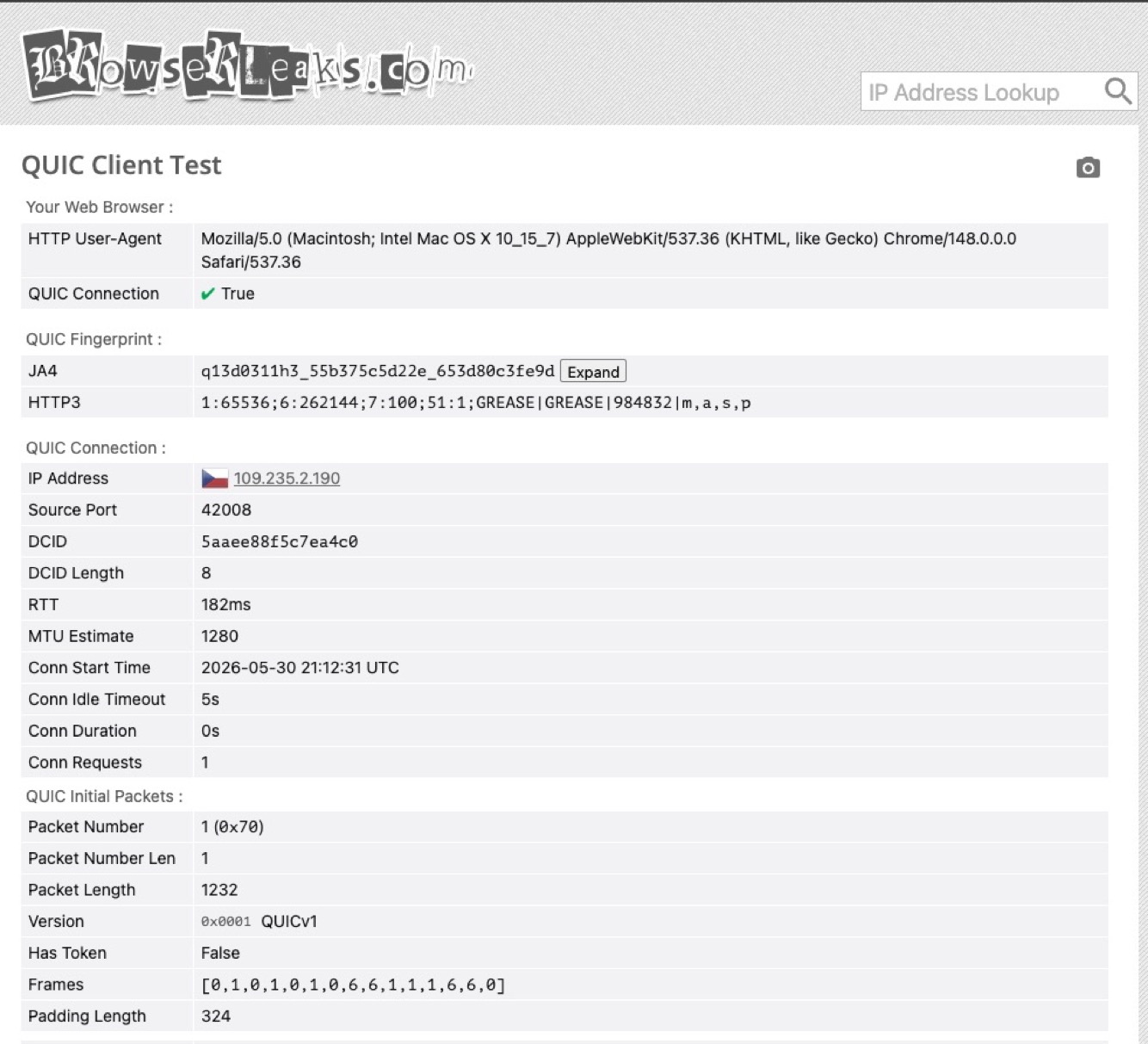
| browserleaks.com/quic | QUIC True, JA4 matches real Chrome, MTU 1232 over SOCKS5 UDP relay |
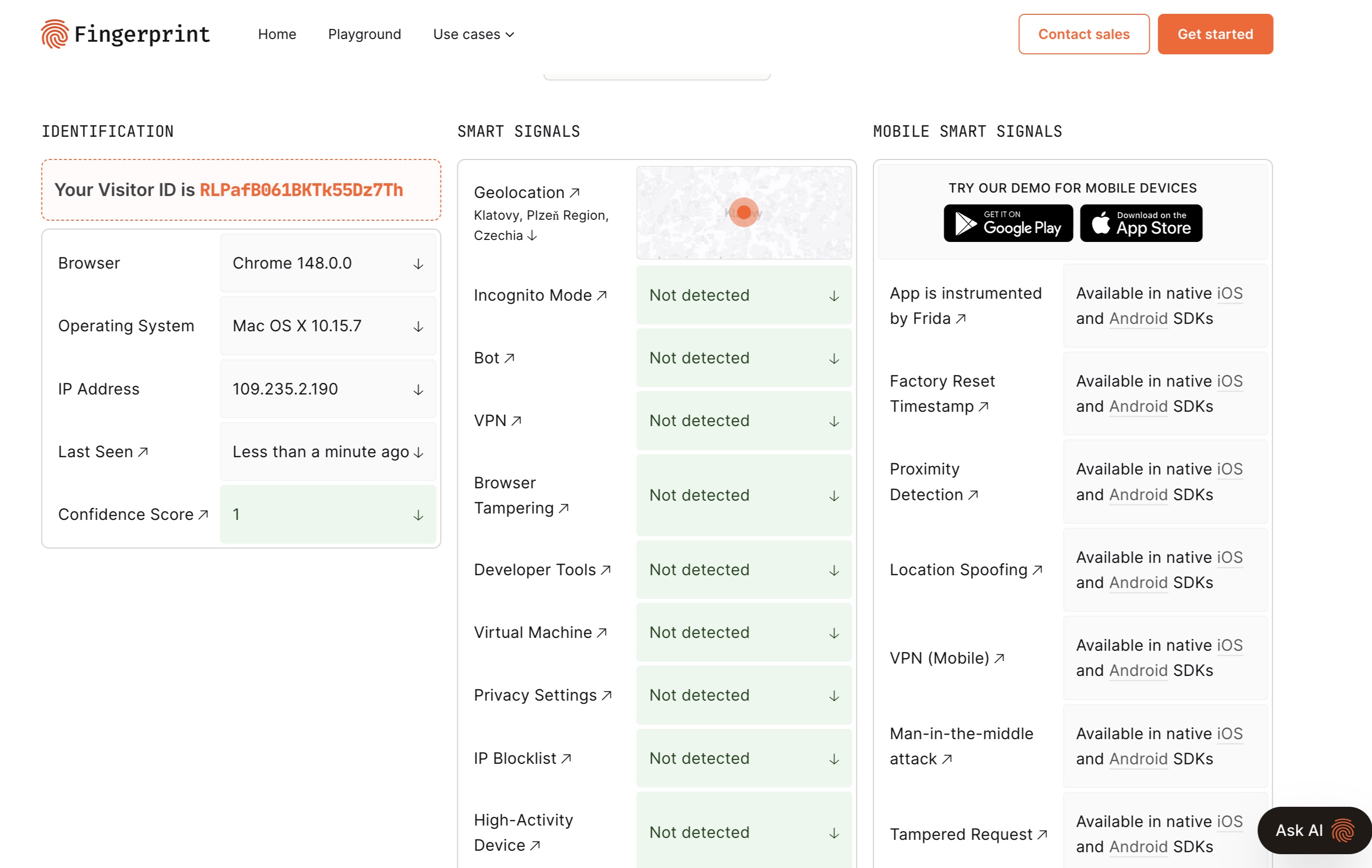
| fingerprint.com | Bot / VPN / DevTools / browser-tampering all Not detected |
| browserscan.net | Authenticity 100% |
| pixelscan.net | Fingerprint consistent, no proxy / automation detected |
| deviceandbrowserinfo.com/are_you_a_bot | Browser fingerprinting and CDP bot-detection test |
| antcpt.com/score_detector | reCAPTCHA v3 score 0.9 |
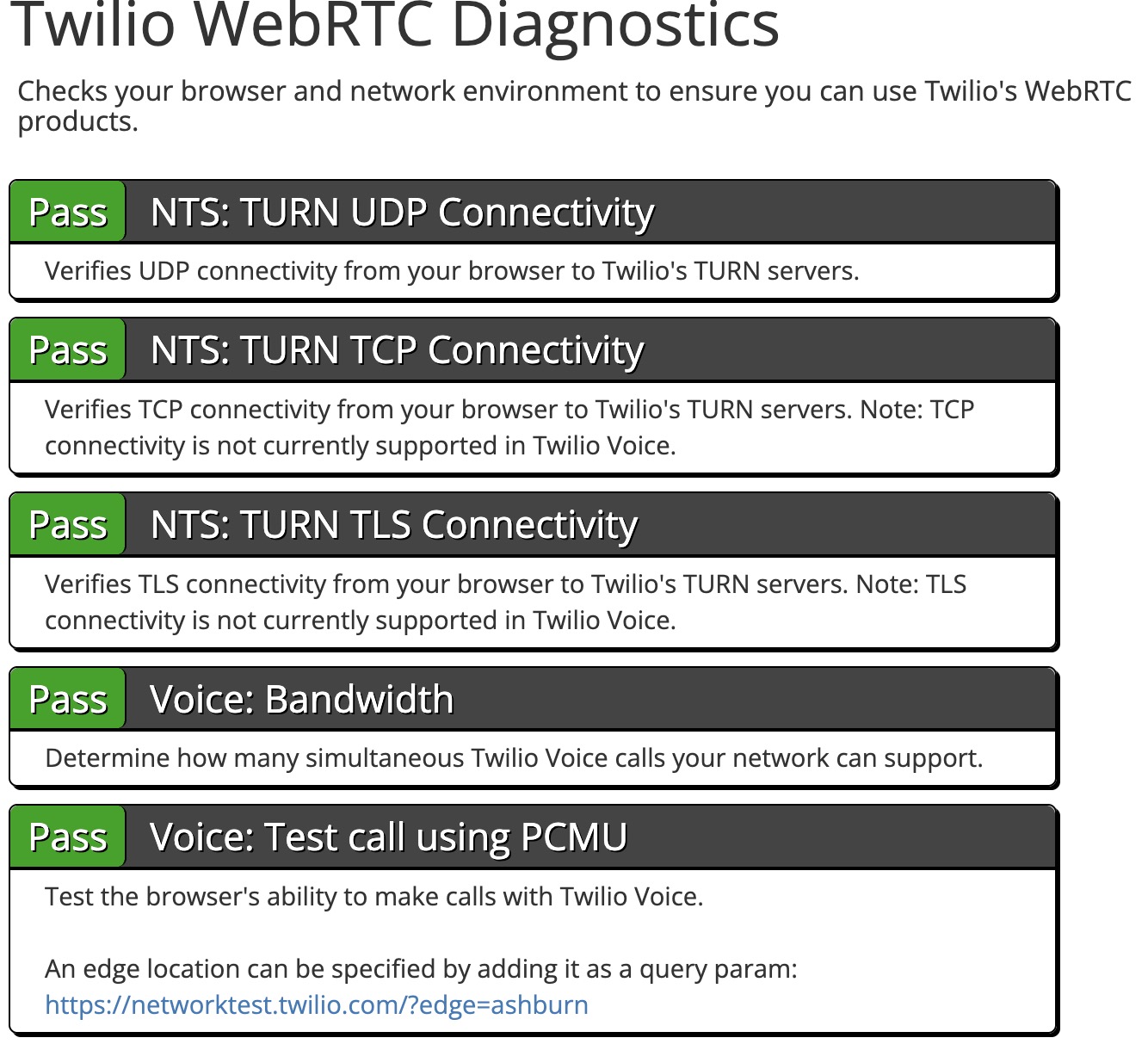
| networktest.twilio.com | TURN UDP / TCP / TLS + Voice. All checks Pass with no real-IP leak |
All overrides are applied inside the browser engine. There is no JavaScript shim layer, so the configured values remain consistent in iframes, web workers, developer tools and headless mode.
block / tcp_only / auto. In auto, traffic
uses the proxy's UDP relay. In the other modes, WebRTC candidates report the
proxy exit IP, never the host. STUN / TURN targets on private
networks are dropped.speechSynthesis.getVoices()
enumeration (200+ macOS voices, SAPI + Google for Windows, Google-only
for Linux).navigator.gpu and answers the adapter request with nothing, which is
what Chrome on Linux does — it ships with the service switched off.
Without this the profile handed back the host machine's own adapter.x-client-data.
Its absence is a strong reCAPTCHA bot signal.user-data-dir, persistent
Chrome sessions ("Continue where you left off" without the
crash-restore bubble), bulk import, folder / tag organization, pin
to top, clone.127.0.0.1,
Bearer JWT authentication. Full reference at
docs.proxyshard.com/eng/shardx-launcher-api,
raw schema in openapi.yaml. Create / start / stop
profiles and get a CDP WebSocket URL programmatically..crx. Local .crx and .zip files and unpacked
folders also work. Extensions can be selected per profile. The grid reads
the name, version, description and icon from manifest.json, including
localized __MSG_*__ values from the default locale.ShardX folder on each
launch without changing the user's bookmarks.--shardx-profile-color.requestMediaKeySystemAccess call with a robustness string reads the
difference. Turned on, the profile answers like the device it claims to be.
The trade is real and is why it is off by default: ShardX reaches Widevine
through a software module, so a site that believes the answer and asks for a
hardware-secured licence gets one it cannot play. Leave it off where paid
video has to work, turn it on where matching the device matters more.The QUIC handshake completes end to end through the SOCKS5 UDP relay. Twilio's UDP, TCP and TLS WebRTC tests pass without exposing the host IP.
browserleaks.com/quic: QUIC True, JA4 matches Chrome 152 | networktest.twilio.com: every probe Pass |
|---|---|
 |  |
fingerprint.com
Bot, VPN, DevTools and browser tampering are not detected
Additional fingerprinting test: deviceandbrowserinfo.com/are_you_a_bot
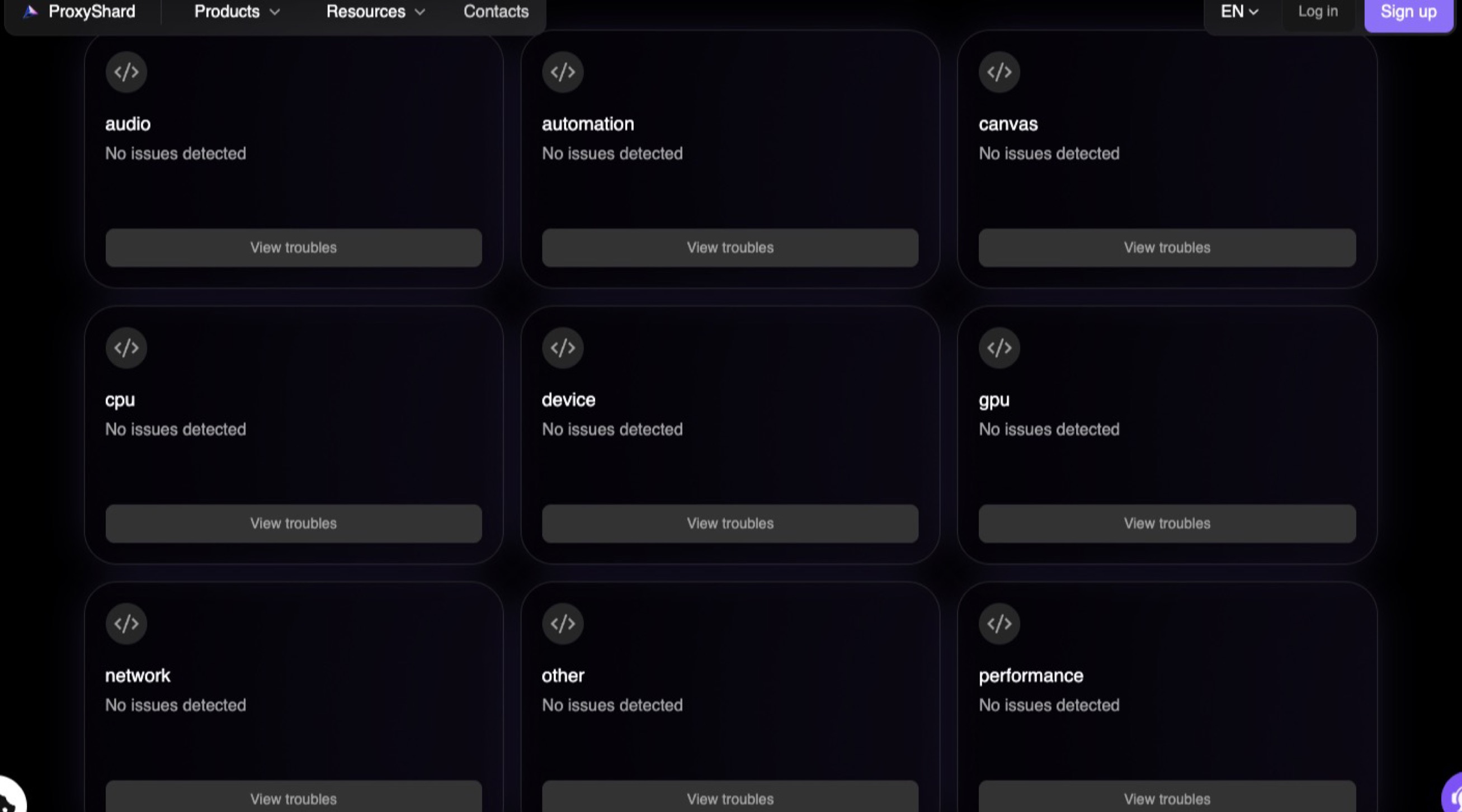
| ProxyShard browser checker: no issues across 9 categories | pixelscan.net: Fingerprint consistent |
|---|---|
 | 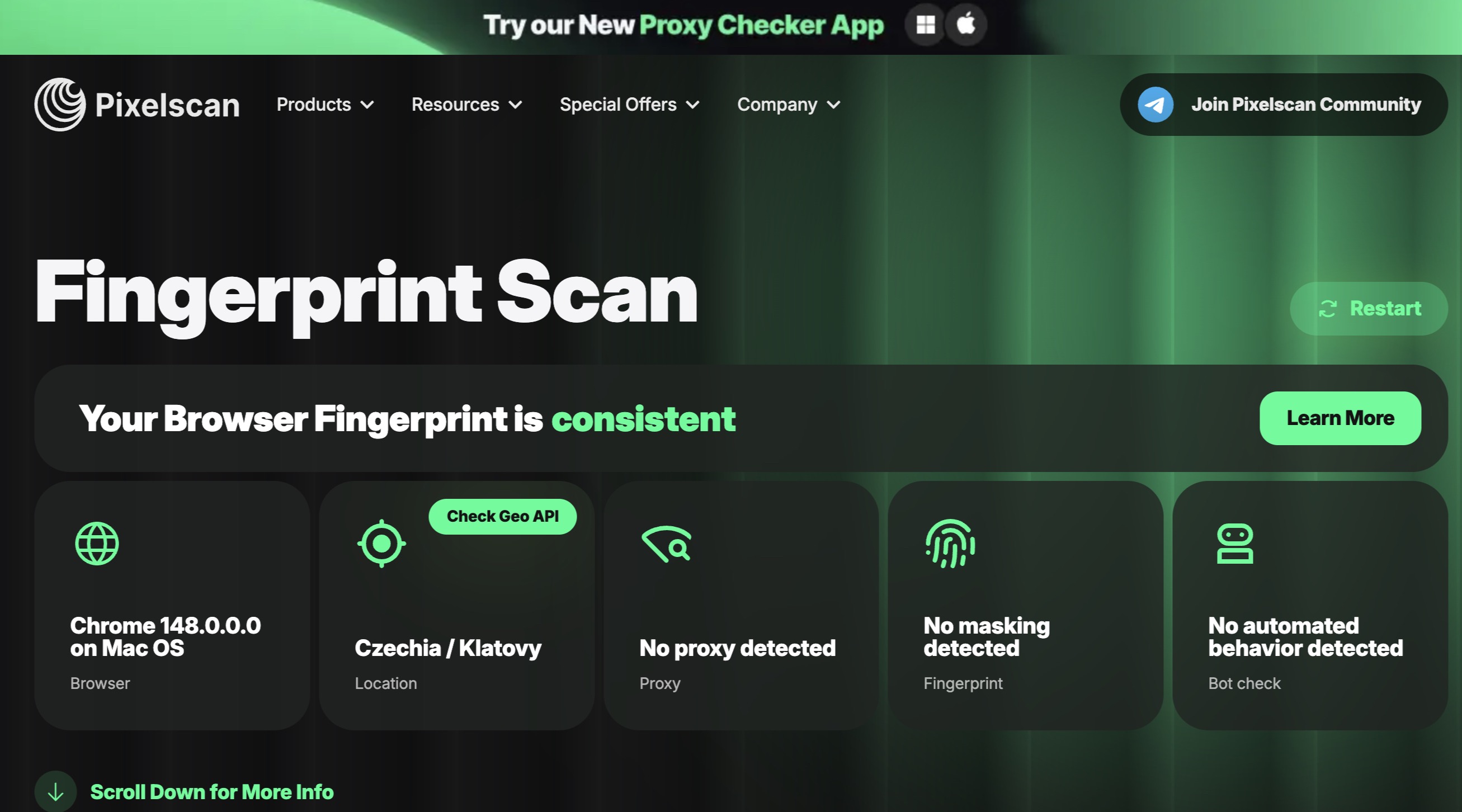 |
| browserscan.net: Authenticity 100%, locale honored | antcpt.com: reCAPTCHA v3 score 0.9 |
|---|---|
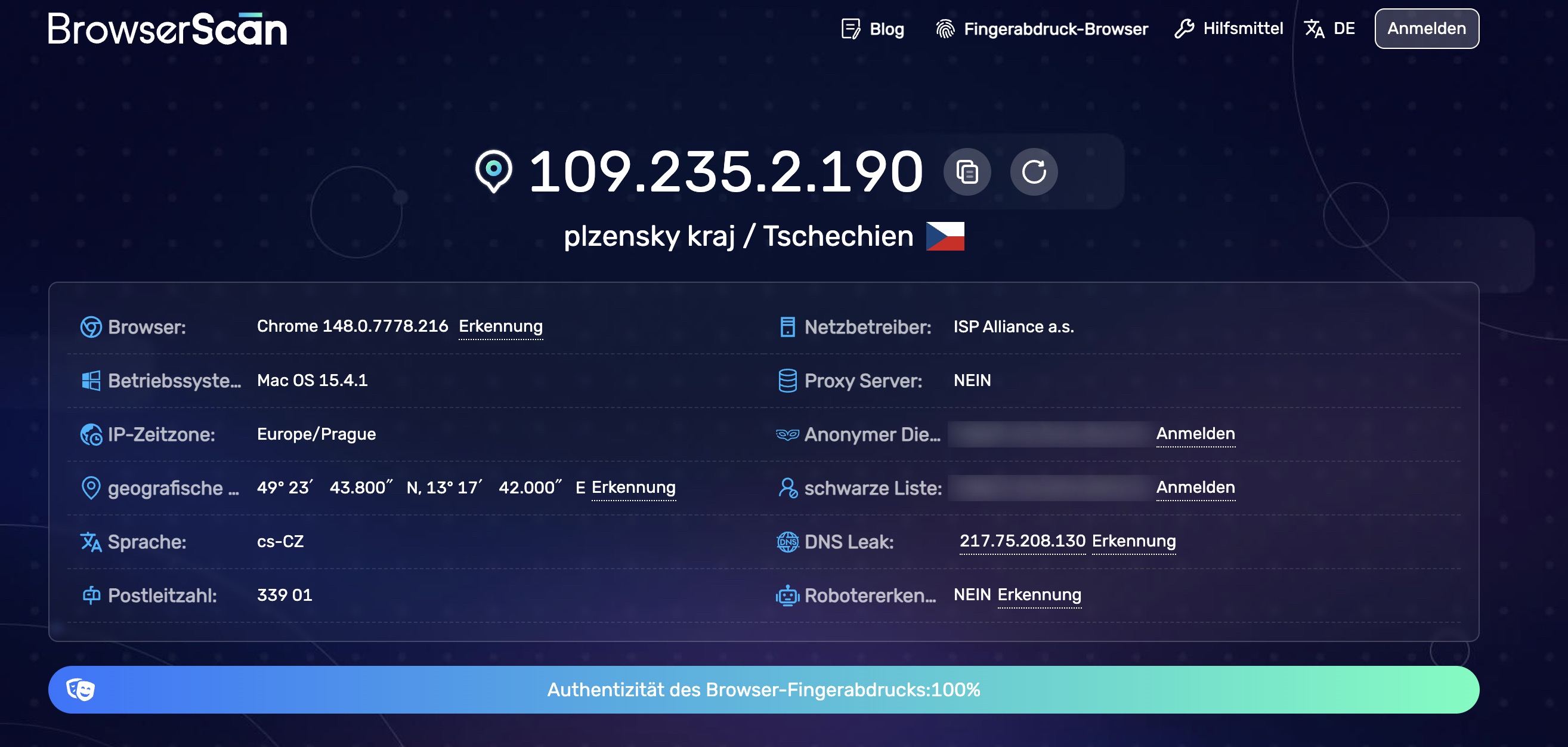 | 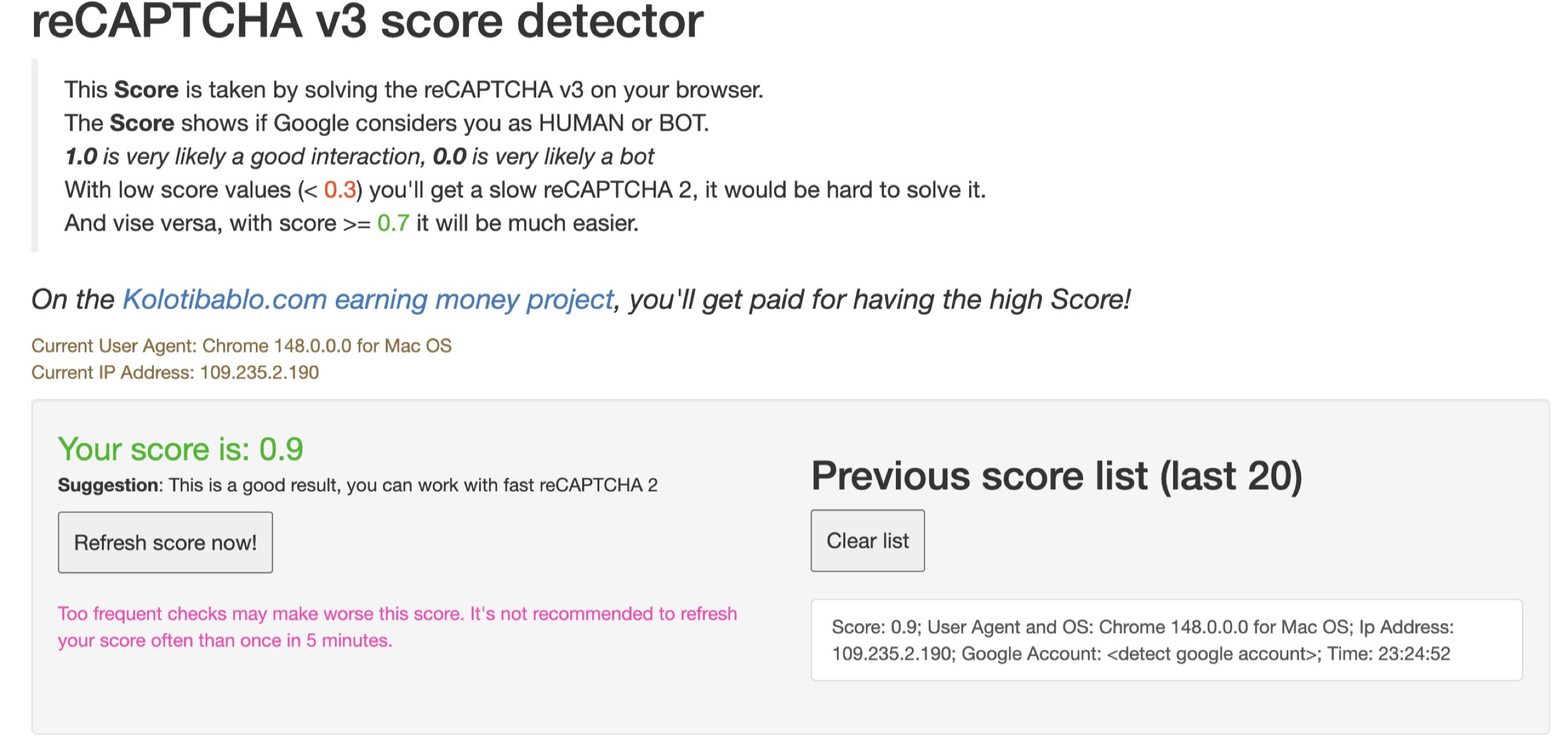 |
All three products use patched Chromium builds. The table compares fingerprint coverage, network behavior and the tools provided around the browser engine.
| Feature | ShardX (this project) | CloakBrowser | Multilogin / AdsPower / Dolphin |
|---|---|---|---|
WebGPU spoofing (navigator.gpu adapter + every limit) | ✅ full | ❌ untouched, host GPU leaks | ✅ full |
| Client Hints (Sec-CH-UA-* full stack with GREASE) | ✅ full | ❌ partial / inconsistent | ✅ full on Multilogin / AdsPower, ❌ Dolphin |
| Font enumeration pinned per profile | ✅ system-level | ❌ JS-only, host fonts still leak via CSS / canvas font-render | ⚠️ partial |
| V8 / CDP side-channel hardening (preview-getters, inspector) | ✅ closed | ❌ open, CDP automation detectable | ⚠️ partial |
| TLS ClientHello fingerprint (JA4) | ✅ matches real Chrome 152 | ⚠️ static, may drift after browser updates | ✅ matches the forked Chrome version |
| QUIC / HTTP-3 over SOCKS5 | ✅ stable end to end via UDP relay | ⚠️ unstable, falls back to TCP or drops mid-session | ❌ disabled when proxy is set |
| WebRTC over SOCKS5 (no real-IP leak via STUN) | ✅ proxy UDP relay or synth candidates | ⚠️ same UDP relay path, same instability | ⚠️ disable-only |
| Consistency of generated profiles | ✅ coherent device (GPU, CPU, RAM, UA and fonts) | ❌ frequent contradictions (Win UA + Mac GPU, mobile UA + desktop screen, etc.) | ⚠️ varies |
| Bundled fingerprint library | 220 profiles from real-device samples, phones included | ❌ random generator, may combine a Windows UA with a Mac GPU or a mobile UA with a desktop screen | catalog (subscription) |
| Mobile profiles (touch input, sensors, phone fonts) | ✅ the browser behaves like a phone, not only answers like one | ❌ none | ⚠️ UA and screen only |
| Synchronised windows | ✅ one window drives, the rest repeat in their own profiles | ❌ none | ⚠️ paid add-on where offered |
| Built-in automation | ✅ visual projects, recording, fleet runs, WASM modules, local API + MCP | ❌ external scripts only | ⚠️ varies, usually paid |
| Human input engine | ✅ in the browser itself, used by hand and by scripts | ❌ none | ⚠️ synthetic events |
| Pricing | Free, proxy costs only | Free, engine only | Paid / freemium |
| Management UI | ✅ desktop app (this launcher) | ⚠️ CLI only, manual profile management | ✅ desktop app |
| Launcher source | Open (MIT, this repo) | Open (CLI) | Closed |
Public browser checkers such as fingerprint.com, pixelscan.net, browserscan.net, deviceandbrowserinfo.com and antcpt test only part of the browser fingerprint. An anti-detect browser can pass these checks while still exposing inconsistent values on surfaces that are not tested there.
Production anti-fraud systems inspect these additional surfaces. Inconsistencies can cause an account to be flagged after several sessions even when the initial public checks passed:
navigator.gpu.requestAdapter() returns the host GPU on
CloakBrowser, so a profile claiming an RTX 4060 on Windows leaks the
Mac M-series adapter underneath. ShardX (and the paid anti-detects)
return the claimed GPU with full WebGPU limits.Object.toString
side-channels remain exposed on CloakBrowser and are only partially
handled by some paid anti-detects. ShardX patches the documented side
channels so they do not expose automation.document.fonts.check() return the host font list on
CloakBrowser no matter what the profile claims. ShardX pins the font
enumeration at the system level so the result matches the device.hardwareConcurrency=2). ShardX's
library is derived from real-device samples so every signal agrees
with the others.Download the build for your OS from GitHub Releases,
then run it. Use .dmg for macOS, .msi or the portable .exe for
Windows, and .AppImage or .deb for Linux.
The release is not code-signed with Apple Developer ID or Authenticode, so the operating system may show a warning on first launch:
xattr -dr com.apple.quarantine "/Applications/ShardX Launcher.app"
.AppImage, run chmod +x ShardX-Launcher.AppImage && ./ShardX-Launcher.AppImage.
For .deb, run sudo apt install ./ShardX-Launcher.deb.The bundled Chromium engine needs unzip and the standard shared
libraries any Chromium fork links against. On a fresh Debian / Ubuntu:
sudo apt install -y \
  unzip ca-certificates fonts-liberation \
  libnss3 libnspr4 libatk1.0-0 libatk-bridge2.0-0 libcups2 \
  libxkbcommon0 libxcomposite1 libxdamage1 libxfixes3 libxrandr2 \
  libgbm1 libpango-1.0-0 libcairo2 libasound2 libxshmfence1
Run these commands from the repository root:
npm install
npm run tauri dev      # dev (hot reload)
# or
npm run tauri build    # release .app / .msi / .AppImage in src-tauri/target/release/bundle/
The app downloads the patched browser (~150 MB) and the fingerprint library (~780 KB) from our CDN, places everything under
~/Library/Application Support/shardx-launcher/ (mac)%APPDATA%\shardx-launcher\ (win)~/.config/shardx-launcher/ (linux)and you're ready to bind a proxy and launch your first profile.
ShardX provides four interfaces for different workflows. They all read the same local state. A profile created in the UI is immediately available through the API, MCP server and SDKs.
Use the desktop app for daily profile management. Open Proxies > Add
proxy and enter socks5://user:pass@host:port, or paste a list for
bulk import. Select Test to run a TCP check, UDP_ASSOCIATE probe and
IP geolocation lookup. Open Profiles, select a profile, choose Bind
proxy and then select Start. The launcher handles the following tasks:
user-data-dir so cookies / cache / extensions stay
isolated.user-data-dir next time so you get
"Continue where you left off" without the crash-restore bubble.The workspace also includes bulk import and export, folders, tags, pinning, cloning, and cookie import and export for Chromium SQLite v10 and DPAPI. The fingerprint editor randomizes CPU, RAM and platform version together to keep hardware combinations consistent.
An axum HTTP server bound to 127.0.0.1:40325 (port configurable in
Settings > Automation API). Use it to control the launcher from
Python, Go, curl or any other HTTP client. Every endpoint except
GET /health requires the Bearer JWT shown in Settings > Automation API.
Regenerating the token rotates the signing secret immediately.
Launching a profile and getting a CDP endpoint:
TOKEN="<from Settings / Automation API>"
BASE="http://127.0.0.1:40325"

# Start the profile in CDP mode and return its websocket endpoint.
# Reuse the endpoint with Puppeteer, patchright, a raw WebSocket client
# or another CDP client.
curl -s -X POST "$BASE/profiles/win-rtx4060/start?cdp=true&headless=false" \
     -H "Authorization: Bearer $TOKEN" | jq .
# Response: {"id":"win-rtx4060","cdp_url":"ws://127.0.0.1:53217/devtools/browser/...","pid":48211}

# Stop it.
curl -s -X POST "$BASE/profiles/win-rtx4060/stop" \
     -H "Authorization: Bearer $TOKEN"
Endpoints cover profiles (create, edit, delete, start, stop, and list running profiles), proxies (add, delete, and list), extensions (add from a Web Store link or local file, list, and remove), bookmarks (add, list, and delete), trash (list, restore, and purge), fingerprint generation and library listing, folders, and cookie import or export. See the OpenAPI file for the complete list.
The color and extensions fields can be set when a profile is created
or edited. This lets a script create a recognizable profile with the
extensions it needs from the first launch:
EXTENSION_ID="$(
  curl -s -X POST "$BASE/extensions" \
       -H "Authorization: Bearer $TOKEN" \
       -H 'Content-Type: application/json' \
       -d '{"url":"https://chromewebstore.google.com/detail/rabby-wallet/acmacodkjbdgmoleebolmdjonilkdbch"}' |
    jq -r '.id'
)"

FINGERPRINT="$(
  curl -s "$BASE/fingerprint/new" \
       -H "Authorization: Bearer $TOKEN" |
    jq -c '.fingerprint'
)"

jq -n \
  --arg extension "$EXTENSION_ID" \
  --argjson fingerprint "$FINGERPRINT" \
  '{
    name: "kz-01",
    color: "#2FCB80",
    extensions: [$extension],
    fingerprint: $fingerprint
  }' |
curl -s -X POST "$BASE/profiles" \
     -H "Authorization: Bearer $TOKEN" \
     -H 'Content-Type: application/json' \
     --data-binary @- | jq .
POST /profiles/temporary makes a profile that is hidden from the
list and deleted when its browser closes. It takes a noise block, so
a scripted run can decide per vector instead of taking the default
(everything off):
curl -s -X POST "$BASE/profiles/temporary" \
     -H "Authorization: Bearer $TOKEN" -H 'Content-Type: application/json' \
     -d '{
           "platform": "Windows",
           "proxy": "socks5://user:pass@host:1080",
           "noise": {
             "canvas": true,
             "webgl": { "enabled": true, "intensity": 0.0005 },
             "fonts": true
           }
         }'
Shorthand (true) and full blocks can be mixed. A block is merged into
the vector instead of replacing it, so {"webgl": {"intensity": 0.001}}
leaves enabled unchanged. Enabling webgl or client_rects with
shorthand also sets the strength used by the UI because an enabled vector
with zero strength has no effect. A seed of 0, or an omitted seed,
still derives a stable value from the profile ID. This prevents temporary
profiles created a second apart from sharing a fingerprint.
Once you have a CDP endpoint, the patched core provides a Motion
domain for pointer movement and keystrokes. It uses the same engine as
the browser's own Human Type menu item. Text is typed one key at a time
through the browser's input path. It is not pasted or set directly on the
element, and no script is injected.
The domain is merged into the browser-level protocol, so it is available
from the browser target but does not appear in /json/protocol or
Schema.getDomains. This is intentional. A client that knows the commands
can use them, while a page that enumerates the protocol cannot discover
them. The command names also differ from those used by other products
because matching a known tool's vocabulary would create its own
fingerprint.
| Command | Parameters | Returns |
|---|---|---|
Motion.createPointer | x, y, paceScale?, seed? | No fields |
Motion.glideTo | x, y, targetWidth? | durationMs |
Motion.tap | button?, clickCount? | durationMs |
Motion.dragTo | x, y, targetWidth?, button? | durationMs |
Motion.wheel | deltaY, deltaX? | durationMs |
Motion.enterText | text, allowTypos? | durationMs |
Motion.pressKey | key, modifiers? | durationMs |
Motion.destroyPointer | No parameters | No fields |
targetWidth is the element's real width. It feeds Fitts's law, so
passing it is what makes a small target take longer to reach than a
large one. Defaults to 32.paceScale multiplies the profile's own speed. A value of 1.0 keeps
its default pace.seed overrides the profile's motor seed. Leave it unset in production
so profiles do not end up moving identically.allowTypos lets the profile's typo rate introduce a mistake and
correct it with a real backspace. Off by default, because it changes
the value that ends up in the field.createPointer first. A session without a pointer answers every
other command with an error instead of inventing an origin. A guessed
starting point would produce the wrong duration and curve.# pip install websockets
import asyncio, json, websockets
CDP = "ws://127.0.0.1:53217/devtools/browser/..." # from /profiles/{id}/start
async def main():
async with websockets.connect(CDP, max_size=None) as ws:
n = 0
async def call(method, params=None):
nonlocal n
n += 1
await ws.send(json.dumps({"id": n, "method": method,
"params": params or {}}))
while True:
msg = json.loads(await ws.recv())
if msg.get("id") == n:
if "error" in msg:
raise RuntimeError(msg["error"])
return msg.get("result", {})
# Where the cursor starts. Not a movement.
await call("Motion.createPointer", {"x": 20, "y": 20})
# Aim at the field. Pass its real width.
r = await call("Motion.glideTo", {"x": 640, "y": 360,
"targetWidth": 220})
print("moved in", r["durationMs"], "ms")
await call("Motion.tap") # focus it
await call("Motion.enterText", {"text": "hello there"})
await call("Motion.destroyPointer")
asyncio.run(main())
The same sequence in Node over an existing Puppeteer connection:
const s = await browser.target().createCDPSession();
await s.send("Motion.createPointer", { x: 20, y: 20 });
await s.send("Motion.glideTo", { x: 640, y: 360, targetWidth: 220 });
await s.send("Motion.tap");
await s.send("Motion.enterText", { text: "hello there" });
await s.send("Motion.destroyPointer");
Typing happens in real time. enterText returns only when the last key is
released, and durationMs reports how long it took. Allow as much time as
you would for a person typing the same text.
wheel scrolls with the device the profile's platform implies — a
trackpad on macOS, a notched wheel on Windows and Linux, where the
distance delivered is rounded to whole detents. It deliberately does not
move the pointer: a scroll happens under whatever the cursor is already
over. pressKey takes a UI Events name (Enter, Tab, ArrowDown,
F5) and resolves a printable character through the profile's keyboard
layout, so on a ru-RU profile the key a US layout calls a reports code
KeyA.
A profile that claims a touchscreen has no cursor, and the core enforces it in both directions: the pointer commands above are refused on such a profile, and the ones below are refused on every other. A phone that moves a cursor and hovers has contradicted itself before any statistical check on the motion begins.
| Command | Parameters | Returns |
|---|---|---|
Motion.touchTap | x, y, targetWidth?, tapCount? | durationMs |
Motion.touchLongPress | x, y, holdMs? | durationMs |
Motion.touchSwipe | fromX, fromY, toX, toY, flick? | durationMs |
Motion.touchDrag | fromX, fromY, toX, toY, holdMs? | durationMs |
Motion.pinch | x, y, scale, rotation? | durationMs |
Motion.setOrientation | angle, turnMs? | angle, type, screenWidth, screenHeight, durationMs |
createPointer equivalent and no way to leave a
contact down across two calls.targetWidth
defaults to 44, the smallest target the platform guidelines call
tappable.GestureScrollBegin/Update/End and
GestureFlingStart with the velocity the browser's own tracker fitted
from the last 100 ms of the stroke. flick decides whether the finger
lifts while still moving.touchDrag differs from touchSwipe in the one way that decides
everything: the contact stays still, inside the tap slop, until the
long-press timers have fired. That is when a page's drag-and-drop
starts. A stroke that begins earlier is a scroll.pinch fails rather than producing a gesture the browser will not
recognise — the initial separation must clear the minimum scaling span
and the span must then change by more than the slop. A pinch below those
thresholds delivers DOM touch events and no zoom at all, which looks
like success and is not.setOrientation is physical and takes time. The pose the sensors
report starts moving first and the screen angle commits at the end of
the ramp, 150–500 ms later, which is the order a handset produces. It
answers once the new angle has reached every renderer, so screen.width
read straight afterwards is already the turned one. angle is 0, 90,
180 or 270; anything else is refused rather than rounded. It is refused
too on a profile with no motion sensors: a device with no accelerometer
cannot notice that it has been turned.const s = await browser.target().createCDPSession();
await s.send("Motion.touchSwipe", { fromX: 200, fromY: 600,
toX: 200, toY: 200, flick: true });
await s.send("Motion.touchLongPress", { x: 200, y: 300 });
await s.send("Motion.pinch", { x: 200, y: 400, scale: 2 });
const r = await s.send("Motion.setOrientation", { angle: 90 });
// r → { angle: 90, type: "landscape-primary", screenWidth: 844, ... }
In the desktop Automation section the same gestures are the Touch
palette — touch.tap, touch.longPress, touch.swipe, touch.drag,
touch.pinch and screen.rotate — and the ordinary steps become touches
by themselves on a phone profile: click taps, rightClick long-presses,
scroll and swipe use a finger. hover is the one that refuses, since
there is nothing to hover with.
A Model Context Protocol server for Claude Desktop, Cursor and any other MCP client. It wraps the launcher's HTTP API and browser control over CDP through patchright, allowing a language model to:
The app does not run the server itself. Open Settings > MCP server >
Download MCP server, choose a folder, run npm install and register
the server with your MCP client. Setup instructions, environment
variables and tools are listed in
mcp/README.md.
Minimal stdio registration:
{
  "mcpServers": {
    "shardx": {
      "command": "node",
      "args": ["/ABSOLUTE/PATH/mcp/index.js"],
      "env": {
        "SHARDX_API": "http://127.0.0.1:40325",
        "SHARDX_TOKEN": "<Bearer token>"
      }
    }
  }
}
These client libraries do not require the desktop app. On first use, they download the same engine and fingerprint library, then launch profiles directly as subprocesses. Python and Node use patchright as a stealth Playwright client. Rust uses chromiumoxide over CDP. The SDKs use the same pre-launch pipeline as the desktop app, including a UDP probe, conditional QUIC, automatic resolution of timezone, locale and geolocation, the same screen strategy and host-aware hardware randomization.
Use an SDK when you want ShardX as a library inside a scraper, CI job or server-side worker without installing the GUI.
pip install shardxnpm install @proxyshard/shardxcargo add shardxThe desktop launcher source in this repository, including the Tauri shell, React UI and Rust source, is available under the MIT License. See LICENSE. You may use, fork, modify and distribute the launcher, including for commercial projects.
The browser engine (the patched Chromium 152 binary that the launcher downloads from our CDN on first run) is distributed as a closed-source binary. Its source is not published in this repository or elsewhere, and the following are explicitly not permitted:
Permitted uses include personal projects, web scraping, multi-accounting and integration with the launcher's automation API. Contact us before building a commercial product on top of the engine.
18 followers · starred Jul 2026
47 followers · starred May 2026
Free, open-source anti-detect browser launcher for web scraping and multi-accounting. By the ProxyShard team. Engine-level fingerprint spoofing in Chromium 152 (WebGL / WebGPU / Client Hints / fonts / TLS), 220+ device profiles bundled, stable QUIC + WebRTC over SOCKS5.
TypeScript
1,284
43 commits
updated Sep 13, 2026
A free, open-source anti-detect browser launcher for web scraping and multi-accounting.
Patched Chromium 152 with engine-level fingerprint spoofing, a local API, an MCP server and SDKs.
Overview · Features · Screenshots · Comparison · Install · Usage
ShardX is built by the ProxyShard team. ProxyShard provides full SOCKS5 UDP relay support (RFC 1928 §7) and active p0f TCP fingerprint spoofing at the proxy exit. This keeps the operating system presented by the proxy consistent with the SYN/ACK shape seen by websites. ShardX is the anti-detect browser stack built to use those capabilities. The launcher manages profiles, binds proxies and ships a patched Chromium 152 build that applies fingerprint changes inside the browser engine.
Website · Documentation · Browser guide · UDP relay · p0f spoofing
| Native fingerprinting Blink, V8 and the network stack | Proxy-native networking QUIC, HTTP/3 and WebRTC over SOCKS5 UDP | Four control surfaces Desktop UI, HTTP API, MCP and SDKs |
ShardX provides four ways to control the same profiles. They all use the same local state, so no additional synchronization is required:
127.0.0.1:40325.
Create, start and stop profiles from any language, then obtain a CDP endpoint.Configuration details are available in Usage.
ShardX can run hundreds of isolated browser identities side by side. Each profile defines a complete device identity, including GPU, screen and its refresh rate, fonts, audio settings, timezone, locale, WebGL and WebGPU capabilities, TLS ClientHello, UA-CH, WebRTC policy, geolocation and cookies. The signals within a profile are kept consistent with one another.
Fingerprint changes are applied inside Chromium's C++ engine, including Blink, V8 and the network stack. ShardX does not rely on JavaScript injection, so the same values are visible in frames, workers, developer tools and headless sessions.
The launcher includes 220 ready-made device profiles for Mac M1 to M5,
Windows desktops and laptops with NVIDIA RTX or GTX, Intel, and AMD
GPUs, Linux workstations and Android phones. You can bind a SOCKS5 or HTTP
proxy to each profile.
The launcher resolves timezone, locale and geolocation from the proxy
exit country. It also manages an isolated user-data-dir for each
profile, persistent cookies, Widevine pre-warming and QUIC over the
proxy UDP relay. WebRTC traffic follows the configured proxy policy and
does not expose the host IP.
ShardX is free to use. ProxyShard proxies support end-to-end QUIC and WebRTC over SOCKS5 UDP relay. Other proxy providers can also be used, but full QUIC and WebRTC operation requires SOCKS5 UDP relay support.
Verification results and test pages:
| Test | Result |
|---|---|
| browserleaks.com/quic | QUIC True, JA4 matches real Chrome, MTU 1232 over SOCKS5 UDP relay |
| fingerprint.com | Bot / VPN / DevTools / browser-tampering all Not detected |
| browserscan.net | Authenticity 100% |
| pixelscan.net | Fingerprint consistent, no proxy / automation detected |
| deviceandbrowserinfo.com/are_you_a_bot | Browser fingerprinting and CDP bot-detection test |
| antcpt.com/score_detector | reCAPTCHA v3 score 0.9 |
| networktest.twilio.com | TURN UDP / TCP / TLS + Voice. All checks Pass with no real-IP leak |
All overrides are applied inside the browser engine. There is no JavaScript shim layer, so the configured values remain consistent in iframes, web workers, developer tools and headless mode.
block / tcp_only / auto. In auto, traffic
uses the proxy's UDP relay. In the other modes, WebRTC candidates report the
proxy exit IP, never the host. STUN / TURN targets on private
networks are dropped.speechSynthesis.getVoices()
enumeration (200+ macOS voices, SAPI + Google for Windows, Google-only
for Linux).navigator.gpu and answers the adapter request with nothing, which is
what Chrome on Linux does — it ships with the service switched off.
Without this the profile handed back the host machine's own adapter.x-client-data.
Its absence is a strong reCAPTCHA bot signal.user-data-dir, persistent
Chrome sessions ("Continue where you left off" without the
crash-restore bubble), bulk import, folder / tag organization, pin
to top, clone.127.0.0.1,
Bearer JWT authentication. Full reference at
docs.proxyshard.com/eng/shardx-launcher-api,
raw schema in openapi.yaml. Create / start / stop
profiles and get a CDP WebSocket URL programmatically..crx. Local .crx and .zip files and unpacked
folders also work. Extensions can be selected per profile. The grid reads
the name, version, description and icon from manifest.json, including
localized __MSG_*__ values from the default locale.ShardX folder on each
launch without changing the user's bookmarks.--shardx-profile-color.requestMediaKeySystemAccess call with a robustness string reads the
difference. Turned on, the profile answers like the device it claims to be.
The trade is real and is why it is off by default: ShardX reaches Widevine
through a software module, so a site that believes the answer and asks for a
hardware-secured licence gets one it cannot play. Leave it off where paid
video has to work, turn it on where matching the device matters more.The QUIC handshake completes end to end through the SOCKS5 UDP relay. Twilio's UDP, TCP and TLS WebRTC tests pass without exposing the host IP.
browserleaks.com/quic: QUIC True, JA4 matches Chrome 152 | networktest.twilio.com: every probe Pass |
|---|---|
| |
fingerprint.com
Bot, VPN, DevTools and browser tampering are not detected
Additional fingerprinting test: deviceandbrowserinfo.com/are_you_a_bot
| ProxyShard browser checker: no issues across 9 categories | pixelscan.net: Fingerprint consistent |
|---|---|
| |
| browserscan.net: Authenticity 100%, locale honored | antcpt.com: reCAPTCHA v3 score 0.9 |
|---|---|
| |
All three products use patched Chromium builds. The table compares fingerprint coverage, network behavior and the tools provided around the browser engine.
| Feature | ShardX (this project) | CloakBrowser | Multilogin / AdsPower / Dolphin |
|---|---|---|---|
WebGPU spoofing (navigator.gpu adapter + every limit) | ✅ full | ❌ untouched, host GPU leaks | ✅ full |
| Client Hints (Sec-CH-UA-* full stack with GREASE) | ✅ full | ❌ partial / inconsistent | ✅ full on Multilogin / AdsPower, ❌ Dolphin |
| Font enumeration pinned per profile | ✅ system-level | ❌ JS-only, host fonts still leak via CSS / canvas font-render | ⚠️ partial |
| V8 / CDP side-channel hardening (preview-getters, inspector) | ✅ closed | ❌ open, CDP automation detectable | ⚠️ partial |
| TLS ClientHello fingerprint (JA4) | ✅ matches real Chrome 152 | ⚠️ static, may drift after browser updates | ✅ matches the forked Chrome version |
| QUIC / HTTP-3 over SOCKS5 | ✅ stable end to end via UDP relay | ⚠️ unstable, falls back to TCP or drops mid-session | ❌ disabled when proxy is set |
| WebRTC over SOCKS5 (no real-IP leak via STUN) | ✅ proxy UDP relay or synth candidates | ⚠️ same UDP relay path, same instability | ⚠️ disable-only |
| Consistency of generated profiles | ✅ coherent device (GPU, CPU, RAM, UA and fonts) | ❌ frequent contradictions (Win UA + Mac GPU, mobile UA + desktop screen, etc.) | ⚠️ varies |
| Bundled fingerprint library | 220 profiles from real-device samples, phones included | ❌ random generator, may combine a Windows UA with a Mac GPU or a mobile UA with a desktop screen | catalog (subscription) |
| Mobile profiles (touch input, sensors, phone fonts) | ✅ the browser behaves like a phone, not only answers like one | ❌ none | ⚠️ UA and screen only |
| Synchronised windows | ✅ one window drives, the rest repeat in their own profiles | ❌ none | ⚠️ paid add-on where offered |
| Built-in automation | ✅ visual projects, recording, fleet runs, WASM modules, local API + MCP | ❌ external scripts only | ⚠️ varies, usually paid |
| Human input engine | ✅ in the browser itself, used by hand and by scripts | ❌ none | ⚠️ synthetic events |
| Pricing | Free, proxy costs only | Free, engine only | Paid / freemium |
| Management UI | ✅ desktop app (this launcher) | ⚠️ CLI only, manual profile management | ✅ desktop app |
| Launcher source | Open (MIT, this repo) | Open (CLI) | Closed |
Public browser checkers such as fingerprint.com, pixelscan.net, browserscan.net, deviceandbrowserinfo.com and antcpt test only part of the browser fingerprint. An anti-detect browser can pass these checks while still exposing inconsistent values on surfaces that are not tested there.
Production anti-fraud systems inspect these additional surfaces. Inconsistencies can cause an account to be flagged after several sessions even when the initial public checks passed:
navigator.gpu.requestAdapter() returns the host GPU on
CloakBrowser, so a profile claiming an RTX 4060 on Windows leaks the
Mac M-series adapter underneath. ShardX (and the paid anti-detects)
return the claimed GPU with full WebGPU limits.Object.toString
side-channels remain exposed on CloakBrowser and are only partially
handled by some paid anti-detects. ShardX patches the documented side
channels so they do not expose automation.document.fonts.check() return the host font list on
CloakBrowser no matter what the profile claims. ShardX pins the font
enumeration at the system level so the result matches the device.hardwareConcurrency=2). ShardX's
library is derived from real-device samples so every signal agrees
with the others.Download the build for your OS from GitHub Releases,
then run it. Use .dmg for macOS, .msi or the portable .exe for
Windows, and .AppImage or .deb for Linux.
The release is not code-signed with Apple Developer ID or Authenticode, so the operating system may show a warning on first launch:
xattr -dr com.apple.quarantine "/Applications/ShardX Launcher.app"
.AppImage, run chmod +x ShardX-Launcher.AppImage && ./ShardX-Launcher.AppImage.
For .deb, run sudo apt install ./ShardX-Launcher.deb.The bundled Chromium engine needs unzip and the standard shared
libraries any Chromium fork links against. On a fresh Debian / Ubuntu:
sudo apt install -y \
  unzip ca-certificates fonts-liberation \
  libnss3 libnspr4 libatk1.0-0 libatk-bridge2.0-0 libcups2 \
  libxkbcommon0 libxcomposite1 libxdamage1 libxfixes3 libxrandr2 \
  libgbm1 libpango-1.0-0 libcairo2 libasound2 libxshmfence1
Run these commands from the repository root:
npm install
npm run tauri dev      # dev (hot reload)
# or
npm run tauri build    # release .app / .msi / .AppImage in src-tauri/target/release/bundle/
The app downloads the patched browser (~150 MB) and the fingerprint library (~780 KB) from our CDN, places everything under
~/Library/Application Support/shardx-launcher/ (mac)%APPDATA%\shardx-launcher\ (win)~/.config/shardx-launcher/ (linux)and you're ready to bind a proxy and launch your first profile.
ShardX provides four interfaces for different workflows. They all read the same local state. A profile created in the UI is immediately available through the API, MCP server and SDKs.
Use the desktop app for daily profile management. Open Proxies > Add
proxy and enter socks5://user:pass@host:port, or paste a list for
bulk import. Select Test to run a TCP check, UDP_ASSOCIATE probe and
IP geolocation lookup. Open Profiles, select a profile, choose Bind
proxy and then select Start. The launcher handles the following tasks:
user-data-dir so cookies / cache / extensions stay
isolated.user-data-dir next time so you get
"Continue where you left off" without the crash-restore bubble.The workspace also includes bulk import and export, folders, tags, pinning, cloning, and cookie import and export for Chromium SQLite v10 and DPAPI. The fingerprint editor randomizes CPU, RAM and platform version together to keep hardware combinations consistent.
An axum HTTP server bound to 127.0.0.1:40325 (port configurable in
Settings > Automation API). Use it to control the launcher from
Python, Go, curl or any other HTTP client. Every endpoint except
GET /health requires the Bearer JWT shown in Settings > Automation API.
Regenerating the token rotates the signing secret immediately.
Launching a profile and getting a CDP endpoint:
TOKEN="<from Settings / Automation API>"
BASE="http://127.0.0.1:40325"

# Start the profile in CDP mode and return its websocket endpoint.
# Reuse the endpoint with Puppeteer, patchright, a raw WebSocket client
# or another CDP client.
curl -s -X POST "$BASE/profiles/win-rtx4060/start?cdp=true&headless=false" \
     -H "Authorization: Bearer $TOKEN" | jq .
# Response: {"id":"win-rtx4060","cdp_url":"ws://127.0.0.1:53217/devtools/browser/...","pid":48211}

# Stop it.
curl -s -X POST "$BASE/profiles/win-rtx4060/stop" \
     -H "Authorization: Bearer $TOKEN"
Endpoints cover profiles (create, edit, delete, start, stop, and list running profiles), proxies (add, delete, and list), extensions (add from a Web Store link or local file, list, and remove), bookmarks (add, list, and delete), trash (list, restore, and purge), fingerprint generation and library listing, folders, and cookie import or export. See the OpenAPI file for the complete list.
The color and extensions fields can be set when a profile is created
or edited. This lets a script create a recognizable profile with the
extensions it needs from the first launch:
EXTENSION_ID="$(
  curl -s -X POST "$BASE/extensions" \
       -H "Authorization: Bearer $TOKEN" \
       -H 'Content-Type: application/json' \
       -d '{"url":"https://chromewebstore.google.com/detail/rabby-wallet/acmacodkjbdgmoleebolmdjonilkdbch"}' |
    jq -r '.id'
)"

FINGERPRINT="$(
  curl -s "$BASE/fingerprint/new" \
       -H "Authorization: Bearer $TOKEN" |
    jq -c '.fingerprint'
)"

jq -n \
  --arg extension "$EXTENSION_ID" \
  --argjson fingerprint "$FINGERPRINT" \
  '{
    name: "kz-01",
    color: "#2FCB80",
    extensions: [$extension],
    fingerprint: $fingerprint
  }' |
curl -s -X POST "$BASE/profiles" \
     -H "Authorization: Bearer $TOKEN" \
     -H 'Content-Type: application/json' \
     --data-binary @- | jq .
POST /profiles/temporary makes a profile that is hidden from the
list and deleted when its browser closes. It takes a noise block, so
a scripted run can decide per vector instead of taking the default
(everything off):
curl -s -X POST "$BASE/profiles/temporary" \
     -H "Authorization: Bearer $TOKEN" -H 'Content-Type: application/json' \
     -d '{
           "platform": "Windows",
           "proxy": "socks5://user:pass@host:1080",
           "noise": {
             "canvas": true,
             "webgl": { "enabled": true, "intensity": 0.0005 },
             "fonts": true
           }
         }'
Shorthand (true) and full blocks can be mixed. A block is merged into
the vector instead of replacing it, so {"webgl": {"intensity": 0.001}}
leaves enabled unchanged. Enabling webgl or client_rects with
shorthand also sets the strength used by the UI because an enabled vector
with zero strength has no effect. A seed of 0, or an omitted seed,
still derives a stable value from the profile ID. This prevents temporary
profiles created a second apart from sharing a fingerprint.
Once you have a CDP endpoint, the patched core provides a Motion
domain for pointer movement and keystrokes. It uses the same engine as
the browser's own Human Type menu item. Text is typed one key at a time
through the browser's input path. It is not pasted or set directly on the
element, and no script is injected.
The domain is merged into the browser-level protocol, so it is available
from the browser target but does not appear in /json/protocol or
Schema.getDomains. This is intentional. A client that knows the commands
can use them, while a page that enumerates the protocol cannot discover
them. The command names also differ from those used by other products
because matching a known tool's vocabulary would create its own
fingerprint.
| Command | Parameters | Returns |
|---|---|---|
Motion.createPointer | x, y, paceScale?, seed? | No fields |
Motion.glideTo | x, y, targetWidth? | durationMs |
Motion.tap | button?, clickCount? | durationMs |
Motion.dragTo | x, y, targetWidth?, button? | durationMs |
Motion.wheel | deltaY, deltaX? | durationMs |
Motion.enterText | text, allowTypos? | durationMs |
Motion.pressKey | key, modifiers? | durationMs |
Motion.destroyPointer | No parameters | No fields |
targetWidth is the element's real width. It feeds Fitts's law, so
passing it is what makes a small target take longer to reach than a
large one. Defaults to 32.paceScale multiplies the profile's own speed. A value of 1.0 keeps
its default pace.seed overrides the profile's motor seed. Leave it unset in production
so profiles do not end up moving identically.allowTypos lets the profile's typo rate introduce a mistake and
correct it with a real backspace. Off by default, because it changes
the value that ends up in the field.createPointer first. A session without a pointer answers every
other command with an error instead of inventing an origin. A guessed
starting point would produce the wrong duration and curve.# pip install websockets
import asyncio, json, websockets
CDP = "ws://127.0.0.1:53217/devtools/browser/..." # from /profiles/{id}/start
async def main():
async with websockets.connect(CDP, max_size=None) as ws:
n = 0
async def call(method, params=None):
nonlocal n
n += 1
await ws.send(json.dumps({"id": n, "method": method,
"params": params or {}}))
while True:
msg = json.loads(await ws.recv())
if msg.get("id") == n:
if "error" in msg:
raise RuntimeError(msg["error"])
return msg.get("result", {})
# Where the cursor starts. Not a movement.
await call("Motion.createPointer", {"x": 20, "y": 20})
# Aim at the field. Pass its real width.
r = await call("Motion.glideTo", {"x": 640, "y": 360,
"targetWidth": 220})
print("moved in", r["durationMs"], "ms")
await call("Motion.tap") # focus it
await call("Motion.enterText", {"text": "hello there"})
await call("Motion.destroyPointer")
asyncio.run(main())
The same sequence in Node over an existing Puppeteer connection:
const s = await browser.target().createCDPSession();
await s.send("Motion.createPointer", { x: 20, y: 20 });
await s.send("Motion.glideTo", { x: 640, y: 360, targetWidth: 220 });
await s.send("Motion.tap");
await s.send("Motion.enterText", { text: "hello there" });
await s.send("Motion.destroyPointer");
Typing happens in real time. enterText returns only when the last key is
released, and durationMs reports how long it took. Allow as much time as
you would for a person typing the same text.
wheel scrolls with the device the profile's platform implies — a
trackpad on macOS, a notched wheel on Windows and Linux, where the
distance delivered is rounded to whole detents. It deliberately does not
move the pointer: a scroll happens under whatever the cursor is already
over. pressKey takes a UI Events name (Enter, Tab, ArrowDown,
F5) and resolves a printable character through the profile's keyboard
layout, so on a ru-RU profile the key a US layout calls a reports code
KeyA.
A profile that claims a touchscreen has no cursor, and the core enforces it in both directions: the pointer commands above are refused on such a profile, and the ones below are refused on every other. A phone that moves a cursor and hovers has contradicted itself before any statistical check on the motion begins.
| Command | Parameters | Returns |
|---|---|---|
Motion.touchTap | x, y, targetWidth?, tapCount? | durationMs |
Motion.touchLongPress | x, y, holdMs? | durationMs |
Motion.touchSwipe | fromX, fromY, toX, toY, flick? | durationMs |
Motion.touchDrag | fromX, fromY, toX, toY, holdMs? | durationMs |
Motion.pinch | x, y, scale, rotation? | durationMs |
Motion.setOrientation | angle, turnMs? | angle, type, screenWidth, screenHeight, durationMs |
createPointer equivalent and no way to leave a
contact down across two calls.targetWidth
defaults to 44, the smallest target the platform guidelines call
tappable.GestureScrollBegin/Update/End and
GestureFlingStart with the velocity the browser's own tracker fitted
from the last 100 ms of the stroke. flick decides whether the finger
lifts while still moving.touchDrag differs from touchSwipe in the one way that decides
everything: the contact stays still, inside the tap slop, until the
long-press timers have fired. That is when a page's drag-and-drop
starts. A stroke that begins earlier is a scroll.pinch fails rather than producing a gesture the browser will not
recognise — the initial separation must clear the minimum scaling span
and the span must then change by more than the slop. A pinch below those
thresholds delivers DOM touch events and no zoom at all, which looks
like success and is not.setOrientation is physical and takes time. The pose the sensors
report starts moving first and the screen angle commits at the end of
the ramp, 150–500 ms later, which is the order a handset produces. It
answers once the new angle has reached every renderer, so screen.width
read straight afterwards is already the turned one. angle is 0, 90,
180 or 270; anything else is refused rather than rounded. It is refused
too on a profile with no motion sensors: a device with no accelerometer
cannot notice that it has been turned.const s = await browser.target().createCDPSession();
await s.send("Motion.touchSwipe", { fromX: 200, fromY: 600,
toX: 200, toY: 200, flick: true });
await s.send("Motion.touchLongPress", { x: 200, y: 300 });
await s.send("Motion.pinch", { x: 200, y: 400, scale: 2 });
const r = await s.send("Motion.setOrientation", { angle: 90 });
// r → { angle: 90, type: "landscape-primary", screenWidth: 844, ... }
In the desktop Automation section the same gestures are the Touch
palette — touch.tap, touch.longPress, touch.swipe, touch.drag,
touch.pinch and screen.rotate — and the ordinary steps become touches
by themselves on a phone profile: click taps, rightClick long-presses,
scroll and swipe use a finger. hover is the one that refuses, since
there is nothing to hover with.
A Model Context Protocol server for Claude Desktop, Cursor and any other MCP client. It wraps the launcher's HTTP API and browser control over CDP through patchright, allowing a language model to:
The app does not run the server itself. Open Settings > MCP server >
Download MCP server, choose a folder, run npm install and register
the server with your MCP client. Setup instructions, environment
variables and tools are listed in
mcp/README.md.
Minimal stdio registration:
{
  "mcpServers": {
    "shardx": {
      "command": "node",
      "args": ["/ABSOLUTE/PATH/mcp/index.js"],
      "env": {
        "SHARDX_API": "http://127.0.0.1:40325",
        "SHARDX_TOKEN": "<Bearer token>"
      }
    }
  }
}
These client libraries do not require the desktop app. On first use, they download the same engine and fingerprint library, then launch profiles directly as subprocesses. Python and Node use patchright as a stealth Playwright client. Rust uses chromiumoxide over CDP. The SDKs use the same pre-launch pipeline as the desktop app, including a UDP probe, conditional QUIC, automatic resolution of timezone, locale and geolocation, the same screen strategy and host-aware hardware randomization.
Use an SDK when you want ShardX as a library inside a scraper, CI job or server-side worker without installing the GUI.
pip install shardxnpm install @proxyshard/shardxcargo add shardxThe desktop launcher source in this repository, including the Tauri shell, React UI and Rust source, is available under the MIT License. See LICENSE. You may use, fork, modify and distribute the launcher, including for commercial projects.
The browser engine (the patched Chromium 152 binary that the launcher downloads from our CDN on first run) is distributed as a closed-source binary. Its source is not published in this repository or elsewhere, and the following are explicitly not permitted:
Permitted uses include personal projects, web scraping, multi-accounting and integration with the launcher's automation API. Contact us before building a commercial product on top of the engine.
18 followers · starred Jul 2026
47 followers · starred May 2026



