
README
Programming with Pixels (PwP)
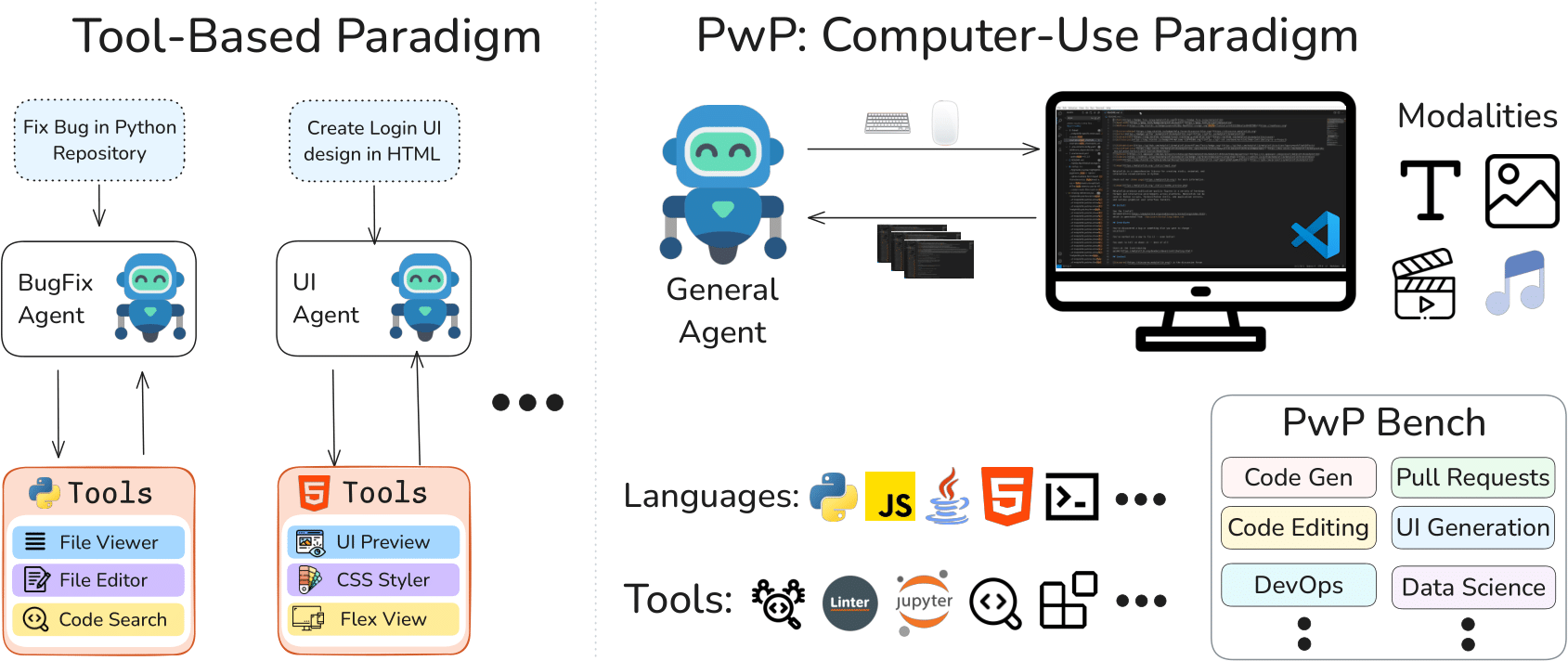


Overview
Programming with Pixels (PwP) is a modern framework for evaluating and developing Software Engineering (SWE) agents that interact with computers as humans do - through visual perception and basic actions like typing and clicking.
Our motivating hypothesis is that achieving general-purpose Software Engineering (SWE) agents requires a shift to computer-use agents that can interact with any IDE interface through screenshots and primitive actions, rather than through specialized tool APIs.
Installation
Prerequisites
- Python 3.6+
- Docker
- (Optional) NVIDIA GPU with CUDA support
Using pip (Recommended)
pip install programming-with-pixels
Development Installation
git clone https://github.com/ProgrammingWithPixels/pwp.git
cd pwp
pip install -e .
Quick Start
from pwp import PwP
from pwp import PwPBench

# Create a basic environment
env = PwP(image_name='pwp_env')

# Take a screenshot
observation = env.render()
observation.save('screenshot.png')

# Execute a command
result = env.step("echo 'Hello, World!'")
print(result['output'])

# Try a benchmark task
bench = PwPBench('humaneval')
dataset = bench.get_dataset()
task_env = bench.get_env(dataset[0])
Command Line Interface
For quicker testing, PwP also comes with a convenient command-line interface:
# Start an environment
pwp env --vnc

# List available benchmark tasks
pwp list

# Run a benchmark
pwp bench humaneval
Examples
Check out the examples directory for demonstration scripts:
- Quickstart: Complete walkthrough of PwP's capabilities, including environment interaction, benchmarks, and advanced features
- Basic Demo: Simple environment setup and interaction showcase
- Demo2: Additional demonstration of PwP features
Benchmark Tasks
PwP-Bench comes with a wide range of benchmark tasks for evaluating agents:
- HumanEval: Python coding problems
- Design2Code: Converting design mockups to code
- ChartMimic: Recreating charts from visual references
- SWE-bench: Software engineering tasks
- And many more!
You will first need to setup benchmarks for evaluating agents. See the benchmark documentation for more details.
Evaluating Agents
For detailed examples, check out the agent implementations in the src/pwp/agents directory. Each agent type can be customized with different LLM backends and system prompts to optimize for various tasks.
Building Custom Environments
Build the Base Environment
# Build the base PWP environment
cd src/pwp/docker/
docker build -t pwp_env .
Custom Environment
You can create custom Docker environments by extending the base image:
FROM pwp_env

# Install additional dependencies
RUN apt-get update && apt-get install -y \
    your-package-here \
    && rm -rf /var/lib/apt/lists/*

# Add custom files
COPY your-files /home/devuser/your-files
Package Structure
The PwP package consists of several modules:
pwp.env: Core environment module for managing Docker containerspwp.bench: Benchmark module with various programming taskspwp.agents: Agent implementations for solving taskspwp.utils: Utility functions for image processing and other helperspwp.tools: Tools for agent interaction with environmentspwp.functions: Function implementations for toolspwp.prompts: Prompt templates for different agent types
See the package documentation for more details on each module.
Contributing
We welcome contributions to the PwP project! Please see our contribution guidelines for more information.
License
This project is licensed under the MIT License - see the LICENSE file for details.
Citation
If you use PwP in your research, please cite our paper:
@misc{aggarwal2025programmingpixelscomputerusemeets,
      title={Programming with Pixels: Computer-Use Meets Software Engineering},
      author={Pranjal Aggarwal and Sean Welleck},
      year={2025},
      eprint={2502.18525},
      archivePrefix={arXiv},
      primaryClass={cs.SE},
      url={https://arxiv.org/abs/2502.18525},
}
Acknowledgments
- This project builds on various open-source tools and libraries
- Thanks to all contributors who have helped shape the project
Similar repos


Languages
JavaScript
70.6%
HTML
21.0%
Python
6.4%
CSS
1.7%
README
Programming with Pixels (PwP)
Overview
Programming with Pixels (PwP) is a modern framework for evaluating and developing Software Engineering (SWE) agents that interact with computers as humans do - through visual perception and basic actions like typing and clicking.
Our motivating hypothesis is that achieving general-purpose Software Engineering (SWE) agents requires a shift to computer-use agents that can interact with any IDE interface through screenshots and primitive actions, rather than through specialized tool APIs.
Installation
Prerequisites
- Python 3.6+
- Docker
- (Optional) NVIDIA GPU with CUDA support
Using pip (Recommended)
pip install programming-with-pixels
Development Installation
git clone https://github.com/ProgrammingWithPixels/pwp.git
cd pwp
pip install -e .
Quick Start
from pwp import PwP
from pwp import PwPBench

# Create a basic environment
env = PwP(image_name='pwp_env')

# Take a screenshot
observation = env.render()
observation.save('screenshot.png')

# Execute a command
result = env.step("echo 'Hello, World!'")
print(result['output'])

# Try a benchmark task
bench = PwPBench('humaneval')
dataset = bench.get_dataset()
task_env = bench.get_env(dataset[0])
Command Line Interface
For quicker testing, PwP also comes with a convenient command-line interface:
# Start an environment
pwp env --vnc

# List available benchmark tasks
pwp list

# Run a benchmark
pwp bench humaneval
Examples
Check out the examples directory for demonstration scripts:
- Quickstart: Complete walkthrough of PwP's capabilities, including environment interaction, benchmarks, and advanced features
- Basic Demo: Simple environment setup and interaction showcase
- Demo2: Additional demonstration of PwP features
Benchmark Tasks
PwP-Bench comes with a wide range of benchmark tasks for evaluating agents:
- HumanEval: Python coding problems
- Design2Code: Converting design mockups to code
- ChartMimic: Recreating charts from visual references
- SWE-bench: Software engineering tasks
- And many more!
You will first need to setup benchmarks for evaluating agents. See the benchmark documentation for more details.
Evaluating Agents
For detailed examples, check out the agent implementations in the src/pwp/agents directory. Each agent type can be customized with different LLM backends and system prompts to optimize for various tasks.
Building Custom Environments
Build the Base Environment
# Build the base PWP environment
cd src/pwp/docker/
docker build -t pwp_env .
Custom Environment
You can create custom Docker environments by extending the base image:
FROM pwp_env

# Install additional dependencies
RUN apt-get update && apt-get install -y \
    your-package-here \
    && rm -rf /var/lib/apt/lists/*

# Add custom files
COPY your-files /home/devuser/your-files
Package Structure
The PwP package consists of several modules:
pwp.env: Core environment module for managing Docker containerspwp.bench: Benchmark module with various programming taskspwp.agents: Agent implementations for solving taskspwp.utils: Utility functions for image processing and other helperspwp.tools: Tools for agent interaction with environmentspwp.functions: Function implementations for toolspwp.prompts: Prompt templates for different agent types
See the package documentation for more details on each module.
Contributing
We welcome contributions to the PwP project! Please see our contribution guidelines for more information.
License
This project is licensed under the MIT License - see the LICENSE file for details.
Citation
If you use PwP in your research, please cite our paper:
@misc{aggarwal2025programmingpixelscomputerusemeets,
      title={Programming with Pixels: Computer-Use Meets Software Engineering},
      author={Pranjal Aggarwal and Sean Welleck},
      year={2025},
      eprint={2502.18525},
      archivePrefix={arXiv},
      primaryClass={cs.SE},
      url={https://arxiv.org/abs/2502.18525},
}
Acknowledgments
- This project builds on various open-source tools and libraries
- Thanks to all contributors who have helped shape the project
Similar repos
Languages
JavaScript
70.6%
HTML
21.0%
Python
6.4%
CSS
1.7%