Demo code for Boole-1.7B
See the code

Run Boole-1.7B, a 1-bit Qwen3-1.7B, on your own machine.
llama.cpp for CPU or CUDA, vLLM + Humming for a CUDA GPU.
🤗 Model · 💬 On-Device Chat · Blog · Quick start
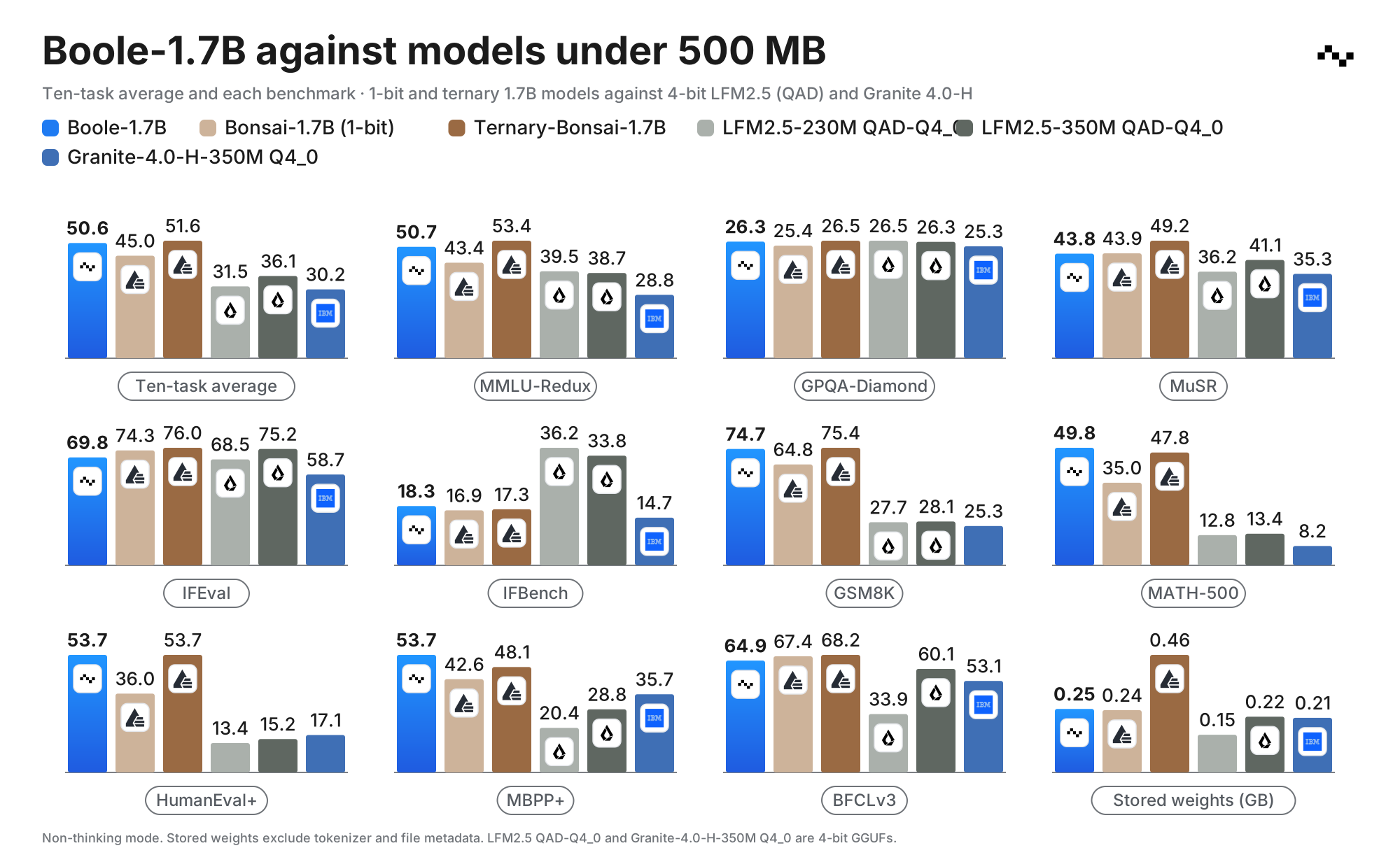
Boole-1.7B is a 1-bit language model derived from Qwen3-1.7B. Its weights take 247 MB, 13.9× less than the BF16 original, and it keeps 85.9% of the original's ten-task benchmark average. See the blog for the evaluation.
| Runtime | Model file | Hardware |
|---|---|---|
| llama.cpp | Boole-1.7B-Q1_0.gguf (292.1 MB) | CPU or CUDA GPU |
| vLLM + Humming | Boole-1.7B.safetensors (247.1 MB), exported locally | CUDA GPU, bf16, single GPU |
The GGUF is larger because it stores the embedding and output matrices separately; the safetensors file shares their sign bits and keeps separate scales.
Python 3.10 or newer is required. Run the commands from a clone of this repository:
git clone https://github.com/PrecisionNumerics/boole-demo.git
cd boole-demo

python -m venv .venv
source .venv/bin/activate
python -m pip install huggingface_hub

export MODEL_REPO=precision-numerics/Boole-1.7B
The examples use a 4,096-token context and disable thinking, which is the supported mode.
Download the GGUF, then fetch and build the pinned llama.cpp release:
hf download "$MODEL_REPO" --include '*-Q1_0.gguf' --local-dir model
bash scripts/setup_llama_cpp.sh            # CUDA build; GGML_CUDA=0 for CPU only
Start the server and open the URL it prints:
third_party/llama.cpp/build/bin/llama-server \
    -m model/*-Q1_0.gguf \
    -ngl 99 -c 4096 \
    --reasoning off
Use -ngl 0 on CPU. Try: Explain why the sky is blue in one sentence.
Install the loader, export the model, and start the server:
python -m pip install -e '.[vllm]'
boole-prep vllm "$MODEL_REPO" --out out/humming

vllm serve out/humming \
    --dtype bfloat16 --max-model-len 4096 \
    --default-chat-template-kwargs '{"enable_thinking": false}'
In another terminal, send a chat request (replace <server-url> with the server's URL):
curl -sS '<server-url>/v1/chat/completions' \
    -H 'Content-Type: application/json' \
    -d '{
      "model": "out/humming",
      "messages": [{"role": "user", "content": "Explain why the sky is blue in one sentence."}],
      "max_tokens": 128,
      "temperature": 0
    }'
The reply is in choices[0].message.content.
boole-prep downloads the packed checkpoint and writes a vLLM model directory. Installing
the package registers a vLLM plugin that loads the 1-bit embedding and output head. The model
repository includes the Qwen3-1.7B config and tokenizer files, so a downloaded model directory
can also be exported offline by passing its path instead of MODEL_REPO.
The loader targets vLLM 0.31.0 and humming-kernels 0.1.16, both pinned by the vllm extra.
| Path | Contents |
|---|---|
src/boole_demo/ | Checkpoint reader, vLLM export, vLLM plugin and the boole-prep command |
scripts/ | setup_llama_cpp.sh: fetch and build the pinned llama.cpp |
tests/ | CPU-only tests on a synthetic checkpoint (pip install -e '.[dev]', then pytest) |
assets/ | README figure and logo |
Runtime code and model weights are licensed under Apache License 2.0. See the runtime license and the model license.
Demo code for Boole-1.7B
See the code
Run Boole-1.7B, a 1-bit Qwen3-1.7B, on your own machine.
llama.cpp for CPU or CUDA, vLLM + Humming for a CUDA GPU.
🤗 Model · 💬 On-Device Chat · Blog · Quick start
Boole-1.7B is a 1-bit language model derived from Qwen3-1.7B. Its weights take 247 MB, 13.9× less than the BF16 original, and it keeps 85.9% of the original's ten-task benchmark average. See the blog for the evaluation.
| Runtime | Model file | Hardware |
|---|---|---|
| llama.cpp | Boole-1.7B-Q1_0.gguf (292.1 MB) | CPU or CUDA GPU |
| vLLM + Humming | Boole-1.7B.safetensors (247.1 MB), exported locally | CUDA GPU, bf16, single GPU |
The GGUF is larger because it stores the embedding and output matrices separately; the safetensors file shares their sign bits and keeps separate scales.
Python 3.10 or newer is required. Run the commands from a clone of this repository:
git clone https://github.com/PrecisionNumerics/boole-demo.git
cd boole-demo

python -m venv .venv
source .venv/bin/activate
python -m pip install huggingface_hub

export MODEL_REPO=precision-numerics/Boole-1.7B
The examples use a 4,096-token context and disable thinking, which is the supported mode.
Download the GGUF, then fetch and build the pinned llama.cpp release:
hf download "$MODEL_REPO" --include '*-Q1_0.gguf' --local-dir model
bash scripts/setup_llama_cpp.sh            # CUDA build; GGML_CUDA=0 for CPU only
Start the server and open the URL it prints:
third_party/llama.cpp/build/bin/llama-server \
    -m model/*-Q1_0.gguf \
    -ngl 99 -c 4096 \
    --reasoning off
Use -ngl 0 on CPU. Try: Explain why the sky is blue in one sentence.
Install the loader, export the model, and start the server:
python -m pip install -e '.[vllm]'
boole-prep vllm "$MODEL_REPO" --out out/humming

vllm serve out/humming \
    --dtype bfloat16 --max-model-len 4096 \
    --default-chat-template-kwargs '{"enable_thinking": false}'
In another terminal, send a chat request (replace <server-url> with the server's URL):
curl -sS '<server-url>/v1/chat/completions' \
    -H 'Content-Type: application/json' \
    -d '{
      "model": "out/humming",
      "messages": [{"role": "user", "content": "Explain why the sky is blue in one sentence."}],
      "max_tokens": 128,
      "temperature": 0
    }'
The reply is in choices[0].message.content.
boole-prep downloads the packed checkpoint and writes a vLLM model directory. Installing
the package registers a vLLM plugin that loads the 1-bit embedding and output head. The model
repository includes the Qwen3-1.7B config and tokenizer files, so a downloaded model directory
can also be exported offline by passing its path instead of MODEL_REPO.
The loader targets vLLM 0.31.0 and humming-kernels 0.1.16, both pinned by the vllm extra.
| Path | Contents |
|---|---|
src/boole_demo/ | Checkpoint reader, vLLM export, vLLM plugin and the boole-prep command |
scripts/ | setup_llama_cpp.sh: fetch and build the pinned llama.cpp |
tests/ | CPU-only tests on a synthetic checkpoint (pip install -e '.[dev]', then pytest) |
assets/ | README figure and logo |
Runtime code and model weights are licensed under Apache License 2.0. See the runtime license and the model license.






