
README
Pleias-RAG-Library
A library for API interaction with custom Pleias RAG models that generate high-quality, factual responses backed up by literal quotations. Currently this includes two models:
- Pleias-RAG-350M, a phone-sized SLM with 350 million parameters.
- Pleias-RAG-1B, a 1.2B parameters SLM.
Pleias-RAG-Library was developed by Mattia Nee. This repository contains detail and documentations about the library. A Colab notebook is available for easy tests and experimentations.
For more information about the models, their training and their expected performance, please refer to the model card.
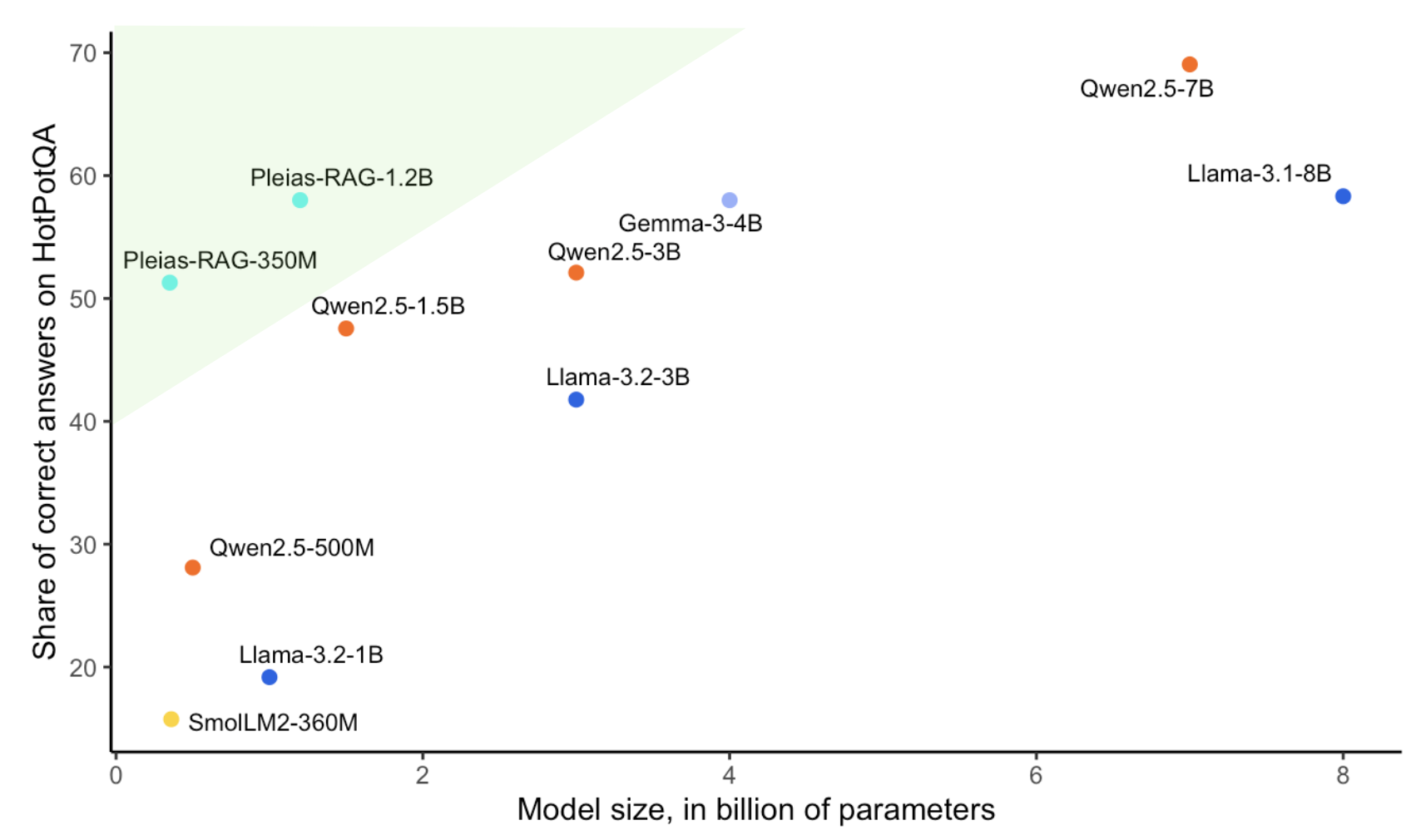
Table of Contents
- Features
- Installation
- Quick Start
- Input Format
- Output Structure
- Response Sections
- Citation System
- Model Management
- Advanced Usage
- Implementation Details
Features
- Dual Backend Support: Automatically uses vLLM for GPU acceleration or falls back to Transformers for CPU
- Structured Outputs: Generates responses with clearly organized sections (analysis, draft, final answer)
- Automated Citations: Tracks and formats citations from source documents
- Metadata Management: Preserves source document metadata
- JSON Export: Provides structured responses for seamless integration
- Model Management: Supports predefined models with automatic downloading functionality
Installation
To be completed when the library is put somewhere
Quick Start
# Initialize with your preferred model
rag = RAGWithCitations("/path_to_pleias_model")

# Or use a predefined model with automatic downloading
rag = RAGWithCitations("1b_rag", hf_token="your_huggingface_token")

# Define query and sources
query = "What is the capital of France?"
sources = [
    {
        "text": "Paris is the capital and most populous city of France.",
        "metadata": {"source": "Geographic Encyclopedia", "reliability": "high"}
    },
    {
        "text": "The Eiffel Tower is located in Paris, France.",
        "metadata": {"source": "Travel Guide", "year": 2020}
    }
]

# Generate a response
response = rag.generate(query, sources)

# Print the final answer with citations
print(response["processed"]["clean_answer"])
Input Format
Query
A string containing the user's question:
query = "What is the capital of France?"
Sources
A list of dictionaries with required text and optional metadata:
sources = [
    {
        "text": "Document content here...",
        "metadata": {  # Optional dictionary of metadata
            "source": "Wikipedia",
            "last_updated": "2023-04-15",
            "author": "John Doe"
        }
    }
]
Output Structure
The generate() method returns a dictionary with this structure:
{
    "raw_response": "Full unprocessed model output",
    "processed": {
        # Extracted sections (see Response Sections below)
        "language": "Analysis of query language",
        "query_report": "Report about the query",
        "source_analysis": "Analysis of provided sources",
        "draft": "Draft response",
        "answer": "Final answer with citation markers",
        "clean_answer": "Readable answer with formatted citations",
        "citations": [  # List of extracted citations
            {
                "citation_number": 1,
                "source_id": "1",
                "cited_text": "Text that was cited",
                "supported_text": "Context surrounding citation"
            }
        ]
    },
    "backend_used": "vllm or transformers"
}
If no sections are found in the response, the processed dictionary will contain only a full_text field with the complete unprocessed text.
Response Sections
The model response is divided into structured sections:
| Section | Description | Tags |
|---|---|---|
language | Analysis of query language | <|language_start|> to <|language_end|> |
query_report | Analysis of the query | <|query_report_start|> to <|query_report_end|> |
source_analysis | Analysis of source documents | <|source_analysis_start|> to <|source_analysis_end|> |
draft | Draft response | <|draft_start|> to <|draft_end|> |
answer | Final answer with citations | <|answer_start|> to <|answer_end|> |
Citation System
Format
Citations in the raw model output use this format:
<ref name="<|source_id|>NUMBER">cited text</ref>
Where NUMBER is the source number (1-based index).
Processing
The library:
- Extracts all citation tags from the response
- Replaces each tag with a numbered reference like
[1] - Captures surrounding context (up to 150 characters)
- Adds a formatted citations section at the end
Example Output
The capital of France is Paris[1]. It is the most populous city in France[1] and serves as the center of French economic, political, and cultural life.

**Citations**
[1] "Paris is the capital and most populous city of France." [Source 1]
Model Management
Predefined Models
The library supports using predefined models by name, which will be automatically downloaded:
# Use a predefined model with automatic downloading
rag = RAGWithCitations(
    model_path_or_name="1b_rag",  # Predefined model name
    hf_token="your_huggingface_token",  # Required for downloading
    models_dir="./custom_models_dir"  # Optional, default is "./pleias_models"
)
Currently available predefined models:
"1b_rag": Maps to"PleIAs/1b_rag_traceback"
Model Download Process
When using a predefined model name:
- The library checks if the model name is in the list of available models
- It attempts to download the model using the provided Hugging Face token
- The model is saved to the specified directory (default:
./pleias_models) - If download is successful, the local path is used; otherwise, it falls back to using the model name directly
Advanced Usage
Processing JSON Requests
request_json = {
    "query": "What is the capital of France?",
    "sources": [
        {
            "text": "Paris is the capital of France.",
            "metadata": {"source": "Encyclopedia"}
        }
    ]
}

# Process request and get structured response
response = rag.process_request(request_json)

# Convert to JSON string if needed
json_string = rag.to_json(response)
The response structure from process_request() is:
{
    "query": "Original query",
    "sources_used": [
        {
            "id": 1,
            "metadata": {...}  # Source metadata (empty dict if none provided)
        }
    ],
    "raw_response": "Full unprocessed model output",
    "processed_response": {
        # Same structure as the "processed" field from generate()
    },
    "backend_used": "vllm or transformers"
}
Customizing Generation Parameters
It is recommended to use the default parameters, as the models are optimized for them.
rag = RAGWithCitations(
    model_path="your-model-path",
    max_tokens=2048,        # Maximum tokens to generate (default: 2048)
    temperature=0.0,        # Sampling temperature (default: 0.0)
    top_p=0.95,             # Nucleus sampling parameter (default: 0.95)
    repetition_penalty=1.0, # Penalty to reduce repetition (default: 1.0)
    trust_remote_code=True, # Whether to trust remote code (default: True)
    hf_token="your_token",  # Required for downloading predefined models
    models_dir="./models"   # Custom directory for downloaded models
)
Implementation Details
Prompt Format
The library constructs a prompt with special tokens:
<|query_start|>User question here<|query_end|>
<|source_start|><|source_id|>1 Source document text here<|source_end|>
<|source_start|><|source_id|>2 Another source document text<|source_end|>
<|language_start|>
Backend Selection
The library automatically selects between:
- vLLM: Used when CUDA is available for faster processing
- Transformers: Used as a fallback when running on CPU-only systems
The backend selection is transparent to the user, but can be identified in the response via the backend_used field.
Contributors


Similar repos




Languages
Python
100.0%
README
Pleias-RAG-Library
A library for API interaction with custom Pleias RAG models that generate high-quality, factual responses backed up by literal quotations. Currently this includes two models:
- Pleias-RAG-350M, a phone-sized SLM with 350 million parameters.
- Pleias-RAG-1B, a 1.2B parameters SLM.
Pleias-RAG-Library was developed by Mattia Nee. This repository contains detail and documentations about the library. A Colab notebook is available for easy tests and experimentations.
For more information about the models, their training and their expected performance, please refer to the model card.
Table of Contents
- Features
- Installation
- Quick Start
- Input Format
- Output Structure
- Response Sections
- Citation System
- Model Management
- Advanced Usage
- Implementation Details
Features
- Dual Backend Support: Automatically uses vLLM for GPU acceleration or falls back to Transformers for CPU
- Structured Outputs: Generates responses with clearly organized sections (analysis, draft, final answer)
- Automated Citations: Tracks and formats citations from source documents
- Metadata Management: Preserves source document metadata
- JSON Export: Provides structured responses for seamless integration
- Model Management: Supports predefined models with automatic downloading functionality
Installation
To be completed when the library is put somewhere
Quick Start
# Initialize with your preferred model
rag = RAGWithCitations("/path_to_pleias_model")

# Or use a predefined model with automatic downloading
rag = RAGWithCitations("1b_rag", hf_token="your_huggingface_token")

# Define query and sources
query = "What is the capital of France?"
sources = [
    {
        "text": "Paris is the capital and most populous city of France.",
        "metadata": {"source": "Geographic Encyclopedia", "reliability": "high"}
    },
    {
        "text": "The Eiffel Tower is located in Paris, France.",
        "metadata": {"source": "Travel Guide", "year": 2020}
    }
]

# Generate a response
response = rag.generate(query, sources)

# Print the final answer with citations
print(response["processed"]["clean_answer"])
Input Format
Query
A string containing the user's question:
query = "What is the capital of France?"
Sources
A list of dictionaries with required text and optional metadata:
sources = [
    {
        "text": "Document content here...",
        "metadata": {  # Optional dictionary of metadata
            "source": "Wikipedia",
            "last_updated": "2023-04-15",
            "author": "John Doe"
        }
    }
]
Output Structure
The generate() method returns a dictionary with this structure:
{
    "raw_response": "Full unprocessed model output",
    "processed": {
        # Extracted sections (see Response Sections below)
        "language": "Analysis of query language",
        "query_report": "Report about the query",
        "source_analysis": "Analysis of provided sources",
        "draft": "Draft response",
        "answer": "Final answer with citation markers",
        "clean_answer": "Readable answer with formatted citations",
        "citations": [  # List of extracted citations
            {
                "citation_number": 1,
                "source_id": "1",
                "cited_text": "Text that was cited",
                "supported_text": "Context surrounding citation"
            }
        ]
    },
    "backend_used": "vllm or transformers"
}
If no sections are found in the response, the processed dictionary will contain only a full_text field with the complete unprocessed text.
Response Sections
The model response is divided into structured sections:
| Section | Description | Tags |
|---|---|---|
language | Analysis of query language | <|language_start|> to <|language_end|> |
query_report | Analysis of the query | <|query_report_start|> to <|query_report_end|> |
source_analysis | Analysis of source documents | <|source_analysis_start|> to <|source_analysis_end|> |
draft | Draft response | <|draft_start|> to <|draft_end|> |
answer | Final answer with citations | <|answer_start|> to <|answer_end|> |
Citation System
Format
Citations in the raw model output use this format:
<ref name="<|source_id|>NUMBER">cited text</ref>
Where NUMBER is the source number (1-based index).
Processing
The library:
- Extracts all citation tags from the response
- Replaces each tag with a numbered reference like
[1] - Captures surrounding context (up to 150 characters)
- Adds a formatted citations section at the end
Example Output
The capital of France is Paris[1]. It is the most populous city in France[1] and serves as the center of French economic, political, and cultural life.

**Citations**
[1] "Paris is the capital and most populous city of France." [Source 1]
Model Management
Predefined Models
The library supports using predefined models by name, which will be automatically downloaded:
# Use a predefined model with automatic downloading
rag = RAGWithCitations(
    model_path_or_name="1b_rag",  # Predefined model name
    hf_token="your_huggingface_token",  # Required for downloading
    models_dir="./custom_models_dir"  # Optional, default is "./pleias_models"
)
Currently available predefined models:
"1b_rag": Maps to"PleIAs/1b_rag_traceback"
Model Download Process
When using a predefined model name:
- The library checks if the model name is in the list of available models
- It attempts to download the model using the provided Hugging Face token
- The model is saved to the specified directory (default:
./pleias_models) - If download is successful, the local path is used; otherwise, it falls back to using the model name directly
Advanced Usage
Processing JSON Requests
request_json = {
    "query": "What is the capital of France?",
    "sources": [
        {
            "text": "Paris is the capital of France.",
            "metadata": {"source": "Encyclopedia"}
        }
    ]
}

# Process request and get structured response
response = rag.process_request(request_json)

# Convert to JSON string if needed
json_string = rag.to_json(response)
The response structure from process_request() is:
{
    "query": "Original query",
    "sources_used": [
        {
            "id": 1,
            "metadata": {...}  # Source metadata (empty dict if none provided)
        }
    ],
    "raw_response": "Full unprocessed model output",
    "processed_response": {
        # Same structure as the "processed" field from generate()
    },
    "backend_used": "vllm or transformers"
}
Customizing Generation Parameters
It is recommended to use the default parameters, as the models are optimized for them.
rag = RAGWithCitations(
    model_path="your-model-path",
    max_tokens=2048,        # Maximum tokens to generate (default: 2048)
    temperature=0.0,        # Sampling temperature (default: 0.0)
    top_p=0.95,             # Nucleus sampling parameter (default: 0.95)
    repetition_penalty=1.0, # Penalty to reduce repetition (default: 1.0)
    trust_remote_code=True, # Whether to trust remote code (default: True)
    hf_token="your_token",  # Required for downloading predefined models
    models_dir="./models"   # Custom directory for downloaded models
)
Implementation Details
Prompt Format
The library constructs a prompt with special tokens:
<|query_start|>User question here<|query_end|>
<|source_start|><|source_id|>1 Source document text here<|source_end|>
<|source_start|><|source_id|>2 Another source document text<|source_end|>
<|language_start|>
Backend Selection
The library automatically selects between:
- vLLM: Used when CUDA is available for faster processing
- Transformers: Used as a fallback when running on CPU-only systems
The backend selection is transparent to the user, but can be identified in the response via the backend_used field.
Similar repos
Contributors
Languages
Python
100.0%