speech to text benchmark framework
See the codeMade in Vancouver, Canada by Picovoice
This repo is a minimalist and extensible framework for benchmarking different speech-to-text engines.
Word error rate (WER) is the ratio of edit distance between words in a reference transcript and the words in the output of the speech-to-text engine to the number of words in the reference transcript.
Character error rate (CER) is the ratio of edit distance between characters in a reference transcript and the characters in the output of the speech-to-text engine to the number of characters in the reference transcript. CER is reported for Korean and Japanese following industry standards.
Punctuation Error Rate (PER) is the ratio of punctuation-specific errors between a reference transcript and the output of a speech-to-text engine to the number of punctuation-related operations in the reference transcript (more details in Section 3 of Meister et al.). We report PER results for periods (.) and question marks (?).
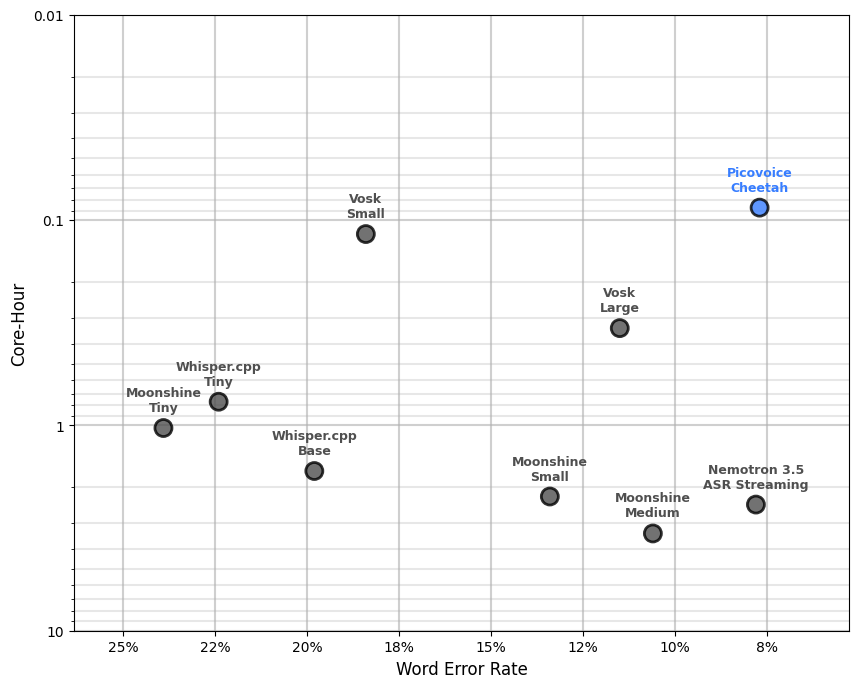
The Core-Hour metric is used to evaluate the computational efficiency of the speech-to-text engine, indicating the number of CPU hours required to process one hundred hours of audio. A speech-to-text engine with lower Core-Hour is more computationally efficient. We omit this metric for cloud-based engines.
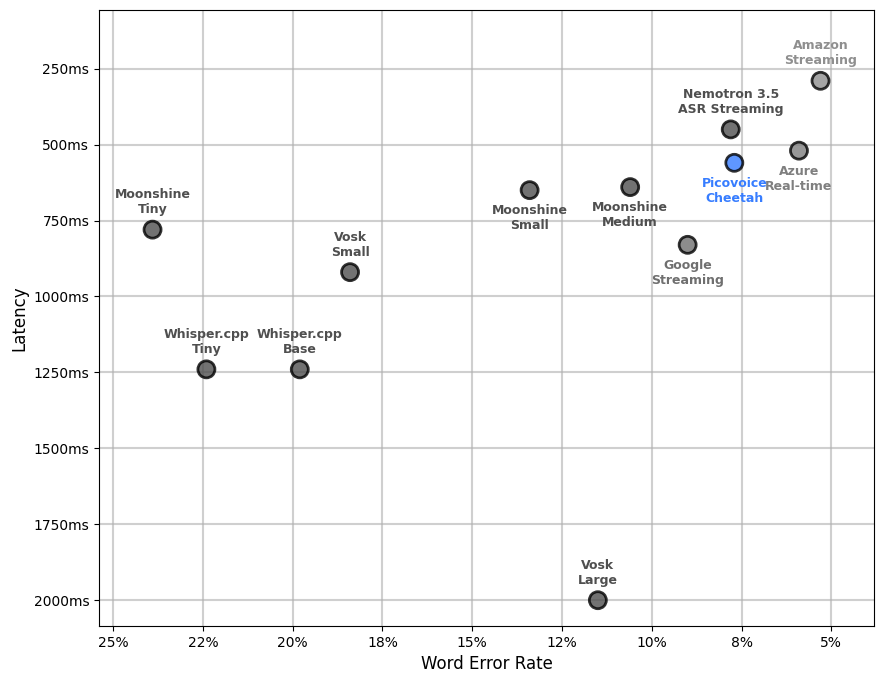
Word emission latency is used to evaluate the responsiveness of streaming speech-to-text engines. It measures the average delay from the point a word has finished being spoken to when its transcription is emitted by the engine. We measure this metric only for streaming engines.
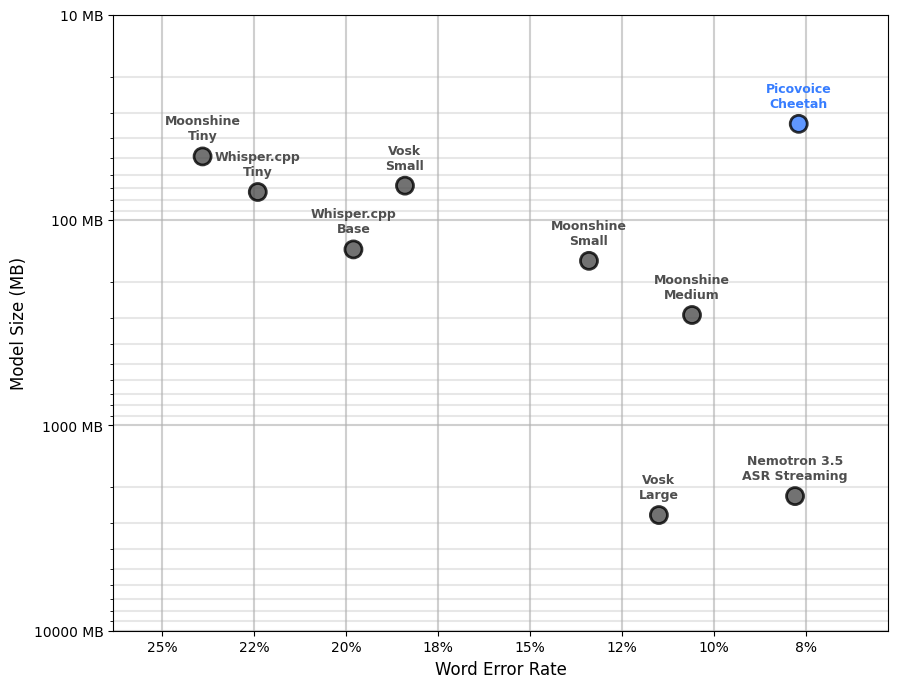
The aggregate size of models (acoustic and language), in MB. We omit this metric for cloud-based engines.
This benchmark has been developed and tested on Ubuntu 22.04 with Python 3.12.
pip3 install -r requirements.txt
In the following, we provide instructions for running the benchmark for each engine.
The supported datasets are:
COMMON_VOICE, LIBRI_SPEECH_TEST_CLEAN, LIBRI_SPEECH_TEST_OTHER, TED_LIUM, MLS, VOX_POPULI, FLEURS,
ZEROTH_KOREAN, PANSORI and JSUT_BASIC.
The supported languages are:
EN, FR, DE, ES, IT, PT-BR, PT-PT, KO and JA.
To evaluate Punctuation Error Rate, use the --punctuation flag.
Use --punctuation-set ${PUNCTUATION_SET} to select which punctuation marks to calculate PER against, where ${PUNCTUATION_SET} is one or more of ., ? and , (default .?).
Replace ${DATASET} with one of the supported datasets, ${DATASET_FOLDER} with the path to the dataset, ${LANGUAGE} with the target language,
${AWS_LOCATION} with the name of the AWS server and ${AWS_PROFILE} with the name of the AWS profile you wish to use.
python3 benchmark.py \
--dataset ${DATASET} \
--dataset-folder ${DATASET_FOLDER} \
--language ${LANGUAGE} \
--engine AMAZON_TRANSCRIBE \
--aws-profile ${AWS_PROFILE} \
--aws-location ${AWS_LOCATION}
Set --engine to AMAZON_TRANSCRIBE_STREAMING to use Amazon Transcribe in streaming mode.
Replace ${DATASET} with one of the supported datasets, ${DATASET_FOLDER} with the path to the dataset, ${LANGUAGE} with the target language,
${AZURE_SPEECH_KEY} and ${AZURE_SPEECH_LOCATION} information from your Azure account.
python3 benchmark.py \
--dataset ${DATASET} \
--dataset-folder ${DATASET_FOLDER} \
--language ${LANGUAGE} \
--engine AZURE_SPEECH_TO_TEXT \
--azure-speech-key ${AZURE_SPEECH_KEY} \
--azure-speech-location ${AZURE_SPEECH_LOCATION}
Set --engine to AZURE_SPEECH_TO_TEXT_REAL_TIME to use Azure Speech-to-text in streaming mode.
Replace ${DATASET} with one of the supported datasets, ${DATASET_FOLDER} with the path to the dataset, ${LANGUAGE} with the target language
and ${GOOGLE_APPLICATION_CREDENTIALS} with credentials download from Google Cloud Platform.
python3 benchmark.py \
--dataset ${DATASET} \
--dataset-folder ${DATASET_FOLDER} \
--language ${LANGUAGE} \
--engine GOOGLE_SPEECH_TO_TEXT \
--google-application-credentials ${GOOGLE_APPLICATION_CREDENTIALS}
Set --engine to GOOGLE_SPEECH_TO_TEXT_STREAMING to use Google Speech-to-text in streaming mode.
Replace ${DATASET} with one of the supported datasets, ${DATASET_FOLDER} with the path to the dataset
and ${WATSON_SPEECH_TO_TEXT_API_KEY}/${${WATSON_SPEECH_TO_TEXT_URL}} with credentials from your IBM account.
This engine only supports English.
python3 benchmark.py \
--dataset ${DATASET} \
--dataset-folder ${DATASET_FOLDER} \
--language EN \
--engine IBM_WATSON_SPEECH_TO_TEXT \
--watson-speech-to-text-api-key ${WATSON_SPEECH_TO_TEXT_API_KEY} \
--watson-speech-to-text-url ${WATSON_SPEECH_TO_TEXT_URL}
Replace ${DATASET} with one of the supported datasets, ${DATASET_FOLDER} with the path to the dataset, ${LANGUAGE} with the target language
and ${WHISPER_MODEL} with the whisper model type (WHISPER_TINY, WHISPER_BASE, WHISPER_SMALL,
WHISPER_MEDIUM, WHISPER_LARGE, WHISPER_LARGE_V2, WHISPER_LARGE_V3 or WHISPER_LARGE_TURBO)
python3 benchmark.py \
--engine ${WHISPER_MODEL} \
--dataset ${DATASET} \
--language ${LANGUAGE} \
--dataset-folder ${DATASET_FOLDER} \
Replace ${DATASET} with one of the supported datasets, ${DATASET_FOLDER} with the path to the dataset, ${LANGUAGE} with the target language,
and ${WHISPER_CPP_MODEL} with the Whisper.cpp streaming model type (WHISPER_CPP_STREAMING_TINY, WHISPER_CPP_STREAMING_BASE, WHISPER_CPP_STREAMING_SMALL,
WHISPER_CPP_STREAMING_MEDIUM, WHISPER_CPP_STREAMING_LARGE_V3 or WHISPER_CPP_STREAMING_LARGE_TURBO).
python3 benchmark.py \
--engine ${WHISPER_CPP_MODEL} \
--dataset ${DATASET} \
--dataset-folder ${DATASET_FOLDER} \
--language ${LANGUAGE} \
Replace ${DATASET} with one of the supported datasets, ${DATASET_FOLDER} with the path to the dataset
and ${MOONSHINE_MODEL} with the Moonshine streaming model type (MOONSHINE_STREAMING_TINY, MOONSHINE_STREAMING_SMALL or MOONSHINE_STREAMING_MEDIUM).
This engine only supports English.
python3 benchmark.py \
--engine ${MOONSHINE_MODEL} \
--dataset ${DATASET} \
--dataset-folder ${DATASET_FOLDER} \
--language EN \
Replace ${DATASET} with one of the supported datasets, ${DATASET_FOLDER} with the path to the dataset
and ${VOSK_MODEL} with the Vosk streaming model type (VOSK_STREAMING_SMALL or VOSK_STREAMING_LARGE).
This engine only supports English.
python3 benchmark.py \
--engine ${VOSK_MODEL} \
--dataset ${DATASET} \
--dataset-folder ${DATASET_FOLDER} \
--language EN
Replace ${DATASET} with one of the supported datasets, ${DATASET_FOLDER} with the path to the dataset, ${LANGUAGE} with the target language,
and ${CHUNK_SIZE_MS} with a supported chunk size: 80, 160, 320, 560 or 1120 (default 560).
python3 benchmark.py \
--engine NEMOTRON_3_5_ASR_STREAMING \
--dataset ${DATASET} \
--dataset-folder ${DATASET_FOLDER} \
--language ${LANGUAGE} \
--streaming-chunk-size-ms ${CHUNK_SIZE_MS}
Replace ${DATASET} with one of the supported datasets, ${DATASET_FOLDER} with the path to the dataset, ${LANGUAGE} with the target language,
and ${PICOVOICE_ACCESS_KEY} with AccessKey obtained from Picovoice Console.
By default, the Cheetah English model is used.
For non-English languages models replace ${PICOVOICE_MODEL_PATH} with the path to a model file acquired from the Cheetah Github Repo.
python3 benchmark.py \
--engine PICOVOICE_CHEETAH \
--dataset ${DATASET} \
--dataset-folder ${DATASET_FOLDER} \
--language ${LANGUAGE} \
--picovoice-access-key ${PICOVOICE_ACCESS_KEY} \
--picovoice-model-path ${PICOVOICE_MODEL_PATH}
Replace ${DATASET} with one of the supported datasets, ${DATASET_FOLDER} with the path to the dataset, ${LANGUAGE} with the target language,
and ${PICOVOICE_ACCESS_KEY} with AccessKey obtained from Picovoice Console.
If benchmarking a non-English language, include --picovoice-model-path and replace ${PICOVOICE_MODEL_PATH} with the path to a model file acquired from the Leopard Github Repo.
python3 benchmark.py \
--engine PICOVOICE_LEOPARD \
--dataset ${DATASET} \
--dataset-folder ${DATASET_FOLDER} \
--language ${LANGUAGE} \
--picovoice-access-key ${PICOVOICE_ACCESS_KEY} \
--picovoice-model-path ${PICOVOICE_MODEL_PATH}
In the following, we provide instructions for running the latency benchmark for each streaming engine.
To run the benchmark, generate word timing alignment information for one of the supported datasets by following the instructions found here.
Replace ${DATASET_PATH} with the path to the outputted folder from this process in the following commands.
Replace ${DATASET_FOLDER} with the path to an aligned dataset, ${LANGUAGE} with the target language,
${AWS_LOCATION} with the name of the AWS server and ${AWS_PROFILE} with the name of the AWS profile you wish to use.
python3 benchmark_latency.py \
--engine AMAZON_TRANSCRIBE_STREAMING \
--dataset-folder ${DATASET_FOLDER} \
--language ${LANGUAGE} \
--aws-profile ${AWS_PROFILE} \
--aws-location ${AWS_LOCATION}
Replace ${DATASET_FOLDER} with the path to an aligned dataset, ${LANGUAGE} with the target language,
${AZURE_SPEECH_KEY} and ${AZURE_SPEECH_LOCATION} information from your Azure account.
python3 benchmark_latency.py \
--engine AZURE_SPEECH_TO_TEXT_REAL_TIME \
--dataset-folder ${DATASET_FOLDER} \
--language ${LANGUAGE} \
--azure-speech-key ${AZURE_SPEECH_KEY} \
--azure-speech-location ${AZURE_SPEECH_LOCATION}
Replace ${DATASET_FOLDER} with the path to an aligned dataset, ${LANGUAGE} with the target language,
and ${GOOGLE_APPLICATION_CREDENTIALS} with credentials download from Google Cloud Platform.
python3 benchmark_latency.py \
--engine GOOGLE_SPEECH_TO_TEXT_STREAMING \
--dataset-folder ${DATASET_FOLDER} \
--language ${LANGUAGE} \
--google-application-credentials ${GOOGLE_APPLICATION_CREDENTIALS}
Replace ${DATASET_FOLDER} with the path to an aligned dataset, ${LANGUAGE} with the target language,
and ${WHISPER_CPP_MODEL} with the Whisper.cpp streaming model type (WHISPER_CPP_STREAMING_TINY, WHISPER_CPP_STREAMING_BASE, WHISPER_CPP_STREAMING_SMALL,
WHISPER_CPP_STREAMING_MEDIUM, WHISPER_CPP_STREAMING_LARGE_V3 or WHISPER_CPP_STREAMING_LARGE_TURBO).
python3 benchmark_latency.py \
--engine ${WHISPER_CPP_MODEL} \
--dataset-folder ${DATASET_FOLDER} \
--language ${LANGUAGE}
Replace ${DATASET_FOLDER} with the path to an aligned dataset and ${MOONSHINE_MODEL} with the Moonshine streaming model type (MOONSHINE_STREAMING_TINY, MOONSHINE_STREAMING_SMALL or MOONSHINE_STREAMING_MEDIUM).
This engine only supports English.
python3 benchmark_latency.py \
--engine ${MOONSHINE_MODEL} \
--dataset-folder ${DATASET_FOLDER} \
--language EN
Replace ${DATASET_FOLDER} with the path to an aligned dataset
and ${VOSK_MODEL} with the Vosk streaming model type (VOSK_STREAMING_SMALL or VOSK_STREAMING_LARGE).
python3 benchmark_latency.py \
--engine ${VOSK_MODEL} \
--dataset-folder ${DATASET_FOLDER} \
--language ${LANGUAGE}
Replace ${DATASET_FOLDER} with the path to an aligned dataset, ${LANGUAGE} with the target language,
and ${CHUNK_SIZE_MS} with a supported chunk size: 80, 160, 320, 560 or 1120 (default 560).
python3 benchmark_latency.py \
--engine NEMOTRON_3_5_ASR_STREAMING \
--dataset-folder ${DATASET_FOLDER} \
--language ${LANGUAGE} \
--chunk-size-ms ${CHUNK_SIZE_MS}
Replace ${DATASET_FOLDER} with the path to an aligned dataset, ${LANGUAGE} with the target language,
and ${PICOVOICE_ACCESS_KEY} with an AccessKey obtained from Picovoice Console.
By default, the Cheetah English model is used.
For non-English languages models replace ${PICOVOICE_MODEL_PATH} with the path to a model file obtained from the Cheetah Github Repo.
python3 benchmark_latency.py \
--engine PICOVOICE_CHEETAH \
--dataset-folder ${DATASET_FOLDER} \
--language ${LANGUAGE} \
--picovoice-access-key ${PICOVOICE_ACCESS_KEY} \
--picovoice-model-path ${PICOVOICE_MODEL_PATH}
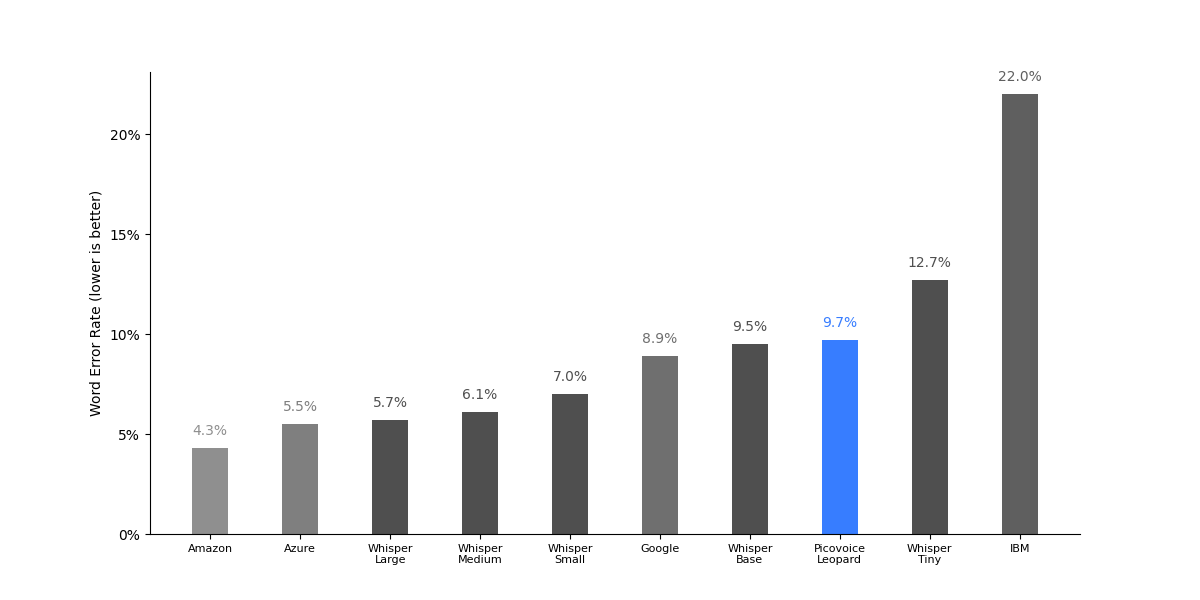
| Engine | LibriSpeech test-clean | LibriSpeech test-other | TED-LIUM | CommonVoice | Average |
|---|---|---|---|---|---|
| Amazon Transcribe | 2.3% | 4.6% | 4.0% | 6.4% | 4.3% |
| Azure Speech-to-Text | 2.9% | 6.0% | 4.6% | 8.4% | 5.5% |
| Google Speech-to-Text | 5.3% | 10.5% | 5.5% | 14.3% | 8.9% |
| IBM Watson Speech-to-Text | 10.9% | 26.2% | 11.7% | 39.4% | 22.0% |
| Whisper Large V3 | 3.7% | 5.4% | 4.6% | 9.0% | 5.7% |
| Whisper Medium | 3.3% | 6.2% | 4.6% | 10.2% | 6.1% |
| Whisper Small | 3.3% | 7.2% | 4.8% | 12.7% | 7.0% |
| Whisper Base | 4.3% | 10.4% | 5.4% | 17.9% | 9.5% |
| Whisper Tiny | 5.9% | 13.8% | 6.6% | 24.4% | 12.7% |
| Picovoice Leopard | 5.1% | 11.1% | 6.4% | 16.1% | 9.7% |
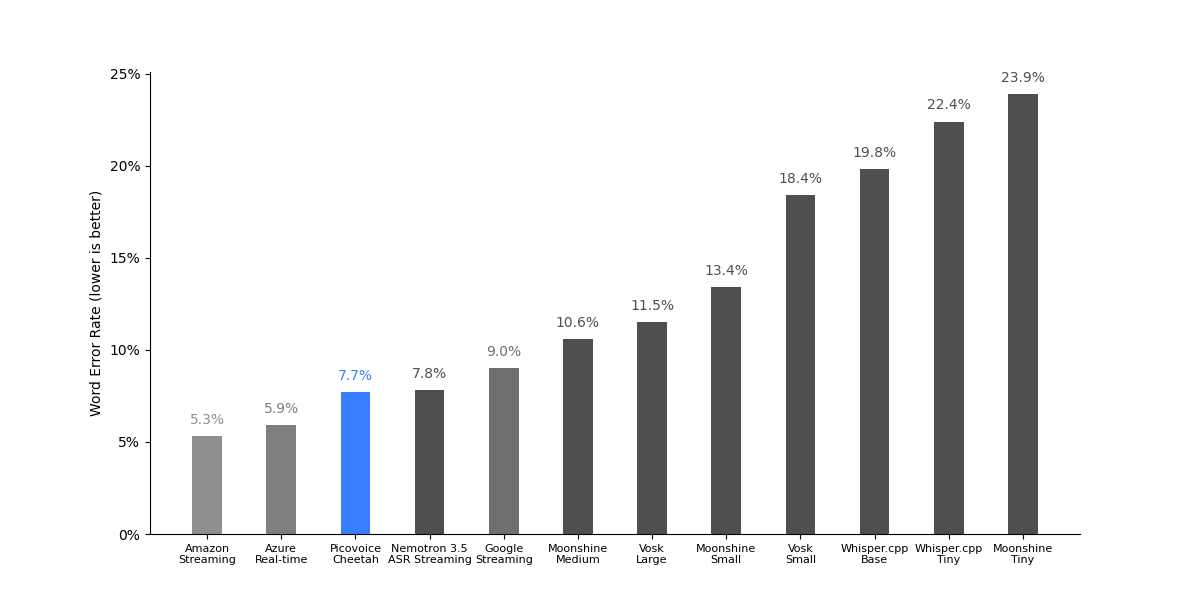
| Engine | LibriSpeech test-clean | LibriSpeech test-other | TED-LIUM | CommonVoice | Average |
|---|---|---|---|---|---|
| Amazon Transcribe Streaming | 2.5% | 5.1% | 5.2% | 8.2% | 5.3% |
| Azure Speech-to-Text Real Time | 3.4% | 6.7% | 4.5% | 9.0% | 5.9% |
| Google Speech-to-Text Streaming | 5.3% | 10.6% | 5.5% | 14.4% | 9.0% |
| Nemotron 3.5 ASR Streaming | 3.4% | 7.8% | 4.9% | 15.0% | 7.8% |
| Whisper.cpp Streaming Tiny | 12.7% | 23.3% | 16.0% | 37.5% | 22.4% |
| Whisper.cpp Streaming Base | 11.9% | 19.9% | 14.2% | 33.2% | 19.8% |
| Vosk Small | 9.9% | 21.0% | 10.7% | 32.1% | 18.4% |
| Vosk Large | 5.4% | 12.7% | 6.6% | 21.4% | 11.5% |
| Moonshine Tiny | 11.8% | 28.7% | 12.5% | 42.4% | 23.9% |
| Moonshine Small | 7.0% | 15.0% | 6.9% | 24.8% | 13.4% |
| Moonshine Medium | 5.9% | 11.4% | 6.5% | 18.7% | 10.6% |
| Picovoice Cheetah | 3.3% | 7.9% | 5.1% | 14.4% | 7.7% |
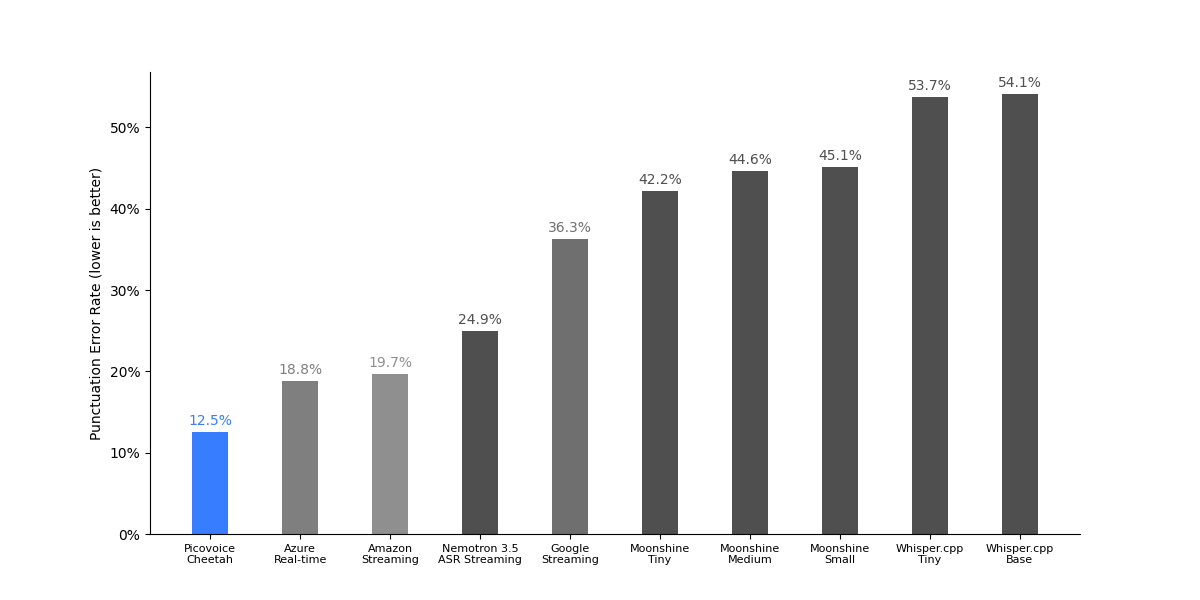
| Engine | CommonVoice | Fleurs | VoxPopuli | Average |
|---|---|---|---|---|
| Amazon Transcribe Streaming | 8.1% | 27.4% | 23.5% | 19.7% |
| Azure Speech-to-Text Real Time | 6.2% | 21.5% | 28.6% | 18.8% |
| Google Speech-to-Text Streaming | 20.5% | 45.3% | 43.0% | 36.3% |
| Nemotron 3.5 ASR Streaming | 20.5% | 26.7% | 27.6% | 24.9% |
| Whisper.cpp Streaming Tiny | 41.2% | 57.9% | 62.1% | 53.7% |
| Whisper.cpp Streaming Base | 43.2% | 56.4% | 62.8% | 54.1% |
| Moonshine Tiny | 21.0% | 46.5% | 59.1% | 42.2% |
| Moonshine Small | 30.5% | 45.3% | 59.5% | 45.1% |
| Moonshine Medium | 32.3% | 46.1% | 55.4% | 44.6% |
| Picovoice Cheetah | 4.8% | 14.8% | 17.9% | 12.5% |
To obtain these results, we ran the benchmark across the entire LibriSpeech test-clean dataset and recorded the processing time.
The measurement is carried out on an Ubuntu 22.04 machine with AMD CPU (AMD Ryzen 9 5900X (12) @ 3.70GHz),
64 GB of RAM, and NVMe storage, using 10 cores simultaneously. We omit Whisper Large from this benchmark.
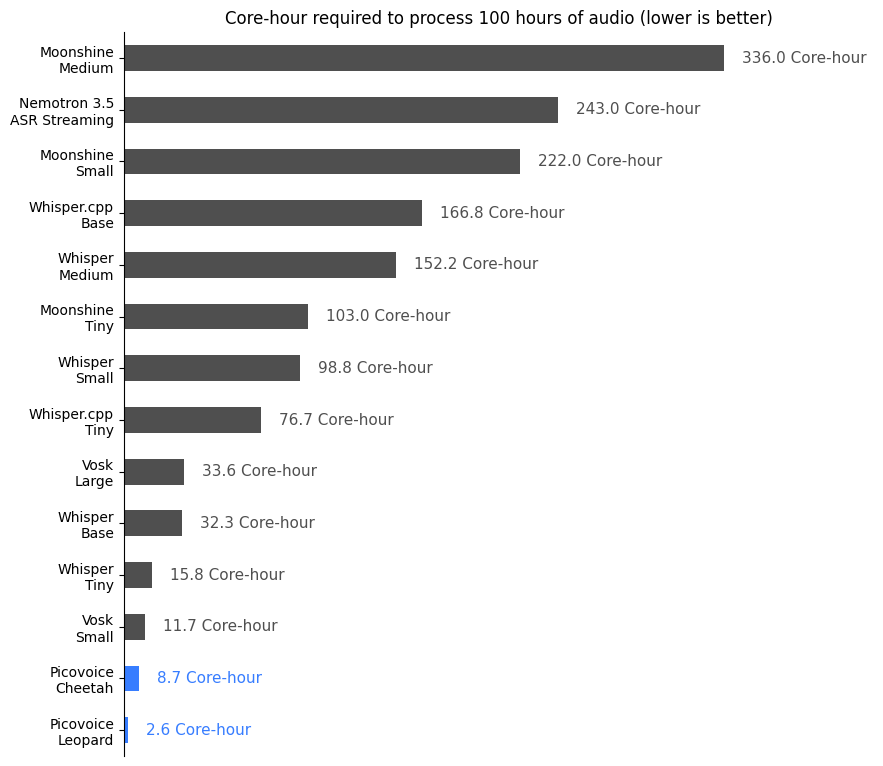
| Engine | Core-Hours | Model Size / MB |
|---|---|---|
| Whisper Medium | 152.2 | 1457 |
| Whisper Small | 98.8 | 462 |
| Whisper Base | 32.3 | 139 |
| Whisper Tiny | 15.8 | 73 |
| Whisper.cpp Streaming Base | 166.8 | 139 |
| Whisper.cpp Streaming Tiny | 76.7 | 73 |
| Vosk Large | 33.6 | 2733 |
| Vosk Small | 11.7 | 68 |
| Moonshine Streaming Tiny | 103.0 | 49 |
| Moonshine Streaming Small | 222.0 | 158 |
| Moonshine Streaming Medium | 336.0 | 290 |
| Nemotron 3.5 ASR Streaming | 243.0 | 2210 |
| Picovoice Leopard | 2.6 | 37 |
| Picovoice Cheetah | 8.7 | 34 |
To obtain these results, we used 100 randomly selected files from the LibriSpeech test-clean dataset.
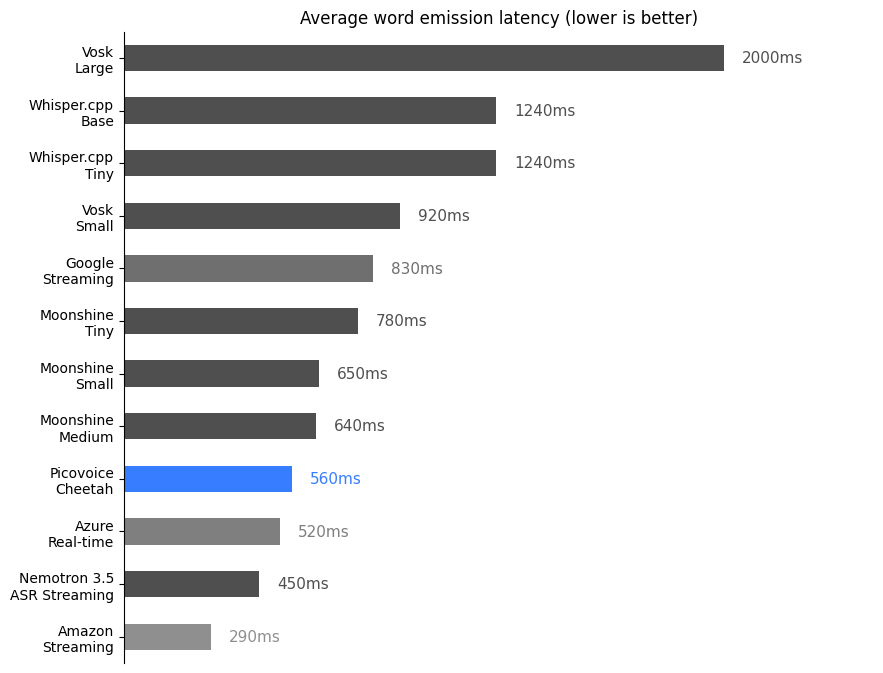
| Engine | Latency (ms) |
|---|---|
| Azure Speech-to-Text Real-time | 520 |
| Amazon Transcribe Streaming | 290 |
| Google Speech-to-Text Streaming | 830 |
| Nemotron 3.5 ASR Streaming | 450 |
| Whisper.cpp Streaming Tiny | 1240 |
| Whisper.cpp Streaming Base | 1240 |
| Vosk Small | 920 |
| Vosk Large | 2000 |
| Moonshine Tiny | 780 |
| Moonshine Small | 650 |
| Moonshine Medium | 640 |
| Picovoice Cheetah | 560 |
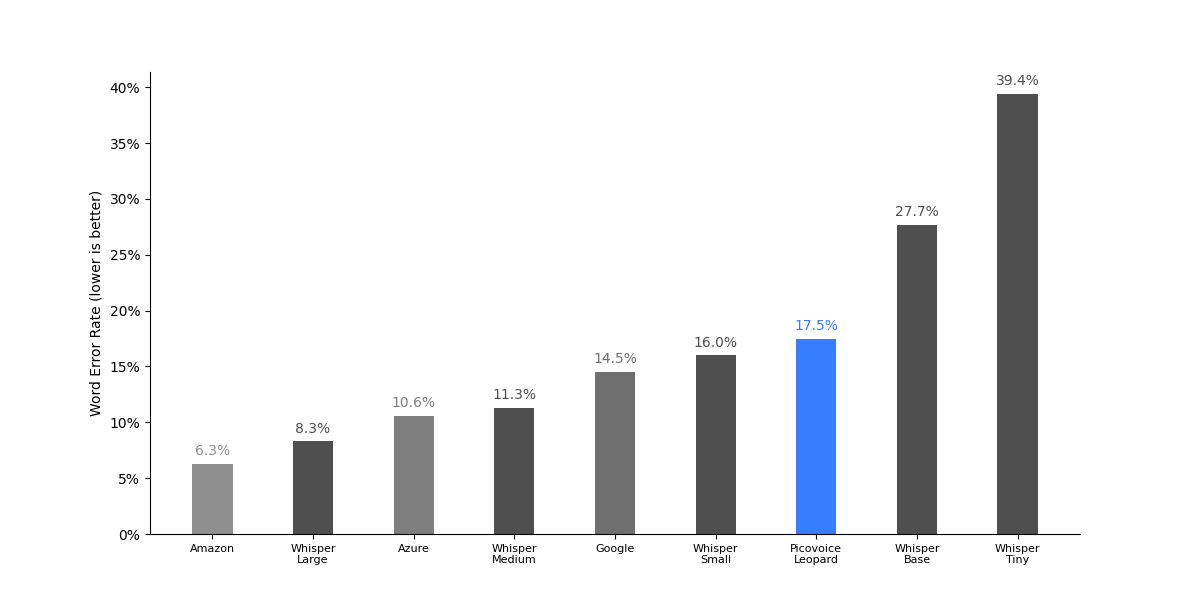
| Engine | CommonVoice | Multilingual LibriSpeech | VoxPopuli | Average |
|---|---|---|---|---|
| Amazon Transcribe | 6.0% | 4.4% | 8.6% | 6.3% |
| Azure Speech-to-Text | 11.1% | 9.0% | 11.8% | 10.6% |
| Google Speech-to-Text | 14.3% | 14.2% | 15.1% | 14.5% |
| Whisper Large | 9.3% | 4.6% | 10.9% | 8.3% |
| Whisper Medium | 13.1% | 8.6% | 12.1% | 11.3% |
| Whisper Small | 19.2% | 13.5% | 15.3% | 16.0% |
| Whisper Base | 35.4% | 24.4% | 23.3% | 27.7% |
| Whisper Tiny | 49.8% | 36.2% | 32.1% | 39.4% |
| Picovoice Leopard | 15.9% | 19.2% | 17.5% | 17.5% |
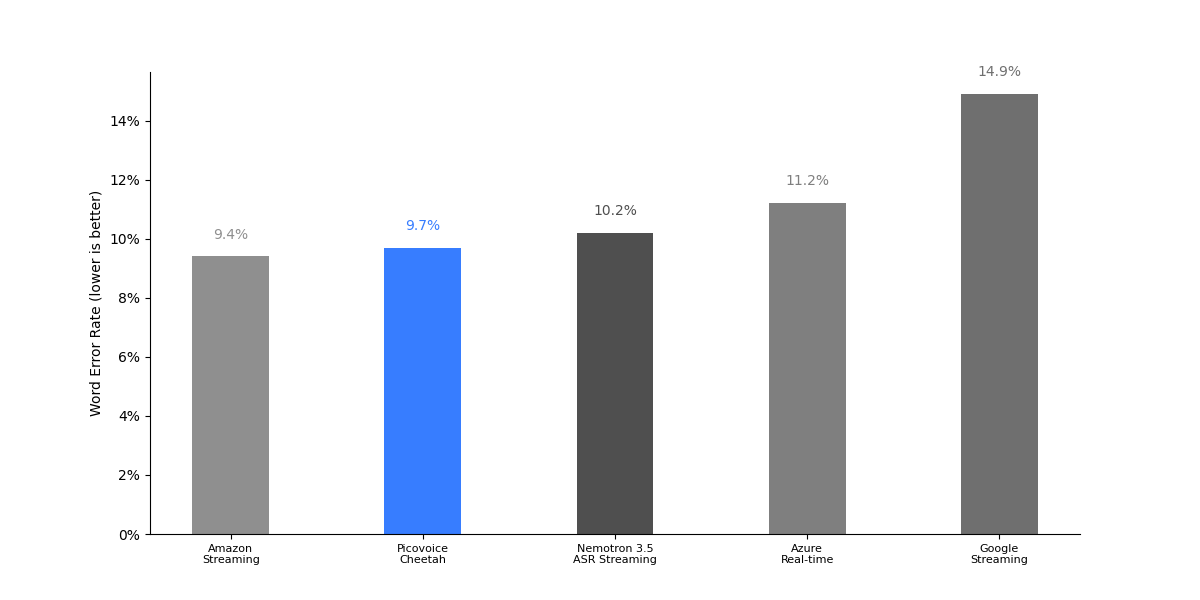
| Engine | CommonVoice | Multilingual LibriSpeech | VoxPopuli | Average |
|---|---|---|---|---|
| Amazon Transcribe Streaming | 9.7% | 7.7% | 10.7% | 9.4% |
| Azure Speech-to-Text Real Time | 11.5% | 8.9% | 13.1% | 11.2% |
| Google Speech-to-Text Streaming | 15.0% | 14.5% | 15.3% | 14.9% |
| Nemotron 3.5 ASR Streaming | 11.3% | 8.0% | 11.4% | 10.2% |
| Picovoice Cheetah | 10.6% | 7.5% | 11.1% | 9.7% |
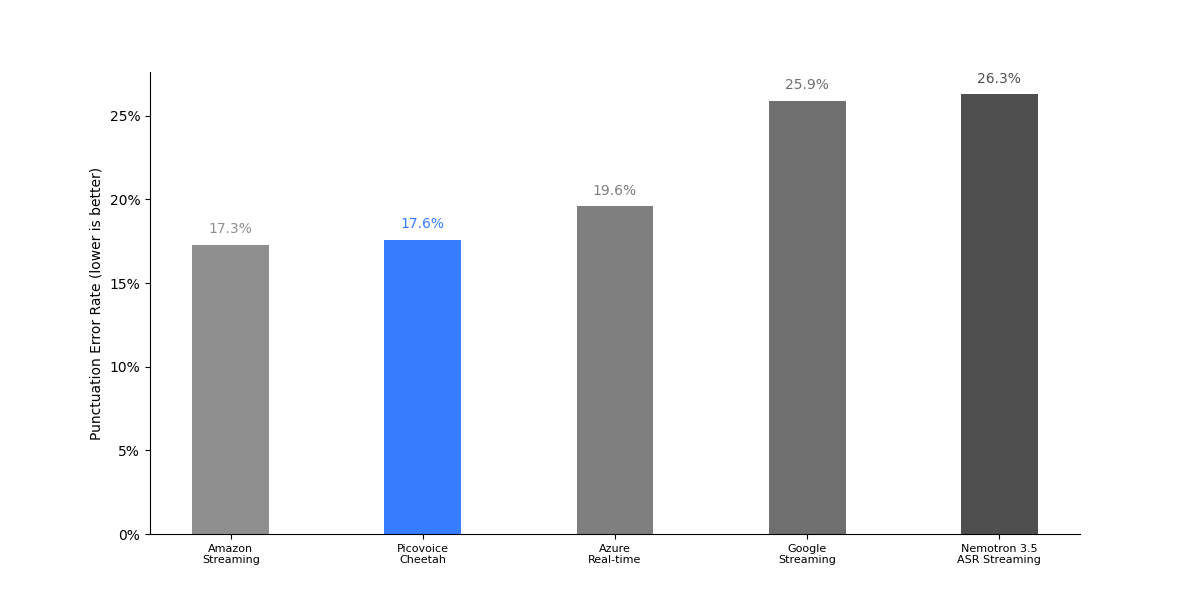
| Engine | CommonVoice | Fleurs | VoxPopuli | Average |
|---|---|---|---|---|
| Amazon Transcribe Streaming | 8.1% | 20.2% | 23.7% | 17.3% |
| Azure Speech-to-Text Real Time | 7.6% | 20.1% | 31.2% | 19.6% |
| Google Speech-to-Text Streaming | 26.5% | 22.7% | 28.4% | 25.9% |
| Nemotron 3.5 ASR Streaming | 20.2% | 30.6% | 28.2% | 26.3% |
| Picovoice Cheetah | 5.2% | 17.2% | 30.4% | 17.6% |
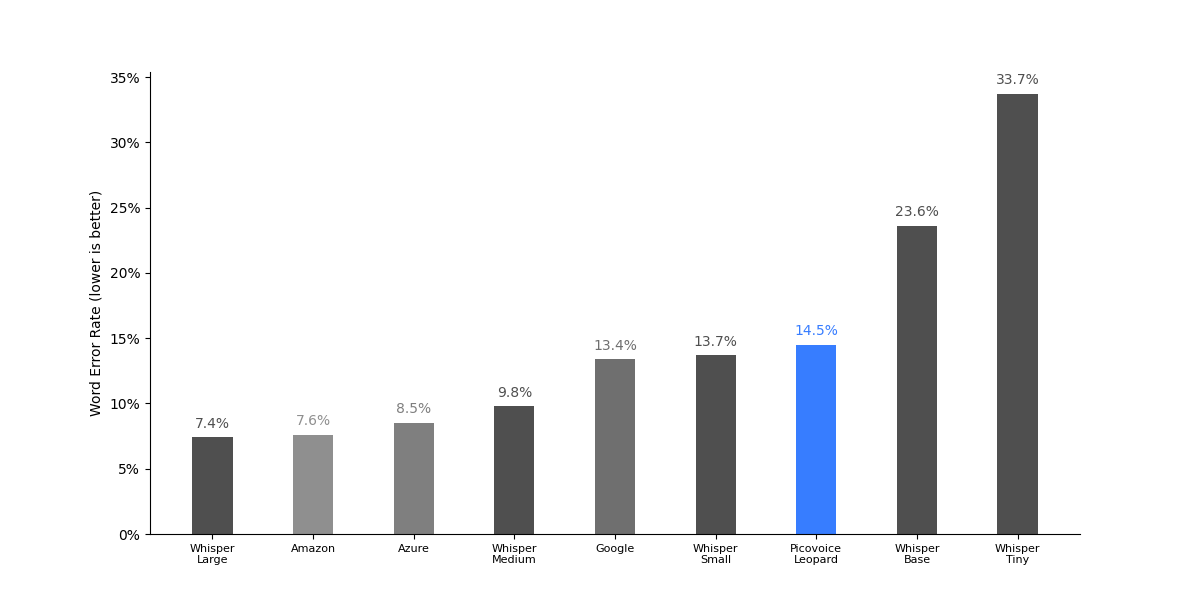
| Engine | CommonVoice | Multilingual LibriSpeech | VoxPopuli | Average |
|---|---|---|---|---|
| Amazon Transcribe | 5.3% | 2.9% | 14.6% | 7.6% |
| Azure Speech-to-Text | 6.9% | 5.4% | 13.1% | 8.5% |
| Google Speech-to-Text | 9.2% | 13.9% | 17.2% | 13.4% |
| Whisper Large | 5.3% | 4.4% | 12.5% | 7.4% |
| Whisper Medium | 8.3% | 7.6% | 13.5% | 9.8% |
| Whisper Small | 13.8% | 11.2% | 16.2% | 13.7% |
| Whisper Base | 26.9% | 19.8% | 24.0% | 23.6% |
| Whisper Tiny | 39.5% | 28.6% | 33.0% | 33.7% |
| Picovoice Leopard | 8.2% | 11.6% | 23.6% | 14.5% |
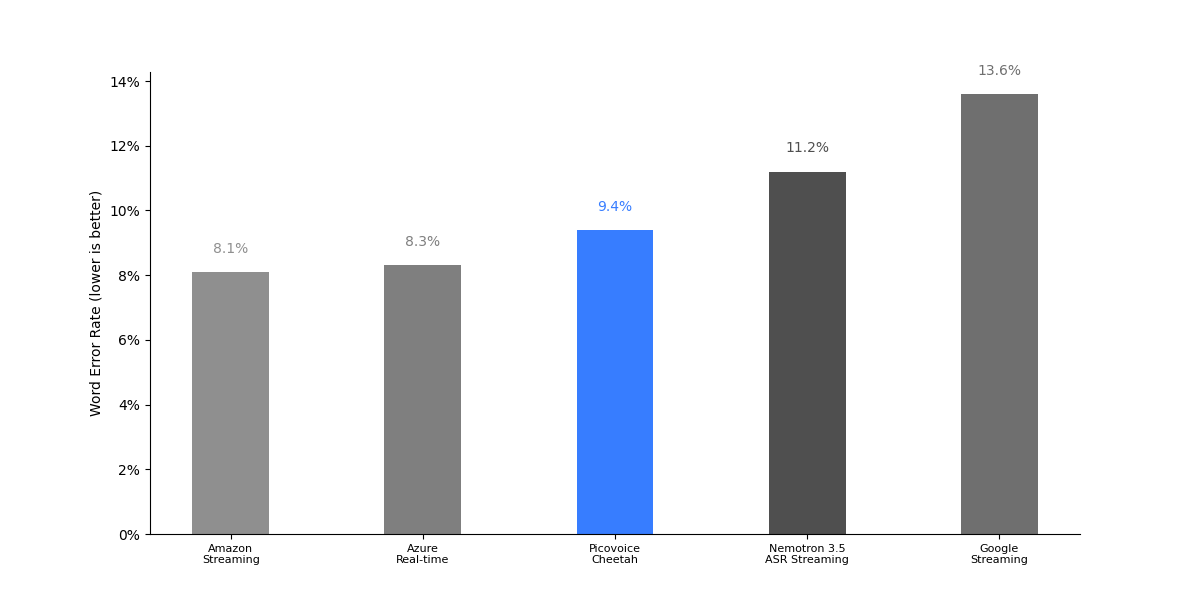
| Engine | CommonVoice | Multilingual LibriSpeech | VoxPopuli | Average |
|---|---|---|---|---|
| Amazon Transcribe Streaming | 6.1% | 6.5% | 11.6% | 8.1% |
| Azure Speech-to-Text Real Time | 6.4% | 5.1% | 13.4% | 8.3% |
| Google Speech-to-Text Streaming | 9.4% | 14.0% | 17.5% | 13.6% |
| Nemotron 3.5 ASR Streaming | 10.2% | 9.0% | 14.3% | 11.2% |
| Picovoice Cheetah | 7.3% | 7.6% | 13.3% | 9.4% |
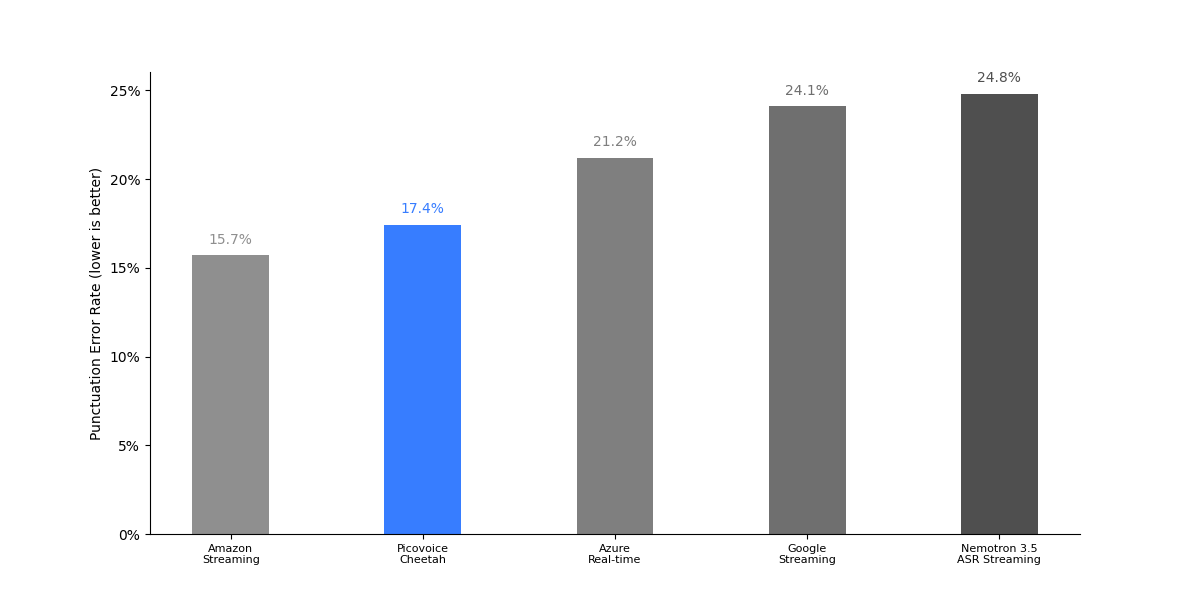
| Engine | CommonVoice | Fleurs | VoxPopuli | Average |
|---|---|---|---|---|
| Amazon Transcribe Streaming | 3.6% | 23.4% | 20.1% | 15.7% |
| Azure Speech-to-Text Real Time | 5.7% | 29.3% | 28.6% | 21.2% |
| Google Speech-to-Text Streaming | 16.4% | 27.5% | 28.5% | 24.1% |
| Nemotron 3.5 ASR Streaming | 17.2% | 26.1% | 31.0% | 24.8% |
| Picovoice Cheetah | 2.1% | 24.9% | 25.1% | 17.4% |
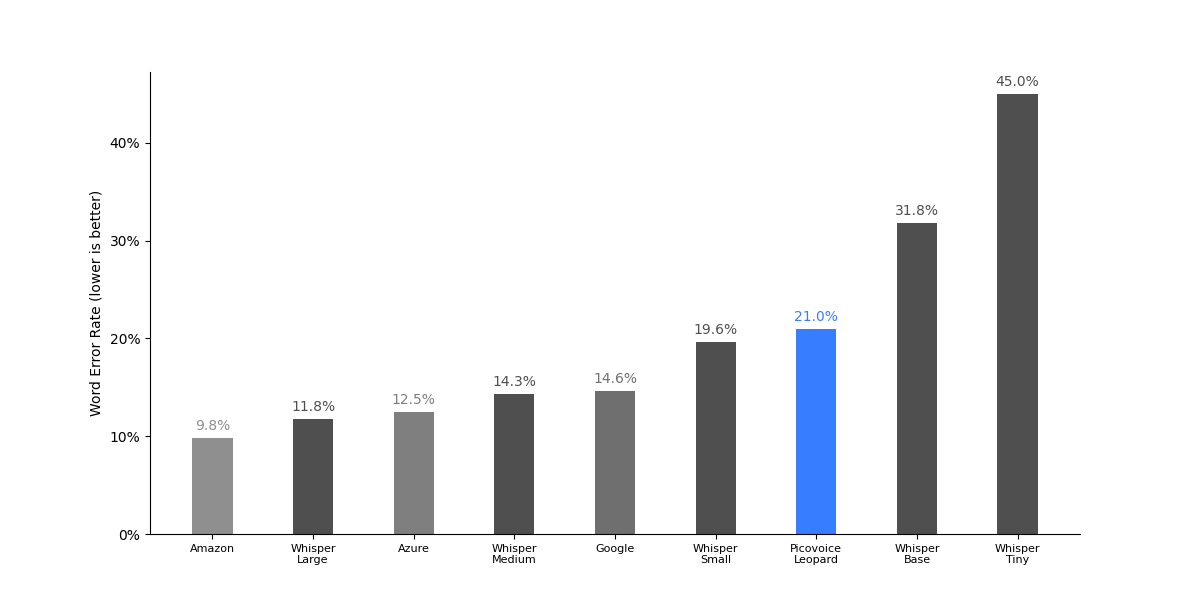
| Engine | CommonVoice | Multilingual LibriSpeech | VoxPopuli | Average |
|---|---|---|---|---|
| Amazon Transcribe | 4.1% | 9.1% | 16.1% | 9.8% |
| Azure Speech-to-Text | 5.8% | 14.0% | 17.8% | 12.5% |
| Google Speech-to-Text | 5.5% | 19.6% | 18.7% | 14.6% |
| Whisper Large | 4.9% | 8.8% | 21.8% | 11.8% |
| Whisper Medium | 8.7% | 14.9% | 19.3% | 14.3% |
| Whisper Small | 15.4% | 20.6% | 22.7% | 19.6% |
| Whisper Base | 32.3% | 31.6% | 31.6% | 31.8% |
| Whisper Tiny | 48.1% | 43.3% | 43.5% | 45.0% |
| Picovoice Leopard | 13.0% | 27.7% | 22.2% | 21.0% |
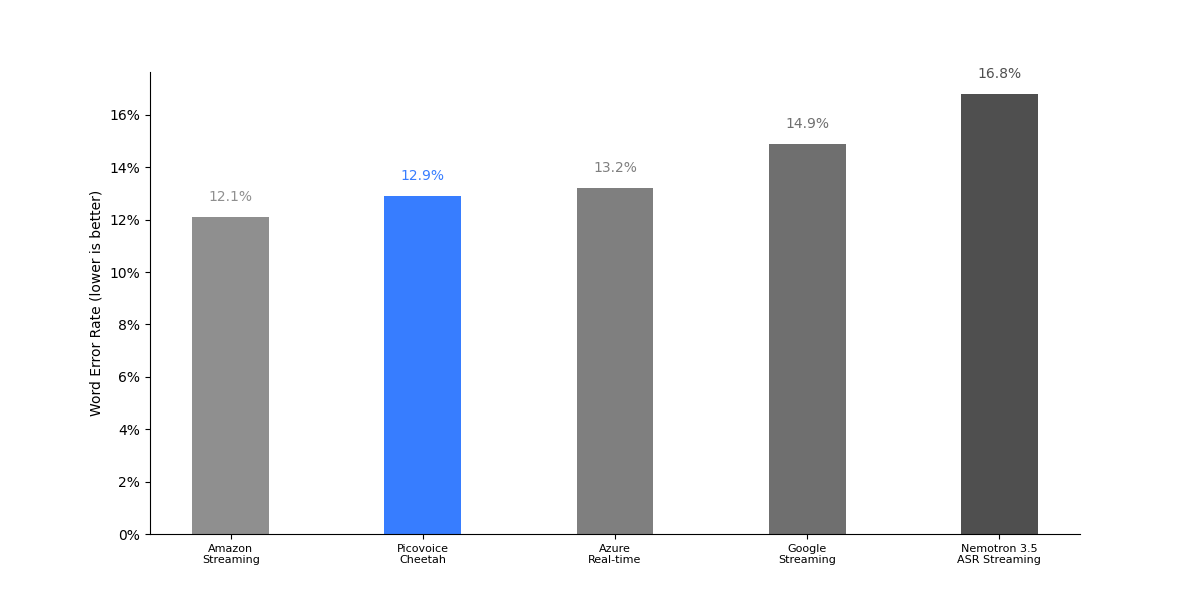
| Engine | CommonVoice | Multilingual LibriSpeech | VoxPopuli | Average |
|---|---|---|---|---|
| Amazon Transcribe Streaming | 4.9% | 10.8% | 20.7% | 12.1% |
| Azure Speech-to-Text Real Time | 5.9% | 14.2% | 19.4% | 13.2% |
| Google Speech-to-Text Streaming | 5.7% | 20.1% | 18.8% | 14.9% |
| Nemotron 3.5 ASR Streaming | 8.4% | 18.5% | 23.5% | 16.8% |
| Picovoice Cheetah | 7.7% | 13.2% | 17.7% | 12.9% |
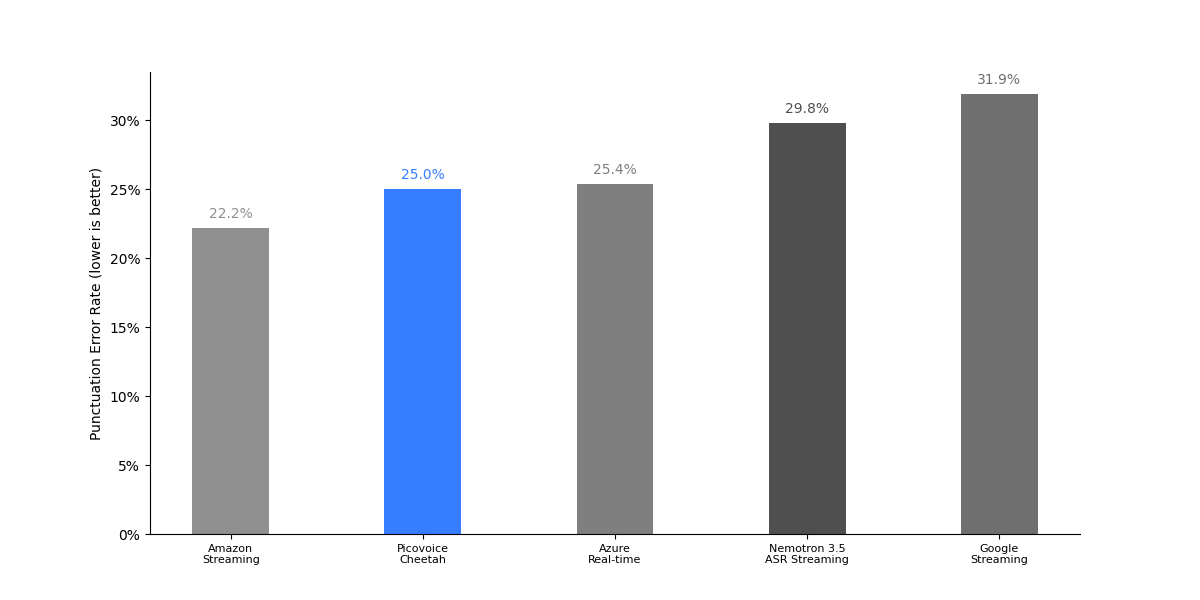
| Engine | CommonVoice | Fleurs | VoxPopuli | Average |
|---|---|---|---|---|
| Amazon Transcribe Streaming | 4.2% | 27.7% | 34.7% | 22.2% |
| Azure Speech-to-Text Real Time | 6.1% | 28.6% | 41.6% | 25.4% |
| Google Speech-to-Text Streaming | 27.3% | 23.3% | 45.0% | 31.9% |
| Nemotron 3.5 ASR Streaming | 23.9% | 23.2% | 42.3% | 29.8% |
| Picovoice Cheetah | 2.6% | 25.0% | 47.4% | 25.0% |
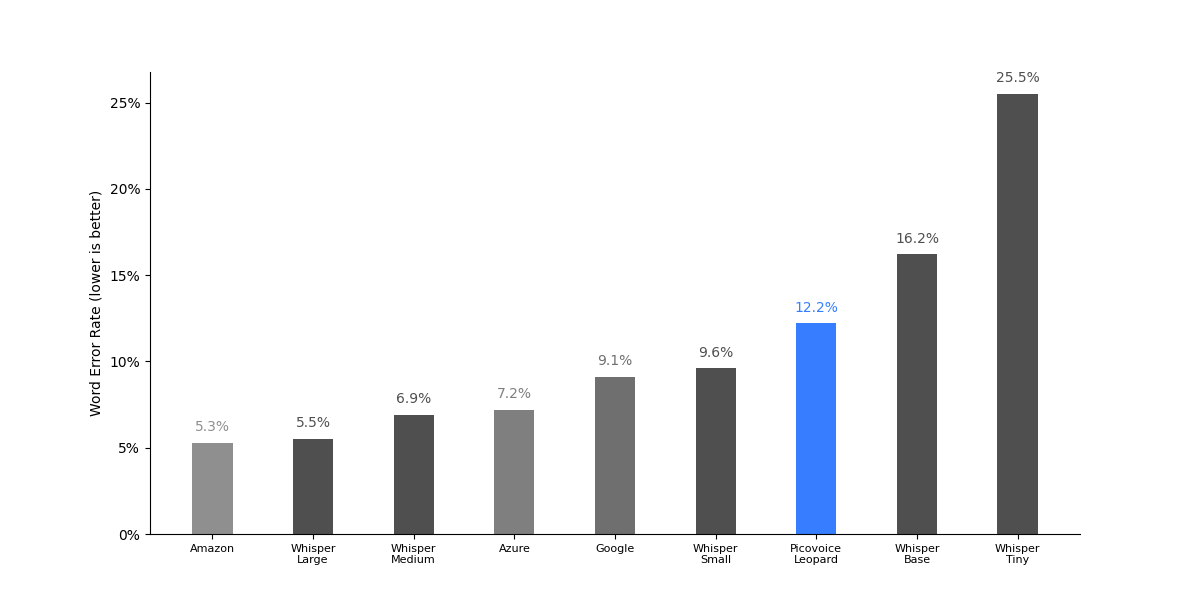
| Engine | CommonVoice | Multilingual LibriSpeech | VoxPopuli | Average |
|---|---|---|---|---|
| Amazon Transcribe | 3.9% | 3.3% | 8.7% | 5.3% |
| Azure Speech-to-Text | 6.3% | 5.8% | 9.4% | 7.2% |
| Google Speech-to-Text | 6.6% | 9.2% | 11.6% | 9.1% |
| Whisper Large | 4.0% | 2.9% | 9.7% | 5.5% |
| Whisper Medium | 6.2% | 4.8% | 9.7% | 6.9% |
| Whisper Small | 9.8% | 7.7% | 11.4% | 9.6% |
| Whisper Base | 20.2% | 13.0% | 15.3% | 16.2% |
| Whisper Tiny | 33.3% | 20.6% | 22.7% | 25.5% |
| Picovoice Leopard | 7.6% | 14.9% | 14.1% | 12.2% |
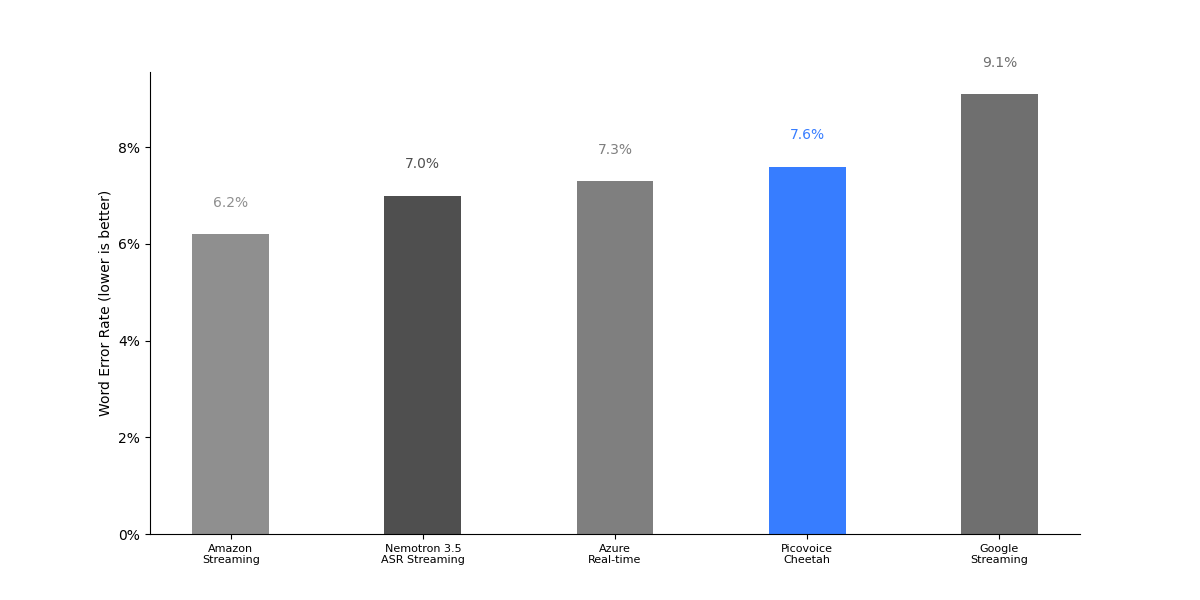
| Engine | CommonVoice | Multilingual LibriSpeech | VoxPopuli | Average |
|---|---|---|---|---|
| Amazon Transcribe Streaming | 5.2% | 4.8% | 8.7% | 6.2% |
| Azure Speech-to-Text Real Time | 6.4% | 6.1% | 9.4% | 7.3% |
| Google Speech-to-Text Streaming | 6.6% | 9.2% | 11.6% | 9.1% |
| Nemotron 3.5 ASR Streaming | 7.2% | 5.4% | 8.5% | 7.0% |
| Picovoice Cheetah | 7.5% | 5.5% | 9.8% | 7.6% |
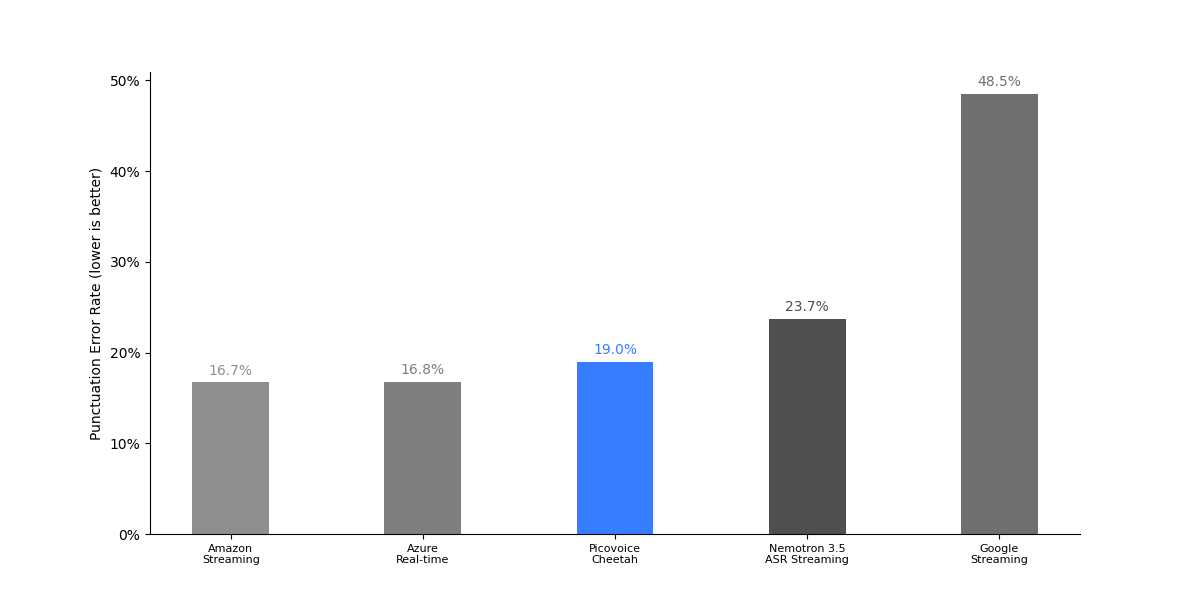
| Engine | CommonVoice | Fleurs | VoxPopuli | Average |
|---|---|---|---|---|
| Amazon Transcribe Streaming | 6.3% | 18.7% | 25.0% | 16.7% |
| Azure Speech-to-Text Real Time | 4.4% | 18.6% | 27.3% | 16.8% |
| Google Speech-to-Text Streaming | 58.7% | 45.0% | 41.9% | 48.5% |
| Nemotron 3.5 ASR Streaming | 19.2% | 20.0% | 32.0% | 23.7% |
| Picovoice Cheetah | 3.1% | 18.5% | 35.5% | 19.0% |
For Amazon Transcribe, Azure Speech-to-Text, and Google Speech-to-Text, we report results with the language set to PT-BR, as this achieves better results compared to PT-PT across all engines.
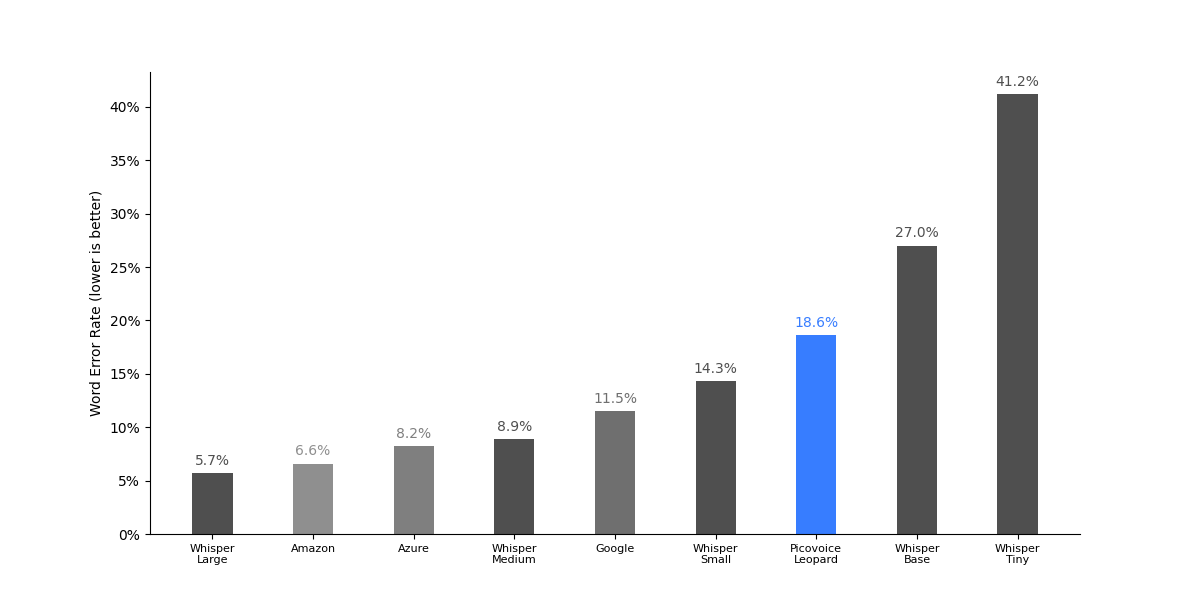
| Engine | CommonVoice | Multilingual LibriSpeech | Average |
|---|---|---|---|
| Amazon Transcribe | 5.4% | 7.8% | 6.6% |
| Azure Speech-to-Text | 7.4% | 9.0% | 8.2% |
| Google Speech-to-Text | 8.8% | 14.2% | 11.5% |
| Whisper Large | 5.9% | 5.4% | 5.7% |
| Whisper Medium | 9.6% | 8.1% | 8.9% |
| Whisper Small | 15.6% | 13.0% | 14.3% |
| Whisper Base | 31.2% | 22.7% | 27.0% |
| Whisper Tiny | 47.7% | 34.6% | 41.2% |
| Picovoice Leopard | 17.1% | 20.0% | 18.6% |
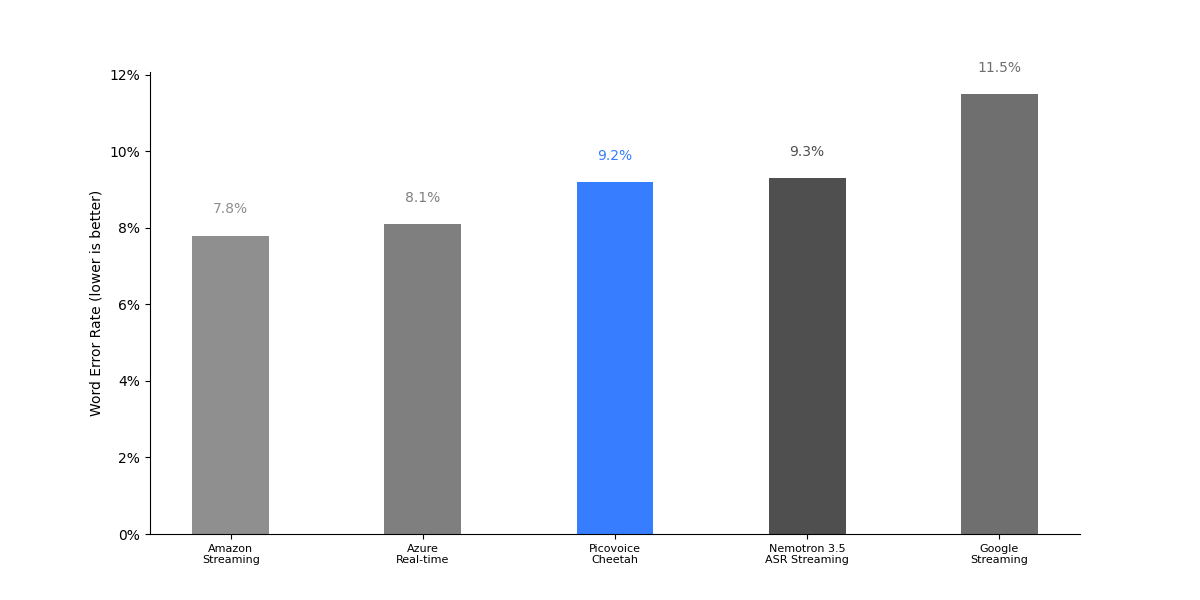
| Engine | CommonVoice | Multilingual LibriSpeech | Average |
|---|---|---|---|
| Amazon Transcribe Streaming | 6.2% | 9.4% | 7.8% |
| Azure Speech-to-Text Real Time | 7.5% | 8.7% | 8.1% |
| Google Speech-to-Text Streaming | 9.0% | 14.0% | 11.5% |
| Nemotron 3.5 ASR Streaming | 10.2% | 8.3% | 9.3% |
| Picovoice Cheetah | 8.1% | 10.3% | 9.2% |
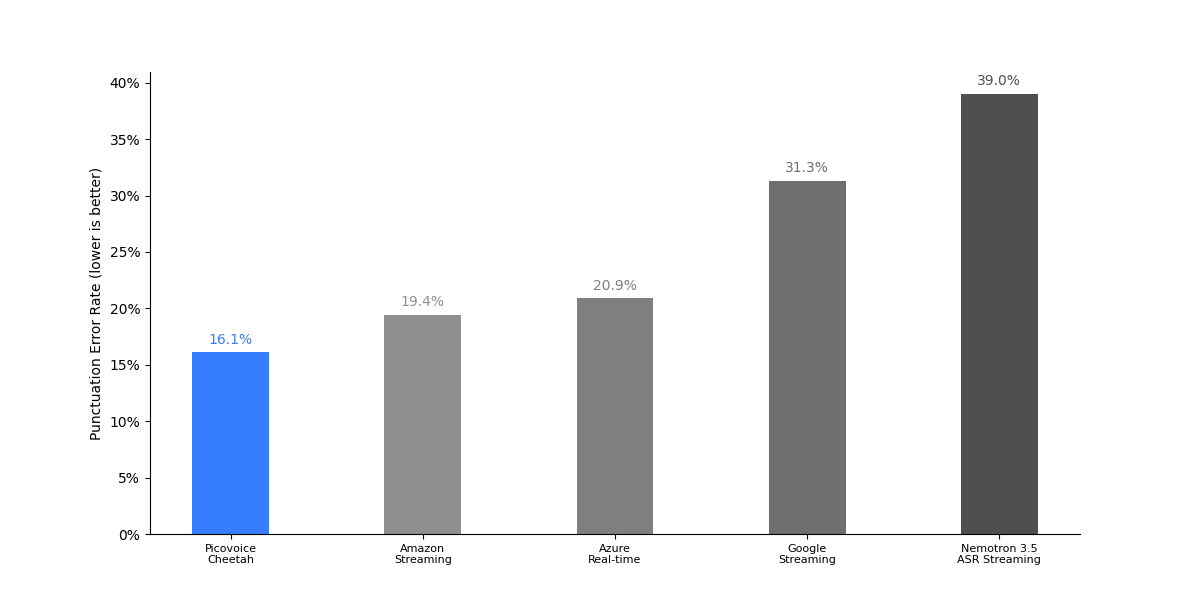
| Engine | CommonVoice | Fleurs | Average |
|---|---|---|---|
| Amazon Transcribe Streaming | 10.0% | 28.8% | 19.4% |
| Azure Speech-to-Text Real Time | 13.6% | 28.2% | 20.9% |
| Google Speech-to-Text Streaming | 30.9% | 31.7% | 31.3% |
| Nemotron 3.5 ASR Streaming | 38.8% | 39.2% | 39.0% |
| Picovoice Cheetah | 7.7% | 24.4% | 16.1% |
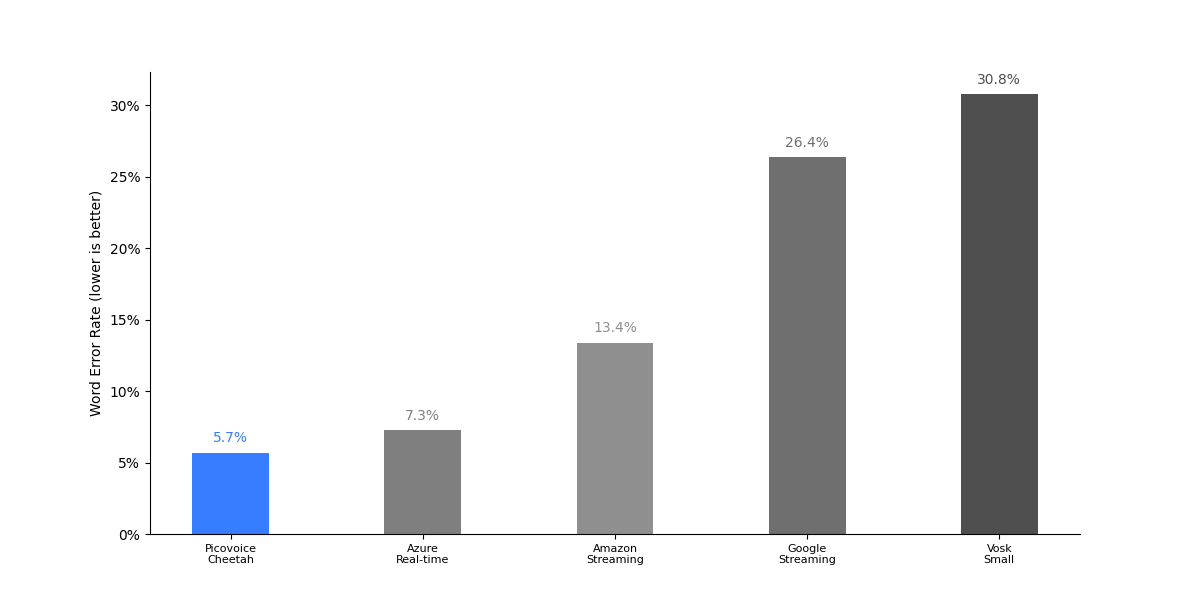
| Engine | CommonVoice | Zeroth Korean | Pansori | Average |
|---|---|---|---|---|
| Amazon Transcribe Streaming | 14.8% | 13.3% | 12.1% | 13.4% |
| Azure Speech-to-Text Real Time | 8.1% | 8.6% | 5.1% | 7.3% |
| Google Speech-to-Text Streaming | 32.0% | 33.7% | 13.5% | 26.4% |
| Vosk Small | 39.0% | 12.7% | 40.7% | 30.8% |
| Picovoice Cheetah | 7.0% | 3.7% | 6.5% | 5.7% |
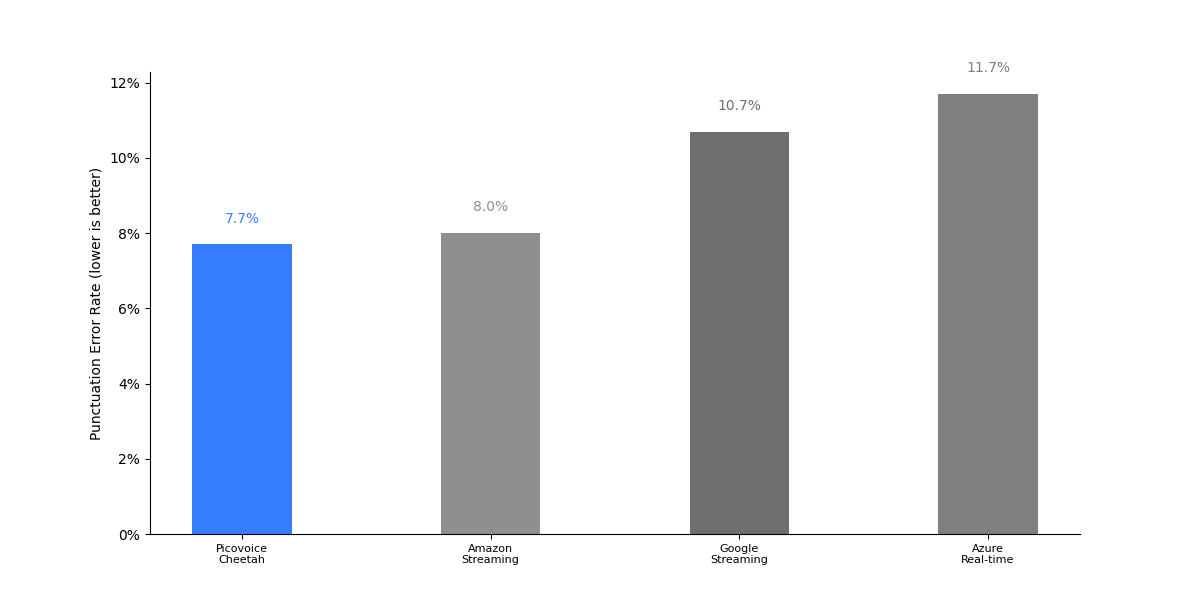
| Engine | CommonVoice | Fleurs | Average |
|---|---|---|---|
| Amazon Transcribe Streaming | 6.5% | 9.4% | 8.0% |
| Azure Speech-to-Text Real Time | 11.7% | 11.6% | 11.7% |
| Google Speech-to-Text Streaming | 12.1% | 9.3% | 10.7% |
| Picovoice Cheetah | 12.5% | 2.9% | 7.7% |
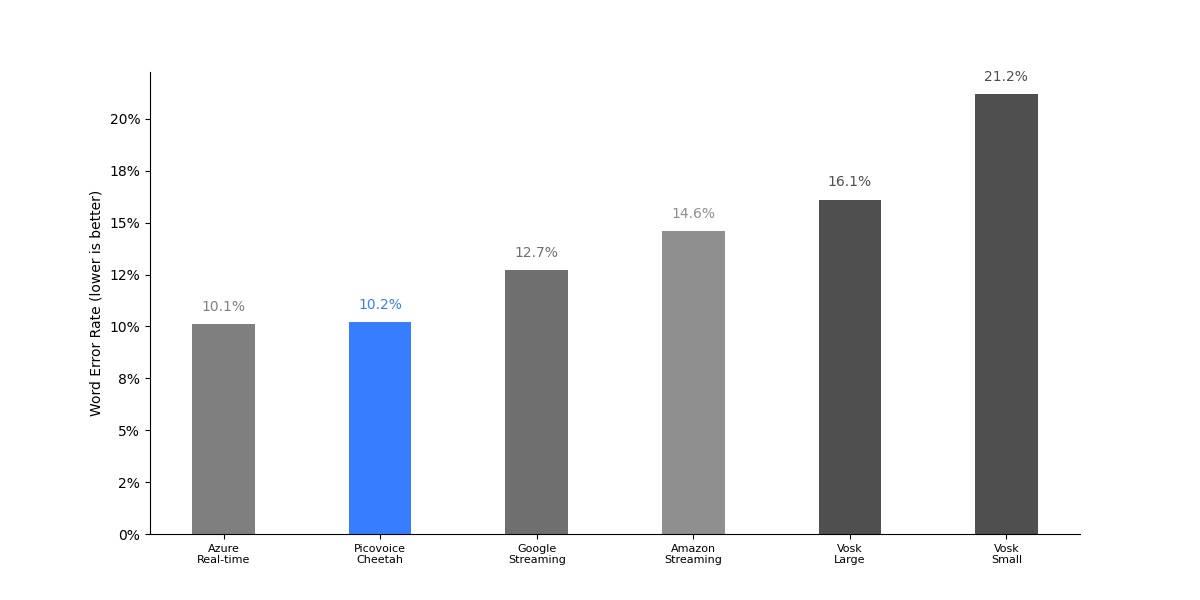
| Engine | CommonVoice | JSUT Basic | Fleurs | Average |
|---|---|---|---|---|
| Amazon Transcribe Streaming | 23.2% | 10.0% | 10.7% | 14.6% |
| Azure Speech-to-Text Real-time | 16.6% | 7.6% | 6.2% | 10.1% |
| Google Speech-to-Text Streaming | 20.1% | 9.3% | 8.6% | 12.7% |
| Vosk Streaming Large | 23.6% | 7.1% | 17.5% | 16.1% |
| Vosk Streaming Small | 31.1% | 11.0% | 21.4% | 21.2% |
| Picovoice Cheetah | 14.1% | 8.6% | 7.8% | 10.2% |
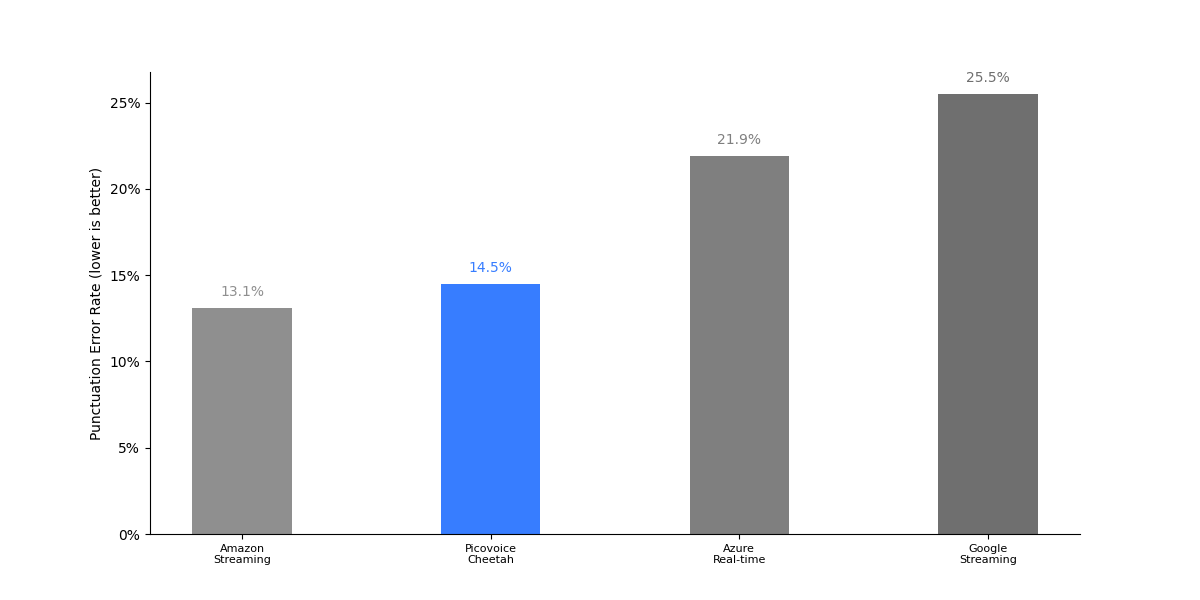
| Engine | CommonVoice | Fleurs | Average |
|---|---|---|---|
| Amazon Transcribe Streaming | 20.7% | 5.5% | 13.1% |
| Azure Speech-to-Text Real-time | 23.7% | 20.0% | 21.9% |
| Google Speech-to-Text Streaming | 28.6% | 22.3% | 25.5% |
| Picovoice Cheetah | 26.3% | 2.6% | 14.5% |
398 followers · starred Mar 2019
47 followers · starred Jan 2026
139 followers · starred Sep 2019
speech to text benchmark framework
See the codeMade in Vancouver, Canada by Picovoice
This repo is a minimalist and extensible framework for benchmarking different speech-to-text engines.
Word error rate (WER) is the ratio of edit distance between words in a reference transcript and the words in the output of the speech-to-text engine to the number of words in the reference transcript.
Character error rate (CER) is the ratio of edit distance between characters in a reference transcript and the characters in the output of the speech-to-text engine to the number of characters in the reference transcript. CER is reported for Korean and Japanese following industry standards.
Punctuation Error Rate (PER) is the ratio of punctuation-specific errors between a reference transcript and the output of a speech-to-text engine to the number of punctuation-related operations in the reference transcript (more details in Section 3 of Meister et al.). We report PER results for periods (.) and question marks (?).
The Core-Hour metric is used to evaluate the computational efficiency of the speech-to-text engine, indicating the number of CPU hours required to process one hundred hours of audio. A speech-to-text engine with lower Core-Hour is more computationally efficient. We omit this metric for cloud-based engines.
Word emission latency is used to evaluate the responsiveness of streaming speech-to-text engines. It measures the average delay from the point a word has finished being spoken to when its transcription is emitted by the engine. We measure this metric only for streaming engines.
The aggregate size of models (acoustic and language), in MB. We omit this metric for cloud-based engines.
This benchmark has been developed and tested on Ubuntu 22.04 with Python 3.12.
pip3 install -r requirements.txt
In the following, we provide instructions for running the benchmark for each engine.
The supported datasets are:
COMMON_VOICE, LIBRI_SPEECH_TEST_CLEAN, LIBRI_SPEECH_TEST_OTHER, TED_LIUM, MLS, VOX_POPULI, FLEURS,
ZEROTH_KOREAN, PANSORI and JSUT_BASIC.
The supported languages are:
EN, FR, DE, ES, IT, PT-BR, PT-PT, KO and JA.
To evaluate Punctuation Error Rate, use the --punctuation flag.
Use --punctuation-set ${PUNCTUATION_SET} to select which punctuation marks to calculate PER against, where ${PUNCTUATION_SET} is one or more of ., ? and , (default .?).
Replace ${DATASET} with one of the supported datasets, ${DATASET_FOLDER} with the path to the dataset, ${LANGUAGE} with the target language,
${AWS_LOCATION} with the name of the AWS server and ${AWS_PROFILE} with the name of the AWS profile you wish to use.
python3 benchmark.py \
--dataset ${DATASET} \
--dataset-folder ${DATASET_FOLDER} \
--language ${LANGUAGE} \
--engine AMAZON_TRANSCRIBE \
--aws-profile ${AWS_PROFILE} \
--aws-location ${AWS_LOCATION}
Set --engine to AMAZON_TRANSCRIBE_STREAMING to use Amazon Transcribe in streaming mode.
Replace ${DATASET} with one of the supported datasets, ${DATASET_FOLDER} with the path to the dataset, ${LANGUAGE} with the target language,
${AZURE_SPEECH_KEY} and ${AZURE_SPEECH_LOCATION} information from your Azure account.
python3 benchmark.py \
--dataset ${DATASET} \
--dataset-folder ${DATASET_FOLDER} \
--language ${LANGUAGE} \
--engine AZURE_SPEECH_TO_TEXT \
--azure-speech-key ${AZURE_SPEECH_KEY} \
--azure-speech-location ${AZURE_SPEECH_LOCATION}
Set --engine to AZURE_SPEECH_TO_TEXT_REAL_TIME to use Azure Speech-to-text in streaming mode.
Replace ${DATASET} with one of the supported datasets, ${DATASET_FOLDER} with the path to the dataset, ${LANGUAGE} with the target language
and ${GOOGLE_APPLICATION_CREDENTIALS} with credentials download from Google Cloud Platform.
python3 benchmark.py \
--dataset ${DATASET} \
--dataset-folder ${DATASET_FOLDER} \
--language ${LANGUAGE} \
--engine GOOGLE_SPEECH_TO_TEXT \
--google-application-credentials ${GOOGLE_APPLICATION_CREDENTIALS}
Set --engine to GOOGLE_SPEECH_TO_TEXT_STREAMING to use Google Speech-to-text in streaming mode.
Replace ${DATASET} with one of the supported datasets, ${DATASET_FOLDER} with the path to the dataset
and ${WATSON_SPEECH_TO_TEXT_API_KEY}/${${WATSON_SPEECH_TO_TEXT_URL}} with credentials from your IBM account.
This engine only supports English.
python3 benchmark.py \
--dataset ${DATASET} \
--dataset-folder ${DATASET_FOLDER} \
--language EN \
--engine IBM_WATSON_SPEECH_TO_TEXT \
--watson-speech-to-text-api-key ${WATSON_SPEECH_TO_TEXT_API_KEY} \
--watson-speech-to-text-url ${WATSON_SPEECH_TO_TEXT_URL}
Replace ${DATASET} with one of the supported datasets, ${DATASET_FOLDER} with the path to the dataset, ${LANGUAGE} with the target language
and ${WHISPER_MODEL} with the whisper model type (WHISPER_TINY, WHISPER_BASE, WHISPER_SMALL,
WHISPER_MEDIUM, WHISPER_LARGE, WHISPER_LARGE_V2, WHISPER_LARGE_V3 or WHISPER_LARGE_TURBO)
python3 benchmark.py \
--engine ${WHISPER_MODEL} \
--dataset ${DATASET} \
--language ${LANGUAGE} \
--dataset-folder ${DATASET_FOLDER} \
Replace ${DATASET} with one of the supported datasets, ${DATASET_FOLDER} with the path to the dataset, ${LANGUAGE} with the target language,
and ${WHISPER_CPP_MODEL} with the Whisper.cpp streaming model type (WHISPER_CPP_STREAMING_TINY, WHISPER_CPP_STREAMING_BASE, WHISPER_CPP_STREAMING_SMALL,
WHISPER_CPP_STREAMING_MEDIUM, WHISPER_CPP_STREAMING_LARGE_V3 or WHISPER_CPP_STREAMING_LARGE_TURBO).
python3 benchmark.py \
--engine ${WHISPER_CPP_MODEL} \
--dataset ${DATASET} \
--dataset-folder ${DATASET_FOLDER} \
--language ${LANGUAGE} \
Replace ${DATASET} with one of the supported datasets, ${DATASET_FOLDER} with the path to the dataset
and ${MOONSHINE_MODEL} with the Moonshine streaming model type (MOONSHINE_STREAMING_TINY, MOONSHINE_STREAMING_SMALL or MOONSHINE_STREAMING_MEDIUM).
This engine only supports English.
python3 benchmark.py \
--engine ${MOONSHINE_MODEL} \
--dataset ${DATASET} \
--dataset-folder ${DATASET_FOLDER} \
--language EN \
Replace ${DATASET} with one of the supported datasets, ${DATASET_FOLDER} with the path to the dataset
and ${VOSK_MODEL} with the Vosk streaming model type (VOSK_STREAMING_SMALL or VOSK_STREAMING_LARGE).
This engine only supports English.
python3 benchmark.py \
--engine ${VOSK_MODEL} \
--dataset ${DATASET} \
--dataset-folder ${DATASET_FOLDER} \
--language EN
Replace ${DATASET} with one of the supported datasets, ${DATASET_FOLDER} with the path to the dataset, ${LANGUAGE} with the target language,
and ${CHUNK_SIZE_MS} with a supported chunk size: 80, 160, 320, 560 or 1120 (default 560).
python3 benchmark.py \
--engine NEMOTRON_3_5_ASR_STREAMING \
--dataset ${DATASET} \
--dataset-folder ${DATASET_FOLDER} \
--language ${LANGUAGE} \
--streaming-chunk-size-ms ${CHUNK_SIZE_MS}
Replace ${DATASET} with one of the supported datasets, ${DATASET_FOLDER} with the path to the dataset, ${LANGUAGE} with the target language,
and ${PICOVOICE_ACCESS_KEY} with AccessKey obtained from Picovoice Console.
By default, the Cheetah English model is used.
For non-English languages models replace ${PICOVOICE_MODEL_PATH} with the path to a model file acquired from the Cheetah Github Repo.
python3 benchmark.py \
--engine PICOVOICE_CHEETAH \
--dataset ${DATASET} \
--dataset-folder ${DATASET_FOLDER} \
--language ${LANGUAGE} \
--picovoice-access-key ${PICOVOICE_ACCESS_KEY} \
--picovoice-model-path ${PICOVOICE_MODEL_PATH}
Replace ${DATASET} with one of the supported datasets, ${DATASET_FOLDER} with the path to the dataset, ${LANGUAGE} with the target language,
and ${PICOVOICE_ACCESS_KEY} with AccessKey obtained from Picovoice Console.
If benchmarking a non-English language, include --picovoice-model-path and replace ${PICOVOICE_MODEL_PATH} with the path to a model file acquired from the Leopard Github Repo.
python3 benchmark.py \
--engine PICOVOICE_LEOPARD \
--dataset ${DATASET} \
--dataset-folder ${DATASET_FOLDER} \
--language ${LANGUAGE} \
--picovoice-access-key ${PICOVOICE_ACCESS_KEY} \
--picovoice-model-path ${PICOVOICE_MODEL_PATH}
In the following, we provide instructions for running the latency benchmark for each streaming engine.
To run the benchmark, generate word timing alignment information for one of the supported datasets by following the instructions found here.
Replace ${DATASET_PATH} with the path to the outputted folder from this process in the following commands.
Replace ${DATASET_FOLDER} with the path to an aligned dataset, ${LANGUAGE} with the target language,
${AWS_LOCATION} with the name of the AWS server and ${AWS_PROFILE} with the name of the AWS profile you wish to use.
python3 benchmark_latency.py \
--engine AMAZON_TRANSCRIBE_STREAMING \
--dataset-folder ${DATASET_FOLDER} \
--language ${LANGUAGE} \
--aws-profile ${AWS_PROFILE} \
--aws-location ${AWS_LOCATION}
Replace ${DATASET_FOLDER} with the path to an aligned dataset, ${LANGUAGE} with the target language,
${AZURE_SPEECH_KEY} and ${AZURE_SPEECH_LOCATION} information from your Azure account.
python3 benchmark_latency.py \
--engine AZURE_SPEECH_TO_TEXT_REAL_TIME \
--dataset-folder ${DATASET_FOLDER} \
--language ${LANGUAGE} \
--azure-speech-key ${AZURE_SPEECH_KEY} \
--azure-speech-location ${AZURE_SPEECH_LOCATION}
Replace ${DATASET_FOLDER} with the path to an aligned dataset, ${LANGUAGE} with the target language,
and ${GOOGLE_APPLICATION_CREDENTIALS} with credentials download from Google Cloud Platform.
python3 benchmark_latency.py \
--engine GOOGLE_SPEECH_TO_TEXT_STREAMING \
--dataset-folder ${DATASET_FOLDER} \
--language ${LANGUAGE} \
--google-application-credentials ${GOOGLE_APPLICATION_CREDENTIALS}
Replace ${DATASET_FOLDER} with the path to an aligned dataset, ${LANGUAGE} with the target language,
and ${WHISPER_CPP_MODEL} with the Whisper.cpp streaming model type (WHISPER_CPP_STREAMING_TINY, WHISPER_CPP_STREAMING_BASE, WHISPER_CPP_STREAMING_SMALL,
WHISPER_CPP_STREAMING_MEDIUM, WHISPER_CPP_STREAMING_LARGE_V3 or WHISPER_CPP_STREAMING_LARGE_TURBO).
python3 benchmark_latency.py \
--engine ${WHISPER_CPP_MODEL} \
--dataset-folder ${DATASET_FOLDER} \
--language ${LANGUAGE}
Replace ${DATASET_FOLDER} with the path to an aligned dataset and ${MOONSHINE_MODEL} with the Moonshine streaming model type (MOONSHINE_STREAMING_TINY, MOONSHINE_STREAMING_SMALL or MOONSHINE_STREAMING_MEDIUM).
This engine only supports English.
python3 benchmark_latency.py \
--engine ${MOONSHINE_MODEL} \
--dataset-folder ${DATASET_FOLDER} \
--language EN
Replace ${DATASET_FOLDER} with the path to an aligned dataset
and ${VOSK_MODEL} with the Vosk streaming model type (VOSK_STREAMING_SMALL or VOSK_STREAMING_LARGE).
python3 benchmark_latency.py \
--engine ${VOSK_MODEL} \
--dataset-folder ${DATASET_FOLDER} \
--language ${LANGUAGE}
Replace ${DATASET_FOLDER} with the path to an aligned dataset, ${LANGUAGE} with the target language,
and ${CHUNK_SIZE_MS} with a supported chunk size: 80, 160, 320, 560 or 1120 (default 560).
python3 benchmark_latency.py \
--engine NEMOTRON_3_5_ASR_STREAMING \
--dataset-folder ${DATASET_FOLDER} \
--language ${LANGUAGE} \
--chunk-size-ms ${CHUNK_SIZE_MS}
Replace ${DATASET_FOLDER} with the path to an aligned dataset, ${LANGUAGE} with the target language,
and ${PICOVOICE_ACCESS_KEY} with an AccessKey obtained from Picovoice Console.
By default, the Cheetah English model is used.
For non-English languages models replace ${PICOVOICE_MODEL_PATH} with the path to a model file obtained from the Cheetah Github Repo.
python3 benchmark_latency.py \
--engine PICOVOICE_CHEETAH \
--dataset-folder ${DATASET_FOLDER} \
--language ${LANGUAGE} \
--picovoice-access-key ${PICOVOICE_ACCESS_KEY} \
--picovoice-model-path ${PICOVOICE_MODEL_PATH}
| Engine | LibriSpeech test-clean | LibriSpeech test-other | TED-LIUM | CommonVoice | Average |
|---|---|---|---|---|---|
| Amazon Transcribe | 2.3% | 4.6% | 4.0% | 6.4% | 4.3% |
| Azure Speech-to-Text | 2.9% | 6.0% | 4.6% | 8.4% | 5.5% |
| Google Speech-to-Text | 5.3% | 10.5% | 5.5% | 14.3% | 8.9% |
| IBM Watson Speech-to-Text | 10.9% | 26.2% | 11.7% | 39.4% | 22.0% |
| Whisper Large V3 | 3.7% | 5.4% | 4.6% | 9.0% | 5.7% |
| Whisper Medium | 3.3% | 6.2% | 4.6% | 10.2% | 6.1% |
| Whisper Small | 3.3% | 7.2% | 4.8% | 12.7% | 7.0% |
| Whisper Base | 4.3% | 10.4% | 5.4% | 17.9% | 9.5% |
| Whisper Tiny | 5.9% | 13.8% | 6.6% | 24.4% | 12.7% |
| Picovoice Leopard | 5.1% | 11.1% | 6.4% | 16.1% | 9.7% |
| Engine | LibriSpeech test-clean | LibriSpeech test-other | TED-LIUM | CommonVoice | Average |
|---|---|---|---|---|---|
| Amazon Transcribe Streaming | 2.5% | 5.1% | 5.2% | 8.2% | 5.3% |
| Azure Speech-to-Text Real Time | 3.4% | 6.7% | 4.5% | 9.0% | 5.9% |
| Google Speech-to-Text Streaming | 5.3% | 10.6% | 5.5% | 14.4% | 9.0% |
| Nemotron 3.5 ASR Streaming | 3.4% | 7.8% | 4.9% | 15.0% | 7.8% |
| Whisper.cpp Streaming Tiny | 12.7% | 23.3% | 16.0% | 37.5% | 22.4% |
| Whisper.cpp Streaming Base | 11.9% | 19.9% | 14.2% | 33.2% | 19.8% |
| Vosk Small | 9.9% | 21.0% | 10.7% | 32.1% | 18.4% |
| Vosk Large | 5.4% | 12.7% | 6.6% | 21.4% | 11.5% |
| Moonshine Tiny | 11.8% | 28.7% | 12.5% | 42.4% | 23.9% |
| Moonshine Small | 7.0% | 15.0% | 6.9% | 24.8% | 13.4% |
| Moonshine Medium | 5.9% | 11.4% | 6.5% | 18.7% | 10.6% |
| Picovoice Cheetah | 3.3% | 7.9% | 5.1% | 14.4% | 7.7% |
| Engine | CommonVoice | Fleurs | VoxPopuli | Average |
|---|---|---|---|---|
| Amazon Transcribe Streaming | 8.1% | 27.4% | 23.5% | 19.7% |
| Azure Speech-to-Text Real Time | 6.2% | 21.5% | 28.6% | 18.8% |
| Google Speech-to-Text Streaming | 20.5% | 45.3% | 43.0% | 36.3% |
| Nemotron 3.5 ASR Streaming | 20.5% | 26.7% | 27.6% | 24.9% |
| Whisper.cpp Streaming Tiny | 41.2% | 57.9% | 62.1% | 53.7% |
| Whisper.cpp Streaming Base | 43.2% | 56.4% | 62.8% | 54.1% |
| Moonshine Tiny | 21.0% | 46.5% | 59.1% | 42.2% |
| Moonshine Small | 30.5% | 45.3% | 59.5% | 45.1% |
| Moonshine Medium | 32.3% | 46.1% | 55.4% | 44.6% |
| Picovoice Cheetah | 4.8% | 14.8% | 17.9% | 12.5% |
To obtain these results, we ran the benchmark across the entire LibriSpeech test-clean dataset and recorded the processing time.
The measurement is carried out on an Ubuntu 22.04 machine with AMD CPU (AMD Ryzen 9 5900X (12) @ 3.70GHz),
64 GB of RAM, and NVMe storage, using 10 cores simultaneously. We omit Whisper Large from this benchmark.
| Engine | Core-Hours | Model Size / MB |
|---|---|---|
| Whisper Medium | 152.2 | 1457 |
| Whisper Small | 98.8 | 462 |
| Whisper Base | 32.3 | 139 |
| Whisper Tiny | 15.8 | 73 |
| Whisper.cpp Streaming Base | 166.8 | 139 |
| Whisper.cpp Streaming Tiny | 76.7 | 73 |
| Vosk Large | 33.6 | 2733 |
| Vosk Small | 11.7 | 68 |
| Moonshine Streaming Tiny | 103.0 | 49 |
| Moonshine Streaming Small | 222.0 | 158 |
| Moonshine Streaming Medium | 336.0 | 290 |
| Nemotron 3.5 ASR Streaming | 243.0 | 2210 |
| Picovoice Leopard | 2.6 | 37 |
| Picovoice Cheetah | 8.7 | 34 |
To obtain these results, we used 100 randomly selected files from the LibriSpeech test-clean dataset.
| Engine | Latency (ms) |
|---|---|
| Azure Speech-to-Text Real-time | 520 |
| Amazon Transcribe Streaming | 290 |
| Google Speech-to-Text Streaming | 830 |
| Nemotron 3.5 ASR Streaming | 450 |
| Whisper.cpp Streaming Tiny | 1240 |
| Whisper.cpp Streaming Base | 1240 |
| Vosk Small | 920 |
| Vosk Large | 2000 |
| Moonshine Tiny | 780 |
| Moonshine Small | 650 |
| Moonshine Medium | 640 |
| Picovoice Cheetah | 560 |
| Engine | CommonVoice | Multilingual LibriSpeech | VoxPopuli | Average |
|---|---|---|---|---|
| Amazon Transcribe | 6.0% | 4.4% | 8.6% | 6.3% |
| Azure Speech-to-Text | 11.1% | 9.0% | 11.8% | 10.6% |
| Google Speech-to-Text | 14.3% | 14.2% | 15.1% | 14.5% |
| Whisper Large | 9.3% | 4.6% | 10.9% | 8.3% |
| Whisper Medium | 13.1% | 8.6% | 12.1% | 11.3% |
| Whisper Small | 19.2% | 13.5% | 15.3% | 16.0% |
| Whisper Base | 35.4% | 24.4% | 23.3% | 27.7% |
| Whisper Tiny | 49.8% | 36.2% | 32.1% | 39.4% |
| Picovoice Leopard | 15.9% | 19.2% | 17.5% | 17.5% |
| Engine | CommonVoice | Multilingual LibriSpeech | VoxPopuli | Average |
|---|---|---|---|---|
| Amazon Transcribe Streaming | 9.7% | 7.7% | 10.7% | 9.4% |
| Azure Speech-to-Text Real Time | 11.5% | 8.9% | 13.1% | 11.2% |
| Google Speech-to-Text Streaming | 15.0% | 14.5% | 15.3% | 14.9% |
| Nemotron 3.5 ASR Streaming | 11.3% | 8.0% | 11.4% | 10.2% |
| Picovoice Cheetah | 10.6% | 7.5% | 11.1% | 9.7% |
| Engine | CommonVoice | Fleurs | VoxPopuli | Average |
|---|---|---|---|---|
| Amazon Transcribe Streaming | 8.1% | 20.2% | 23.7% | 17.3% |
| Azure Speech-to-Text Real Time | 7.6% | 20.1% | 31.2% | 19.6% |
| Google Speech-to-Text Streaming | 26.5% | 22.7% | 28.4% | 25.9% |
| Nemotron 3.5 ASR Streaming | 20.2% | 30.6% | 28.2% | 26.3% |
| Picovoice Cheetah | 5.2% | 17.2% | 30.4% | 17.6% |
| Engine | CommonVoice | Multilingual LibriSpeech | VoxPopuli | Average |
|---|---|---|---|---|
| Amazon Transcribe | 5.3% | 2.9% | 14.6% | 7.6% |
| Azure Speech-to-Text | 6.9% | 5.4% | 13.1% | 8.5% |
| Google Speech-to-Text | 9.2% | 13.9% | 17.2% | 13.4% |
| Whisper Large | 5.3% | 4.4% | 12.5% | 7.4% |
| Whisper Medium | 8.3% | 7.6% | 13.5% | 9.8% |
| Whisper Small | 13.8% | 11.2% | 16.2% | 13.7% |
| Whisper Base | 26.9% | 19.8% | 24.0% | 23.6% |
| Whisper Tiny | 39.5% | 28.6% | 33.0% | 33.7% |
| Picovoice Leopard | 8.2% | 11.6% | 23.6% | 14.5% |
| Engine | CommonVoice | Multilingual LibriSpeech | VoxPopuli | Average |
|---|---|---|---|---|
| Amazon Transcribe Streaming | 6.1% | 6.5% | 11.6% | 8.1% |
| Azure Speech-to-Text Real Time | 6.4% | 5.1% | 13.4% | 8.3% |
| Google Speech-to-Text Streaming | 9.4% | 14.0% | 17.5% | 13.6% |
| Nemotron 3.5 ASR Streaming | 10.2% | 9.0% | 14.3% | 11.2% |
| Picovoice Cheetah | 7.3% | 7.6% | 13.3% | 9.4% |
| Engine | CommonVoice | Fleurs | VoxPopuli | Average |
|---|---|---|---|---|
| Amazon Transcribe Streaming | 3.6% | 23.4% | 20.1% | 15.7% |
| Azure Speech-to-Text Real Time | 5.7% | 29.3% | 28.6% | 21.2% |
| Google Speech-to-Text Streaming | 16.4% | 27.5% | 28.5% | 24.1% |
| Nemotron 3.5 ASR Streaming | 17.2% | 26.1% | 31.0% | 24.8% |
| Picovoice Cheetah | 2.1% | 24.9% | 25.1% | 17.4% |
| Engine | CommonVoice | Multilingual LibriSpeech | VoxPopuli | Average |
|---|---|---|---|---|
| Amazon Transcribe | 4.1% | 9.1% | 16.1% | 9.8% |
| Azure Speech-to-Text | 5.8% | 14.0% | 17.8% | 12.5% |
| Google Speech-to-Text | 5.5% | 19.6% | 18.7% | 14.6% |
| Whisper Large | 4.9% | 8.8% | 21.8% | 11.8% |
| Whisper Medium | 8.7% | 14.9% | 19.3% | 14.3% |
| Whisper Small | 15.4% | 20.6% | 22.7% | 19.6% |
| Whisper Base | 32.3% | 31.6% | 31.6% | 31.8% |
| Whisper Tiny | 48.1% | 43.3% | 43.5% | 45.0% |
| Picovoice Leopard | 13.0% | 27.7% | 22.2% | 21.0% |
| Engine | CommonVoice | Multilingual LibriSpeech | VoxPopuli | Average |
|---|---|---|---|---|
| Amazon Transcribe Streaming | 4.9% | 10.8% | 20.7% | 12.1% |
| Azure Speech-to-Text Real Time | 5.9% | 14.2% | 19.4% | 13.2% |
| Google Speech-to-Text Streaming | 5.7% | 20.1% | 18.8% | 14.9% |
| Nemotron 3.5 ASR Streaming | 8.4% | 18.5% | 23.5% | 16.8% |
| Picovoice Cheetah | 7.7% | 13.2% | 17.7% | 12.9% |
| Engine | CommonVoice | Fleurs | VoxPopuli | Average |
|---|---|---|---|---|
| Amazon Transcribe Streaming | 4.2% | 27.7% | 34.7% | 22.2% |
| Azure Speech-to-Text Real Time | 6.1% | 28.6% | 41.6% | 25.4% |
| Google Speech-to-Text Streaming | 27.3% | 23.3% | 45.0% | 31.9% |
| Nemotron 3.5 ASR Streaming | 23.9% | 23.2% | 42.3% | 29.8% |
| Picovoice Cheetah | 2.6% | 25.0% | 47.4% | 25.0% |
| Engine | CommonVoice | Multilingual LibriSpeech | VoxPopuli | Average |
|---|---|---|---|---|
| Amazon Transcribe | 3.9% | 3.3% | 8.7% | 5.3% |
| Azure Speech-to-Text | 6.3% | 5.8% | 9.4% | 7.2% |
| Google Speech-to-Text | 6.6% | 9.2% | 11.6% | 9.1% |
| Whisper Large | 4.0% | 2.9% | 9.7% | 5.5% |
| Whisper Medium | 6.2% | 4.8% | 9.7% | 6.9% |
| Whisper Small | 9.8% | 7.7% | 11.4% | 9.6% |
| Whisper Base | 20.2% | 13.0% | 15.3% | 16.2% |
| Whisper Tiny | 33.3% | 20.6% | 22.7% | 25.5% |
| Picovoice Leopard | 7.6% | 14.9% | 14.1% | 12.2% |
| Engine | CommonVoice | Multilingual LibriSpeech | VoxPopuli | Average |
|---|---|---|---|---|
| Amazon Transcribe Streaming | 5.2% | 4.8% | 8.7% | 6.2% |
| Azure Speech-to-Text Real Time | 6.4% | 6.1% | 9.4% | 7.3% |
| Google Speech-to-Text Streaming | 6.6% | 9.2% | 11.6% | 9.1% |
| Nemotron 3.5 ASR Streaming | 7.2% | 5.4% | 8.5% | 7.0% |
| Picovoice Cheetah | 7.5% | 5.5% | 9.8% | 7.6% |
| Engine | CommonVoice | Fleurs | VoxPopuli | Average |
|---|---|---|---|---|
| Amazon Transcribe Streaming | 6.3% | 18.7% | 25.0% | 16.7% |
| Azure Speech-to-Text Real Time | 4.4% | 18.6% | 27.3% | 16.8% |
| Google Speech-to-Text Streaming | 58.7% | 45.0% | 41.9% | 48.5% |
| Nemotron 3.5 ASR Streaming | 19.2% | 20.0% | 32.0% | 23.7% |
| Picovoice Cheetah | 3.1% | 18.5% | 35.5% | 19.0% |
For Amazon Transcribe, Azure Speech-to-Text, and Google Speech-to-Text, we report results with the language set to PT-BR, as this achieves better results compared to PT-PT across all engines.
| Engine | CommonVoice | Multilingual LibriSpeech | Average |
|---|---|---|---|
| Amazon Transcribe | 5.4% | 7.8% | 6.6% |
| Azure Speech-to-Text | 7.4% | 9.0% | 8.2% |
| Google Speech-to-Text | 8.8% | 14.2% | 11.5% |
| Whisper Large | 5.9% | 5.4% | 5.7% |
| Whisper Medium | 9.6% | 8.1% | 8.9% |
| Whisper Small | 15.6% | 13.0% | 14.3% |
| Whisper Base | 31.2% | 22.7% | 27.0% |
| Whisper Tiny | 47.7% | 34.6% | 41.2% |
| Picovoice Leopard | 17.1% | 20.0% | 18.6% |
| Engine | CommonVoice | Multilingual LibriSpeech | Average |
|---|---|---|---|
| Amazon Transcribe Streaming | 6.2% | 9.4% | 7.8% |
| Azure Speech-to-Text Real Time | 7.5% | 8.7% | 8.1% |
| Google Speech-to-Text Streaming | 9.0% | 14.0% | 11.5% |
| Nemotron 3.5 ASR Streaming | 10.2% | 8.3% | 9.3% |
| Picovoice Cheetah | 8.1% | 10.3% | 9.2% |
| Engine | CommonVoice | Fleurs | Average |
|---|---|---|---|
| Amazon Transcribe Streaming | 10.0% | 28.8% | 19.4% |
| Azure Speech-to-Text Real Time | 13.6% | 28.2% | 20.9% |
| Google Speech-to-Text Streaming | 30.9% | 31.7% | 31.3% |
| Nemotron 3.5 ASR Streaming | 38.8% | 39.2% | 39.0% |
| Picovoice Cheetah | 7.7% | 24.4% | 16.1% |
| Engine | CommonVoice | Zeroth Korean | Pansori | Average |
|---|---|---|---|---|
| Amazon Transcribe Streaming | 14.8% | 13.3% | 12.1% | 13.4% |
| Azure Speech-to-Text Real Time | 8.1% | 8.6% | 5.1% | 7.3% |
| Google Speech-to-Text Streaming | 32.0% | 33.7% | 13.5% | 26.4% |
| Vosk Small | 39.0% | 12.7% | 40.7% | 30.8% |
| Picovoice Cheetah | 7.0% | 3.7% | 6.5% | 5.7% |
| Engine | CommonVoice | Fleurs | Average |
|---|---|---|---|
| Amazon Transcribe Streaming | 6.5% | 9.4% | 8.0% |
| Azure Speech-to-Text Real Time | 11.7% | 11.6% | 11.7% |
| Google Speech-to-Text Streaming | 12.1% | 9.3% | 10.7% |
| Picovoice Cheetah | 12.5% | 2.9% | 7.7% |
| Engine | CommonVoice | JSUT Basic | Fleurs | Average |
|---|---|---|---|---|
| Amazon Transcribe Streaming | 23.2% | 10.0% | 10.7% | 14.6% |
| Azure Speech-to-Text Real-time | 16.6% | 7.6% | 6.2% | 10.1% |
| Google Speech-to-Text Streaming | 20.1% | 9.3% | 8.6% | 12.7% |
| Vosk Streaming Large | 23.6% | 7.1% | 17.5% | 16.1% |
| Vosk Streaming Small | 31.1% | 11.0% | 21.4% | 21.2% |
| Picovoice Cheetah | 14.1% | 8.6% | 7.8% | 10.2% |
| Engine | CommonVoice | Fleurs | Average |
|---|---|---|---|
| Amazon Transcribe Streaming | 20.7% | 5.5% | 13.1% |
| Azure Speech-to-Text Real-time | 23.7% | 20.0% | 21.9% |
| Google Speech-to-Text Streaming | 28.6% | 22.3% | 25.5% |
| Picovoice Cheetah | 26.3% | 2.6% | 14.5% |
398 followers · starred Mar 2019
47 followers · starred Jan 2026
139 followers · starred Sep 2019



