
README

Flux API








HTTP gateway for Telegram. Runs Telegram accounts as instances and exposes them through a clean REST API, a realtime (SSE) stream and signed outbound webhooks. Built on NestJS 11 + Prisma 7 (PostgreSQL) + Redis, with a Vue 3 dashboard to manage everything visually.
Table of contents
- What is Flux
- How the app works (end to end)
- Architecture
- Engines (Telegram layer)
- Event system
- Webhooks
- Authentication & security
- Permissions & access
- Data model
- API types & contracts
- Endpoints
- Dashboard (Vue SPA)
- Stack
- Setup
- Development
- Folder structure
- Environment variables
- Deployment
- Roadmap
- Support
What is Flux
Flux connects one or more Telegram accounts (over MTProto) and turns each one into an instance manageable over HTTP. With it you can:
- Connect accounts via QR code or phone (OTP) + 2FA, with the session persisted and automatic reconnection.
- Read chats and history, send messages and media, and download avatars/attachments.
- Receive realtime events (new/edited/deleted messages, read receipts, reactions, session status) over SSE and over durable, signed webhooks.
- Operate everything from a dashboard or directly through the API (with OpenAPI/Scalar at
/docs).
How the app works (end to end)
The path of a message, from Telegram to your system:
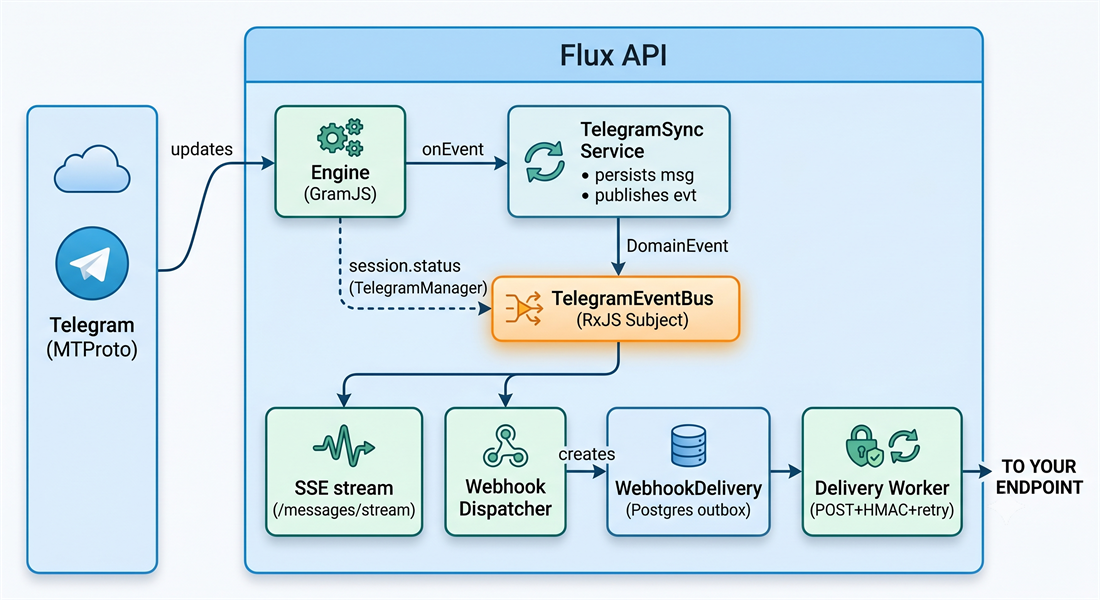
- Connection — The
TelegramManagerresolves the instance's engine (e.g. GramJS), connects using the session saved in Redis and, if needed, drives the QR/2FA login. - Capture — The engine subscribes to Telegram updates and normalizes them into an engine-agnostic
NormalizedEvent, delivered viaonEvent. - Sync — The
TelegramSyncServicepersists new/edited messages in Postgres and publishes aDomainEventon the bus. TheTelegramManagerpublishessession.statuson lifecycle transitions. - Fan-out — The
TelegramEventBus(RxJS) distributes the event to two consumers: the SSE stream (delivery to the dashboard/client) and the WebhookDispatcher. - Durable delivery — The dispatcher creates a
WebhookDeliveryrow (outbox) per matching webhook (linked instance ∩ subscribed type ∩ active). A worker drains the queue, signs the body with HMAC and POSTs it, with retry/backoff and a persisted log.
Architecture
The code separates core (reusable domain/infra) from modules (HTTP surface).
src/
├── core/                       # domain + infrastructure (no HTTP route)
│   ├── prisma/                 # schema, migrations, PrismaService
│   ├── redis/                  # Redis client (sessions)
│   ├── telegram/               # engines, manager, sync, event bus, views
│   └── webhooks/               # service, dispatcher, worker, signing
└── modules/                    # controllers + DTOs + entities (OpenAPI)
    ├── auth/                   # login, JWT, API key
    ├── users/                  # dashboard users
    ├── telegram/               # instances, chats, messages, media, SSE
    ├── webhooks/               # webhook CRUD, links, deliveries
    ├── health/                 # healthchecks (Terminus)
    └── dashboard/              # redirect / → /dashboard
Principles:
- Core knows nothing about HTTP. Controllers in
modulesinject services fromcore. - In-process pub/sub. Events travel over an RxJS
Subject(TelegramEventBus) — Redis is used only for sessions; no external queue (BullMQ) is required. - Postgres outbox. Webhook durability comes from the
WebhookDeliverytable (queue + audit log), drained by an interval worker. - Typed boundary. Telegram int64 ids (BigInt) become strings; dates are ISO-8601. Views (
*View) are the shapes exposed to the client; Prisma models never leak secrets.
Engines (Telegram layer)
An engine is a pluggable adapter that knows how to connect and operate an account on a specific Telegram library. The TelegramManager stays agnostic and delegates to the engine resolved by the instance's engine field.
Contract
interface InstanceEngine {
  readonly key: EngineKey;                 // 'gramjs' | 'telegraf'
  readonly capabilities: EngineCapabilities;
  isAvailable(): boolean;                  // engine implemented and usable
  requiredConfig(): string[];              // required config keys
  connect(session: string, config: EngineConfig): Promise<EngineClient>;
}

interface EngineCapabilities {
  qrLogin: boolean;   // QR login over MTProto (user accounts)
  botToken: boolean;  // bot-token login (Bot API)
  messaging: boolean; // list dialogs / read history / send / receive updates
}
The EngineClient is the live handle of a connection: isAuthorized, disconnect, getMe, saveSession, and — when the capability exists — qrLogin, listDialogs, getHistory, sendMessage, sendMedia, downloadAvatar, downloadMessageMedia and the onEvent(handler) that delivers normalized events and returns an unsubscribe function.
Available engines
| Engine | key | Status | Capabilities | Login |
|---|---|---|---|---|
| GramJS | gramjs | ✅ implemented | qrLogin, messaging | QR + 2FA |
| Telegraf | telegraf | 🔜 reserved | botToken (planned) | Bot token |
The default engine is
gramjs. Adding a new engine = implementInstanceEngineand register it in theTELEGRAM_ENGINESprovider — nothing in the manager has to change.
Normalization
Each engine converts native types into engine-agnostic shapes: NormalizedChat, NormalizedContact, NormalizedMessage, NormalizedMedia, NormalizedReaction and the discriminated NormalizedEvent. This ensures sync, SSE and webhooks behave identically regardless of the engine.
Event system
Instances emit normalized events, distributed in-process by the TelegramEventBus. A DomainEvent has the shape:
interface DomainEvent {
  instanceId: string;
  type: EventType;
  at: string;                      // ISO timestamp
  payload: Record<string, unknown>;
}
Event types
| Type | When it fires | Payload (summary) |
|---|---|---|
session.status | Instance lifecycle transition | { status, username?, phone? } |
message.new | New message received/sent (also persisted and sent to SSE) | MessageView |
message.edited | Message edited (persisted) | MessageView |
message.deleted | Message(s) deleted | { chat?, tgMessageIds[] } |
message.read | Read receipt ("seen") | { chat, maxId, direction: 'inbound'|'outbound' } |
message.reaction | Reaction added/removed | { chat, tgMessageId, reactions[] } |
In
message.read,direction: 'outbound'= the recipient read your message (the classic "seen");'inbound'= you read their messages.
There are two ways to consume events: SSE (GET /telegram/instances/:id/messages/stream, focused on message.new) and webhooks (any subset of types, durable delivery).
Webhooks
A webhook subscribes to a subset of event types and is linked to one or more instances (an M2M relationship). When an event matches (linked instance ∩ subscribed type ∩ active webhook), a delivery is queued and POSTed.
Delivery guarantees
- Durable — each attempt is a
WebhookDeliveryrow in Postgres (survives restarts). - Retry with backoff —
10s → 1m → 5m → 30m → 2h; after 6 attempts the delivery becomesdead. - Signed — body signed with HMAC-SHA256; verify before trusting.
- Auditable — status, HTTP code, attempt count, last error and the target's response body are queryable (
GET /webhooks/:id/deliveries), with manual resend.
Network access (external vs internal targets)
By default a webhook may only target a public address — an SSRF guard blocks private, loopback and reserved ranges (validated at create/update and re-checked at delivery to defeat DNS rebinding). Set allowInternal: true to deliver to a private/loopback target instead, e.g. another service on the same Docker network or LAN:
// e.g. an n8n instance reachable as http://n8n:5678 on the same compose network
{ "name": "n8n", "url": "http://n8n:5678/webhook/flux", "events": ["message.new"], "allowInternal": true }
In the dashboard this is the External (internet) vs Internal (local/Docker network) choice on the webhook form. Cloud-metadata / link-local addresses (169.254.0.0/16, fe80::/10) stay blocked regardless of this flag, since those are never a legitimate destination.
POST body
{
  "event": "message.new",
  "instanceId": "ckinst0001",
  "at": "2026-06-19T12:00:00.000Z",
  "data": { "...": "event payload (e.g. MessageView)" }
}
Headers
| Header | Content |
|---|---|
Content-Type | application/json |
User-Agent | Flux-Webhooks/1.0 |
X-Flux-Event | event type (e.g. message.new) |
X-Flux-Delivery | delivery id (idempotency) |
X-Flux-Instance | source instance id (when applicable) |
X-Flux-Signature | sha256=<hmac-hex> of the raw body, using the webhook secret |
Signature verification
The secret (prefix whsec_) is returned only once when creating/rotating the webhook. Sign the raw body and compare in constant time:
import { createHmac, timingSafeEqual } from 'node:crypto';

function verify(rawBody: string, header: string, secret: string): boolean {
  const expected = `sha256=${createHmac('sha256', secret).update(rawBody).digest('hex')}`;
  const a = Buffer.from(expected);
  const b = Buffer.from(header);
  return a.length === b.length && timingSafeEqual(a, b);
}
Authentication & security
Two layers protect the API:
- JWT — identifies the dashboard user. Obtained from
POST /auth/login(httpOnlycookie and bearer).GET /auth/meaccepts a JWT without requiring the API key (@NoApiKey()). - API key —
x-api-keyheader, the gateway's static key required on most routes (auth and health are exempt).
Additional protections:
- Passwords: Argon2id hashing (never plaintext).
- Telegram
api_hash: encrypted at rest (AES-256-GCM), never returned. - Rate limiting: global per-IP throttling (
@nestjs/throttler;@SkipThrottle()where appropriate). - Helmet: strict CSP on the API; relaxed CSP only on
/docs(Scalar) and/dashboard(SPA). - CORS: whitelisted origins via
CORS_ORIGIN. - Webhook SSRF guard: outbound webhook targets are restricted to public addresses by default (private/loopback/reserved ranges blocked at create and delivery time); private targets require explicit
allowInternal, and cloud-metadata / link-local addresses stay blocked unconditionally. - Safe BigInt: int64 ids serialized as strings (global shim in
main.ts).
Permissions & access
Authorization is global per user: a single dashboard role applies to all instances. There are no per-instance roles.
Dashboard roles (User.role)
| Permission | viewer | operator | admin |
|---|---|---|---|
| View instances / chats / messages | ✅ | ✅ | ✅ |
| Send message / media | — | ✅ | ✅ |
| Start / stop / login (lifecycle) | — | ✅ | ✅ |
| Create / delete instances | — | ✅ | ✅ |
| Manage webhooks | — | ✅ | ✅ |
| List / change users (global) | — | — | ✅ |
viewer— read-only in the dashboard.operator— operates instances, sends messages and manages webhooks.admin— everything above + manages users and roles. The seeded user (SEED_*) is promoted to admin on boot.
Enforcement: instance routes use @RequireInstancePermission(...) + InstanceAccessGuard (resolves permissions from the global role via AccessService); user routes use @Roles('admin') + RolesGuard. Instance GET responses include myRole (the requester's global role) so the UI can hide disallowed actions.
Data model
Prisma 7 + PostgreSQL. Cascades from User / Instance / Webhook.
User ─┬─ instances[]            (Telegram accounts created by the user)
      └─ webhooks[]             (the user's webhooks)
   id, email, username, role(Role: admin|operator|viewer), createdAt

Setting                         key (PK) → telegram.apiId, telegram.apiHash (encrypted)

Instance ─┬─ chats[]
          ├─ contacts[]
          ├─ messages[]
          └─ webhookLinks[]     (M2M with Webhook)
   id, ownerId, label, engine, status, apiId?, apiHashEnc?, tgUserId?, username?, phone?, createdAt

enum Role          { admin  operator  viewer }

Chat        id, instanceId, tgPeerId, type(user|group|channel), title?, username?, lastMessageAt?
Contact     id, instanceId, tgUserId, firstName?, lastName?, username?, phone?, isContact
Message     id, instanceId, chatId, tgMessageId, senderId?, outgoing, text?, media*, date, editedAt?, replyToTgId?

Webhook ─┬─ instanceLinks[]     (M2M with Instance)
         └─ deliveries[]
   id, ownerId, name, url, secret, active, events String[], createdAt, updatedAt

WebhookInstance   @@id([webhookId, instanceId])     (M2M join)

WebhookDelivery   id, webhookId, instanceId?, event, status(WebhookStatus),
                  attempts, statusCode?, lastError?, payload(Json),
                  nextAttemptAt, createdAt, deliveredAt?
                  @@index([status, nextAttemptAt])

enum WebhookStatus { pending  success  failed  dead }
API types & contracts
The shapes exposed to the client (ISO dates, int64 as string). All have a full schema at /docs.
// Telegram
interface InstanceView   { id; label; engine; status; firstName?; username?; phone?; apiId?; createdAt }
interface ChatView       { id; tgPeerId; type; title?; username?; hasPhoto; lastMessageAt? }
interface MessageView    { id; chatId; tgMessageId; text?; outgoing; date; senderId?; sender?; media? }
interface MediaView      { type; mimeType?; fileName?; width?; height?; duration? }
type     InstanceStatus  = 'new'|'connecting'|'awaiting_qr'|'awaiting_code'|'password_required'|'authorized'|'disconnected'|'error'

// Auth & access
interface UserEntity      { id; email; username; role: 'admin'|'operator'|'viewer' }  // never exposes the hash
interface LoginResponse   { accessToken }                          // the JWT also goes in the httpOnly cookie
// InstanceView gains `myRole?: 'admin'|'operator'|'viewer'` (the requester's global role)

// Webhooks
interface WebhookView           { id; name; url; active; allowInternal; events[]; instanceIds[]; createdAt; updatedAt }
interface WebhookWithSecret     extends WebhookView { secret }    // only on create / regenerate-secret
interface WebhookDeliveryView   { id; webhookId; instanceId?; event; status; attempts; statusCode?; lastError?; responseBody?; nextAttemptAt; createdAt; deliveredAt? }
Endpoints
Most routes require JWT (Bearer) +
x-api-key.authandhealthhave exceptions (see the Auth column). Interactive documentation at/docs.
Auth (auth)
| Route | Method | Auth | Description |
|---|---|---|---|
/auth/register | POST | Bearer JWT + API key | Create a user (admin only; the 1st seeded user is admin) |
/auth/login | POST | public | Login; sets the httpOnly JWT cookie and returns the token |
/auth/logout | POST | public | Clears the auth cookie |
/auth/me | GET | Bearer JWT | Current user (no API key required) |
/auth/api-key-check | GET | x-api-key | Validates the static API key |
Telegram — settings & stats (telegram)
| Route | Method | Description |
|---|---|---|
/telegram/settings | GET | Read api_id / hasApiHash (api_hash never leaves) |
/telegram/settings | PUT | Set the global api_id / api_hash |
/telegram/stats | GET | Uptime + total/authorized/connected instances |
Telegram — instances & login
| Route | Method | Description |
|---|---|---|
/telegram/instances | POST | Create an instance (label, engine?, api_id?, api_hash?) |
/telegram/instances | GET | List instances |
/telegram/instances/:id | GET | Details of one instance |
/telegram/instances/:id | DELETE | Remove an instance (and its session) |
/telegram/instances/:id/info | GET | Details + live connection state + uptime |
/telegram/instances/:id/start | POST | Connect from the saved session |
/telegram/instances/:id/stop | POST | Disconnect (keeps the session) |
/telegram/instances/status/stream | SSE | Stream of status transitions for all instances |
/telegram/instances/:id/login/qr | SSE | QR login stream: qr → password_required → authorized |
/telegram/instances/:id/login/phone | POST | Start phone login {phone: "+5511…"} — Telegram sends a code |
/telegram/instances/:id/login/code | POST | Submit the OTP {code: "12345"} → password_required or authorized |
/telegram/instances/:id/login/password | POST | Submit the 2FA password (QR or phone login); may return { ok, me? } |
Telegram — chats, messages & media
| Route | Method | Description |
|---|---|---|
/telegram/instances/:id/chats | GET | List chats (most recent first) |
/telegram/instances/:id/chats/:chatId/messages | GET | List messages (cursor-paginated) |
/telegram/instances/:id/chats/:chatId/messages | POST | Send a text message |
/telegram/instances/:id/chats/:chatId/media | POST | Send photo/video/document (multipart, ≤ 50 MB) |
/telegram/instances/:id/messages/stream | SSE | Stream of new messages |
/telegram/instances/:id/chats/:chatId/photo | GET | Chat/group avatar (bytes) |
/telegram/instances/:id/contacts/:contactId/photo | GET | Contact avatar (bytes) |
/telegram/instances/:id/chats/:chatId/messages/:messageId/media | GET | Message attachment (bytes, lazy download) |
Webhooks (webhooks)
| Route | Method | Description |
|---|---|---|
/webhooks/event-types | GET | List the subscribable event types |
/webhooks | POST | Create a webhook (returns the secret once) |
/webhooks | GET | List your webhooks |
/webhooks/:id | GET | Details of one webhook |
/webhooks/:id | PATCH | Update (name, url, active, events, allowInternal) |
/webhooks/:id | DELETE | Remove the webhook and its deliveries |
/webhooks/:id/regenerate-secret | POST | Rotate the signing secret (returned once) |
/webhooks/:id/instances/:instanceId | POST | Link an instance (M2M; requires the webhook:manage permission) |
/webhooks/:id/instances/:instanceId | DELETE | Unlink an instance |
/webhooks/:id/deliveries | GET | Delivery log (?limit=, default 50) |
/webhooks/deliveries/:deliveryId/resend | POST | Re-queue a delivery for immediate resend |
Useful bodies
- POST
/webhooks—{ name, url, events[], instanceIds?, allowInternal? } - PATCH
/webhooks/:id—{ name?, url?, active?, events?, allowInternal? }
Users & system
| Route | Method | Auth | Description |
|---|---|---|---|
/users | GET | Bearer JWT + API key | List registered users (admin only) |
/users/:id/role | PATCH | Bearer JWT + API key | Change the global role {role: 'admin'|'operator'|'viewer'} (admin only; cannot change your own role) |
/users/:id | PATCH | Bearer JWT + API key | Edit a user {email?, username?, password?, role?} (admin only; cannot change your own role) |
/users/:id | DELETE | Bearer JWT + API key | Delete a user and cascade instances/webhooks (admin only; cannot delete yourself) |
/ | GET | public | Redirects to /dashboard |
/health | GET | public | Postgres + Redis + Telegram + heap |
/docs | GET | public | Scalar API Reference (OpenAPI) |
/dashboard | GET | public | Vue SPA |
Dashboard (Vue SPA)
Vue 3 + TypeScript + Tailwind, served at /dashboard.
- Overview — uptime, instance count and health, total webhooks.
- Instances — create, connect via QR or phone, start/stop, details, open chats.
- Chats — list dialogs, read paginated history, send text and media, realtime.
- Webhooks — create/edit (events + instances, external/internal target), enable/disable, view deliveries (status/code/attempts, with error + response detail) and resend, rotate the secret.
- Users — list accounts and, as an admin, create, edit (email/username/password/role) and delete users.
- Settings — set
api_id/api_hash, testx-api-key. - Help — step-by-step guide. i18n: English + Portuguese (BR).
Stack
| Concern | Lib |
|---|---|
| Runtime | Node.js 22 + TypeScript |
| Framework | NestJS 11 (DI, decorators, modules) |
| ORM | Prisma 7 + PostgreSQL 17 |
| Cache | Redis 7 (Telegram sessions) |
| Auth | @nestjs/passport (local, jwt, api-key) + @nestjs/jwt + argon2 |
| API Docs | OpenAPI (@nestjs/swagger) + Scalar UI at /docs |
| Telegram | GramJS (MTProto client) |
| Realtime | Server-Sent Events (SSE) + RxJS |
| Webhooks | Postgres outbox + worker + HMAC-SHA256 (native crypto) |
| Frontend | Vue 3 + TypeScript + Tailwind + vue-i18n + Pinia + vue-sonner |
| Healthcheck | @nestjs/terminus |
| Throttle | @nestjs/throttler |
| CI/CD | GitHub Actions (build, lint, test, e2e) |
Setup
Prerequisites
- Node.js 22+
- Docker + Docker Compose (Postgres + Redis)
- Git
Installation
git clone https://github.com/PedroL3m0z/Flux-Api.git
cd flux-api

# Optional: the app boots without a .env. Copy it only to override something.
cp .env.example .env

yarn install
yarn prisma:generate
Minimal configuration (zero-config). With no variables defined, the app derives
DATABASE_URLfrom thedocker-compose.dev.ymlPostgres and generates strong secrets (JWT_SECRET,API_KEY,TELEGRAM_SESSION_SECRET) on first boot, saving them to./data/secrets.json(DATA_DIR). The generatedAPI_KEYis printed to the log only once — keep it. Set any variable in.envto override the automatic values.
Run with Docker (recommended)
docker-compose.yml runs the single Flux image, which bundles the API,
PostgreSQL and Redis in one container:
docker compose up -d
# API:       http://localhost:3000
# Dashboard: http://localhost:3000/dashboard
# Docs:      http://localhost:3000/docs
Migrations run automatically. The image applies
prisma migrate deploybefore the API starts. You only apply migrations by hand when running the app on the host (see below).
Run the image directly (docker run)
The same published image, pulled from either registry:
# Docker Hub
docker run -d -p 3000:3000 -v flux_data:/data pedrooaj/flux-api

# or GitHub Container Registry
docker run -d -p 3000:3000 -v flux_data:/data ghcr.io/pedrol3m0z/flux-api
The image is built for linux/amd64 and tagged per release
(X.Y.Z, X.Y, latest). The /data volume persists the database, Redis
data and the auto-generated secrets — keep it across container recreations.
On first boot the app generates the admin login and API_KEY and prints them
to the log once (docker logs <container>): grab them immediately.
Common overrides (-e VAR=value):
| Variable | Default | Purpose |
|---|---|---|
CORS_ORIGIN | http://localhost:3000 | Allowed browser origin(s), comma-separated. Set to your real frontend in production. |
SEED_EMAIL / SEED_USERNAME / SEED_PASSWORD | — | Seed a specific initial admin instead of the generated one. |
TELEGRAM_API_ID / TELEGRAM_API_HASH | — | Enable the Telegram engine (instances stay disabled until set). |
PORT | 3000 | API port inside the container. |
One container, no service isolation: a restart cycles every process. For a single host / self-hosting this is exactly what you want; mount
/dataand you are done.
Run locally (infra in Docker, app on host)
For development you usually run the app on the host against Postgres + Redis in
Docker (docker-compose.dev.yml ships just those two):
docker compose -f docker-compose.dev.yml up -d
yarn prisma migrate dev --schema=src/core/prisma/schema.prisma
yarn start:dev
Production build (on the host)
yarn build:all                              # backend + frontend
yarn prisma:deploy                          # apply migrations (no entrypoint here)
node dist/main.js
Running
node dist/main.jsdirectly does not apply migrations (only the Docker entrypoint does). Runyarn prisma:deployfirst, or prefer the Docker images, which migrate automatically.
Development
# Backend
yarn start:dev       # dev with hot-reload
yarn build           # compile TypeScript (nest build)
yarn lint            # eslint --fix
yarn test            # unit tests (Jest)
yarn test:e2e        # e2e tests
yarn test:cov        # coverage

# Frontend
yarn build:client    # build the dashboard
cd client && npm run dev   # Vite dev server (proxies to the API)

# Prisma
yarn prisma:generate       # generate the client
yarn prisma:migrate        # migrate dev
yarn prisma:studio         # Prisma Studio
Folder structure
flux-api/
├── src/
│   ├── common/                 # decorators, guards, interceptors
│   ├── config/                 # CORS, etc.
│   ├── core/
│   │   ├── prisma/             # schema, migrations, PrismaService
│   │   ├── redis/              # Redis client
│   │   ├── telegram/
│   │   │   ├── engines/        # InstanceEngine, GramJsEngine, normalized types
│   │   │   ├── services/       # sync, settings, event bus, instances...
│   │   │   ├── views.ts        # ChatView, MessageView, MediaView...
│   │   │   ├── telegram.manager.ts   # orchestrates lifecycle + session.status
│   │   │   └── telegram.module.ts
│   │   └── webhooks/           # service, dispatcher, worker, signing, types
│   ├── modules/
│   │   ├── auth/               # controller, DTOs, entities, guards
│   │   ├── users/
│   │   ├── telegram/           # controller, DTOs, entities, messaging service
│   │   ├── webhooks/           # controller, DTOs, entities
│   │   ├── health/
│   │   └── dashboard/
│   ├── app.module.ts
│   └── main.ts                 # bootstrap, OpenAPI/Scalar, BigInt shim
├── client/                     # Vue 3 SPA (base /dashboard/)
├── docker/s6-overlay/          # image service tree (s6-rc.d + scripts)
├── docker-compose.yml          # runs the single image
├── docker-compose.dev.yml      # dev infra only (Postgres + Redis)
├── Dockerfile                  # 2 stages: builder, runtime
├── prisma.config.ts
└── README.md
Environment variables
No variable is required. The fields below are auto-derived or auto-generated when absent. Set only what you want to pin.
| Variable | Default / behavior |
|---|---|
DATABASE_URL | Derived from POSTGRES_* / compose defaults when empty |
POSTGRES_USER/PASSWORD/DB | flux/flux/flux (compose + DATABASE_URL assembly) |
REDIS_HOST / REDIS_PORT | localhost / 6379 |
REDIS_PASSWORD | empty (no auth) |
JWT_SECRET | Auto-generated (CSPRNG) and persisted in DATA_DIR if empty |
API_KEY | Auto-generated and printed to the log once if empty (x-api-key header) |
TELEGRAM_SESSION_SECRET | Auto-generated; encrypts sessions/secrets at rest (AES-256-GCM) |
DATA_DIR | Where auto-generated secrets are saved (default ./data) |
JWT_EXPIRES_IN | Token lifetime (default 3600s) |
SEED_EMAIL/USERNAME/PASSWORD | Creates an admin on first boot when all three are set |
TELEGRAM_API_ID/HASH | Default GramJS api_id/api_hash (or per instance / settings) |
CORS_ORIGIN | Origin whitelist (default *). In production * is refused at boot — set explicit origin(s), comma-separated. |
COOKIE_SECURE | true for a Secure cookie (behind TLS) |
PORT | HTTP port (default 3000) |
NODE_ENV | development / production |
Security: auto-generated secrets use a CSPRNG and live in
DATA_DIR(secrets.json, permission600) — mount a persistent volume so they do not rotate on every restart. Weak placeholders from old templates (e.g.change-me-...) are treated as empty and replaced with strong values. In production, serve behind TLS and restrictCORS_ORIGIN.
Deployment
Flux ships as a single linux/amd64 image that bundles the API,
PostgreSQL and Redis in one container (supervised by s6-overlay). It is
published to Docker Hub and GHCR on every release, tagged X.Y.Z, X.Y and
latest.
Docker Compose
docker compose up -d
docker-compose.yml runs the image with a /data volume — that is the whole
stack. (For local development against host-run code, docker-compose.dev.yml
brings up just Postgres + Redis.)
docker run
docker run -d -p 3000:3000 -v flux_data:/data pedrooaj/flux-api          # Docker Hub
docker run -d -p 3000:3000 -v flux_data:/data ghcr.io/pedrol3m0z/flux-api # GHCR
Build it yourself
docker build -t flux-api .
JWT_SECRET,API_KEYandTELEGRAM_SESSION_SECRETare auto-generated and persisted underDATA_DIR— keep the/datavolume so they stay stable. Set them explicitly only to pin known values. Migrations apply automatically on container start.
Roadmap
- On-demand history (cursor-paginated messages)
- Media send and download (photo/video/document, avatars)
- Event system (status, messages, read receipts, reactions)
- Webhooks for Telegram events (M2M, HMAC, retry, log)
- Telegraf engine (Bot API)
- Group participants (N↔N)
- Search across chats/messages
Documentation
- API (OpenAPI):
/docs— Scalar UI - Dashboard guide: the "Help" section in the app
- Contributing: CONTRIBUTING.md
- Branches & Git flow: BRANCHING.md
- Code of Conduct: CODE_OF_CONDUCT.md
- Security: SECURITY.md
- Maintenance/Releases: docs/MAINTAINING.md
Support
Flux is free and open source. If it saves you time or you just want to back the work, you can support development:

You can also help for free by starring the repo ⭐ or sponsoring on GitHub.
License
Apache License 2.0 © Pedro Lemos
Built with ❤️ on NestJS + Vue + Telegram
Contributors


See what people are saying
Hacker News (1)
Similar repos


Languages
TypeScript
73.9%
Vue
23.8%
README
Flux API
HTTP gateway for Telegram. Runs Telegram accounts as instances and exposes them through a clean REST API, a realtime (SSE) stream and signed outbound webhooks. Built on NestJS 11 + Prisma 7 (PostgreSQL) + Redis, with a Vue 3 dashboard to manage everything visually.
Table of contents
- What is Flux
- How the app works (end to end)
- Architecture
- Engines (Telegram layer)
- Event system
- Webhooks
- Authentication & security
- Permissions & access
- Data model
- API types & contracts
- Endpoints
- Dashboard (Vue SPA)
- Stack
- Setup
- Development
- Folder structure
- Environment variables
- Deployment
- Roadmap
- Support
What is Flux
Flux connects one or more Telegram accounts (over MTProto) and turns each one into an instance manageable over HTTP. With it you can:
- Connect accounts via QR code or phone (OTP) + 2FA, with the session persisted and automatic reconnection.
- Read chats and history, send messages and media, and download avatars/attachments.
- Receive realtime events (new/edited/deleted messages, read receipts, reactions, session status) over SSE and over durable, signed webhooks.
- Operate everything from a dashboard or directly through the API (with OpenAPI/Scalar at
/docs).
How the app works (end to end)
The path of a message, from Telegram to your system:
- Connection — The
TelegramManagerresolves the instance's engine (e.g. GramJS), connects using the session saved in Redis and, if needed, drives the QR/2FA login. - Capture — The engine subscribes to Telegram updates and normalizes them into an engine-agnostic
NormalizedEvent, delivered viaonEvent. - Sync — The
TelegramSyncServicepersists new/edited messages in Postgres and publishes aDomainEventon the bus. TheTelegramManagerpublishessession.statuson lifecycle transitions. - Fan-out — The
TelegramEventBus(RxJS) distributes the event to two consumers: the SSE stream (delivery to the dashboard/client) and the WebhookDispatcher. - Durable delivery — The dispatcher creates a
WebhookDeliveryrow (outbox) per matching webhook (linked instance ∩ subscribed type ∩ active). A worker drains the queue, signs the body with HMAC and POSTs it, with retry/backoff and a persisted log.
Architecture
The code separates core (reusable domain/infra) from modules (HTTP surface).
src/
├── core/                       # domain + infrastructure (no HTTP route)
│   ├── prisma/                 # schema, migrations, PrismaService
│   ├── redis/                  # Redis client (sessions)
│   ├── telegram/               # engines, manager, sync, event bus, views
│   └── webhooks/               # service, dispatcher, worker, signing
└── modules/                    # controllers + DTOs + entities (OpenAPI)
    ├── auth/                   # login, JWT, API key
    ├── users/                  # dashboard users
    ├── telegram/               # instances, chats, messages, media, SSE
    ├── webhooks/               # webhook CRUD, links, deliveries
    ├── health/                 # healthchecks (Terminus)
    └── dashboard/              # redirect / → /dashboard
Principles:
- Core knows nothing about HTTP. Controllers in
modulesinject services fromcore. - In-process pub/sub. Events travel over an RxJS
Subject(TelegramEventBus) — Redis is used only for sessions; no external queue (BullMQ) is required. - Postgres outbox. Webhook durability comes from the
WebhookDeliverytable (queue + audit log), drained by an interval worker. - Typed boundary. Telegram int64 ids (BigInt) become strings; dates are ISO-8601. Views (
*View) are the shapes exposed to the client; Prisma models never leak secrets.
Engines (Telegram layer)
An engine is a pluggable adapter that knows how to connect and operate an account on a specific Telegram library. The TelegramManager stays agnostic and delegates to the engine resolved by the instance's engine field.
Contract
interface InstanceEngine {
  readonly key: EngineKey;                 // 'gramjs' | 'telegraf'
  readonly capabilities: EngineCapabilities;
  isAvailable(): boolean;                  // engine implemented and usable
  requiredConfig(): string[];              // required config keys
  connect(session: string, config: EngineConfig): Promise<EngineClient>;
}

interface EngineCapabilities {
  qrLogin: boolean;   // QR login over MTProto (user accounts)
  botToken: boolean;  // bot-token login (Bot API)
  messaging: boolean; // list dialogs / read history / send / receive updates
}
The EngineClient is the live handle of a connection: isAuthorized, disconnect, getMe, saveSession, and — when the capability exists — qrLogin, listDialogs, getHistory, sendMessage, sendMedia, downloadAvatar, downloadMessageMedia and the onEvent(handler) that delivers normalized events and returns an unsubscribe function.
Available engines
| Engine | key | Status | Capabilities | Login |
|---|---|---|---|---|
| GramJS | gramjs | ✅ implemented | qrLogin, messaging | QR + 2FA |
| Telegraf | telegraf | 🔜 reserved | botToken (planned) | Bot token |
The default engine is
gramjs. Adding a new engine = implementInstanceEngineand register it in theTELEGRAM_ENGINESprovider — nothing in the manager has to change.
Normalization
Each engine converts native types into engine-agnostic shapes: NormalizedChat, NormalizedContact, NormalizedMessage, NormalizedMedia, NormalizedReaction and the discriminated NormalizedEvent. This ensures sync, SSE and webhooks behave identically regardless of the engine.
Event system
Instances emit normalized events, distributed in-process by the TelegramEventBus. A DomainEvent has the shape:
interface DomainEvent {
  instanceId: string;
  type: EventType;
  at: string;                      // ISO timestamp
  payload: Record<string, unknown>;
}
Event types
| Type | When it fires | Payload (summary) |
|---|---|---|
session.status | Instance lifecycle transition | { status, username?, phone? } |
message.new | New message received/sent (also persisted and sent to SSE) | MessageView |
message.edited | Message edited (persisted) | MessageView |
message.deleted | Message(s) deleted | { chat?, tgMessageIds[] } |
message.read | Read receipt ("seen") | { chat, maxId, direction: 'inbound'|'outbound' } |
message.reaction | Reaction added/removed | { chat, tgMessageId, reactions[] } |
In
message.read,direction: 'outbound'= the recipient read your message (the classic "seen");'inbound'= you read their messages.
There are two ways to consume events: SSE (GET /telegram/instances/:id/messages/stream, focused on message.new) and webhooks (any subset of types, durable delivery).
Webhooks
A webhook subscribes to a subset of event types and is linked to one or more instances (an M2M relationship). When an event matches (linked instance ∩ subscribed type ∩ active webhook), a delivery is queued and POSTed.
Delivery guarantees
- Durable — each attempt is a
WebhookDeliveryrow in Postgres (survives restarts). - Retry with backoff —
10s → 1m → 5m → 30m → 2h; after 6 attempts the delivery becomesdead. - Signed — body signed with HMAC-SHA256; verify before trusting.
- Auditable — status, HTTP code, attempt count, last error and the target's response body are queryable (
GET /webhooks/:id/deliveries), with manual resend.
Network access (external vs internal targets)
By default a webhook may only target a public address — an SSRF guard blocks private, loopback and reserved ranges (validated at create/update and re-checked at delivery to defeat DNS rebinding). Set allowInternal: true to deliver to a private/loopback target instead, e.g. another service on the same Docker network or LAN:
// e.g. an n8n instance reachable as http://n8n:5678 on the same compose network
{ "name": "n8n", "url": "http://n8n:5678/webhook/flux", "events": ["message.new"], "allowInternal": true }
In the dashboard this is the External (internet) vs Internal (local/Docker network) choice on the webhook form. Cloud-metadata / link-local addresses (169.254.0.0/16, fe80::/10) stay blocked regardless of this flag, since those are never a legitimate destination.
POST body
{
  "event": "message.new",
  "instanceId": "ckinst0001",
  "at": "2026-06-19T12:00:00.000Z",
  "data": { "...": "event payload (e.g. MessageView)" }
}
Headers
| Header | Content |
|---|---|
Content-Type | application/json |
User-Agent | Flux-Webhooks/1.0 |
X-Flux-Event | event type (e.g. message.new) |
X-Flux-Delivery | delivery id (idempotency) |
X-Flux-Instance | source instance id (when applicable) |
X-Flux-Signature | sha256=<hmac-hex> of the raw body, using the webhook secret |
Signature verification
The secret (prefix whsec_) is returned only once when creating/rotating the webhook. Sign the raw body and compare in constant time:
import { createHmac, timingSafeEqual } from 'node:crypto';

function verify(rawBody: string, header: string, secret: string): boolean {
  const expected = `sha256=${createHmac('sha256', secret).update(rawBody).digest('hex')}`;
  const a = Buffer.from(expected);
  const b = Buffer.from(header);
  return a.length === b.length && timingSafeEqual(a, b);
}
Authentication & security
Two layers protect the API:
- JWT — identifies the dashboard user. Obtained from
POST /auth/login(httpOnlycookie and bearer).GET /auth/meaccepts a JWT without requiring the API key (@NoApiKey()). - API key —
x-api-keyheader, the gateway's static key required on most routes (auth and health are exempt).
Additional protections:
- Passwords: Argon2id hashing (never plaintext).
- Telegram
api_hash: encrypted at rest (AES-256-GCM), never returned. - Rate limiting: global per-IP throttling (
@nestjs/throttler;@SkipThrottle()where appropriate). - Helmet: strict CSP on the API; relaxed CSP only on
/docs(Scalar) and/dashboard(SPA). - CORS: whitelisted origins via
CORS_ORIGIN. - Webhook SSRF guard: outbound webhook targets are restricted to public addresses by default (private/loopback/reserved ranges blocked at create and delivery time); private targets require explicit
allowInternal, and cloud-metadata / link-local addresses stay blocked unconditionally. - Safe BigInt: int64 ids serialized as strings (global shim in
main.ts).
Permissions & access
Authorization is global per user: a single dashboard role applies to all instances. There are no per-instance roles.
Dashboard roles (User.role)
| Permission | viewer | operator | admin |
|---|---|---|---|
| View instances / chats / messages | ✅ | ✅ | ✅ |
| Send message / media | — | ✅ | ✅ |
| Start / stop / login (lifecycle) | — | ✅ | ✅ |
| Create / delete instances | — | ✅ | ✅ |
| Manage webhooks | — | ✅ | ✅ |
| List / change users (global) | — | — | ✅ |
viewer— read-only in the dashboard.operator— operates instances, sends messages and manages webhooks.admin— everything above + manages users and roles. The seeded user (SEED_*) is promoted to admin on boot.
Enforcement: instance routes use @RequireInstancePermission(...) + InstanceAccessGuard (resolves permissions from the global role via AccessService); user routes use @Roles('admin') + RolesGuard. Instance GET responses include myRole (the requester's global role) so the UI can hide disallowed actions.
Data model
Prisma 7 + PostgreSQL. Cascades from User / Instance / Webhook.
User ─┬─ instances[]            (Telegram accounts created by the user)
      └─ webhooks[]             (the user's webhooks)
   id, email, username, role(Role: admin|operator|viewer), createdAt

Setting                         key (PK) → telegram.apiId, telegram.apiHash (encrypted)

Instance ─┬─ chats[]
          ├─ contacts[]
          ├─ messages[]
          └─ webhookLinks[]     (M2M with Webhook)
   id, ownerId, label, engine, status, apiId?, apiHashEnc?, tgUserId?, username?, phone?, createdAt

enum Role          { admin  operator  viewer }

Chat        id, instanceId, tgPeerId, type(user|group|channel), title?, username?, lastMessageAt?
Contact     id, instanceId, tgUserId, firstName?, lastName?, username?, phone?, isContact
Message     id, instanceId, chatId, tgMessageId, senderId?, outgoing, text?, media*, date, editedAt?, replyToTgId?

Webhook ─┬─ instanceLinks[]     (M2M with Instance)
         └─ deliveries[]
   id, ownerId, name, url, secret, active, events String[], createdAt, updatedAt

WebhookInstance   @@id([webhookId, instanceId])     (M2M join)

WebhookDelivery   id, webhookId, instanceId?, event, status(WebhookStatus),
                  attempts, statusCode?, lastError?, payload(Json),
                  nextAttemptAt, createdAt, deliveredAt?
                  @@index([status, nextAttemptAt])

enum WebhookStatus { pending  success  failed  dead }
API types & contracts
The shapes exposed to the client (ISO dates, int64 as string). All have a full schema at /docs.
// Telegram
interface InstanceView   { id; label; engine; status; firstName?; username?; phone?; apiId?; createdAt }
interface ChatView       { id; tgPeerId; type; title?; username?; hasPhoto; lastMessageAt? }
interface MessageView    { id; chatId; tgMessageId; text?; outgoing; date; senderId?; sender?; media? }
interface MediaView      { type; mimeType?; fileName?; width?; height?; duration? }
type     InstanceStatus  = 'new'|'connecting'|'awaiting_qr'|'awaiting_code'|'password_required'|'authorized'|'disconnected'|'error'

// Auth & access
interface UserEntity      { id; email; username; role: 'admin'|'operator'|'viewer' }  // never exposes the hash
interface LoginResponse   { accessToken }                          // the JWT also goes in the httpOnly cookie
// InstanceView gains `myRole?: 'admin'|'operator'|'viewer'` (the requester's global role)

// Webhooks
interface WebhookView           { id; name; url; active; allowInternal; events[]; instanceIds[]; createdAt; updatedAt }
interface WebhookWithSecret     extends WebhookView { secret }    // only on create / regenerate-secret
interface WebhookDeliveryView   { id; webhookId; instanceId?; event; status; attempts; statusCode?; lastError?; responseBody?; nextAttemptAt; createdAt; deliveredAt? }
Endpoints
Most routes require JWT (Bearer) +
x-api-key.authandhealthhave exceptions (see the Auth column). Interactive documentation at/docs.
Auth (auth)
| Route | Method | Auth | Description |
|---|---|---|---|
/auth/register | POST | Bearer JWT + API key | Create a user (admin only; the 1st seeded user is admin) |
/auth/login | POST | public | Login; sets the httpOnly JWT cookie and returns the token |
/auth/logout | POST | public | Clears the auth cookie |
/auth/me | GET | Bearer JWT | Current user (no API key required) |
/auth/api-key-check | GET | x-api-key | Validates the static API key |
Telegram — settings & stats (telegram)
| Route | Method | Description |
|---|---|---|
/telegram/settings | GET | Read api_id / hasApiHash (api_hash never leaves) |
/telegram/settings | PUT | Set the global api_id / api_hash |
/telegram/stats | GET | Uptime + total/authorized/connected instances |
Telegram — instances & login
| Route | Method | Description |
|---|---|---|
/telegram/instances | POST | Create an instance (label, engine?, api_id?, api_hash?) |
/telegram/instances | GET | List instances |
/telegram/instances/:id | GET | Details of one instance |
/telegram/instances/:id | DELETE | Remove an instance (and its session) |
/telegram/instances/:id/info | GET | Details + live connection state + uptime |
/telegram/instances/:id/start | POST | Connect from the saved session |
/telegram/instances/:id/stop | POST | Disconnect (keeps the session) |
/telegram/instances/status/stream | SSE | Stream of status transitions for all instances |
/telegram/instances/:id/login/qr | SSE | QR login stream: qr → password_required → authorized |
/telegram/instances/:id/login/phone | POST | Start phone login {phone: "+5511…"} — Telegram sends a code |
/telegram/instances/:id/login/code | POST | Submit the OTP {code: "12345"} → password_required or authorized |
/telegram/instances/:id/login/password | POST | Submit the 2FA password (QR or phone login); may return { ok, me? } |
Telegram — chats, messages & media
| Route | Method | Description |
|---|---|---|
/telegram/instances/:id/chats | GET | List chats (most recent first) |
/telegram/instances/:id/chats/:chatId/messages | GET | List messages (cursor-paginated) |
/telegram/instances/:id/chats/:chatId/messages | POST | Send a text message |
/telegram/instances/:id/chats/:chatId/media | POST | Send photo/video/document (multipart, ≤ 50 MB) |
/telegram/instances/:id/messages/stream | SSE | Stream of new messages |
/telegram/instances/:id/chats/:chatId/photo | GET | Chat/group avatar (bytes) |
/telegram/instances/:id/contacts/:contactId/photo | GET | Contact avatar (bytes) |
/telegram/instances/:id/chats/:chatId/messages/:messageId/media | GET | Message attachment (bytes, lazy download) |
Webhooks (webhooks)
| Route | Method | Description |
|---|---|---|
/webhooks/event-types | GET | List the subscribable event types |
/webhooks | POST | Create a webhook (returns the secret once) |
/webhooks | GET | List your webhooks |
/webhooks/:id | GET | Details of one webhook |
/webhooks/:id | PATCH | Update (name, url, active, events, allowInternal) |
/webhooks/:id | DELETE | Remove the webhook and its deliveries |
/webhooks/:id/regenerate-secret | POST | Rotate the signing secret (returned once) |
/webhooks/:id/instances/:instanceId | POST | Link an instance (M2M; requires the webhook:manage permission) |
/webhooks/:id/instances/:instanceId | DELETE | Unlink an instance |
/webhooks/:id/deliveries | GET | Delivery log (?limit=, default 50) |
/webhooks/deliveries/:deliveryId/resend | POST | Re-queue a delivery for immediate resend |
Useful bodies
- POST
/webhooks—{ name, url, events[], instanceIds?, allowInternal? } - PATCH
/webhooks/:id—{ name?, url?, active?, events?, allowInternal? }
Users & system
| Route | Method | Auth | Description |
|---|---|---|---|
/users | GET | Bearer JWT + API key | List registered users (admin only) |
/users/:id/role | PATCH | Bearer JWT + API key | Change the global role {role: 'admin'|'operator'|'viewer'} (admin only; cannot change your own role) |
/users/:id | PATCH | Bearer JWT + API key | Edit a user {email?, username?, password?, role?} (admin only; cannot change your own role) |
/users/:id | DELETE | Bearer JWT + API key | Delete a user and cascade instances/webhooks (admin only; cannot delete yourself) |
/ | GET | public | Redirects to /dashboard |
/health | GET | public | Postgres + Redis + Telegram + heap |
/docs | GET | public | Scalar API Reference (OpenAPI) |
/dashboard | GET | public | Vue SPA |
Dashboard (Vue SPA)
Vue 3 + TypeScript + Tailwind, served at /dashboard.
- Overview — uptime, instance count and health, total webhooks.
- Instances — create, connect via QR or phone, start/stop, details, open chats.
- Chats — list dialogs, read paginated history, send text and media, realtime.
- Webhooks — create/edit (events + instances, external/internal target), enable/disable, view deliveries (status/code/attempts, with error + response detail) and resend, rotate the secret.
- Users — list accounts and, as an admin, create, edit (email/username/password/role) and delete users.
- Settings — set
api_id/api_hash, testx-api-key. - Help — step-by-step guide. i18n: English + Portuguese (BR).
Stack
| Concern | Lib |
|---|---|
| Runtime | Node.js 22 + TypeScript |
| Framework | NestJS 11 (DI, decorators, modules) |
| ORM | Prisma 7 + PostgreSQL 17 |
| Cache | Redis 7 (Telegram sessions) |
| Auth | @nestjs/passport (local, jwt, api-key) + @nestjs/jwt + argon2 |
| API Docs | OpenAPI (@nestjs/swagger) + Scalar UI at /docs |
| Telegram | GramJS (MTProto client) |
| Realtime | Server-Sent Events (SSE) + RxJS |
| Webhooks | Postgres outbox + worker + HMAC-SHA256 (native crypto) |
| Frontend | Vue 3 + TypeScript + Tailwind + vue-i18n + Pinia + vue-sonner |
| Healthcheck | @nestjs/terminus |
| Throttle | @nestjs/throttler |
| CI/CD | GitHub Actions (build, lint, test, e2e) |
Setup
Prerequisites
- Node.js 22+
- Docker + Docker Compose (Postgres + Redis)
- Git
Installation
git clone https://github.com/PedroL3m0z/Flux-Api.git
cd flux-api

# Optional: the app boots without a .env. Copy it only to override something.
cp .env.example .env

yarn install
yarn prisma:generate
Minimal configuration (zero-config). With no variables defined, the app derives
DATABASE_URLfrom thedocker-compose.dev.ymlPostgres and generates strong secrets (JWT_SECRET,API_KEY,TELEGRAM_SESSION_SECRET) on first boot, saving them to./data/secrets.json(DATA_DIR). The generatedAPI_KEYis printed to the log only once — keep it. Set any variable in.envto override the automatic values.
Run with Docker (recommended)
docker-compose.yml runs the single Flux image, which bundles the API,
PostgreSQL and Redis in one container:
docker compose up -d
# API:       http://localhost:3000
# Dashboard: http://localhost:3000/dashboard
# Docs:      http://localhost:3000/docs
Migrations run automatically. The image applies
prisma migrate deploybefore the API starts. You only apply migrations by hand when running the app on the host (see below).
Run the image directly (docker run)
The same published image, pulled from either registry:
# Docker Hub
docker run -d -p 3000:3000 -v flux_data:/data pedrooaj/flux-api

# or GitHub Container Registry
docker run -d -p 3000:3000 -v flux_data:/data ghcr.io/pedrol3m0z/flux-api
The image is built for linux/amd64 and tagged per release
(X.Y.Z, X.Y, latest). The /data volume persists the database, Redis
data and the auto-generated secrets — keep it across container recreations.
On first boot the app generates the admin login and API_KEY and prints them
to the log once (docker logs <container>): grab them immediately.
Common overrides (-e VAR=value):
| Variable | Default | Purpose |
|---|---|---|
CORS_ORIGIN | http://localhost:3000 | Allowed browser origin(s), comma-separated. Set to your real frontend in production. |
SEED_EMAIL / SEED_USERNAME / SEED_PASSWORD | — | Seed a specific initial admin instead of the generated one. |
TELEGRAM_API_ID / TELEGRAM_API_HASH | — | Enable the Telegram engine (instances stay disabled until set). |
PORT | 3000 | API port inside the container. |
One container, no service isolation: a restart cycles every process. For a single host / self-hosting this is exactly what you want; mount
/dataand you are done.
Run locally (infra in Docker, app on host)
For development you usually run the app on the host against Postgres + Redis in
Docker (docker-compose.dev.yml ships just those two):
docker compose -f docker-compose.dev.yml up -d
yarn prisma migrate dev --schema=src/core/prisma/schema.prisma
yarn start:dev
Production build (on the host)
yarn build:all                              # backend + frontend
yarn prisma:deploy                          # apply migrations (no entrypoint here)
node dist/main.js
Running
node dist/main.jsdirectly does not apply migrations (only the Docker entrypoint does). Runyarn prisma:deployfirst, or prefer the Docker images, which migrate automatically.
Development
# Backend
yarn start:dev       # dev with hot-reload
yarn build           # compile TypeScript (nest build)
yarn lint            # eslint --fix
yarn test            # unit tests (Jest)
yarn test:e2e        # e2e tests
yarn test:cov        # coverage

# Frontend
yarn build:client    # build the dashboard
cd client && npm run dev   # Vite dev server (proxies to the API)

# Prisma
yarn prisma:generate       # generate the client
yarn prisma:migrate        # migrate dev
yarn prisma:studio         # Prisma Studio
Folder structure
flux-api/
├── src/
│   ├── common/                 # decorators, guards, interceptors
│   ├── config/                 # CORS, etc.
│   ├── core/
│   │   ├── prisma/             # schema, migrations, PrismaService
│   │   ├── redis/              # Redis client
│   │   ├── telegram/
│   │   │   ├── engines/        # InstanceEngine, GramJsEngine, normalized types
│   │   │   ├── services/       # sync, settings, event bus, instances...
│   │   │   ├── views.ts        # ChatView, MessageView, MediaView...
│   │   │   ├── telegram.manager.ts   # orchestrates lifecycle + session.status
│   │   │   └── telegram.module.ts
│   │   └── webhooks/           # service, dispatcher, worker, signing, types
│   ├── modules/
│   │   ├── auth/               # controller, DTOs, entities, guards
│   │   ├── users/
│   │   ├── telegram/           # controller, DTOs, entities, messaging service
│   │   ├── webhooks/           # controller, DTOs, entities
│   │   ├── health/
│   │   └── dashboard/
│   ├── app.module.ts
│   └── main.ts                 # bootstrap, OpenAPI/Scalar, BigInt shim
├── client/                     # Vue 3 SPA (base /dashboard/)
├── docker/s6-overlay/          # image service tree (s6-rc.d + scripts)
├── docker-compose.yml          # runs the single image
├── docker-compose.dev.yml      # dev infra only (Postgres + Redis)
├── Dockerfile                  # 2 stages: builder, runtime
├── prisma.config.ts
└── README.md
Environment variables
No variable is required. The fields below are auto-derived or auto-generated when absent. Set only what you want to pin.
| Variable | Default / behavior |
|---|---|
DATABASE_URL | Derived from POSTGRES_* / compose defaults when empty |
POSTGRES_USER/PASSWORD/DB | flux/flux/flux (compose + DATABASE_URL assembly) |
REDIS_HOST / REDIS_PORT | localhost / 6379 |
REDIS_PASSWORD | empty (no auth) |
JWT_SECRET | Auto-generated (CSPRNG) and persisted in DATA_DIR if empty |
API_KEY | Auto-generated and printed to the log once if empty (x-api-key header) |
TELEGRAM_SESSION_SECRET | Auto-generated; encrypts sessions/secrets at rest (AES-256-GCM) |
DATA_DIR | Where auto-generated secrets are saved (default ./data) |
JWT_EXPIRES_IN | Token lifetime (default 3600s) |
SEED_EMAIL/USERNAME/PASSWORD | Creates an admin on first boot when all three are set |
TELEGRAM_API_ID/HASH | Default GramJS api_id/api_hash (or per instance / settings) |
CORS_ORIGIN | Origin whitelist (default *). In production * is refused at boot — set explicit origin(s), comma-separated. |
COOKIE_SECURE | true for a Secure cookie (behind TLS) |
PORT | HTTP port (default 3000) |
NODE_ENV | development / production |
Security: auto-generated secrets use a CSPRNG and live in
DATA_DIR(secrets.json, permission600) — mount a persistent volume so they do not rotate on every restart. Weak placeholders from old templates (e.g.change-me-...) are treated as empty and replaced with strong values. In production, serve behind TLS and restrictCORS_ORIGIN.
Deployment
Flux ships as a single linux/amd64 image that bundles the API,
PostgreSQL and Redis in one container (supervised by s6-overlay). It is
published to Docker Hub and GHCR on every release, tagged X.Y.Z, X.Y and
latest.
Docker Compose
docker compose up -d
docker-compose.yml runs the image with a /data volume — that is the whole
stack. (For local development against host-run code, docker-compose.dev.yml
brings up just Postgres + Redis.)
docker run
docker run -d -p 3000:3000 -v flux_data:/data pedrooaj/flux-api          # Docker Hub
docker run -d -p 3000:3000 -v flux_data:/data ghcr.io/pedrol3m0z/flux-api # GHCR
Build it yourself
docker build -t flux-api .
JWT_SECRET,API_KEYandTELEGRAM_SESSION_SECRETare auto-generated and persisted underDATA_DIR— keep the/datavolume so they stay stable. Set them explicitly only to pin known values. Migrations apply automatically on container start.
Roadmap
- On-demand history (cursor-paginated messages)
- Media send and download (photo/video/document, avatars)
- Event system (status, messages, read receipts, reactions)
- Webhooks for Telegram events (M2M, HMAC, retry, log)
- Telegraf engine (Bot API)
- Group participants (N↔N)
- Search across chats/messages
Documentation
- API (OpenAPI):
/docs— Scalar UI - Dashboard guide: the "Help" section in the app
- Contributing: CONTRIBUTING.md
- Branches & Git flow: BRANCHING.md
- Code of Conduct: CODE_OF_CONDUCT.md
- Security: SECURITY.md
- Maintenance/Releases: docs/MAINTAINING.md
Support
Flux is free and open source. If it saves you time or you just want to back the work, you can support development:
You can also help for free by starring the repo ⭐ or sponsoring on GitHub.
License
Apache License 2.0 © Pedro Lemos
Built with ❤️ on NestJS + Vue + Telegram
See what people are saying
Hacker News (1)
Similar repos
Contributors
Languages
TypeScript
73.9%
Vue
23.8%